
In this lesson, students will reflect on the work of Francis Kéré, including a school he designed. Then they will examine their own school to try to understand the decisions architects make.
What’s Going On in This Picture? | March 28, 2022

1. After looking closely at the image above (or at the full-size image), think about these three questions:
2. Next, join the conversation by clicking on the comment button and posting in the box that opens on the right. (Students 13 and older are invited to comment, although teachers of younger students are welcome to post what their students have to say.)
3. After you have posted, try reading back to see what others have said, then respond to someone else by posting another comment. Use the “Reply” button or the @ symbol to address that student directly.
Each Monday, our collaborator, Visual Thinking Strategies, will facilitate a discussion from 9 a.m. to 2 p.m. Eastern time by paraphrasing comments and linking to responses to help students’ understanding go deeper. You might use their responses as models for your own.
4. On Thursday afternoons, we will reveal at the bottom of this post more information about the photo. How does reading the caption and learning its back story help you see the image differently?
The Reveal
We’ll post more information here on Thursday afternoon. Stay tuned!
More?
• See all images in this series or slide shows of 40 of our favorite images — or 40 more.
• Learn more about this feature in this video, and discover how and why other teachers are using it in their classrooms in our on-demand webinar.
• Find out how teachers can be trained in the Visual Thinking Strategies facilitation method.
Students 13 and older in the United States and the Britain, and 16 and older elsewhere, are invited to comment. All comments are moderated by the Learning Network staff, but please keep in mind that once your comment is accepted, it will be made public.
Weekly Accessible Learning Activities: Black History Collection, March Madness, Vocabulary Videos

Each Wednesday we shine a spotlight on five student activities that support a broad range of learners. In this week’s roundup of accessible activities, we invite students to learn about one of the largest private Black history collections, reflect on their relationship with their grandparents, look closely at an image, share their March Madness predictions and watch some winning 15-second vocabulary videos.
Note: To learn more about this new weekly feature, read our introductory post. Please share your thoughts in the comments section or by emailing us at LNFeedback@nytimes.com.
1. Learn about one of the largest collections of Black history.
In this Lesson of the Day, students learn about an unexpected location of an expansive Black history collection: the home of a 90-year-old former schoolteacher. Students will learn about her collection through text and videos and then curate their own art exhibit of objects from Elizabeth Meaders’s collection.
3. Respond to an image about March Madness.
This Picture Prompt asks students if they have filled out a bracket or joined a pool for this year’s N.C.A.A. basketball tournament? They can share the predictions they’ve made in the comments section and read some advice on picking a bracket for the men’s or women’s tournament.
4. Look closely at a photograph.
In this What’s Going On in This Picture, students make observations about a photograph originally published elsewhere in The Times and join a moderated conversation with other young people from around the world. They can read what other students have said about the image, and then share their thoughts in the comments section.
Are You a Crypto Optimist or Skeptic?

Cryptocurrency — the universe of more than 10,000 digital currencies powered by public, permanent databases of information — is everywhere. How do you feel about it?
Are you a crypto optimist who believes these decentralized and largely unregulated currencies will shape our political and economic future for the better?
Or are you among the movement’s skeptics, who argue that crypto is overhyped, and even potentially destructive to the economy and the environment?
Maybe this world feels too confusing for you to make a judgment yet. In “The Latecomer’s Guide to Crypto,” the technology columnist Kevin Roose writes that his most firmly held belief about crypto is that it is poorly explained. He writes:
Until fairly recently, if you lived anywhere other than San Francisco, it was possible to go days or even weeks without hearing about cryptocurrency.
Now, suddenly, it’s inescapable. Look one way, and there are Matt Damon and Larry David doing ads for crypto start-ups. Swivel your head — oh, hey, it’s the mayors of Miami and New York City, arguing over who loves Bitcoin more. Two N.B.A. arenas are now named after crypto companies, and it seems as if every corporate marketing team in America has jumped on the NFT — or nonfungible token — bandwagon. (Can I interest you in one of Pepsi’s new “Mic Drop” genesis NFTs? Or maybe something from Applebee’s “Metaverse Meals” NFT collection, inspired by the restaurant chain’s “iconic” menu items?)
Crypto! For years, it seemed like the kind of fleeting tech trend most people could safely ignore, like hoverboards or Google Glass. But its power, both economic and cultural, has become too big to overlook. Twenty percent of American adults, and 36 percent of millennials, own cryptocurrency, according to a recent Morning Consult survey. Coinbase, the crypto trading app, has landed on top of the App Store’s top charts at least twice in the past year. Today, the crypto market is valued at around $1.75 trillion — roughly the size of Google. And in Silicon Valley, engineers and executives are bolting from cushy jobs in droves to join the crypto gold rush.
As it’s gone mainstream, crypto has inspired an unusually polarized discourse. Its biggest fans think it’s saving the world, while its biggest skeptics are convinced it’s all a scam — an environment-killing speculative bubble orchestrated by grifters and sold to greedy dupes, which will probably crash the economy when it bursts.
I’ve been writing about crypto for nearly a decade, a period in which my own views have whipsawed between extreme skepticism and cautious optimism. These days, I usually describe myself as a crypto moderate, although I admit that may be a cop-out.
I agree with the skeptics that much of the crypto market consists of overvalued, overhyped and possibly fraudulent assets, and I am unmoved by the most utopian sentiments shared by pro-crypto zealots (such as the claim by Jack Dorsey, the former Twitter chief, that Bitcoin will usher in world peace).
But as I’ve experimented more with crypto — including accidentally selling an NFT for more than $500,000 in a charity auction last year — I’ve come to accept that it isn’t all a cynical money-grab, and that there are things of actual substance being built. I’ve also learned, in my career as a tech journalist, that when so much money, energy and talent flows toward a new thing, it’s generally a good idea to pay attention, regardless of your views on the thing itself.
Students, read the entire article, and then tell us:
Do you consider yourself a crypto optimist, a crypto skeptic or neither? Why?
Do you agree with Mr. Roose that crypto is “terribly explained”? Why or why not? How well do you feel like you understand crypto? How much did Mr. Roose’s explanations help?
According to the article, what do proponents of cryptocurrency see as its benefits? Which of these arguments are most compelling to you, if any?
Are you worried about any of the criticisms of crypto that Mr. Roose names, for example, its environmental impact or the fact that it might be attractive to extremists? How valid do you think these objections are?
Do you hope to eventually, or do you already, own cryptocurrency or NFTs? Why or why not?
What questions do you still have about the world of crypto?
Want more writing prompts? You can find all of our questions in our Student Opinion column. Teachers, check out this guide to learn how you can incorporate them into your classroom.
Students 13 and older in the United States and Britain, and 16 and older elsewhere, are invited to comment. All comments are moderated by the Learning Network staff, but please keep in mind that once your comment is accepted, it will be made public.
Confused By The New Instagram Feed? Here’s How Algorithms Are Made


You might’ve noticed that you can now make your Instagram feed look a little different. Instead of seeing posts in an order determined by Instagram’s algorithm, you now have the option to scroll posts chronologically or filter your feed so you only see photos from hand-selected favorite people who you follow. Try it out by tapping on the Instagram logo in the top left corner of your home page and selecting “Following” or “Favorites.”
Some people bristled at the fact that the homepage still defaults to the algorithmic feed, showing you a ranked feed that includes suggested accounts to follow and presenting ads that are relevant to your interests. You have to opt-in to see your “deterministic chronological field,” Adam Mosseri, head of Instagram, explained in an announcement video posted Wednesday.
When Instagram first launched in 2010, the feed was a single stream of photos presented chronologically. In 2016, Instagram switched it up and “introduced a Feed that ranked posts based on what you care about most,” Adam wrote in a blog in June 2021.
Since then, Instagram’s personalization has become a keystone of the product, and a wellspring of data for the company to research. Not everyone was happy with the change, which is one reason why Instagram brought back the stripped-down chronological feed.
If you’re interested in programming, you might be wondering: What’s going on behind-the-scenes of a social media algorithm shift like this? There’s a lot that’s under wraps, but here’s what you need to know about the technical difference between a deterministic chronological feed and one that’s ranked.
Chronological sorting is relatively easy
Sorting is a common function in lots of programming languages that allows you to organize data in the order that you want it. Through sorting, you can take data and create an array, or a collection of elements in an order — like chronologically or reverse chronologically.
Using photos as an example, you’d need meta fields (additional data that is used to describe a document) that include data on when the photo was taken in order to sort posts chronologically. “It’s easy to do if you know the language syntax,” says Kenny Lin, Codecademy’s Domain Manager.
Fun fact: Instagram was originally written in the programming language Python. Want to learn Python? Check out our beginner-friendly course Learn Python 3, for hands-on experience utilizing tools like control flow and Boolean logic. Once you have a basic grasp on Python, Learn Sorting Algorithms with Python is a great next step to learn how to implement sorting algorithms to parse through data.
Algorithms that involve ranking are more challenging to make
Instagram’s ranking system that decides which photos get priority in a user’s feed is really “a variety of algorithms, classifiers, and processes, each with its own purpose,” Adam wrote in a 2021 blog post.
To go back to that photo example: If you want to sort chronologically, you just need the timestamp for each photo. If you want to sort the images using a ranked system, you’d need multiple types of data for each photo. Then, you’d write an algorithm in which the various data points are all weighed differently so that certain categories influence the order of the photos more than others.
And although Instagram’s algorithm is proprietary, it’s not as elusive as it seems. There’s a detailed explanation of the machine learning tactics that Instagram uses on the Meta AI blog. Simply put, Instagram’s ranking system is a group of machine learning models, AI systems, and non-AI technologies.
The exact order of your Instagram feed is based on five key interactions: “how likely you are to spend a few seconds on a post, comment on it, like it, save it, and tap on the profile photo,” Adam wrote in the 2021 blog. “The more likely you are to take an action, and the more heavily we weigh that action, the higher up you’ll see the post.”
Using this data, Instagram assigns an A.I. “score” to all unseen content from your connections, including things like shopping posts and Reels (though, according to Meta, they’re all weighted fairly so that one type of post doesn’t take over your feed). There’s also a key step in this process that weeds out posts containing misinformation or ones that violate Instagram’s community guidelines.
“The ranking algorithm aims at personalization ultimately — and it’s what makes our feeds interesting (or addictive),” explains Nitya Mandyam, Senior Curriculum Developer at Codecademy.
As you can see, there’s a lot more data that needs to go into building an algorithm like Instagram’s. “Recommendation systems are inherently a difficult problem in AI, as validating them is non-trivial unlike other predictive machine learning algorithms where there is one correct answer (say predicting fraud: it’s either a yes or no!),” Nitya says.
So, a lot of attention is paid to fine tuning an algorithm so it presents the right balance of randomness and specificity: When algorithms do poorly (like, they don’t capture your interests or tastes) it can be irritating, Nitya says. “When they do too well, they can be ‘creepy.’”
But this is just one example of how machine learning and AI can have a profound effect on our daily lives. If you want to understand more about how social media filters are built, and the vast applications of machine learning, check out Codecademy’s Machine Learning courses. The Pro Skill Path Get started with Machine Learning will teach you how to use Python to clean and manipulate data and use predictive models to make recommendations. For a beginner-friendly option, try our Machine Learning Fundamentals Pro Skill Path. And if you need to be briefed on what a Machine Learning Engineer does, we have you covered.
Catalog Home | Codecademy
If you’re not sure where to begin or what to learn next, this is a great place to start. Check out our top coding courses, Skill Paths, and Career Paths.

9 Thoughtful Questions To Ask During Your Next Job Interview


It’s a relatively easy question that can catch you off-guard when you’re interviewing for a job: “Do you have any questions?” In most situations, you should.
Asking a recruiter or hiring manager questions when you’re interviewing for a job makes you seem prepared and enthusiastic about a position. Plus, it can help you glean useful information that will allow you to make an informed decision about a job.
Job interviews are a two-way street, meaning you’re also interviewing the company to make sure it’s a fit for you, explains Danny Roberts, Senior Technical Recruiter at Codecademy. “A lot of people go into interviews and are so eager and solely focused on proving themselves that they forget to do the homework to figure out if it’s actually a place they really want to be,” he says.
Asking the right types of questions — not just fluffy throwaway ones — can give you insight into the company that you may not get from a recruiter alone. (After all, it’s a recruiter’s job to paint a positive picture of the company so that you want to work there.)
Here are some sample questions you can ask the next time you’re interviewing for a job.
What are your company values? Can you give me a couple of examples of how you see that carried out in your organization?
If you ask a vague question about the “company culture,” there’s a good chance a recruiter or hiring manager will tell you about the company perks or the popular Slack channels. Framing your question around company “values” and asking for specific examples will give you an idea of whether or not a company practices what it preaches, Danny says.
How does your company manage remote operations?
When you’re interviewing for a fully remote position, it’s important to understand what kind of policies and expectations the employer has for your virtual workplace. “A company that is managing remote operations well is setting boundaries and is very clear about onboarding,” Danny says. For example, are there no-meeting days? Do you have set working hours? Will you get a stipend to outfit your WFH setup?
“A lot of people are getting burned out because they’re at organizations with poor remote boundaries, and it’s leaving people permanently on a hamster wheel,” Danny says.
What’s the average tenure of employees at this company?
This question can potentially reveal turnover, which is the rate at which people join and leave the company, Danny says. If there’s high turnover (meaning people typically don’t last long), that could hint at the instability of the company, managerial issues, or a lack of work-life balance. If the answer gives you pause, don’t be afraid to ask a follow-up question about why they think this is.
Does your company promote internally often, and is there a defined career ladder?
A career ladder is a formal process at an organization that allows people to advance and progress in their roles. Ideally, you want a recruiter to be able to provide recent examples of impactful internal promotion, Danny says. The answer to this question will tell you how serious an organization is about developing its talent.
If you could wave a magic wand and greatly improve a process, strategy, or execution, what would that be and why?
While a recruiter probably won’t spill all the tea about the pain points within the company, this question can highlight areas where the organization needs to grow. The question is kind of like a filter that will help you identify if it’s a match in terms of values, leadership, lifestyle, and work-life balance. “It may also help candidates consider blind spots to think about through onboarding, should they join,” Danny says.
What brought you here? Is there anything you’re working on that you’re particularly excited about?
Asking about a recruiter or hiring manager’s personal experience or path to the company might elicit a more genuine response than asking a broad question about the company, Danny says. “You can get personal with a recruiter and ask what gets them excited,” he says. You’ll get a glimpse into people’s morale, or how they feel about the work they’re doing.
What are key traits your organization looks for in leadership hiring?
Regardless of your level, you should get a general sense of the style of leadership at an organization, including its potential strengths, weaknesses, and pitfalls at an organizational level, Danny says.
Can you share a little bit about the financial situation with the company?
“There’s a certain degree of challenge and chaos at every startup — that’s to be expected,” Danny says. But in some cases, you might be compelled to ask about the company’s financial health, for example, if you’re applying for a high-level role or the company was recently in the news.
Someone should be able to communicate a “clearly developed strategy and roadmap” for the company, Danny says. If you hear mixed messages or shifting narratives, that could be a sign that there’s a lot of sugar-coating going on, he says. All the more reason to do some research on the company ahead of time.
Do you have a timeline for the next steps?
Avoid getting ghosted by a recruiter or hiring manager and ask for details on the timeline and next steps at the end of your interview. For example, will there be a technical interview? At what stage will they want to see your portfolio? The more transparent they are about the next steps, the more relaxed you can feel about your status.
Want more job-search advice? Here are some tips for tackling job interview nerves, plus what to put on your LinkedIn profile to get noticed. And if you decide to take a new job, here’s how to make connections and bond with your team when you’re fully remote. For even more tools, resources, and support, check out our Career Center.
Catalog Home | Codecademy
If you’re not sure where to begin or what to learn next, this is a great place to start. Check out our top coding courses, Skill Paths, and Career Paths.
Solo Climb

German climber Jost Kobusch has been attempting to be the first person to scale Everest, the world’s tallest mountain, alone in winter, without supplemental oxygen.
Use your imagination to write the opening of a short story or poem inspired by this short video of his climb.
If you like, try writing from Kobusch’s point of view: How fearful or brave do you feel? What led you to this moment? Why did you journey alone? What other thoughts fill your mind as you strive to reach the summit?
Tell us in the comments, then read the related article to learn more about Kobusch’s mountaineering adventure.
Want more Picture Prompts? Find them all in this column.
Students 13 and older in the United States and Britain, and 16 and older elsewhere, are invited to comment. All comments are moderated by the Learning Network staff, but please keep in mind that once your comment is accepted, it will be made public.
Word of the Day: mettlesome
The word mettlesome has appeared in one article on NYTimes.com in the past year, including on Feb. 10 in “In Beijing, Britain’s Skeleton Team Resets, With Confidence” by Jonathan Abrams:
Not everyone lasts.
“We’re quite brutal and quite cutthroat,” Williams said. “You have to get results. Otherwise, you’ll be kicked off. There’s not enough funding just to keep you on if you’re just not performing and maybe that mentality really drives the athlete continuously.”
Pairing mettlesome athletes with cutting-edge technology is “the nucleus of what’s driven the program over the last 20 years,” Holdcroft said.
Daily Word Challenge
Can you correctly use the word mettlesome in a sentence?
Based on the definition and example provided, write a sentence using today’s Word of the Day and share it as a comment on this article. It is most important that your sentence makes sense and demonstrates that you understand the word’s definition, but we also encourage you to be creative and have fun.
Then, read some of the other sentences students have submitted and use the “Recommend” button to vote for two original sentences that stand out to you.
If you want a better idea of how mettlesome can be used in a sentence, read these usage examples on Vocabulary.com.
If you enjoy this daily challenge, try one of our monthly vocabulary challenges.
Students ages 13 and older in the United States and the United Kingdom, and 16 and older elsewhere, can comment. All comments are moderated by the Learning Network staff.
Vocabulary in Context: Forest Skating

“This is an actual childhood dream come true: to be able to skate anywhere you want,” said Michelle Reid, who drove with her husband, Lee Larson, for about two hours from Kingston, Ontario, to celebrate their 23rd wedding anniversary at Icelynd, which became Ottawa’s sixth ice-trail network when it opened this January. “It’s travel by skate through a forest, instead of circles on a rink.”
Chris Neil, a defenseman in the National Hockey League for 17 years, began cutting down trees last autumn to a patch of forest into Icelynd.
How Important Are College Rankings to You?
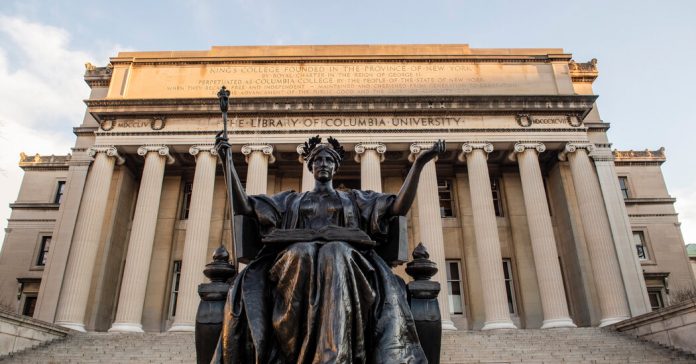
Do college rankings matter to you or to the people you know? Should they?
Every year U.S. News & World Report ranks the best colleges and universities in the country. This year, Columbia University rose to No. 2 from No. 3, tied with Harvard and the Massachusetts Institute of Technology and surpassed only by Princeton.
But colleges self-report the data that the publication uses to make the rankings, such as the amount of money a school raises and spends. And there is little, if any, independent monitoring. Even so, millions of high school students and their parents rely on these annual rankings as a way to determine which schools to apply to. Should they?
In “U.S. News Ranked Columbia No. 2, but a Math Professor Has His Doubts,” Anemona Hartocollis reports on the debate over the value and accuracy of these rankings.
Everyone knows that students buff their résumés when applying to college. But a math professor is accusing Columbia University of buffing its own résumé — or worse — to climb the all-important U.S. News & World Report rankings of best universities.
Michael Thaddeus, who specializes in algebraic geometry at Columbia, has challenged the university’s No. 2 ranking this year with a statistical analysis that found that key supporting data was “inaccurate, dubious or highly misleading.”
In a 21-page blistering critique on his website, Dr. Thaddeus is not only challenging the rating but redoubling the debate over whether college rankings — used by millions of prospective college students and their parents — are valuable or even accurate.
Columbia said it stood by its data. Officials said there was no accepted industry standard for the data that goes into college rankings — every rankings project does it differently — and they strove to meet the technical requirements as set by U.S. News. But, they said, the university was not necessarily defending the process.
The dispute has seized the education world, and university officials are in the awkward position of trying to defend themselves against the sleuthing of one of their own tenured faculty, while not alienating him or his colleagues.
Students, read the entire article and then tell us:
How will you determine where you want to go to college? To what degree do qualities such as academic rigor, fields of study, total cost, social life, athletics, size, location and reputation weigh in your decision? Which characteristics are most important to you?
Will the rankings by U.S. News & World Report or another publication factor into your decision making? Are these rankings helpful in any way? Why or why not?
In a 2012 Opinion piece, Joe Nocera wrote, “U.S. News likes to claim that it uses rigorous methodology, but, honestly, it’s just a list put together by magazine editors. The whole exercise is a little silly. Or rather, it would be if it weren’t so pernicious.” And in the article you just read, Ms. Hartocollis wrote, “Critics of the rankings say that the criteria that go into them — such as class size and instructional spending — can be manipulated, and that the very act of rating schools has produced conformism in the race to the top.” Do you agree with these critics that the annual rankings are not only unreliable but harmful, too? Why or why not?
With so many colleges and universities from which to choose, how can students and their parents sort through all the information? Is there a better alterative to the rankings by U.S. News & World Report to help prospective students find the best schools for them? If yes, what might it be?
