“Let the show begin.” “Homecoming at a historically Black college and university is everything.” “Homecoming itself — it’s like being baptized in Blackness.” “It’s almost a ritual. It’s almost like church.” “It was a culture shock for me, personally, because I haven’t really been to school with so many Black kids. And then to see them just doing all of these great things, I was just like, ‘Yeah, this is it.’” “Homecoming is a definite pick-me-up.” “Homecoming is literally what the word is.” “Going back.” “You go back every year.” “Even go back to how you were in college, and no one’s going to judge you.” “There is a buzz in the atmosphere.” “The vibe.” “The vibes were unmatched.” “It is just the absolute best thing ever.” “So not being able to do that, especially during such a difficult year —” “We actually won’t get to physically see each other in person, but Tuskegee’s doing a virtual homecoming. So we don’t know what that’s going to entail, but I’m excited.” “Five, six, seven, eight — one, two, three, four, five, six, grab seven, up eight — yeah, so anybody has any questions for the routine?” “This is the only area I could get internet reception. Do you want me just to type it in the chat?” “Yes, type it, because your service is still kind of going in and out.” “I think it’s a lot tougher than in person. It looks totally different, it feels totally different. And that is hard, doing it virtually, but I believe something epic will come out of it. Just give us a little bit of distance between your bell and the microphone, OK?” “Good, good, good, approach, good steady articulation. And I don’t know if you saw me out of the corner of your eye —” “They call me the Old Man, the Grandpa. Technology was a struggle. So I had to move out the way and, hey, OK, let’s set up the Zoom meeting. OK, I’ll make you a host, I’ll make you a host. We don’t want to sit and waste the time of the students while I’m struggling in there. I started at the university in 1995, so this is year 26. So I would imagine 26 homecomings — pray my math is right.” [singing] “I did a little research and discovered that the tradition of homecoming has its origins in alumni football games since the 19th century. From that, many of the traditions that we are familiar with evolved.” “Every day of the week leading up to homecoming, there’s always some event at an H.B.C.U.” “So you have pep rallies, step shows.” “Bands, cheerleaders —” “Like a gospel brunch or something —” “There’s the homecoming fashion show, which is always a very hot commodity.” “Coronation, the homecoming parade on Saturday morning — you also have, of course, the game, the halftime show.” “We really, really love to party.” “Passing out Jell-O shots at 10 o’clock in the morning.” “People say they don’t remember the week at the end of the week.” “Sunday, you’re like.” “Your outfit has to be just so.” “We tend to have outfits that match.” “You’ve got to come, and you better come correct. I tell all the chicks, every now and then, ‘Look, if it wasn’t for me, you wouldn’t be walking around with that little bikini on.’ So we were flag girls, and we wore full uniforms. So I said, you know what? We’d get a whole lot more attention if we had our legs out. So one night, we slipped into the band hall, got some old band uniform, and made hot pants. And on Homecoming Day, we marched in front of the infamous Marching 101 Band with our legs out. And we did it in fine style.” “So for me, it represents the opportunity for women to try to own who they are. When we started out in 1983, we didn’t really know what we were doing. And so we really created our own genre — some ballet foundations, and you’re doing some lyrical and jazz. And you’re incorporating some hip-hop. If you ever see any of the dance squads, it is a separate genre. It kind of bothers me when people downplay the importance of women expressing themselves through dance, because it’s just so much more than that.” “At all H.B.C.U.s, we are very family-like.” “It was like having a second family.” “I thought I had sisters that I just never met before. I thought I had brothers that I just never met before.” “Anyone who goes to Howard is my cousin. Somewhere down the line, like, ‘Oh, you went to Howard?’ Like, ‘Hey.’” “So Kamala Harris being the V.P. nominee is very exciting.” “And the Howard community — when that was announced, oh, my friends were so annoyed with me, because they will never hear the end of that.” “Homecoming is actually a very contested topic in my house, because my dad went to A&T, so, you know, they have ‘G.H.O.E.’ — the ‘Greatest Homecoming on Earth — so they say.” “Oh, no — whoa — I’ll be honest with you. I do believe that every homecoming brings something different to the table.” “But I know that ours is the best.” “Virginia State University has the best homecoming.” “So when you go to homecoming, it’s all about F.A.M.U.” “I don’t know about F.A.M.U., but I know Hampton and Howard — we have this ongoing rivalry with each other.” “We go back and forth with, who’s the real H.U.?” “Ludacris said, ‘I’ll never miss a homecoming at Howard … so.” “You know, it’s so hard for me because, you know, people know that my daughter went to Howard.” “I get excited. I get turned on, because if you think yours is better, come to the table. Let’s do this. Let’s do it. Let’s duke it out.” “Yeah man, see like, this right here, this says, ‘Morehouse changed my life.’ Man, that’s for real.” “If I had not gone to South Carolina State University, which is a H.B.C.U., I would not be as bold as I am.” “We hear a lot that H.B.C.U.s do not prepare you for the real world, because it’s not realistic. And you’re never really going to be somewhere where it’s going to be majority Black people. And I fully 100 percent agree with that, but —” “You have to maintain a connection to your history, because if you lose that connection, it’s hard to rebuild.” “There was a time we couldn’t attend other schools, period.” “You really get to be judged on your character. You don’t walk in the room and people are like, ‘Who’s that Black girl?’ Because everybody in the room is Black, so.” “Once I graduated from Hampton University, my entire work career was me being in the minority.” “If I’m sitting at the conference table, it’s usually me, one Black female, OK?” “They instilled in me that you need to go above and beyond what others do, because you’re going to be viewed a different way, right?” “But when we go home to homecoming, we can express what has occurred to us in corporate America. And corporate America doesn’t always listen.” “You don’t feel like you have to code switch. You feel like you can be yourself.” “It is family.” “Family reunion — that’s exactly the vibe.” “Just think of it like a yearly family reunion of the family that you really like, right?” “So it’s bigger than the party.” “And to bring all Black people back to one place, because, you know, we go through a lot, as it is. So to have that one weekend to just, like, have fun, it’s really a beautiful event. And I think that’s why it means so much.” “But I think everybody is already geared up for 2021.” “Please let us be able to — I don’t know if we can do two years, I don’t know.” “The comeback is going to be real.” “You know, it’s just an opportunity to up the ante.” “And that’s what we do at the H.B.C.U.”
Halloween Edition – Treats and Tricks
Have you ever bought a learning system only to find out nine months later, that the support team were actually a group of demons out to ruin your life?
Did you ever ascertain whether or not your boss, is a lizard person? And if so, what gave it away the Zoom Video call, when her eyes flickered or when you saw that he kept some mice in a cage next to his printer?
Any of these sights or experiences would surely frighten most people, but we, in the L&D and Training communities deal far too often with horrors that other departments would surely crumble under.
Let us prepare for a journey into the unknown. Where portals to other dimensions open up at the moment the learner can’t access the system, when a manager from accounting complains in a two page e-mail, that she can’t access the mobile app, or when a customer demands a refund because the content you uploaded doesn’t run on their Windows 2000 machine.
It isn’t yet Halloween, but that doesn’t mean the frights are not just around the corner….
Here now are some tricks and treats for you…
TREAT
Allow me to open up my pack of tarot cards and read your learning system’s future. Ahh, I see, best in class. Who may I see as Best in Class for the following capabilities
Skills Management – Skill ratings, Skill libraries (usually tied to job roles), extensive upskilling features and capabilities – Many vendors in the learning system space are pushing the message as they themselves are elite above all others, but who pray tell really is?
Those who stand above all else..
In no particular order (or are they??? hahhahah (it is an evil laugh, so go with it)
- EdCast, Cornerstone Learning, Degreed, Disprz, Learn Amp, SAP Litmos
- Origin Fractal, Brightspace by D2L
Fun UI for your learners
It isn’t every a category people look at, but honestly, when was the last time, you went on a platform that bored you to tears and then stayed on it, because you enjoyed being bored to tears?
Here are the systems that I any adult learner would enjoy thanks to their intuitive UI and UX (learner side), extensive feature set around playlists/channels, content curation and content and connection with the future.
Most folks will perceive that the leaders in the above all play in the formally known as LXP market, and while it is true that many once did or still do, there are others who, well never have, and shall I say it… are known as an LMS, making the argument that forward driven isn’t about being new or the latest, rather it is about understanding where we are heading and being in the forefront of getting there..
Leaders of the Pack of Werewolves..
- EdCast, Learn Amp, SAP Litmos, Degreed, Fuse, Thought Industries, Absorb LMS
But nearby and lurking..
- Docebo, Growth Engineering, THRIVE, CK Connect, Cross Knowledge, Stream LXP Learning Suite
What you say, you are want to know about specific industries or verticals? Ahh, I will need to bring out my Oujia board for this.. Oh, board, do tell…do tell….
- Association – Brightspace by D2L and CourseStage lead, with LearnUpon, Absorb, Docebo and Thinking Cap close by
- Financial Services – Access LMS leads, but CrossKnowledge with banking as its vertical isn’t far behind.
- Software Technology – SAP Litmos leads all, Docebo, Absorb and Fuse are within breathing room
- Retail – Very close.. Very close indeed..I can see now – CrossKnowledge, Fuse, EdCast drive the car, Christine it isn’t, no, the name is something else.
Who loves apples? Why, everyone loves them, okay, except those who don’t, but play along.. not every apple though is the same, and when it comes to open source (Moodle specifically), not every vendor in the customization of Moodle are the same. Some do a far better job than others, which is why it can be a bit confusing out there, in deciding who to select.
Allow me to assist – and yes, this is in order.
Top Three Moodle Customization Providers
- eThink – Outstanding if you are eyeing Moodle Workspace, Moodle’s answer to a truly corporate system (for employees, even customers). If Workspace isn’t your route, and Moodle in general is..
- Learning Pool – Moodle custom shop that can do wonders
- Totara – They are now pushing heavy into the direct to buyer mode, rather than thru partners (although they still go this route outside of the states). Most folks think Moodle means Totara, but oh, no, you do not need to pick only them, rather Learning Pool or eThink.
Healthcare
Look the leader is Healthstream, but let’s be honest about them – average system, high price point, but they dominate the healthcare market. I wouldn’t buy them, simply because they are overpriced and the system is just so-so.
If you are in medical care, which yes is different than healthcare, but some vendors are unaware, than Relias is one to seriously consider. Ethos CE is by far the best for Medical CEUs if that is your main need, it is designed with that, and honestly with medical care and even healthcare as their focus. Many of the systems globally will play in healthcare so it will always come down to the ones who do the best from a compliance standpoint and connecting CEU or CPD (similar term) to content, sending notifications before certifications are about to expire or the license, and reminders via text if available.
Higher Education
Yes, online learning for education and higher education are taking big hits lately, which isn’t helping folks to buy into the power of e-learning over F2F. Learning on Zoom as your main method, is the same as hanging out with a bunch of zombies fighting over a leg, and you are losing..
Still there are three that are far better, and one of which, is known more for Corporate – proving that EdTech doesn’t mean staying in EdTech.
- D2L – Desire2Learn is the original name, and while the Brightspace solution is focused on corporate, the D2L solution is EdTech. Their capabilities for the edtech market are far better than many of their contemporaries including Blackboard and Instructure.
- NEO LMS – A little different look and feel than many of their EdTech competitors, but they offer quite a bit, and a lower cost to boot (not a witch boot either).
- Growth Engineering – Academy LMS is a fun system. Kids will love it. Rabbits too, after all, tricks are not just for the college kids.
The biggest story in edTech, I’d say are well, actually two stories, so I misstated, but it is a Halloween edition after all.
Anyway, the two big takeaways from 2020 in EdTech world
- Investment from Private Equity firms and investors is well over several billion dollars (with the highest amounts going to systems targeting 5-12 yr olds and HQ in China, the second highest investment area is India).
- Schoology (owned by Powerschool) reported numerous offlines, crashes if you will, more so, than many other vendors in the same EdTech space. School districts in such places as Alabama, NC and even CA experienced issues. What was interesting, was that in a couple of cases, the school district was using Schoology as the SIS, and Instructure for the learning side.
Schoology has a site you can go to, regarding any operational issues.
TRICK
Performance Support. EPS – Electronic Performance Support. These two terms are gaining steam for some folks when it comes to referring to Learning Systems, more so with the LMS segment. In their eyes, they see the LMS as only for employees and thus, for talent performance or talent support.
The problem with that notion is that it is just plain not accurate. Any learning system can be for performance support, if that is what you want your system to be, but none of them are designed for that, rather they are designed for learning and training.
The industry continues to get into a terms war, with new terms spun out to trick – and yes I will say it, trick folks into thinking this versus that, as a way to lure them to their system over someone else.
Some recent hits beyond Performance Support or EPS are
- Traditional – I know, I’ve mentioned this one before, but if a vendor espouses the idea that an LMS is traditional, because it was all about formal learning, I want you to tell them, that they are not only wrong, but that even in the 1400s people knew the earth was round.
Some of the NexGen systems on my T-Grid (coming in Nov) are LMS vendors. Any learning system is controlled by you the client. If you want to use it only for assigned formal learning you can, but the system can do far more than that, and as a former buyer of them, I had an LMS in 2000 that had “informal”.
Formal Learning is another buzz word being heavily forced into the LMS world, worse than before. The LXPs were not the first ones to push this narrative, nope, it was other learning platforms trying to distance themselves as forward driven, not backward.
What the LXPs did was push the formal learning to the forefront as the key reason not to pick an LMS. What they failed to mention is that nearly every LXP in the market these days has, wait for it, assigned formal learning as a feature. In fact, many push it to the extent that a playlist/channel can be all assigned content, you know, formal learning.
Those the notion that formal is only for one learning system segment compared to another is a load of orange wrapped candies (they have a nickname, I will leave it up to your imagination).
The terms themselves are old school, formal and informal, devised when e-learning wasn’t even a twinkle in someone’s eye.
They are terms IMO, which shouldn’t be used when it comes to e-learning, but well, we can always dream.
TRICK
E-Learning or eLearning?
I know, the industry has way too many terms to represent a learning system. And yes, I do wish we could just narrow it down to a few names and be down with it. However, that would require us to fly to an island, better known as Fantasy Island.
E-Learning Platform is the newest term to hit the market for a learning system. What is an e-learning platform you might ask? Well, it is an LMS, just re-branded by the vendor to be called an e-learning platform. It is an LXP, re-branded by the population because it is a term getting wide viewing and hearing. Forget the fact that any system in the cloud, easily could be an e-learning platform, or forget that the term e-learning was created to mean systems you accessed via the Internet (no it was not devised to mean systems you access in 1988 via your LAN or WAN). The term was meant to be an umbrella term, created for WBT (web based training), to mean online learning, which required you to access via a modem.
It initially was umbrella thus authoring tools (creating courses for online learning), web conferencing, online learning tools, content for online learning, LMSs, LCMSs, CMSs all were under the moniker of E-Learning.
Then in the past five or six years, vendors in the learning system space, started to refer to their content as elearning content or eLearning content. And thus, the change began.
Now, comes the eLearning Platform or Elearning Platform or E-Learning Platform. Another word, to add to an already full amount of terms to represent systems.
First, the term is e-learning. It is hyphenated. You can spell it as E-Learning or e-Learning or e-learning – your choice. Yes, I know folks just smush it all together, and yes, I am aware that people say email, rather than how it used to spelled as e-mail. BTW, nobody was saying e-mail in the 80s with their WAN (Wide Area Network).
Secondly, for the learning system market the key types of systems (i.e. where the majority fall into) are one of the following:
- LMS – Learning Management System
- LXP aka Learning Experience Platform – Some vendors in this space, are dumping the name LXP, and calling it something else. One refers to themselves as a Learning Experience System.
- TM – Training Management System – The core of this segment, sees their system heavily around scheduling of training sessions and resources. Big players are Training Orchestra and Fox by BKS.
- Sales Enablement Platforms – Sort of stumbling around, with some pushing learning as an essential piece tied around sales feature sets in a CRM experience, and others pushing away from learning, as the said essential piece.
TREAT
Here is where I expect the market to be by end of 2021 – Learning System Types that is
- Learning Ecosystem – Think everything is here – so you can expect some systems to go with we have an LMS, an LXP, a content marketplace, and so forth – in one system. Hence ecosystem. You can buy the parts or get the whole thing. Maybe the LMS is a part first, then you can add LXP features later on, etc. – The truth be told, it is all in the system already, you are just paying to turn it on.
- Learning Suite – Follows the previously noted above. But, some vendors will list the pieces that come already (no additional charge) – but you can turn on at any time, and others will play the add-on angle (again, add-on is just a term, it is already in the system, you just pay extra to turn it on).
- E-Learning Platform – I hate this term. It doesn’t even make sense, but I am equally not someone who owns a buggy, so even I have to accept something that is just a waster. Anyone, it is gaining enough early traction, that you will see vendors use this term to refer to their learning system. I know of one vendor who uses several terms to refer to their learning system, including e-learning platform, for SEO purposes.
- LXP – It is still going to be there, but there are plenty who could jump over to a learning suite or an Learning Ecosystem tomorrow, and be just fine. Because, they already are.
- Training Mgt systems – Not going anywhere
- Digital Learning Platform – Still a dip in the water, too bad, they align well with LXP.
- Other – Always will be other names to refer to a learning system, but I can’t recall the last time I heard anyone in a virtual conference room ask for an employee engagement talent platform.
TREAT
FindAnLMS has added some new features for folks who use the system, including Craig’s Rating.
Let’s take a quick look:


As you can see in the above, when you enter in the catalog listings you will see next to each vendor’s name, a rating of stars, with the highest being five stars. Because I do not believe that any system (overall) can be five/five – which would mean a perfect system, the highest would be actually 4.5 in the overall.
Always dive deeper, because some vendors who scored a three overall, was due to the lack of NexGen feature sets and lack of CES strength.
The overall rating is based on a series of specific ratings around the following which you can see, when you click “Read More” that is in every listing.
One star – Poor, Two Stars – Below Avg., 3 – Average, 4- Good, 5- Elite.

When you go into the listing, you will see these Ratings (In individual components, I do believe systems can be 5/5, which means elite)
- Administration UX – That means admin user experience – navigation, ease of use, find the info and be able to complete the tasks needed – quickly, logical in view, and even accessing data – the higher the better (i.e. score).
- Customer Education Strength (EXE) – This refers to customer training/education, partner training, B2B/B2C – even direct to consumer. The EXE refers to Extended Enterprise, the old legacy term that many folks new to the space are not familiar with, and are more familiar with the newer term of customer education or older term of customer training. There are numerous features that are needed to gain a higher rating if you will including e-commerce, multi-tenant, custom domains, and capabilities assigned to it. Some vendors are bad in CES, some don’t play in the space, and so, if that is the case it reflects it. Others play very heavily in the space, so it reflects that as well. Two systems standout in the Customer Ed market, Thought Industries (#1 in the space) and Skill Jar (#2), but there are plenty out there who do it quite well.
- Enterprise Strength – How strong is the system for the Enterprise and Large Enterprise market. Higher the score the stronger they are. Some systems lack all the features/capabilities they really need to do quite well, especially when you start to surpass 50,000 learners (large enterprise).
- Learner Experience – Learner’s experience in the system on the front end – i.e. learner side. Ease of use, navigation, accessing content, sharing content, playlists (if available) and so on. You want a system that has at least a 3 in Learning Experience.
- Metrics and Reporting – This year I decided on going strong and touch with metrics, with vendors who do especially well with segmentation of data (as a capability), and what that data says as important factors. Data visualization is a must, but it does not alone carry someone to 4 stars, let alone 3.
- NexGen Features – Ties around my Tier 4 feature set. If a vendor is at 4 or higher, they are truly NexGen. At five, they are world leaders.
- Services and Support – Training, Implementation, Follow-up, Support – customer, tech – admin side of the house. Support is the number one reason why people leave systems, yet it is rarely noted or even inquired about when folks do RFIs or RFPs. Now you will know who really does have outstanding and who doesn’t.
- System UI – Overall user interface and UX if you will. Some vendors have an amazing learner UI, but the admin UI is a throwback to 1999 (and I know who you are – err, who you two are), You want at least a 3 here.
To search via the filter in the platform –

This will show you the overall rating. Please note that since there is no 5/5 vendor in overall, you could do a 4 star or go 4.5 star and you will find the top tier rating of vendors. In other words, 4 or higher is good. 3 is average, with more on the avg plus if you will.
TREAT
One last new feature to talk about, which you probably saw – “REQUEST QUOTE”

When you click on “Request Quote”, you will complete some very high level information and then click submit and it goes directly to the vendor. We all know that at the end of the day, if the system isn’t within our budget, then we are not buying it.
While FindAnLMS provides pricing ranges in each vendor’s listing, Request Quote takes it one okay ten step forward. By presenting the vendor with some initial information, they can see if you are a fit, and if yes, ping you with a quote and a demo to book.
I like this approach, because what it does it create a very quick method to getting some numbers, before you dive into seeing a demo of the system, which may not be worth your time, if you can’t afford the system. When you are researching a car or insurance it is very common nowadays to request a quote. Because both are big ticket budget items.
Well, a learning system is definitely a big ticket item for your budget, so why go another route, when now you do not have to. I always ask for ballpark estimates (aka as street pricing), when considering a system, before I book a demo (and after I give them some info) to see if we should continue. Now, instead of talking first on the phone, you can fill in some info, click and whalla – the vendor responds. Next, if you like what you see or hear, schedule a demo and provide them with more details, specifics, use cases, etc. for that demo.
If not, move on.
With today’s business environment, and more systems going pre-packaged (turnkey), this is now the fastest route to finding a system suitable for your needs, requirements and yes, budget.
TREAT or TRICK?
Recently, I interviewed Charles Jennings, the name behind the term 70-20-10. If you were unable to attend the webinar, you can view on-demand. I mention Charles here because he said a few things that really caught my ear and which I totally agree with.
One the notion that L&D people need to stop looking at learning just for learning’s sake, and see it for what it can be beyond – in other words it is more than just for someone’s job role, and secondly the term micro learning is the wrong term to use – what it should be instead is micro training.
I totally agree.
We are getting closer to trying to push people into a circle, when they might be a square block or octagon block. People are different. And they have different interests.
Systems seem to be going either by skills which may not be the same as someone’s interest, or skills tied around a job role or specific opportunity i.e. project manager.
The issue is that I may have interests that have nothing to do with my job role, or want to learn new skills that are not associated with my job role. If the system limits me in having those opportunities to acquire new knowledge, than are we really applying “formal” in a new light with a new spin?
The best way is for a system to offer interests and skills, since folks may see them differently. If the vendor only offers skills for example, and those skills are really interests (but not listed as such), then the system should allow the administrator to allow learners to select skills of interest for example, rather than just skills tied to their job role.
The same can apply to any expert. Systems who offer the ability to ask an expert, must include the expert’s interests and skills.
No one cares that Jen is from Santa Monica, and works in X dept., what they care is whether or not she is an expert is whatever field they are looking to learn, or new skill or improve their skills. If Ken is from Boise, who has a skill rating as elite for negotiating, then I am more likely going to select him for that negotiating – especially if I can see additional skill subsets under negotiation. After all, if someone is an expert in sales, it may not be all of sales, rather it might be a specific subset, like cold calling. Wouldn’t you want to know that when picking someone?
One vendor I saw recently, had other items in an “Experts Profile” which included interests like enjoys reading books, drinking coffee and so forth (listed as tags). Very clever, and I like it, because it gave them – the people a human element, a human quality that is gone as we go all remote.
And it can open up even more capabilities tied around social, sharing, creation and curation..
I hope other vendors follow suit.
TRICK
Vendors getting close to recruiting as a feature in a learning system. There are a few who are nibbling ever so close to the JAWS scene of recruiting. They are not HCMs, nor are trying to be one, rather they have a customer base who wants to add the ability for employees to apply for jobs within the learning consumption of content tied to skills – and those for that job.
Right now the vendors doing this are doing it as an add-on (additional purchase). They are not an ecosystem, by the way, this is the only add-on available, beyond say an add-on integration for a BI tool.
It is a slippery slope and once you add internal recruiting to your learning system, whether it is an add-on or not, you start to tap dance around the HCM space. If I want a learning system for learning or training, then I should buy one for that. If I want recruiting, then buy it from a vendor who sells it or offers it, as a key takeaway. But keep it where it belongs, in HR
and not in your training.
TREAT
Best Authoring tool for 2020 – Elucidat.
Fantastic SaaS authoring tool. Yes, they have learning accelerator (I called it LearningBooster, sorry), which gets you up and going quickly, with templates from linear – ABCDEFG – think the classroom, to non-linear (aka menu in their terms, think ACXK&) – and the best way to learn to be honest, to branching – another great way to learn especially with a TOC tied to it (Table of Contents).
I loved the storyboard capability, a lost art in the ID world, which is too bad, because it can be a big help, and preview is nice. The system has an exchange so you can see what other end users have done, and if you like it, download it, edit and off you go. I have to admit it is the first authoring tool, that if I was doing customer training, product training, would be a must to buy. Great for employee training too.
Two minuses though exist – one they lack a screen/webcam recorder built into the system. And the asset library (which appears) does not come with any assets ahead of time. Even links to free royalty content that is available out on the net would be sufficient, although I’d love to see a bit more, like some stock photos, images, clip art (but not the cruddy stuff), and so forth.
This is ideal authoring tool for folks brand new to building courses to those who have some experience, but are not ready nor have highly experienced ID (Instructional Design) or e-learning developer skills.
Bottom Line
There you go, 2020’s Halloween Blog Edition.
That wasn’t too scary was it?
I mean it wasn’t like an old person dressed in period clothing looking at you, when you wake up, OR knocking on your bedside table or seeing your dogs stare and growl and nothing, I mean it isn’t that.
Or is
It?
E-Learning 24/7
No blog next week as I am moving! Yes, I am leaving CA after nearly two decades. As such, I will be offline, but the following week, the NexGen Grid rolls out… Now that is a treat we can all enjoy.
Kelly Smith: “Alison is a platform that can change your life!”
“My name is Kelly Smith. I’m a work from home freelance agent who is looking to expand her skill set.”
How did you learn about Alison?
I found Alison via an online search.
What was your first course on Alison, and why did you choose it?
ALISON ABC IT – Computer Training Suite. I chose this course to begin basic computer training. I think I’m going to try to everything they offer that interests me.
What’s your favourite way to relax from studying?
Listening to my favourite music and doing yoga.
Where are you working and what are you studying now?
I work in Corporate Social Responsibility and I’m learning a little bit of everything!
What’s next for you, in terms of education or work?
I’m focusing on real estate right now and I just got hired with a home brokerage firm.
What would you say to someone if they asked you about Alison? Would you recommend it and why?
I’d say it’s an amazing free learning platform that can change your life! I 100% recommend it!
Haruna Barry: “In term of learning professional skills, Alison is the best place to be.”
“My name is Haruna Barry. I am Councilor for Kudang Ward and vice-chairman of Janjanbureh Area Council in Central River Region South, The Gambia.”
How did you learn about Alison?
I came across an Alison post on Facebook.
What was your first course on Alison, and why did you choose it?
My first course with Alison was on Conflict Management. The reason I chose this was because I am heading up an institution with 200 staff so I think it necessary to have skills in conflict management. This allows me to help my institution to deliver on expectations and to deliver services to the people we serve.
How have Alison courses affected your career?
The course gave me a new insight on how to respond to conflicts both at home and in the workplace.
What’s your favourite way to relax from studying?
I play football or go for a long run.
Where are you working now?
I am working as vice-chairman of Janjanbureh Area Council.
What’s next for you, in terms of education or work?
I want to continue learning with Alison and, after my tenure in office, I want to work as an Alternative Dispute Resolution coordinator.
If you could learn a absolutely anything in the world from an Alison course, what would it be?
It would a course on Psychology.
What would you say to someone if they asked you about Alison? Would you recommend it and why?
In term of learning professional skills, Alison is the best place to be.
Michaella Kalyangu: “The Alison website and courses are easy to use and I also love their teaching methods.”
“My name is Michaella Kalyangu. I am an entrepreneur, motivational speaker and activist. I always dreamed of mastering the English language and becoming an English teacher. Alison has helped me to realize my goal. Thanks to Alison, I am now an English teacher.”
How did you learn about Alison?
I came across Alison on Google.
What was your first course on Alison, and why did you choose it?
I think my first course was English. I have always wanted to master the English language and speak it fluently. This has always been my dream and learning with Alison has made my dream a reality.
What’s your favourite way to relax from studying?
Getting away from the internet.
What’s next for you, in terms of education or work?
I’m a business woman and right now I want to acquire more professional skills.
If you could learn absolutely anything in the world from an Alison course, what would it be?
What would you say to someone if they asked you about Alison? Would you recommend it and why?
Definitely. The website and the courses are easy to use and I also love their teaching methods. They are quality and professional.
Remove & add a sidebar with Genesis layout extras

Did you know that most of Genesis Themes come with additional built-in Genesis layout extras? They allow you to modify your design without touching its code. This tutorial will show you how to access the Genesis layout options and remove or add a sidebar to your post and pages.
Genesis Layout Extras
There are two ways of disabling (or turning on) sidebar on your site. You can set it up for all posts and pages on your site at once or you can remove/add a sidebar just for one specific post or page. No matter which option you choose, you can always return to those settings later and revert them. Because of that, you do not need to worry about messing something up.
Sidebar settings for all posts and pages
Firstly, to change the sidebar settings across your entire site, go to your WordPress Dashboard. From there, navigate to the left tabs, pick Genesis, and the Theme Options.

You should now see the WordPress Customization section in the new window. With a preview of your theme on the right and Genesis Layout Options on the left.
For the sidebar settings, go to the Site Layout tab.

Once clicked, it will give you access to a drop-down menu with all the layout options your theme has. Our WordPress premade themes come with a full-width layout and the one with the right sidebar. You can see it on the screens from Clara theme in this post.

Pick the layout you like and hit the Publish button at the top. Now all the posts and pages will be using the format of your choice.
Sidebar setting for one post or page
Sometimes, you need to turn off the sidebar for just one of your posts or pages. It is relatively easy to do with Genesis. With the new Gutenberg post and page editor, Genesis options can be found in the top right corner of your post or page edition screen.

After clicking, it will change the right panel to Genesis layout options. To switch it back to the Document or Block view, you will need to click the cogwheel next to the Genesis icon.

Genesis panel on your post or page edition screen will have the same drop-down menu with the layout settings. The layout you will choose here will work only for this specific post or page so you can use it whenever you need a different view for your content.
I hope this tutorial was helpful! If you have any questions, feel free to leave them in the comments below.
Spooky Freebie Full Of Zombies – Free Halloween Printable Poster

This year, I decided to refresh one of our oldest Halloween printable poster – Danger Zombie Quarantine. Looking at the current pandemic crisis, I’m more scared when I hear quarantine then when I think about zombies. Since most of us will probably stay at home, this printable poster is a perfect option for some seasonal decorations.
Free Halloween Printable Poster
Posters are the universal option for a quick house makeover. When I was renting a flat and did not have space for fancy decorations, I loved to get myself a few posters now and then get a more seasonal look in the living room. I encourage you to try that too if you do not have a lot of space! Our Halloween Printable Poster is easy to print and available in three different sizes – A4, A5, and US Letter.

For Personal Use Only.
What types of decorations are your favorites? Above all, do you even decorate your house for seasonal occasions like Halloween? I would love to know that so please let me know in the comments below!
If you are looking for more Halloween Freebies, make sure to check our free printables library
Looking for something specific?
If you have an idea for printable, let us know in the comments! We are always looking for inspiration. If you decide to print today’s Halloween printable poster, make sure to share photos of your decorated room with us via Instagram or Twitter.
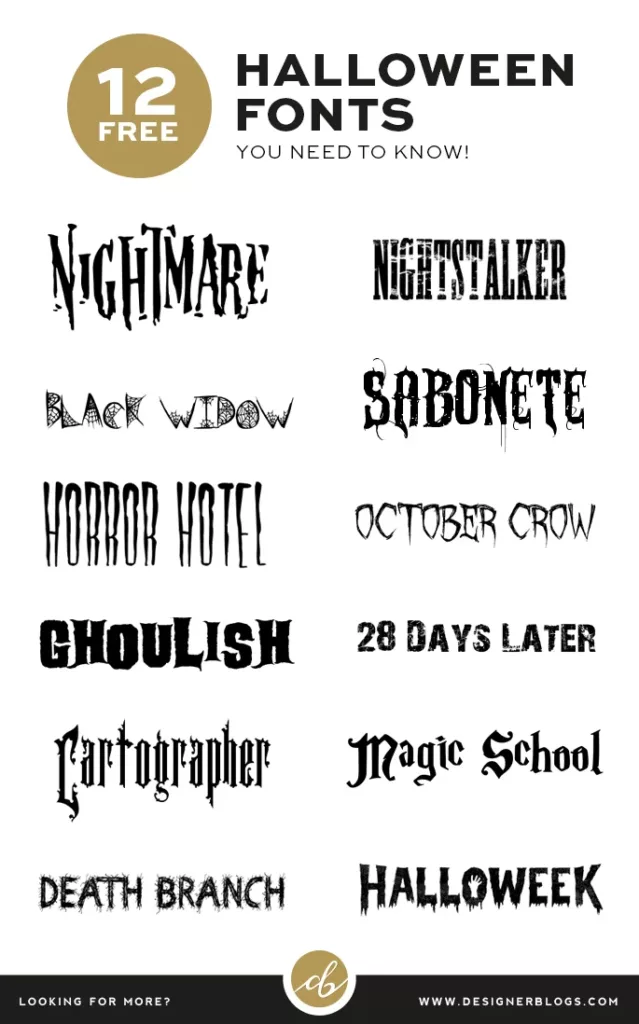
10 Best Scary Halloween Fonts – Free Download links inside!

I don’t know about you, but I can always use a little inspiration about this time of year as I’m prepping my Halloween crafts and decorations. Today, I would love to share with you 10 best scary Halloween fonts for free.
Best Free & Scary Halloween Fonts
I have picked ten different fonts to make sure everyone will find something perfect. My favorite one is Silent Night, which has a great balance between graphic and simple font. I’m usually not a huge fan of too crazy shapes, but they are the best for seasonal crafts. You will never have too many spiders, bones, and grunge when doing a spooky decoration!
If you are looking for download links, you will find them below the image.

Bone | FrankenDork | Shlop | Lakeshore Drive | An Unfortunate Event | Ravenscroft | Boycott | Witches Magic | Silent Night
Please show us your works!
I would love to see what you will create using those best scary Halloween fonts for free. Make sure to let us know in the comments, or share your creation on social media and tag Designer Blogs.
Don’t forget to let us know which font is your favorite. Do you prefer such graphic fonts, or would you rather see something more simple next time?
Still looking for a perfect font? Check our 10 Classic Halloween Fonts list.
How to add a new blog post on WordPress in 5 easy steps

The ability to create a post is the essential thing every blogger needs to learn. Well-formated content will not only draw more visitors to your blog, but it will also keep them longer. Because of that, the first thing every new WordPress blogger should do is learn How to add a new blog post on WordPress.
Back in 2011, we have created a guide on how to create a post in WordPress (with classic editor); however, since then, the WordPress post editor was rebuilt entirely. You can still use the old post editor using WordPress plugins; however, this solution is not permanent. Classic post editor will eventually become unsupported, and you will need to learn how to use the new one, called Gutenberg.
#1 Add a new blog post in WordPress
The transition from one editor to another may be a bit intimidating as they look completely different. I can assure you that the new editor is not only easy to use, but it also offers many more options which you will love!
The beginning is very similar. You need to visit your WordPress Dashboard and from the left menu pick Posts > Add New

The old post editor was very similar to blogger one, so switching between those two platforms was a little bit easier. The main difference now is the post body field. You no longer have one massive post content area. Instead, your posts (and pages) are build from blocks. You can access them by clicking on any “plus in a circle” symbol. I have marked them red on the screen below:

TIP: Use the top symbol to learn more about each block.
The top button is better for beginners because it includes a description of each block. Most of them are straightforward; however, you can always learn something new browsing block descriptions.
#2 Managing your blocks
Once you add a block to your post, it will appear under the title area. Select your new block to reveal even more options!

There is no limit to the number of blocks you can have in your post. To make your blog post more appealing, make sure to use different blocks, for example, images or headings.
TIP: You can use a panel with arrows to drag and drop your block!

If you plan to work on your post for a longer time, remember to hit ‘Save Draft’ in the top right corner to save your progress for later.
#3 Assign your post to a category
With the post ready to publish, it is time to assign it to the proper category and some tags to it.
Use the right column settings to add new categories or pick an existing one. Both categories and tags help your visitors find the content they are looking for, so you should never skip this step.

Click on the tab name to expand it and find all options.

#4 Add featured image
Another essential part of each post is your featured image, also known as a cover photo of your post. The picture which you will upload here is used for your post excerpts (short post snippets on the homepage) when you share your post on social media and everywhere else, where there will be just one image needed.

Select an image that best represents the content of your post and choose one that is visually appealing.
#5 Publish your post
Is your post ready? Let’s do a quick check! You should already have:
- Post Title
- Post content (build from blocks)
- At least one post category
- Featured Image
With all those elements in place, head to the top of the right column. Before you hit the ‘Publish’ button it is worth to take a look at the options below it.
The most important will be Visibility and Publish

Remember to preview your post before publishing it!
If the preview is alright and you are happy with what you see, you can finally click ‘Publish’ and create your post in WordPress. The new post editor will ask you to double-check everything and suggests options you may want to look through.

You will need to click ‘Publish’ again to confirm that everything is double-checked, and you want to publish your post.
Congratulation! You have created your first post!
I hope this guide was helpful and you learned how to add a new blog post on WordPress! Let me know in the comments below if you have any questions or if there are any topics you would like me to cover in the next guides.
Remember – there are no stupid questions!
We all been there. In the beginning, even the most natural and most obvious things for everyday WordPress users can look complicated.