fbpx
Home Blog Page 1252

What is a cyber attack?

0
What is a cyber attack?

Cyber attacks are attempts to disrupt or disable computer systems or steal valuable data. From the Experian data breach to the Colonial Pipeline ransomware attack, cyber attacks are a part of just about every news cycle and have very real consequences. In this article, we’ll take a closer look at what cyber attacks are, why they happen, and how to prevent them.

Cyber attack basics

Cyber attacks can compromise sensitive personal data, including Social Security numbers, birthdates, medical information, credit card numbers, bank account numbers, and more. This can lead to identity theft, which is time-consuming, frustrating, and expensive to resolve.

Cyber attacks are also very expensive for companies. Cybersecurity Ventures expects global cybercrime costs to grow to $10.5 trillion annually by 2025, with over $6 trillion in damages alone this year.

But why is cybercrime so expensive? Cyber attacks often bring down computer networks, and downtime costs companies money. It also takes time and money to back up and evaluate compromised systems and data.

Companies also have to notify their customers if their data was compromised and take measures to restore their reputations. That doesn’t include the costs of attempting to prevent cyber attacks in the first place, which requires professional expertise, investments in hardware and software, and lots of time.

Types of cyber attacks

There are several types of cyber attacks. Here are some of the most common.

Malware

Malware are software like spyware and ransomware that are used to attack information systems.

Spyware is installed on devices without a user’s knowledge. It can be used to steal information, including login credentials, and invades privacy. Trojans are one example of spyware.

Trojans hide in legitimate software programs, which gives them access to a computer. From there, it can delete or encrypt files or access user information.

Ransomware is software used to encrypt and hijack computer systems, which are only released after a ransom has been paid. The Colonial Pipeline shutdown was one example of this. The Pipeline is one of the main fuel pipelines in the United States, and shutting it down caused fuel shortages across the east coast. Colonial paid $4.4 million to the hacking group to bring their systems back online.

Phishing

Phishing is when cybercriminals send emails or texts to unsuspecting people who then click on a link or attachment that downloads malware onto their device. Another variation is when the link takes the user to a fake website that tricks them into entering sensitive information.

Phishing emails and texts have become increasingly sophisticated, so it’s critical to be vigilant about not clicking links or opening any emails you don’t recognize.

Man-in-the-middle

This attack is when a cybercriminal inserts themselves between two parties. For example, they might intercept connections on public, unsecured WiFi networks to steal data from someone logging into their work email or bank account.

Distributed denial-of-service attack (DDoS)

DDoS attacks bombard systems with traffic that exhausts their resources and bandwidth. They make servers unable to handle requests, making systems unusable.

SQL injection

SQL injections involve using the SQL programming language to collect data from servers and databases.

Zero-day exploits

Software have vulnerabilities. Zero-day exploits are when cybercriminals exploit vulnerabilities within software before they’re patched.

DNS tunneling

DNS tunneling hides the data of other programs in DNS queries and responses. It allows data to be removed from a system without being detected.

Why do cyber attacks happen?

Criminals engage in cyber attacks for several reasons:

  • Money: Perhaps the most obvious reason, money drives a lot of cyber attacks. Ransomware can bring in millions for cybercriminals. They can also sell personal and corporate data.
  • Disruption: Some hackers just want to disrupt the status quo. They enjoy the chaos. Or they may want to damage a specific organization or entity.
  • Cyberwarfare: Governments are also involved in cyber attacks. They use cyber attacks to weaken political opponents and expose weaknesses.

How to prevent cyber attacks

Organizations and individuals can take steps to prevent cyber attacks.

  • Education: You can only prevent what you’re aware of, so keep an eye on evolving cyber threats. Organizations should educate employees on common cyber threats, including phishing and social engineering, which involve manipulating someone into providing access to sensitive information. For example, someone could pretend to be tech support to gain access to protected servers.
  • Install perimeter defenses: These include firewalls, which should be kept up to date.
  • Malware detection: Consider adding malware protection on your computers and other devices. Corporations should have state-of-the-art antivirus software that’s continually updated to address threats.
  • Patch management: Those pesky security updates might seem annoying, but they prevent vulnerabilities from being exploited.
  • User access: Multi-factor authentication and strong passwords play a huge role in preventing cyber attacks.

Along with the steps listed above, businesses should also have a clear response plan to deal with security breaches.

Getting involved in cybersecurity

Since cyber attacks are constantly evolving, cybersecurity professionals are in high demand. If you’re interested in a career in cybersecurity, you can get started in several ways.

One option is learning a programming language that’s commonly used in cybersecurity. Some options include:

We also offer an Introduction to Cybersecurity course. It covers cybersecurity standards, cyber threats, cryptography, network security basics, and more. In other words, it’s a great way to take your first steps toward a rewarding career!


Cybersecurity Courses & Tutorials | Codecademy

Cybersecurity is a fast-growing field that addresses the security risks of our increasingly connected digital world. Learn cybersecurity, and you will learn how users, companies, and even governments protect themselves and recover from, cyber threats and attacks. Start defending yourself, or your or…

7 benefits of cloud computing

0
7 benefits of cloud computing

Cloud computing is becoming more and more popular. Every day, more companies are turning away from traditional IT infrastructures and corporate data centers. Instead, they’re flocking to cloud services and platforms — but why?

In this article, we’ll explore the many benefits behind cloud computing’s popularity. But first, let’s look at what cloud computing is.

What is cloud computing?

Every business needs some sort of IT infrastructure. Think about the many different types of files that employees need to access. The large amounts of data stored in databases. The email and other software that needs to be installed on company devices.

In the past, companies managed the hardware and software behind their servers, databases, and networks in a physical data center.

Cloud computing changed all of this. By delivering computing services like software, analytics, servers, storage, and more, over the Internet, cloud services like AWS (Amazon Web Services) save businesses the time, money, and other resources they’d otherwise dedicate to maintaining their IT infrastructure.

There are several different types of cloud services, ranging from Infrastructure as a Service (IaaS) to Software as a Service (Saas). In another post, we take a closer look at what cloud computing is.

7 benefits of cloud computing

Cloud computing offers many benefits — so much so that more and more businesses are migrating their infrastructures and data to cloud services and platforms. Some startups rely entirely on cloud computing for benefits like:

1. Scalability

The IT needs of every company are different. For example, a big tech company with thousands of employees needs different resources than a startup with only three. Cloud providers are a perfect solution for either company because their services can be scaled to meet their needs.

This scaling can be done in a matter of seconds or minutes, which is great for a company that’s growing quickly. As demands increase, a business can quickly scale its cloud-based infrastructure without investing in physical components.

2. Cost

While the initial migration of existing infrastructure may take planning, money, and time, most businesses see cost savings in using cloud services right away. Since cloud computing resources can be sized to a business’s needs, they never pay for more than they use. It’s a pay-as-you-go system.

In contrast, many on-site data centers have more resources than they need. This is largely for preventative reasons — it’s better to be overprepared than underprepared when things go wrong. But, with cloud computing and its scalable services, a business never has to pay for more than they need.

3. Speed

Along with saving time and resources, cloud computing has also sped up software development. Setting up a new development environment or virtual machine on a cloud can be done in seconds with the click of a few buttons. With a traditional data center, you’d have to purchase, install, and maintain all the required hardware.

Cloud services are fast. With a traditional data center, users have to connect to that one data center no matter where they’re located in the world. A cloud service, on the other hand, can be distributed across the world, so users get a fast connection close to their geographical location.

4. Productivity

Cloud computing improves productivity in many ways:

  1. As we explained earlier, eliminating the need for infrastructure maintenance allows your IT staff to focus on business-related tasks.
  2. It makes software development, testing, and deployment quicker and easier.
  3. It provides a worldwide network of services that can be easily accessed by remote employees.

5. Performance

Because providing modern IT infrastructure is their business, cloud providers keep data centers updated with the latest high-performance hardware and technologies. This enables better connectivity and performance.

6. Security

Cybersecurity is a big concern of any business. Data breaches can damage an enterprise’s revenue, reputation, and even its clients. Cloud services resolve this by managing permissions and access to the services and resources they provide. For example, you could restrict access to an important file to a specific set of users.

7. Disaster recovery

Losing data can be just as bad for a business as having a data breach. Storing data on the cloud ensures that it’s always available, even if a laptop or mobile device gets lost or damaged.

Cloud providers also provide backup systems for files, databases, source code, and more. In a worst-case scenario, any lost data can be restored from backups in no time.

Getting Started

If you’re into coding, chances are you’ll run into cloud computing in your career. It’s where most businesses host their infrastructure — and after looking at all of its advantages, it’s easy to see why. Cloud computing saves money, increases productivity, is available from anywhere, 24/7, and much more.

What does this mean to a developer? It means it makes your job a lot easier. When it comes to writing code, not much has changed. You can still develop apps with the same technologies and languages you’re already using. The cloud just provides an easier way to deploy, test, and run your code. It also makes it possible to work remotely from anywhere in the world.

Ready to start working with the cloud? If you’re looking to build server-side applications that run in cloud environments, check out our Back-End Engineer Career Path. We’ll teach you how to build your own applications, APIs, databases, and more.

If you’re more interested in building web applications that run in the browser, our Front-End Engineer Career Path could be right for you. You’ll learn how to use languages like JavaScript, CSS, and HTML, along with front-end libraries like React and Redux. Lastly, for those who want to master both the front and back end, try our Full-Stack Developer Career Path.


Web Development Courses & Tutorials | Codecademy

Web Development is the practice of developing websites and web apps that live on the internet. Whether you’re interested in front-end, back-end, or going full-stack, the content in our Web Development domain will help you get there.

Catalog Home | Codecademy

If you’re not sure where to begin or what to learn next, this is a great place to start. Check out our top coding courses, Skill Paths, and Career Paths.

How to Use Customize Fonts with Blogger

0
How to Use Customize Fonts with Blogger

How to Use Customize Fonts with Blogger

Did you know that you can customize fonts for some of the Blogger elements with just a few clicks? Such a feature is available with all default Blogger templates and our Blogger Themes. It’s nice to be able to change even the smallest of things on your blog to match your personal style more closely, but changing things up on your blog by yourself can be intimidating at best. But the good news is, Blogger has made this pretty easy. In this short guide, I will show you how you can use custom fonts with Blogger.

Access your Custom Fonts with Blogger

As an example, I will use one of our premade Blogger templates called Aimee

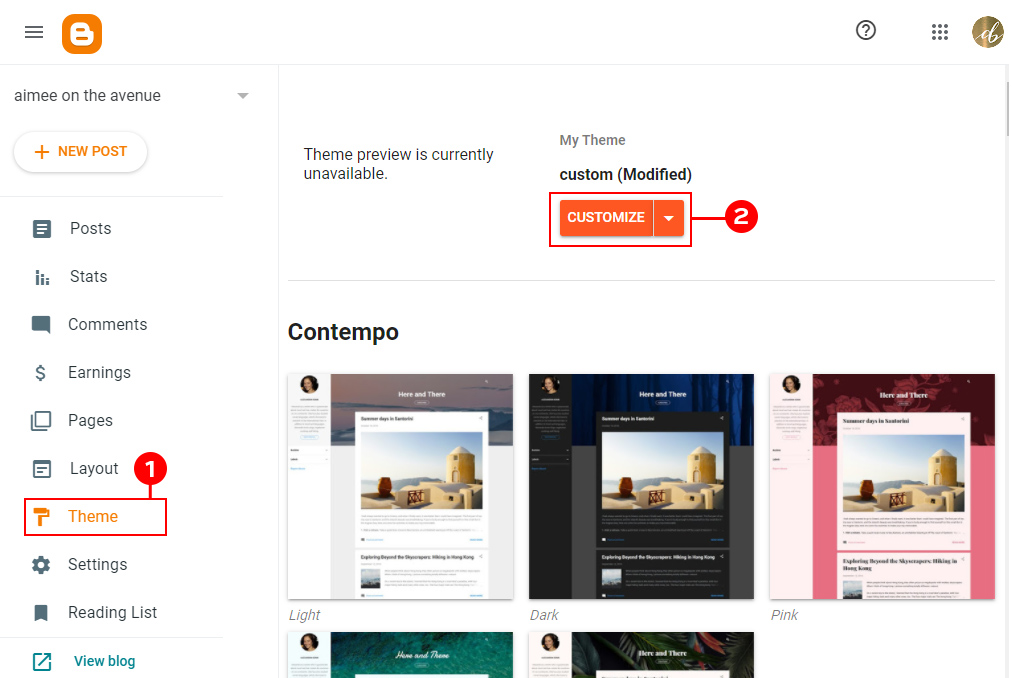
To make your changes, you will need to log in to your Blogger and click on your Theme (1) tab in your dashboard.  Then click on the orange Customize (2) button to be taken to your theme customizer.

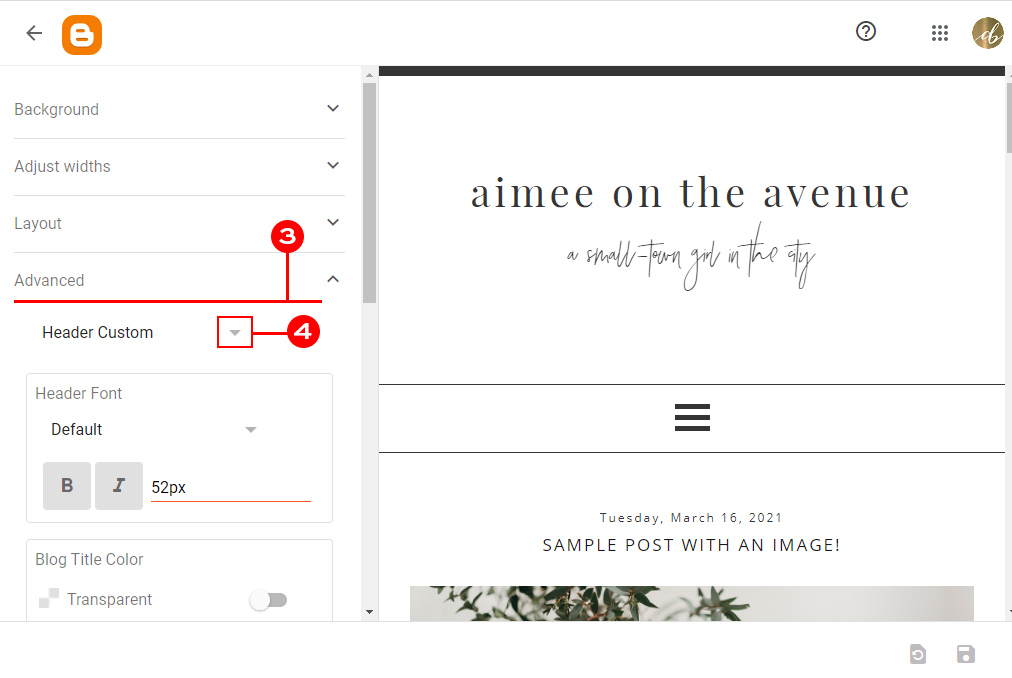
This is what your Theme Customizer looks like.  As you can see, there are quite a few options to click on the left.  Today we will focus on the Advanced (3) tab.

Using the small arrow (4) just below the advanced tab name, you can pick a section of your blog which you would like to edit. Our templates come with a couple of them however, if you bought the design somewhere else, you might notice that your design is not customizable or have just one or two options to choose from.

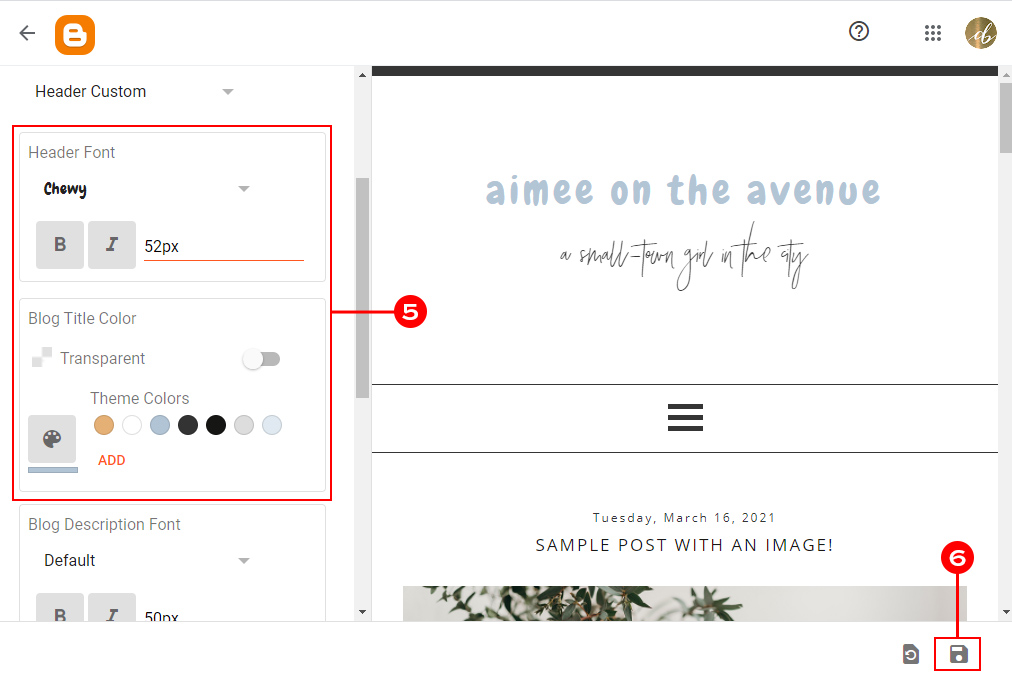
Browse the options on the left side of your screen (5) and change the font style, color, size, and more! You will find here lots of custom fonts that can be used with Blogger. Go ahead and play around with these a bit without being scared because nothing here gets saved unless you actually save your changes.

Accessing Custom Fonts with Blogger

As you are making changes in this area, you will see a preview of how the changes look on your blog so you can get things set how you like them before they are actually saved to your live blog. Don’t be afraid to click on the different options and make changes. Again, nothing will be saved to your live blog until you hit the Save button (6)

When you are happy with the results, click the save button (6) at the bottom right corner. You can also use the button next to save to reset unsaved changes.


That’s all!

You have just customized fonts on your blog. As you see, using custom fonts with Blogger is very easy and takes only a few clicks. I hope that this short guide will help you make your blog perfect.

If you have any questions, make sure to leave them in the comments below.

Word of the Day: deft

0
Word of the Day: deft

: skillful in physical movements; especially of the hands

_________

The word deft has appeared in 138 articles on NYTimes.com in the past year, including on Aug. 3 in “A Cat on the Field. A Mantis on a Hat. Monday Baseball Had It All.” by Daniel Victor:

An animal unexpectedly gets loose on a field of competition no more than a handful of times per year, and fans typically agree that it never gets old. In 2019, a cat scurried into the end zone at Giants Stadium. In 2017, a cat perched on the Miami Marlins’ gaudy home run sculpture.

Most times, the animal — typically a terrified cat — displays deft skill in evading human capture until it decides to run off the field on its own terms. The fans in the stadium typically root for the cat against the villainous grounds crew, and TV announcers gamely narrate the drama.

Can you correctly use the word deft in a sentence?

Based on the definition and example provided, write a sentence using today’s Word of the Day and share it as a comment on this article. It is most important that your sentence makes sense and demonstrates that you understand the word’s definition, but we also encourage you to be creative and have fun.

Then, read some of the other sentences students have submitted and use the “Recommend” button to vote for two original sentences that stand out to you.

If you want a better idea of how deft can be used in a sentence, read these usage examples on Vocabulary.com.

If you enjoy this daily challenge, try one of our monthly vocabulary challenges.

Students ages 13 and older in the United States and the United Kingdom, and 16 and older elsewhere, can comment. All comments are moderated by the Learning Network staff.

14 Ways to Learn Vocabulary and Explore Language With The New York Times

0
14 Ways to Learn Vocabulary and Explore Language With The New York Times

Another lens through which to look at language? The Times’s Upshot team used data analysis to create the interactive “The Words Men and Women Use When They Write About Love,” pictured above. It mines the language of four years of Modern Love essays. What questions does it raise for you?

You can see graphs the team has done on topics as varied as “The Rise of ‘Middle Class’ as an Ordinary American Term,” “The Word Choices That Explain Why Jane Austen Endures, and the language The Times has used since 1860 to describe newcomers to America. You can also read data analysis of topics related to language and culture, including the words used in job listings and how we described our mental health on social media in 2020.

As you explore these analyses, you might borrow the protocol we use in our weekly What’s Going On in This Graph? feature. Ask yourself:

  • What do I notice?

  • What do I wonder?

When you’re done, ask yourself, Is there something interesting I’ve observed about language and language patterns that could be useful to explore using data analysis, perhaps via tools like Google Trends or the Google Books Ngram Viewer? What and why? How could you present your findings visually?

Language changes all the time, and, in turn, changes us. Word choice matters. It could be as relatively small as scientists calling for less sensational ways of describing human encounters with sharks. It could be as big as a deep rethinking of the language we use to talk about gender, sexuality or race. From the various examples we’ve given above, you can see that significant social, cultural and political changes in our society can’t help but affect the language we use. And thanks to the internet, those changes are happening faster than ever before.

If you are a regular reader of The Times, you can track these conversations in real time. For example, in 2020 the paper announced that, after conversations that began in earnest after the death of George Floyd and subsequent protests, The Times would begin capitalizing “Black” when describing people and cultures of African origin. Nearly 800 readers commented on the change, some supporting it, others rejecting it and many offering nuanced reasons for their opinions.

You can find pieces that touch on language and its relationship to culture in sections across the paper, including Politics, Sports, Style and Food. If you want just one recent example, however, we recommend the Aug., 2021 piece by the linguist John McWhorter exploring “How ‘Woke’ Became an Insult.” After tracing how and why its meaning has morphed, he writes:

A mature societal take on language will understand that words are not simply what they mean in something called the dictionary and that words referring to issues societal or controversial — i.e., the interesting ones — will often need replacement about once a generation.

Finally, and most important, we invite you to become a part of the conversation, too. The Learning Network’s daily Student Opinion question often focuses on issues of language, culture and politics, and gives young people a dedicated place to have their say.

Here are just a few of the questions we’ve asked recently. Post your thoughts in the comments section for each — and read and respond to what other teenagers have contributed:

7 Great Hobbies To Start This September

0
7 Great Hobbies To Start This September

Regardless of what age you are, September brings with it that “back to school” feeling. The summer is over and your bodyclock starts gearing up to go back to work. But you can also harness and direct that “back to school” energy towards more recreational ends. September is a great time to try your hand at a new hobby.

Among the thousands of courses published on Alison are many dedicated to a diverse range of pastimes and activities. It’s not all skills training and career development! Our publishers range from educational institutions publishing courses on project management to passionate individuals seeking to share their hobbies and interests. So whether your new passion is baking or learning languages, interior design or literature, we have the courses to help you on your way this September.

Languages

There’s nothing more satisfying than learning a new language and feeling your vocabulary and confidence grow in a second or third tongue. Maybe you want to learn French to read your favourite French authors in the original, or perhaps you have taken an interest in Japanese and its rich history. Regardless of what has stirred your interest in learning a new language, Alison has a wide range of courses for learners of all levels across a host of languages, including:

Gardening

Gardening is the ideal hobby: it gets you outdoors, allows you to be creative, and the end result brings endless enjoyment. The Diploma in Garden Design and Maintenance guides you through the basics of gardening, from the planning stage right through to garden maintenance. Completing this course will enable you to evaluate, plan, purchase, plant, and maintain a garden to suit your property’s natural environment and characteristics.

Literature

Literature offers us the chance to lose ourselves in other worlds and other times. It is a truly limitless hobby. If you’re feeling a desire to reach back beyond your favourite books and learn more about the ideas behind the stories, then we have the courses for you. From Aesop’s Fables to Virginia Woolf, you can explore the history of great books through our literature  courses.

History

The study of history is an endlessly fascinating pastime. By learning what happened in the past, you understand how it brought about the present. From World War One to Brexit, our history courses don’t just enlighten, they entertain and captivate, too.


Interior Design

Whether you’re redecorating your entire house or just redoing your spare room, a solid understanding of in interior design is a great life skill to have. The Diploma in Interior Design course provides you with an overview of interior design as a discipline. You’ll learn about project planning and the design principles and factors a designer considers when working within a space. The course also teaches you how to employ colour, use surface materials and textures, work with textiles and accessories, source and select furniture, and much more.

Photography

Alison offers a range of photography courses that will help you move past your digital camera’s automatic settings. From beginner classes that can teach you the basics of photography, to training courses that teach more advanced photography concepts such as bracketing, hyperfocal distance, and focal length, we have something for everyone.

Baking

Baking, with its exact measurements and precise recipes, can be a calming activity, as well as a delicious one! Baking and Desserts for Beginners will help new bakers understand the fundamental techniques and methods of baking and of preparing desserts. The course breaks down and walks you through various recipes, as well as teaching you about pastry and studying key ingredients like dairy, chocolate and sugar.

What is back end?

0
What is back end?
What is back end?

Generally, a website consists of two parts — the front end and the back end. The front end, also known as the client-side, is what you see in the browser. The back end, or server-side, is everything that happens “under the hood,” and its components aren’t immediately obvious.

In the video above, Web Developer Carlos Grijalva gives us an example. Think of a website as a restaurant. When you first sit down, you’re presented with a menu, which may include pictures and descriptions of the items you can order. When you place your order, you might request something specific, like a salad with dressing on the side. This is similar to how the front end works.

Then, the kitchen staff takes your order, gets the ingredients from the refrigerator and pantry, cooks them together, and brings you your food. This is essentially how the back end works.

Below, we’ll take a closer look at the back end, what Back-End Developers do, the tools they use, and how to become one.

What goes into the back end?

As Carlos explains, “the back end is a combination of a database and a software written in a server-side language.” The back end includes servers and databases. Servers control how users access files. Databases are organized and structured collections of data.

Here’s an example. When you log into a website, you enter your username or email and password. This information is then sent to server-side software, which ensures that your email looks like an email address and your password is structured like a password. If everything looks good, it sends the data to the database to ensure someone with that username and password exists. Then, it chooses what’s important and sends it back to you in the form of your user page.

What do Back-End Developers do?

In another post, Doug, one of our Senior Back-End Engineers, gives us an overview of what a Back-End Developer does. While touching on the role’s capacity for problem-solving, he provides a list of common responsibilities, including:

  • Creating, integrating, and managing databases.
  • Using back-end frameworks to build server-side software.
  • Validating data to make sure it’s formatted correctly before being sent to the database.
  • Integrating user-facing elements with server-side elements to make sure that information is being sent to the right place so the server can retrieve it.

Back-End Developers use a range of technology and software, many of which fall into three categories: databases, programming languages, and frameworks.

Databases

As we explained above, databases are used to store user information and other important data. Popular database management systems include:

  • MySQL
  • MongoDB
  • Oracle
  • PostgreSQL

Programming languages

Back-End Developers use query languages like SQL to manipulate the data stored in databases. They also use various programming languages to build applications that facilitate communication between servers and databases. Some of these languages include:

Python is a great choice for beginners. It’s concise and easy to read. It’s also extremely popular and has a large programming community behind it. Ruby is another beginner-friendly language that has an enthusiastic programming community behind it.

Frameworks

Frameworks make software development faster and easier, saving time developers would otherwise spend writing code. Popular frameworks include:

How do you become a Back-End developer?

You can take a few paths to become a Back-End Developer. One obvious option is to get a degree, but that’s not for everyone. Fortunately, you can become a back-end developer without a degree by taking classes and learning on your own.

Carlos suggests starting by choosing a language and a framework. For example, you could begin with Ruby and then learn its associated Ruby on Rails framework.

From there, Carlos suggests learning how to work with servers, then learning APIs and HTTP methods. Next, you’ll want to connect to databases and learn how to retrieve data. Finally, you’ll want to build something on your own. This allows you to implement the server, database, and APIs and connect to a simple front end. This brings all your learning together and provides you with a project you can include in your portfolio.

How do you become a Back-End Engineer?

If you’re intrigued by all the happenings behind the scenes of websites, another career option is becoming a Back-End Engineer. Back-End Engineers tend to take a big picture view of the back end, essentially serving as architects — designing entire systems and overseeing entire projects.

If this sounds like the role for you, check out our Back-End Engineer Career Path. You’ll learn how to use tools like JavaScript, Node/Express.js, SQL, and more. You’ll also create Portfolio Projects, which will help you land a job as a Back-End Developer or Engineer.

You’ll also learn about web security, algorithms, and how to scale servers. We’ll even help you prepare for your technical interviews, which are on-the-spot demonstrations of your skills. Ready to start your Path? Sign up today!


Python Courses & Tutorials | Codecademy

Python is a general-purpose, versatile, and powerful programming language. It’s a great first language because it’s concise and easy to read. Whatever you want to do, Python can do it. From web development to machine learning to data science, Python is the language for you.

SQL Courses & Tutorials | Codecademy

SQL is the standard relational data management language. We live in a data-driven world, and there are many businesses that store their information inside large, relational databases. This makes SQL a great skill not only for data scientists and engineers, but for anyone wanting to be data-literate.

What is front end?

0
What is front end?
What is front end?

If you’re familiar with web development, you’ve probably heard reference to “the front end” — but what is it, exactly? Generally speaking, the front end is the user-facing part of a website. It’s what you see when you type in something like “codecademy.com.” But, of course, there’s more to it than that.

As Front-End Web Developer Pat DePuydt explains in the video above, the front end is the part of the website a user or customer interacts with. A lot goes into making the front end work, including database architecture, frameworks, scaling solutions, and more. It includes:

  • Styles: This includes the buttons, layouts, inputs, text, images, and more. It’s the overall look of the website.
  • Accessibility: Accessibility features like text-to-speech, voice recognition, simple user flows, and more make websites easier to use and provide a better user experience.
  • Speed: Most people won’t wait for a website to load. The faster a website works, the better.

What are common front-end tasks?

Front-end web development can include a variety of tasks, including:

  • Updating existing web pages or creating new ones
  • Building HTML emails for email campaigns
  • Making sure web pages work well on mobile or tablets
  • Improving website performance by cleaning and splitting code
  • Adding and improving accessibility features

What are front-end technologies?

You’ll use three main technologies in front-end development.

  • HTML: Pat describes HTML as the skeleton of a webpage. It’s used to structure a webpage’s content, and it also tells the web browser how to display it.
  • CSS: The “skin and clothes of the webpage” according to Pat, CSS (Cascading Style Sheets) gives browsers more specific information on displaying content, like the size and color of text.
  • JavaScript: There’s more to websites than just text. JavaScript allows you to create more complex elements like interactive maps and animated graphics. It’s executed both in the browser and the server, which makes it versatile.

Front-End Developers also use other tools, ranging from content management systems (CMSs) like WordPress and Drupal to libraries and frameworks like React, Angular, and Vue. Libraries and frameworks allow you to use a blueprint to create web elements like buttons rather than creating a new one every time.

What are front-end careers?

There are two primary roles in front-end development: Front-End Interface Developers and Front-End Engineers. While they might sound similar, several distinctions lie between the two.

Front-End Interface Developers

Front-End Interface Developers (or Front-End Designers) take drawings and other static images and translate them into web pages. This is a big task, as the web pages need to match the designs and ensure they work on various screen sizes.

Front-End Engineers

Front-End Engineers are less focused on design and more on making the website functional and scaleable. Some Front-End Engineers also do design work, and some workplaces use the two job titles interchangeably.

What goes into front-end design?

Front-end design is a collaborative effort, so if you enjoy working with others as much as you enjoy development, it could be a good fit.

Most Front-End Developers and Engineers coordinate with user experience (UX) teams. These folks determine the target demographic for the website and how users might interact with it.

Graphic design is another critical part of front-end design. It includes fonts and colors and ensures that the website’s design matches the company and product the web application is for. This often comes from the research and branding team. For example, Amazon has a distinct logo, the same fonts used throughout, and consistent colors.

Front-End Developers coordinate with various departments to ensure web applications work across all browsers and screen sizes, including phones and tablets. They may also receive feedback from these departments throughout development, so they need to be able to incorporate and listen to feedback from a variety of people with different perspectives and priorities.

Why is the front end important?

In the video above, Pat explains that the front end is important because:

“It’s the digital representation of a company, or an individual, or an organization. It builds a bridge between a customer or client and the brand.”

If a website or application has an issue, it reflects poorly on the brand.

The front end is also what makes a website usable. If a website or application doesn’t work well, it can push customers away, and those customers can be difficult to win back.

Ultimately, the front end represents someone’s idea, and it’s important to do it justice.

Becoming a Front-End Engineer

One option for becoming a Front-End Engineer or Developer is to get a degree. While that’s a good fit for some, getting a degree isn’t practical for everyone. Fortunately, you can become a Front-End Engineer without a degree.

To do that, you’ll want to start by taking relevant courses. You could start with programming languages like HTML, CSS, and JavaScript. Or, you could check out our Front-End Engineer Career Path. Each Career Path provides a series of courses that take you from a beginner to ready to interview.

The Front-End Engineer Career Path includes the languages listed above, along with libraries like React and Redux. You’ll learn the basics of web design, including wireframing and color theory. You’ll build projects that you can include in your portfolio. You’ll also learn what to expect in a technical interview. Ready to get started? Sign up now!


Web Design Courses & Tutorials | Codecademy

Web Design is essential to bringing a website to life and creating the experience that you want for your end users. The courses here will help you polish your HTML and CSS skills while learning about color design, navigation design, and more.

Web Development Courses & Tutorials | Codecademy

Web Development is the practice of developing websites and web apps that live on the internet. Whether you’re interested in front-end, back-end, or going full-stack, the content in our Web Development domain will help you get there.

How to use GitHub to strengthen your resume

0
How to use GitHub to strengthen your resume

Boasting 40 million users, GitHub is one of the leading online development environments. Programmers use GitHub every day to work on projects and collaborate with others. In today’s competitive developer job market, you can use GitHub to showcase your skills, giving you a leg up on the competition when you apply for your next job.

Keep reading to learn the benefits of using GitHub to bolster your job prospects, some of the possible downfalls and how to approach them, and how entry-level, mid-career, and seasoned professionals can use GitHub to make their resumes pop.

What is GitHub?

GitHub provides internet hosting for developers who use Git — a software used to track changes made to code. With Git, programmers can work with each other to design and improve source code.

Developers use GitHub to manage and store different versions of projects. For example, if you’re working on a web application, you can upload your code to GitHub, invite others to help you work on your code, or simply store it there to work on later.

Plus, as you develop new versions of your app, you can use GitHub to get easy access to what you’ve already made, giving you a straightforward way to compare, improve, and troubleshoot your solutions.

The benefits of including GitHub work on your resume

Even though you can describe your skills and experience on your resume, GitHub adds another dimension. Here are some of the top benefits of including your GitHub projects and contributions on your resume.

It shows you know how to write code

It’s easy to claim you’re a programmer, but it’s another thing to prove it. Showcasing GitHub work on your resume gives a prospective employer tangible evidence of your skills. Showing some of your best work also gives your interviewer something they can share with decision-makers and other stakeholders, like the rest of the dev team.

Showing your work can be intimidating, especially if you feel like your project still needs some fine-tuning. Don’t let this stop you because analysis of what you could’ve done better is a great talking point during an interview. It shows you’re introspective about your work and capable of evaluating it with a critical eye.

It shows you can read code

When you showcase projects you’ve contributed to on GitHub, you let employers know you’re proficient at reading code. For many programmers, reading other people’s code is very challenging. Employers know this, and while they’re often ready to invest time into improving a new developer’s reading skills, they’d prefer someone who already has experience.

To make your reading skills shine, you can:

  • Collaborate on different kinds of projects
  • Work with multiple developers
  • Contribute to projects that are out of your comfort zone to broaden your horizon

Doing this will add diversity to the kinds of code you can read and work with, giving your employer the confidence they need in you to move forward.

It shows your collaboration skills

The ability to collaborate with others on GitHub shows you know how to produce quality work with other programmers. While many developers create excellent products working alone, working within a team environment is a necessary element of today’s DevOps teams.

When you connect with others on GitHub and include links to your work on your resume, you show an employee you know:

  • How to take feedback about your work
  • How to provide constructive feedback that improves the end-product
  • How to maintain a focus on higher-level objectives while working on smaller pieces of a project
  • How to annotate clearly, explaining your coding ideas to others

It lets the employer know you can use Git

Granted, not every employer is going to have Git as part of their production process, but some do. Someone who knows how to use Git will require less upfront training for these companies.

Also, some other development platforms, like Helix Core and AWS CodeCommit, have a few similarities with Git. Even if the employer doesn’t use Git, your experience with it could be a bonus and give you an edge over the competition.

It shows your passion for coding

Developers who use GitHub to contribute to open-source programming have an admirable passion driving them. The time, energy, and effort it takes to invest yourself in open-source solutions—usually without any compensation—shows you have a sense of commitment to your craft that may set you apart from others applying for the position.

Potential downfalls of using GitHub on your resume

While the benefits of showcasing your work on GitHub outweigh the drawbacks, there are a few things you want to keep in mind when deciding if and how to showcase your work.

Older work may reflect past weaknesses

Showing older work is great—as long as you have the opportunity to explain how you’ve improved or how you’ve grown when it comes to that specific kind of programming.

Be careful to provide context for any work you showcase, especially products that have clear deficiencies. This will make your introspection and improvement stand out instead of the errors you made.

You may overemphasize your dependence on others

If you primarily use GitHub to get help when you’re stuck, it might seem like you rely on others to solve problems versus tackling them on your own. Do your best to avoid a narrative like, “I got stuck so I went to GitHub for help. I got stuck again, and GitHub bailed me out. And this other time when I couldn’t figure an error out, I went to GitHub…”

If you use GitHub only when you need help, be sure to highlight what you’ve learned from each experience, including:

  • How another programmer’s thinking improved your own
  • New skills you picked up by working with others
  • How watching someone else improve your code helped you improve your troubleshooting abilities

Long periods of inactivity may undercut the benefits

If you choose to showcase GitHub work on your resume, there’s a chance the hiring team will focus more on your GitHub work than the rest of your resume. If that’s the case, inactivity on GitHub may convey inconsistent performance, passion, and work ethic.

To avoid this, explain why you chose to take a break from GitHub, perhaps because you got busy with other work that paid more or had to focus on more important projects.

Advice for different kinds of GitHub Users

The way you show your work on GitHub will vary based on whether you’re applying for an entry-level position, mid-career position, or if you’re a seasoned professional. Here are tips for each stage of your career.

Entry-level applicants

As an entry-level applicant, GitHub gives you a chance to show the kinds of skills many can only acquire with years of experience. By working on GitHub, you can show employers how you can:

  • Accept feedback from others
  • Improve the work of experienced programmers
  • Systematically adjust products until they meet core requirements

To ensure you have the skills you need to produce on GitHub, and for a traditional dev team, you can enroll in any of our Career Paths. For new developers, some of the best choices include:

Mid-career applicants

As a professional in the middle of your career, GitHub offers you a chance to show how you can solve more complex problems and adapt to new types of programming, including learning new languages. The ability to acquire and apply new knowledge is crucial to the skillset of a mid-career applicant.

Even if you haven’t produced stellar work with a language you’re still getting comfortable with, showing what you’ve been able to accomplish using newer skills can convince an employer you have the agility necessary to work in a flexible environment.

Seasoned professionals

GitHub offers seasoned professionals a chance to flex their knowledge and help others with their projects. Showing the hiring team how you support up-and-coming developers on GitHub is a great addition to any resume.

Also, if you’ve been working on a pet project on GitHub, letting employers see this work can be just as beneficial. A little passion project lets them know you’re still hungry, innovating, and ready for challenges.

With the help of our courses, you can acquire and improve the skills necessary to shine on GitHub—and your resume. We teach you not just skills, but also provide valuable experience working with others. Also, you can develop a portfolio of work to upload to GitHub and show to potential employers. Get started today, free of charge.

On a Vital Team of Editors, 2 Interns Learn Valuable Lessons

0
On a Vital Team of Editors, 2 Interns Learn Valuable Lessons

Times Insider explains who we are and what we do, and delivers behind-the-scenes insights into how our journalism comes together.

The first questions we were asked as interns at The New York Times were usually: “What do you do there? Where can I see your work?”

Well, that’s a bit tricky because we worked on the Flex desk.

When we told people outside The Times that we published our first articles, they were confused as to why our names weren’t included. They were puzzled why we weren’t out in the streets conducting interviews or scrolling our phones for sources. They didn’t understand that we spent the summer working alongside a SWAT team of editors who are truly unsung heroes of the newsroom.

The Flex desk may not have a recognizable name like Styles, Books or Sports, but it exemplifies editing at its finest, which is covert protection.

The editors on the Flex desk serve as a kind of last defense before Times journalism reaches readers, making the language clearer, catching mistakes in articles, headlines, captions, videos — you name it — and maintaining Times standards in style and grammar. They’re the ones who see the shore if a reporter is lost in a sea of words.

Every piece of news at The Times is edited by at least two people other than the writer. Typically, an editor in that reporter’s department will look at the article first. Until a few years ago, a copy editor in that same department would read it second.

In 2017, however, The Times eliminated the copy desk, and this decision wasn’t met without controversy. It soon became clear that “there was a glaring need to restore some of the ancillary luxuries that a copy desk had once afforded,” according to a note from our boss, Peter Blair. This became the motivation behind the Flex desk’s creation in February 2019.

Now, when other departments need help, a second read will most likely be done by editors like us on the Flex desk, who can read any piece of text from anywhere in the newsroom. In fact, at some point, one of our colleagues on the Flex desk edited this very piece. (And for whoever did that: Thank you!)

Editing for style means ensuring that articles are consistent in the way words and names are presented. For example, we always spell out “United States,” instead of saying just “U.S.,” if it’s used as a noun, except in headlines, digital summaries, certain newsletters, charts and social media posts. (There are seemingly hundreds of rules like this.)

Editing can be tricky and sensitive when you’re a new face, especially when you edit an article by a veteran reporter. However, we couldn’t have been better trained, and we dived headfirst into this world. We were taught how to refine our “editing eye,” to look out for dangling modifiers, watch for instances where a word or phrase could be misinterpreted and spot passages where an article’s tone just seemed off. It was the best English class we’ve ever taken.

Every day, we would read articles from across the newsroom. We edited stories about Olympic records, the Delta variant and scientific discoveries about fireflies. Our 10 weeks went by in a blink, but they also felt like a lifetime. We learned more than we could ever imagine, not only about the topics we covered but also about how painstaking, relevant journalism is done.

We also witnessed nearly an entire newsroom operate virtually. Reporters and editors produced creative and boundary-pushing journalism from their living rooms, and we learned the skeletal foundations of editing in our bedrooms. Instead of hearing office noises like the ringing of telephones, a cacophony of clacking keyboards or the murmurs of colleagues, the noises of our block became the soundtrack to our workweek. Having your fridge nearby wasn’t the worst thing in the world.

Throughout this internship, we learned valuable things that you can’t absorb in a classroom. The editing process isn’t a monolith, and errors happen. Journalism is about humanity at the end of the day, and humans make mistakes. But when we do, we admit it, correct it and try to do better next time. And on the Flex desk, there’s always a next time. Usually on deadline.