fbpx
Home Blog Page 1421

Lesson of the Day: ‘High Schoolers Across the Country Are Seeking “Teenager Therapy’’’

0
Lesson of the Day: ‘High Schoolers Across the Country Are Seeking “Teenager Therapy’’’

Featured Article: “High Schoolers Across the Country Are Seeking ‘Teenager Therapy’” by Taylor Lorenz

As the coronavirus pandemic has upended school, summer plans and daily life for millions of teenagers, many are turning to a podcast to cope. “Teenager Therapy,” hosted by five rising seniors at Loara High School in Anaheim, Calif., has become a lifeline for kids and a breakout hit.

In this lesson, you will learn about the podcast, its young creators and the reasons for their success. In the Going Further activity, you will design your own podcast.

How familiar are you with the growing world of podcasting? Do you have some favorite podcasts? What do you like about them? When and how do you tend to listen?

If you’ve never listened to a podcast, what subjects do you think might interest you?

Now, take five minutes to listen to an episode from the “Teenager Therapy” podcast above. Then answer the following questions:

  • What do you notice?

  • What are the qualities you think make the podcast so popular?

  • Which aspect do you find most appealing and why? Do you relate to any of the podcasters’ interests, views and experiences?

Read the article, then answer the following questions:

1. Who are the five teenagers who created the “Teenager Therapy” podcast? What in their personal biographies do you find most interesting?

2. What goals do the young creators have for the podcast? Why is it important for the podcast to be “raw and authentic,” according to Gael Aitor, 17, one of the show’s hosts?

3. How has the podcast grown and changed over time? What lessons have the five teenagers learned about making a successful and engaging podcast?

4. What are some of the topics and themes addressed on the podcast? Which do you find most relevant and why? Have you ever turned to a podcast or other type of media as a form of “therapy”?

5. What are some reasons that account for the success of the podcast according to its creators and fans? Which reasons ring most true for you?

6. Does reading the article make you want to listen to “Teenager Therapy” or to other podcasts? Tell us why or why not.

Design your own podcast.

1. If you could create your own podcast, what would it be?

What topics and themes would you want to address and explore? What style or format might you use? Who would be your desired audience? What would you hope your podcast would achieve?

Would your ideal podcast be scripted or spontaneous, as in “Teenager Therapy”? Would it be a conversation or a solo-cast monologue? Would you include music or interviews? Would it be light and funny or serious in tone?

For inspiration, you might listen to more episodes of “Teenager Therapy” or check out some of these popular podcasts. You might also listen to past winners of the Learning Network’s annual podcast contest.

2. Then come up with a podcast name, a tagline and a two-sentence synopsis for your show.

Your name and tagline should be catchy and appeal to your target audience, and the synopsis should provide a clear idea of what the podcast is about. Keep in mind, audiences have a lot of options — so it should be distinctive and original.

Use “Teenage Therapy” as a model: Their tagline is “Because We Have Problems Too,” and the synopsis on their website is: “Five stressed, sleep deprived, yet energetic teens sit down and talk about the struggles that come with being a teenager. Is high school really as bad as everyone says?”

3. If you have time and are inspired, write a script and record the first 60 seconds of your podcast. You can use our podcast planning form to help you plan and outline your show, and you can find some recording tips here. In addition, a past winner of our contest has created a student podcast guide to walk students through creating their own podcast.

When you are done, share and celebrate your projects with your class!


About Lesson of the Day

• Find all our Lessons of the Day in this column.
• Teachers, watch our on-demand webinar to learn how to use this feature in your classroom.

How to Write an Effective Resume

0
How to Write an Effective Resume

Download this guide in PDF format

In this guide, you’ll learn how to create an effective resume. You’ll learn strategies for tailoring your resume to the role you’re pursuing, and how to effectively present your skills and experience—whether you’re a new-job seeker or a mid-career professional switching to a new field. You will learn about templates and formats and understand the structure of every core section of a successful resume.

Strategy

An effective resume needs to present all the important information about you as a professional in a concise and clear way. Format and content are both important. Prior to diving into the details of resume structure, you’ll first want to have a clear understanding of what you are trying to communicate. It’s also important to keep your focus on what matters to the employer and do everything you can to tailor your resume to the role.

Focus on what’s important to the employer

Before writing your resume, try to consider the employer’s point of view. What do they want to know? Answering this question will enable you to focus on the information that is going to be relevant to the employer. This, in turn, increases your chances of getting their attention.

When applying to a specific role, carefully read the job description. This will help you understand specifically what the employer is looking for. If you want to gather additional insights, review multiple job descriptions to see what shows up repeatedly. This will help you gain a broader understanding of the role. Another great way to understand the needs of your potential employer is to schedule networking conversations with industry professionals who can share their experiences and insights.

Keep in mind that focusing on what’s relevant to the employer might mean omitting details about your skills and experiences that are significant to you but are not directly relevant to the role. Deciding what to not include on your resume can be as important as deciding what to include. Irrelevant information might distract or confuse a reader, potentially making them more likely to discard your resume.

Tailor your resume to a role

It is essential that you tailor your resume to each job that you apply for. Even if your target roles have the same general set of requirements—and even if your skills and experience are broadly applicable—you should still adjust the order of your qualifications to match the order on the job description. In this way, you’re putting what’s most important to each employer at the top. 

If you can, try to match the language of the job description. For example, if you have a resume built around recruiting, and you are applying for a talent acquisition role, replace “recruiting” with “talent acquisition” on your resume. Shifting to the employer’s terminology can help them relate to you. This approach can also help prevent you from being filtered out by automated software that relies on keywords to match your resume to the job description and to determine whether it should be passed on to a recruiter or discarded.

Tip: Keep in mind that resumes are traditionally written in the third person without the use of personal pronouns. 

Different Types of Job Seekers

Your resume strategy will differ at different stages of your career journey. Someone seeking their first role will need to use a different approach than someone looking to make a mid-career switch to a new field. In both of these scenarios, you have to communicate your value despite not having experience in the field, but your strategy will differ depending on what information you have available to share.

You can use the recommendations in this section to understand how to communicate your value to an employer in a way that’s appropriate to your skills and experience.

Career changers

If you are an experienced professional but are looking to start a career in a new field, your background can provide you with a unique perspective, and can potentially help you stand out as a candidate. At the same time, you will need to be conscious about clearly establishing yourself as a qualified professional in your new field. Remember that your application will most likely be reviewed alongside applications from people with  directly relevant experience, so you need to make it clear to the employer why they should consider you for the role over those candidates. 

Here are some key things to keep in mind as you build your resume:

Focus on your transferable skills and experiences and highlight the advantages of your diverse background. 

When describing your past experiences, focus on what’s relevant to your new career, and don’t over-elaborate on less relevant details. For example, if you’ve been managing a restaurant and are now shifting into IT support, your customer service skills will be crucial, while your ability to manage staff won’t be as relevant. If, as a restaurant manager, you maintained your computer network and electronics, that will be important to discuss on your resume as well—even if it was a minor component of your role. Finally, try to point out how your background—despite being in a different field—is actually an advantage. For example, you might highlight how the commercial awareness you developed as a restaurant manager can help you understand business needs when prioritizing your work as an IT support professional. 

Adopt the terminology of your new industry. 

Get familiar with the language, terms, and jargon of your new industry and demonstrate this familiarity by using industry-specific words and phrases in your resume. This will make it easier for the reader to understand how your experience is relevant for them, and give them confidence about your engagement with your new field. For example, if you’ve run your own business in the past and are now looking for a role in marketing, use terms such as “marketing funnel” and “nurturing leads” when discussing your past marketing activities—even if you weren’t thinking in those terms at the time.

New Professionals

People who are looking for their first job, and who don’t yet have professional experience to describe, might struggle with how to fill their resumes. When this is the case, you can leverage non-professional experiences such as coursework, extracurricular activities, volunteer work, and life experiences (travel, caretaking, and more) as a means to demonstrate to the employer how you overcome challenges, solve problems, and achieve results. 

It’s important to remember that the employer only knows what’s on your resume. If you think something will help you make your case to a prospective employer, you need to find a way to include that information on your resume. Use sections such as Projects, Volunteer Work, Relevant Experiences as alternatives to Professional Experience for that purpose.

Templates and Layouts

Now that you have an idea of what you want to communicate on your resume, you can start filling out the details. You can design your own resume or use an existing template. There are many templates available online, and you can access them by typing “resume templates” into your favorite search engine. You can also find Google Doc templates by going to Google Docs and clicking Template Gallery at the top right. 

Tip: Whether you actually use a Google Doc template or not, it’s a good idea to design your resume in Google Docs. It will enable you to easily share, get feedback, and download your resume in a convenient format.

You can use your personal taste and preferences when selecting a template, but it’s also important to consider the following factors:

  • Ease of reading: Your resume needs to make a great impression and communicate all your most important information in a very short amount of time. Make sure sections are clearly organized and that the font is easy to read, and use margins and white space to prevent the document from feeling cramped. 
  • Simple design. Your resume needs to be easily comprehended by both humans and applicant tracking systems (ATS)—the software that companies use to store and retrieve candidate information. ATS’s vary, but many cannot parse graphs and other visual elements, meaning that information contained in them will be lost. Simple designs relying on well-organized text are best. 
  • Length. Your resume should be one page, unless you have at least 10-15 years of relevant (not total) experience. Two-column resume templates are appropriate for one-page resumes. Two-page resumes should use the entire width of the page.

Resume Sections

Before you start filling out your resume, you’ll need to decide which sections to include, and in what order. There are core components that should be in every resume. There are also optional components you may want to include, depending on your skills and experience, and the roles you’re applying for. Adjust your template by moving, adding, removing, and renaming sections as necessary.

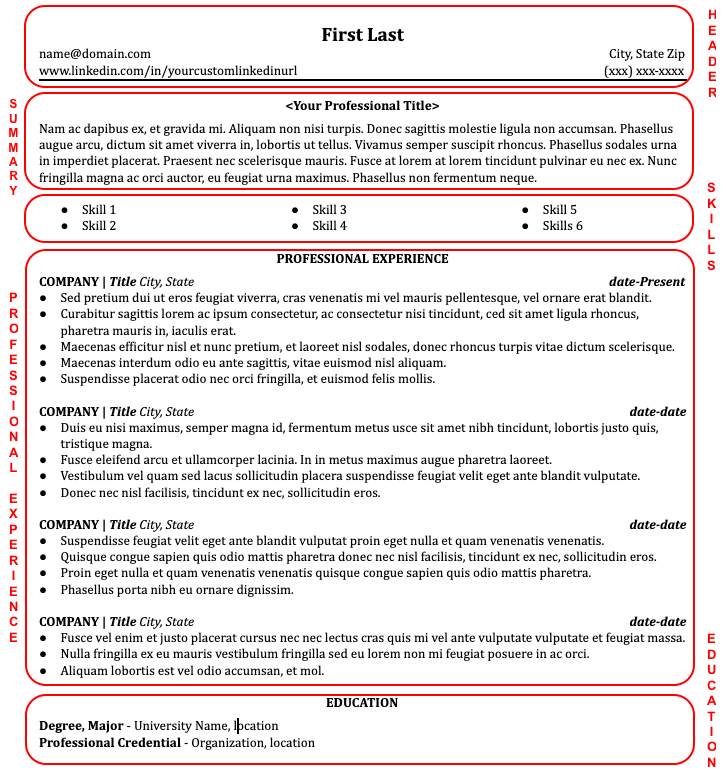
Core resume sections include contact information, a professional summary, and details about your skills, experience, and education. Make sure to use section labels to help the reader easily navigate through your resume. In terms of order, this will often depend on what you want to highlight to your employer. A recent graduate might want to put their education first, whereas a working professional would lead with their experience. Optional sections could include information on projects, publications, volunteer experience, awards and honors, patents, languages, and more.

Let’s take a closer look at each section of a typical resume.

Individual Resume Sections

Header

This is the section at the top of your resume that includes your contact information. Your name is the only part of your resume that should be spelled out in a larger font than the rest of your document. Your contact information should include:

  • city, state, zip (no street address for privacy purposes) 
  • phone number, email address
  • LinkedIn profile URL
  • Optional: personal website, GitHub (for technical roles), portfolio (for creative roles)

Summary

The Summary section will always be located at the top of your resume immediately following the Header. It should be brief (3-5 lines) and clearly articulate what makes you a great candidate for the role, as well as what makes you stand out from your competition. The Summary sets the context for the rest of the document by calling out the most important things for the reader to know about you.

While there are many ways to write a summary, consider the following format, focusing on your core expertise, strengths, and what sets you apart from others.

Sentence 1: Describe yourself by role and competencies. This is where you provide your professional introduction. Examples:

  • Digital Marketing Manager with expert level knowledge of SEO, Social, PPC, and GMB.
  • Talent Acquisition expert with 4+ years of experience in the medical device industry.

Tip: If you are changing careers, describe yourself using your desired title. For example, if you are shifting from QA Analytics to Project Management, describe yourself as a Project Manager. You can add “with background in QA Analytics” to acknowledge that part of your career.

Sentence 2: Connect your expertise to your value prop.  This is where you define how your unique skills will make you a valuable asset to the company. Examples:

  • Proficient in creating and editing graphics, figures, and illustrations. Consistently able to create high-quality marketing assets that drive conversions.
  • Able to source for full range of positions from administrative to executive level. Able to create a seamless recruiting and hiring process for managers, and consistently present top-quality candidates.

Sentence 3: Include a differentiator. You are likely competing against other people with similar skills, so it’s important to provide a clear reason why an employer should select your resume. Examples:  

  • Known for the ability to eloquently present point of view to clients, prospects, and colleagues with expertise, confidence, and clarity.
  • Consistently noted in performance reviews as being able to present to clients, prospects and colleagues, with expertise, confidence, and clarity.
  • Received 8 awards for customer service excellence.

Tip: Instead of using the word “Summary” to label this section, use a professional headline to help to set the tone for the rest of the document. For example: “Experienced SEO Manager” or “Android Developer | Medical Devices.” 

Skills

Immediately below the Summary you should have a list of your core areas of expertise, and your specific skills.

For a non-technical role, include 4-8 short bullets detailing your core skills (also known as Areas of Expertise) organized in two or three columns. To decide what goes on this list, think of what the employer would primarily hire you for. Focus on quantifiable skills like copywriting, agile project management, Google Analytics, or sales funnel management. Keep in mind that skills like communication, time management, and collaboration—which are harder to quantify, and are claimed by most people—are not as effective on a resume. 

Tip: When tailoring your resume to a specific role, the Skills section is your first opportunity to line up with the job description.

For a technical role, it’s important to list out all of your relevant technical skills. If you find that your list is too long to list out each item in a separate bullet, then organize your skills by type—software, programming languages, hardware, data analytics, or any other categories that apply.

Professional Experience Section

The Professional Experience section is uniquely important because it tells the story of what you’ve done in your career. For employers, this is a strong indicator of what you will be able to do for them.

The Professional Experience section should list your roles (company, job title, location, employment dates) in reverse chronological order. If you have significant professional experience, limit your resume to the past 10-15 years, as that is what is most relevant to the employer. 

Ideally, you want to list three to six roles on your resume that demonstrate progress on your career journey. Under each role, you should list your responsibilities and accomplishments in bullets. Responsibilities describe what you were supposed to do, and accomplishments are the specific outcomes that demonstrate how well you performed your role. 

Your most recent role should feature the most detail, with four to six bullets of no more than two lines each. Older roles should provide less information. Begin each bullet with an action verb that puts you in control. Include numbers to show the scope of your role and impact—how many leads did you convert, how much revenue growth did you drive, how many new hires did onboard, how large was the team you managed, and more.

Tip: Avoid chronological gaps in your Professional Experience. If you spent more than six months out of the workforce at any point—whether intentionally (for caregiving purposes or travel) or unintentionally (unemployment)—explain on your resume what you did during that time. Particularly highlight any activities relevant to your professional life, such as independent study, projects, and part-time or volunteer work. 

Example 

Big Box Story, Service Associate, Middleton, CA 01/2015 – 02/2016

  • Provided customer service during checkout transactions and assisted customer questions and concerns in a big-box retail 
  • Earned 8 Employee of the Week awards in one year on a team of 100+ associates
  • Enrolled over 200 consumers in new credit cards within a 15-month time frame (4x average rate)
  • Received “Certificate of Excellence” for success at upselling to customers

Education Section

In this section, include degrees beyond high-school in reverse chronological order (include your high-school information only if you don’t have any education or training beyond it). For each entry in the Education section, list the degree, institution, location, and date of completion.

Tip:  You can include pending or incomplete degrees by marking them as “In progress” or “Incomplete”—if you do so, make sure to include information on the classes/work you did complete. 

Finalize Your Resume

Once you’ve completed your resume using the guidance in this document, try to have someone proofread it for you. Recruiters consistently say they will discard resumes with typos, even if the resume is in great shape otherwise.

Tip: Consider asking a few people you trust—especially those familiar with your work—to provide feedback on the content. Don’t feel obligated to incorporate all the feedback you receive, but be open to recommendations that can help enhance the quality of your resume.

In conclusion, please keep in mind that, while there is no such thing as a perfect resume, you can use this guide to create an effective resume that avoids common problems and pitfalls. As you progress in your job search, remember that your resume is a living document. You can make revisions based on any feedback you receive, but try to avoid losing valuable time trying to over-optimize. Focus on your skills and experience, present yourself in the best light possible, and get ready to land that next role!

1

Esther Chidinma Chinweuba: “With Alison, you can find any course you desire to learn.”

0
Esther Chidinma Chinweuba: “With Alison, you can find any course you desire to learn.”

“My name is Esther Chidinma Chinweuba from the south-eastern part of Nigeria. I’m a graduate of Forestry and Wildlife and am currently a master’s student of Science-Policy Interface on Biodiversity and Ecosystem services (SPIBES). I love nature and learning generally.”

How did you learn about Alison?

I cannot remember how I learnt about Alison but it was during my undergraduate programme.

What was your first course on Alison, and why did you choose it?

The first course I took on Alison was about study skills and I chose this course because I wanted to learn how to effectively study all of the courses I had as part of my first degree. After seeing my first year result in university, I knew I needed to learn study skills if I was going to graduate with a good result. Thankfully, I graduated incredibly well.

How have Alison courses affected your career?

Alison courses have developed my soft skills in great ways that have helped me with my studies. I recently took a course on Alison called Winning With Communication- Master Your Communication Skills which helped me with class discussions and presentations. I have received good grades in my presentations because of my ability to communicate effectively. Also, I am learning French to help me cope in a French environment [in Côte d’Ivoire] as an English speaker and during lectures delivered in French.

What’s your favourite way to relax from studying?

My favourite ways of relaxing are learning something new outside the classroom and watching movies, particularly animation.


What are you studying now?

I am currently studying Science-Policy on Biodiversity and Ecosystem Services at the University of Felix Houphouet-Boigny in Côte d’Ivoire. It is a master’s programme organised as part of West Africa’s contribution to the Intergovernmental Platform on Biodiversity and Ecosystem Services (IPBES). 

What’s next for you, in terms of education or work?

After my master’s programme, I would like to get a job before I go on to study a PhD.

If you could learn absolutely anything in the world from an Alison course, what would it be?

It would be a course on interpersonal skills. I think it’s necessary not only for career success, but for life generally.

What would you say to someone if they asked you about Alison? Would you recommend it and why?

Alison is one of the best online learning platforms with a diverse range of courses for learners. You can find any course you desire to learn. The courses are free with the option of purchasing certificates, which allow them to keep running free online courses. The platform always sends reminders to their learners to encourage them to continue learning and meet targeted goals. The modules are easy to follow and not overwhelming. It is self-paced and can be completed anytime.

Happy Halloween | Free Blogger Template

0
Happy Halloween | Free Blogger Template

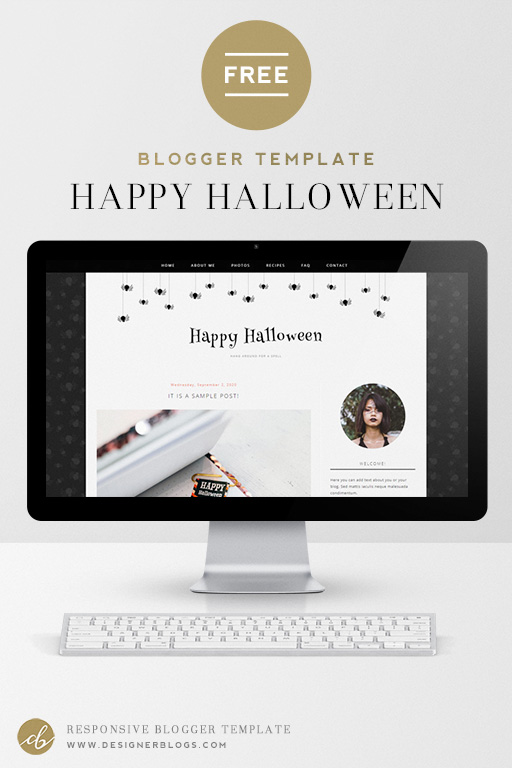
Free Halloween blogger template with cute little spiders

I know that it is still over a month until Halloween but I have already refreshed one of our Free Halloween Blogger template! This one is called Happy Halloween and features cute small spiders.

Seasonal Blogger templates can be temporarily installed to your blog to give your blog a festive, yet stylish look. Just make sure you save a back-up before installing any new design.


What is included with this free Halloween blogger template?

When installed on your blog, you’ll be able to edit the title, tagline, and menu link titles. All of your existing sidebar gadgets will remain with this design.

You can edit fonts and most design colors using the blogger template editor, so feel free to play with the settings. Make sure to share the results with your blog link in the comments below. Everything else comes as shown in the preview.

This design IS mobile responsive, however, remember that it is for Blogger Platform only.

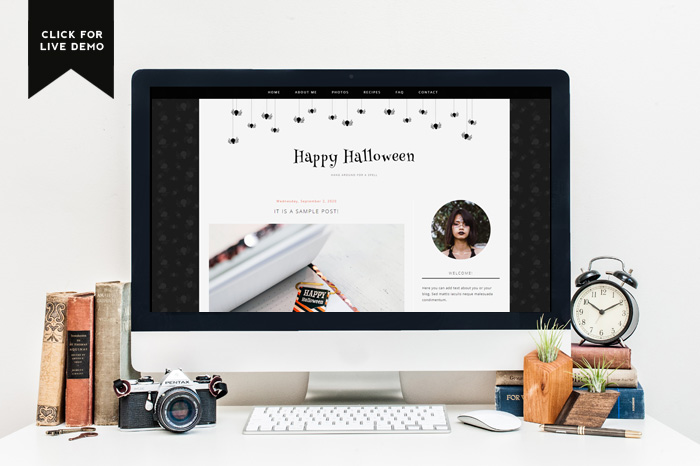
Make sure to check the live demo of the desigining by clicking the image below.

Click for the preview of free Halloween blogger template

For personal use only.


The download package includes an Installation Instruction to help you set-up your new design. Remember that by downloading this template you are agreeing to these terms. Enjoy!


If you are looking for more blogger designs, you can find them in our Premade Templates Blogger Shop. They are all just $15 each, so it is a perfect option for a stylish and affordable blog makeover.


Lastly, I hope you like this free Halloween blogger template. Would you like to get some more freebies like this in the future?

Multitasking and Selective Attention

0
Multitasking and Selective Attention

by Althea Need Kaminske

When I got married, I had no idea that my husband would become my office mate. COVID19 has affected our lives in a number of ways, one of them being that we now both work from home in the same home office. For most of my career I’ve been lucky enough to have my own office. It had its fair share of distractions (I used to eat lunch with the lights off, careful to type quietly so that I couldn’t be heard by the students who somehow only had problems that only I could solve during the 20 minutes I had to myself to eat lunch) but by and large it offered me a place to focus on work. Now, every email answered, every blog post written, every meeting zoomed, is a minor miracle of focused attention as my husband takes work calls in the background and we take turns with baby duty. I am not a great multitasker, and chances are that you aren’t either.

When people say they are multitasking, i.e. doing more than one task at the same time, what is really happening is that they are rapidly switching between tasks. When we engage in task switching, several things have to happen. We have to disengage with the first task, find the new task, find the new task parameters, and engage in the new task. Our brains are able to do this very quickly, so it feels like we are doing two things at once. And, in fact, the more practiced or experienced we are at a task the faster we get at task switching and the more automatic the task becomes. Like walking and chewing gum.

When we talk about multitasking, however, we’re usually talking about tasks that are a bit more complicated than walking. Like driving and talking on the phone (1) or typing and email while answering questions about your grocery list. For these slightly more complicated tasks, task switching comes at a cost. We’re slower to respond, we make more mistakes (2), and our memory for the tasks we’re trying to do is worse (3). It’s this last consequence of task switching that may explain why we feel like we are multitasking. We don’t remember the mistakes we made or the information we missed. This is most obvious to me when I diligently remind students of an upcoming exam or assignment at the end of a class period, only to have them insist later on that they were not warned. My well intentioned reminders were given when students were distracted – finishing up their notes from the class, packing up their materials, and anxiously waiting for the class to end so they could get to lunch, their next class, or meet up with their friends. For the students who were distracted it was as if I never gave the reminder. They felt they were successfully multitasking (listening while checking the time on their phone) because they weren’t aware of the information they had missed.

Another example of our inability to remember or process information that we didn’t pay attention to is this excellent demonstration of inattentional blindness from Daniel Simons. Inattentional blindness refers to the finding that we do not appear to remember or even perceive information that we do not attend to. We are blind to it. If you haven’t already, I recommend taking a minute to watch the video. 

Tropical Confinement

0
Tropical Confinement

What story does this image inspire for you?

Use your imagination to write the opening of a short story or poem inspired by this illustration — or tell us about a memory from your own life that this image makes you think of.

Post it in the comments, then read the related article to learn more.


About Picture Prompts

• Find all our Picture Prompts in this column.
• Have an idea for a Picture Prompt? Tell us about it.
• Teachers, discover more ways to teach with our Picture Prompts and learn how to use our free daily writing prompts for remote learning.

Students 13 and older in the United States and the United Kingdom, and 16 and older elsewhere, are invited to comment. All comments are moderated by the Learning Network staff, but please keep in mind that once your comment is accepted, it will be made public.

Word + Quiz: passel

0
Word + Quiz: passel

: (often followed by ‘of’) a large number or amount or extent

_________

The word passel has appeared in 18 articles on NYTimes.com in the past year, including on March 24 in “Brightening Up Coronavirus Quarantine With Christmas Spirit” by Blane Bachelor:

During a global pandemic, all is certainly not calm. But things are a little bit brighter in some neighborhoods, thanks to a growing movement that has families stringing Christmas lights, blowing up holiday inflatables and building spirit-lifting snowmen to help bring some much-needed cheer during the coronavirus crisis.

… Then, of course, there’s the feel-good factor of brightening up someone else’s mood in these dark times. In Clover, S.C., Elizabeth and Bill Nickles and their three children got busy decorating their house with lights and a passel of inflatables and lawn characters, including kid favorites like Minnie Mouse and the “Frozen” character Olaf. On the other side of the house, they decided to go with an Easter theme, complete with a barrage of bunny inflatables.

_________

How Has 2020 Challenged or Changed You?

0
How Has 2020 Challenged or Changed You?

That’s why we’re inviting young people everywhere to document their lives right now. For students in the United States, we’re also running a special multimedia contest inviting you to submit anything you like — in words or images, video or audio — to tell us about your experiences.

To inspire you, we’re posing the question above — How has 2020 challenged or changed you? — and also inviting you to read the July 14 article “This Year Will End Eventually. Document It While You Can.” In it, Lesley M. M. Blume shows how and why historians, archivists and museums suggest we start preserving personal materials for posterity.

She writes:

A few weeks ago, a nerdy joke went viral on Twitter: Future historians will be asked which quarter of 2020 they specialize in.

As museum curators and archivists stare down one of the most daunting challenges of their careers — telling the story of the pandemic; followed by severe economic collapse and a nationwide social justice movement — they are imploring individuals across the country to preserve personal materials for posterity, and for possible inclusion in museum archives. It’s an all-hands-on-deck effort, they say.

“Our cultural seismology is being revealed,” said Anthea M. Hartig, the director of the Smithsonian’s National Museum of American History of the events. Of these three earthshaking events, she said, “The confluence is unlike most anything we’ve seen.”

Museums, she said, are grappling “with the need to comprehend multiple pandemics at once.”

The article continues:

While some curators are loath to suggest a laundry list of items that we should be saving — they say that they don’t want to manipulate the documentation of history, but take their cues from the communities they document — many are imploring us to see historical value in the everyday objects of right now.

“Whatever we’re taking to be ordinary within this abnormal moment can, in fact, serve as an extraordinary artifact to our children’s children,” said Tyree Boyd-Pates, an associate curator at the Autry Museum of the American West, which is asking the public to consider submitting materials such as journal entries, selfies and even sign-of-the times social media posts (say, a tweet about someone’s quest for toilet paper — screengrab those, he said).

To this end, curators said, don’t be so quick to edit and delete your cellphone photos right now. “Snapshots are valuable,” said Kevin Young, the director of New York City’s Schomburg Center for Research in Black Culture. “We might look back at one and say, ‘This picture tells more than we thought at the time.’”

At the National Civil Rights Museum in Memphis, the curatorial team will be evaluating and collecting protest materials such as placards, photos, videos and personalized masks — and the personal stories behind them.

“One activist found a tear-gas canister, and he gave it to us,” said Noelle Trent, a director at the museum. “We’re going to have to figure out how to collect items from the opposing side: We have to have the racist posters, the ‘Make America Great’ stuff. We’re going to need that at some point. The danger is that if we don’t have somebody preserving it, they will say this situation was not as bad.”

And there is perhaps no article more representative of this year than the mask, which has “become a really powerful visual symbol,” said Margaret K. Hofer, the vice president and museum director of the New-York Historical Society, which has identified around 25 masks that the museum will collect, including an N95 mask worn by a nurse in the Samaritan’s Purse emergency field hospital set up in New York’s Central Park in the spring. (The museum also collected a set of field hospital scrubs, and a cowbell that the medical team rang whenever they discharged a patient.)

Students, read the entire article, then tell us:

  • How would you answer our big question about how 2020 has challenged or changed you? Don’t worry if your answer doesn’t seem dramatic — sometimes small things tell a big story. If you like, make a list. In how many ways are you a different person now than you were at the end of 2019? Why?

  • What aspect of this year’s local, national or global news was most profound for you? The pandemic? The protests for racial justice? Something else? Why?

  • Now that you’ve read the article, what artifacts might you have that tell some part of your story of 2020? For instance, what’s on your camera roll? Do you keep a journal, or draw in a sketchbook? What have you posted on social media? What do your texts, emails, letters or, yes, even grocery lists say about your experiences this year? Which of these artifacts might you submit to a museum, and what “back story” would you tell about them?

  • You may think you have nothing unique to say, but, trust us, you do. No one can tell the same story you can. What aspects of who you are — where you live, your family, your racial, ethnic or religious background, your sexuality, your hobbies or interests, a job, your health status, a role you play in your community, or anything else — have affected your experiences most profoundly this year?

    For example, non-athletes might not know what it’s like to have been without team games and workouts all season. Students who are considered essential workers have stories to tell that those who could stay home do not. Teenagers of color experienced the protests for racial justice differently than white students. Young people living in foster care went through quarantine differently than those living in traditional families. This list, of course, could go on and on. What can you express that other people may not know or understand? Why?

    If you are a teenager in the United States, consider submitting something about your experience to our related Coming of Age in 2020 contest, which runs from Sept. 10 to Nov. 12. Your submission can be in the form of writing, images, audio or video. Learn more here.


About Student Opinion

• Find all our Student Opinion questions in this column.
• Have an idea for a Student Opinion question? Tell us about it.
• Learn more about how to use our free daily writing prompts for remote learning.

Students 13 and older in the United States and the United Kingdom, and 16 and older elsewhere, are invited to comment. All comments are moderated by the Learning Network staff, but please keep in mind that once your comment is accepted, it will be made public.

10 Systems I’d recommend on any given day

0
10 Systems I’d recommend on any given day

10.

To be quite honest, I could easily name 100 systems that I would recommend on any given day, depending of course on your use case, business goals/objectives, feature sets, and so forth. Budget is always an important one, okay it is the main one because a system can have everything you need, match your use case perfectly, but the one little item, it is not in your budget.

I never understood why vendors love to place the pricing in the far back of their proposals, some of which I have seen that are more than 25 pages, as though you are going to start on the first page and read through. Everyone I know jumps to the price.

Just as I can’t figure out why vendors love giving you their history as if that is going to sway you on buying a system. “Oh, I see that you were around in 1989, when Prodigy made its debut and no one could see actually web pages unless they had a time machine.”

I digress.

The fact of the matter is that people always ask me what system or systems I recommend, and once they give me some things (that I request), I can always provide them with three systems that hit the bill (I should note, it is a service, I still offer, in case you are wondering).

Please remember a few items here:

  1. I base this on an extensive analysis of the system, so what I am looking it may not be everything you are looking at. Support plays a crucial component here because it is the number one reason, why people leave a learning system. Some vendors below, may not have an awesome track record on support but based on what I am seeing there are improvements. Equally, there are times that salespeople over-promise on what their system can do in terms of configuration (if applicable), integrations with systems that are unfamiliar with (say Wallys HCM) or it is loaded with bugs and not the kind that fly around.
  2. One system is an HCM, but based on extensive discussions with the vendor, they have a very strong commitment to learning, including some new solutions that will be rolling out to compliment the learning piece.
  3. One system targets only customer education/training, partner training, what we refer to as B2B and B2C (customer being the company’s or business customers) or it can be an association whereas the members receive the training.
  4. Each of these vendors can support at least 10mb bandwidth for remote workers (i.e. not working in the office but at home), and the browsers – Firefox, Chrome, Edge, Safari (not all do), IE Explorer (usually version 7 at the min.). Most vendors nowadays will state you need the latest version of a browser, it will work with older versions say of FF or Chrome, but for optimum, you should go the latest version. If you are using an alternative browser such as Brave, Vivaldi, Opera, always ask the vendor. Everyone says they are browser-agnostic – here is a hint, many are not.
  5. Video Assessment (Definition) – This is not an “assessment” that appears in a video or you add to a video. A video assessment is based on speech patterns/words used when practicing a scenario, sales training techniques, customer service techniques to the coach/mentor/manager.

 A VA component will always include a listing of overused words, words that are difficult to understand, a transcript with highlighted words (so the learner knows), and a form of metrics visual via data visualization on the learner screen.  This is very brand new to the industry, so a lot of vendors do not yet offer it.  

The Ten

(As of September 1, 2020) – This is not a precursor to my 2021 rankings (and where they appear), because a) they are not in any order here, and b) there is still time for vendors to bounce into the top 10 for 2021. Oh, and these are ones as noted “I’d recommend any day of the week”.

In no particular order, rather it is just a list.

CrossKnowledge

  • Extended Enterprise – Average, Enterprise- Elite, Best for employees, associations, customer education/training, vILT – ties to event management feature set and integrations – Very good.

Outstanding UI/UX for learners and administrators. Mobile is fantastic, native apps for iTunes and Google Play, on/off synch, Analytics and Reporting is fantastic, create KPIs, heat maps, metrics on articles, web sites/web links, data visualization, custom fields are reportable too.

Extensive capabilities with machine learning, content curation and playlists.

On the Skills development/management side, the system can use job roles and/or skills to identify and present recommended or suggested courses to the end-user

Comes with CK Connect – a very cool platform based on pre-assessments via personality test, pushes out content as a result of your strengths and weaknesses based on your personality. 

This is not a system if you want e-commerce.

EdCast

  • Extended Enterprise – Above Average, Enterprise – Very Good, Large Enterprise – Elite, best for employees, but you could offer it to customer/education channel, and even higher education. vILT is very good.

Learner UI/UX is elite. Administrator UI/UX equally elite, system offers event management needed for vILT, skills development/management features are elite as well. Metrics and reporting are good. Can be a stand-alone or a bolt on to any existing system. Excellent list of connectors.  Skills development capabilities are elite, and playlists are quite good. Enough content is available (free and paid). There is a content marketplace that comes with the system (but you just need to connect it).

Spark is nearly identical to the EdCast system, but its focus is on SMB, so you will see a lower price (based on seats), and a couple of features are not available – for example, you cannot integrate the Domo BI tool (it is doable with EdCast itself, for an additional cost).

This is by far the most robust LXP on the market, but I wish they drop the LXP, and instead embrace themselves either as a NexGen Learning Ecosystem or a Digital Learning Platform.

Will be in my T-Grid in the Leader area in 2020 (grid to be published in October). 

Absorb LMS

  • Extended Enterprise – Elite, Enterprise – Good, Large Enterprise – Good, Best for customer education/partner training, associations and employees.

T-Grid Leader Area 2020, Data visualization and metrics are quite good.  Wonderful system for mid-market too. Finally, added ad-hoc reporting. Skills development/management features are good. The multi-tenant is very good. Event management is top tier. Learning Environment and Administration – elite. Strong with rules-based options. Outstanding UI and UX.

SAP Litmos

  • Extended Enterprise – Good, Enterprise – Good, Large Enterprise – Good. Best for employees, associations, customer education/training, channel partners, B2B/B2C. 

For my NexGen T-Grid 2020, they are in the Leader’s area. Digital Coaching/Video Assessment is elite. UI/UX on the learner and administration side – very good.

A strong system overall, with a very good track record. Skills management/development is good, multi-tenant is good, data visualization and analytics are equally good. Reporting is fine but needs some tweaks. Their content marketplace frankly needs more partners, but it is still solid for most.

I’d like to see even more administration functionality, but that said, on my rating scale they achieved 90%. The system comes with a built-in authoring tool.

E-commerce continues to be a work in progress.

Cornerstone Learning

  • Extended Enterprise – Average, Large Enterprise – Elite, Enterprise – Strong. Best for employees, doable with customer education/training and associations, although the system is heavily skewed to employees. 

Where to start. On the NexGen side of the house, they were in the leader’s area for my T-Grid in 2019, and will once again appear in the T-Grid leader’s area for 2020. Cornerstone Development is their version of an LXP, and will be launching soon. As of right now, it will be part of the Cornerstone Learning (as a separate offering) – so you can only buy it if you are a Cornerstone customer. My personal feeling is that is a mistake.

Cornerstone Skills and Metrics is a new feature that will exist in Cornerstone Learning and takes data visualization and analytics to a whole new level. Content Anywhere, which is their content marketplace comes with Cornerstone Learning, and includes free and fee-based content (again, this is where the client buys the content based on the number of seats, and gives it to their learners for free).

They now have a built-in skills library (identifies skills and job titles) with over 46,000 skills/job titles. This is a trend that you will see more of in the learning system space in 2021. So kudos to them, for jumping in early. Feature-wise with Cornerstone Learning is beyond robust. Learner UI/UX is quite good, the administration side needs a revamp, as it can be overwhelming to many.

I wish they would just re-name the system, Cornerstone Learning Suite and include everything at one price point, rather than their current structure.

If there is one knock with Cornerstone is that I am not a fan of them outsourcing implementation, support, and configuration to a partner. Their top partner is Bluewater, which is a wonderful company and has a strong track record. However, I know of another partner, whose track record isn’t as strong.

There are other vendors out there, who have partnerships with companies who handle the implementation, support, etc. – so Cornerstone isn’t the only one.

This is why I personally am not a fan of the reseller/partner implementation angle, because it puts the entire success or failure on whom the client gets as their partner. And sadly, the client has no idea on the track record of said partners/resellers, something I wish all vendors who have resellers who handle the entire client process, provide.

Degreed

  • Extended Enterprise – Average, Enterprise – Average, Large Enterprise – Very Good. The system is skewed heavily towards employees.  vILT is above average.  

They have dropped the LXP moniker and now identify themselves as a Learning Experience system.

The first vendor in the learning system space to include skill ratings in their system (for learners), a learner can self-assess, a manager can review and modify if needed, admin the same. Thus for skills development/management features, elite level.  The bookmarklet feature is very good, it is a drag and drop into your browser, and available in the Chrome store as an extension (which BTW, you can also use with Edge. 

A recent revamp on the administration side provides mixed results. While overall, it is a vast improvement from a UX standpoint and upgraded to solid on the UI side, it provides a Jekyll and Hyde when it comes to their data visualization/metrics and reporting. Hyde appears with the new UX/UI for KPIs and other items, Jekyll appears with the bar graphs. It’s hard to fully explain, which is why I recommend checking out my blog on the comparison of Degreed, EdCast and Fuse, so you can see for yourself. 

They now offer as an add-on “Opportunities” which is where for a certain job that is available, within the company (uh, your company), is presented with the skills needed. Thus, a person can have five of the 10 skills needed. 

The system comes with a built-in skills/job roles library, a nice plus.  The mobile app is good, with native apps in iOS and Google Play.

The big knock? Digital coaching/video assessment is lacking.

Learn Amp

· Extended Enterprise – Above average, Enterprise – very good, Large Enterprise – Average. Best for employees (up to 10,000) – the system is very strong for SMB, customer training/education and associations. Government too.

Ranked #2 in the LXP/DLP Rankings for 2019-20.

Learn Amp is a digital learning platform. Playlists are very good, this is a very robust system, feature-wise, can play with the big boys as I like to say. UI/UX on the learner and administration side is good. Metrics and data visualization is average, but many items are in the works for early 2021.

The bookmarklet feature is very good. E-Commerce exists in the system and is good.  Event management is strong. This system could easily be referenced to as an LMS, which isn’t a bad thing. The system continues to get better every year. Has their own training department for their clients – which is rare, as many vendors in the learning system space, do not have trainers, let alone a training department. 

Brightspace by D2L

  • Extended Enterprise – Good, Enterprise – Very Good, Large Enterprise – Average, Best for employees, associations, customer education/partner training. 

#1 learning system in 2020 for the association market. Continues to improve in the corporate side of the house. I expect a lot of enhancements and updates in 2021, with improvements on the Learner UI side. Learner UX is quite good. Administration UX is very good, UI needs a few tweaks (which is on their roadmap for 2021).

Content curation, machine learning, content marketplace, and e-commerce are excellent. Digital coaching/video assessment is elite. Skills management/development is elite with skill ratings, playlists based on skills with a slight twist – it is dependent on a pre-assessment of that skill.

I personally like this, because when you ask a learner to rate themselves, as a whole, people tend to rate themselves higher than they really are. That’s fine, but if my manager isn’t inside my brain, and some of those skills I have, they are not familiar with, then them changing the ratings (which many systems that offer skill ratings can do), isn’t always going to work out well.

Another win that I like is the ability to assign CEU’s and CPDs to any piece of content.

Mobile learning is good with native apps for iOS and Android.

System to keep an eye on for 2021.

Thought Industries

  • Extended Enterprise – Elite, Enterprise – Good, Large Enterprise – Average, Best for – Customer Education, partner training, etc. and Associations

Thought Industries focuses only on the customer education/training, partner training, extended enterprise market (aka as B2B and B2C)

#1 system for that segment – i.e. extended enterprise. I listed them with Enterprise and LE only if that company provides customer training/education. How good are they B2B/B2C, the leader in 2020, and even 2019.

Panorama capability (elite) which enables you to do quite a bit in each tenet for your multi-tenant (if you so choose), comes with the system – i.e. based on packages you receive X number of the Panoramas. The base is 25, which should be more than enough for most companies.

Learner and Administration UI/UX are very good. Just added digital coaching/video assessment which is already quite good. E-commerce is very good. Data visualization and analytics/metrics, reporting is very good.

Fuse

Extended Enterprise – Good, Enterprise – Very Good, Large Enterprise – Good, best for employees, associations and customer education/training (B2B/B2c).

Pitches themselves as an LXP, I see them more as a Learning Ecosystem or a digital learning platform.

While most of their capabilities fall within what they refer to as communities, which is fine, I would still like to see a bit more. Learner UI/UX is elite. Administration UI/UX is good, but needs some tweaks.

The data visualization/metrics and reporting is the best I have seen in 2020. The options for metrics you can generate is over 300, this is due to the system comes fully integrated with GoodData, a BI tool, (at no charge to you, the customer). KPI metrics are over the charts. I wish every system had this level of metric capabilities, to be honest, especially as trends show, more L&D and Training people are seeking more data than ever before.

Social learning has always been their strong point, but to me, I’m not totally sold, in terms of the latest that is out there for social. Then again, I have yet to see one vendor fully take it to the next level of social, so I can’t fault Fuse here.

It is a fun system, and I can see why many people like it. I know “fun” is a scary word for the corporate side, but let’s remember who is accessing the system – learners, not you – uh I am talking to you CLO.

While they have over 100 connectors, they still are missing a full integration with Microsoft Teams. Digital coaching/video assessment is non-existent, and skills development/management is equally non-existent.

Both items are needed and based on their previous track record, I’m confident it will be seen in 2021.

Others I recommend without hesitation

(but did not list as the ten right out of the gate). In no particular order

Biz Library (ideal for SMB), Access LMS (great in FS space), Brainier (strong in many ways, not well-known, GyrusAim (Enterprise – very good), Knowledge Anywhere (Streamlined system ideal for SMB), Docebo (overall, solid system, but lacks some items, and the admin UI is confusing – still worthy of note), Spoke LMS (now comes with Hub360 an excellent SEP – Sales Enablement Platform), Area9 Rhapsode (follows what they call brain-based learning, UI/UX isn’t for everyone), BlueVolt (ideal system for the trades segment).

ConveYour (not well-known, a shame really, a very different take on learning/training), eThink (partner behind Moodle Workspace – the best for folks who want Moodle or Moodle Workspace customization), Tivoli (another, not well-known vendor, under the radar, if you will, has a lot of wonderful capabilities).

As you can see, that is just a few, and I could go on and on, because this is the best time to buy a learning system, with so many out there that do an outstanding job, and to which I would recommend, any day of the week.

Except Holidays.

E-Learning 24/7

What’s Going On in This Graph? | Sept. 16, 2020

0
What’s Going On in This Graph? | Sept. 16, 2020

The New York Times reports that in the United States there have been more than 6.3 million Covid-19 cases and more than 190,000 deaths.

The two maps above use data as compiled by The Times as of Sept. 9, 2020.

Definition: Per capita cases is the number of cases per person and is usually expressed as either 1 case in some number of people or as the number of cases per 100,000 people.

By Friday morning, Sept. 18, we will provide the “Reveal” — the maps’ free online link, additional background and questions, shout outs for student headlines, and Stat Nuggets.

After looking closely at the maps above (or at these full-size images), answer these four questions:

  • What do you notice?

  • What do you wonder?

The questions are intended to build on one another, so try to answer them in order.

2. Next, join the conversation online by clicking on the comment button and posting in the box. (Teachers of younger students are welcome to post their students’ responses.)

3. Below the response box, there is an option for students to click on “Email me when my comment is published.” This sends the link to their response which they can share with their teacher.

4. After you have posted, read what others have said, then respond to someone else by posting a comment. Use the “Reply” button to address that student directly.

On Wednesday, Sept. 16, teachers from our collaborator, the American Statistical Association, will facilitate this discussion from 9 a.m. to 2 p.m. Eastern time.

5. By Friday morning, Sept. 18, we will reveal more information about the maps, including a free link to the article that included these maps, at the bottom of this post. We encourage you to post additional comments based on the article, possibly using statistical terms defined in the Stat Nuggets.