fbpx
Home Blog Page 1477

How to be productive when home working

0
How to be productive when home working

So, you’re working from home? Great, right? No more commuting, no more awkward conversations in the staff kitchen. But with all those benefits, there inevitably come challenges. How do I stay focused? How can I manage my schedule? How do I stop my back hurting?

We’ve put together a summary of well-known methods on how to be more productive, plus some general working from home tips to get you going.


Productivity may not be the first thing that comes to mind when you hear the word Pomodoro, and for that you can be forgiven. But over the last 30 years, the much-loved tomato has become just as famous for its eponymous productivity technique as for its delicious flavour, and it’s a valuable tool if you’re looking to work from home. 

Named after the tomato-shaped timer that inventor Francesco Cirillo liked to use, the Pomodoro Technique breaks down large or difficult tasks into short 25-minute bursts of work, broken up by five-minute breaks. This trains your brain to focus for short periods, helping you stay on top of your workload. After four of these 25-minute ‘Pomodoros’ you’re advised to take a longer break to give yourself time to recharge.

All you really need to give the Pomodoro Technique a go is a timer. If you prefer a manual timer, like Cirillo himself, you might enjoy a Pomodoro Timer in the ‘official’ shape, or there are several free digital programmes including Tomighty (Windows/Mac) and Marinara Timer (Web) to help you stay productive. 

‘Don’t take your work home with you’ – is something most of us will have heard that at some point. But now you’re working from home, just go ahead and disregard that immediately. Your work has now officially moved in with you, and you’re going to need to spend some time working on how to live together. Your home office is going to be key to that. 

Think about what type of office environment normally helps you to work at your best, and set about recreating that at home. Remove non-essential household items that can serve as distractions – dirty washing, televisions, family members – and instead surround yourself with work-enhancers like plants and space for your files and folders.

If you’re working from home you’re also likely to spend a lot of time sitting down, and without your usual office chair, this could lead to bad posture and, in many cases, back pain. Take some time out to make your set up as ergonomic as possible. The Guardian have a helpful guide to setting up a comfortable home office. 

This doesn’t necessarily mean breaking the bank on a high-end desk and fancy chair. Work with what you’ve got – raise yourself up with cushions on your seat, use large books to make a stand for your laptop (eyeline should roughly be level with, or just below, the top of your screen) – and be creative.

If you’re unsure what type of home office space will be the most productive for you, this guide from Success uses the Myers-Briggs method to design a workstation that fits your personality. 

The Eisenhower Matrix is a simple tool to help you understand how to be more productive with your time. Rather than aiding concentration, the focus falls more heavily on prioritisation, which is perfect for navigating your way through a build-up of work. 

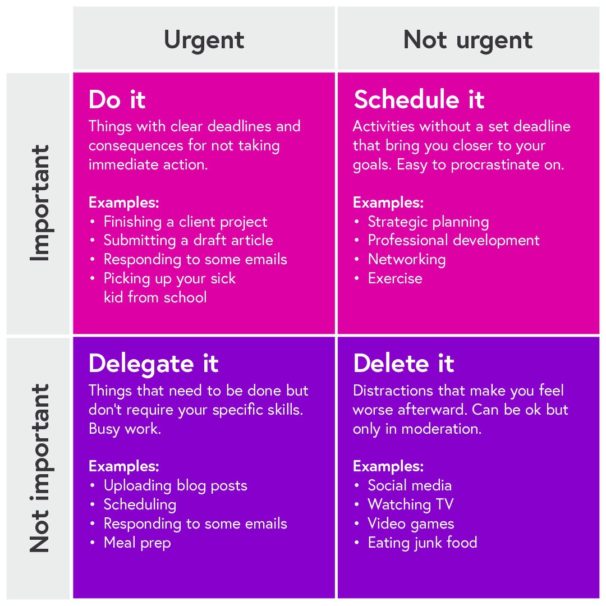
Named after, although not invented by, the former President of the United States, Dwight D. Eisenhower, this productivity method helps you decide which tasks are urgent, important or neither.

All the tasks on your to-do list, big or small, will fall into one of the four quadrants. Urgent matters require immediate attention and come with consequences if you don’t complete them. Important tasks have long term value but can be planned ahead. Those that are one or the other can either be scheduled for a later date or perhaps delegated to another team member if that’s an option. If an item is neither urgent nor important, it should be removed. 

The Eisenhower Matrix asks you to really think about whether the work you’re doing is actually important, or just urgent. The good news is you don’t need anything more than a pen and paper (possibly a ruler) to get started with the Eisenhower Matrix. Here’s a helpful video from Eisenhower.me to get you started. 

Now you’re working from home, technology is very much your friend. Firstly, look to utilise it as frequently as possible to stay in contact with your colleagues. Of course, a video call isn’t quite the same as a face-to-face chat, but apps like Zoom are crucial to feeling like you’re still part of a team. 

If you’re struggling with the ever-present distractions that technology also brings, then consider investing in apps that fight the battle on your behalf. 

A good start is Forest, an app that helps you ignore the distractions on your phone, whilst at the same time earning credits that can be used to plant real trees! Lifehack has a thorough summary of the best productivity apps for phones or here are some ideas from GetCloudApp for turning your computer into that productivity machine you always knew it could be. 

Getting Things Done is another well-established time management tool which you can use to be more productive when working from home. The principle is to take all those nagging tasks, to-do lists and schedules from your head and write them out in front of you, in order to make them more manageable. 

To begin, take all of those things – everything from the mundane household chore right through to the most high-pressure work projects – and record them in one place. Then break each task into the actions you need to take in order to complete it.

Next, group the task into categories (e.g. Work, House, Studying) and prioritise each one. Set realistic due dates and reminders in your calendar to keep you on track.

Then it’s time to put the kettle on and reflect on the work of art you’ve just created. If anything in there doesn’t have a clear action to get you started, then you need to go back and re-simplify it. The Getting Things Done method is designed to be constantly updated so best to write your tasks down digitally so you can easily edit. 


FutureLearn has an array of courses to keep you learning during lockdown.

If you’d like to learn more about how to be more productive working from home, check out Coventry University’s course on ‘Work-Life Balance and the Impact of Remote Working’

If you’d like to know more about COVID-19 itself, London School of Hygiene & Tropical Medicine’s ‘COVID-19: Tackling the Novel Coronavirus’ course explores coronavirus from its inception to the search for a vaccine.

Most Challenged Books

0
Most Challenged Books

Eight of the 10 most challenged books last year were based on L.G.B.T.Q. subjects or narratives, the American Library Association said in its annual ranking of books that were banned or protested in schools and public libraries.

One of them parodied Marlon Bundo, Vice President Mike Pence’s rabbit. Another told a story about a marriage between two men. Other books on the 2019 list were stories about children and transgender identity.

Are there books that you don’t think should be in schools or public libraries? If so, what and why? What do you think of the rising number of challenges to L.G.B.T.Q. books specifically? Why?

Tell us in the comments, then read the related article to learn more about the various books and why they were challenged.

Current MCIT Online Students Discuss Community in Online Learning

0
Current MCIT Online Students Discuss  Community in Online Learning

The University of Pennsylvania’s MCIT Online degree prepares students without a computer science background to launch rewarding careers in the computing and technology industries. This 100% online program also helps students passionate about their current field — whether it’s business, music, or product management — learn how to harness the power of technology to drive innovation. MCIT Online students get the same top-quality instruction provided by the on-campus program and graduate with the exact same degree, but with the benefit of learning on their own schedule from anywhere in the world. 

Hear from current MCIT Online students as they discuss the community in online learning, the opportunities they received even before graduating, and how they balance work and studying. 

The MCIT Online program fosters a rich and inclusive community for students, granting access to core services from the University of Pennsylvania that support their well-being and future career goals. These resources, combined with a strong alumni network, prepare students from a variety of professional backgrounds to succeed in the tech industry.

Learn more about MCIT Online and the application process on Coursera. The Fall 2020 application deadline is on May 1, 2020, and the Spring 2021 application opens on June 1, 2020.


Eyeballs

0
Eyeballs

What is this image saying? How does it relate to or comment on society or current events? What is your opinion of its message?

Tell us in the comments, then read the related news analysis to see what it is about.


Find many more ways to use our Picture Prompt feature in this lesson plan. You can find all our Picture Prompts in this column.

Word + Quiz: peroration

0
Word + Quiz: peroration

1. (rhetoric) the concluding section of an oration

2. a flowery and highly rhetorical formal speech usually given on a formal occasion

_________

The word peroration has appeared in three articles on NYTimes.com in the past year, including on July 19 in “The Playlist: Miranda Lambert Stomps Back, and 11 More New Songs” by Giovanni Russonello:

On “Tubman.,” his latest album, avery r. young comes on like a preacher from the Afrofuture. Moving between peroration, poetry and explosive singing — whether he’s backed by a thumping house beat or by a small choir — this Chicago-based poet and vocalist seems most focused on stirring the congregation to action …

________

Lesson of the Day: ‘Now Virtual and in Video, Museum Websites Shake Off the Dust’

0
Lesson of the Day: ‘Now Virtual and in Video, Museum Websites Shake Off the Dust’

In this lesson, you will explore some of the world’s greatest museums and artistic treasures and consider the role of art in chaotic times. In a Going Further activity, you will respond to one artwork in depth.

Afterward, respond to the following prompts:

Read the article, then answer the following questions:

1. Jason Farago writes, “In times of adversity, we look to art to give form to chaos.” Do you agree? What is the role of art in your life? How have artistic works featured in the article helped you during these difficult times?

2. The author asks, “Should a museum aim to replicate online the exact experience of visiting in person the world’s great picture galleries and palaces?” What do you think is the answer to this question? Why?

3. Here is Mr. Farago’s answer to that same question:

The truth is that a museum’s digital assets can’t duplicate its brick-and-mortar presence — and the best of them, the ones I’ve selected here, do not try. Rather, they regard a museum’s physical and digital activities as complementary platforms of a single mission. They take the ambition and intelligence and public commitment they bring to the galleries, and feed it into new channels onscreen.

Do you agree? What is your response to his answer?

4. Choose one of the museums mentioned in the article — one that you didn’t already visit in the warm-up activity — and spend some time exploring its online collection. Then respond to the following questions:

  • What did you notice about the museum’s online experience?

  • What did you like or appreciate about the presentation?

  • What changes do you think could make the visitor experience even better?

Choose one artwork you encountered during your online explorations above, or spend more time discovering another piece of art via the websites featured in the article.

Take a few minutes to look carefully at the work you selected and then respond to the following questions adapted from our weekly “What’s Going On in This Picture?” feature:

Then, dig a little deeper:

  • What do you notice about the composition, colors, objects and people in the artwork?

  • Why did this artwork stand out to you? What do you find interesting or moving about it?

  • What do you think is the purpose of this artwork? What do you think the artist wanted to communicate?

  • What questions would you ask the artist about this work, if she or he were here?

How Do You Connect With Your Parents?

0
How Do You Connect With Your Parents?

Most of my childhood friends from our predominantly white New Jersey suburb have a story about how their love of sports began — usually involving their fathers. Shaun’s played catch with him for hours in the backyard and took him to baseball card shows, hence Shaun’s love of baseball. Matt’s brought him up watching Knicks games in the basement, so Matt loved basketball.

Not me, though. I had to find another way in. My father, Shyamal Kanti Deb, emigrated from India to the United States in 1975 and never cared for sports. He never understood any of it. I began watching games on television, usually by myself or with my older brother, Sattik. Or sometimes at a friend’s house with their dad. My earliest sports memory is being wowed by a rookie basketball player in 1996 named Antoine Walker, who played for the Boston Celtics. Something clicked, and I became a lifelong Celtics fan at age 8.

As I found my way into sports fandom, resentment for my father grew. I was jealous of the Shauns and the Matts of the world. Several of my classmates had fathers who were coaches of whatever team sport they were playing. It felt like every other kid had bonded with their father over a shared passion for athletics, and I hadn’t found a way to bond with my father at all. Clearly, it was serious: I was jealous of Matt getting to watch the Knicks with his father.

An electrical engineer by trade, Shyamal’s idea of a fun night was memorizing the periodic table, which would make perfect sense if you could see him hunched over the kitchen table in his thick, horn-rimmed glasses. He has always been an academic, wowed by calculus and physics, rather than dunks and home runs. The idea of playing catch with me was foreign to him. Shyamal didn’t know the basic rules of, well, any sport, except maybe soccer, which he played some growing up, and cricket, which is as essential to living life in India as oxygen. Like many South Asian parents of his generation living in the United States, his focus was on survival and trying to get to the next day. On behalf of their children, it was on professional and scholastic pursuits. Anything else was a distraction.

Even though we never discussed it, he knew that I looked longingly at my friends’ fathers. And he tried — in his own awkward way — to bridge the gap between him and his American son. One time, when I was about 12, he came to one of my Little League games, armed with a brand-new point-and-shoot camera. My mother had signed me up for baseball — not because I loved playing, but in the hope it would help me develop the focus I needed to get good grades.

It was my turn to bat. I promptly struck out — as usual. But my mild disappointment shifted quickly to horror as I looked up at the stands on my way back to the dugout. My father was clapping wildly at my strikeout and taking pictures. His son, as he understood it, had not had to endure the punishment of running around this diamond-shaped field, which he took to be a major victory. (By this standard, I was Babe Ruth.)

Students 13 and older are invited to comment. All comments are moderated by the Learning Network staff, but please keep in mind that once your comment is accepted, it will be made public.

I’m Sorry

0
I’m Sorry

What story does this image inspire for you?

Use your imagination to write the opening of a short story or poem inspired by this illustration — or tell us about a memory from your own life that this picture makes you think of.

Post it in the comments, then read the related article to find out what this image is about.


Find many more ways to use our Picture Prompt feature in this lesson plan. You can find all our Picture Prompts in this column.

Learning Systems RFP and Tier4 NexGen

0
Learning Systems RFP and Tier4 NexGen

EXTRA! EXTRA!  Read all about it, that is what the kid on the street corner back in the 1800s and early 1900s would shout to get your attention to buy the latest penny press.

If you have ever seen “Newsies” and I am personally sorry if you did, they show a perfect example. 

I note this, because this post covers my new Learning Systems RFP Template, which includes the latest NexGen Tier 4 feature sets.  Everything you need to know will be in this post.  This is why, you can actually download a hard copy of this post for future reading or bonfires. You choose.

Why one RFP instead of specific ones for LXP and LMS?

Simply speaking the systems are becoming extremely similar, with only minor differences.  This could change in the next year or so, but for now, depending on what you are seeking can be found in this template.  If you are not interested in X or Y, just delete the row(s). 

When see the template you are going to be like “this is a lot of features and categories, no vendor will complete all of this.”  If they want your business they will.  This is far better than them receiving a 20 page RFP or 100 page RFP.  Vendors who gripe, clearly have never experienced a 10 page or more RFI/RFP (and high page RFPs are common).  

NexGen Tier 4

Each year I publish a NexGen Grid, with last year being the new T-Grid for NexGen.  There are vendors who achieved a perfect score for Tier 3, and there are some now who have many Tier 4, just not all of them.  Thus, if there is something you see in the Tier4 level, be aware that vendor may not have it. 

That’s okay for now, but find it if it is on their roadmap.  If the vendor asks you what do you mean, I can tell you that is a) not a good sign  b)unlikely to have it and c)if they pull the “oh, we call it this,” – then this means you believe there are Lizard people living by you. 

To offset the “what is this” a vendor may ask, or just for your own knowledge, I included some terms and definitions in the template. 

Here are the Terms and Definitions

Some are brand new to the industry, but popping up in places and yes, the industry continues to confuse folks.

vILT – The instructor/presenter/trainer appears via a web conferencing tool through the system, or on some other virtual tool/system, and conducts the session online. It is a new term in the e-learning space.  

Classroom Management (not a new term, but a lot of people get confused on what is means)  – This is for physical on-site training whereas the instructor/trainer/whomever presents before attendees. Aka ILT.  Resource management is a feature that checks to see if that item is checked out, before you decide to check it out.  Think, you want that projector, your company only has one, and Fred in accounting has it. 

Machine Learning – System uses an algorithm, which is initially “trained” based on a set of data. Then afterward the system continues to learn, through user actions, additional data streams added, etc. Some vendors are very open on what was the initial data set, others less so.  Machine Learning is a subset of AI.

Skills Management – Replaces the term competencies (which is an old-school term).  LXPs were the first ones to really leverage the use of skills, but vendors across the board or jumping on board with it.  Still, the LXP space leads overall, especially with skill ratings for example. 

Event Management – Scheduling capability, includes calendars, waitlists, notifications – a must – you will want. Covers webinars, online instruction classes, seminars (F2F, although right now that isn’t happening), events, and so forth.  Waitlist is a must feature.  Auto waitlist is ideal, this way you are not having to go into the system and manually add folks to the session, if Sara decides changes her mind and not attend the webinar.  I find that folks often confuse event management with classroom management.  BTW, you want the calendar feature.

Digital Coaching – Replaces the term coaching. Expect Digital Coaching to grow extensively. This is something you will want in your system. Please note that some features are very brand new to the industry and thus not every system will have it.  In the template there are some NexGen Tier 4 features in the digital coaching section.

Video Assessment (Tier 4 NexGen) – This is not an “assessment” that appears in a video or you add to a video. A video assessment is based on speech patters/words used when practicing a scenario, sales training techniques, customer service techniques to the coach/mentor/manager.

A VA component will always include a listing of over used words, words that are difficult to understand, a transcript with highlighted words (so the learner knows), and a form of metrics visual via data visualization on the learner screen. This is very brand new to the industry, so a lot of vendors do not yet offer it.  

xAPI – Often referred by vendors as Tin Can (the proper term is xAPI).  Is not the same as an API integration. It stands for experience application program interface. I recommend you wanting xAPI for your system. It is a course standard, and many claim it is far better for content on a mobile device than SCORM. 

CMI-5 – A replacement for SCORM, which many consider outdated. CMI-5 is still very new to the industry, and while there are some vendors who offer it, it is not a need right now. 3rd party content providers do not support it (the majority), authoring tools do not support it (a lot of them), and thus, if you really want it, prepare to see your options dwindle significantly.

Online Proctoring (NexGen Tier 4) – This is through the learning system, whether via a 3rd party system (API integrated – and usually the case) or within the system. Security measures are very important with online proctoring. A very good tool will require the learner to either scan/photograph their driver license (not a fan of this), or capture a photo of them through their web cam.

Basically, the learner looks at the web cam, the software lines up, then takes the pic. The proctoring can be timed – i.e. you have an hr to complete type of thing. Please be aware that it does not usually mean, that a “live” person is on the other end of the system “as a live proctor”, like you would find if someone had to physically take a certification examination or exam of some sort, and a human was watching them.

I have seen online proctoring systems that use bio-metrics and there are a few, who offer a live human watching but they require the learner to have their web cam (i.e. the proctoring provider). I do not recommend this type of solution. Online proctoring is new to the corporate learning system market. 

Sections in the Template that are new, hot off the presses

  • Video Assessment – This is something you will want by the end of 2021. It is often used in conjunction with digital coaching, but it doesn’t have to be.  If you are doing sales training, customer service training, call center training, anything that requires F2F interaction, even online, this is going to make a huge difference for you. In a good way.  Right now, SAP Litmos (LMS) and Brainshark (a Sales Enablement Platform) definitely have it.  Expect others to join the club.
  • Microsoft Teams – Super hot right now in the learning system community.  The features contained within, not every vendor will have.  Always check to see what their solution looks like within Microsoft Teams.  The Big Ticket Item you will want (a must by 2021) – ability to stay within MS Teams and do everything you could do in the learning system (it mimics the learner side), and you never have to login to the learning system.  Data is auto-pushed into the LXP, LMS, Learning Platform and so forth.   Majority of vendors do not offer this capability, yet.  MS Teams is a NexGen Tier 4.
  • vILT (Tier 4 NexGen) –  It is rare for your learning system or any learning system to have a proprietary built-in web conferencing solution, thus API-Connected is the usual route vendors go.
  • Extended Enterprise (B2B/B2C) –  If you are doing or want to do customer education, then this section is extremely important to you. Extended Enterprise is old school term, but I am aware that some companies and even vendors still use it.  The more appropriate term is B2B/B2C.   A couple of the features always existed in the B2B/B2C section, but there are a few that are new.

NexGen Tier 4 Features

Please be aware that the majority of systems do not have every NexGen Tier 4.  Always check if you want specific ones listed here and where is it on their roadmap, if they do not offer it.

The reason a lot of folks end up hating their system is they buy it based on their needs now, rather than looking down the road.  L&D and Training needs change frequently, and if you have a system that isn’t forward thinking, you are not going to be a happy camper when you need it, and they are not even considering it.

All Feature Sets in

  • Video Assessment
  • Microsoft Teams
  • vILT

The following Features in other sections

  • Online Proctoring – This is new to the corporate world.  Has existed for a while in the EdTech sector, including education/HE systems.
  • Templates (can be edited) for Terms of Use/Privacy terms/Etc. – that can be added to the system, when a user logins the first time. This is an ideal for customer education.
  • System comes with digital assets (stock photos, clip art, video clips, themes, etc.) that the administrator can utilize in the system. Should be free.  Some vendors tap into agreements with iStock for example, most do not.  This is not a common feature set, but if you do not have a graphics team on hand for you beckoned call, it is nice to get.  Rare in the space right now.
  • Supports California Consumer Protection Act – CCPA does not go into effect until 2021, and is a law, not optional. If you are not in CA, you do not need this feature.  If you as a vendor, have any customers or are interested in having clients in CA, you will need to develop this feature. 
  • Where are their servers hosted – The most common in AWS.  It is always a great idea to know where they house their servers.  For folks that ask vendors all types of security questions, I can tell you that their responses, if they are on AWS or Rackspace for example, are coming from those pages on those respected sites.  AWS stands for Amazon Web Services.  FindAnLMS for example, my learning system search engine is housed on AWS. 
  • Exchange Connectors for Zoom, Microsoft 365 (they re-branded, originally called Office 365), Outlook 365 (surprisingly, not ever vendor can tap into the calendar for Outlook 365) and Shopify. 
  • Built-in business intelligence component which is the metrics/data back-end of the system.  There are vendors replacing their metrics/reporting developed by them, with a robust BI tool.  Those that offer it, usually it is integrated via a 3rd party and you do not pay for anything – it is included, and you can’t even tell it is 3rd party.  One vendor I know built their own. 
  • Create your own library of skills, including definitions
  • Match a skill or a series of skills to a piece of content/a playlist
  • Ability for a pre-assessment to identify skill strengths and areas to improve
  • System can generate a playlist based on skill rating, skill level or any other skill related variable (achieved via machine learning)
  • Skills tied to job roles/job profiles, which can be used to submit to jobs within the company (if applicable/available as part of the system)
  • Learner can rate their own skill(s)
  • Manager can create, edit or delete skill ratings for their own team
  • Allow managers to assess an employee’s existing skills
  • Online Proctoring
  • Mobile app checks bandwidth speed and will modify for optimum FPS (Frames Per Second) and Quality of Content 
  • End user (the learner) can change optimum speed or quality if they want to (does not need Admin approval)
  • Auto notification when CEU/CPD needs to be completed, before expiration
  • Built-in Themes (client can select a “theme”)
  • Mobile coaching capabilities within an app
  • Peer to Peer Coaching
  • Client can create their own courses (via system or 3rd party) and sell them on vendor’s course marketplace – to other clients in the vendor’s system
  • Learning System vendor creates curation content playlists
  • Learner can create their own content playlist and share it with others (who may subscribe depending on system)
  • Learner can create multiple playlists
  • System can use job roles and/or skills to identify and present recommended or suggested course/content playlist (constantly updates)
  • System can scan documents, courses, content, audio and video files and produce text results in a transcript or similar items

UI/UX Specific

  • Ability on the learner side, to move widgets around (drag and drop) – With admin approval
  • Administration – Options are on the left side of the admin screen, center or right of the admin screen.  If left side, should be able to close the sidebar if you will.
  • Administration – Options are clear on what is listed under them (example: User Management – then under it, add new users, edit, etc.).  I’ve seen some funky terms vendors use, and areas that make no sense. 
  • Administration side – Drag and Drop capability

Bottom Line

I could use the usual “One Ring to rule them all,” but that is dated. Speaking of which, if you decide this month to watch “Newsies” and I can’t figure out why, check out a young Christian Bale.

He may not know the NexGen Tier 4 features, let alone anything regarding learning systems, or the new template, but he can sure sing.

E-Learning 24/7

No blog next week.  Week after, MS Teams for Learning and Training. The Pros/Cons and what you will need to maximize it for learning/training.


April’s Industry round-up’s

0
April’s Industry round-up’s

Opinion: Universities must create opportunities for the people coronavirus will harm most
The Guardian, 16 April
This article argues that we must use the pandemic to reimagine a more equal and just society. It points out that as engines of social mobility, universities have a crucial part to play in teaching the skills that people who have lost their jobs need to move on with their lives. The piece challenges universities to use this time to step up to their efforts to improve social mobility through working closely with hard-to-reach schools.


Editorial: THE Impact Rankings 2020: Results Announced
Times Higher Education, 22 April 
Universities in Australasia have topped the second edition of Times Higher Education’s Impact Rankings, which assess the social and economic impact of universities, using metrics based on the United Nations’ Sustainable Development Goals. New Zealand’s University of Auckland once again leads the overall THE Impact Rankings, despite an additional 299 institutions joining the table this year, while Australia’s University of Sydney, Western Sydney University and La Trobe University complete the top four. Last year, no Australian universities featured in the top 10. The overall ranking includes 766 universities from 85 nations/regions.


Opinion: What students are doing is remote learning, not online learning. There’s a difference.
EdSurge, 2 April 
This opinion piece argues that the media is touting an online learning “revolution”, and claims that students are currently adapting to remote learning, not online learning. It argues that what students are experiencing on Zoom and other conferencing platforms is not online learning, but rather remote learning. It suggests that the two can be distinguished as remote learning is a “quick, ad hoc, low-fidelity mitigation strategy” in contrast to “well-considered, durable online learning”. 


New research: Students more anxious than excited about starting their careers despite confidence they will find work
HEPI, 28 April
The Higher Education Policy Institute has published new research about students’ views on starting their careers, Open for business? Students’ views on entering the labour market (Policy Note 22). The survey of over 1,000 full-time UK undergraduate students, undertaken for HEPI and JobTeaser in partnership with the polling company YouthSight, found that three-quarters (79%) of graduates feel confident of getting a graduate level job once they graduate. However, when asked about their feelings towards entering the labour market, most (28%) cite anxiety as their number one feeling, ahead of confidence (23%), uncertain (16%) and feeling overwhelmed by the prospect (16%). Only 14% selected excitement as their primary emotion, leaving 3% feeling relaxed. Around one-third (29%) said that the Coronavirus pandemic has altered these feelings.


Editorial: Universities are expecting 230,000 fewer students – that’s serious financial pain
The Guardian, 23 April 
New analysis suggests that over 230,000 fewer students will enter higher education in 2020 as a result of the COVID-19 crisis, over half of which are international students. That fall in student numbers would translate into a drop in income of around £1.51bn from non-EU students, £350 million from EU students and £612 million from UK students opting to stay away. The report from London Economics for the University and College Union lays bare how vulnerable some of the most renowned universities are to falls in international demand, but also how widespread the financial pain might be. All 125 universities in the report would suffer substantial falls in income, leaving 91 (almost three-quarters) in a critical financial position where income only just covers expenditure.


Opinion: Digital can’t replace face to face when it comes to widening participation
WONKHE, 14 April 
In this article, Hugh Rayment-Pickard talks about the limitations of online learning when it comes to widening participation. He argues that ‘Covid-19 has illuminated the depth of the digital gulf between well-off families where every child has a study-bedroom kitted out with a high spec laptop, and free school meal pupils in overcrowded homes, with shared bedrooms and inadequate IT.’ He points to research from Teach First which found that teachers in the poorest communities believe that at least a fifth of their pupils do not have adequate access to a device for online learning at home.


New research: How Teaching Changed in the (Forced) Shift to Remote Learning
Inside Higher Ed, 23 April
A US survey offers insights into the transition colleges have made to online learning as campuses shut across the country. It found that 90% of institutions engaged in some form of emergency distance education and 76% reported they had moved their courses online to complete the term. Respondents were also asked about the level of experience they had with remote teaching and 50% said their institutions had some faculty members with online teaching experience to ease the transition. Additionally, almost two-thirds said they changed “the kinds of assignments or exams” they gave to students, and nearly half said they lowered their expectations for the amount of work students would be able to do.


Category Research insights