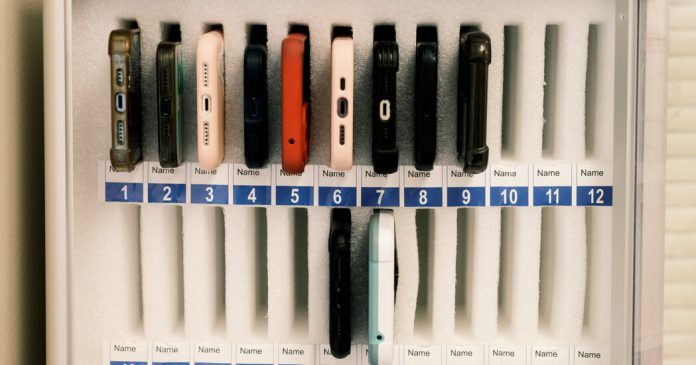
Tell us a story, real or made up, that is inspired by this image.
Word of the Day: sever
This word has appeared in 123 articles on NYTimes.com in the past year. Can you use it in a sentence?
Outlook Hacks You Didn’t Know You Needed
Every day, millions of us, whether in the office or at home, will turn on our computers or laptops and open Outlook to get the workday started. For many people, it’s an email correspondence tool. What they don’t know, and many people are starting to discover, is that Outlook is a handy tool to help you achieve optimal productivity. In this article, we’re going to explore some Outlook hacks you didn’t know you needed and help you manage your 8-4 (and after-hours) better.
What is Microsoft Outlook?
Outlook is the preferred email feature for clients to use for sending and receiving emails. It was released in 1997 and over the years, has gone through many versions and feature updates. It forms part of the Microsoft Office suite, which includes Excel and PowerPoint. Outlook also has a free browser-based version but with fewer features. Outlook is plugged into the Cloud and Office 365, allowing clients an integrated system that they can use to collaborate with their team and so much more.
Outlook features
Every version came with its own notable features that improved upon and revolutionised previous versions and maintained its summit as the business industry standard. Some of these included:
- No longer sending files as an attachment but sharing documents so that a team can collaborate on one file.
- Outlook mobile app. The on-the-go feature meant you can work from the palm of your hand and never miss a thing.
- Calendar to organise and manage your day and focus on the emails that matter most
- Scheduling assistant that lets you find suitable meeting times and therefore, keeps the whole team in sync with your team.
All these features are great right? And have done wonders for yourself and your team. What more is there that you could possibly need and use that you haven’t discovered yet? Keep reading.
Outlook hacks you didn’t know you needed
Customise events
You can add customised events on your calendar. Meaning, you’ll miss a game or the premiere of your favourite show.
- Go to “add calendar”.
- Select your events, “sports” or “TV”.
- Choose the event you want and add you selection.
Time zones
Many companies have adopted remote work solutions for their employees. This inevitably means that more workers are operating across different time zones – even within teams and across departments.
With Outlook, you can have a clear side-by-side view reference of multiple time zones to make scheduling meetings and sending emails easier.
- Go to “File”.
- Under “Calendar”, select ‘Time zones”.
- Check the “show the second time zone” box.
You can add three separate time zones in your calendar, and you can decide on these based on where most of your team or clients operate from. Do note that these are only for your calendar view and do not affect where your calendar items are stored, located, or displayed.
Schedule emails
Sometimes you work late and need to send emails off as you complete your tasks. While this is great for you because you’re getting things done, the recipient may not be as happy to receive notifications at 11 pm or 2 am. Thanks to Outlook, you can schedule when your emails will be sent.
- Compose your email.
- Click on the arrow next to “send”.
- Select “send later” and from the new window, choose your preferred time and date to send the email.
Until the scheduled time, you can go into your ‘drafts’ folder and make changes or delete the email if you need to do so.
Mute conversations
Sometimes you may be included in a long email thread as an FYI but have no contribution to make. And other times, the ‘reply all’ from a bulk email will have you stuck with a constantly pinging inbox notification and nowhere to run. Here’s how to mute these conversations:
- Open the email and thread you want to mute.
- Click on the three dots settings feature in the toolbar.
- Click “Ignore”.
- Click “OK” to confirm you want to ignore the conversation.
“Ignoring” a conversation means you are automatically deleting it so before clicking, be sure it’s really what you want to do. Instead, you can opt to “snooze” a conversation. With this hack, you can decide how long you want the conversation to be in silent mode. It also allows you to go back into the thread and search for the information you need.
Quick Steps and Quick Parts
This exciting feature allows you to turn three steps into one. If you have certain tasks you do regularly, save time and configure your inbox into quick parts.
- Go to Home and select ‘Quick Steps’.
- Select “Create new” and give it a name.
- Choose what actions you want it to do.
With Quick Parts, you can copy the body of an email (or parts that you need) and paste it into the body of future emails. This feature also enables you to save the text as auto text. With your new email, Outlook will suggest the remaining copy of your email and you click “Enter” to insert it into your email.
- Highlight the copy in the email you want to save and use in future.
- Go to Insert and click “Quick Parts”.
- Select “Save selection to Quick Part Gallery”. You can choose a name for the text for easy reference.
- Save as “quick part” or auto text.
These are just a few Outlook hacks can utilise to make your workday easier. Unfortunately, we can’t name them all. Task management, sharing calendars, viewing messages and your way, and keyboard shortboards are just a few more handy ways to boost your productivity.
If you want to explore more about Outlook and other Microsoft tools, check out our free Office 265 Web Apps course and discover how they can help your business grow.
Have you got more Outlook hacks that have changed the way you work and made you more productive? Comment with your winning productivity tricks to help us work better together.
Learn how Emilia enhanced key soft skills to grow in her career

Meet Emilia who’s learning from Toronto, Canada! Emilia is a Creative Industries graduate from Toronto Metropolitan University (TMU) who specializes in performance and story-telling through media. Read more about her career journey after graduation and how a time management course on Coursera helped her succeed in the workplace.
During my time at TMU, I took an internship as a Music Office Intern for the City of Toronto. The title of my internship is a bit misleading as I wasn’t sitting around listening to music all day. Instead, I completed projects relevant to the department including reviewing music venue tax applications and potential property development applications. I also communicated with local stakeholders on policy and answered questions, coordinated performance opportunities, and reviewed artist applications. Through my internship, I discovered my love for being a coordinator, project manager, and liaison as I naturally had an ability to multitask.
After graduating from TMU in 2021, I was lucky to land a position as a marketing coordinator at Givex, a global IT platform focused on providing merchants with useful customer insights. After 9 months, I was promoted to Corporate Communications Coordinator responsible for assisting with the execution of Givex’s public relations and investor relations messaging. Maintaining all internal, external, and public communications for Givex requires me to be extremely organized, efficient, and manage my time effectively. I wanted to enhance my soft skills of time management and productivity, so I began looking for a way I could empower myself around my hectic work schedule.
Along came Coursera! I was attracted to taking an online course because I really did not have the time to sit in a classroom. Coursera’s flexibility along with their vast selection of courses in business and personal development ultimately caught my attention. I decided to enroll in the Work Smarter, Not Harder: Time Management for Personal & Professional Productivity from the University of California, Irvine (UCI). In this course, I learned methods and techniques in goal setting, prioritization, scheduling, and delegation to overcome time management challenges and enhance my productivity. Not only has this course been helpful in my career, it’s truly been helpful in my personal life as well.
Having completed this course, I am eager to enroll in others to continue to enhance my skills and abilities to grow in my career! To other learners out there, I would like to leave you with this: Don’t give up, no matter how long it takes you to finish the course! It’s a marathon not a sprint.
How Important to You Is Being Able to Drive?
Is getting your driver’s license a big deal where you live? What does it mean to you?
Math Word Field Notes: A Collaborative Project Across Subject Areas
Students from language arts and math classes team up to create one-page field guides for key mathematical concepts.
Sun and Cloud
What do you think this image is communicating?
Word of the Day: depredation
This word has appeared in seven articles on NYTimes.com in the past year. Can you use it in a sentence?
7 Reasons to Join the 5 A.M. Club
Do you aspire to occupy the corner office? Is your dream to be a successful entrepreneur, businessperson, or renowned industry leader? Have you set your sights on the ultimate success in sports, arts or in your field of interest? The secret to success, if you ask anyone in any industry, is being a member of the 5 A.M. club. For years this concept has revolutionised how people work and achieve success. And we’re diving right into it and exploring 10 reasons you should join the 5 A.M. club.
The 5 A.M. club
20 years ago, best-selling author Robin Sharma released a book, The 5 A.M. Club, to global acclaim. In his book, he shared the concept of how getting up at 5 A.M. is the difference between the ordinary and the extraordinary. According to Sharma, a 5 A.M. wake-up allows you to complete a set of 20/20/20. 20 minutes of intense exercise, 20 minutes to reflect on your goals, and another 20 minutes to learn a new skill. The 20/20/20 technique is a method to optimise your productivity.
How the 20/20/20 looks
If you’re like most of us, your reflex will be to toss your alarm clock (not your phone) across the room when it blares at 5 A.M. Very normal reaction. But resist the urge. Keep in mind the purpose behind the early start – to be the best, most productive person you can be.
- 05:00-05:20 – exercise
- 05:20-05:40 – pause and reflect
- 05:40-06:00 – read and/or learn something new
“Early to bed, and early to rise makes a man healthy, wealthy and wise.” —Benjamin Franklin
7 reasons to join the 5 A.M. club
Let’s be real for a minute. Our lives are busy. From the moment we wake up until we go to bed at night, we live jumping from one task and responsibility to the next. With little to no time dedicated to accomplishing key projects – well. Or even giving time to things that excite us, challenge us, and make us feel alive. Enter the 5 A.M. club mentality.
- No distractions. At 5 A.M., very little is happening in the world. Your phone isn’t buzzing with notifications, the kids are still sleeping (if you’re lucky), and few people are awake. This quiet time is the perfect time to tap into your brain and do or begin working towards one thing uninterrupted.
- Creates a routine. Our bodies have a 24-hour internal clock, the circadian rhythm, that helps us regulate our physical and mental functioning. Our mind and body serve us best when we are well-rested. A consistent sleep-wake schedule gives you more energy to get through the day and get things done.
- Time to plan. The extra hours you get in the morning allow you to plan your day ahead – without the rush and madness that tends to come with lateness.
- Exercise. While Sharma’s rule calls for “intense exercise”, find something that works for you. The key is to get your body moving, the happy hormones flowing, and your body primed for the day. A Pilates class, walking your dog, going for a jog or a session at the gym, the burst of energy will do wonders for your body.
- Prepare. Dedicate the other 20 minutes of your 5 A.M. start to reflect on your goals. These can be your daily, weekly, or even monthly goals. Are you on track to achieving them? What can you do today that will get you closer to meeting them? What did you do yesterday that you can build on today? And how can you prepare for the day ahead in a way that will get you where you need to be?
- Discipline. Anyone can wake up at 5 A.M. tomorrow. And keep that up for a week or two. To do something when everything in you screams not to, that’s where change happens. Waking up at 5 A.M. requires discipline and digging deep when the urge to sleep is strong. The discipline of repetition for months and years on end takes stamina, mental and physical strength, and an unwavering commitment to succeeding. “Discipline is choosing between what you want now, and what you want most.” – Abraham Lincoln.
- Healthy habits. Waking up at 5 A.M. means you’ll most likely go to bed earlier. This means you’ll “switch off” and reduce the late-night indulgences we’ve become accustomed to – think late-night snacking, bingeing on series, and incessant scrolling in bed. The 5 A.M. club, by default, encourages developing healthier habits that contribute to your success.
No, waking up at 5 A.M. is not easy. But then again, nothing worthwhile ever is easy. And no, not all will become CEOs or billionaires, but that’s not what it’s about at the end of the day. Life is about living to your full potential, being present in any and every moment, doing good (to yourself and others), being productive, creative, and leaving the world better than you found it. It’s being alive. And what better way to achieve this than by getting the most out of every day?
Set your alarm and join the 5 A.M. club. Your dreams won’t wait for you.
What Is Your Reaction to the New Report About Teen Sadness?
Teenage girls reported record levels of sadness in a recent study from the Centers for Disease Control and Prevention. Do you think adolescents are experiencing a mental health crisis?