When students have practiced noticing and listening to birds, they can act as citizen scientists and contribute their data to a larger research project.
Citizen science invites “regular people,” including K–12 students, to contribute their observations of something — birds, frogs, plants, weather, the night sky — to a central database, which professional scientists can analyze. It vastly extends scientists’ observational powers and allows them to ask and answer questions that otherwise would be impossible to tackle. For young people, it’s a chance to connect with the outside world in a real, meaningful, and fun way.
To get started, students who are over 13 in the United States can download the Merlin birding app from the Cornell Lab of Ornithology. Alli Smith, the project coordinator for Merlin, shares these tips for using the app:
Merlin will ask you where you saw the bird specifically and the time of year. A lot of places have different birds depending on the season.
Then, observing the bird for a while can really help. Is it tiny, like a house sparrow? Is it really big, like a goose? And the colors of the bird can help as well. Is it bright and yellow and colorful? Is it solid black?
And then the behavior: What is it doing? Is it visiting a bird feeder? There’s a very small list, relatively, of birds that are likely to visit a bird feeder compared with birds that are elsewhere in the environment. Is it spending a lot of time perched in a tree? Is it walking around on the ground? Is it in the water swimming?
With all of these things put together, Merlin can give you a list of likely birds. But even if you’re not using Merlin, those are the types of things that you should be looking for: the size, color, behavior, location and date.
And as mentioned, Merlin’s Sound ID feature can help you pick out birds by their vocalizations.
The Merlin app is a reference and learning tool. If students are ready to record their observations in Cornell’s scientific database, eBird, they can follow the steps in Merlin.
Discover Manuel’s Experience in the iMBA program by the University of Illinois Urbana-Champaign’s Gies College of Business, providing online education excellence for decades.
Manuel is a student in the Master of Business Administration (iMBA) program at the University of Illinois Urbana-Champaign’s Gies College of Business. Urbana-Champaign is part of the University of Illinois System, which has been a leader in online learning for decades. Manuel’s program on Coursera continues a legacy of online learning that began with the very first fully online course offered by the University of Illinois back in 1995.
Because Manuel’s professors use the Coursera platform and its many features to create his student experience, he’s able to pursue his career development in his learning style and on his personal timeline. Manuel knows he wants additional responsibility at work. He has set his heart on becoming a more well-rounded employee. He possesses a technical background and hopes to gain new business skills.
Manuel recalls doing extensive research on different courses and programs, as well as talking to representatives from many universities. He was originally looking for a program he could attend in person, but as he was exploring courses on Coursera, he discovered the iMBA from Gies. Manuel claims everything kept pointing him to the iMBA.
While trying to decide whether to study a few topics through individual courses or cover many more in a full degree program, Manuel realized the iMBA is the best offering for the subject areas where he wants to focus. He feels that with the iMBA, he can have quality, flexibility, and affordability all at once. Manuel also mentions he couldn’t pass up a top institution like Illinois. He thinks it’s awesome that the university collaborates with a platform as big as Coursera.
As he discusses unique aspects of the program, Manuel observes the whole thing is thought out well. He remarks on how diversity and inclusion are prioritized, and how the people who support you in the program show they care by being very responsive. He notes that communications are thoughtful and processes are streamlined. Gies and Coursera are very coordinated from his perspective. Speaking about the work-life balance he is enjoying during his time in the program, Manuel says some of the coursework is self-paced and he can plan around his schedule.
Manuel’s favorite part of the program is the engagement with instructors and other students. He previously believed an online experience would be less collaborative, but he’s actually found it to be more so. Manuel specifically cites the breakout sessions as a great way to get to know everyone. With students from widespread backgrounds and regions, Manuel has broader networking opportunities than he would have had on campus. He also brings up the real-world experience he’s gaining through group projects. He’s able to translate that experience immediately into the workplace with his current job.
Using Manuel’s story as inspiration, perhaps you can start to see yourself succeeding with an MBA degree from Gies. University of Illinois alumni have been hired by 85 of the Fortune 100 companies. Over half of iMBA graduates have started a new job upon completing the program, and graduates also report receiving an average raise of 26 percent during or immediately after their time in the program. For innovative learning here and now, as well as in-demand job skills and a career credential for your future, check out the iMBA today.
Learn how Kristen, a recent graduate of the online Master of Science in Management (iMSM), pursued a digital marketing course on Coursera that proved pivotal in her business and her learning through a diverse array of courses.
Kristen is a recent graduate of the online Master of Science in Management (iMSM) program from the University of Illinois Urbana-Champaign’s Gies College of Business. Urbana-Champaign is part of the University of Illinois System which was recently ranked among the top 50 national universities by U.S. News & World Report. Kristen’s program on Coursera is one of over 90 degree, certificate, and endorsement programs that the university offers online as millions of students worldwide continue to choose Illinois.
The iMSM program is designed for working professionals like Kristen who are interested in management, consulting, analytics, entrepreneurship, and more. In 2019, Kristen began searching for learning opportunities that would help her run her massage therapy company.
Her quest led her to Coursera, where she took a digital marketing course. The knowledge and skills she gained in the course proved valuable as she grew her business by 200 percent within a year, so she then sought more opportunities on Coursera.
Previously, Kristen was unsure online learning would work for her. But her digital marketing course helped her understand how to approach online learning. Needing flexibility for her schedule and living far from any physical campus, Kristen soon enrolled in the iMSM program so that she could learn more about business in general. She saw it as a way to build foundational understanding without spending two or three years in school. She felt the iMSM program was perfect for her at the time as it aligned with her needs then.
Once Kristen started the program, the people she met stood out to her. She says everyone was friendly and helpful, noting there are some amazing professors that are very motivating. Kristen worked with students in London and Germany during her time in the program, and she raves about how great it was to get their perspectives. Kristen enjoyed her project management course the most, and she says the classes push you to think differently. She also found faculty office hours to be super engaging, and she liked being able to rewatch lectures (one of the perks of online learning).
Having sold her share of her massage therapy company, Kristen successfully transitioned to working in human resources after graduating with her MSM degree in May of 2023. Her new master’s even helped her negotiate a higher salary. Because of her time in the program, Kristen has changed how she thinks about herself as part of her company. She’s also changed her standards for what she looks for in an employer. Ultimately, she says starting or switching your career can be tough, but worth it.
As Kristen shows us, the world of business can include everything from owning a share of your own company to being part of a department like human resources. But wherever you go in the business world, it’s easy to see all the areas where fundamental knowledge and management skills are essential. When you encounter any of these areas in your business career, remember Gies College of Business at the University of Illinois Urbana-Champaign. You could join Kristen on the long list of successful graduates. Explore the iMSM program for yourself.
In tech, every day is a school day. Part of the challenge (and joy) of working in an industry that shifts and grows constantly is that you never stop being a student. Upskilling isn’t just important when you’re vying for a promotion or looking for new opportunities — learning and developing helps you add more value in your current role and makes work more interesting.
Not sure where to start? With a Codecademy Plus membership, you get unlimited access to over 300 courses on topics from AI to game development and more. This plan is great for people who want to learn a specialized skill or build their own roadmap.
Ahead, professional devs from Codecademy and beyond share their tips for making time for upskilling, choosing the technologies to learn next, and staying ahead of emerging tech trends.
Learn something new for free
How to make time for upskilling at work
Most companies explicitly support continuous development, whether that’s through access to online courses, peer-led learning sessions, or allocating some percentage of your working hours to side projects (such as Google’s famous “20% Time”).
“I encourage my reports to continually invest in their ‘knowledge portfolio’ so that they will continue to have relevant skills,” says Judah Anthony, Director of Product Engineering at Codecademy. That said, some engineers still find it difficult to make space for upskilling during the busy work week. Here are some smart ways engineers are carving out time to learn.
Seek your team leader’s support
“I recently started working with my manager to set up one learning goal per month. I’m hoping that having that accountability will help me with setting aside that time.” – Sylvana Santos, Senior Software Engineer, Codecademy
“We’re encouraged to write up a personal development plan every quarter, which we go through with our managers on a fortnightly basis to check what progress we have made.” – Jennifer Chan, Software Engineer, OVO
Nothing beats the kind of growth that comes with working on a team with other seasoned developers.
John Rood
Codecademy Senior Software Engineer
Try pair programming
“Nothing beats the kind of growth that comes with working on a team with other seasoned developers. When I joined Codecademy, I had already started the Learn Go course. It gave me a good foundation for Go, but it was spending a few weeks pairing with another seasoned Go developer that really started to make me feel fluent in writing Go code.” – John Rood, Senior Software Engineer, Codecademy
Get involved in open source
“I recently joined as an open source maintainer on a library that we use extensively at my work. I’ve been learning a lot about its internals, writing documentation, reviewing pull requests, and discussing advanced use cases with the community. I’ve learned a ton from it and it’s really valuable to my company since we use it so heavily — making it easy to justify the time spent.” – Tyler Williams, Lead Software Engineer, WalterPicks
What should you learn about?
With the entire internet at your disposal and new technologies launching all the time, it can be overwhelming to narrow down what to spend your time on. There are two tracks you can take: fill in gaps you encounter in your work, or follow your interests.
Explore your company’s stack
“We have meetings where engineers can share in-flight projects and learnings. If an engineer talks about a technology, language, or concept that I haven’t worked with (for example, GraphQL federation), I’ll jot it down as a potential learning topic for myself. I’ll spend some time learning the basics of that topic and then connect with the team working on the project to learn even more. Sometimes we can get so caught up in meeting deadlines and shipping quickly, it can be hard to slow down and really take the time to understand the technologies that we work with, so I like to revisit topics every once in a while and dive deeper.” – Sylvana
Go where your hobbies lead you
“I recently started building a web app for budgeting. It’s been a chance for me to try using banking APIs like Plaid and Teller, authorization technologies like the Twilio Verify API and the Web Crypto API, and new frontend frameworks like Deno Fresh and SolidJS. While I’m doing yard work I’ll often listen to podcasts like JavaScript Jabber or just the audio from YouTube channels like Theo – t3․gg, to get new perspectives on the web development industry and inspiration about which tools I want to try in both hobby and work projects.” – John
What devs are learning about right now
Still looking for inspiration? We asked some engineers at all levels about what they’re learning about right now.
Monitoring and analytics
“My team’s goal is to maximize and retain our customer base. I’m currently learning more about Datadog, which my company uses for monitoring our cloud infrastructure to help them understand how our app is performing (for example, by monitoring failed requests, completed actions by users, and so on). I’m working on building a dashboard for our customer account management area, and adding further queries, metrics, and widgets which will inform us on how the app is performing and highlight any potential areas where it can improve.” – Jennifer
“Early on I explored things like attribution models, recommendation engines, and behavior analysis/prediction. Of late, content generation and semantic analysis with plain-text feedback seem very promising. OpenAI is super interesting, but even things like translations can have huge potential.” – Judah
Frameworks: React and Next.js
“One technology that I’ve been learning about recently — related to both work and hobbies — is React Server Components. It’s a major paradigm shift, not just about reducing code that we send to the browser, but also about how we load and cache data. JavaScript Jabber has a great interview with Dan Abramov and Joe Savona that really helped that concept click for me.” – John
“I’m doing a deeper dive into data fetching in Next.js and exploring more advanced Next.js concepts. We started moving our pages to Next.js a while ago and I did a little bit of learning on the subject back then, but I recently stumbled upon a pull request that used incremental static generation (ISR) and it felt so foreign to me. So I decided that I want to revisit the framework and understand what else is possible with it.” – Sylvana
Cybersecurity
“I’ve studied application security, especially the OWASP Top 10, so I can keep an eye out for common application vulnerabilities. I’ve also studied various topics in cryptography, so I can better understand how to apply them, and what the various guarantees are. For example, I did a code review on some code that was trying to pass some sensitive user state in the query string. They thought they were safe because they were encrypting the data with AES-CBC, but I was able to demonstrate that that mode offers privacy but not integrity, so if someone knew the content of the plain text, they could alter the cipher text to unencrypt to whatever value they want (i.e. swapping role:"user" with role:"admin"). I recommended using a mode that includes a signature.” – Judah
These are just a few examples of areas you can explore. If you’re feeling overwhelmed, getting advice about what to focus on from a more senior engineer can help, or check out our free course, Choosing a Programming Language.
In tech, every day is a school day. Part of the challenge (and joy) of working in an industry that shifts and grows constantly is that you never stop being a student. Upskilling isn’t just important when you’re vying for a promotion or looking for new opportunities — learning and developing helps you add more value in your current role and makes work more interesting.
Not sure where to start? With a Codecademy Plus membership, you get unlimited access to over 300 courses on topics from AI to game development and more. This plan is great for people who want to learn a specialized skill or build their own roadmap.
Ahead, professional devs from Codecademy and beyond share their tips for making time for upskilling, choosing the technologies to learn next, and staying ahead of emerging tech trends.
Learn something new for free
How to make time for upskilling at work
Most companies explicitly support continuous development, whether that’s through access to online courses, peer-led learning sessions, or allocating some percentage of your working hours to side projects (such as Google’s famous “20% Time”).
“I encourage my reports to continually invest in their ‘knowledge portfolio’ so that they will continue to have relevant skills,” says Judah Anthony, Director of Product Engineering at Codecademy. That said, some engineers still find it difficult to make space for upskilling during the busy work week. Here are some smart ways engineers are carving out time to learn.
Seek your team leader’s support
“I recently started working with my manager to set up one learning goal per month. I’m hoping that having that accountability will help me with setting aside that time.” – Sylvana Santos, Senior Software Engineer, Codecademy
“We’re encouraged to write up a personal development plan every quarter, which we go through with our managers on a fortnightly basis to check what progress we have made.” – Jennifer Chan, Software Engineer, OVO
Nothing beats the kind of growth that comes with working on a team with other seasoned developers.
John Rood
Codecademy Senior Software Engineer
Try pair programming
“Nothing beats the kind of growth that comes with working on a team with other seasoned developers. When I joined Codecademy, I had already started the Learn Go course. It gave me a good foundation for Go, but it was spending a few weeks pairing with another seasoned Go developer that really started to make me feel fluent in writing Go code.” – John Rood, Senior Software Engineer, Codecademy
Get involved in open source
“I recently joined as an open source maintainer on a library that we use extensively at my work. I’ve been learning a lot about its internals, writing documentation, reviewing pull requests, and discussing advanced use cases with the community. I’ve learned a ton from it and it’s really valuable to my company since we use it so heavily — making it easy to justify the time spent.” – Tyler Williams, Lead Software Engineer, WalterPicks
What should you learn about?
With the entire internet at your disposal and new technologies launching all the time, it can be overwhelming to narrow down what to spend your time on. There are two tracks you can take: fill in gaps you encounter in your work, or follow your interests.
Explore your company’s stack
“We have meetings where engineers can share in-flight projects and learnings. If an engineer talks about a technology, language, or concept that I haven’t worked with (for example, GraphQL federation), I’ll jot it down as a potential learning topic for myself. I’ll spend some time learning the basics of that topic and then connect with the team working on the project to learn even more. Sometimes we can get so caught up in meeting deadlines and shipping quickly, it can be hard to slow down and really take the time to understand the technologies that we work with, so I like to revisit topics every once in a while and dive deeper.” – Sylvana
Go where your hobbies lead you
“I recently started building a web app for budgeting. It’s been a chance for me to try using banking APIs like Plaid and Teller, authorization technologies like the Twilio Verify API and the Web Crypto API, and new frontend frameworks like Deno Fresh and SolidJS. While I’m doing yard work I’ll often listen to podcasts like JavaScript Jabber or just the audio from YouTube channels like Theo – t3․gg, to get new perspectives on the web development industry and inspiration about which tools I want to try in both hobby and work projects.” – John
What devs are learning about right now
Still looking for inspiration? We asked some engineers at all levels about what they’re learning about right now.
Monitoring and analytics
“My team’s goal is to maximize and retain our customer base. I’m currently learning more about Datadog, which my company uses for monitoring our cloud infrastructure to help them understand how our app is performing (for example, by monitoring failed requests, completed actions by users, and so on). I’m working on building a dashboard for our customer account management area, and adding further queries, metrics, and widgets which will inform us on how the app is performing and highlight any potential areas where it can improve.” – Jennifer
“Early on I explored things like attribution models, recommendation engines, and behavior analysis/prediction. Of late, content generation and semantic analysis with plain-text feedback seem very promising. OpenAI is super interesting, but even things like translations can have huge potential.” – Judah
Frameworks: React and Next.js
“One technology that I’ve been learning about recently — related to both work and hobbies — is React Server Components. It’s a major paradigm shift, not just about reducing code that we send to the browser, but also about how we load and cache data. JavaScript Jabber has a great interview with Dan Abramov and Joe Savona that really helped that concept click for me.” – John
“I’m doing a deeper dive into data fetching in Next.js and exploring more advanced Next.js concepts. We started moving our pages to Next.js a while ago and I did a little bit of learning on the subject back then, but I recently stumbled upon a pull request that used incremental static generation (ISR) and it felt so foreign to me. So I decided that I want to revisit the framework and understand what else is possible with it.” – Sylvana
Cybersecurity
“I’ve studied application security, especially the OWASP Top 10, so I can keep an eye out for common application vulnerabilities. I’ve also studied various topics in cryptography, so I can better understand how to apply them, and what the various guarantees are. For example, I did a code review on some code that was trying to pass some sensitive user state in the query string. They thought they were safe because they were encrypting the data with AES-CBC, but I was able to demonstrate that that mode offers privacy but not integrity, so if someone knew the content of the plain text, they could alter the cipher text to unencrypt to whatever value they want (i.e. swapping role:"user" with role:"admin"). I recommended using a mode that includes a signature.” – Judah
These are just a few examples of areas you can explore. If you’re feeling overwhelmed, getting advice about what to focus on from a more senior engineer can help, or check out our free course, Choosing a Programming Language.
As you stock up on new school supplies and figure out your new class schedule, there’s a back-to-school item that could be a game-changer for you: Codecademy Pro Student.
Lots of our learners use Codecademy courses alongside their college or high school curriculum. Our self-paced, interactive courses will have you writing code from the jump, so you can skip the mind-numbing theory work and start gaining practical experience. Students who learn with Codecademy go on to have successful careers in technology, regardless of what they studied in the classroom.
And unlike that pricey textbook you had to buy for class and never opened, a Codecademy Pro Student membership comes with tons of useful hands-on resources that will help you get job-ready. Here are some resourceful ways that our learners use Codecademy to supplement their schoolwork, work smarter not harder, and get ahead in the classroom — and the “real world.”
Discover a new passion
There’s a common misconception that coding is only for people who are math whizzes — that’s one reason why Louise Jones initially wrote off coding. “I briefly coded at uni when we did a statistics module, and it was awful,” Louise, who studied wildlife conservation in college, says. “We had about two weeks to learn it, and they threw us in at the deep end with statistical stuff. I just thought, This is not this is not my thing.”
Learn something new for free
Since Louise started learning front-end development with Codecademy in November 2021, she’s been “non-stop coding,” she says. She recently took up data science and plans to pursue a career as a data engineer. The key was finding a learning technique and pace that worked for her (and reading the book A Mind for Numbers). Coding can be an outlet for you to explore your hobbies and interests, and it has the potential to introduce you to new domains or ways of thinking.
Choose your major or switch it
Deciding a college major is a big decision that can take time. Even if you select a subject to focus on, it’s tough to know for certain whether you’ll like a particular career without doing the work every single day. If you’re interested in software engineering, for example, getting used to writing code every day is the best way to test the waters before you commit to the profession.
Jordan Guada discovered coding during the Covid lockdown, and he would spend hours each day learning with Codecademy on top of the Zoom-based classes for his business administration major. “I wanted to make sure I tried coding out before I pursued it in college, because once you’re locked into a major, you’ve got to do it,” he says.
Spending so much of his free time coding confirmed Jordan’s interest in tech. Three months into learning how to code, he decided to switch his major to IT. The change gave his college advisor pause, but he was confident: “I knew that I could get behind this topic,” he says. (Want to sample different careers you can have in tech? Try our free course Choosing a Career in Tech.)
Prepare for class
Feeling totally overwhelmed by the syllabus your teacher handed out on the first day of class? We got you. We have hundreds of bite-sized courses that can help you make sense of the concepts you’re learning (or about to learn) in a CS class. For example, if you need a refresher on data structures and algorithms, you can take our course Learn Data Structures and Algorithms with Python. Or if you’re stumped in stats class trying to remember R, you could check out the free course Learn the Basics of Causal Inference with R.
Another way to feel confident going into any CS class is by taking our Computer Science Career Path. This path is designed to give you a foundation in all the programming fundamentals that are covered in a typical four-year college CS degree, including data structures and algorithms. It’s a great starting point if you want to master the basics or meet the prerequisites to take more advanced courses.
Learn at your speed (not your professor’s)
While learning Java and SQL in school, Jordan found it was necessary to go back and revisit Codecademy courses, “because my professor moved a little too fast,” he says. We know that everyone learns at a different speed, which is why all our courses are self-paced. You get to determine how much or little you work on, and you can stop to take breaks whenever you want — no stressing about getting behind or being late to a lecture.
There’s also so much more to learning with Codecademy than just keeping up with lessons and taking quizzes. You can code projects to use in a professional portfolio, test your knowledge by completing code challenges, and connect with other self-taught developers in our community.
Fight your fear of failure
In school, it can often feel like your next grade will make or break your whole future. That’s a lot of pressure to put on yourself! Our lessons are a safe space for you to work on the basics — even if it means getting tripped up or making a mistake. And while we do grade the quizzes in our lessons, we also know that mistakes are important steppingstones towards improvement.
A big part of being a developer is investigating what went wrong or solving a problem. “When I started learning concepts at school, I was more comfortable messing up, because Codecademy gave me the idea that you can keep trying over and over,” Jordan says. Indeed, you can retake quizzes and even entire courses so you can fully engage with the subject matter without stressing about getting penalized.
Supplement your school syllabus
Although Andrew Polemeni was an IT major in college, his program focused less on coding and more on theoretical topics like security, project management, and networking. So, Andrew turned to Codecademy to fill in some of his knowledge gaps, starting with Learn JavaScript. “I mostly learned to code after I was done with my classwork,” Andrew says. “I would shovel food in between, and then just go back to doing Codecademy.”
Lots of learners use Codecademy because their schools don’t offer courses in the specific subjects that they want to pursue, or they’re limited to classes that are relevant to their major. Victor Ontiveros went to a high school that didn’t have a STEM program, so he started a coding club that would meet and take Codecademy courses. “It was definitely at that point that I realized I could turn this into a living and do this for work,” he says. Now, Victor is a full-time Software Designer.
The rapid pace of the tech world means that what you’re taught in school might not align with the real-world tools and practices that professionals actually use. Take ChatGPT: Since the generative AI chatbot was released in March 2023, it’s transformed the way that we use and create technology. We’re always releasing new cutting-edge courses so you can immerse yourself in the latest technologies. We recently launched brand new AI courses and case studies focusing on the essential topics that technologists need today, like Prompt Engineering for Software Engineers, Debug Python Code with ChatGPT, and Intro to Generative AI.
With Codecademy courses and Pro features, you can maintain a competitive edge, gain practical experience, and be well-positioned to kickstart a career in tech. Many of our learners start from scratch and land jobs in a matter of months.
Scott Shireman, Global Head of Coursera for Campus
Career outcomes are a top decision-making factor for students selecting their higher education institution. Enhancing curricula to better align with in-demand skills used by today’s employers is therefore a top priority for higher education institutions.
Industry micro-credentials, such as Professional Certificates offered through Coursera’s Career Academy, are emerging as a favored solution for bridging the curriculum-to-career gap. These certificates are designed to equip students with the specific skills needed for in-demand, entry-level jobs, particularly in digital roles.
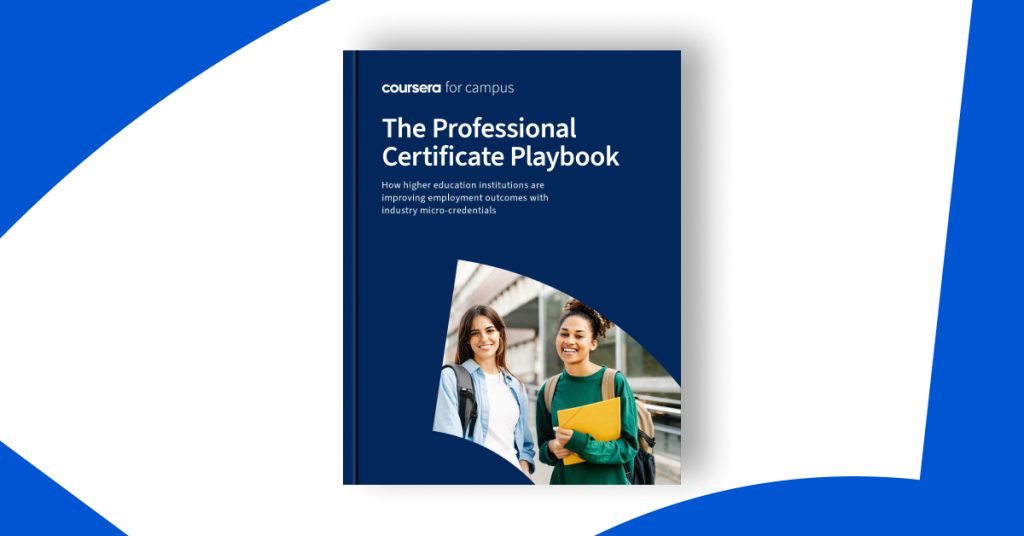
Our latest e-book, The Professional Certificate Playbook, explores how higher education institutions globally are implementing industry micro-credentials in different ways to drive career outcomes for students. These certificates can be offered as non-credit options or integrated into the curriculum for credit, providing flexibility in implementation.
Why Industry Micro-Credentials Matter
Student-Centric: Coursera’s recent survey shows that students are 76% more likely to enroll in a program offering industry micro-credentials.
Employer-Approved: The same survey found that 88% of employers agree that Professional Certificates add value to a candidate’s job application.
Global Success Stories: A Quick Look
Many higher education institutions around the world are successfully integrating industry micro-credentials into their curriculum and positively impacting student engagement, employability, and institutional outcomes.
Among these include the University of Arizona, which offers Professional Certificates as a free, co-curricular opportunity. Their Student Engagement & Career Development office found early success promoting Professional Certificates to equity-deserving students. Faculty also have access, which has helped recruit internal champions for the program.
Oulu University of Applied Sciences (OAMK) in Finland began offering Professional Certificates from Coursera as part of a program revamp for career-oriented learning. The certificates are available to students as for-credit electives during their first three years. Since launching, more than 1,300 enrolled students have taken more than 10,000 lessons from the certificates.
Lakshmi Narain College of Technology (LNCT) in India offers Professional Certificates as non-credit options for students through the career services office. Their focus is on in-demand roles such as software engineering and data science. LNCT graduates that have earned Professional Certificates credit their experience with helping them start “dream careers.”
Implementation Options
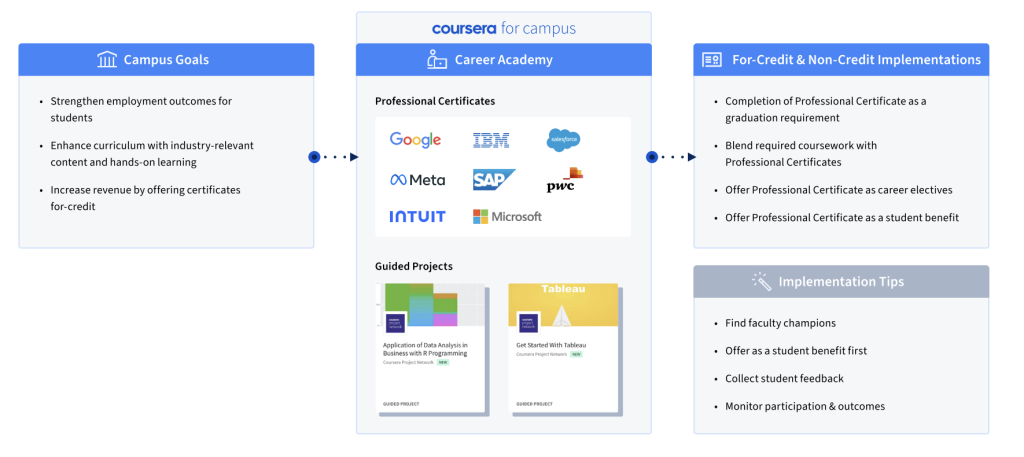
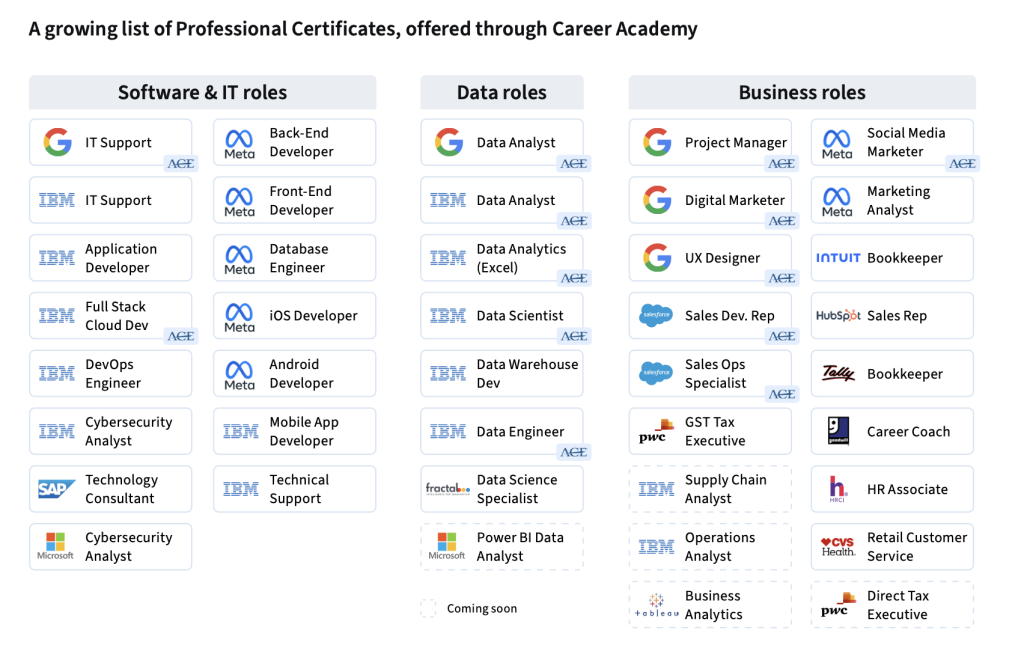
As validated by the global success stories, industry micro-credentials can be implemented in a flexible manner. Platforms like Coursera’s Career Academy offer a ready-made solution, allowing you to offer Professional Certificates from industry leaders like Google, Meta, IBM, and Salesforce.
A summary of for-credit and non-credit implementations of Career Academy.A look at the growing list of Professional Certificates offered through Coursera’s Career Academy across Software & IT, Data, and Business roles.
With demand for job skills at an all-time high, industry micro-credentials offer a win-win solution for both students and higher education institutions. They not only enhance the value of traditional degree programs but also prepare students for the real-world challenges they will face in the job market.
If you’re a university decision-maker looking to advance your institution and drive outcomes for students, now is the time to consider implementing Career Academy.
To learn more about how you can bring industry micro-credentials to your institution, download the Professional Certificate Playbook today.
The word exacerbate has appeared in 205 articles on NYTimes.com in the past year, including on Aug. 10 in “Heat Singes the Mind, Not Just the Body” by Apoorva Mandavilli_:
Heat not only fuels feelings like irritability and anger, but also seems to exacerbate mental illnesses, such as anxiety, schizophrenia and depression. Older adults, adolescents and people with pre-existing mental illnesses are particularly vulnerable, as are people who do not have housing or are of lower socioeconomic status.
A landmark study last year analyzed data on more than two million people with private insurance and found that emergency department visits for mental illnesses were significantly higher during the five or six hottest days of summer, compared with the coolest days of the same season.
Daily Word Challenge
Can you correctly use the word exacerbate in a sentence?
Based on the definition and example provided, write a sentence using today’s Word of the Day and share it as a comment on this article. It is most important that your sentence makes sense and demonstrates that you understand the word’s definition, but we also encourage you to be creative and have fun.
Then, read some of the other sentences students have submitted and use the “Recommend” button to vote for two original sentences that stand out to you.
If you want a better idea of how exacerbate can be used in a sentence, read these usage examples on Vocabulary.com.
Students ages 13 and older in the United States and the United Kingdom, and 16 and older elsewhere, can comment. All comments are moderated by the Learning Network staff.
Our Summer Reading Contest is our longest-running challenge and perhaps our simplest: To participate, all you have to do is answer the question, What got your attention in The Times this week?
Over the course of 10 weeks this year, we received 10,144 answers to that question from teenagers around the world. To help us read them all, we invited volunteers from the Times newsroom and across the company.As we judged the final batch of 1,456 entries this week, we asked if any of the volunteers would like to comment on what they noticed as they read. Here is what they had to say.
Judy Wang, who is Executive Director of Employee Storytelling & Content Strategy, was especially taken with students’ “curious and flexible minds”:
What impressed me most was watching these students reflect on not only what they’ve read, but also how they think. It was inspiring to see them eagerly confront narratives that made them question how they process facts — whether about free speech, college rankings or the art of rejection — and try to understand the world. I was seriously blown away by the curious and flexible minds on display here, and by their gorgeous prose too!
Mathilde Tanon, a data privacy manager, noted how deeply young people responded to frightening news about the state of the world:
It must be really hard to be a teenager in 2023. Wildfires, climate change, wars and the detriments of social media were by far the most discussed topics in the essays I have reviewed. Some submissions expressed a deep sense of doom and guilt that the writers are experiencing regarding the state of our world. While this was, at times, disheartening, it also shows that this generation is passionate about these issues, and willing to do whatever is necessary to improve the situation. The empathy and self-awareness shown by the students serve as an example for the older generations, who should act responsibly and fix past mistakes to enable younger generations to thrive, and, most importantly, to never lose hope.
Chamara Adams, who is an operations manager, told us that some teen writing inspired debate with her friends:
I was not expecting such insightful thoughts and connections. Some of the essays showed me different perspectives, had me see a topic in a new light and sparked a debate or two with my friends. I am so impressed by these students and so glad I was able to get a glimpse into their worlds through their thoughts and opinions.
And Nina Feinberg, who is a lead product designer for The Times, summed up the most common response we get from our judges, year after year:
I’m not sure what I was expecting, but I was genuinely wowed by the quality of the entries and the breadth of the experiences from students around the globe.
Thank you to everyone who participated, this week and every week, and congratulations to our Week 10 winner, Ruby N., as well as to the runners-up and honorable mentions we honor below.
We’ll be back with a new and updated version of this contest for Summer 2024. But while you’re waiting, don’t forget that you can read the work of all of our winners since 2017 in this column.
I’m excited to present to you this month’s wallpaper featuring stunning scenery to celebrate the beginning of autumn. It is truly breathtaking, with trees adorned in the most stunning shades of orange and yellow, and the leaves gently falling in the breeze. This wallpaper is the perfect way to welcome the fall season and bring a cozy vibe to your device’s screen.
Each wallpaper download from September 2023 includes the following:
Desktop wallpaper x3 (plain, with the calendar, and with a quote)
Phone wallpaper x3 (plain, with the calendar and with a quote)
Tablet wallpaper
Instagram ready quote
Quote for September 2023
This month’s quote is a touching reminder that every season must come to an end and we should embrace change with grace and acceptance. Just like the leaf, we too must let go of what no longer serves us and trust that new growth and opportunities will arise in their place.
a fallen leaf is nothing more than a summer’s wave goodbye
P.S the square image is also included as a larger file in the download package below! Feel free to post it on your Instagram.
You can get three different desktop options with the free download – one that has a calendar, one without the calendar, and another with a quote. Additionally, there’s a wallpaper available for tablets, and three phone options too. You’ll also find an Instagram-ready square that features the weekly quote.
FOR PERSONAL USE ONLY.
NOTE: This wallpaper is available as a free download through September 31, 2023 only. After that, a $5 download fee applies.
How about a new design?
Since you just got a new wallpaper, consider updating your blog’s appearance with a fresh and modern look too! There are many different blog templates available that can make your page more enjoyable to read and navigate. Take some time to browse through them and see what catches your eye.
Blogger templates
WordPress Themes
Your voice matters!
If you have your favorite quotes and would like them to appear on the next free wallpaper, make sure to post them in the comments below or send us your ideas via email.