
This word has appeared in 63 articles on NYTimes.com in the past year. Can you use it in a sentence?
How to Give and Receive Feedback

When we think, let alone hear the term “feedback”, we can become paralyzed at the thought of what we’ll hear about our performance. If you’re giving feedback, it feels uncomfortable. As much as we may not enjoy it, feedback is a necessary part of our growth. Keep reading to learn how to give and receive feedback.
What Is Feedback?
Feedback is a two-way communication system where a sender delivers a message to a receiver that is to be interpreted. It is the response given by the receiver after perceiving a message. Bartol & Martin define feedback as “…the receiver’s basic response to the interpreted message”. It is a peer-to-peer interaction and while it is primarily used in the workplace or school (reports), it can also be found and used in personal relationships and settings outside the office.
The Benefits of Feedback
Feedback is a vital communication process of any development. It set a good foundation for an effective performance management system for companies. When feedback is given and received well, it can result in phenomenal changes between the individuals, the organisation, and how it operates.
- Improved performance. Individuals have a clear understanding of what is expected of them. This allows them to develop skills and stretch themselves.
- Increased employee engagement. Employees become more active and interested in their advancement and will be more open to doing regular check-ins to assess their progress.
- Motivation tool. Effective feedback and communication drives staff to reach individual goals and work harder together to achieve team and company objectives.
- Keeps track of goals. Actionable targets given to individuals in feedback sessions create a clear target to aim for. This also makes it easier to achieve as the worker knows what steps they need to take.
- Feedback enhances growth. “Unlearn to learn”. The goal of feedback is to promote individual, team, and an organisation’s growth. Effective feedback has great benefits that can contribute to individual and organizational success.
How to Give Feedback
At its core, feedback should focus on quality sessions and check-ins and focus less on the number of sessions you have. These sessions need to be focused, actionable and effective. Whatever capacity you’re in that requires you to give feedback, you need the right tools to ensure your message lands with the receiver. The OILS Framework is a powerful and structured tool that can be used to give and receive feedback. Let’s explore further below.
- Observation. The first step is to frame the feedback from an objective standpoint. You should also refer to a specific event or time.
- Impact/Interpretation. Here, you explain how the event and the actions affected you – how you felt or behaved.
- Listen. This step invites the receiver to contribute to the exchange and provide context, an apology, or an explanation for their behaviour. This will also allow the receiver to be an active participant in the dialogue and not feel like they are being ‘spoken at’ instead of being ‘spoken with/to’.
- Suggestion. The last technique in the framework brings it all together. As the giver, you can provide some thoughts and suggestions on the next steps to take and how best to move forward. You can come up with an action plan with things you both can do for a better outcome.
OILS is a simple yet powerful framework for effective feedback.
How to Receive Feedback
We would all rather not hear any negative feedback relating to our performance in any area. However, an inability to tolerate feedback is an inability to allow yourself personal growth. We need to recognise that all feedback, when given properly, can be received openly and with an understanding that it’s an opportunity to grow in certain areas.
- Be open. Hearing feedback is not the brightest part of anyone’s day. It is however important to remain open to hear the feedback. Good or bad, receive and then decide on how you will proceed with what has been given to you.
- Be an active listener. During the feedback session, try to repeat and affirm what you have heard. This active listening skill allows you to hear the truth, no matter how hard, without being defensive. It ensures you’ve heard what is being said and not the emotions that comes with it.
- Review. Request clarity. Ask questions. Take time to process what was discussed and come back for a follow-up conversation, if necessary.
- S.I.F.T through the feedback. The SIFT acronym means you should consider the source (who is the feedback coming from), impact (what is the impact of the feedback given), frequency (is this something you hear often or is it the first time the issue is being raised) and trends (is this feedback coming from work, home, school or other) from your feedback session.
If you feel that there are skills gaps in your resume and highlighted areas that you could grow in, building your resume can pinpoint these areas.

Learning how to give and receive feedback is an ongoing process that requires practice and a healthy dose of honesty. But it can get better over time. It’s a two-way street that needs to be given and received constructively for lasting change and impact.
How Kira changed careers with the iMBA


Meet Kira! She’s based in Salt Lake City, Utah. After being passed up for several promotions at her librarian job, she decided to invest in new leadership skills through courses on Coursera. After initial success with these courses, she then applied to the iMBA program at the University of Illinois Urbana-Champaign through the Performance-Based Admissions Track (PAT). She was accepted! Follow along as she details her learning experience with Coursera and how she successfully changed careers to project management.
Hi, I’m Kira! I’m sure we’ve all felt the disappointment of being passed over for a promotion. Well, I became very familiar with this feeling as I kept getting passed over for Assistant Manager positions at my library job. Rather than letting frustration consume me, I decided I could work on further developing my leadership skills. I signed up for Coursera and enrolled in courses with a focus in leadership and engagement. I had concerns about my eligibility, so I applied as a Performance-Based Admissions Track (PAT) student for the iMBA Program at the University of Illinois Urbana-Champaign and was overjoyed to find out I had been accepted. The PAT is an alternative pathway into the iMBA program for students like me who have concerns about their application profile.
Not only did I learn valuable skills through the iMBA program, I also gained useful knowledge from my fellow colleagues. As I went through the program, I picked the brains of students who were further along to get advice on how to succeed. I learned so much about myself and leadership, and also gained a solid knowledge of business. Throughout my iMBA journey, I leaned into leadership focused modules but later, I started to shift my focus to project management. I ended up getting four project management certifications in one semester as a result of the iMBA elective class.
By my last semester, I landed a highly competitive IT Project Manager position in Salt Lake County.
From a librarian to an IT position with the county, I completely changed the trajectory of my career by taking that first step and enrolling –- and you can too! For those wanting to make a career change or advance their education, I have some advice:
1. Try new things. I went from being a librarian to a project manager, a path I never thought possible.
2. Make new friends. Meet them in person if you can.
3. Make mistakes, get messy, and learn from those mistakes.
4. Live sessions and office hours are your best friend. Attend them.
5. Always start Coursera ahead of the week and stay ahead on tasks. Also, get used to 1.5 to 2x speed on Coursera. You’ll thank me later.
6. Week 4 and 8 for most classes can be challenging. Plan for it and reward yourself when you get past those weeks.
7. Enjoy the journey. Happiness isn’t a destination and neither are MBAs. It’s what you learn about yourself on the way that will differentiate you.
How I Went From Project Manager to UX Designer in 3 Months


Learning to code so that you can land a job in tech can feel daunting. That’s why we’re sharing inspiring stories from Codecademy’s community — to show how people like you (yes, you!) can embark on a learning journey and end up with a totally new career. We hope these stories serve as a reminder that there’s no single path to a more fulfilling work life.
Today’s story is from Elena Gorman, a 40-year-old UX Designer at the UX design studio Qrious, living in Gateshead, U.K. Read more stories from Codecademy learners here — and be sure to share your story here.
Why I chose to learn to code
“When I was in my last job as a Project Manager, we were developing an online platform that would connect people with digital and tech jobs. I kept reading about user experience, and I thought it just seemed like a career that was exactly right for me.
At the time, I was learning Python and blogging about it, because nobody who knows me would believe that I’d go into coding. I decided to sign up for a free evening course on UX, and within a few minutes, I just knew that it was going to be for me. Everything about UX felt right: the creativity, coming up with new ideas, and the approach to research.

Then, something changed at work, and my entire team resigned. I thought, I could either find another project management job and learn UX on the side, or I can just really throw myself into it, try and learn everything I can now, and see if I can get a UX job.”
How I made time to learn
“It is an absolute juggle, and some days it works and some days it doesn’t. I have to be flexible, because there isn’t really time. I will work a full day, pick up my two children, cook for them, get them to bed — and my children can wake up at any time multiple times. So it’s normally late nights and early hours in the morning that I’ll study.

When I was out of work and looking for a job, I was literally up until 1 or 2 in the morning studying and trying to learn. But I loved it so much that I had to pull myself away from the computer to go to bed. Learning is like a luxury for me. After being off with the children for maternity leave, I feel like I’m building up my career again — and that’s something for me, and also for my children to see that it’s possible for women to have careers, progress, and follow their dreams.”
How I saved up enough money to switch careers
“I was really lucky that my employer at the time [Durham University] gave me temporary access to a Codecademy Pro account, as we had bought a batch of Pro accounts for our learners on the TechUP programs. There was a spare account that I could use, so I didn’t have to pay for it myself.
The only money I’ve parted with is about £120 for an annual membership at the Interaction Design Foundation. All the other things that I’ve done have been free, apart from a one-day boot camp, which was about £200. The boot camp was out of my budget with the kids and being out of work, but my current job said that they would cover it for me because I was going to move into the company. I wouldn’t have been able to do that without their support.”
How long it took me to find a job
“I started my first UX course in April, and I resigned in the middle of May, with my last day of work in June. I got hired as a UX Designer in July 2022.”
How I got in the door
“This has been a completely different job-searching journey for me than with any other role that I’ve had. I used LinkedIn massively and it completely transformed everything. I spent a lot of time during my training trying to build a portfolio, and I shared my journey on LinkedIn.
The absolute most important thing for me in getting this job was just speaking to lots of people who work in UX in different sectors, companies, in-house agencies, and consultancies. Some of the people I just contacted out of the blue and said, ‘You’ve got my dream job. I really want to work in this area. Would you have 15 minutes to spare to just chat about what you do?’ Almost everybody replied saying, ‘Yes.’
I also applied for 10 or 15 jobs on LinkedIn as a UX Designer, and I didn’t get a single response apart from one very badly worded automated response from a recruitment agent. That can be soul-destroying.
Qrious, the experience transformation design studio I’m with now, didn’t even have a vacancy advertised, but they saw my LinkedIn post where I explained that I want to get into UX and bullet-pointed all of the things that I think make me good as a potential hire.

Apparently the CFO saw it and sent it to the CEO. At the same time, I spoke to a recruiter and they said, ‘I’ve been forwarding your CV to these people about a completely different role at the same company.’ So they were seeing my CV and profile from different places and they thought, Oh, follow this application.
They had the capacity within their team to take on a new UX Designer. So they’ve brought me in as a UX Designer, but the company shaped the role slightly so that I could come in from day one and contribute my project management experience, and help them with funding applications, while learning about all the projects they’ve got. Now I’m taking on some UX work, and they’ll train me up so I can get involved in projects.”
How I nailed the interview
“I ended up speaking to the COO first, then I spoke to one of their UX Designers, and went into the studio to meet the [18-person] team as a whole. I went in again and they got pizza, and we all sat around and talked. It was the most wonderful experience. It didn’t at any point feel like I was interviewing, it just felt like we were just seeing whether we could work together.”

How I evaluated the offer
“You have to find the right place, and you don’t know that until you speak to people at a company several times. Listen to how they talk about people who have left the company, and what they do to support people within their organization. What do they value? Through those conversations, I got a sense of what it’d be like to work from home, what a UX Designer means in their company, and what their vision is for the future.”
How day one & beyond went
“It was absolutely amazing. I had a good feeling about it, and I really tried to find a company that I felt shared my values and would be supportive, and I think I’ve landed on my feet. I’ve learned a lot — my head is full of stuff! And I’m also very aware of all the stuff I’ve got to learn coming up and I’m so excited. It’s going to be really good, and the people are lovely.”
What I wish I knew before I started learning
“Before I started learning, I thought that the gold standard would be to do a boot camp, but they cost thousands of pounds. When I resigned from my job, I decided: That’s it, I’m going to make my own boot camp. I pulled together my list of books, blogs, and courses and I worked my way through it.
To be honest, I wish I’d known about Codecademy’s UI/UX course really early because that would have been brilliant for learning Figma. It’s so good because you come out of it at the end with projects and something to show, which I think is so great if you’re building up your portfolio.
I would have liked to have had a mentor who’s working in UX who could help me connect with other UX Designers, because it can be hugely overwhelming. When you have very little time outside of your life, you need to use it wisely. A little bit of guidance would have given me more direction.”
Learn like Elena
See the courses and languages that helped her most.
You can also jumpstart your journey into UX by taking our new free courses Learn User Research: Generative and Learn Design Thinking: Ideation. In these beginner-friendly courses, you’ll learn about the methods that UX teams use to conduct research, analyze their findings, and brainstorm possible design solutions using the visual collaboration platform Miro.
Not sure where to start? Check out our personality quiz! We’ll help you find the best programming language to learn based on your strengths and interests.
Want to share your Codecademy learner story? Drop us a line here. And don’t forget to join the discussions in our community.
Catalog Home | Codecademy
If you’re not sure where to begin or what to learn next, this is a great place to start. Check out our top coding courses, Skill Paths, and Career Paths.

Comment on Free House Rules Printable – 2 color versions! by Kate


Hi everyone! I know you’ve all seen those gorgeous photo collage walls in magazines, HGTV, and on Pinterest, and I’m on a mission to create my own. I created this free house rules printable to add to my growing collection of goodies.
Free House Rules Printable
It’s 8×10 in size and I created it with both black and white backgrounds so you can choose your favorite, or download both!
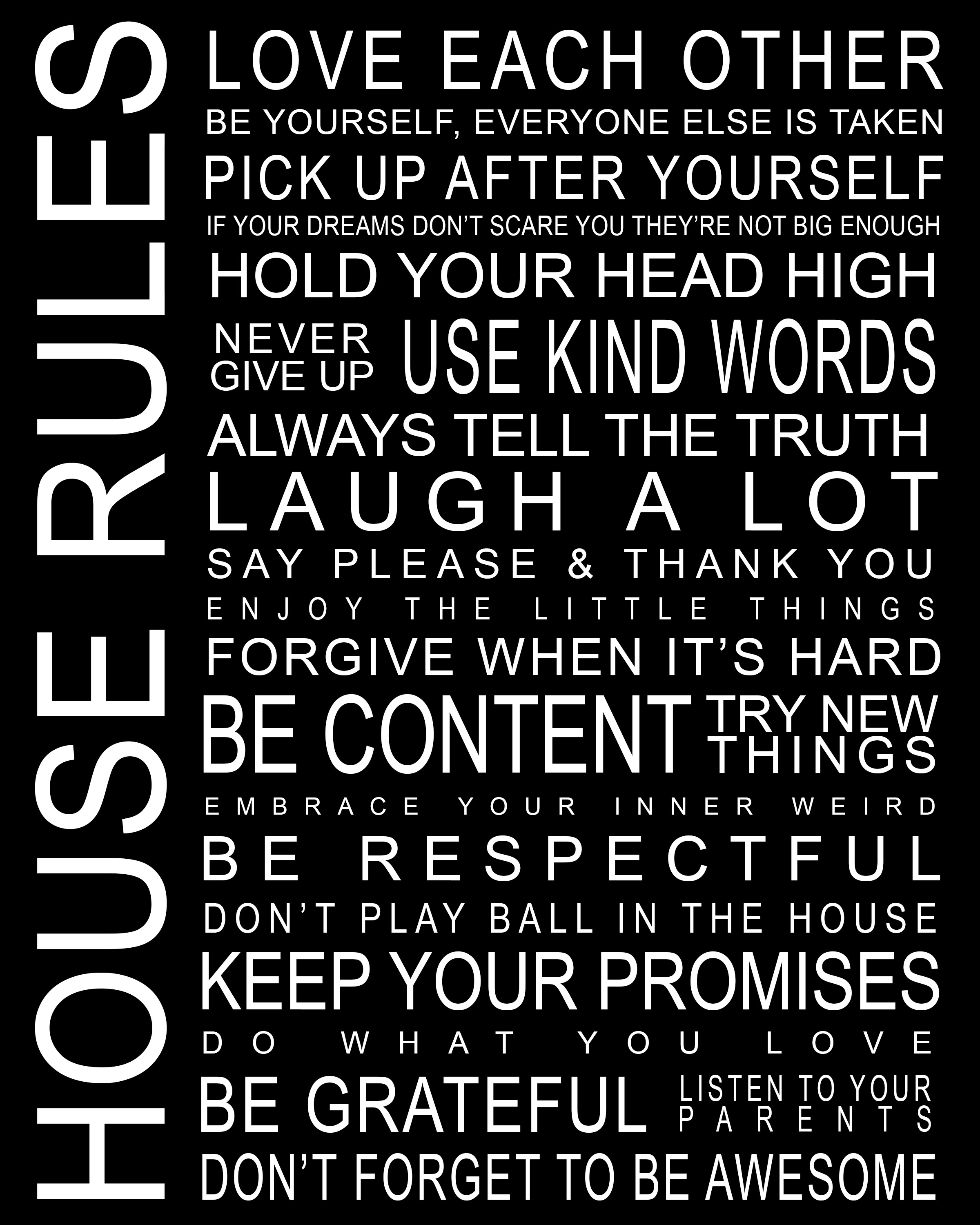
Black Background
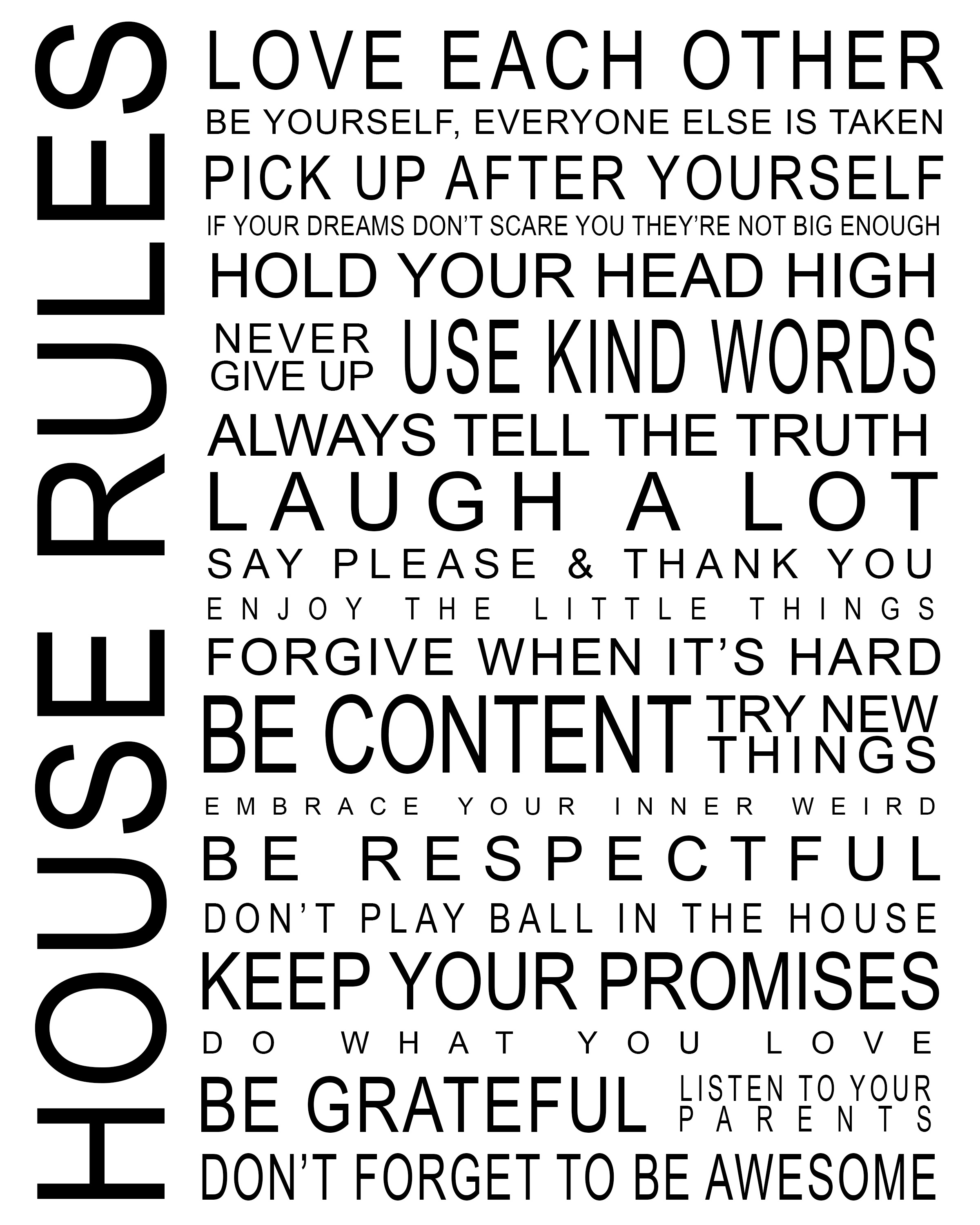
White Background
Download Free House Rules Printable
For Personal Use Only.
If you are looking for more printables, make sure to check our free printables library

We would appreciate it if you can share this printable because it helps us a lot! Just click on the buttons below. It is entirely free for you but helps us grow and produce even more content.
Share and help us grow. Thanks!
Looking for something specific?
If you have an idea for printable, let us know in the comments! We are always looking for inspiration. If you decide to print today’s freebie, make sure to share photos of your decorated room with us via Instagram or Twitter.
P.S This post includes affiliate links. By clicking them, you are supporting us. Thanks!
Comment on Free House Rules Printable – 2 color versions! by GG

Hi everyone! I know you’ve all seen those gorgeous photo collage walls in magazines, HGTV, and on Pinterest, and I’m on a mission to create my own. I created this free house rules printable to add to my growing collection of goodies.
Free House Rules Printable
It’s 8×10 in size and I created it with both black and white backgrounds so you can choose your favorite, or download both!
Black Background
White Background
Download Free House Rules Printable
For Personal Use Only.
If you are looking for more printables, make sure to check our free printables library
We would appreciate it if you can share this printable because it helps us a lot! Just click on the buttons below. It is entirely free for you but helps us grow and produce even more content.
Share and help us grow. Thanks!
Looking for something specific?
If you have an idea for printable, let us know in the comments! We are always looking for inspiration. If you decide to print today’s freebie, make sure to share photos of your decorated room with us via Instagram or Twitter.
P.S This post includes affiliate links. By clicking them, you are supporting us. Thanks!
Have You Ever Been Ghosted?
Why do you think people ghost others? What should you do if it happens to you?
I Voted
What do you think of this sticker, created by a 14-year-old? What would your “I voted” sticker look like if you made one?
Word of the Day: forlorn
This word has appeared in 73 articles on NYTimes.com in the past year. Can you use it in a sentence?
How Much Does a UX Researcher Make?

User experience (UX) is all about making products, websites, and apps easier to use. But to do that, a company needs to have a deep understanding of their users — and that’s where UX Researchers come in.
UX Researchers are tasked with diving into the minds of users to identify their needs, motivations, and behaviors. Their insights help inform the rest of the UX work and ensure that their products can (and will) help users achieve their goals.
UX research is a great choice for anyone with a passion for problem-solving and working with others, and the field is full of opportunities. Ahead, we’ll explore how much UX Researchers make, how various factors influence their salaries, and how you can get started on this career path.
What does a UX Researcher do?
UX research involves connecting with users to figure out their pain points and desired outcomes using a mix of qualitative and quantitative research methods like surveys and interviews. Nannearl Brown, a UX Researcher at Figma, explains that this requires strong communication skills — not only to connect with users, but also to synthesize your findings and share them with the rest of your team.
So what does a typical day look like for a UX Researcher? According to Nannearl, “I might be leading a workshop and facilitating the formation of ideas and hypotheses that we want to look further into and then planning how we’re going to actually get answers to the questions that we came up with.” You can read more about Nannearl’s job, including how she got in the door at Figma, here.
UX Researcher average salary
UX Researchers play a key role in the software development process, so their skills are highly valued in the tech industry. Salary expectations generally sit above the six-figure mark, with Glassdoor reporting an average of $104,771, Indeed listing an average of $110,147, and ZipRecruiter estimating $112,899. Payscale provides a slightly lower estimate for the average UX Researcher salary at $88,788.
It’s worth noting that other UX roles also earn fairly high salaries, with the average for UX Designers ranging between $98,933 and $98,579, and UX Engineers sitting around $124,346.
What factors influence a UX Researcher’s salary?
The averages listed above are a solid reference point, but a UX Researcher’s salary will depend on their location, as salaries are often adjusted to align with the area’s cost of living. Other factors include how much experience they have, and the size of the company they work for.
Location
UX research tends to be well-paying no matter where you live, but Indeed reports that the highest-paying areas for UX Researchers are:
- San Jose, CA: $166,932
- New York, NY: $127,2243
- Boston, MA: $121,966
- Seattle, WA: $117,938
- Menlo Park, CA: $103,817
- Irving, TX: $96,196
- Chicago, IL: $81,040
- San Francisco, CA: $72,361
- Mountain View, CA: $67,516
And according to ZipRecruiter, the top-paying cities for UX Researchers include::
- Atkinson, NE: $155,985
- Bridgehampton, NY: $134,961
- San Mateo, CA: $133,051
- Boston, MA: $132,336
- Deer Park, CA: $129,940
- Morton, WA: $129,912
- Covelo, CA: $129,465
- Laytonville, CA: $129,424
- Lowell, MA: $128,675
- Green River, WY: $128,247
Experience
User Interviews, a Massachusetts-based user research firm, surveyed hundreds of UX Researchers around the world and found that (unsurprisingly) salaries generally rise as a person gains more years of experience. According to the report, UX Researchers with up to 10 years of experience earn between $100,000 and $150,000, while those with over 10 years of experience range between $150,000 and $200,000.
Aside from simply breaking down salaries by years of experience, salaries can also be considered based on titles. Glassdoor provides salary breakdowns for the following titles, which typically range from associate (entry-level) to lead (the most experienced, usually with managerial responsibility for a research team):
Company size
In 2020, User Interviews found that a company’s size also influences a UX Researcher’s salary. Generally, larger companies have more resources to hire and compensate researchers and often provide more opportunities for new UX Researchers to learn from more experienced ones and develop their skills as part of a team.
The 2020 survey breaks down UX Researcher average salaries by company size:
- 0-50 employees: $77,224
- 51-200 employees: $82,077
- 201-500 employees: $89,700
- 501-1000 employees: $90,832
- 1001-5000 employees: $95,079
- 5001 or more employees: $104,810
Note that while larger companies often offer higher salaries, working at a smaller company can still be a great opportunity — offering UX Researchers a wider range of responsibilities and the chance to make a more demonstrable impact.
Top-paying employers
Ultimately, a UX Researcher’s salary will be determined by the company they work for. According to Indeed, the companies that pay their UX Researchers the highest salaries include:
- eBay: $274,800
- Grubhub: $258,697
- Twitter: $182,890
- Meta: $162,498
- IBM: $153,455
- Uber: $147,908
- Google: $139,559
- Liberty Mutual Insurance: $136,481
- LinkedIn: $133,012
- LanceSoft Inc: $130,811
- Autodesk: $128,917
- eMoney Advisor: $121,248
How to become a UX Researcher
Ready to start your journey to a lucrative career in UX research? Check out these blog posts to learn more about what the field involves and how to get started:
Then, hop into our free course Introduction to UI and UX Design. You’ll learn more about the different careers in UX and what they entail, and we’ll also show you how to use Figma — one of the most popular tools in the industry.
You can also learn how to use Miro, another popular tool, in our free course Learn User Research: Generative as you start planning and executing user research strategies. Then you can learn how to leverage your insights to create more effective designs in Learn Designing Thinking: Ideation. Sign up now to get started!
Catalog Home | Codecademy
If you’re not sure where to begin or what to learn next, this is a great place to start. Check out our top coding courses, Skill Paths, and Career Paths.
