fbpx
Home Blog Page 1597

Word + Quiz: prognostication

0
Word + Quiz: prognostication

1. a sign of something about to happen

2. a statement made about the future

3. knowledge of the future (usually said to be obtained from a divine source)

_________

The word prognostication has appeared in 16 articles on NYTimes.com in the past year, including on April 22 in “Elon Musk Predicts Tesla Driverless Taxi Fleet Next Year” by Neal E. Boudette:

Elon Musk, Tesla’s chief executive, has made plenty of bold predictions. They don’t always come true.

On Monday, Mr. Musk said the company was on the cusp of making cars that could drive themselves safely on any road. He also promised that the company would begin operating a fleet of driverless “robo taxis” by the end of next year.

… Mr. Musk’s lofty prognostications about self-driving cars and the new business of robo-taxis came as investors are bracing for troubling news from the electric carmaker. On Wednesday, Tesla is expected to report a loss for the first quarter amid slumping sales. The company previously said it delivered 63,000 cars in the quarter, down 31 percent from the fourth quarter, despite beginning sales of its Model 3 sedan in Europe and China.

_________

How Do You Feel About Active-Shooter Drills in Schools?

0
How Do You Feel About Active-Shooter Drills in Schools?

Do you have regular active-shooter drills at your school? If so, what happens during these drills? What are you expected to do? How do you feel about having to participate?

WASHINGTON — After the first day of school at Mark T. Sheehan High School in Wallingford, Conn., Mackenzie Bushey, a 15-year-old junior, came home upset that a teacher enforced a no-cellphones policy by confiscating students’ phones before class. She needed her cell, Mackenzie told her family last month, to notify police should a gunman attack her school.

And also, she said, “to say my final goodbye to you.”

Mackenzie’s mother, Brenda Bushey, blames her daughter’s fears on monthly active-shooter drills at Sheehan High. “I understand they’re trying to think about the children’s best interests,’’ Ms. Bushey said in an interview. “But you can’t help but think of how it’s affecting them.”

Nearly every American public school now conducts lockdown drills — 96 percent in 2015 and 2016 — according to the Education Department’s National Center for Education Statistics. Law enforcement officials and many school administrators say they are crucial for preparing and safeguarding students, but methods vary widely and now include drills that child trauma experts say do little more than terrify already anxious children.

“A whole new cottage industry has emerged where people who don’t know anything about kids are jumping in and adapting protocols for groups like police officers or people preparing for combat,” said Bruce D. Perry, founder of the ChildTrauma Academy, whose clinical team assists maltreated and traumatized children through counseling, research and education. As a result, Dr. Perry said in an interview, “The number of developmentally uninformed, child-uninformed and completely stupid ideas is mind-numbing.”

The news media attention and policy debate surrounding school shootings, and the heartbreaking details of massacres like Columbine, Sandy Hook and Parkland, heighten the perceived risk among parents and students alike. After the shooting last year at Marjory Stoneman Douglas High School in Parkland, Fla., nearly 60 percent of American teenagers said they were very or somewhat worried about a mass shooting at school, a similar proportion as parents, according to a survey by the Pew Research Center.

In fact, while the vast majority of gun-related homicides involving children occur in the United States, only a tiny percentage occur on school grounds. But August’s spate of mass shootings, including in Dayton, Ohio, and El Paso, Odessa and Midland, Tex., have lent urgency to a flood of new preparedness efforts.

Students 13 and older are invited to comment. All comments are moderated by the Learning Network staff, but please keep in mind that once your comment is accepted, it will be made public.

Lesson of the Day: ‘New York City’s First Skateboarding Superstar’

0
Lesson of the Day: ‘New York City’s First Skateboarding Superstar’

Please note: Each current events “Lesson of the Day” (renamed from our old “Article of the Day” feature) aims to be usable in a single class period.

Featured Article: “New York City’s First Skateboarding Superstar”

We chose this article, from The New York Times Magazine, because sports broadly, and skateboarding, specifically, are rarely brought into classrooms and academic settings. The questions and activities below will help students to consider both what it takes to make it big for one talented skater as well as the perils and pitfalls for all Gen Z’ers seeking fame and fortune in the age of social media.

Please note that this is a long article; accordingly, the questions in the Writing and Discussion section pertain to the first half of the feature.

Have you ever tried skateboarding? Are you any good? Can you do any tricks? A kickflip? Grind? Ollie? Do you think you could jump over a garbage can? What do you think makes a good skateboarder? Athleticism? Style? Fearlessness? Swagger?

In the article, you will meet Tyshawn Jones, who is described as “someone who rapidly and almost out of nowhere redefines what’s physically possible on a board.”

Scroll through the images and videos in the article.

What do you notice? What do you wonder? What do you think are the qualities that make Jones both a great skateboarder and a star in the skateboarding community? Which maneuver or trick do you find most impressive and why?

Read the article, then answer the following questions:

1. Compare the skateboard cultures in California, the sport’s “ancestral homeland,” to New York? How does Jones use the landscape of New York City to his advantage?

2. How does Jones make money from his skateboarding? Do you think it is a sustainable way to earn a living? How does his story exemplify the connection between fashion, social media and fame in 2019?

3. How did Jones’s ollie over a subway entrance in Manhattan “symbolize” his life’s journey? How is that trick like “doing a parabolic calculus problem with your body while also attempting suicide?” How would you describe the trick in your own words?

4. Toward the end of the article, Termisha Henry, Mr. Jones’s mother, says of his many sponsors:

‘You can’t depend on these companies forever. They use you until they can’t use you anymore … Don’t ever think they just love you, and they just want to give you this and that. No, they get something out of it, so make sure you always get yours.

Do you agree with her? In what ways is Jones being used by sponsors? In what ways could it be said that he is using them?

5. After reading the article, how have your views on the sport of skateboarding changed? Do you think it deserves more respect and attention? Should skaters like Jones be considered world-class athletes along side Stephen Curry and Tom Brady?

Choose one or more of the following questions to respond to in writing or discussion with your classmates:

  • What did you find most interesting or compelling about Jones? What quote, image or video stood out to you, and why?

  • Do you think Jones deserves the attention he is getting from the skateboard community and beyond? Should he be considered a positive role model? Or do you think his street-style skateboarding recklessly endangers others, or himself?

  • What life lessons can we learn from his story?

Looking Over the Edge

0
Looking Over the Edge

What do you think this image is saying? How does it relate to or comment on society or our world today? Can you relate to it personally? What is your opinion of its message?

Tell us in the comments, then read the related article to learn what this illustration is all about.


Find many more ways to use our Picture Prompt feature in this lesson plan. You can find all our Picture Prompts in this column.

2020 – The Year of the Hub

0
2020 – The Year of the Hub

Initially I was going to write about my forecasts for 2020. Then I realized that the post would mainly focus on one major trend that will impact the space in such a way (good, I believe), and thus as a result, decided to hold off on my forecasts for 2020 – until Oct.

As part of this trend, I’ve included some additional trends too, since they apply as well.  Plus for fans of VR who want to know about that trend, it’s in this post, after the Hub.

For me though, the one Trend that will take the industry by storm (in fact, it is starting to appear with a few waves)…

The BIG Trend

In studying the industry these past nine months, a trend or a series of trends have been forming and one shines through over and over again.  I’ve heard it from end users (not the trend, but what they are seeking).  I’ve heard it from vendors.  I’ve seen it, staring at me, wanting me to expose it for what it is, and what it can be. What it is and how it works, is going to be a gist of this post, because this trend, will change our industry, I believe for the better.

Many consumers, I surmise are doing it already without even realizing it, and even some vendors are too.

The HUB
H2

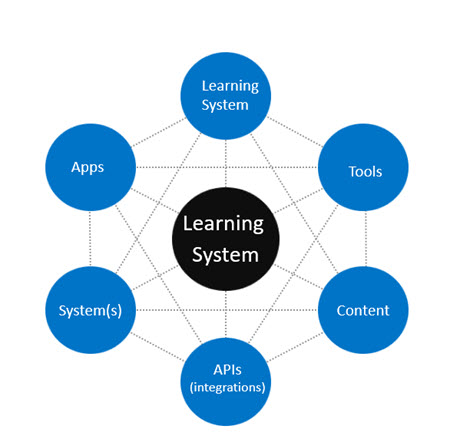
Welcome to the Hub.  The game changer in the industry, whereas every spoke is interconnected with the central component, the learning system.  The Learning System can be an LMS, a Digital Learning Platform (formally known as an LXP), Learning Platform, Sales Enablement Platform, Employee Engagement Platform and so on. 

The Center entity though is the main system.   This is where everything is driven off or from if you will.  And each component, off of each spoke, again interconnected goes from and in off the Center entity. 

In each case, push and pull exists, because even if it is content from a 3rd party provider, which in the Hub it is, the content is sitting on the content provider’s server, and not directly within your learning system.

The Connectors

Each of those bubbles if you will are part of the collective (Borg are extra).  They are a series of connectors.  You can have more connectors or less than I have above, but what I have seen is that in most cases, the number seems to be four.   But every trend is pointing towards six, hence the six connections.   Again, you can have more as your grow, but within the six, could be subsets of each connector, which without over repetition (I know too late), is still six.
H3

There isn’t any specific order in the Hub, because, wait for it.. they are all interconnected, so A can be D, D can lead to J and so forth.  But, as you can see they all connect to the Center Connection – the main entity.

Here is how I define each connector and this is based on a series of trends that I am seeing.

Learning System Connector  

Trends are pointing towards consumers selecting additional learning systems (think add-ons) to their main learning system.  This does not mean everyone is adding a Digital Learning Platform (aka an LXP) to their LMS or an LMS to their DLP (aka LXP), but what it does point towards is a multi-set of learning solutions, rather than just one to handle everything.  For example, if you are providing employee training and customer training, the trend is pointing towards people having a system for employees and another system for customers.  Now, could one system handle both? Yes, absolutely, but overall, that is not what is occurring in the industry.

Other types of Learning System Connectors could be

  • A SEP connected to your LMS or DLP (aka LXP)
  • A coaching platform connected to your LMS
  • DLP (aka LXP) connected to your LMS or vice-versa  (this is the most common, i.e. DLP (LXP) connected to an LMS
  • Micro-Learning Platform connected to your LMS or DLP (aka LXP) or Learning Platform
  • And the list goes on…

The trend points towards separate coaching platforms, albeit more LMSs and even some DLPs are adding coaching/mentoring (the term lately used in replace of coaching) functionality.   However, if you examine the e-learning industry from a system standpoint, coaching/mentoring standalone solutions are at a higher number than ever before in the space.  

Apps

An app is often listed as a mobile app.  Preferably on/off synch, but as I mentioned in my LinkedIn mini-post, most learning system vendors still are not on/off synch with said mobile app.  The overwhelmingly focus vendors seem to be using their mobile app is for learning mastery, which surprise, surprise creates under utilization of all other functionality on the app (another post for another day on why that is, and what/how it can be resolved). 

You can have multiple mobile apps with a learning system.  Unicorn LMS for example, has a mobile app for their system, another for Minds-I, and then one for CPD.  However, that is not the norm.  The majority of vendors have two mobile apps – one for iOS and one for Android (and yes, it is easy to say one mobile app with two different OS versions).

System(s)

Nowadays clients are connecting their learning system to at least one other non-learning system, usually a HRIS or HCM platform.  A push/pull of data is taking place.   If you have a performance management/talent management system you might connect it to your learning system, which in turn is having it connect to another HCM or say a Payroll system for that matter.  As noted earlier, each connector can have sub-connectors or if you prefer additional connectors expanding off the hub (I just positioned six).

Let’s say you have Salesforce.  Well that is a system is it not?  And you have Workday, but not Workday Learning.   Rather you have Absorb LMS.   Thus, under the systems connector you would have Salesforce Connector and Workday Connector tied to the learning system.  With the learning system push/pull data to each one. 

APIs/Integrations

Extremely popular in today’s e-learning industry. More and more vendors either are showing/visibility their API options (example: Mailchimp, Zapier, Office 365, etc.) or have experience with them and thus usually have the API documentation and thus the API ready to connect to your learning system.  Integrations have always existed in the learning system space, so the new trend is frankly more and more integrations, without the need to do a customization integration thanks to… APIs.  An API by the way stands for Application Program Interface.  And you can have multiple APIs too (again sub-connectors), the proper term is called a Mashup (two or more APIs, and honestly more common than having only one API). 

Content

A must in today’s learning system market. The trend line is showing that more and more 3rd party content shown in a learning system’s marketplace is visible.  Then the client selects the content (most is fee-based, although some is free), and then the content is added or placed into the learning system.  The end users (learners) can access it for free.  This is 3rd party content, not content you as the client have created and uploaded or had someone upload for you into the system.   3rd party content providers include Open Sesame, LinkedIn Learning and Skillsoft to name a few. 

When your learner is taking the content they “see” it in the learning system, in reality however, it is being housed on the content provider’s server, which is why content is another connector.  And yes, it is highly likely you will have sub-sets of content connectors.  

Two trends are appearing when it comes to 3rd party content and a learning system.  First, the majority of consumers (defined by me as the client, and not a learner per se), are selecting two or more 3rd party content providers, when purchasing the content thru a marketplace, with an exception. 

Secondly, there seems to be a trend that if a consumer purchases only one 3rd party content provider (if available in that vendor’s marketplace) – it is either LinkedIn Learning, Open Sesame, Udemy or Skillsoft.  

A third trend in the 3rd party marketplace is the lack of foreign language, which is odd, when you consider that many end users buy/use mobile apps and software to learn a foreign language. Why foreign language offerings are not making a bigger dent in the content provider marketplaces, is due to a series of factors which include among other things, lack of interest by learning system vendors to add them (#1 reason), and a lack of interest among foreign language providers to offer their content in the marketplace and those that do, tend to be very picky, which uh, doesn’t make sense.

Another factor of the lack of foreign language is due to the non listing of foreign language as an interest in any DLP (aka LXP) in the market.  I’ve yet to see one that offers end users (under their options of interests or topics) a foreign language or languages.  Clearly, people have an interest (otherwise nobody would be using Dulingo or Babbell mobile apps for example). 

Tools

Common Tools (trend wise are)

  • SaaS authoring tools 
  • SaaS publishing tools – Inkling for example, would slide under a digital publishing platform, and thus a tool
  • Business Intelligence tool (a hot trend for 2020 and yes, some learning systems have built-in ones)
  • Online Proctoring tool (Yes, I know some people will say this is better listed under systems, but I slide it here, especially in the EdTech space)
  • SaaS assessment tool
  • SaaS web conferencing tool (#1 SaaS tool in the industry tied to learning systems)
  • Any SaaS e-learning tool

What is of interest is that a trend line is clearly pointing towards consumers having at least two SaaS tools for their learning system.  I believe this will stay true for 2020, and likely will expand to at least three tools.

XR Trend

Before you race over to the latest XR trade show with learning (XR is the umbrella term for VR, AR and MR), I’d hold off buying that ticket.  While VR is popular with big companies such as Wal-Mart, and other companies who have the financial purse strings to buy custom VR content, the majority of companies even F500 and Global 2000 are in a hold pattern.   Mid-market, SMB and Small business too.  

There are multiple barriers that are causing the hold and it won’t change in 2020, although there is a glimmer of hope – one 3rd party VR and AR content provider (360Immersive – be aware the web site is a tad confusing and implies they only do safety VR, which is erroneous, because they sell canned content across multiple verticals) who has canned (off the shelf content) with course standards, SCORM 1.2 and xAPI.  I expect them to make a small dent, but most 3rd party VR content is not off the shelf and VR authoring tools are misleading in terms of true VR.

Current Barriers to mass usage of VR content in the e-learning space include:

  • Lack of off the shelf VR content with course standards (that one vendor listed above, should change that, but again, it is very rare as a whole)
  • Cost – Custom development cost is not cheap
  • Headsets – Standalone wireless headsets in the VR space is a barrier, they still do not have the same processing speed you need to avoid headaches, which is over 90hz, the latest Oculus is around 70hertz, has a low battery usage of about 2 hrs, and plenty of complaints that viewing say Netflix and YouTube is underwhelming.  Vive is far better, but the one you want, is around 1900 USD and you setup is not easy.   Oh, and then there is content. 
  • A pure VR LMS – Two do exist, one is better than the other, but even then, to have say VR training records into a regular LMS (i.e. non VR) is not doable. 

AR is a far better route to go, because most folks already have a mobile device, so AR will work with it, but finding off the shelf content for AR for learning/training isn’t that simple (again, that one vendor, could change that).

MR is the future, but not ready for prime time in 2020. The Samsung  HMD Odyssey is far the best MR headset, and that isn’t saying much. Content is the major issue here, okay capabilities too.

Bottom Line

Interconnected. 

Intertwined.

Introducing the Hub

It is already in full view,

Now get ready to see it fully utilized, in 

2020.

E-Learning 24/7


Ready for retention: Presenting a unified note-taking experience

0
Ready for retention: Presenting a unified note-taking experience

Ken Sun, Director of Product Management, Coursera

What did you learn in your last course on Coursera? What were the important concepts presented each week? Could you draw one graph the instructor used? If recalling these facts feels tough, you’re not alone. Humans tend to lose 40% of information within the first 24 hours after hearing or reading it, with the recall rate dropping significantly as time goes on. To tackle this natural struggle, we’ve developed  new note-taking functionalities on Coursera. 

Actively engaging in the learning process via note-taking is tied to increased retention and comprehension. To help you get the most out of Coursera, we’ve fine-tuned the platform’s note-taking, highlighting, and centralized note functionalities, combining the seemingly old-school tradition (a.k.a. frantically scribbling down key concepts during a lecture) with 21st century capabilities. 

Snagging Important Imagery

Screengrabs are a great way to tuck away graphs, drawings, and other visuals instructors might show during a course. Via our note-taking functionalities, we’ve made capturing and organizing images easier than ever. 

While watching a lecture, you can click the “Save Note” button below the video and save a screenshot to their course notes. You’re the only one who can view your course notes, where you can add your own commentary, for example what to observe in a given graph, and easily delete any saved lecture screenshots. While watching a lecture, corresponding notes can be accessed in real time via a sidebar on the right side of the screen.    

Without pausing the video, learners can simply click a button to capture a lecture screenshot.

No Highlighter? No Problem.

Although pictures are worth a thousand words, we know sometimes you need to remember a specific fact or phrase spoken by an instructor. As with all courses on Coursera, you have a full lecture transcript beneath each video that tracks an instructor’s voice. We’ve made it easy to pick words in that transcript you want to highlight. 

Learners can highlight within the transcript without missing the video lecture, which is visible “picture-in-picture” style in the lower-right hand corner of the screen.

When an important concept comes along, you can highlight that phrase within the transcript and click the “Save Note” pop up button. The highlight will then appear in your course notes section. As with screenshots, highlights can be edited or deleted and are accessible during a lecture via the sidebar. Additionally, saved highlights can be deleted directly within the transcript with a “Delete Note” pop up button. 

Highlights can be easily saved or deleted directly in the lecture transcript.

A Virtual Notebook 

To keep you organized and ready for a post-lecture review session, we’ve created a centralized location, a sort of digital note-keeping binder, where all of your saved images and other notes can be stored. This unified review page can be accessed from the course homepage. Notes for the course can then be viewed all at once or thematically, module by module. 

Navigate directly from a course’s homepage to the unified review page to access all notes in one place.

Starting (and Ending) Courses on a High Note

Although retention is a challenge for many of us, it’s one we can identify and address. Currently, note-taking is available on both desktop and mobile. Highlighting capabilities and the unified review page are live on desktop and coming soon for mobile.  

With the variety of options available, you can find a note-taking method that best fits your learning style. And most importantly, by using our new note-taking tools you will be able to better retain information, ultimately fostering a more engaging and beneficial learning experience for any course. 


Word + Quiz: quaver

0
Word + Quiz: quaver

verb: give off unsteady sounds, alternating in amplitude or frequency

verb: sing or play with trills, alternating with the half note above or below

noun: a tremulous sound

noun: a musical note having the time value of an eighth of a whole note

_________

The word quaver has appeared in 24 articles on NYTimes.com in the past year, including on Jan. 10 in “Andy Murray Announces Retirement This Year” by Ben Rothenberg:

Though often in the shadow of the others in the Big Four of men’s tennis — Novak Djokovic, Roger Federer and Rafael Nadal — Murray is considered by many the greatest sportsman in Scottish history. He was knighted at 29.

Just two years later, with a ranking of 230 after the injury layoff, Murray accepted his mortality in the sport. The weight of the decision was obvious in his news conference on Friday, when he broke down after the opening question: “How are you feeling, and how is the hip injury?”

“Yeah, not great,” Murray said, his voice quavering. He then sighed and let his emotions flood in, and left the interview room for about three minutes to compose himself.

_________

Word + Quiz: copacetic

0
Word + Quiz: copacetic

: completely satisfactory

_________

The word copacetic has appeared in eight articles on NYTimes.com in the past year, including on Feb. 2 in the Opinion essay “The Real Legacy of the 1970s” by Michael Tomasky:

Inflation changed how Americans thought about their economic relationships to their fellow citizens — which is to say, inflation and its associated economic traumas changed who we were as a people. It also called into question the economic assumptions that had guided the country since World War II, opening the door for new assumptions that have governed us ever since. Here is the story:

The United States of the 1960s experienced many social upheavals. But in one realm, all was copacetic. The economy roared. The gross domestic product was increasing between 2 percent and 6 percent, wages grew, jobs were stable. The year 1968 was an annus horribilis — assassinations, riots, a bitter presidential race. But the Economic Report of the President for that year reflected at length on — imagine this — “the problem of prosperity.”

_________

Introducing a New Feature: Mentor Texts

0
Introducing a New Feature: Mentor Texts

We’ve been welcoming student writers to our site for years, inviting them to post thoughts to our daily prompts, analyze multimedia compositions in our live-moderated forums, and submit formal work to our many annual contests.

But there has long been a missing piece. Though we’ve provided plenty of places to practice, we’ve only occasionally published resources to help teach young people how to write.

This school year, we’re making up for that gap with a new series called Mentor Texts.

If the term is new to you, here is how the National Writing Project defines it:

Mentor texts are pieces of literature that you — both teacher and student — can return to and reread for many different purposes. They are texts to be studied and imitated … Mentor texts help students to take risks and be different writers tomorrow than they are today. It helps them to try out new strategies and formats. They should be [texts] that students can relate to and can even read independently or with some support.

And of course, a mentor text doesn’t have to be in the form of a book — a mentor text might be a poem, a newspaper article, song lyrics, comic strips, manuals, essays, almost anything.

Thanks to the 1,000-plus fresh articles published every week on NYTimes.com, we’re in no danger of running out of possible material. In fact, the hardest part of creating this series may be choosing from among too many good options.

In general, though, each edition in the series will …

  • Spotlight an excellent piece of writing published in The New York Times, whether on the front page or from sections like Opinion, Arts, Science, Sports, Business, Food, Travel or Style.

  • Try to demystify for students the effective craft moves writers make, then provide exercises that invite them to try those same moves in their own work.

  • Show students how the writing genres they study in school can be used in real-world contexts.

You can find the whole series in this column, beginning with several intended to support narrative writing. We’ve created these — on telling short, memorable stories; using details to show rather than tell; crafting a narrative arc; and more — to accompany the first unit of our yearlong Writing Curriculum, which will culminate in a Personal Narrative Essay Contest for students. Over the course of the school year, we’ll also be creating Mentor Text editions to support argumentative, informational and analytic writing, among other genres.

On-Demand Webinar: Teach Across the Curriculum With New York Times-Inspired Daily Prompts

0
On-Demand Webinar: Teach Across the Curriculum With New York Times-Inspired Daily Prompts

Do you wish you could easily bring current issues and events into English, social studies, science or math class? For example, would you like your students to develop arguments using topics they care about, like social media, football, pop culture or the criminal justice system? Do you wish they could connect what they’re studying in class to themes and controversies relevant to today’s world, on issues from race, gender and identity to genetics and climate change?

Every school day we publish fresh writing prompts inspired by current New York Times articles, photography, art and even graphs. In this 43-minute webinar, recorded live in Feb. 2019, join Learning Network editors, along with guest students and their teachers, to explore how to use our thousands of free writing prompts for everyday low-stakes writing practice across the curriculum.

We discuss ways teachers can:

• Develop students’ argument, narrative and creative writing skills;

• Connect to cross-curricular themes and questions, from the American dream to the role of technology in our lives, and to academic subjects from genetics to immigration;

• Easily bring current events into the classroom;

• Offer an authentic audience for student voice on the important issues and questions facing our society.

Whether your students are already writing sophisticated paragraphs or just learning English as a new language, our daily writing prompts also provide a safe, moderated forum where teenagers can share their ideas publicly and engage in civil discussion with other students from around the world.

Walk away from this webinar with practical strategies for bringing more engaging and relevant writing into classrooms from middle school to college.

Resource List: In this PDF you can find links to all the resources we discuss in this webinar.

Original Webinar: You can watch the original, unedited webinar here and download a professional development certificate at the end. The webinar is free, but registration is required.

John White and Jay McGillen, A.P. English Language & Composition Teachers at Danvers High School in Danvers, Mass.

Meghan Miraglia (12th Grade) and Ezra Lombardi (11th Grade), Students at Danvers High School in Danvers, Mass.