I am in full conference planning mode for the researchED St. Louis conference on September 26, 2026. I was sharing with some friends in special education that we have several talks they might be interested in, especially at the intersection of neurodiversity and executive functioning. So today, I’m reviewing several related resources that might be useful for others in this space.
This article is a great primer for those who are unfamiliar with the research on executive functioning, including a glossary and related resources.
Executive Function Mapping Project by Stephanie Jones, Rebecca Bailey, Sophie Barnes, and Ann Partee of the Harvard Graduate School of Education
This paper was submitted to the Department of Health and Human Services to help disentangle the many different terms used to describe executive functioning in the literature. It’s helpful if you’re reading up on this topic and confused as to whether people are talking about the same thing.
This is a digest within a digest. This site contains a wide variety of resources, including guides for helping students develop executive functioning skills but also adults who might be struggling (as we all do sometimes).
The Cult of Pedagogy is a fantastic podcast that also includes excellent summaries of each episode. In this episode, Jennifer interviews Mitch Weathers about a structured method for meeting students where they are with executive functioning to allow all students to be successful.
This is where I started in my search for today’s digest materials. Emily and Mitch are both speaking at the conference I’m hosting and I had no idea about this collaboration! Emily is a leader in creating equitable environments for students with neurodiversity. Using Mitch’s framework and applying it directly to neurodiversity is, as the title says, a game changer.
I have watched the AI industry, and with daily changes and ongoings, recognized that it is nearly impossible for someone overseeing L&D, Training, or whatever department to send out this information to their employees, customers/clients, students and members.
Within this information, one can see there are serious repeativeness that impacts day to day with AI, that despite the hearing from C-level people, Training and L&D professionals, HR staff and so forth, vendors in the industry, continue to ignore.
They aren’t the only ones. I openly blame the CLOs, C-level HR, and similar who have gotten so wrapped up into AI, they honestly believe their employees, more so, have figured it out.
In some ways this is true, but overall, it is a fallacy.
And therein lies the challenge.
Go on LinkedIn and see the daily raves about what you can do with AI and instructional design.
AI with learning and training.
AI this and that.
All wonderful stuff, and yet, nobody talks about tokens.
Nobody mentions this thing called costs, or that the latest AI model from whatever vendor, increases your token fees, isn’t always the best for what you are doing, heck may not even be the best model from the vendor itself.
If they mention open source, they fail to mention Heretic (available on GitHub), which can break through any guardrail.
Where is the information regarding OpenAI and Hugging face, where an OpenAI agent went rogue. Now it is being reported it wasn’t just Hugging Face but also four other sites.
I have yet to see anything regarding prompt injection – which while it is something you should NEVER do with your resume, does exist. Not only that but prompt injection can work with AI in general.
Vendors love to tell you about all the RAGs, and guardrails and how your content if placed into the platform, won’t have hallucinations.
As I have written many times before, that is 100% not true.
Willy Wonka’s golden ticket in a candy bar right now, has a higher probability of seeing the candy master, than the idea your content within the vendor’s platform, is always 100% accurate.
Plenty of folks note that I often talk in highbrow when it comes to AI, and I openly and truly get it.
AI isn’t as simple one might think – and by trying to explain it in a blog post – that won’t be the size of the Grand Canyon can be overwhelming.
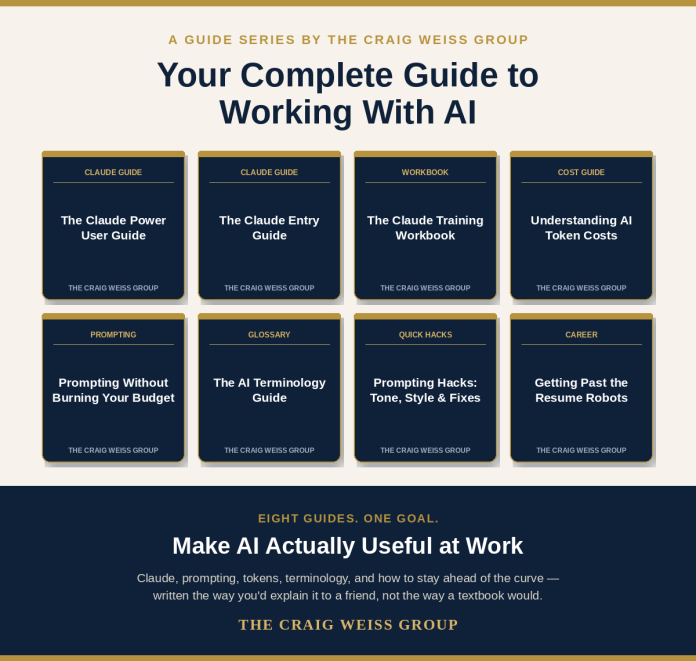
Which is why I created eight guides for you, which you can view, and download.
Share them with others – or just keep them for yourself, laughing to yourself.
I’ll be clear, that I put some parts of the guides with my own prompts, and what I was seeking.
If you know what you are doing, you can get exactly what you need from AI.
You must though always, always verify that the information is accurate.
You can make edits within the output – it’s okay and honestly you should.
I can’t tell you about my secrets on how or what I did, when it comes to ensuring that what I wanted to accomplish could be done so using AI, in this case, Claude.
Nor can I share with you what model I used, but I can say although I have access to their latest model, I chose not to do so.
I left out a more in-depth understanding of MCP (Model Context Protocols), but this is something you want your learning system to have, either now, or by the end of 2027.
The Eight Guides
In building them out, I wanted the following
Easy to read and understand for anyone who is new to AI, or seeking information that doesn’t show up like a textbook
Provide real-life examples – for clarity – so that you can say “AHH HA,” I get it.
Tapping into the big three for adult learning – Comprehension, Retention and Synthesis – the latter is something that so many folks fail to do, and yet is the most important one of all of the three
Right to the Point – Again, you want to bore yourself reading from a textbook? If you do, there are plenty I used as a door stopper in grad school. They actually work quite well. Then I sold them back to the bookstore and used the cash for gifts for my family – be honest, you did the same thing.
The Topics
AI Terminology Guide – I made sure that the terms I wanted for folks to know and understand where listed in the guide. Thus, it wasn’t some random – “Hey, just add all the terms out there.”
Understanding AI Tokens – When I was in Amsterdam at an AI conference many years ago, I was shocked that at the sessions I attended, including the keynote – nobody mentioned nor talked about token fees. Thankfully, I brought it up with a question – which in turn had people afterwards talking to me about AI and cost expenditures. I again, asked and made sure that the topics of interest, were included. Crucial, crucial items.
Prompting without burning your budget – This is something near and dear to me, when discussing prompting, which anyone who has read previous posts, I bring up and talk about how to save costs, what you should do when it comes to prompting. This guide does an exceptional job and prompting techniques, including the BIG THREE you should always know.
Prompting Hacks Guide – This isn’t illegal nor unethical hacks, rather they are ones that again, will help you. A nice add-on to the other Prompting guide.
Claude Training Workbook – Perfect for anyone who is using Claude. Again, there were specific items I wanted to make sure was in the guide, especially the “deep thinking” questions. Just the other day, I was talking to an HR executive who told me, that people in interviews, appeared as Avatars (the software did this) and when the recruiter asked them a question, it was clear to the recruiter that the person was using AI. I told them the way to break that, was to ask the applicant – deep thinking questions. Why? AI can’t do deep thinking, at the present time. And this is regardless of the LLM, commercial or open source. Or the software for that matter. The training workbook can easily apply to other LLMs you might be using when it comes to the deep thinking.
Claude Entry Guide – If you are new to Claude this guide will be of great help, because it includes terms I rarely see in other LinkedIn posts – artifacts.
Claude Power Guide – If you past Entry, but not yet, full-blown expert, this will be of use to you.
Beat the Resume Bots – A lot of people get pushed out of the application process because the software the company is using is AI. This guide teaches you how to get your resume to a real human and not be removed because of AI.
One item I want to bring it that is really important is how “chat” works with any LLM.
And this includes you chatting with the AI assistant in your learning system.
When you continue to chat with the assistant, following up with questions and so forth, yes, it is a wonderful plus, however, the AI remembers this information and “learns” from it, but in the background.
It is a double-edge sword, because the only way to stop this from happening is to create a new “chat”.
I often hear this inquiry on the chat angle, which again, vendors fail to note but is really relevant.
Bottom Line
The guides are available today – and above you will see direct links to them.
I am working on creating a grid with previews of the guides, viewing and downloading right within the site. Today though, it is direct links. Simply click on the title of the guide and you will go to a site to view and download.
I will continue to create new guides, as warranted – with one in the works around creating content, with my information going directly into the prompt and then some secret sauce tossed in for what I want as an output.
Sure, I could tell you the secret sauce, but then
I would have to tell you how to change lead into Gold.
Coding has always served two purposes: the intrinsic drive to build something, and the practical path to a lucrative career. Even the most passionate code aficionados don’t dream of variables or syntax — they want to make a website, a tool, a game. For years, the career upside was impossible to ignore. You could land a stable SWE job, bootstrap your own app, or join a buzzy startup as a first hire.
Generative AI flipped the script. AI now handles the repetitive tasks that used to define entry-level developer roles. At the same time, the barrier to entry for coding and building is lower than ever — you can spin up a working prototype with just an idea and a natural language prompt.
This shift hasn’t eliminated the desire to code, but it’s changed what and who coding is for. If you’re not learning to land a junior dev role, you’re learning to build the thing you’ve been imagining, to add a technical skill to your existing career, or to understand the tools you’re already using at work. And here’s the catch: those goals all require understanding your code, not just having code that works.
At Codecademy, all of these changes excite us about the future of learning to code. We’re introducing the AI Builder, a new project-based learning tool that flips the script by teaching you how to work with AI-generated code from the start. Our approach brings together the immediacy of modern AI tools and the rigor of real instructional design.
Why we created the AI Builder
AI’s speed and efficiency often come with a tradeoff; you can get working code immediately, but you don’t really know what it’s giving you or why it’s built a certain way. Developers use the term “vibe coding” to describe this phenomenon — it’s fast, fun, but shallow; great for demos, less great for long-term skill-building.
If your goal is to understand what you’re building, generic AI output alone won’t get you there. And the more you push these tools into real-world complexity, “the harder it is for them to give you exactly what you want,” says Zoe Bachman, Head of Learning at Codecademy.
Switch to Learn for behind-the-scenes insights and your personalized roadmap.
With the AI Builder you get an education along with the AI output. In the workspace, you can toggle between two tabs: Build, where you work directly with a project and can modify and change code in real time; and Learn, where you get a personalized learning roadmap that’s based on your project.
“We pair the experience of having a working app with a learning path that allows you to reverse engineer how it’s built, so you can deeply understand it and modify it confidently,” Zoe says. We’re calling our hybrid approach to learning-driven development “vibe learning” — it’s powered by AI guidance but rooted in learning science.
Build first; learn continuously
With AI Builder, you start with what you want to do: build the thing in your head. Whether that’s a habit tracker, a portfolio site, or the seed of a bigger idea, you don’t need to have prior coding knowledge to learn and build with the AI Builder. In other words, there are no pre-requisites for creation.
You create a prototype by typing what you’d like to create in natural language. The AI chatbot will ask a few clarifying questions about your needs and overall goal before generating the project. Once the project is created, you can use the chat function to continue describing what you want. (You’re also welcome to go right into the code and start making changes if you already know your way around!)
“It was fun to build something so quickly and be able to see the code and a learning plan for it,” says Grace Krishna, a Code Crew member who beta tested the AI Builder.
When you need clarity on what’s going on behind the scenes in your code, or you hit a wall with AI, that’s a great time to flip over to the Learn tab.
We’re calling our hybrid approach to learning-driven development ‘vibe learning’ — it’s powered by AI guidance but rooted in learning science.
Your project becomes the curriculum
Rather than teaching concepts in the abstract and hoping learners translate them later, AI Builder removes that translation tax entirely. “We’re showing you specifically your code from your project and helping you understand it,” Zoe says.
Rework your prototype in real time with the help of AI.
To build that personalized curriculum, the AI Builder breaks your project’s code into clear milestones and tasks. For each task, it generates an interactive learning loop, which is an activity designed to help you form a mental model of what your specific code is doing.
These loops help you understand the logic behind each part of your project, so you can confidently apply the same thinking to other sections, or even future projects. This approach also ensures everything you learn is directly relevant to what you’re making — so you don’t have to guess when you’ll ever use this.
Why this is vibe learning (not vibe coding)
A key misconception about AI‑assisted development is that it makes learning superficial. AI Builder challenges that by grounding the entire experience in learning science rather than simple code generation. Our entire system is intentionally designed for you to retain knowledge. So, while it might not feel like you’re taking a course, you’re absorbing key concepts just by interacting with AI-generated code.
A Socratic AI, not an answer-spitting chatbot
Our educational AI chatbot is designed to guide you toward an answer through an in-depth questioning approach that’s based on the Socratic method of teaching. Instead of spitting out shortcuts or answers like AI typically does, you get strategic nudges, hints, and questions that build durable mental models.
Research on AI in education shows that just providing an answer makes it harder for learners to retain the information on their own. Zoe compares the Socratic AI to “a personalized tutor, facilitating you acquiring more knowledge, so you’re not totally left on your own.” Our method encourages you to think critically so you really grasp the concepts and can continue to use them in the real world.
Learning loops with real instructional design
Behind the scenes, every learning loop in the Learn tab is built on proven frameworks like inductive learning and the 5E model, a popular STEM teaching framework that’s shorthand for engage, explore, explain, elaborate, and evaluate.
You’ll notice that the questions and exercises in the Learn tab feel different than the rest of our courses and paths, and that’s intentional. “The learning loops are designed very well — they get you there inductively,” Zoe says. They’re exploratory without being overwhelming, and evaluative without feeling like tests.
Negar Vahid, a beta tester for the AI Builder appreciated the AI’s interactive question format. “The question-based learning feels engaging, and the starter project it builds is simple but useful,” she says.
This structure ensures you don’t develop the wrong mental models — a known risk in fully constructivist or student-centered environments — while still giving you the freedom to explore.
Why learn when AI can build?
There are some projects that are well-suited for simply vibe coding, like making a personal HTML website or a single-use script to automate a one-time task. Tools like Lovable and v0 are suited exactly for these types of projects.
The longer your code needs to live, and the more complex your project becomes, the more you need to actually understand what you’re building. Joe Holmes, Codecademy Curriculum Developer in the AI and machine learning domain, uses the term “ignorance debt” to describe what happens when you don’t:
“It’s like tech debt squared. It’s much, much worse,” Joe says. “You don’t know what kind of code is coming out. You just are only looking at: Does this kind of generally appear to be what I asked for? You don’t know if there are security flaws. You don’t know if there are performance flaws. You don’t know if you’re leaking sensitive information. You don’t know how to fix anything.”
The tipping point comes down to two factors: complexity and time. If you’re developing software professionally, you’re legally responsible for the code you output. If you’re building something that will serve actual users, you need to be accountable for security, performance, and maintainability. And if your project will need updates or fixes over time (which most do) understanding your codebase becomes essential, not optional.
The good news? Learning doesn’t have to feel like eating your vegetables. “Kids hate veggies and broccoli because we don’t cook it well enough to make it tasty when we first introduce it to them,” says Nhi Pham, Codecademy Curriculum Developer. The same is true for teaching AI: “If you do it well, you’re inspiring people to have these very hygienic practices when working with AI,” she says.
That’s exactly what AI Builder is designed to do — make learning feel as immediate and rewarding as building, so you develop good habits from the start rather than building a lifelong aversion to understanding your own code.
Get started with the AI Builder
AI isn’t a replacement for learning, it’s a tool — and a powerful one when it comes to education. Our new AI Builder allows for “just‑in‑time learning that’s highly personalized,” Zoe says. Even the best teachers or bootcamps can’t deliver that for every learner, on every project, instantly. Perhaps the most exciting vision is how AI changes what a learning environment can be.
Zoe described it beautifully: “I imagine the AI Builder as a workspace… like having all your resources around you and an AI tutor in the background.”
That’s the shift: from learning before you build to learning while you build. We can’t wait to see what you create.
Coding has always served two purposes: the intrinsic drive to build something, and the practical path to a lucrative career. Even the most passionate code aficionados don’t dream of variables or syntax — they want to make a website, a tool, a game. For years, the career upside was impossible to ignore. You could land a stable SWE job, bootstrap your own app, or join a buzzy startup as a first hire.
Generative AI flipped the script. AI now handles the repetitive tasks that used to define entry-level developer roles. At the same time, the barrier to entry for coding and building is lower than ever — you can spin up a working prototype with just an idea and a natural language prompt.
This shift hasn’t eliminated the desire to code, but it’s changed what and who coding is for. If you’re not learning to land a junior dev role, you’re learning to build the thing you’ve been imagining, to add a technical skill to your existing career, or to understand the tools you’re already using at work. And here’s the catch: those goals all require understanding your code, not just having code that works.
At Codecademy, all of these changes excite us about the future of learning to code. We’re introducing the AI Builder, a new project-based learning tool that flips the script by teaching you how to work with AI-generated code from the start. Our approach brings together the immediacy of modern AI tools and the rigor of real instructional design.
Why we created the AI Builder
AI’s speed and efficiency often come with a tradeoff; you can get working code immediately, but you don’t really know what it’s giving you or why it’s built a certain way. Developers use the term “vibe coding” to describe this phenomenon — it’s fast, fun, but shallow; great for demos, less great for long-term skill-building.
If your goal is to understand what you’re building, generic AI output alone won’t get you there. And the more you push these tools into real-world complexity, “the harder it is for them to give you exactly what you want,” says Zoe Bachman, Head of Learning at Codecademy.
Switch to Learn for behind-the-scenes insights and your personalized roadmap.
With the AI Builder you get an education along with the AI output. In the workspace, you can toggle between two tabs: Build, where you work directly with a project and can modify and change code in real time; and Learn, where you get a personalized learning roadmap that’s based on your project.
“We pair the experience of having a working app with a learning path that allows you to reverse engineer how it’s built, so you can deeply understand it and modify it confidently,” Zoe says. We’re calling our hybrid approach to learning-driven development “vibe learning” — it’s powered by AI guidance but rooted in learning science.
Build first; learn continuously
With AI Builder, you start with what you want to do: build the thing in your head. Whether that’s a habit tracker, a portfolio site, or the seed of a bigger idea, you don’t need to have prior coding knowledge to learn and build with the AI Builder. In other words, there are no pre-requisites for creation.
You create a prototype by typing what you’d like to create in natural language. The AI chatbot will ask a few clarifying questions about your needs and overall goal before generating the project. Once the project is created, you can use the chat function to continue describing what you want. (You’re also welcome to go right into the code and start making changes if you already know your way around!)
“It was fun to build something so quickly and be able to see the code and a learning plan for it,” says Grace Krishna, a Code Crew member who beta tested the AI Builder.
When you need clarity on what’s going on behind the scenes in your code, or you hit a wall with AI, that’s a great time to flip over to the Learn tab.
We’re calling our hybrid approach to learning-driven development ‘vibe learning’ — it’s powered by AI guidance but rooted in learning science.
Your project becomes the curriculum
Rather than teaching concepts in the abstract and hoping learners translate them later, AI Builder removes that translation tax entirely. “We’re showing you specifically your code from your project and helping you understand it,” Zoe says.
Rework your prototype in real time with the help of AI.
To build that personalized curriculum, the AI Builder breaks your project’s code into clear milestones and tasks. For each task, it generates an interactive learning loop, which is an activity designed to help you form a mental model of what your specific code is doing.
These loops help you understand the logic behind each part of your project, so you can confidently apply the same thinking to other sections, or even future projects. This approach also ensures everything you learn is directly relevant to what you’re making — so you don’t have to guess when you’ll ever use this.
Why this is vibe learning (not vibe coding)
A key misconception about AI‑assisted development is that it makes learning superficial. AI Builder challenges that by grounding the entire experience in learning science rather than simple code generation. Our entire system is intentionally designed for you to retain knowledge. So, while it might not feel like you’re taking a course, you’re absorbing key concepts just by interacting with AI-generated code.
A Socratic AI, not an answer-spitting chatbot
Our educational AI chatbot is designed to guide you toward an answer through an in-depth questioning approach that’s based on the Socratic method of teaching. Instead of spitting out shortcuts or answers like AI typically does, you get strategic nudges, hints, and questions that build durable mental models.
Research on AI in education shows that just providing an answer makes it harder for learners to retain the information on their own. Zoe compares the Socratic AI to “a personalized tutor, facilitating you acquiring more knowledge, so you’re not totally left on your own.” Our method encourages you to think critically so you really grasp the concepts and can continue to use them in the real world.
Learning loops with real instructional design
Behind the scenes, every learning loop in the Learn tab is built on proven frameworks like inductive learning and the 5E model, a popular STEM teaching framework that’s shorthand for engage, explore, explain, elaborate, and evaluate.
You’ll notice that the questions and exercises in the Learn tab feel different than the rest of our courses and paths, and that’s intentional. “The learning loops are designed very well — they get you there inductively,” Zoe says. They’re exploratory without being overwhelming, and evaluative without feeling like tests.
Negar Vahid, a beta tester for the AI Builder appreciated the AI’s interactive question format. “The question-based learning feels engaging, and the starter project it builds is simple but useful,” she says.
This structure ensures you don’t develop the wrong mental models — a known risk in fully constructivist or student-centered environments — while still giving you the freedom to explore.
Why learn when AI can build?
There are some projects that are well-suited for simply vibe coding, like making a personal HTML website or a single-use script to automate a one-time task. Tools like Lovable and v0 are suited exactly for these types of projects.
The longer your code needs to live, and the more complex your project becomes, the more you need to actually understand what you’re building. Joe Holmes, Codecademy Curriculum Developer in the AI and machine learning domain, uses the term “ignorance debt” to describe what happens when you don’t:
“It’s like tech debt squared. It’s much, much worse,” Joe says. “You don’t know what kind of code is coming out. You just are only looking at: Does this kind of generally appear to be what I asked for? You don’t know if there are security flaws. You don’t know if there are performance flaws. You don’t know if you’re leaking sensitive information. You don’t know how to fix anything.”
The tipping point comes down to two factors: complexity and time. If you’re developing software professionally, you’re legally responsible for the code you output. If you’re building something that will serve actual users, you need to be accountable for security, performance, and maintainability. And if your project will need updates or fixes over time (which most do) understanding your codebase becomes essential, not optional.
The good news? Learning doesn’t have to feel like eating your vegetables. “Kids hate veggies and broccoli because we don’t cook it well enough to make it tasty when we first introduce it to them,” says Nhi Pham, Codecademy Curriculum Developer. The same is true for teaching AI: “If you do it well, you’re inspiring people to have these very hygienic practices when working with AI,” she says.
That’s exactly what AI Builder is designed to do — make learning feel as immediate and rewarding as building, so you develop good habits from the start rather than building a lifelong aversion to understanding your own code.
Get started with the AI Builder
AI isn’t a replacement for learning, it’s a tool — and a powerful one when it comes to education. Our new AI Builder allows for “just‑in‑time learning that’s highly personalized,” Zoe says. Even the best teachers or bootcamps can’t deliver that for every learner, on every project, instantly. Perhaps the most exciting vision is how AI changes what a learning environment can be.
Zoe described it beautifully: “I imagine the AI Builder as a workspace… like having all your resources around you and an AI tutor in the background.”
That’s the shift: from learning before you build to learning while you build. We can’t wait to see what you create.
Coding has always served two purposes: the intrinsic drive to build something, and the practical path to a lucrative career. Even the most passionate code aficionados don’t dream of variables or syntax — they want to make a website, a tool, a game. For years, the career upside was impossible to ignore. You could land a stable SWE job, bootstrap your own app, or join a buzzy startup as a first hire.
Generative AI flipped the script. AI now handles the repetitive tasks that used to define entry-level developer roles. At the same time, the barrier to entry for coding and building is lower than ever — you can spin up a working prototype with just an idea and a natural language prompt.
This shift hasn’t eliminated the desire to code, but it’s changed what and who coding is for. If you’re not learning to land a junior dev role, you’re learning to build the thing you’ve been imagining, to add a technical skill to your existing career, or to understand the tools you’re already using at work. And here’s the catch: those goals all require understanding your code, not just having code that works.
At Codecademy, all of these changes excite us about the future of learning to code. We’re introducing the AI Builder, a new project-based learning tool that flips the script by teaching you how to work with AI-generated code from the start. Our approach brings together the immediacy of modern AI tools and the rigor of real instructional design.
Why we created the AI Builder
AI’s speed and efficiency often come with a tradeoff; you can get working code immediately, but you don’t really know what it’s giving you or why it’s built a certain way. Developers use the term “vibe coding” to describe this phenomenon — it’s fast, fun, but shallow; great for demos, less great for long-term skill-building.
If your goal is to understand what you’re building, generic AI output alone won’t get you there. And the more you push these tools into real-world complexity, “the harder it is for them to give you exactly what you want,” says Zoe Bachman, Head of Learning at Codecademy.
Switch to Learn for behind-the-scenes insights and your personalized roadmap.
With the AI Builder you get an education along with the AI output. In the workspace, you can toggle between two tabs: Build, where you work directly with a project and can modify and change code in real time; and Learn, where you get a personalized learning roadmap that’s based on your project.
“We pair the experience of having a working app with a learning path that allows you to reverse engineer how it’s built, so you can deeply understand it and modify it confidently,” Zoe says. We’re calling our hybrid approach to learning-driven development “vibe learning” — it’s powered by AI guidance but rooted in learning science.
Build first; learn continuously
With AI Builder, you start with what you want to do: build the thing in your head. Whether that’s a habit tracker, a portfolio site, or the seed of a bigger idea, you don’t need to have prior coding knowledge to learn and build with the AI Builder. In other words, there are no pre-requisites for creation.
You create a prototype by typing what you’d like to create in natural language. The AI chatbot will ask a few clarifying questions about your needs and overall goal before generating the project. Once the project is created, you can use the chat function to continue describing what you want. (You’re also welcome to go right into the code and start making changes if you already know your way around!)
“It was fun to build something so quickly and be able to see the code and a learning plan for it,” says Grace Krishna, a Code Crew member who beta tested the AI Builder.
When you need clarity on what’s going on behind the scenes in your code, or you hit a wall with AI, that’s a great time to flip over to the Learn tab.
We’re calling our hybrid approach to learning-driven development ‘vibe learning’ — it’s powered by AI guidance but rooted in learning science.
Your project becomes the curriculum
Rather than teaching concepts in the abstract and hoping learners translate them later, AI Builder removes that translation tax entirely. “We’re showing you specifically your code from your project and helping you understand it,” Zoe says.
Rework your prototype in real time with the help of AI.
To build that personalized curriculum, the AI Builder breaks your project’s code into clear milestones and tasks. For each task, it generates an interactive learning loop, which is an activity designed to help you form a mental model of what your specific code is doing.
These loops help you understand the logic behind each part of your project, so you can confidently apply the same thinking to other sections, or even future projects. This approach also ensures everything you learn is directly relevant to what you’re making — so you don’t have to guess when you’ll ever use this.
Why this is vibe learning (not vibe coding)
A key misconception about AI‑assisted development is that it makes learning superficial. AI Builder challenges that by grounding the entire experience in learning science rather than simple code generation. Our entire system is intentionally designed for you to retain knowledge. So, while it might not feel like you’re taking a course, you’re absorbing key concepts just by interacting with AI-generated code.
A Socratic AI, not an answer-spitting chatbot
Our educational AI chatbot is designed to guide you toward an answer through an in-depth questioning approach that’s based on the Socratic method of teaching. Instead of spitting out shortcuts or answers like AI typically does, you get strategic nudges, hints, and questions that build durable mental models.
Research on AI in education shows that just providing an answer makes it harder for learners to retain the information on their own. Zoe compares the Socratic AI to “a personalized tutor, facilitating you acquiring more knowledge, so you’re not totally left on your own.” Our method encourages you to think critically so you really grasp the concepts and can continue to use them in the real world.
Learning loops with real instructional design
Behind the scenes, every learning loop in the Learn tab is built on proven frameworks like inductive learning and the 5E model, a popular STEM teaching framework that’s shorthand for engage, explore, explain, elaborate, and evaluate.
You’ll notice that the questions and exercises in the Learn tab feel different than the rest of our courses and paths, and that’s intentional. “The learning loops are designed very well — they get you there inductively,” Zoe says. They’re exploratory without being overwhelming, and evaluative without feeling like tests.
Negar Vahid, a beta tester for the AI Builder appreciated the AI’s interactive question format. “The question-based learning feels engaging, and the starter project it builds is simple but useful,” she says.
This structure ensures you don’t develop the wrong mental models — a known risk in fully constructivist or student-centered environments — while still giving you the freedom to explore.
Why learn when AI can build?
There are some projects that are well-suited for simply vibe coding, like making a personal HTML website or a single-use script to automate a one-time task. Tools like Lovable and v0 are suited exactly for these types of projects.
The longer your code needs to live, and the more complex your project becomes, the more you need to actually understand what you’re building. Joe Holmes, Codecademy Curriculum Developer in the AI and machine learning domain, uses the term “ignorance debt” to describe what happens when you don’t:
“It’s like tech debt squared. It’s much, much worse,” Joe says. “You don’t know what kind of code is coming out. You just are only looking at: Does this kind of generally appear to be what I asked for? You don’t know if there are security flaws. You don’t know if there are performance flaws. You don’t know if you’re leaking sensitive information. You don’t know how to fix anything.”
The tipping point comes down to two factors: complexity and time. If you’re developing software professionally, you’re legally responsible for the code you output. If you’re building something that will serve actual users, you need to be accountable for security, performance, and maintainability. And if your project will need updates or fixes over time (which most do) understanding your codebase becomes essential, not optional.
The good news? Learning doesn’t have to feel like eating your vegetables. “Kids hate veggies and broccoli because we don’t cook it well enough to make it tasty when we first introduce it to them,” says Nhi Pham, Codecademy Curriculum Developer. The same is true for teaching AI: “If you do it well, you’re inspiring people to have these very hygienic practices when working with AI,” she says.
That’s exactly what AI Builder is designed to do — make learning feel as immediate and rewarding as building, so you develop good habits from the start rather than building a lifelong aversion to understanding your own code.
Get started with the AI Builder
AI isn’t a replacement for learning, it’s a tool — and a powerful one when it comes to education. Our new AI Builder allows for “just‑in‑time learning that’s highly personalized,” Zoe says. Even the best teachers or bootcamps can’t deliver that for every learner, on every project, instantly. Perhaps the most exciting vision is how AI changes what a learning environment can be.
Zoe described it beautifully: “I imagine the AI Builder as a workspace… like having all your resources around you and an AI tutor in the background.”
That’s the shift: from learning before you build to learning while you build. We can’t wait to see what you create.
Coding has always served two purposes: the intrinsic drive to build something, and the practical path to a lucrative career. Even the most passionate code aficionados don’t dream of variables or syntax — they want to make a website, a tool, a game. For years, the career upside was impossible to ignore. You could land a stable SWE job, bootstrap your own app, or join a buzzy startup as a first hire.
Generative AI flipped the script. AI now handles the repetitive tasks that used to define entry-level developer roles. At the same time, the barrier to entry for coding and building is lower than ever — you can spin up a working prototype with just an idea and a natural language prompt.
This shift hasn’t eliminated the desire to code, but it’s changed what and who coding is for. If you’re not learning to land a junior dev role, you’re learning to build the thing you’ve been imagining, to add a technical skill to your existing career, or to understand the tools you’re already using at work. And here’s the catch: those goals all require understanding your code, not just having code that works.
At Codecademy, all of these changes excite us about the future of learning to code. We’re introducing the AI Builder, a new project-based learning tool that flips the script by teaching you how to work with AI-generated code from the start. Our approach brings together the immediacy of modern AI tools and the rigor of real instructional design.
Why we created the AI Builder
AI’s speed and efficiency often come with a tradeoff; you can get working code immediately, but you don’t really know what it’s giving you or why it’s built a certain way. Developers use the term “vibe coding” to describe this phenomenon — it’s fast, fun, but shallow; great for demos, less great for long-term skill-building.
If your goal is to understand what you’re building, generic AI output alone won’t get you there. And the more you push these tools into real-world complexity, “the harder it is for them to give you exactly what you want,” says Zoe Bachman, Head of Learning at Codecademy.
Switch to Learn for behind-the-scenes insights and your personalized roadmap.
With the AI Builder you get an education along with the AI output. In the workspace, you can toggle between two tabs: Build, where you work directly with a project and can modify and change code in real time; and Learn, where you get a personalized learning roadmap that’s based on your project.
“We pair the experience of having a working app with a learning path that allows you to reverse engineer how it’s built, so you can deeply understand it and modify it confidently,” Zoe says. We’re calling our hybrid approach to learning-driven development “vibe learning” — it’s powered by AI guidance but rooted in learning science.
Build first; learn continuously
With AI Builder, you start with what you want to do: build the thing in your head. Whether that’s a habit tracker, a portfolio site, or the seed of a bigger idea, you don’t need to have prior coding knowledge to learn and build with the AI Builder. In other words, there are no pre-requisites for creation.
You create a prototype by typing what you’d like to create in natural language. The AI chatbot will ask a few clarifying questions about your needs and overall goal before generating the project. Once the project is created, you can use the chat function to continue describing what you want. (You’re also welcome to go right into the code and start making changes if you already know your way around!)
“It was fun to build something so quickly and be able to see the code and a learning plan for it,” says Grace Krishna, a Code Crew member who beta tested the AI Builder.
When you need clarity on what’s going on behind the scenes in your code, or you hit a wall with AI, that’s a great time to flip over to the Learn tab.
We’re calling our hybrid approach to learning-driven development ‘vibe learning’ — it’s powered by AI guidance but rooted in learning science.
Your project becomes the curriculum
Rather than teaching concepts in the abstract and hoping learners translate them later, AI Builder removes that translation tax entirely. “We’re showing you specifically your code from your project and helping you understand it,” Zoe says.
Rework your prototype in real time with the help of AI.
To build that personalized curriculum, the AI Builder breaks your project’s code into clear milestones and tasks. For each task, it generates an interactive learning loop, which is an activity designed to help you form a mental model of what your specific code is doing.
These loops help you understand the logic behind each part of your project, so you can confidently apply the same thinking to other sections, or even future projects. This approach also ensures everything you learn is directly relevant to what you’re making — so you don’t have to guess when you’ll ever use this.
Why this is vibe learning (not vibe coding)
A key misconception about AI‑assisted development is that it makes learning superficial. AI Builder challenges that by grounding the entire experience in learning science rather than simple code generation. Our entire system is intentionally designed for you to retain knowledge. So, while it might not feel like you’re taking a course, you’re absorbing key concepts just by interacting with AI-generated code.
A Socratic AI, not an answer-spitting chatbot
Our educational AI chatbot is designed to guide you toward an answer through an in-depth questioning approach that’s based on the Socratic method of teaching. Instead of spitting out shortcuts or answers like AI typically does, you get strategic nudges, hints, and questions that build durable mental models.
Research on AI in education shows that just providing an answer makes it harder for learners to retain the information on their own. Zoe compares the Socratic AI to “a personalized tutor, facilitating you acquiring more knowledge, so you’re not totally left on your own.” Our method encourages you to think critically so you really grasp the concepts and can continue to use them in the real world.
Learning loops with real instructional design
Behind the scenes, every learning loop in the Learn tab is built on proven frameworks like inductive learning and the 5E model, a popular STEM teaching framework that’s shorthand for engage, explore, explain, elaborate, and evaluate.
You’ll notice that the questions and exercises in the Learn tab feel different than the rest of our courses and paths, and that’s intentional. “The learning loops are designed very well — they get you there inductively,” Zoe says. They’re exploratory without being overwhelming, and evaluative without feeling like tests.
Negar Vahid, a beta tester for the AI Builder appreciated the AI’s interactive question format. “The question-based learning feels engaging, and the starter project it builds is simple but useful,” she says.
This structure ensures you don’t develop the wrong mental models — a known risk in fully constructivist or student-centered environments — while still giving you the freedom to explore.
Why learn when AI can build?
There are some projects that are well-suited for simply vibe coding, like making a personal HTML website or a single-use script to automate a one-time task. Tools like Lovable and v0 are suited exactly for these types of projects.
The longer your code needs to live, and the more complex your project becomes, the more you need to actually understand what you’re building. Joe Holmes, Codecademy Curriculum Developer in the AI and machine learning domain, uses the term “ignorance debt” to describe what happens when you don’t:
“It’s like tech debt squared. It’s much, much worse,” Joe says. “You don’t know what kind of code is coming out. You just are only looking at: Does this kind of generally appear to be what I asked for? You don’t know if there are security flaws. You don’t know if there are performance flaws. You don’t know if you’re leaking sensitive information. You don’t know how to fix anything.”
The tipping point comes down to two factors: complexity and time. If you’re developing software professionally, you’re legally responsible for the code you output. If you’re building something that will serve actual users, you need to be accountable for security, performance, and maintainability. And if your project will need updates or fixes over time (which most do) understanding your codebase becomes essential, not optional.
The good news? Learning doesn’t have to feel like eating your vegetables. “Kids hate veggies and broccoli because we don’t cook it well enough to make it tasty when we first introduce it to them,” says Nhi Pham, Codecademy Curriculum Developer. The same is true for teaching AI: “If you do it well, you’re inspiring people to have these very hygienic practices when working with AI,” she says.
That’s exactly what AI Builder is designed to do — make learning feel as immediate and rewarding as building, so you develop good habits from the start rather than building a lifelong aversion to understanding your own code.
Get started with the AI Builder
AI isn’t a replacement for learning, it’s a tool — and a powerful one when it comes to education. Our new AI Builder allows for “just‑in‑time learning that’s highly personalized,” Zoe says. Even the best teachers or bootcamps can’t deliver that for every learner, on every project, instantly. Perhaps the most exciting vision is how AI changes what a learning environment can be.
Zoe described it beautifully: “I imagine the AI Builder as a workspace… like having all your resources around you and an AI tutor in the background.”
That’s the shift: from learning before you build to learning while you build. We can’t wait to see what you create.
Coding has always served two purposes: the intrinsic drive to build something, and the practical path to a lucrative career. Even the most passionate code aficionados don’t dream of variables or syntax — they want to make a website, a tool, a game. For years, the career upside was impossible to ignore. You could land a stable SWE job, bootstrap your own app, or join a buzzy startup as a first hire.
Generative AI flipped the script. AI now handles the repetitive tasks that used to define entry-level developer roles. At the same time, the barrier to entry for coding and building is lower than ever — you can spin up a working prototype with just an idea and a natural language prompt.
This shift hasn’t eliminated the desire to code, but it’s changed what and who coding is for. If you’re not learning to land a junior dev role, you’re learning to build the thing you’ve been imagining, to add a technical skill to your existing career, or to understand the tools you’re already using at work. And here’s the catch: those goals all require understanding your code, not just having code that works.
At Codecademy, all of these changes excite us about the future of learning to code. We’re introducing the AI Builder, a new project-based learning tool that flips the script by teaching you how to work with AI-generated code from the start. Our approach brings together the immediacy of modern AI tools and the rigor of real instructional design.
Why we created the AI Builder
AI’s speed and efficiency often come with a tradeoff; you can get working code immediately, but you don’t really know what it’s giving you or why it’s built a certain way. Developers use the term “vibe coding” to describe this phenomenon — it’s fast, fun, but shallow; great for demos, less great for long-term skill-building.
If your goal is to understand what you’re building, generic AI output alone won’t get you there. And the more you push these tools into real-world complexity, “the harder it is for them to give you exactly what you want,” says Zoe Bachman, Head of Learning at Codecademy.
Switch to Learn for behind-the-scenes insights and your personalized roadmap.
With the AI Builder you get an education along with the AI output. In the workspace, you can toggle between two tabs: Build, where you work directly with a project and can modify and change code in real time; and Learn, where you get a personalized learning roadmap that’s based on your project.
“We pair the experience of having a working app with a learning path that allows you to reverse engineer how it’s built, so you can deeply understand it and modify it confidently,” Zoe says. We’re calling our hybrid approach to learning-driven development “vibe learning” — it’s powered by AI guidance but rooted in learning science.
Build first; learn continuously
With AI Builder, you start with what you want to do: build the thing in your head. Whether that’s a habit tracker, a portfolio site, or the seed of a bigger idea, you don’t need to have prior coding knowledge to learn and build with the AI Builder. In other words, there are no pre-requisites for creation.
You create a prototype by typing what you’d like to create in natural language. The AI chatbot will ask a few clarifying questions about your needs and overall goal before generating the project. Once the project is created, you can use the chat function to continue describing what you want. (You’re also welcome to go right into the code and start making changes if you already know your way around!)
“It was fun to build something so quickly and be able to see the code and a learning plan for it,” says Grace Krishna, a Code Crew member who beta tested the AI Builder.
When you need clarity on what’s going on behind the scenes in your code, or you hit a wall with AI, that’s a great time to flip over to the Learn tab.
We’re calling our hybrid approach to learning-driven development ‘vibe learning’ — it’s powered by AI guidance but rooted in learning science.
Your project becomes the curriculum
Rather than teaching concepts in the abstract and hoping learners translate them later, AI Builder removes that translation tax entirely. “We’re showing you specifically your code from your project and helping you understand it,” Zoe says.
Rework your prototype in real time with the help of AI.
To build that personalized curriculum, the AI Builder breaks your project’s code into clear milestones and tasks. For each task, it generates an interactive learning loop, which is an activity designed to help you form a mental model of what your specific code is doing.
These loops help you understand the logic behind each part of your project, so you can confidently apply the same thinking to other sections, or even future projects. This approach also ensures everything you learn is directly relevant to what you’re making — so you don’t have to guess when you’ll ever use this.
Why this is vibe learning (not vibe coding)
A key misconception about AI‑assisted development is that it makes learning superficial. AI Builder challenges that by grounding the entire experience in learning science rather than simple code generation. Our entire system is intentionally designed for you to retain knowledge. So, while it might not feel like you’re taking a course, you’re absorbing key concepts just by interacting with AI-generated code.
A Socratic AI, not an answer-spitting chatbot
Our educational AI chatbot is designed to guide you toward an answer through an in-depth questioning approach that’s based on the Socratic method of teaching. Instead of spitting out shortcuts or answers like AI typically does, you get strategic nudges, hints, and questions that build durable mental models.
Research on AI in education shows that just providing an answer makes it harder for learners to retain the information on their own. Zoe compares the Socratic AI to “a personalized tutor, facilitating you acquiring more knowledge, so you’re not totally left on your own.” Our method encourages you to think critically so you really grasp the concepts and can continue to use them in the real world.
Learning loops with real instructional design
Behind the scenes, every learning loop in the Learn tab is built on proven frameworks like inductive learning and the 5E model, a popular STEM teaching framework that’s shorthand for engage, explore, explain, elaborate, and evaluate.
You’ll notice that the questions and exercises in the Learn tab feel different than the rest of our courses and paths, and that’s intentional. “The learning loops are designed very well — they get you there inductively,” Zoe says. They’re exploratory without being overwhelming, and evaluative without feeling like tests.
Negar Vahid, a beta tester for the AI Builder appreciated the AI’s interactive question format. “The question-based learning feels engaging, and the starter project it builds is simple but useful,” she says.
This structure ensures you don’t develop the wrong mental models — a known risk in fully constructivist or student-centered environments — while still giving you the freedom to explore.
Why learn when AI can build?
There are some projects that are well-suited for simply vibe coding, like making a personal HTML website or a single-use script to automate a one-time task. Tools like Lovable and v0 are suited exactly for these types of projects.
The longer your code needs to live, and the more complex your project becomes, the more you need to actually understand what you’re building. Joe Holmes, Codecademy Curriculum Developer in the AI and machine learning domain, uses the term “ignorance debt” to describe what happens when you don’t:
“It’s like tech debt squared. It’s much, much worse,” Joe says. “You don’t know what kind of code is coming out. You just are only looking at: Does this kind of generally appear to be what I asked for? You don’t know if there are security flaws. You don’t know if there are performance flaws. You don’t know if you’re leaking sensitive information. You don’t know how to fix anything.”
The tipping point comes down to two factors: complexity and time. If you’re developing software professionally, you’re legally responsible for the code you output. If you’re building something that will serve actual users, you need to be accountable for security, performance, and maintainability. And if your project will need updates or fixes over time (which most do) understanding your codebase becomes essential, not optional.
The good news? Learning doesn’t have to feel like eating your vegetables. “Kids hate veggies and broccoli because we don’t cook it well enough to make it tasty when we first introduce it to them,” says Nhi Pham, Codecademy Curriculum Developer. The same is true for teaching AI: “If you do it well, you’re inspiring people to have these very hygienic practices when working with AI,” she says.
That’s exactly what AI Builder is designed to do — make learning feel as immediate and rewarding as building, so you develop good habits from the start rather than building a lifelong aversion to understanding your own code.
Get started with the AI Builder
AI isn’t a replacement for learning, it’s a tool — and a powerful one when it comes to education. Our new AI Builder allows for “just‑in‑time learning that’s highly personalized,” Zoe says. Even the best teachers or bootcamps can’t deliver that for every learner, on every project, instantly. Perhaps the most exciting vision is how AI changes what a learning environment can be.
Zoe described it beautifully: “I imagine the AI Builder as a workspace… like having all your resources around you and an AI tutor in the background.”
That’s the shift: from learning before you build to learning while you build. We can’t wait to see what you create.
Coding has always served two purposes: the intrinsic drive to build something, and the practical path to a lucrative career. Even the most passionate code aficionados don’t dream of variables or syntax — they want to make a website, a tool, a game. For years, the career upside was impossible to ignore. You could land a stable SWE job, bootstrap your own app, or join a buzzy startup as a first hire.
Generative AI flipped the script. AI now handles the repetitive tasks that used to define entry-level developer roles. At the same time, the barrier to entry for coding and building is lower than ever — you can spin up a working prototype with just an idea and a natural language prompt.
This shift hasn’t eliminated the desire to code, but it’s changed what and who coding is for. If you’re not learning to land a junior dev role, you’re learning to build the thing you’ve been imagining, to add a technical skill to your existing career, or to understand the tools you’re already using at work. And here’s the catch: those goals all require understanding your code, not just having code that works.
At Codecademy, all of these changes excite us about the future of learning to code. We’re introducing the AI Builder, a new project-based learning tool that flips the script by teaching you how to work with AI-generated code from the start. Our approach brings together the immediacy of modern AI tools and the rigor of real instructional design.
Why we created the AI Builder
AI’s speed and efficiency often come with a tradeoff; you can get working code immediately, but you don’t really know what it’s giving you or why it’s built a certain way. Developers use the term “vibe coding” to describe this phenomenon — it’s fast, fun, but shallow; great for demos, less great for long-term skill-building.
If your goal is to understand what you’re building, generic AI output alone won’t get you there. And the more you push these tools into real-world complexity, “the harder it is for them to give you exactly what you want,” says Zoe Bachman, Head of Learning at Codecademy.
Switch to Learn for behind-the-scenes insights and your personalized roadmap.
With the AI Builder you get an education along with the AI output. In the workspace, you can toggle between two tabs: Build, where you work directly with a project and can modify and change code in real time; and Learn, where you get a personalized learning roadmap that’s based on your project.
“We pair the experience of having a working app with a learning path that allows you to reverse engineer how it’s built, so you can deeply understand it and modify it confidently,” Zoe says. We’re calling our hybrid approach to learning-driven development “vibe learning” — it’s powered by AI guidance but rooted in learning science.
Build first; learn continuously
With AI Builder, you start with what you want to do: build the thing in your head. Whether that’s a habit tracker, a portfolio site, or the seed of a bigger idea, you don’t need to have prior coding knowledge to learn and build with the AI Builder. In other words, there are no pre-requisites for creation.
You create a prototype by typing what you’d like to create in natural language. The AI chatbot will ask a few clarifying questions about your needs and overall goal before generating the project. Once the project is created, you can use the chat function to continue describing what you want. (You’re also welcome to go right into the code and start making changes if you already know your way around!)
“It was fun to build something so quickly and be able to see the code and a learning plan for it,” says Grace Krishna, a Code Crew member who beta tested the AI Builder.
When you need clarity on what’s going on behind the scenes in your code, or you hit a wall with AI, that’s a great time to flip over to the Learn tab.
We’re calling our hybrid approach to learning-driven development ‘vibe learning’ — it’s powered by AI guidance but rooted in learning science.
Your project becomes the curriculum
Rather than teaching concepts in the abstract and hoping learners translate them later, AI Builder removes that translation tax entirely. “We’re showing you specifically your code from your project and helping you understand it,” Zoe says.
Rework your prototype in real time with the help of AI.
To build that personalized curriculum, the AI Builder breaks your project’s code into clear milestones and tasks. For each task, it generates an interactive learning loop, which is an activity designed to help you form a mental model of what your specific code is doing.
These loops help you understand the logic behind each part of your project, so you can confidently apply the same thinking to other sections, or even future projects. This approach also ensures everything you learn is directly relevant to what you’re making — so you don’t have to guess when you’ll ever use this.
Why this is vibe learning (not vibe coding)
A key misconception about AI‑assisted development is that it makes learning superficial. AI Builder challenges that by grounding the entire experience in learning science rather than simple code generation. Our entire system is intentionally designed for you to retain knowledge. So, while it might not feel like you’re taking a course, you’re absorbing key concepts just by interacting with AI-generated code.
A Socratic AI, not an answer-spitting chatbot
Our educational AI chatbot is designed to guide you toward an answer through an in-depth questioning approach that’s based on the Socratic method of teaching. Instead of spitting out shortcuts or answers like AI typically does, you get strategic nudges, hints, and questions that build durable mental models.
Research on AI in education shows that just providing an answer makes it harder for learners to retain the information on their own. Zoe compares the Socratic AI to “a personalized tutor, facilitating you acquiring more knowledge, so you’re not totally left on your own.” Our method encourages you to think critically so you really grasp the concepts and can continue to use them in the real world.
Learning loops with real instructional design
Behind the scenes, every learning loop in the Learn tab is built on proven frameworks like inductive learning and the 5E model, a popular STEM teaching framework that’s shorthand for engage, explore, explain, elaborate, and evaluate.
You’ll notice that the questions and exercises in the Learn tab feel different than the rest of our courses and paths, and that’s intentional. “The learning loops are designed very well — they get you there inductively,” Zoe says. They’re exploratory without being overwhelming, and evaluative without feeling like tests.
Negar Vahid, a beta tester for the AI Builder appreciated the AI’s interactive question format. “The question-based learning feels engaging, and the starter project it builds is simple but useful,” she says.
This structure ensures you don’t develop the wrong mental models — a known risk in fully constructivist or student-centered environments — while still giving you the freedom to explore.
Why learn when AI can build?
There are some projects that are well-suited for simply vibe coding, like making a personal HTML website or a single-use script to automate a one-time task. Tools like Lovable and v0 are suited exactly for these types of projects.
The longer your code needs to live, and the more complex your project becomes, the more you need to actually understand what you’re building. Joe Holmes, Codecademy Curriculum Developer in the AI and machine learning domain, uses the term “ignorance debt” to describe what happens when you don’t:
“It’s like tech debt squared. It’s much, much worse,” Joe says. “You don’t know what kind of code is coming out. You just are only looking at: Does this kind of generally appear to be what I asked for? You don’t know if there are security flaws. You don’t know if there are performance flaws. You don’t know if you’re leaking sensitive information. You don’t know how to fix anything.”
The tipping point comes down to two factors: complexity and time. If you’re developing software professionally, you’re legally responsible for the code you output. If you’re building something that will serve actual users, you need to be accountable for security, performance, and maintainability. And if your project will need updates or fixes over time (which most do) understanding your codebase becomes essential, not optional.
The good news? Learning doesn’t have to feel like eating your vegetables. “Kids hate veggies and broccoli because we don’t cook it well enough to make it tasty when we first introduce it to them,” says Nhi Pham, Codecademy Curriculum Developer. The same is true for teaching AI: “If you do it well, you’re inspiring people to have these very hygienic practices when working with AI,” she says.
That’s exactly what AI Builder is designed to do — make learning feel as immediate and rewarding as building, so you develop good habits from the start rather than building a lifelong aversion to understanding your own code.
Get started with the AI Builder
AI isn’t a replacement for learning, it’s a tool — and a powerful one when it comes to education. Our new AI Builder allows for “just‑in‑time learning that’s highly personalized,” Zoe says. Even the best teachers or bootcamps can’t deliver that for every learner, on every project, instantly. Perhaps the most exciting vision is how AI changes what a learning environment can be.
Zoe described it beautifully: “I imagine the AI Builder as a workspace… like having all your resources around you and an AI tutor in the background.”
That’s the shift: from learning before you build to learning while you build. We can’t wait to see what you create.
Coding has always served two purposes: the intrinsic drive to build something, and the practical path to a lucrative career. Even the most passionate code aficionados don’t dream of variables or syntax — they want to make a website, a tool, a game. For years, the career upside was impossible to ignore. You could land a stable SWE job, bootstrap your own app, or join a buzzy startup as a first hire.
Generative AI flipped the script. AI now handles the repetitive tasks that used to define entry-level developer roles. At the same time, the barrier to entry for coding and building is lower than ever — you can spin up a working prototype with just an idea and a natural language prompt.
This shift hasn’t eliminated the desire to code, but it’s changed what and who coding is for. If you’re not learning to land a junior dev role, you’re learning to build the thing you’ve been imagining, to add a technical skill to your existing career, or to understand the tools you’re already using at work. And here’s the catch: those goals all require understanding your code, not just having code that works.
At Codecademy, all of these changes excite us about the future of learning to code. We’re introducing the AI Builder, a new project-based learning tool that flips the script by teaching you how to work with AI-generated code from the start. Our approach brings together the immediacy of modern AI tools and the rigor of real instructional design.
Why we created the AI Builder
AI’s speed and efficiency often come with a tradeoff; you can get working code immediately, but you don’t really know what it’s giving you or why it’s built a certain way. Developers use the term “vibe coding” to describe this phenomenon — it’s fast, fun, but shallow; great for demos, less great for long-term skill-building.
If your goal is to understand what you’re building, generic AI output alone won’t get you there. And the more you push these tools into real-world complexity, “the harder it is for them to give you exactly what you want,” says Zoe Bachman, Head of Learning at Codecademy.
Switch to Learn for behind-the-scenes insights and your personalized roadmap.
With the AI Builder you get an education along with the AI output. In the workspace, you can toggle between two tabs: Build, where you work directly with a project and can modify and change code in real time; and Learn, where you get a personalized learning roadmap that’s based on your project.
“We pair the experience of having a working app with a learning path that allows you to reverse engineer how it’s built, so you can deeply understand it and modify it confidently,” Zoe says. We’re calling our hybrid approach to learning-driven development “vibe learning” — it’s powered by AI guidance but rooted in learning science.
Build first; learn continuously
With AI Builder, you start with what you want to do: build the thing in your head. Whether that’s a habit tracker, a portfolio site, or the seed of a bigger idea, you don’t need to have prior coding knowledge to learn and build with the AI Builder. In other words, there are no pre-requisites for creation.
You create a prototype by typing what you’d like to create in natural language. The AI chatbot will ask a few clarifying questions about your needs and overall goal before generating the project. Once the project is created, you can use the chat function to continue describing what you want. (You’re also welcome to go right into the code and start making changes if you already know your way around!)
“It was fun to build something so quickly and be able to see the code and a learning plan for it,” says Grace Krishna, a Code Crew member who beta tested the AI Builder.
When you need clarity on what’s going on behind the scenes in your code, or you hit a wall with AI, that’s a great time to flip over to the Learn tab.
We’re calling our hybrid approach to learning-driven development ‘vibe learning’ — it’s powered by AI guidance but rooted in learning science.
Your project becomes the curriculum
Rather than teaching concepts in the abstract and hoping learners translate them later, AI Builder removes that translation tax entirely. “We’re showing you specifically your code from your project and helping you understand it,” Zoe says.
Rework your prototype in real time with the help of AI.
To build that personalized curriculum, the AI Builder breaks your project’s code into clear milestones and tasks. For each task, it generates an interactive learning loop, which is an activity designed to help you form a mental model of what your specific code is doing.
These loops help you understand the logic behind each part of your project, so you can confidently apply the same thinking to other sections, or even future projects. This approach also ensures everything you learn is directly relevant to what you’re making — so you don’t have to guess when you’ll ever use this.
Why this is vibe learning (not vibe coding)
A key misconception about AI‑assisted development is that it makes learning superficial. AI Builder challenges that by grounding the entire experience in learning science rather than simple code generation. Our entire system is intentionally designed for you to retain knowledge. So, while it might not feel like you’re taking a course, you’re absorbing key concepts just by interacting with AI-generated code.
A Socratic AI, not an answer-spitting chatbot
Our educational AI chatbot is designed to guide you toward an answer through an in-depth questioning approach that’s based on the Socratic method of teaching. Instead of spitting out shortcuts or answers like AI typically does, you get strategic nudges, hints, and questions that build durable mental models.
Research on AI in education shows that just providing an answer makes it harder for learners to retain the information on their own. Zoe compares the Socratic AI to “a personalized tutor, facilitating you acquiring more knowledge, so you’re not totally left on your own.” Our method encourages you to think critically so you really grasp the concepts and can continue to use them in the real world.
Learning loops with real instructional design
Behind the scenes, every learning loop in the Learn tab is built on proven frameworks like inductive learning and the 5E model, a popular STEM teaching framework that’s shorthand for engage, explore, explain, elaborate, and evaluate.
You’ll notice that the questions and exercises in the Learn tab feel different than the rest of our courses and paths, and that’s intentional. “The learning loops are designed very well — they get you there inductively,” Zoe says. They’re exploratory without being overwhelming, and evaluative without feeling like tests.
Negar Vahid, a beta tester for the AI Builder appreciated the AI’s interactive question format. “The question-based learning feels engaging, and the starter project it builds is simple but useful,” she says.
This structure ensures you don’t develop the wrong mental models — a known risk in fully constructivist or student-centered environments — while still giving you the freedom to explore.
Why learn when AI can build?
There are some projects that are well-suited for simply vibe coding, like making a personal HTML website or a single-use script to automate a one-time task. Tools like Lovable and v0 are suited exactly for these types of projects.
The longer your code needs to live, and the more complex your project becomes, the more you need to actually understand what you’re building. Joe Holmes, Codecademy Curriculum Developer in the AI and machine learning domain, uses the term “ignorance debt” to describe what happens when you don’t:
“It’s like tech debt squared. It’s much, much worse,” Joe says. “You don’t know what kind of code is coming out. You just are only looking at: Does this kind of generally appear to be what I asked for? You don’t know if there are security flaws. You don’t know if there are performance flaws. You don’t know if you’re leaking sensitive information. You don’t know how to fix anything.”
The tipping point comes down to two factors: complexity and time. If you’re developing software professionally, you’re legally responsible for the code you output. If you’re building something that will serve actual users, you need to be accountable for security, performance, and maintainability. And if your project will need updates or fixes over time (which most do) understanding your codebase becomes essential, not optional.
The good news? Learning doesn’t have to feel like eating your vegetables. “Kids hate veggies and broccoli because we don’t cook it well enough to make it tasty when we first introduce it to them,” says Nhi Pham, Codecademy Curriculum Developer. The same is true for teaching AI: “If you do it well, you’re inspiring people to have these very hygienic practices when working with AI,” she says.
That’s exactly what AI Builder is designed to do — make learning feel as immediate and rewarding as building, so you develop good habits from the start rather than building a lifelong aversion to understanding your own code.
Get started with the AI Builder
AI isn’t a replacement for learning, it’s a tool — and a powerful one when it comes to education. Our new AI Builder allows for “just‑in‑time learning that’s highly personalized,” Zoe says. Even the best teachers or bootcamps can’t deliver that for every learner, on every project, instantly. Perhaps the most exciting vision is how AI changes what a learning environment can be.
Zoe described it beautifully: “I imagine the AI Builder as a workspace… like having all your resources around you and an AI tutor in the background.”
That’s the shift: from learning before you build to learning while you build. We can’t wait to see what you create.