fbpx
Home Blog Page 834

Concerts

0
Concerts

Olivia Rodrigo’s Guts World Tour began last month just outside Palm Springs, Calif., and her fans came dressed for the occasion in purple, fishnet stockings and combat boots.

Do you have tickets for this tour? What will you wear?

If not Ms. Rodrigo, whom would you most like to see live in concert — whether a band or musician who is currently touring, or from decades ago? What do you imagine the experience would be like?

Tell us in the comments, then read the related article to learn — and see — more.


Students 13 and older in the United States and Britain, and 16 and older elsewhere, are invited to comment. All comments are moderated by the Learning Network staff, but please keep in mind that once your comment is accepted, it will be made public and may appear in print.

Find more Picture Prompts here.

Word of the Day: inconspicuous

0
Word of the Day: inconspicuous

The word inconspicuous has appeared in 26 articles on NYTimes.com in the past year, including on June 7 in the guest essay “What Owls’ Silent Flight Tells Us About the World” by Jennifer Ackerman:

Owls may be easy to recognize, but they’re not easy to spot. In the day, they often hide right under our noses, camouflaged against the bark of trees or tucked into tree hollows, and in the night, sail off into the darkness. “Finding owls is hard,” said David Lindo, a bird guide known as the Urban Birder. “It’s often a question of diligence. You’ve got to commit yourself to it. You’ve got to try and work out where they are and then religiously search the trees.” If you’re quiet, still and patient, like owls themselves, then you may have the privilege of seeing one.

Owls are hard to observe for some of the same reasons we love them. With their inconspicuous presence and almost soundless flight, they point to the value of not standing out in the world but fitting into it.

Can you correctly use the word inconspicuous in a sentence?

Based on the definition and example provided, write a sentence using today’s Word of the Day and share it as a comment on this article. It is most important that your sentence makes sense and demonstrates that you understand the word’s definition, but we also encourage you to be creative and have fun.

If you want a better idea of how inconspicuous can be used in a sentence, read these usage examples on Vocabulary.com. You can also visit this guide to learn how to use IPA symbols to show how different words are pronounced.

If you enjoy this daily challenge, try our vocabulary quizzes.


Students ages 13 and older in the United States and the United Kingdom, and 16 and older elsewhere, can comment. All comments are moderated by the Learning Network staff.

The Word of the Day is provided by Vocabulary.com. Learn more and see usage examples across a range of subjects in the Vocabulary.com Dictionary. See every Word of the Day in this column.

10 Empowering Books By & About Women in Tech To Read Next

0
10 Empowering Books By & About Women in Tech To Read Next

March is Women’s History Month, where we celebrate and pay tribute to the women who’ve played a vital role throughout American history. Within the tech industry, women have always been at the forefront of innovation and progress — although nowadays, women make up only 28% of the tech industry workforce.

To shed some light on the unique challenges that women face in the tech industry, we’ve compiled a list of book recommendations about women working in tech over the years. From a biography of a woman cryptanalyst during World War II, to a memoir from a software engineer in Silicon Valley during the dotcom boom, there are so many moving stories to add to your want-to-read list. 

Reading these books will help you better understand tech’s “herstory,” and hopefully inspire you to work towards gender equality in your own professional life. 

Dr. Anne-Marie Imafidon, MBE, is a Computer Scientist and Co-founder of the organization Stemettes, which provides support for girls, young women, and non-binary people who aspire to have STEAM careers. In She’s in CTRL, Anne-Marie stresses that everyone should understand and appreciate tech’s impact on society — regardless of your profession or background. By promoting inclusivity and broadening tech literacy, the book advocates for making collective decisions that benefit the greater good, rather than serving only a narrow demographic. Buy it here.

In her book Artificial Intelligence, acclaimed Computer Scientist Melanie Mitchell delves into the captivating and tumultuous history of AI, exploring recent successes, hopes, and fears surrounding the field. She addresses big questions you’ve probably wondered about on your own, like how “intelligent” are the best AI programs? And what are their limitations? With clarity and wit, she navigates the gap between AI hype and reality and offers an essential guide to understanding its impact on our future. Buy it here.

Journalist Kara Swisher’s new memoir chronicles her impressive career starting from the early dot-com days in San Francisco when tech news was “filled with dull geeks and technical who-cares,” she writes. If you’re a fan of Kara’s New York Times column or listen to her go toe-to-toe with power players on her podcast, you’ll be hooked reading her reflections of the tech industry past and present. Buy it here.

Part memoir, part collection of essays, veteran programmer Ellen Ullman’s most recent book paints a vivid picture of what it was like to be a woman engineer during the early days of the dotcom boom. Life in Code is packed with fascinating anecdotes (like the time the Google co-founders offered Ellen a job at a party and she turned it down) and meaningful reflections about the power of programming. BTW, if you haven’t read her hit 1997 book Close to the Machine, you should definitely add that one to your list, too! Buy it here.

Learn about the history of the internet through the lens of the pioneering women who built it. From the 19th century to present day, the book Broad Band spotlights women who had a lasting impact on the internet, like Ada Lovelace, Grace Hopper, and the ENIAC Six. You don’t have to be a history buff to appreciate this fascinating collection of stories. Buy it here.

Whether you’re an engineering apprentice or are managing a team of developers for the first time, you’ll find workplace wisdom in this book by Raji Rajagopalan, Director of Engineering at Microsoft. Raji shares stories about her own experience being a first-generation immigrant in America and navigating being a woman of color in tech. She also shares practical advice that helped her along the way — like how to cope with public speaking nerves and get better at storytelling. Buy it here.

You might remember seeing the news headlines about Ellen Pao in 2015, and the gender discrimination lawsuit she filed against her employer, a prominent venture capital firm in Silicon Valley. The case was a lightning rod for discussions about sexism within tech. In this book, Ellen, who is the former CEO of Reddit, shares her story about being a woman of color and whistleblower in a predominantly white male industry. Buy it here.

Though it was published nearly a decade ago, this powerful book of essays and first-person anecdotes written by women in STEM is still relevant today. Each chapter is a separate crowd-sourced essay by a woman whose work involves innovation and entrepreneurship, including some big names in tech, like Megan Smith, former Google VP and Chief Technology Officer of the United States, Kim Polese, who was the founding product manager for Java, and Silicon Valley venture capitalist Heidi Roizer. Innovating Women sheds important light on the meaningful contributions women have made in the tech industry, while also acknowledging the realities of gender bias. Buy it here.

If you’re learning about data science or working towards a career in data science, this book is a must-read. Invisible Women breaks down all of the ways in which gender bias and discrimination against women is ingrained in data that drives crucial decisions in our modern world. Though the findings are eye-opening (and downright maddening), reading this book will motivate you to pay attention to diversity in datasets that you interact with in your own work. Buy it here.

This is a fascinating true story about Elizebeth Smith, a woman who went from studying languages and Shakespeare to becoming America’s first female cryptanalyst. Elizabeth was highly skilled in “code-breaking,” which is a process of decrypting code or cipher messages to uncover hidden information. She worked as a cryptanalyst during both World Wars, and went on to work for the U.S. Navy, Treasury, Coast Guard, and Army. Buy it here.

Want even more tech books? Codecademy has tons of recommendations for riveting and useful reads. Check out this list of tech books written by Black authors, books that make great gifts for technologists, and more.

This blog was originally published in March 2023 and has been updated to include new book releases by women in tech.

How I Went from Medical Doctor to Data Engineer in 3 Years

0
How I Went from Medical Doctor to Data Engineer in 3 Years

Learning to code so that you can land a job in tech can feel daunting. That’s why we’re sharing inspiring stories from Codecademy’s community — to show how people like you (yes, you!) can embark on a learning journey and end up with a totally new career. We hope these stories serve as a reminder that there’s no single path to a more fulfilling work life.

Today’s story is from Santiago Caraballo, a 33-year-old Data Engineer living in a city outside Buenos Aires, Argentina. Read more stories from Codecademy learners here — and be sure to share your story here.

Why I chose to learn to code

“Before my first job in tech, I was working as a Medical Doctor. In my second year of med school, I had a professor who was working as a researcher, and he used tools like Rstudio on Python. He showed us the tip of the iceberg of what Python can do. I found Codecademy for first time, because I was looking all over the internet for resources to learn Python 2 for free. It was kind of a hobby, and it was always there. But I didn’t imagine myself working as a Software Engineer until Covid.

Here in Latin America, being a doctor is really tough; you don’t have the support from the government or the healthcare companies. I have three kids, and with the Covid pandemic, we were working like 90 hours per week. It was insane.

Learn something new for free

I saw a quote that said, ‘You have to fight to spend more time with your family than with your boss,’ which felt like a knife to my heart. I thought, I have to switch careers and move on and do something else. I was looking for a job that I really like, and I can do from home.”

How I made time to learn

“I wake up at almost five in the morning, do two to three hours, then go to the hospital. I work in the hospital. Sometimes I have free time in the shift of the ambulance. I’d read short articles or whatever I can finish in a few minutes. After work, I would try to continue to study, and my wife was a huge support for that.”

How long it took me to land a job

“In February 2021, I got a job at a telecommunication company. All of my friends told me that the biggest achievement is getting your first job — after that, it’s always easier. Being outside the IT world, I didn’t believe that. I was on LinkedIn looking for all the junior job vacancies. If the job description said I had to learn Swift to code the iOS application, I started to learn Swift. I did the same with JavaScript, HTML, CSS, and whatever I needed to get my first job.”

How I got in the door

“One of my friends is a Software Engineering Manager at Amazon and had some connections here in in Argentina. He told me that there was a job search for a Data Engineer at this telecommunication company, and he pointed me out to one of the heads of the data analytics teams. I added him on LinkedIn, and we started talking. It was difficult because the job description was like, this unicorn person who must know everything about everything. And I thought, I can’t do this job.

When the head of the company interviewed me, he told me that this was for a semi-senior role. I was in my first job as a new Data Engineer, and I lacked [work experience]. At that time, I had knowledge about Git and GitHub, but on the theoretical side of things — not in practice. I was super afraid of that because there was a three-month trial period for this semi-senior role, and I have all my family on my back. I was like, Should I do it or not?”

How I nailed the interview

“It’s all about attitude, like showing yourself with your weakness and saying, ‘I don’t know, but I can learn.’ You have to show that you could learn almost anything if you needed and that you are motivated. I sold myself in that interview so much. I thought, This guy has to hire me, there’s no other option.”

How I evaluated the offer

“At this moment, I’m pretty comfortable with my company. The salaries are not even near what you can make in the US, but the career path they have is really good. I have impostor syndrome like everyone, and I have a lot of knowledge gaps that I need to solve. So now I’m pursuing that knowledge, not the high-paying job. Perhaps in five years, I will look for something that meets the adrenaline that I need for my personality and provides new challenges.”

How day one and beyond went

“I had the study mentality from med school, so I would wake up two hours early for work and read all the things I had in my notebook. I’d write down a lot of terms that I didn’t understand to look up later. Everyone was talking about the ‘data lake’ that it was ‘on-prem’ and ‘cloud’ — I was like, what does that mean?

The first month was difficult, because you have to pick up the language, learn how they write code, and read documentation. One of the best things that I learned was to read the documentation and code. Sometimes we really hate documenting our code, but it’s super useful to know how to do it and try to use the rubber duck to talk about what your code is doing.”

Come across a tech term you’ve never heard of?

You can look up definitions to common coding terms and concepts in our open-contribution resource Docs. BTW, “on-prem” is short for “on-premises,” and it refers to a centralized place where businesses store large data repositories.

What I wish I knew before I started learning

“Technology is a super huge world where you can do almost everything. I wish I had researched more about which fields I really liked and enjoyed. I wish I knew about data engineering sooner, because it’s a mixture between software engineering and data. If I would have known that this was the role that I wanted, I would’ve put all my effort mind in that direction. I wouldn’t be like jumping and hopping between languages at the very beginning.”

Not sure where to start? Check out our personality quiz! We’ll help you find the best programming language to learn based on your strengths and interests.

Want to share your Codecademy learner story? Drop us a line here. And don’t forget to join the discussions in our community.

What Is Splunk? 

0
What Is Splunk? 

​​Modern businesses create a ton of incredibly valuable ​data that companies use to inform business decisions. ​But before ​organizations​ can put ​data​ to good use, it needs to be collected and formatted correctly. ​     ​​ 

​​There’s a high demand for Data Scientists and Analysts ​who​ know how to find actionable insights in massive datasets. Smart devices, for example, generate machine data, which is ​challenging​ to decipher because ​it’s not formatted​ ​and there’s simply so much of it​. That’s why we use big data analytics tools like Splunk that make it easier to find variations and patterns in data. 

Splunk is a cloud-based platform designed for big data analysis. It’s great for working with high volumes of incoming unstructured data, power automation, and machine learning.

Learn something new for free

What is Splunk used for? 

Splunk is used to power through machine-generated data and reveal the insights within. Instead of dealing with a high volume of unformatted data, Data Analysts can use Splunk to format it and make it easier to find ways to improve operations. From there, they can use AI to predict and forecast traffic, find abnormalities in incoming traffic patterns, and build full data models. Ultimately, this all helps make data more user-friendly and easier to understand. 

Splunk can collect data from a range of sources, allowing you to analyze the results of all your efforts in one place. This prevents data siloing (when data is stored in isolation from the rest of the organization), ​which tends to be​ common in larger organizations. It also helps reveal more detailed insights by consolidating data from all sources.  

Splunk uses a three-stage data pipeline: 

  • In stage 1, data is collected from the source and formatted to include the metadata keys needed to make the next stages possible. 
  • In stage 2, Splunk parses data, sorting it into individual events based on the timestamp and adding metadata keys to these events. Event data then transforms based on the rules you define. 
  • In stage 3, these parsed events are transferred to a disk with an index file attached to allow fast search across all the data. 

The data gets compressed so that it only takes up 15% of the original storage space and is stored in what’s known as file buckets. These buckets can identify whether the data is composed of letters or numbers and sort them accordingly. With the data sorted, you can then search through it,  or use it to create reports and dashboards, or generate pivot reports that can be displayed as visualizations like tables or charts. 

Spunk also allows you to process data in real-time. Cleaning and formatting data happens instantaneously, keeping the data current as you look at it. This prevents the lag times seen in some data processing platforms and makes it easier to find issues or outliers when they occur. 

By looking at real-time data to monitor the devices that make up your network, you can minimize any downtime coming from an issue with a broken component. And while Splunk is mainly used for data-related tasks, it also offers cybersecurity solutions. Unifying security operations and monitoring them through Splunk for Security makes it easy to detect outliers and protect data stored in the cloud. 

Who uses Splunk? 

Splunk is a versatile tool with a ton of applications, so all sorts of teams use it. For example: 

  • Security: Introducing automation into data protection allows security professionals to make decisions without getting lost in the numbers. 
  • IT: Splunk helps reduce downtime and outages, allowing IT to monitor KPIs from a range of sources to quickly identify any issues and fix them. 
  • DevOps: Full-stack observability allows DevOps to unify data and set metrics, then monitor the progress they’ve made. 
  • Management: Thanks to the software’s easy-to-understand dashboards, users with little understanding of raw machine data can use Splunk to get a high-level view of what’s happening across the enterprise. 

Other uses for Splunk 

​​S​everal big name ​companies​ on the Fortune 100 list​ use Splunk​, including ​organizations​ in finance, healthcare, social media, and retail sales. Splunk’s real-world applications show how you can use data to power insights that impact people’s lives. 

Health and medical organizations can use the machine data generated by patient-worn sensors to monitor the overall health of a hospital ward and be alerted to any variations in the data. When a change in data appears, healthcare professionals can ​use Splunk to ​investigate data changes and promptly respond with specialized care if needed. 

Splunk is great for companies using Hadoop to track and store machine data. As the Hadoop framework ages, it can be time-consuming or even impossible for enterprises to extract the necessary insights from this program. Splunk Hunk integrates with Hadoop to make visualizations that are traditionally not possible with Hadoop-based datasets. The Splunk virtual index separates data storage, making analysis and dashboard creation simpler. Like Splunk’s cloud platform, Splunk Hunk handles unstructured data without manual formatting, which is valuable for Hadoop users dealing with a lot of raw data. 

Splunk architecture 

Splunk architecture follows the structure laid out below, with key components acting to process data: 

  • First, the Splunk forwarder collects data from files and scripts through the universal forwarder component that collect data to send to the indexer. You can install this component on the client’s side or within the application server. Splunk also has a heavyweight forwarder that offers advanced functionality to parse data as it’s being collected. 
  • Next, Splunk’s indexer processes data if necessary or receives the forwarded data and stores it in file buckets until it needs to be deployed. The file buckets compress and store the data. User access and controls are managed at this level, with each indexer having its own rules and boundaries. With the data organized, the indexer can also search through the numbers. 
  • The Splunk deployer manages any search heads and indexers used during deployment. The deployer can host and deploy apps or technology add-ons wherever they need to within the Splunk infrastructure. 
  • The search head produces dashboards and visualizations that end users see when interacting with Splunk. It allows users to search the data and generate reports with the results. 

Splunk also has a built-in license server that monitors usage. 

Learn more about data analysis 

Knowing how to use data to help a company achieve its goals is a powerful skill that can open the door to many professional opportunities. If you want to learn more, check out our data analytics courses like Introduction to Big Data with PySpark.

What’s Your Favorite Kind of TikTok Video?

0
What’s Your Favorite Kind of TikTok Video?

There are nights when Michael Shields lies awake next to his wife and thinks about Ping-Pong balls. He muses on their arcs and speeds, the ways they bounce off a wooden plank or roll down a Hot Wheels track. In the mornings he often turns his visions into reality, and millions tune in to watch.

Mr. Shields, 33, is a creator of trick shots, among the more popular armchair athletes who seek out ever more elaborate and challenging ways to, for example, sink a Ping-Pong ball in a cup or land a CD in a disc tray after bouncing it off three basketballs. If, as in Mr. Shields’s case, the trick shots garner enough views on social media, talent agents begin to call, and money and corporate partnerships help to keep new content coming.

For one of his most popular shots of 2023, Mr. Shields, who posts under the account name That’ll Work, attached a small cup to a clothes hanger perched near the ceiling, looped to a string that reaches the floor. His brother-in-law, Trent Golz, tosses an orange Ping-Pong ball and Mr. Shields releases the hanger, which slides toward the ground while the ball ricochets among five meticulously placed tiles.

On the fifth bounce, as the hanger nears the end of its path, the Ping-Pong ball, miraculously, lands and stays inside the tiny cup. The two men scream with joy (and relief) and clench their fists. The sea of Ping-Pong balls across the floor testifies to their many failed attempts.

“I try to post two or three times a week, because it takes hours to hit a shot,” Mr. Shields, of Urbandale, Iowa, said. “On TikTok they say, post every day or three times a day. I’m lucky if I make one or two of these a week.”

Setting up a trick shot can appear deceptively straightforward: Align a few tiles and cups and sink a ball in a target. But even the simplest shots can take hours or even days to execute. Being transparent about the process, by sharing footage of their failed attempts, makes viewers feel as if they have a stake in the outcome.

Matt Brockman, another trick shot constructor, began posting feats of precision card-throwing during the pandemic. By the beginning of 2023, he and a childhood friend and frequent collaborator, Andre Void, had enough content to create a compilation video of their trick shots, with time stamps indicating how long their attempts actually took. The video has been viewed nearly 150 million times on TikTok.

Throwing a hanger from a second-story window onto a pole in a backyard: 45 minutes. Flicking a playing card through the air so that it lands perfectly inside a spinning card case: 35 hours.

“I find it very meditative,” Mr. Brockman, 23, of Milwaukee, said in an interview. “If I have a shot that I know is going to take a long time, I kind of go into that flow state: I’m going to be here for probably a while, I’m just going to hang out, it’s going to be a good time.”

Students 13 and older in the United States and Britain, and 16 and older elsewhere, are invited to comment. All comments are moderated by the Learning Network staff, but please keep in mind that once your comment is accepted, it will be made public and may appear in print.

Word of the Day: chronology

0
Word of the Day: chronology

The word chronology has appeared in 65 articles on NYTimes.com in the past year, including on Aug. 24 in “‘Gran Turismo’ Review: Once Upon a Pair of Sticks” by Nicolas Rapold:

Madekwe’s Jann is so unassuming that every step in his journey comes as a pleasant surprise. After Jann’s father (Djimon Hounsou) says there’s no future in gaming and brings Jann to his job at a rail yard, Jann goes off and wins a contest held by Nissan to recruit promising Gran Turismo players. (His mother, played by Geri Halliwell Horner, is a bit more encouraging.) He earns a spot in the company’s racing academy, which is overseen by a hard-nosed engineer, Jack (David Harbour), and an unctuous marketer, Danny (Orlando Bloom). Once again Jann exceeds expectations and beats out a more TV-ready competitor for the chance to race professionally.

The movie begins to resemble the levels in a video game, as Jann enters races worldwide to clinch his contract with Nissan. He finally beats an obnoxious front-runner (Josha Stradowski) in Dubai and celebrates in Tokyo, but he flips his car on his next race (as the real Mardenborough did in 2015, though the film adjusts the chronology). Like many sports movies, there’s no shortage of training and competition — the perpetual buildup. A finale comes at Le Mans, the annual 24-hour race.

Can you correctly use the word chronology in a sentence?

Based on the definition and example provided, write a sentence using today’s Word of the Day and share it as a comment on this article. It is most important that your sentence makes sense and demonstrates that you understand the word’s definition, but we also encourage you to be creative and have fun.

If you want a better idea of how chronology can be used in a sentence, read these usage examples on Vocabulary.com. You can also visit this guide to learn how to use IPA symbols to show how different words are pronounced.

If you enjoy this daily challenge, try our vocabulary quizzes.


Students ages 13 and older in the United States and the United Kingdom, and 16 and older elsewhere, can comment. All comments are moderated by the Learning Network staff.

The Word of the Day is provided by Vocabulary.com. Learn more and see usage examples across a range of subjects in the Vocabulary.com Dictionary. See every Word of the Day in this column.

What’s Going On in This Picture? | March 4, 2024

0
What’s Going On in This Picture? | March 4, 2024

1. After looking closely at the image above (or at the full-size image), think about these three questions:

2. Next, join the conversation by clicking on the comment button and posting in the box that opens on the right. (Students 13 and older are invited to comment, although teachers of younger students are welcome to post what their students have to say.)

3. After you have posted, try reading back to see what others have said, then respond to someone else by posting another comment. Use the “Reply” button or the @ symbol to address that student directly.

Each Monday, our collaborator, Visual Thinking Strategies, will facilitate a discussion from 9 a.m. to 2 p.m. Eastern time by paraphrasing comments and linking to responses to help students’ understanding go deeper. You might use their responses as models for your own.

4. On Thursday afternoons, we will reveal at the bottom of this post more information about the photo. How does reading the caption and learning its back story help you see the image differently?

We’ll post more information here on Thursday afternoon. Stay tuned!


More?

• See all images in this series or slide shows of 40 of our favorite images — or 40 more.

• Learn more about this feature in this video, and discover how and why other teachers are using it in their classrooms in our on-demand webinar.

• Find out how teachers can be trained in the Visual Thinking Strategies facilitation method.

Students 13 and older in the United States and the Britain, and 16 and older elsewhere, are invited to comment. All comments are moderated by the Learning Network staff, but please keep in mind that once your comment is accepted, it will be made public.

Free March 2024 Wallpaper & Instagram quote

0
Free March 2024 Wallpaper & Instagram quote

Free March 2024 Wallpaper & Instagram quote

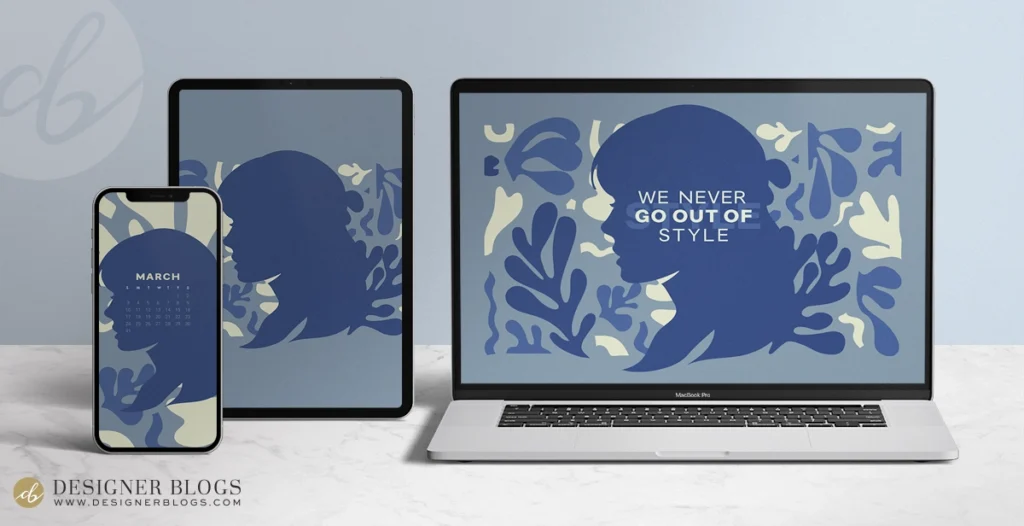
Free March 2024 wallpaper is here!

March marks the start of spring, but since we have had numerous wallpapers featuring flowers in the past, I have decided to create a more neutral one before delving into the floral frenzy. I am still drawing inspiration from Taylor Swift’s songs, and for this month, I have chosen the song “Style” from her 1989 album. I’ve incorporated the song in both a monthly quote and the colors and visuals of the wallpaper, which I loosely based on the official music video. Hope you’ll enjoy it!

Each wallpaper download from March 2024 includes the following:

  • Desktop wallpaper x3 (plain, with the calendar, and with a quote)
  • Phone wallpaper x3 (plain, with the calendar and with a quote)
  • Tablet wallpaper
  • Instagram ready quote

March's wallpaper phone preview

Quote for March 2024

We never go out of style

P.S the square image is also included as a larger file in the download package below! Feel free to post it on your Instagram.


Looking for more? Check our previous wallpapers!

You can get three different desktop options with the free download – one with a calendar, one without the calendar, and another with a quote. Additionally, there’s a wallpaper available for tablets and three phone options too. You’ll also find an Instagram-ready square that features the weekly quote.

Free March 2024 Wallpaper & Instagram quote Inspired Taylor Swift 's song

FOR PERSONAL USE ONLY.

NOTE: This wallpaper is available as a free download through March 31, 2024 only. After that, a $5 download fee applies.


Looking for more?

Browse all wallpapers from this series.


It is time for new design!

Since you just got a new wallpaper, consider updating your blog’s appearance with a fresh and modern look too! There are many different blog templates available that can make your page more enjoyable to read and navigate. Take some time to browse through them and see what catches your eye.

Blogger templates

WordPress Themes


Your voice matters!

If you have your favorite quotes or lyrics and would like them to appear on the next free wallpaper, make sure to post them in the comments below or send us your ideas via email.

Enjoy!

Should You Only Learn Memory-Safe Languages Now?

0
Should You Only Learn Memory-Safe Languages Now?

The White House is urging programmers to move away from older programming languages like C and C++ in favor of “memory-safe” languages like Rust. There’s evidence that building software with memory-safe languages can significantly reduce vulnerabilities and prevent cyberattacks, according to a report issued Monday.  

As aspiring programmers and code enthusiasts, you’re probably wondering what this federal guidance means for you. Are memory-safe languages our only option for building software and apps? Is it time to stop learning C and C++ and pivot to something else?

When you’re choosing a programming language to learn or use, you have to consider what you want to create and how easy the language is to understand. Other factors, like the frameworks used in a project or the legacy codebase, also matter. Although security and safety may not be your first concern, it’s crucial, as highlighted in the White House report.

Ahead, we’ll break down the news, explain the difference between memory-safe languages and unsafe ones, and share free courses you can take to start learning memory-safe languages today.

Learn something new for free

What does “memory safe” mean?

Memory safety is a feature found in certain programming languages that prevents programmers from introducing a type of bug that messes with how computer memory is accessed and stored.

Nobody likes bugs, but memory-safety bugs are a big problem in computing because they affect how computer memory is written, allocated, or deallocated. This can lead to crashes and open the door to cyber-attacks. Studies from Microsoft and Google shows that up to 70% of security vulnerabilities are caused by memory safety issues.

Memory safety errors can cause vulnerabilities. Two common types are: “out of bounds read,” which happens when a program attempts to access or modify data outside of its allocated memory; and a “use after free” bug, which occurs when a program tries to access a memory location that’s already been freed.

Which programming languages are considered memory safe?

Memory-safe languages are designed to automatically catch this type of error at compile time. Here are some examples of memory-safe programming languages — with links to courses if you want to start learning them today:

Each of these languages approach memory safety through different features. As for languages that are memory unsafe, the White House report calls out C and C++ as languages that lack built-in memory safe assurances. If you’re curious how you can manage memory allocation manually with these languages, check out our in-depth tutorial.  

What are memory-safe languages used for?

Memory-safe languages can be used to create all sorts of apps. If you know Swift, for example, you can develop software for Apple devices that run iOS and macOS. C# is a popular language developed by Microsoft that you can use to build web apps and games. Python is a fan favorite because it’s versatile and can be used for data analytics, machine learning, web development, and more. Rust was named the top desired programming language in the Stack Overflow 2023 Developer Survey and is beloved in blockchain, VR, and game development.  

“If I was starting a project from scratch and it didn’t have major interdependencies on other frameworks or libraries, I would have a hard time finding a reason of going out of the Rust-Go-Python spectrum,” explains Judah Anthony, Senior Director of Software Engineering at Codecademy. “If I found myself reaching for C/C++ and/or Assembly, I probably have a very specific reason why.”

Should I still learn C and C++?

This directive isn’t necessarily a reason to give up on learning C and C++. There are specific times and places when you might want to use these languages. You might work in an industry where all the legacy code is written in these languages. For example, C++ is used heavily in gaming, because it can optimize resources to accommodate graphics and multiple players.

Not to mention, there are plenty of reasons to learn programming languages beyond just being able to use them in production. Learning how each language frames a problem can help you understand programming concepts better.

TL;DR

Every programming language has strengths and weaknesses: “What you should learn needs to be connected to when you should learn it,” Judah says. The right choice for you completely depends on what it is you’d like to do and where you are in your coding journey. As new research and technology emerge, the methods and languages we use to code will keep evolving — this is just the latest development to consider.

Learn memory-safe languages for free

Take the first step towards safer coding practices by mastering memory-safe languages. If you’re familiar with programming basics in other languages, we recommend starting with the free course Rust for Programmers. Or if you’re starting from zero, we have beginner friendly free courses Learn Swift, Learn Kotlin, Learn Java, and Learn Go. With our interactive lessons, you’ll dive into practical projects, gain hands-on experience, and build a solid foundation in memory-safe programming that’ll empower you to develop robust and secure software applications.