fbpx
Home Blog Page 833

What Is Teenage Bullying Like Today?

0
What Is Teenage Bullying Like Today?

Have you ever watched an old high school movie — say, “Mean Girls,” “The Breakfast Club” or “Clueless” — and been shocked by the insults the teenagers in the film hurled at one another? Did they use names and terms that you and your friends wouldn’t dare use today?

If so, do you think members of your generation are nicer to one another than those of previous generations? Or is bullying just different now?

In the Opinion essay “‘Mean Girls’ Has Lost Its Bite. Girls Haven’t,” Jessica Bennett writes that while teenagers today are more aware of the importance of inclusivity, they still aren’t as kind as the new “Mean Girls” musical movie makes them seem. Instead, thanks to technology, teenage torture has become more subtle:

Passive aggression isn’t just “No offense, but” before delivering a stinging insult. It’s a soft block (blocking, then unblocking on social media, so that the person no longer follows you and then wonders why) for just a hint that you’re mad or removing people from a close friends group on Instagram, so that they can no longer view your Stories — but without ever telling them, so they are left to wonder what happened.

People get dropped from group chats or are abandoned as new ones are started. Stealth meanness can be as covert as tagging someone in an unflattering photo or as clever as posting a celebratory birthday post for your bestie — but one that’s purposely less effusive than the one you posted for your other friend.

“The phones make everything more exclusive,” said Poppy, 13, of New York. “When people leave others ‘on read’ even for a little” — she’s talking about having a text sit unanswered — “it can hurt the other person’s feelings even if that’s not the intention.”

Hearing about the unwritten rules of today’s cafeteria dynamics made me almost pine for the simplicity of “you can’t sit with us.” A teenager in Michigan told me she unfollowed a classmate on Instagram because the girl had liked what she posted too quickly. It was “too thirsty,” she said. Another teenager, in Maryland, explained how a former friend would use their text chats as a way to constantly shift from hot to cold — acting friendly at school, then leaving her texts unanswered, then texting all night in minute-to-minute flurries, then ghosting her for days on end, leaving her on her phone and in her feelings, ruminating (something girls are more prone to) on the unanswered messages.

Emily Weinstein, a social scientist at Harvard who studies how technology is shaping adolescents’ lives, notes that it’s the ambiguity that can make this kind of aggression so much more insidious, leading to a “perpetual state of second- and third-guessing.”

Students, read the entire article and then tell us:

  • Does Ms. Bennett’s essay resonate with you? Have you experienced or witnessed — or maybe even committed — any of the forms of exclusion and aggression she mentioned?

  • Based on your observations, what is teenage bullying like today? Is Ms. Bennett’s description accurate? Is there anything she missed? If she had interviewed you for this piece, what would you have told her?

  • Poppy, 13, of New York, said, “The phones make everything more exclusive.” Do you agree? How do phones affect your relationships with your peers, if at all?

  • Ms. Bennett writes, “Adults and teenagers alike are more aware of the importance of inclusivity and more attuned to the seriousness of subjects that used to be treated as fodder for jokes.” Do you think that’s true? Why or why not?

  • “Mean Girls,” of course, focuses on girls’ mistreatment of one another. But Ms. Bennett writes that “such behavior is by no means limited to girls.” This article from 2015 states, “It’s no surprise to learn that boys are more likely than girls to use physical aggression, but we also know that boys surpass girls when it comes to attacking peers verbally and engaging in cyberbullying.” Does this surprise you? Or is it true to your experience? Why do you think we view bullying among girls differently from how we view bullying among boys?

  • How much of a problem is bullying among students at your school? What would you want your parents, teachers, school administrators or other adults to know about it?


Students 13 and older in the United States and Britain, and 16 and older elsewhere, are invited to comment. All comments are moderated by the Learning Network staff, but please keep in mind that once your comment is accepted, it will be made public and may appear in print.

Find more Student Opinion questions here. Teachers, check out this guide to learn how you can incorporate these prompts into your classroom.

Checking Your Watch

0
Checking Your Watch

Are you always rushing and racing to and fro?

Rushing to get out of the house. Racing to get to school. Hurrying to catch the bus. Dashing off to class. Hustling to get through a meal. To go hang out with friends. To make a decision. To get to the next thing …

If so, do you find all of this running around to be stressful? Or is it manageable, and maybe even exhilarating — as if hustling about all day shows that you have important things to do?

Do you ever wish you could slow down? What are your strategies for moving through life at a more manageable or relaxing pace?

Tell us in the comments, then read the related article to learn how we can stop rushing, take our time and be present.


Students 13 and older in the United States and Britain, and 16 and older elsewhere, are invited to comment. All comments are moderated by the Learning Network staff, but please keep in mind that once your comment is accepted, it will be made public and may appear in print.

Find more Picture Prompts here.

Word of the Day: eventuality

0
Word of the Day: eventuality

The word eventuality has appeared 15 times on NYTimes.com in the past year, including on Feb. 25 in The New York Times Magazine article “Can Humans Endure the Psychological Torment of Mars?” by Nathaniel Rich:

This Mars mission, CHAPEA, would not actually go to Mars. But the success of CHAPEA (“Crew Health and Performance Exploration Analog”) will hang on the precision with which it simulates the first human expedition to Mars — an eventuality that NASA expects to occur by 2040.

That people will travel to Mars, and soon, is a widely accepted conviction within NASA. The target date for the initial human mission has drifted slightly — in a 2018 report commissioned by Congress, NASA estimated that the first human beings would land on Mars “no later than the late 2020s” — but the certainty has not wavered, even if technical hurdles remain. Rachel McCauley, until recently the acting deputy director of NASA’s Mars campaign, had, as of July, a punch list of 800 problems that must be solved before the first human mission launches…

Can you correctly use the word eventuality in a sentence?

Based on the definition and example provided, write a sentence using today’s Word of the Day and share it as a comment on this article. It is most important that your sentence makes sense and demonstrates that you understand the word’s definition, but we also encourage you to be creative and have fun.

If you want a better idea of how eventuality can be used in a sentence, read these usage examples on Vocabulary.com. You can also visit this guide to learn how to use IPA symbols to show how different words are pronounced.

If you enjoy this daily challenge, try our vocabulary quizzes.


Students ages 13 and older in the United States and the United Kingdom, and 16 and older elsewhere, can comment. All comments are moderated by the Learning Network staff.

The Word of the Day is provided by Vocabulary.com. Learn more and see usage examples across a range of subjects in the Vocabulary.com Dictionary. See every Word of the Day in this column.

Reskilling vs Skilling, E-Learning Selection, and more

0
Reskilling vs Skilling, E-Learning Selection, and more
  • Find someone or a company or a firm with extensive knowledge and experience – the need requirement here in the e-learning industry – especially those who have a background of actually doing both (whether it was at a company they worked at, etc.,.). I see people select consultants whose sole experience is that their firm previously did this work and thus, you should hire them, because they have that knowledge and experience. Doesn’t mean the trenches of at a place for example, overseeing L&D or Training (and thus lack that aspect). It can go either good or bad as the outcome. Some consultants are very good or good at what they do, others not so much – but they can sell you at the idea they can. Remember everyone is going to have clients, including big names – but it doesn’t mean they were masters of the knowledge (say from the early days). It reminds me of buying a system, whereas you see the big names and think, “This system must be great because they have ABCDS as a client.” To me, it means nothing. And it should mean nothing to you. Everyone has big names, otherwise they wouldn’t be in business. Ditto on the consultant side.
  • I wouldn’t use an HR firm to find a system or help with e-learning strategy or both. Even if you are in HR, these folks IMO are not the experts to go with around e-learning, which uh, is relevant here. If they can’t explain to you what WBT is, why it was created, nor why an LMS was created (and it had nothing to do with compliance, nor is it solely used for management of learning – a serious misnomer), then don’t go. I mean, let’s say you are looking for an HRIS platform. Who would you consider? It wouldn’t be a training or L&D firm that’s for sure. Ditto on a recruiting platform.
  • Budget clearly plays a role here for many folks, but this isn’t a time to pick someone because they bid the lowest. Focus on expertise – experience, knowledge of the industry, beyond the key or near key players; and ideally whether or not they have been in the trenches (i.e. working at a company, or business or whatever) in e-learning. I mean, you are about to invest in a big budget line item, nor a few pencils (do people still use them?).

I really do.

  • Support – It is either good, average or bad. What a lot of people do not know, is really the level of it, behind the scenes. I never take a vendor’s word for it – nobody is going to say, their support is awful. I know vendors’ whose support is just not good. Even those, who really don’t care – because they know it is bad, and it isn’t an essential (which makes no sense). Vendors love to talk about an NPS (who cares) – but they never like to tell you how many distractors they have (a key piece of info to share). The high return of clients – always presented, is great for marketing, but I have no idea on whether they are staying because they do not want to search – it is time consuming, or they have to, or the vendor gave them a discount to stay, etc. BTW, a vendor should have more than one metric, but that is another story. You really have to dig into the weeds here to get an idea of their level of support. I will ask if I can see the metrics they generate for their support. And they all have this – any vendor who says they are not tracking this – are either lying (I’ll be blunt here), or really don’t and that should be a huge red flag. I will sometimes get the “we can’t share that information,” which is a concern. If you want me to buy, let me see it. I’ll sign an NDA – send it over!
  • UI/UX – This is huge. When was the last time it was updated? Don’t assume that the update is across the board. I’ve seen the learner side, and the ignoring on the admin side, or big on learner side, and a tweak or two on the admin side. There are a lot of great systems out there, even ones that are not on your radar, whose only fault is they need to update their UI/UX. For the most part, they know this and are working on it (not yet live). But yes, I’ve seen ones that see their UI/UX as fine. Oh, don’t assume that the newest system out there is going to have a better UI/UX and functionality for that matter than say someone who has been around for more than a decade. It is a false premise.
  • Functionality – I want to go beyond what they point out or I see. I ask a lot of questions, really dig into it. And I will go off-script, and yes, be blunt. I don’t have time for spin. Spin bores me. And I do get plenty of spin.
  • Strategy – What do they see as the key areas they need to focus on – in the current year, and coming year (the next year). I get bemused on the number of vendors who just don’t get it. They don’t see what is clearly waving at them – “You must do this,” because they are so focused on what clients have told them. Don’t use your clients as your strategy. If you do, then why are you in business? Let them run it. Oh, wait, they may already be doing it.
  • Speaking of clients – how big of an impact are they in your strategy for the coming year. I have heard numbers like 50% or even 70% and the vendor thinks this is a great idea. YOWSA. That’s a horrible idea. It should never be more than 10%. If it is higher than that, as my dad would often say in business, “If I can do it, what do I need you for?” – a valid point. Oh, this is a question people should ask – and be aware that if the number is higher than 10%, be concerned. I usually find that the vendors that follow the mantra of more than 10% are listening to those who are either large size – by user base, or those that reach out (and a lot will never do), or those that use the system a lot. I’d focus on those who don’t, and a swarth of clients you have. Plus, uh, I don’t know – be the expert yourselves? That would be a great idea, don’t you think?
  • Your presentation. I see a lot of these, and I always tell them in an e-mail, to send it to me ahead of time, I will read it, and if I have any questions follow up. Then those who ignore that (and at least 90% do), start their discussion, pulling out the PowerPoint – and again, I tell them, no need to do it – just send it to me, and blah blah blah. With that, I see less than maybe 10% who ever send it. I love when they say, it’s confidential we can’t do it, but uh, you are willing to show it to me? That is, as Spock would say, “illogical.”
  • Case studies – I don’t care. Case studies are marketing materials – great for a vendor to show or send to a prospect, but from an analyst standpoint, not relevant. It won’t be a deciding factor on whether I am enamored with your system or not. I expect a vendor would have case studies – nice marketing spin and potential selling point – just remember they aren’t going to send you any case study or info around someone who dislikes them. It’s love all around!
  • List of clients – I always ask is the vendor the only one in the company (many have no response to that, and yes, how is that possible?) And what department they are in, or departments (they should know this – surprise, many can’t answer that – oh, and I never see the answer when I ask for it). I love the “we are very transparent with prospects.” Which I commend them on, but transparency means you tell me, while I am looking at the list, not me having to ask you.

8 Organizations Helping Girls & Women Build Careers in Tech

0
8 Organizations Helping Girls & Women Build Careers in Tech

Landing a job in tech can be a thrill — but it can also feel intimidating, like you’re asking to join an exclusive club or sit at the cool kids’ table. If you identify as a woman or a non-binary person, this experience is heightened, because you may not see people like you represented in the industry very often. Fortunately, there are organizations around the world working hard to address gender disparities in tech.

Even better, there are lots of ways to get involved, whether you’re new to tech and looking for mentorship or you’re more established in your career and want to pay it forward. In honor of Women’s History Month, we’ve rounded up a few awesome organizations helping girls, women, and non-binary folks break into tech, foster relationships and community, and ultimately build successful careers.

Learn something new for free

Who they’re for: Latinx people working in tech or pursuing technical careers, as well as allies who support the Latinx community

What they do: Latinas in Tech hosts virtual and in-person networking events and a popular annual summit with a competition that awards Latina-founded tech startups. Studies have shown that when Latinx entrepreneurs start a business, 70% of their funding comes from personal savings because they often lack the resources and the network to access capital. Latinas in Tech aims to change that: “Latina entrepreneurs are not only capable of working in the tech industry, they are innovators that have proven themselves to be creators of tech as well,” Rocio van Nierop, CEO of Latinas in Tech, said in a release.

Latinas in Tech also has a members-only job board that’s focused on full-time tech roles in an effort to diversify the tech talent pipeline. The nonprofit organization covers various roles within the tech ecosystem, including Engineers, Cybersecurity Experts, Data Scientists, and more.

How you can get involved: There are local Latinas in Tech chapters that you can join around the world to meet other Latinx tech professionals. Regardless of your career level, you can volunteer to mentor another Latinas in Tech member and provide professional and leadership development tools.

Who they’re for: Women hoping to rise the ranks in their careers and increase their financial literacy

What they do: Ladies Get Paid is a network of 100,000+ women where people join to take online courses, attend events, and connect with peers and mentors — all in service of growing “your career and your bank account.” As founder Claire Wasserman puts it in an interview with the Get Together podcast, “It just blows me away how amazing these women are. But I think the success of all of this is that they feed each other.”

How you can get involved: You can either get a free membership, which includes access to the community platform, or pay for a membership that will give you access to their video library, virtual events, and coaching with Wasserman.

Who they’re for: Girls and non-binary students in elementary and middle school all the way through college

What they do: Girls Who Code offers a range of courses, from after-school and summer clubs to college programs, that teach participants core computer science and programming skills. They also provide workshops where students can build websites and applications that help address issues in their communities, like climate change and cyberbullying. Reshma Saujani founded Girls Who Code in 2012 to help nurture the next generation of leaders:

“Young girls are change agents,” she tells “The Daily Show.” “When they have technology, they’re looking at their community, they’re looking at the world, and they’re saying, ‘How can I use technology to make it better?’”

How you can get involved: Want to sign up for a Girls Who Code program? Click here to find the right one for you. Or, if you’d prefer to help support Girls Who Code, you can start an after-school club, form a corporate partnership, fundraise, and/or campaign. (The organization also has a great  Instagram, full of coding memes and profiles of interesting women in tech.)

Who they’re for: Youth and adults of marginalized genders, including non-binary, gender nonconforming, and female-identifying, with an emphasis on racial and ethnic minorities, LGBTQIA+ people, and those from low-income communities

What they do: ChickTech provides learning opportunities and technical education in 15 countries around the world.

Their high school and college programs offer skill-building workshops and help connect participants to professional networks with formal and informal mentorships. Plus, their signature adult program, Advancing the Careers of Technical Women (ACT-W), helps professionals develop their technical and leadership skills with career coaching and national conferences.

Janice Levenhagen-Seely, founder and former CEO of ChickTeck, explains how she formed the organization to help welcome girls and women into the tech industry:

“I started ChickTech to give girls and women the support and sense of belonging that I didn’t have when I was a Computer Engineer. We focus on high school girls because so many of them are still not encouraged to be engineers and programmers, and they rarely even know what a career in tech would look like.”

How you can get involved: If you’re a high school student looking to break into tech (or want to nominate someone who is), click here to register for their virtual high school program. Or if you’re further along in your career and want to use your expertise to mentor students, reach out to your local ChickTech community and inquire about leading a workshop. You can also speak at one of their ACT-W events or even become a member of ACT-W+.

Who they’re for: Girls and women of all ages, from kindergarteners to established professionals, “at the intersections of race/ethnicity, class, age, gender identity, sexual orientation, disability status, and other historically marginalized identities”

What they do: NCWIT’s AspireIT program provides technical education and scholarships for girls in elementary, middle, and high school. Their Aspirations in Computing (AiC) program rewards women who showcase strong leadership and entrepreneurial skills with scholarships, internships, and other professional opportunities.

NCWIT also helps illustrate the impact and successes of women from marginalized groups with their Color of Our Future programs, which include their Modern Figures and TECHNOLOchicas podcasts that feature notable professionals in STEM.

As Dr. Telle Whitney, Co-Founder of NCWIT, put it:

“For young people, there’s often this voice inside of them saying, ‘Oh no, I’m not good enough; I can’t do this; this isn’t me; they’re going to find me out.’ The most important advice is to go for it. Listen to that voice and say, ‘OK, but I’m going to go for it anyway.’”

How you can get involved: Check out NCWIT’s programs to find the right one for you. You can also participate or sign up to be a guest speaker in one of NCWIT’s workshops, volunteer to review award applications virtually, and take part in the organization’s annual celebrations.

Who they’re for: Women in business and technology

What they do: WITI is a network of over 3 million professionals who seek to create a more inclusive and innovative workplace. They offer networking events, professional coaching, career fairs, courses, and webinars that teach participants how to advance in their careers.

“As women, we need to be more proactive to help male (and female) leaders of companies understand the business value for incorporating women at every level of the organization,” Carolyn Leighton, founder of WITI, tells The Huffington Post.

How you can get involved: Explore WITI’s upcoming virtual events and register for whichever one catches your eye. You can also become a member of the WITI community to lead webinars and classes, present at events, and even take on a mentor to contribute first-hand to their professional development.

Who they’re for: Women and gender-expansive adults, particularly racial and ethnic minorities, LGBTQIA+ people, and those from low-income communities

What they do: Named after famed programmer Ada Lovelace, ADA offers a unique, immersive experience for women looking to break into tech. Their free, 6-month training program teaches participants the core skills they’ll need to launch careers in software development, like the fundamentals of computer science and programming with languages including Python, JavaScript, and SQL.

“We aim to reduce the economic barriers to a career in software development by making education and career preparation as accessible as possible,” explains Elise Worthy, co-founder of ADA. “Because many of our students are switching careers and already carrying student loan debt, it would be untenable to expect them to assume an even greater financial burden while taking a year off from earning a full-time salary to pursue a whole new career.”

How you can get involved: ADA asks that aspiring students complete their preparatory curriculum before applying to their program. You can also volunteer with ADA to help promote the growth of new technologists as a private tutor, teaching assistant, industry mentor, mock interviewer, or admissions volunteer.

Who they’re for: People who identify as women who “champion innovation in their work”

What they do: Women in Innovation is a network of over 4000 professionals in cities including New York, San Francisco, and London. Their workshops cover everything from leadership and entrepreneurship to professional growth and development. And they also host less structured, more intimate dinners where women in executive roles discuss the intricacies of their fields.

“Our goal is to close the gender gap in business and thought leadership in the innovation industry,” Alfia Ilicheva, Co-Founder of WIN, explains in an interview with Forbes. “We recognize that women add fundamentally different and unique and a very powerful contribution to creating new ideas, new products, new services.”

How you can get involved: Join the WIN Hub — for free! You can also sign up for their mailing list or even become a partner to host or sponsor an event.

This blog was originally published in March 2022 and has been updated to include additional organizations that support women in tech.

Job search 101

0
Job search 101

Welcome to another brand-new Career Chat series. Over the next several issues, we’ll be talking about searching for a job in a variety of circumstances, such as changing careers or returning to work after a career gap. But first, let’s spend some time taking a big-picture look at the broad steps for finding a job.

It’s important to remember what’s in your control and what’s out of your control when getting a job—particularly one you want. Some aspects, like role availability and competitive hiring pools, are out of your control. This series will help you focus on how to maximize your potential for success with the pieces that are in your control.

What you can do is set yourself up for success every step of the way. And if you’ve already started building your skills, you’re well on your way to success.

Here are the broad stages of any job search:

1. Clarify your career goals. You may remember this from our resume series—the same rationale applies here. Knowing what you want to do, where you want to be, and why can make it easier to focus your job search efforts.

2. Identify your key job skills. Based on your career goals, check out open roles on LinkedIn and grow your network to learn about opportunities available to you. Get a feel for the companies that are hiring and the skills you’ll need to land a position.

3. Write your resume. Think of this document as your first introduction to potential employers. If you want more guidance on formatting and what to include, revisit our resume series for a section-by-section breakdown, learn how to use ChatGPT to write your resume, or check out SUNY Online’s 5-hour course, How to Write a Resume.

4. Apply for jobs. Job listings will typically outline everything you need to submit in order to be considered for a role. Be sure to follow instructions exactly as stated. You can typically expect to fill out online forms, upload your resume, write a cover letter, and submit work samples, depending on your desired role. If you are able to apply directly with the recruiter or hiring manager, take a look at our tips for writing a stand-out job application email.

5. Ace your interviews. Interviews are your opportunity to find out more about a position and show off what you can do. We’ll offer more concrete interview tips in an upcoming series, but for now, check out our best interview tips.

6. Follow up. It’s a good habit to send recruiters and hiring managers a follow-up email after an interview. At the very least, you can thank them for their time—but for roles you’re really excited about, it’s an opportunity to reiterate your enthusiasm and gather more details to make your decision.

7. Refine your process. A job search can take time, so it’s important to keep building skills, updating your resume, and reflecting on your goals. Set up job alerts to stay up-to-date on new job listings. Take time to consider and incorporate feedback you receive from recruiters. If you’re feeling stuck, here are some ways you can expand your job search, be that online, through networking, continuing career prep, or seeking a counselor.

If you’re feeling stalled on any one of these steps, it may help to examine the step directly before it in addition to the step you’re stuck on. For example, if you’re applying for jobs and not getting any interviews, take a closer look at your resume and make sure it’s optimized for the positions you’re applying for; or if you’re uninspired throughout the interview process, consider whether the jobs you’re applying for really align with the job you want.

Where to begin

We’ve linked to step-specific resources above, but here are a couple recommendations to encourage forward movement at any stage of your job search:

To strengthen a variety of in-demand skills, try the University of California, Irvine’s Career Success Specialization. Here, you’ll explore skills employers are looking for like project management, communication, negotiation, and problem-solving.

To figure out your next career move, check out UC Santa Cruz’s The Career Design Lab: Change your Job, Change your Life course. As you progress through the modules, you’ll clarify what you want in your next role and how you can go about getting it.

To present yourself as you want to be seen, try the University of Michigan’s Personal Branding: Stand Out and Succeed course. In 10 hours, you’ll learn how to translate your values into a personal brand that moves you closer to achieving your goals.

If you’d like additional tips for any of the steps above, let us know in the comments and we’ll try to offer more resources. Remember that the Coursera Community is also there for you to help navigate roadblocks.

Next week, we’ll offer tips for applying for entry-level roles. See you then!

Coursera Launches Course Builder: Organizations Can Now Quickly Create and Launch Custom Courses at Scale

0
Coursera Launches Course Builder: Organizations Can Now Quickly Create and Launch Custom Courses at Scale

By Shravan Goli

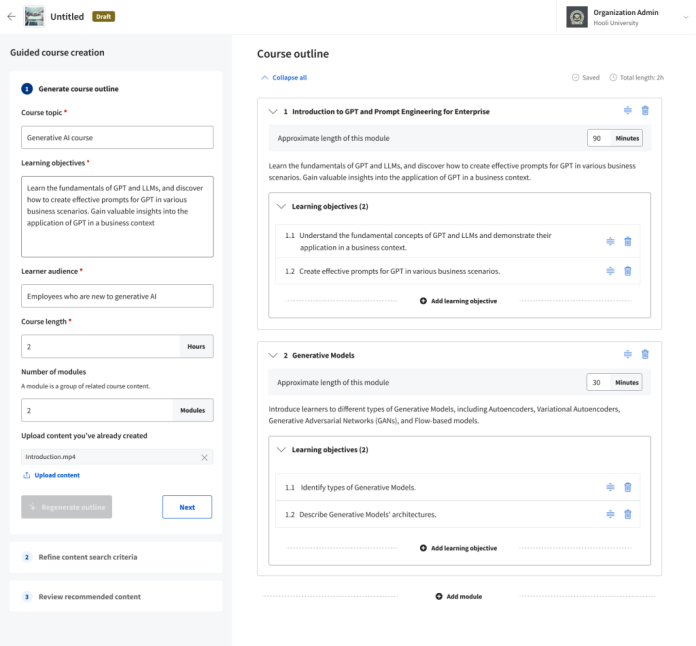
In a fast-changing market, organizations will need to create, update, and deploy learning resources that keep pace with the rate of change. We’re excited to launch Coursera Course Builder, an AI-assisted authoring tool that enables any business, government, or campus customer to easily and quickly produce custom private courses at scale. 

Based on a few simple inputs from a human author, the tool auto-generates course content including outlines, descriptions, and learning objectives, dramatically reducing the time and cost of content production without sacrificing quality. Authors can seamlessly blend modules from participating world-class industry and academic partners on Coursera with content from experts in their own organization. 

With step-by-step guidance, authors can:

  • Develop new private courses, tailored to specific needs and available only to their learners
  • Review relevant content from Coursera’s catalog with AI-assisted recommendations
  • Blend expert items or modules from participating Coursera Partners into a custom course
  • Add custom university or organization-specific content alongside experts from Coursera’s catalog
  • Build assessments with editable AI-generated questions
Author uses Course Builder to create a course outline.

Private and public sector employers can quickly create and launch organization-specific courses tailored to their unique needs, making employee learning more relevant and productive. L&D teams can combine world-class content from leading industry and academic experts with relevant business context, use cases, and internal expertise. They can also tailor core learning resources for specific career levels and job roles. 

“Course Builder allowed us to quickly create custom courses for our Trade team on data analysis and decision making that incorporated both our own private content and material from leading industry experts on Coursera,” said Trina Lima, Global Learning Strategy Lead at Sanofi. “We saw course enrollments surge within the Trade team as a result of this personalized approach, which motivated us to extend access to the AI-assisted authoring tool for L&D leaders to adapt training for specific teams across the organizations.” 

For higher education institutions, time-saving authoring tools can empower faculty to create custom courses and keep learning resources relevant and up-to-date at the speed and scale students and employers now expect. It can also help to bridge curriculum gaps by adding guest lectures and context to university courses. 

“We have a remarkable opportunity to innovate in our blended master’s programs by using Coursera’s cutting-edge technology, specifically Course Builder,” said Jessica Vlasica, Manager of Learning Environment Design, Peruvian University of Applied Sciences (UPC). “This integration streamlines curriculum design, enriches students’ educational journey with content from world-class experts, and equips them with the skills needed to tackle global challenges, affirming our commitment to innovation and academic excellence.”

To learn more about how to get started with Course Builder, visit our websites:  

6 Programming Languages & Tools for Cloud Engineers 

0
6 Programming Languages & Tools for Cloud Engineers 

Thanks to an increasingly data-filled world, many companies are relying on cloud computing to store and analyze data instead of buying their own servers or hard drives.  And by extension, that means they need Cloud Engineers. Ahead, we’ll break down what a Cloud Engineer does, the top programming languages they use, and the skills they need for the job.

Learn something new for free

What does a Cloud Engineer do? 

A Cloud Engineer is a Software Engineer that focuses on migrating data from local servers to cloud-based services. Once those systems are up and running, Cloud Engineers keep them maintained and updated. Cloud Engineers often write front-end or back-end code, but they also need to be familiar with cloud computing tools and concepts like: 

  • How to structure a cloud-based application for performance and security  
  • The best practices for engineering in the cloud  
  • A strong understanding of AWS, GCP, and/or Azure 

Want to learn more about cloud computing? Try our platform-agnostic course Intro to Cloud Computing to learn about cloud computing fundamentals, different deployment models, and the pros and cons of the major cloud platforms. 

Top programming languages for Cloud Engineers 

Some languages are more popular than others for creating applications that run in the cloud, and learning one or more of those languages will give you an advantage in landing a job as a Cloud Engineer. Here are the best languages for cloud development: 

Python 

Python is one of the most popular and widely used programming languages today, so it makes sense that it’s one of the top languages Cloud Engineers use. Google also offers Python-based tools for Google Cloud, so it’s a great choice for cloud development. 

Python’s extensive libraries and cross-platform support make it easier to write software for and manage all the diverse parts of a cloud environment’s development life cycle. Python is also a multi-paradigm language that can be used to write in a procedural, functional, or object-oriented programming style, giving it a lot of flexibility.

Go 

Golang, or Go, is programming language developed by Google and is the newest programming language in this list. Despite its relative newness, its capacity for speed and performance, along with its standardized APIs, make Go great for cloud development. 

Golang is a low-level language, like C or C++, but it has high-level features that make it easier to use and less verbose than other low-level programming languages. It supports concurrency, package management, parallelism, and garbage collection. And because it’s low-level, it’s also faster and has much smaller executables than other languages on this list. 

Ruby 

Ruby is a popular beginner-friendly programming language that’s secure and supports many features. It’s so popular that there are over 60,000 frameworks and libraries in the language, so creating an app with Ruby is a straightforward process. Compared to many other languages on this list, you can deploy an application to the cloud with a lot less code using Ruby. 

Java 

As Java users say, “Java is everywhere” — and that includes the cloud (as you can see in Microsoft’s Azure). Java is a general-purpose, object-oriented language that you can use for many programming tasks. 

Java is also a highly portable language, meaning that you can take the Java code compiled on one system and run it on another, as long as you have the Java Virtual Machine installed on the other machine. This makes it an extremely useful language in a distributed, cloud-based environment. 

C# 

C# is a popular language in the Microsoft ecosystem. It’s the most popular language used in Microsoft’s ASP.NET framework. ASP.NET is used to create dynamic, robust web apps that run on Windows Server. 

Recently, C# has become a cross-platform language that can also run on Linux and Mac OS using the .NET Core framework. This change has made it even more popular for cloud development, especially on Linux. 

Node.js and JavaScript 

Node.js, first released in 2009, implements server-side services using JavaScript. It quickly became popular because it allowed front-end developers that traditionally used JavaScript to write back-end code without having to learn a new language — which means front-end developers can use Node.js to create complete cloud applications. 

How to start your career as a Cloud Engineer 

While you will need some training to build your skills, you don’t need a computer science degree (or any degree at all) to get many of the cloud engineering jobs out there. What’s most important is to have problem-solving skills, a grasp of some of the programming languages we mentioned, and an eagerness to learn.  

Fortunately, you can start learning today. Check out the courses below to get started with the languages we covered in this blog. All of these courses are great for beginners and will teach you the fundamentals of programming, as well as the ins and outs of the specific programming language. And with Codecademy Pro, you’ll able to earn a certificate upon completing each course, giving you more material to add to your portfolio or LinkedIn profile so that you can land a job as a Cloud Engineer.

Weekly Student News Quiz: Primary Elections, Apple, ‘Dune’

0
Weekly Student News Quiz: Primary Elections, Apple, ‘Dune’

Above is an image related to one of the news stories we followed this past week. Do you know what it shows? At the bottom of this quiz, you’ll find the answer.

Have you been paying attention to current events recently? See how many of these 10 questions you can get right.

Do You Have a Hard Time Saying ‘No’?

0
Do You Have a Hard Time Saying ‘No’?

Teachers: Be sure to preview the article to ensure it is appropriate for use with your students.

Your friends want to hang out but you had planned to work on a project for school. Someone wants to borrow your favorite shirt but you’re afraid you won’t get it back. You were saving the last doughnut as a treat for later but your brother asked if he could have it. In each of these situations, you want to say “no.” But do you?

How often do you agree to doing things that you would rather not? Does saying “no” stress you out, or is it not that big of a deal for you?

In “The Mind-Boggling Simplicity of Learning to Say ‘No,’” the writer Leslie Jamison reflects on her struggle to turn people down:

When I was 25, I took a job at a bakery in a small college town in the Midwest. I worked front and back of house, pulling espresso shots at the bar and running into the kitchen to grab my (often burned) sugar cookies from the oven.

My boss and I had agreed on a weekly schedule — I wanted desperately to be a writer and was trying to carve out time to work on my novel — but it seemed like she was always asking me to take on another shift, or stay late, or come in early, and I found it difficult to refuse. If I said no, I worried that I would be leaving her in a jam, or that she might decide I wasn’t worth keeping on the staff at all. (My skills in the kitchen hardly justified my presence.)

One afternoon I was venting about it to my stepfather, expecting his sympathy, and he just shook his head, vaguely amused. Then he offered one of the best pieces of wisdom I’ve ever received: “She has the right to ask the question, and you have the right to say no.”

This was mind-boggling in both its simplicity and its radical reframing. The requests that I’d experienced as acts of violation were really nothing of the sort; it was not only my right but also my responsibility to draw my own boundaries, rather than expect another person to draw them for me.

Ms. Jamison goes on to describe how keeping a “Notebook of Noes” helped her think about her refusals differently:

On every page, I wrote down an opportunity I had decided to decline: a speaking gig, a magazine commission, an invitation from a friend. Then I drew a line across the page. Underneath, I wrote what saying no had made room for: more time with my partner. More time at home. More time to write. More time to call my mother and ask about her day, and tell her about mine.

Because I was a writer, it helped me to list my own refusals in a notebook. It was as if, in their accumulation, they could create a meaningful text: the story of learning to live a different way.

As I gathered more of these noes, I learned that, even after I’d uttered the word, the world continued just as it always had. The people I’d been anxious about disappointing? They were OK. The fear of losing something for good? It often came back, or something else did.

More than anything, however, the Notebook of Noes helped me see absence as a form of presence — instead of lamenting the ghost limb of what I wasn’t doing, I could acknowledge that every refusal was making it more possible to do something else.

Students, read the entire article and then tell us:

  • Do you see yourself in any of Ms. Jamison’s anecdotes about saying “no”? Do you have a hard time with turning down people, plans or opportunities? If not, have you seen others struggle with those situations?

  • Ms. Jamison reflects on why, when she was younger, she found it so hard to decline an offer. “Often it was the fear of disappointing someone, not being able or willing to meet some need,” she writes. “But it was also often the fear of permanently losing something — a chance, an opportunity, a connection.” What is your reaction to that statement? If you have a difficult time saying “no,” why do you think that is?

  • Ms. Jamison also says that most of the women she knows have told her that they have difficulty with saying “no.” Do you think that this challenge affects women and girls disproportionately? If so, why? If not, why not?

  • Suppose you had your own “Notebook of Noes.” What is one “no” you might record in it — a time when you declined an offer, didn’t act on a suggestion or turned down an opportunity? What did this “no” create space for instead?

  • Ms. Jamison writes about her stepfather, who gave her advice that helped her realize she has a right to say “no.” Has anyone helped you with this situation? If so, what advice did you receive? If a friend who gets stressed out at the prospect of saying “no” approached you for advice, what would you say?


Students 13 and older in the United States and Britain, and 16 and older elsewhere, are invited to comment. All comments are moderated by the Learning Network staff, but please keep in mind that once your comment is accepted, it will be made public and may appear in print.

Find more Student Opinion questions here. Teachers, check out this guide to learn how you can incorporate these prompts into your classroom.