fbpx
Home Blog Page 1043

Coursera Launches Expanded Clips Offering with Nearly 200K Short Videos and Lessons to  Accelerate Skills Development for Employees

0
Coursera Launches Expanded Clips Offering with Nearly 200K Short Videos and Lessons to  Accelerate Skills Development for Employees

By Leah Belsky, Chief Enterprise Officer

Lack of career development is a key reason many employees leave an organization. Yet employees have less time to devote to learning than ever before. A growing number of employees are now looking to gain job-specific skills much faster through shorter, more targeted content. 

Today, we’re excited to announce the expansion of Clips, which now provides employees access to nearly 200,000 short videos and lessons designed to help them begin learning high-demand skills in under 10 minutes.

With this shift towards microlearning, Clips enables employees to learn specific skills with 5-10 min videos. It also provides clear pathways into courses for deeper skill development, while driving continuous learning to ensure employees have the right skills to accelerate company growth and innovation.

The initial Clips on Coursera offering featured bite-sized videos focused on business, tech, data, leadership, and human skills.  The expanded Clips offering now provides a more comprehensive library of content, including a higher volume of videos for skills that are becoming increasingly more important like leadership and management. Currently, 83 percent of businesses feel it is important to develop leaders at all levels. Yet less than 5 percent have actually implemented leadership training across every level within their organization. To help address this growing need, Coursera has increased the number of leadership and management-related Clips by 10x. 

As learners quickly gain skills through Clips, many then seek opportunities for deeper development.  Thirty-six  percent of learners that have viewed Clips to address their in-the-moment learning needs have gone on to enroll in at least one course. 

The most viewed Clips to date include a range of data, cloud, and productivity-focused content such as: 

  • Welcome to Python, by University of Michigan [1 min] 
  • Fundamentals of Data Science, by IBM [2 min] 
  • The Business Case for Visionary Leadership, by University of Michigan [7 min]
  • Why is Storytelling Important?, by Macquarie University [9 min]
  • Key Cloud Service Providers and their Services, by IBM [6 min]
  • What is SQL anyway?, by University of California, Davis [7 min] 
  • Customize Google Calendar, by Google [4 min] 
  • Taking Charge of Excel, by Macquarie University [6 min]

Global industry leaders and government organizations like Google, New York State Department of Labor,  Alstom, and Bosch have adopted Clips to help accelerate skills development within their workforce. Google in particular has made Clips available to all employees worldwide, helping many learners obtain skills that will help them elevate their job performance and begin unlocking new advancement opportunities.

With Clips, Coursera now offers fully scalable learning paths featuring everything from short videos and lessons to professional certificates, and degree programs.

“For my role, developing skills in programming, camera hardware, and design is crucial. Finding relevant courses to acquire these new skills, and gaining practical, hands-on experience has been a challenge,” said Doris Chen, hardware design engineer at Google. “The Clips videos provide relevant content focused on everything from camera and imaging to optical system design. As I continue my training, I’m looking forward to enrolling in more advanced classes and potentially earning an additional degree online to help further my career.” 

“I have always been fascinated by the concept of skills development programs and self-paced learning, and the ways it can assist to level up your career,” said Rajat Batra, software engineer  at Google. “Clips takes this concept to the next level by adding short and focused job related videos. These videos act as a good starting point to develop a higher level of understanding for several concepts.”

Coursera for Business now enables over 3,500 companies across the globe to deploy world-class skills development content from top businesses and universities. The company’s skills platform gives organizations the ability to assess, measure, and benchmark skills in their workforce. Recent platform innovations including LevelSets are helping employees to quickly determine their proficiency in key skills and identify areas to focus on moving forward. In addition, SkillSets help employees develop specific skills for specific roles. These Skillsets provide the foundation for Coursera’s Leadership and Data & Analytics Academies, which offer a packaged learning experience based on the depth of skill needed for specific roles across an organization.

As the pace of innovation accelerates, the demand for new skills will continue to increase. We’re honored to deliver the expanded Clips offering featuring job-relevant content from the world’s leading companies and universities to help learners further their career. 

For additional information on Clips, visit here.

Over 120 Leading EMEA Companies Choose Coursera to Drive Digital Transformation, Cultivate Corporate Resilience

0
Over 120 Leading EMEA Companies Choose Coursera to Drive Digital Transformation, Cultivate Corporate Resilience

by Anthony Tattersall, Vice-President for EMEA, Coursera

Accelerating technological progress is creating extraordinary potential for urgently-needed economic growth. Recent analysis suggests that, by 2030, the cumulative additional GDP contribution that could be created by optimising adoption of new digital technologies could amount to €2.2 trillion across the European Union. 

However, many Europeans do not possess the digital skills required to maximise the potential of these new technologies. The Digital Economy and Society Index (DESI) shows that 4 out of 10 adults and every third person who works in Europe lacks basic digital skills, while over 70% of businesses have said that the lack of staff with adequate digital skills is an obstacle to investment.

To drive the upskilling at scale that is imperative for business transformation, in the first half of 2022, more than 120 companies across EMEA launched, renewed or expanded their Coursera for Business relationships to provide employees with the critical skills needed to ensure continued competitiveness and nurture resilience in a challenging business environment. This includes 61 new customers including Siemens, Aker Solutions, Sanofi, and IKEA. 

For Siemens, integrating Coursera into their platform-based learning ecosystem has offered learners the opportunity to pursue flexible, personalised professional development pathways, driven by the extensive range of content available on the Coursera platform. Access to courses on Artificial Intelligence, Cloud Computing, and Data Analysis from industry leaders including Google, Meta, and IBM has enabled Coursera to become a major strategic partner in supporting Siemens with their digitalization, automation and innovation efforts.

Daniela Proust, VP and Global Head of Global Learning and Growth at Siemens, said: “At Siemens, we want to support our people in staying relevant in this permanently changing environment by building the capabilities of embracing change and continuously evolving functional and technical skills. In times where learning & development (L & D) can be a major lever to drive digital transformation, our goal was to establish a culture inspiring continuous learning and development and to provide high standard learning content with a depth in the field of tech and business. Coursera is a market leader in this field best known for great courses created by experts worldwide. Coursera is one of our strategic upskilling partners that complement our learning ecosystem very well.”

Coursera remains dedicated to facilitating a skills-first approach to upskilling and reskilling with Sanofi, actively supporting efforts to tap into the latest technologies, minds, and medical advances to rethink medicine and improve lives. Sanofi employees have already logged over 130,000 learning hours with Coursera, primarily focused on developing the essential business & data science skills required in today’s technology-driven pharmaceutical industry. Top courses undertaken by Sanofi learners include Excel Fundamentals for Data Analysis (Macquarie University), Work Smarter, Not Harder: Time Management for Personal & Professional Productivity (University of California, Irvine, and Foundations: Data, Data Everywhere (Google). Sanofi has also utilised its partnership with Coursera to author their own Guided Projects, which also rank among the top courses undertaken by the company’s employee learners.

Mary Zedeck, Head of the Global Learning Center of Expertise at Sanofi, said: “Learning at Sanofi includes multiple facets of self-paced, cohort-based, social, and blended methodologies. Coursera has provided the Sanofi community with organised learning across a variety of content topics in the quest for acquiring skills needed for today and planning for those skills needed for tomorrow.”

Coursera for Business now provides over 3,500 companies across the globe with the content and tools necessary to connect role-based learning with role-based hiring and professional development, offering world-class content, hands-on learning, and the ability to track, measure, and benchmark skills through a single, unified platform. 

Recent innovations – including LevelSets – are enabling employees to quickly determine their proficiency in key skills and identify key areas for skills development, while giving organizations greater visibility and insights into employee competencies and the scale of institutional skills gaps. Coursera Clips, which offers over 200,000 bite-sized videos and lessons from the world’s leading companies and universities, are enabling institutions to make in-demand skill development content more accessible to employees, allowing them to begin learning new skills in under 10 minutes. In addition, SkillSets are helping employees develop the competencies needed for specific jobs. These SkillSets are the building blocks for Coursera’s portfolio of Academies, which offer a packaged learning experience based on the depth of skill needed for specific roles across an organization.

By continuing to partner with businesses across the EMEA region to provide job-relevant training at speed and scale, we look forward to supporting a more equitable, skilled, resilient labour market.

Face Filters

0

Do you use filters to alter your appearance? Are they fun or harmful?

Word of the Day: rankle

0

This word has appeared in 106 articles on NYTimes.com in the past year. Can you use it in a sentence?

Industry Corner: Flight Attendant

0
Industry Corner: Flight Attendant

An impeccable uniform and pulling their suitcases behind them. Cabin crew. Stewardesses. Air hostesses. And now more popularly known as flight attendants. Whatever name you call them, there’s more to being a flight attendant than asking, “chicken or beef”? Flight attendants are the individuals dedicated to serving you in the air and ensuring you reach your destination in one piece. It’s a much sought-after job and this month, our industry spotlight falls on flight attendants.

If you’re ready to take on the skies as a flight attendant, buckle up…you’re about to get on the flight of your life.

What is a Flight Attendant?

Flight attendants are members of an airline that are hired to ensure the flight deck (where the pilot and co-pilot sit) is secure. They serve meals, drinks, and snacks to passengers and are also tasked with ensuring the comfort and safety of passengers aboard a flight.

  • Prepare cabin and crew for take-off and landing
  • Demonstrate and inform passengers on safety procedures in the event of an emergency
  • Inspection and verification of on-board safety equipment
  • Deplaning and conducting a post flight check-up

The flight attendant is a vital member of the staff employed by every airline to ensure your safety and aid its passengers whenever needed.

Qualifications to Become a Flight Attendant

Most airlines require:

  • English language skills
  • Computer and mathematics skills are beneficial
  • Completed your high school qualification
  • Higher education qualification (in hospitality, transportation)

Airlines conduct a training programme for their recruits. Here, candidates are taught everything they need to know about being a flight attendant. Their training can include height checks, how to put out fires, deliver a baby, first aid course, and a swimming test (candidates must be able to swim). Some airlines will also take you on a mock aircraft for a walk-through and demonstration of what each flight will be and your responsibilities. These training sessions can last for several weeks in preparation for your first flight if successful.

Roles and Responsibilities of a Flight Attendant

Flight attendants will have pre-flight briefings with the pilots to discuss the flight ahead. These include cabin conditions, flight time, special requirements onboard to name a few.

  • Provide medical assistance
  • Check supplies and working condition of all emergency equipment
  • Ensure passengers have fastened their seatbelts, bags are stowed away, and all safety measures are observed
  • Provide direction to passengers, answer questions
  • Provide on-board food service
  • Help passengers in the event of an emergency

At the end of each flight, you will conduct a post-flight check. The senior flight attendant will write a report detailing how the flight went and if there were any incidents.

Required Skills for Flight Attendants

A flight attendant is a client-facing job. That is, you are what the customer sees, and remembers when traveling. This role requires a specific skill set to ensure you carry out all the tasks and hold up under pressure or deal with more difficult clients, without bringing the airline into bad repute.

  • Patience. You need to remain calm in all situations and with all types of flyers.
  • Communication skills. You must be able to speak, listen and interact with your team, pilots, and passengers clearly and confidently.
  • Detail-oriented and organized. You need to keep checking and tracking where everything is.
  • Interpersonal skills. You’ll be engaging with flyers from all walks of life and be able to connect with them.
  • Problem-solving skills. You need to be able to assess situations and make decisive decisions, often in emergency situations or in handling an unruly passenger.
  • Flexible. Varying work schedules and unexpected delays are part and parcel of the job. You need to be adaptable to the last-minute changes that come up.

There are also physical and medical requirements you need to fulfill to become a flight attendant. You need to maintain a professional appearance and have physical stamina that is required to lug baggage, young children, and other objects that require heavy lifting. Additionally:

  • Specific height restrictions (to allow you to reach and close the overhead compartments)
  • Be able swim
  • No visible tattoos or body piercings (other than two small lower earlobe)
  • Good vision (20/40 and hearing
  • Clear drug test, and no criminal background

There are standard requirements across the board for cabin crew staff as set by the aviation authority. You should also note that each airline has its own additional requirements you must meet.

Career Path for Flight Attendants

Like any other career, with work experience, you can advance and reach great heights. You can work your way up from being a member of the cabin crew to being a supervisor or take on a senior cabin crew position. When you grow in seniority, you can begin overseeing schedules, and choose your routes.

You can also opt to be a corporate flight attendant. Here, you work for private clients and fly in smaller aircrafts, working on an as-needed basis.  If you want to put your wings down after years in service, your first-hand experience gives you an added advantage when applying for positions with an airline. You can work in recruitment, training, passenger services, marketing, or go into a career in sales.

If you’re interested in pursuing a career as a flight attendant but aren’t sure if your skills or interest are best suited for this role, you can take our Workplace Personality Assessment.

The dream of traveling to new destinations and countries as a flight attendant is luring. But unlike many other jobs, you’ll have to get used to stretching away from the comfort of home and sacrificing time away from friends and family. 

Comment on Adding Labels to Blog Posts – Blogger Basics You Need To Know by SVRajesh

0
Comment on Adding Labels to Blog Posts – Blogger Basics You Need To Know by SVRajesh

Adding Labels to your Blogger Posts

As simple as it is, adding labels to Blogger posts can help you organize your blog and clean it up. It lets you sort out your content and make all the post topics easy to access for your readers. In this short guide, I will teach you how to add labels to Blogger Posts.


How to Add Labels to Blogger Posts

Follow this quick, three-step guide to have your post sorted out.

#1 Create a new post or edit an already published one

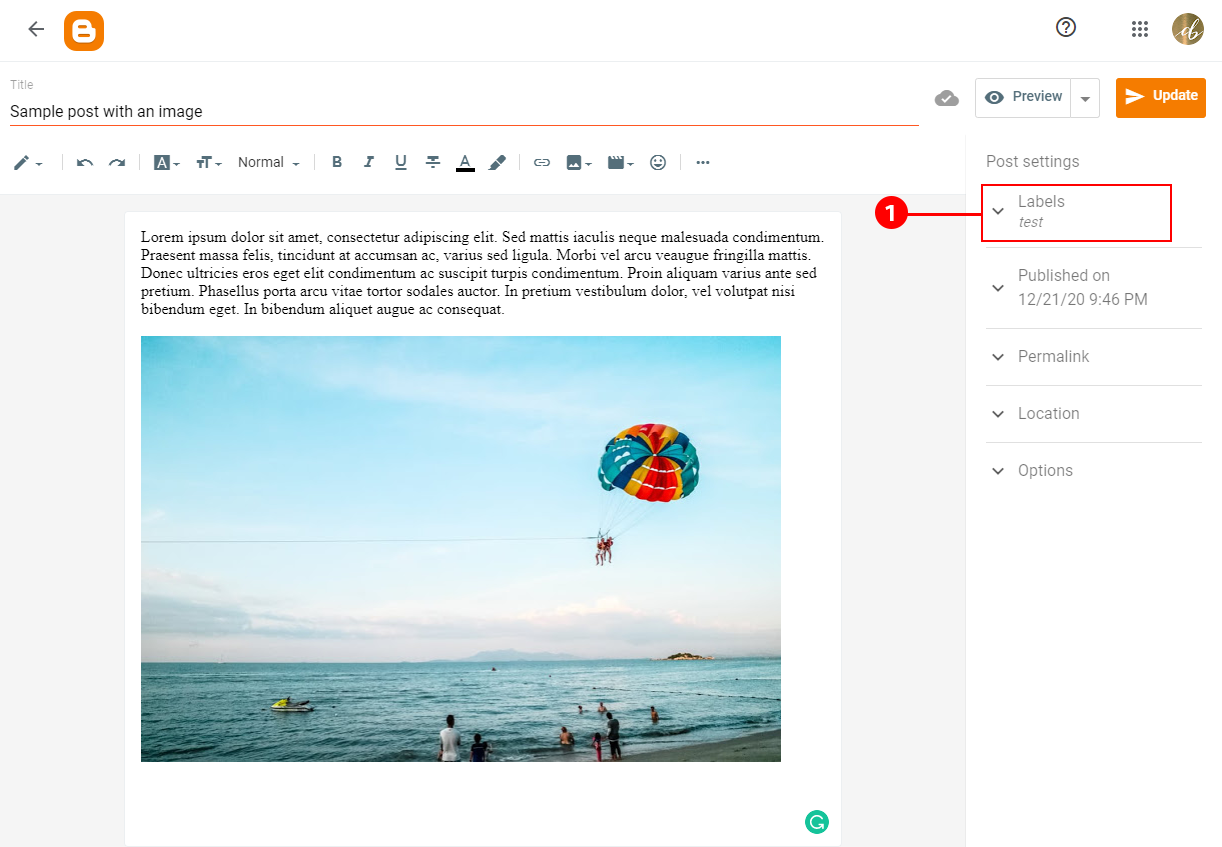
Either compose a new post or click on an already published post to edit it. On the right-hand side, there is a menu called Post Settings. Click on the first option at the to called Labels.

Labels tab in the Blogger Post Settings

#2 Adding Labels to Blogger Posts

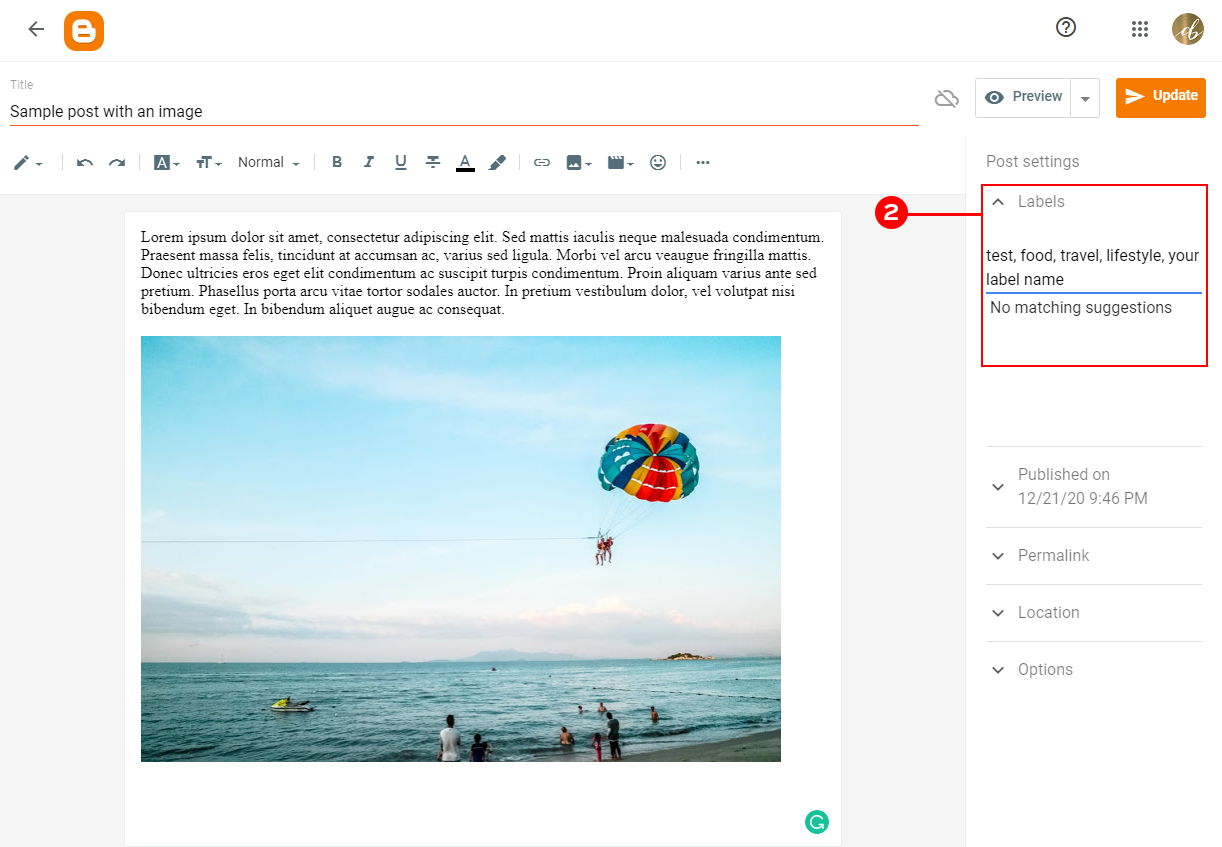
Type in all of the labels that you would like to categorize your post by. Make sure a comma and space separate each label. Try to keep it simple. I usually add around 1-3 labels unless I really need to add more.

Adding your labels to the Blogger Post

If you already added some labels in the past, Blogger will suggest them when you start typing.

Once you will add your label, publish your post.

#3 Check your post

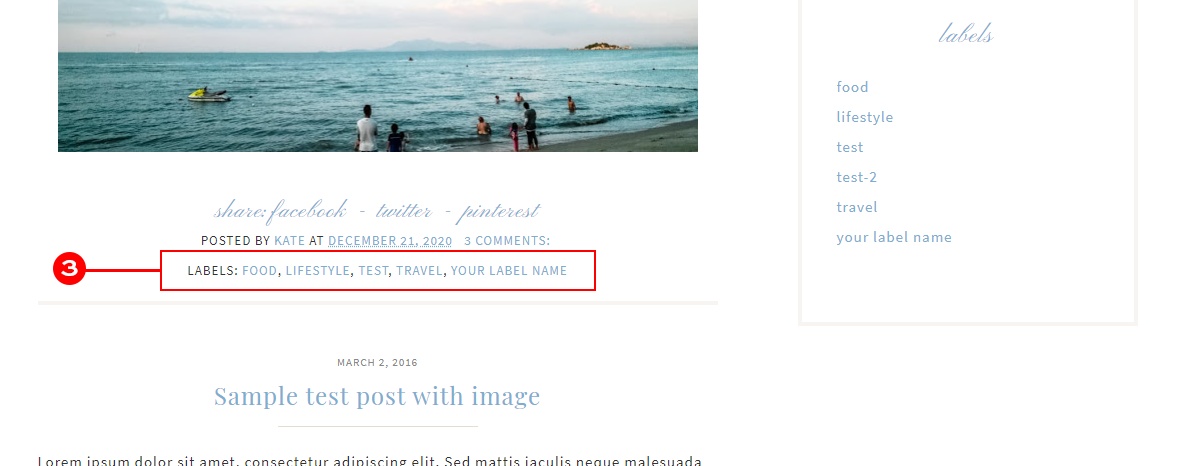
When you view your published post, you will see your labels appear at the bottom of your post.

Keep in mind that not all Blogger template displays label.


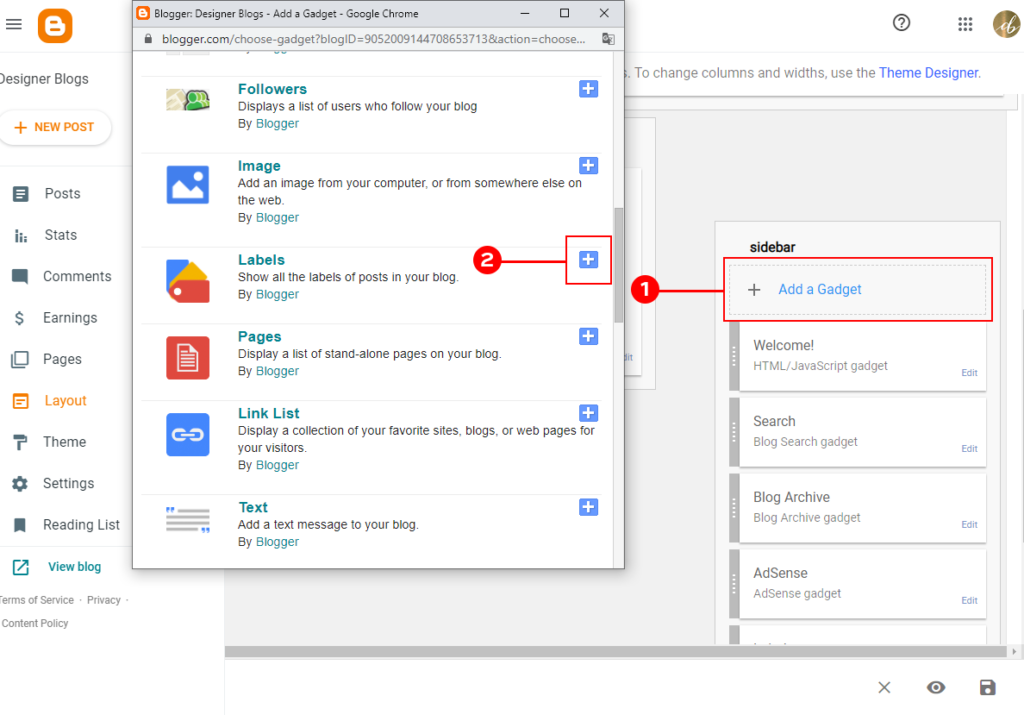
Did you know that you can display all labels as a sidebar widget? There is a built-in gadget with many options to list your labels on your sidebar for easy reference.

If you would like to add one, log in to your Blogger Dashboard and navigate to the Layout tab on the left. Once there, add a label gadget to the sidebar of your choice. On the image below, I’m adding this widget to the right sidebar.


Let’s say you want all of your posts that have the label Food to automatically appear under your navigation bar’s corresponding category.  To do so, you will need to have a link to your label page.

The easiest way of getting one is by visiting a post assigned to your chosen category and clicking the label name at the bottom of it. You can also click it in the sidebar widget if you are using one.

Each label page will usually have a grey bar above the post informing you and your readers where they are.

Copy the link from the top of your browser and use it wherever you need.

Learn how to add links to your Blogger Navigation Bar


I hope that with this guide, you learned that adding labels to Blogger posts is really easy. If you have any questions, make sure to let us know in the comments below.

Comment on Top 10 Fun & Fresh Summer Fonts You Will Love by Olivia Ana

0
Comment on Top 10 Fun & Fresh Summer Fonts You Will Love by Olivia Ana

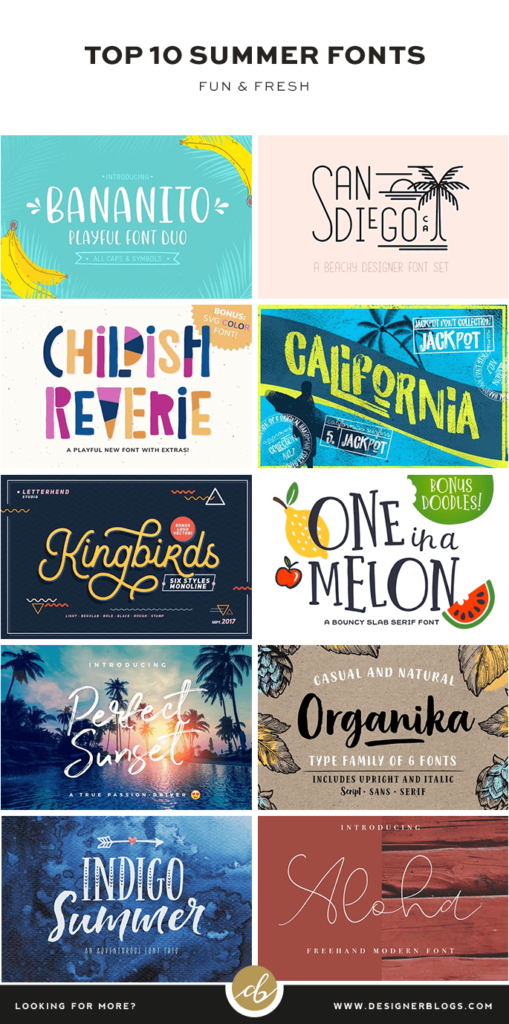
Top Ten Summer Fonts

Make a splash in your design choices this summer with these fun fresh fonts perfect for adding some summer style to your office prints, barbecue invites, and newsletters.

10 Fun & Fresh Summer Fonts

Summer is the best time for some quick and colorful crafts and trying out some new crazy fonts. To give you some fresh ideas we have put together a list of the top 10 fonts we recommend this summer. You will find here everything from funny shapes to classic brush-stroke scripts.

Click on the font cover or name to see its Creative Market page.


Pin me for later!

If you are browsing this post at work or just do not feel crafty right now, we have something for you too! All the fonts collected in one please on easy to pin graphic so you can save those inspirations for later.

Top 10 Fun & Fresh Summer Fonts You Will Love

Show us your works!

I would love to see what you create using those fun & fresh fonts. Make sure to let us know in the comments, or share your creation on social media and tag Designer Blogs.

Don’t forget to let us know which font is your favorite. Do you like script fonts, or would you rather see a compilation of classic serif or sans-serif fonts?

Still looking for a perfect font? Check the list of 20 Best Free Holiday Fonts.


P.S This post includes affiliate links so by clicking them you are supporting us. Thanks!

Comment on How to Use Customize Fonts with Blogger by Rebecca Zara

0
Comment on How to Use Customize Fonts with Blogger by Rebecca Zara

How to Use Customize Fonts with Blogger

Did you know that you can customize fonts for some of the Blogger elements with just a few clicks? Such a feature is available with all default Blogger templates and our Blogger Themes. It’s nice to be able to change even the smallest of things on your blog to match your personal style more closely, but changing things up on your blog by yourself can be intimidating at best. But the good news is, Blogger has made this pretty easy. In this short guide, I will show you how you can use custom fonts with Blogger.

Access your Custom Fonts with Blogger

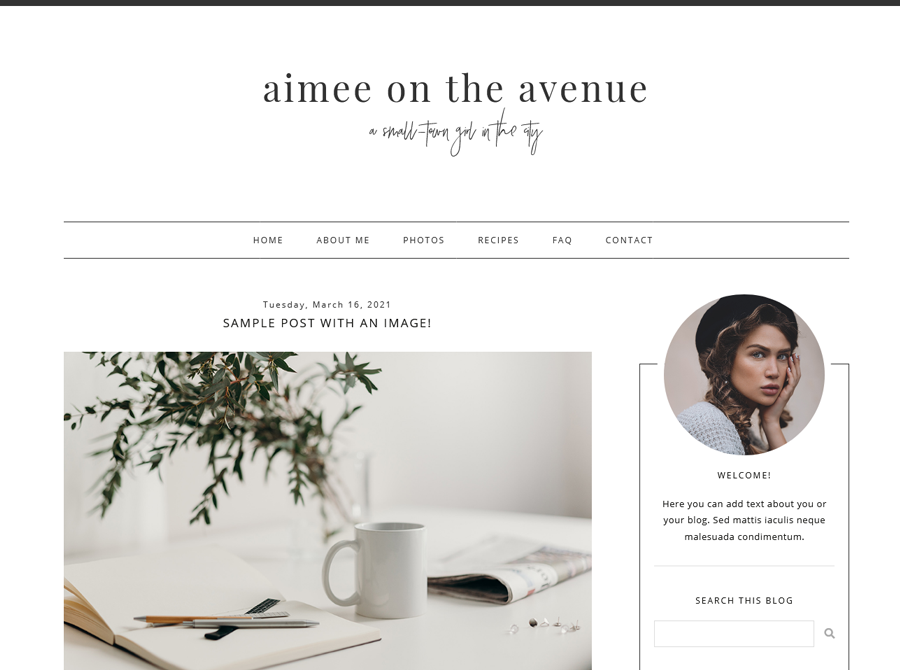
As an example, I will use one of our premade Blogger templates called Aimee

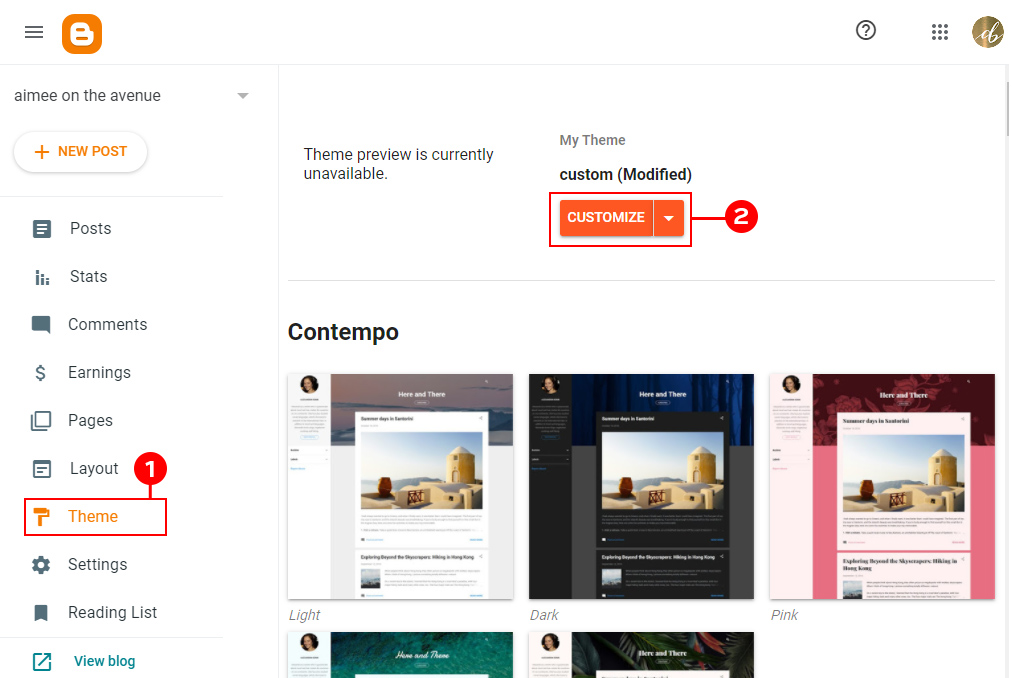
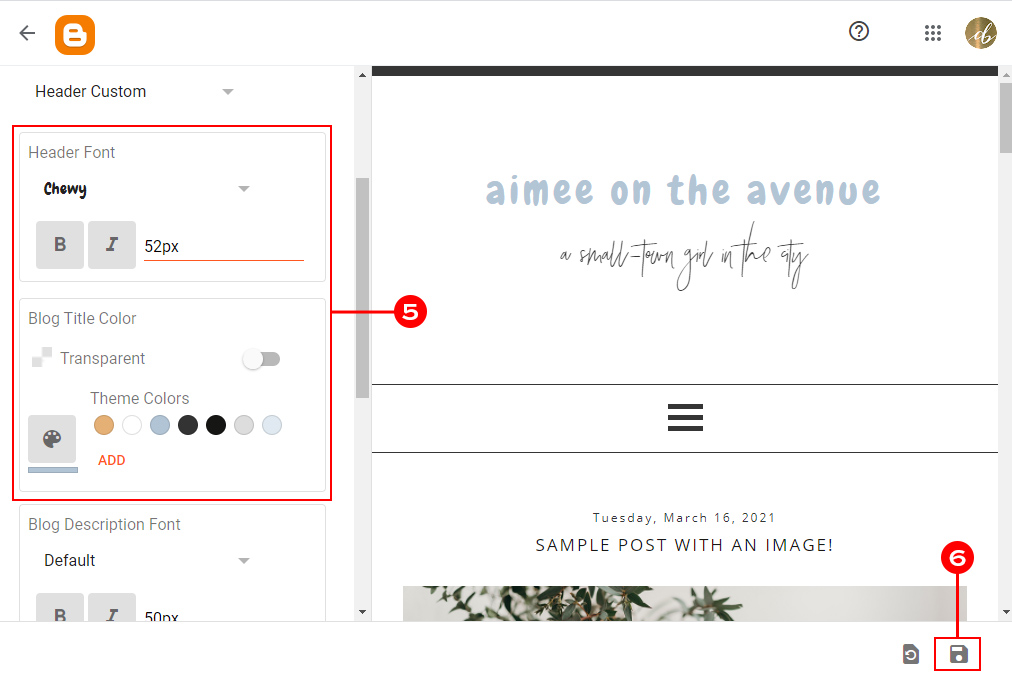
To make your changes, you will need to log in to your Blogger and click on your Theme (1) tab in your dashboard.  Then click on the orange Customize (2) button to be taken to your theme customizer.

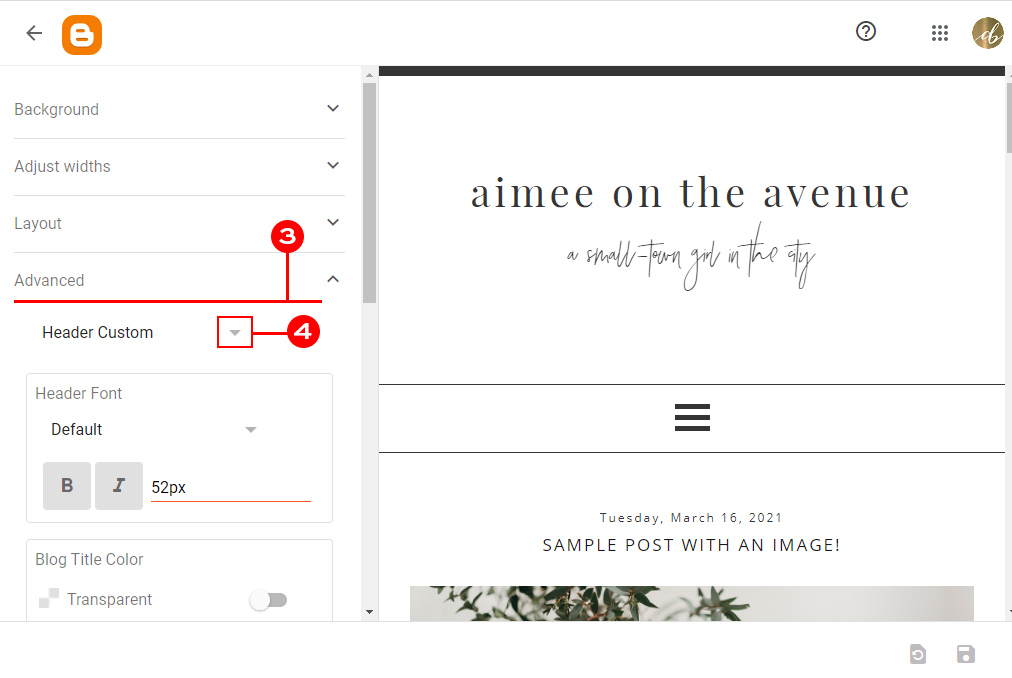
This is what your Theme Customizer looks like.  As you can see, there are quite a few options to click on the left.  Today we will focus on the Advanced (3) tab.

Using the small arrow (4) just below the advanced tab name, you can pick a section of your blog which you would like to edit. Our templates come with a couple of them however, if you bought the design somewhere else, you might notice that your design is not customizable or have just one or two options to choose from.

Browse the options on the left side of your screen (5) and change the font style, color, size, and more! You will find here lots of custom fonts that can be used with Blogger. Go ahead and play around with these a bit without being scared because nothing here gets saved unless you actually save your changes.

Accessing Custom Fonts with Blogger

As you are making changes in this area, you will see a preview of how the changes look on your blog so you can get things set how you like them before they are actually saved to your live blog. Don’t be afraid to click on the different options and make changes. Again, nothing will be saved to your live blog until you hit the Save button (6)

When you are happy with the results, click the save button (6) at the bottom right corner. You can also use the button next to save to reset unsaved changes.


That’s all!

You have just customized fonts on your blog. As you see, using custom fonts with Blogger is very easy and takes only a few clicks. I hope that this short guide will help you make your blog perfect.

If you have any questions, make sure to leave them in the comments below.

Comment on Free May 2022 Wallpaper & Instagram quote by erika acevedo

0
Comment on Free May 2022 Wallpaper & Instagram quote by erika acevedo

Free May 2022 Wallpaper & Instagram quote

Free May 2022 wallpaper is here!

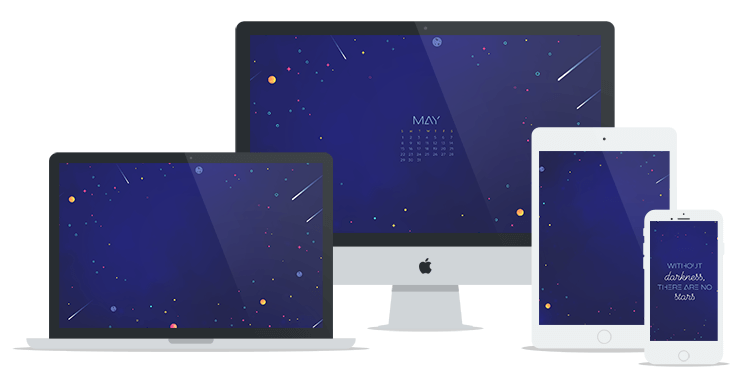
Bright stars on a clear night sky are one of the most stunning views. Now you can have them every day on your computer or phone screen with May’s Free Wallpaper! I hope it will give you hot summer night vibes during those colder spring days.

Each wallpaper download from May 2022 includes:

  • Desktop wallpaper x3 (plain, with the calendar, and with a quote)
  • Phone wallpaper x2 (plain and with a quote)
  • Tablet wallpaper
  • Instagram ready quote

As always, May’s free wallpaper comes with two different mobile phone layouts. They are great to use at once – the simple version for your phone background and the one with a quote for the lock screen.


Quote for May 2022

This month’s theme needed a cosmic quote. However, I wanted to keep it simple. Because of that, I went with a well-known statement about the stars. Let it guide you in those a little bit darker days as they are sometimes needed to help us appreciate all the good things that happen.

Without darkness, there are no stars - may quote

Without darkness, there are no stars

P.S the square image is also included in the download package below! Feel free to post it on your Instagram.


Free May 2022 Wallpaper & Instagram quote

Looking for more? Check our previous wallpapers!

The free download includes three desktop options – one with the calendar and one without the calendar, and one with a quote. There is also a wallpaper for tablets and two options for the phone. We have also included an Instagram-ready square with the weekly quote.

Free May Wallpaper on different devices

FOR PERSONAL USE ONLY.

NOTE: this wallpaper is available as a free download through May 31, 2022 only. After that, a $5 download fee applies.


What font is it?

If you are curious about what font has been used this month, let me help! It is my all-time favorite Cosmopolitan (make sure to check it out as it comes with a few different styles and lots of extras!) and a futuristic sans font called Outer.

If you are looking for some new fonts for your collection, make sure to check 6 Hottest New Fonts for 2022.


Your voice matters!

If you have your favorite quotes and would like them to appear on the next free wallpaper, make sure to post them in the comments below or send us your ideas via email.

Enjoy!


P.S This post includes affiliate links so by clicking them you are supporting us. Thanks!

Comment on 5 Benefits of Keeping a Gratitude Journal by Jaylin McNeil

0
Comment on 5 Benefits of Keeping a Gratitude Journal by Jaylin McNeil

It’s no mystery that showing gratitude can be immensely beneficial to your quality of life. Something magical happens within your soul when you begin showing gratitude for even the simplest things in life. Do you keep a gratitude journal? If no, I will show you how such a simple thing can be beneficial for you.

How Gratitude Journal impact you

Showing gratitude doesn’t take away the difficulties and stresses in your life, but choosing to focus on the good can dramatically improve your outlook on life. Having a grateful mindset naturally attracts more positive feelings and experiences into your life, which brings greater happiness.

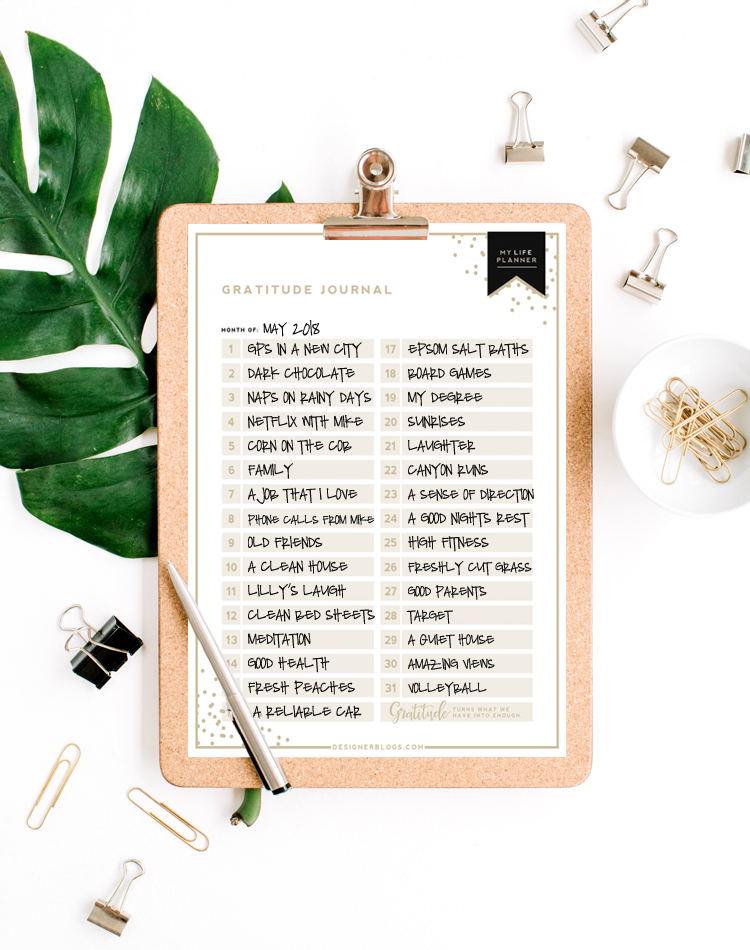
One of the best ways of showing gratitude is by keeping a daily gratitude journal. The My Life Planner includes a gratitude journal page that provides spaces to record simple things you are grateful for each day.

gratitude journal example

As you start jotting down the little things in life you are grateful for, you’ll be amazed at how your outlook on life will start changing. This simple daily task can be done in a matter of seconds, and the effects will be nothing but beneficial to your well-being. The wonderful thing about keeping a gratitude journal is that you’ll create an amazing collection of inspiring notes that you’ll be able to look back on in the future to lift your spirits on a bad day.


Top 5 Benefits of Keeping a Gratitude Journal

1. Gratitude increases positivity

Writing down the things in life you are grateful for naturally makes you a more optimistic and positive person. Focusing on the good in your life gives less power to negative emotions and greater power to positivity. Although you might have positive thoughts come to mind throughout the day, writing them down makes them more concrete and long-lasting.

2. Gratitude improves sleep

Spending a few minutes right before you hop into bed writing down the things you are grateful for will quiet your mind and ease the anxieties of the day. A calm and grateful mind will make it easier for you to fall asleep. Gratitude induces the relaxation response and is the best free sleep aid out there.

3. Gratitude improves self-esteem

It’s easy to feel down when you focus on the negative things in your life. We tend to be so hard on ourselves, but keeping a gratitude journal is a great way to stay focused on our achievements. Showing gratitude has been shown to reduce the natural tendencies we have to compare ourselves to others, which can be detrimental to our self-esteem. By showing gratitude, you’ll have less resentment and jealousy towards others and greater feelings of self-worth.

4. Gratitude reduces stress

Scientists have found that focusing on feelings of contentment and satisfaction is a natural way to counteract stress. Although life will still throw you curve balls, the groundedness that comes from having an attitude of gratitude will help you deal with whatever comes your way.

5. Gratitude improves your health

Grateful people live longer, healthier lives because they have the motivation to better care for themselves. Grateful people have fewer aches and pains and are more inclined to eat healthy, exercise, and attend regular checkups with their doctor.

RELATED: How to Use the Meal Planners & Grocery Lists to Eat Healthily


These are only a few of the many benefits of keeping a gratitude journal. If you haven’t started keeping one, we encourage you to start now!