fbpx
Home Blog Page 1275

Updates to our Learn Node.js course

0
Updates to our Learn Node.js course

Ready to take your server-side programming skills to the next level? We’ll show you how with the new updates to our Learn Node.js course.

Node.js is a cross-platform JavaScript runtime environment used to create event-driven web applications. Originally, Learn Node.js served to introduce our learners to the technology — but now we’ve updated the course with three new modules designed to help you solidify your knowledge of its functionality. For example, in one of the new lessons, we’ll show you how to create servers using Node.js’ built-in HTTP module.

Node.js’s popularity in back-end development makes it a great tool for anyone looking to become a Back-End or Full-Stack Engineer. Plus, learning how to use it will also make it easier for you to learn libraries and frameworks like Express and SQLite. Jiwon S., one of our Curriculum Developers who contributed to the course’s development, explains how:

“Having a strong foundation in core Node.js modules will prepare you for building complete web apps with other popular Node packages.”

Who is the course for?

The newly updated Learn Node.js course is perfect for anyone looking to build their skills with the runtime environment and deepen their understanding of JavaScript.

It’s also a good choice if you’re looking to venture into back-end development, as you’ll learn how to create servers and perform essential back-end operations for web applications.

What are the specific changes?

  • Learn Node.js is now divided into two lessons: Introduction to Node.js and Node.js Essentials.
  • New lesson on Setting up a Server with HTTP
  • Updates and new quizzes on core Node.js modules and HTTP
  • New projects: Message Mixer and Rock-Paper Scissors
  • New articles on JavaScript for Node.js, Node Package Manager
  • Added articles on What is JSON, Implementing Modules in Node, Node modules, and What is REST?
  • Updated the Setting up Node.js Locally article

How will this affect learners who’ve already completed Learn Node.js?

If you’ve already completed the course, you’ll retain your progress and certificate. If you’re currently enrolled, you’ll notice a decrease in your progress because of the new material.

Recap

We’ve updated our Learn Node.js course with new modules designed to teach you more about the runtime environment’s functionality. Along with a lesson dedicated to creating servers using Node.js’ built-in HTTP module, we’ll also deepen your understanding of JavaScript, JSON, the REST paradigm, and more. Plus, you’ll use your new knowledge to build fun new projects that’ll showcase your skills.

10 coding projects for beginners

0
10 coding projects for beginners

Learning to code is a satisfying, rewarding experience — especially if you’re teaching yourself with online programming courses. Still, most developers agree that if you really want to learn how to code, you’ll need to create something. What’s the point in learning about programming languages, libraries, and tools if you’re not applying that knowledge to a project?

Creating coding projects, like simple text-based applications, is the best way to instill the skills and knowledge you gain as you learn how to code. These projects help teach you the basics of programming, force you to think like a developer, and expose you to the tools you’ll use later in your career. To help you gain some hands-on experience, we’ve created this list of 10 coding projects for beginners.

How to begin coding

Before you tackle any of the projects listed below, you’ll need to learn how to code. But which programming language should you learn first? The answer depends on what you want to do with it.

If you want to build your own websites, you’ll need to learn programming languages like HTML, CSS, and JavaScript. If you’re more interested in scientific computing, languages like Python, C++, or Java might be right for you.

To start learning any of these programming languages, check out the courses below:

Once you’ve mastered your language of choice, put your skills to the test with the following projects.

10 coding projects for beginners

The following list of projects is designed to appeal to all skill levels, from new to experienced developers. Each project will teach you how to think like a programmer and build your skills with your languages, libraries, and other tools. You can also publish them on sites like GitHub to showcase your abilities. Here are 10 basic coding projects for beginners:

1. Build a chess game

Building a chess game is a great way to hone your ability to think like a developer. It’ll also allow you to practice using algorithms, as you’ll have to create not only the board and game pieces but also the specific moves that each piece can make.

2. Make a mobile app

Learning how to build mobile applications is an excellent choice if you’re looking to break into mobile development. Depending on your preference of platform, you might have to learn either Swift (for iOS apps) or Kotlin (for Android apps).

Need some guidance as you build your first mobile app? Check out either of the Skill Paths below:

3. Create a basic calculator

Building a calculator is a popular project for new developers, as you’ll need to create both a layout and an algorithm that can process numbers and symbols. While it may seem simple, you’ll have to closely examine your code and process.

4. Build a web scraper

In this project, you’ll use Python and libraries like Beautiful Soup to extract information from HTML and XML files and pages. This is great practice if you’re considering a career in data science. If you need help with this project, try our web scraping with Beautiful Soup course.

5. Create a Javascript slideshow

While this project doesn’t involve tons of work, it is important. It teaches you how to use a Document Object Model (DOM) in a web browser to make a website dynamic. If you’re pursuing a career in web development, this will be one of your many responsibilities.

What’s great about this type of project is that once you know how to create a JavaScript Slideshow, you can apply it to various websites with different designs.

6. Make a countdown timer

A countdown timer tracks the years, months, days, hours, and seconds until an event occurs. This project tests your ability to create a date field, optional time, and a start button. Once it’s complete, you’ll be able to count down the time until any event you have in mind.

7. Flip images

As a developer, you’ll likely find yourself working with digital images at some point in your career. Learning how to alter, resize, and flip them will give you an edge over the competition. For this project, all you need is HTML, CSS, and JavaScript.

8. Develop a recipe app

If you like to cook but have trouble organizing your recipes, creating a recipe app could be a fun and useful project. You’ll want the app to list your recipes by title, displaying a recipe card and picture. You’ll also want to add information about serving sizes, difficulty level, ingredients, and preparation.

9. Create a book finder app

If you’re a book lover with a large library of uncategorized books, a book finder app could be a great assistant — especially if you want to learn more about a book and its author. With this type of app, you’ll need to create a search field that returns relevant information about a book.

10. Build a drawing app

If you have a passion for the visual arts and long for a digital drawing space, try building your own. Within the app, you should be able to draw images with your cursor, manipulate colors, draw and alter shapes, and save the drawing to a local device. Bonus points if you make the images shareable.

Portfolio Projects

Along with the 10 listed above, there’s an almost endless amount of other projects that you can complete to build and showcase your technical skills. If you need help finding one, check out our Portfolio Projects, found in each of our Career Paths.

Our Career Paths are designed to help you learn the skills you’ll need to land an entry-level position in the tech industry. As you complete your Path, you’ll use the skills and knowledge you’ve learned to create various projects that’ll help you illustrate your skills to potential employers.

  • Front-End Engineer Career Path: Learn front-end languages and frameworks and use them to create a custom Spotify playlist, add animations to static web pages, and more.
  • Back-End Engineer Career Path: Learn back-end development with tools like SQL, Express, and PostgreSQL, and use them to build a comic book company API from scratch.
  • Full-Stack Software Engineer Career Path: Learn both front-end and back-end development as you create a database for a restaurant’s menu.
  • Computer Science Career Path: Master Python and development tools like Command Line and Git as you learn how to create your own interactive Choose Your Own Adventure game.
  • Data Scientist Career Path: Venture into data science, database management, machine learning, and more while learning how to visualize your data.
  • Data Analyst Career Path: Explore Python, SQL, and the tools you’ll need to analyze data and use them to visualize data pulled from the World Cup.

Happy Moderator Appreciation Day!

0
Happy Moderator Appreciation Day!

In honor of Moderator Appreciation Day we wanted to give a shout-out to our team of volunteer moderators! Roy (mtf), Pedro (toastedpitabread), Anthony (el_cocodrilo), Elisabeth (ekaseda), Alex (alexc), Lisa (lisalisaj), Jenny (coffeencake), Tim (tgrtim), Tod (midlindner), Aidan (codeneutrino), Steven (vic-st), Glenn (appylpye), stetim94, Shaylin (8-bit-gaming), Sam (thepitycoder), Jeremy (ghostlovescore), Victoria (victoria_dr), Scott (selectall), Michael, and Andrew — we celebrate you!

Moderators are the backbone of our community. These moderators have devoted so much time and energy throughout the past months and years to continually, generously teach and support their Codecademy peers.

We want to thank our mods for all their hard work to keep our community a place conducive to learning and growing — as learners, as people, as a community. The work of a moderator can be challenging and rewarding. At moments, it might not be glamorous, and may even feel like moderators’ work goes unnoticed. But we at Codecademy know moderator contributions are monumental to the success of the Codecademy community.

If you’ve ever gotten a quality answer in the Codecademy Forums, there’s approximately a 70% chance it came from a moderator. That’s right — our moderators are experts in the beginner experience and are hearty advice givers, quick to provide answers to coding questions ranging from HTML tags to the trickiest of Python queries. Click on their profiles above and you’ll see what we mean.

In addition to providing quality solutions to code questions every day of the week, our moderators enforce community guidelines and policies to protect our entire community of learners from harm. That kind of work is often invisible but so incredibly important. It includes managing and removing any content or bad actor that would otherwise disturb the learning experience.

So today, for Moderator Appreciation Day, please join us in recognizing and appreciating all of Codecademy’s volunteer moderators for their part in making our community what it is today — an unmatched resource for learning to code.

From everyone at Codecademy and in this community, we thank you, moderators!

Free July 2021 Wallpaper & Instagram quote

0
Free July 2021 Wallpaper & Instagram quote

Free July 2021 Wallpaper

Our free July 2021 wallpaper is here!

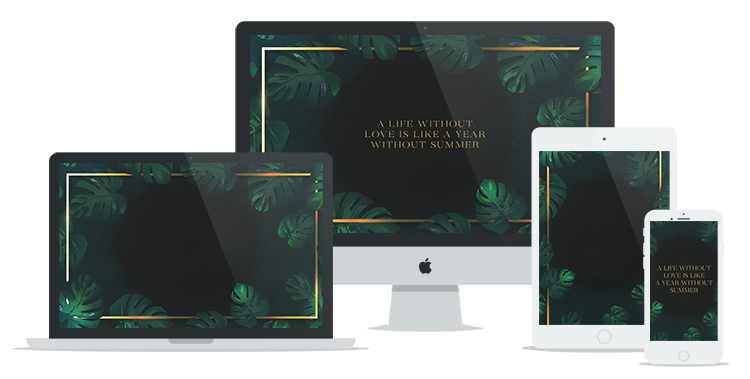
It’s time for hot summer tropical nights! Now you can feel them even when you are staying at home. This months’ free wallpaper features dark green tropical leaves and gold accents that will transform your screen into a perfect summer location.


As always, our July’s free wallpaper comes with two different mobile phone layouts. They are great to use at once – the simple version for your phone background and the one with a quote for the lock screen.


Quote for July

Do you agree that love is like summer? If yes, this month’s quote will be perfect for you!

A life without love is like a year without summer

P.S the square image is also included in the download package below! Feel free to post it on your Instagram.


What font is it?

Free July’s wallpaper features a serif font called Coachella. Coachella is actually one of my newest fonts, but I’ve often used it since I got it. It has a modern and very stylish look so make sure to check it.

If you are looking for some new fonts, make sure to check 10 Affordable Hand Painted Fonts You Must Know.


Free July 2021 Wallpaper & Instagram quote

Looking for more? Check our previous wallpapers!

In conclusion, the free download includes three desktop options – one with the calendar and one without the calendar and one with a quote. There is also a wallpaper for tablet and two options for the phone. We have also included an Instagram ready square with the weekly quote.

Your voice matters!

If you have your favorite quotes and would like them to appear on the next free wallpaper, make sure to post them in the comments below or send us your ideas via email.

Enjoy!

FOR PERSONAL USE ONLY.


Lastly, we would appreciate if you can share this freebie. It is really easy! Just click on the buttons below. It is completely free for you but helps us grow and produce even more content.

Share and help us grow. Thanks!


P.S This post includes affiliate links so by clicking them you are supporting us. Thanks!

Designing Effective Instructional Videos

0
Designing Effective Instructional Videos

This is one of several principles listed under “Principles for Managing Essential Processing”. The segmenting principle suggests breaking down a complex presentation into manageable segments whose pace can be controlled by the learner. Mayer describes research where students were able to click an arrow key to progress through segments of a multimedia presentation (6). However, I imagine that a similar effect can be achieved by presenting labeled slides throughout the presentation such that it would be easier for a learner to navigate the video, giving them the ability to pause and re-watch specific portions.

The Personalization Principle

This is one of several principles listed under “Principles for Fostering Generative Processing”. The personalization principle advocates for using conversational language, rather than formal, in instructional videos. For example, in a description of the human raspatory system talk about how “your mouth” works rather than “the mouth”. “Personalized language is intended to help the learner feel that the instructor is working with them, which can prime stronger motivation to exert effort to understand what the instructor is saying

Many of the principles Mayer suggests seemed obvious. However, I know from experience that it’s hard to keep all of these different principles in mind as you are making videos. It’s so easy to get caught up in the specifics on what you’re teaching, that you can forget to do simple things like verbally signaling key terms, or think about whether you can narrate over an animation or a video to improve comprehension. It’s useful to have such a handy list of evidence-based practice on hand!

(1) Mayer (in press). Evidence Based Principles for How to Design Effective Instructional Videos, Journal of Applied Research in Memory and Cognition. https://doi.org/10.1016/j.jarmac.2021.03.007

(2) Mayer, R. E. & Anderson, R. B. (1991). Animations need narrations: An experimental test of a dual-coding hypothesis. Journal of Educational Psychology, 83, 484-490. DOI: 10.1037/0022-0663.83.4.484

(3) Mayer, R. E. & Anderson, R. B. (1992). The instructive animation: Helping students build connections between words and pictures in multimedia learning. Journal of Educational Psychology, 84, 444-452. DOI: 10.1037/0022-0663.84.4.444

(4) Mautone, P. D. & Mayer, R. E. (2001). Signaling as a Cognitive Guide in Multimedia Learning. Journal of Educational Psychology, 93(2), 371-389. DOI: 10.1037/0022-0663.93.2.377

(5) Lie, W., Wang, F., Mayer, R. E., & Liu, H. (2019). Getting to the point: Which kinds of gestures by pedagogical agents improve multimedia learning? Journal of Educational Psychology, 111(8), 1382-1395. https://doi.org/10.1037/edu0000352

(6) Mayer, R. E., Howarth, J. T., Kaplan M., & Hannah, S. (2018). Applying the segmenting principle to online geography slideshow lessons. Educational Technology Research and Devlopment, 66, 563-577. https://doi.org/10.1007/s11423-017-9554-x

Reader’s Mailbag – You Ask, I Respond

0
Reader’s Mailbag – You Ask, I Respond

I started up again, a reader’s mailbag where you can submit questions to me. This new version (debut here), is based on questions I have received via social media, email direct, and my website.

Before diving into the Q/A, for those who are interested but unaware, I know have a LinkedIn Group, called E-Learning Coach, which is me. Join the group, ask questions, from how to develop a top-tier e-learning program to generating sales and long-term revenue with customer education/partner training, to establishing and building mass use with repeat learners. Or ask which system should I buy between A or B. I do recommend you start your assessment first on FindAnLMS, after it comparing systems, and seeing my “ratings” which are updated twice a year. If a vendor doesn’t have a star rating, this just means they are either new to the platform OR they are about to analyzed by me before the fall.

E-Learning Coach is a free service. It is my way to help you on this journey and to strip away some of the “noise” you may hear or read or see on the net and social media too. I will always be upfront, and honest with you.

So if are new into the whole e-learning scene, new to buying a system, exploring options, think of me as our friendly neighborhood ghost, err human, minus the annoyance of asking to use your lawnmower.

Onto the Mailbag.

Steve,

“I’ve been looking at a few LMSs and I keep hearing that they have an LXP. But, as a reader of your blog, I know that an LXP isn’t something really unique. Why then are so many vendors saying it is?”

A: This is what I call revisionism 1.0. There continues to be a lot of confusion around what an LXP is and is not. On top of that, LMS vendors and other types of learning systems recognize that more and more buyers are eyeing an LXP as something that, as you noted is unique in the industry – only due to, those vendors and some other folks on the net, saying so. Thus, they need to counter it, by saying “oh, we have that too, and it is new or blah blah”.

An LXP, as one reader/follower on social media so rightly said, is a system that is an aggregator of resources, which I concur – the resources are mainly 3rd party course providers (you, as the client pay for the courses for your learners), content that is free (like TED), with various functionality.

Eventually, (and no surprise) they started to add features similar to an LMS, creating even more confusion. As mentioned in my “LXP” post, they did some things rare initially, but now, that is gone. I would argue that today, the vendors who do the best job in the LXP market are those who have not just solid skills management capabilities but are exceeding them.

What I find are vendors, many of them LMSs, but plenty of others, pitching they have either a built-in LXP or an add-on (additional fee), and spin it by showing playlist capabilities, with trending, most popular, and recommended. Skills may or may not exist in the system (and in some cases, it isn’t even associated with the LXP), and surprisingly, a chunk of these systems do not even have a course/content marketplace with 3rd party vendors.

The marketplace concept has been around since 2000. It just wasn’t pitched as such, and wasn’t visible.

Alison,

“We have Workday but have not been impressed with Workday Learning, which we use as a customer of Workday. This has made us wonder if Workday Learning is the right system, especially since we want to provide courses to our customers.”

A: Workday is a great solution for HRIS/HCM. That said, I wouldn’t buy Workday Learning. When it rolled out of the gate many moons ago, a key part of it was the MediaCore system (a Video Learning Platform). While WL has improved in some areas, to me, it seems to be in a rut. I found it interesting that the Workday Convergence show in 2019, which showed a lot of what Workday has to offer, never even showed Workday Learning.

As for providing customer education, I definitely would not go Workday Learning. Workday added this option (it is an additional cost) because I believe they were seeing Workday clients who wanted to do extended enterprise, but couldn’t with Workday Learning and thus, were purchasing other learning systems which could.

The idea that a 3rd party system in customer education or any audience focus for that matter, can not connect well with Workday, is not accurate. Some vendors are better at it than others, but with APIs, it has come a long way. I would definitely ask any CE platform, which says they can integrate with Workday (and your modules), to provide a couple of clients who are Workday customers and use the learning system for customer education. If they can’t provide that, then look elsewhere. They are those who can.

Alejandro,

“I saw on LinkedIn that you are having a roundtable of learning system executives on your blog in July. Can you provide any additional information, and can we register to attend?”

A: The roundtable will not be live, in that it will not have executives in a video format, and thus there isn’t a registration or sign up for it.

Rather it will be a series of questions that are presented to the executives (ahead of time) which they will respond to, and from there, those responses will be published under each question. Not every question will have all the execs’ responses, simply because there are 12 of them. Each question will have at least five execs, but no more than six.

There will be one final question, where all of them will respond to. It will be a long post, but it has never been done before in the industry, and so I hope people will really like it, to hear from so many in the industry with a variety of perspectives. Plus, they represent all different sizes of companies, targets, and even locations.

This is the Final List of who will be on the “Roundtable”

  • Karl Mehta, CEO of EdCast
  • Jonathan Satchell, CEO of LTG
  • Barry Kelly, CEO of Thought Industries
  • Lefteris Ntouanoglou, CEO of Schoox
  • Carol Lehman, CEO of Axonify
  • Dan Levin, CEO of Degreed
  • Juliette Denny, Managing Director of Growth Engineering
  • John Baker, CEO and Founder of D2L
  • Dean Pichee, CEO and Founder of Biz Library
  • Mike Owens, CEO of Absorb
  • Steve Dineen, President and Founder of Fuse
  • Linda Steedman, CEO of eCom Scotland

Each of these distinguished executives will be receiving the questions next week, which will cover five topics. The blog will be published at the end of July.

I should add that another roundtable for L&D and Training execs who have an e-learning program and using a learning system will be coming too – in September. So, watch for that.

Donna,

“What do you see as the top three features to have in a learning system for our employees?”

A: I’d respond this way. What are the top three features that are not common (i.e. not every system offers it) that will be very big in 2022 and 2023. Since systems as a whole, have 80% of similar, the little differences can make a big deal.

  1. Segmented Metrics with data visualization. What you should be looking for our systems, that go far beyond “views” – which I believe is absolutely worthless – I mean your system isn’t a search engine. And “views,” tells you nothing. You want the nitty-gritty here, from how long where they in the system, to where did they go – what content they were taking or looking at or completed, to what skills they selected (if it is available in the system), what skills tied to what pieces of content or courses, how many times did they go in which is different than how long but you want to see the correlation and see if you pick up trends.

I would want to know as much as I can about that learner to see if I can spot some trends, and see what they still need to learn or seek assistance from. If the system offers an “expert” option, then I want to know who my employees are selecting, how often, what are the responses (I have yet to see a system that offers this on the admin side as an aggregate then detailed), a rating and so forth. For skills, I would want what skills are being picked, which are popular, which are not, whether than learner picks skills tied to their job role or if they get to pick something of interest not related to the role (which trust me you want them to pick such skills), and if you have a system that is tied to job roles with content and skills, then you want that data too. Skill ratings are essential here, but drill down is even better.

2. Machine Learning. Look AI is going to continue to be big in the industry, and I believe some vendors will eventually go further with deep learning (a subset of AI, and even stronger than ML). Can the system identify the skills and push content based not just on skills required for the job role or opportunity via a playlist/channel, but also skills/interests too. I would like to see a system that can add a lot of different variables that the administrator can select from, to go even further. Right now it is rather limited. Let’s say the ‘expert’ responses are showing a trend for a group of learners (in a job or around a skill), those responses are then aggregated and pushes out content based on that set of data thru a playlist or channel. Thus, it is truly identifying direct content based on inquiries. That’s cool. I also believe that vendors who rely on “completed” content/courses as a cornerstone for their AI (and there are plenty that do) are providing a disservice to you because the data you are seeing is only half the picture. Online Learning was created to enable people to focus on what they want to know and/or need to know. They drive the learning. If you force them to complete something then you are missing the whole experience. After all, your recommended learning, most popular, and so forth will be solely based on completed (which is often assigned). Regardless of skills or other components, your learner isn’t getting a true sense of their needs, rather they are getting, what the system says they need based on completion. That just isn’t reality. Tell me when was the last time you read an entire online new site?

3. Video-Based Coaching with real-life scenarios and skills building and validation. Right now, even systems that offer the ability to have someone record themselves, and then the coach can respond via a webcam (after the fact) or via a text response is only so-so. It’s a nice start, but it isn’t going full power here. I believe real-time coaching/mentoring is essential, especially if you are in customer education – the value add alone makes it worthwhile. Plus, adult learners learn best in real-world scenarios, not some theory or fictional it will never happen – I mean when is the last time you saw people wearing a suit in your office and you are not in the financial space? Systems push skill ratings (self-assessments), but again is one perspective, and you are assuming that the person is truly being honest. This is always been an issue with these types of assessments, they are only as good as the person’s responses. These systems may have the manager rating of the learner (team member) to validate or reduce. Again, there could be a subconscious bias that the manager isn’t even aware of. That isn’t something that I would think is an ideal angle.

Rather I’d like to see more ways of validation, which can be achieved even in ratings of themselves, thru real-world scenarios, boot camp sims (often used in tech skills), and other matters. Tie it into that machine learning algorithm or at least another mechanism to truly validate. This isn’t going to be something you will likely see – not the full whammy I just described in 2022, although there are systems out there that do a chunk of this – video coaching/mentoring, skills validation, and role-play/scenarios, but to combine it all with ratings/etc. is no.

As long as the L&D and Training Exec are aware of the imperfections around self-ratings, then that will have to work, but do not assume that because someone is a manager, that they may not have a subconscious bias towards an employee. The way to change that is to have within your system an independent capability which would be AI, that can do it for you. Of course, the data initially would have to unbiased, but that is easy to do.

Jenni,

“I’m confused on all the types of learning systems out there. LXP, TDP, LMS, Learning Platform, and the list goes on. I can’t figure out what we need for our employees. Especially when we want LXP functionality with talent development.”

A: One way to solve this is for vendors to stop coming up with different names and spins for what their system does. I’ve been a big supporter of the term Talent Development, and what features are required to be in it, which would include those LXP ones you want. I believe the better term to go with though is TXP, which thus is a combination term, and in essence, says talent experience and learning. The functionality is still the same for the TDP (which requires LXP components in it to begin with), but the term I believe, i.e. TXP replacing TDP and a vendor using LXP with TDP features.

A TXP is focused on employees only with folks like CLOs or people in L&D that want a learning system, with LXP and Talent Development functionality. You are not buying a TXP for customer education, although, I do believe that some clients will use it for that. I mean, the TXP could offer (and I surmise a few will) some e-commerce functionality, trying to hit both sides – the employee focus (the main) and for clients who have customers – them too. It’s a risk for the CE side, I mean I wouldn’t buy a TXP for customer education, per se, only because it will always skew to my employees, and not my customers. However, if it is say an add-on or component as part of a learning suite, that would offer the duality options.

As for the other names, in essence, there is a lot of learning platforms out there, that is really an LMS, but just refuse to call themselves that, for nothing more than marketing purposes. If I could streamline down, I think that there are eight types and each of them has skill functionality at some level, some vastly stronger than others.

  • LMS
  • TXP (Combo TDP and LXP)
  • LXP
  • Learning Platform – They truly do not have the base standards of an LMS, OR they are very streamlined down
  • Learning Suite or Learning Ecosystem (They are made up of multiple modules – which may or may not be an additional cost). In an LS you could have an LMS module, TXP, Skills Platform (if they wanted to split it out), Content Marketplace (Again, it would be in a TXP or LMS anyway, but this is just spin), Authoring tool, Advanced Analytics. OR for me, I’d go LMS, TXP, Marketplace, Advanced Analytics as the four cornerstones, and then anything else are just options. I’m a huge fan of “all included”, thus if you do not want to use it, you don’t have to, but who knows down the road. It saves cost.
  • Training Management System – They focus heavily on the scheduling of ILT and now vILT. I know some vendors call their LMS a TMS, but this tells me they clearly do not know or understand what a TMS was developed and is used for.
  • Skills Measurement Platform – It is all about measuring skills here. UI/UX is not a need. Information is.
  • Sales Enablement Platform – This is a system that combines a heavy dose of sales capabilities (not just about sales training here) including some level of CRM, and Learning functionality. When you see a vendor say, we have sales enablement capabilities in our suite or LMS, what they are referring to is that you can use their system for sales training. Here’s a secret – you can do this in every type of system if you wanted to, so it’s spin. Someone who buys a SEP wants the full muscle of sales capabilities and functions, tied into a learning component for sales training. It is completely different than just saying I am using this for sales training, where training is the muscle and sales is the content or coaching component.

Bottom Line

The debut new Reader’s mailbag, edition one is a wrap.

If you would like to submit your questions you can do it via my E-Learning Coach, or Twitter (@diegoinstudio) or LinkedIn directly or by e-mail.

Lastly, thank you to everyone who reached out and continues wishing me well following my fall, a few weeks back. I’m still dealing with Post Concussion Symptoms but on the mend. Each day is a better day.

E-Learning 24/7

9 tips to help you ace a whiteboard interview

0
9 tips to help you ace a whiteboard interview

Whiteboard interviews can be intimidating. You’re put on the spot and asked to solve a technical problem without knowing anything about it beforehand. And if that wasn’t enough, you also have to explain your solution to your interviewer.

Still, whiteboard interviews are a crucial part of the hiring process. In the video below, Farish, a developer based in California, explains how whiteboard interviews allow you to showcase your ability to reason, explain, and solve a problem — all of which are skills you’ll need while working on a team with other developers. In the paragraphs below, we’ll provide 9 tips that’ll help you ace your whiteboard interviews. But first, we’ll explain what a whiteboard interview is.

What is a whiteboard interview?

During your whiteboard interview, also commonly referred to as a technical interview, your interviewer will present you with a coding problem and ask you to outline your solution on a whiteboard. In the video above, Farish explains how recruiters use these interviews to gauge your technical ability, communication skills, and approach to problem-solving.

The problem you’ll need to solve will likely be an algorithm, but it could also relate to system design or even one of the company’s real-world problems. You may even be asked to solve a problem that goes beyond the position’s requirements, but don’t panic. As Farish explains, your interviewer is more interested in the logic behind your solution than its accuracy.

While discussing technical and behavioral interviews in the tech industry, Christina Kopecky, a writer at CareerKarma, echoes a similar sentiment:

“Remember that whiteboarding is not about coming up with the best answer, but about talking through your approach to get to a workable solution. It probably will be a brute-force or naive solution, and that’s okay.”

9 tips on how to ace your whiteboard interview

To help you prepare for your upcoming whiteboard interviews, we’ve compiled a list of tips that’ll help you showcase your technical, communicative, and problem-solving skills. Not only will they make for a smoother interview, but they’ll also help put your mind at ease. When you’re relaxed, nervousness is less likely to get in the way of clear thinking and communication.

1. Practice whiteboarding

Interviews can be difficult. It’s hard enough to be in the spotlight, even without the added pressure of trying to impress your interviewer. To help you prepare, Farish recommends practicing whiteboarding in the days leading up to your interview.

This doesn’t mean that you need to go out and find complex problems and practice solving them. Instead, take the time to walk yourself through some of your daily activities as you complete them.

Practicing whiteboarding can help you become a better communicator. It’ll also help you get into the practice of explaining your thought processes and identifying any missing steps.

2. Prepare for the interview setting

You may interview in person, but the chance is just as high that you’ll do it over a videoconferencing platform like Zoom. Here are some tips for how to prepare for a remote whiteboard interview:

  • Ask the interviewer which conferencing app you’ll be using and make sure you have downloaded it and are comfortable with its features.
  • Choose a quiet, relaxed setting without distractions like your bedroom, an office, or even a side room reserved at a local library. A little background noise is unavoidable, but you want your interviewer to be able to hear you clearly.
  • Get a notepad ready to take notes during the interview. You may want to write down things such as:
  • The interviewer’s name
  • Questions that come up during the interview that you may want to ask after the interview

3. Clarify the problem

Before starting your solution, Farish recommends taking the time to discuss the problem with your interviewer. Repeat the question aloud in your own words, and ask questions that clarify any assumptions you have about the solution.

Some candidates avoid asking questions because they fear it’ll negatively impact their chances of landing the job, but this isn’t the case. Your interviewer will be glad to see that you prefer to fully understand the problem before tackling a solution. Plus, you’ll also give yourself more time to think of an answer.

4. Define your inputs, outputs, and edge cases

After you’ve clarified the problem, it’s time to start finding a solution. Write the inputs or functions that’ll lead you to a solution, and explain what outputs you expect them to produce. You’ll also want to address any edge cases (uncommon or unexpected inputs that could break your functions) as you find them.

In the video above, Farish shares an example. Imagine that your task involved merging two sorted arrays to a new sorted output array. In this case, your edge cases would be duplicate numbers in the two input arrays.

5. Outline your solution

Outlining your solution with bits of pseudocode gives you the opportunity to communicate your thought process to your interviewer. Plus, your interviewer will be more likely to provide tips or hints if you’re already engaged in conversation. Again, ask questions if you find yourself stuck or confused.

6. Know what your acronyms mean

Programming languages, terms, and their abbreviations may feel like a complex alphabet soup sometimes, but you need to know what they mean.

For example, REST stands for Representational State Transfer. You’re most likely used to simply saying “REST” in conversations with other developers. You don’t want to be caught off-guard when your interviewer asks you to expound on the implications of “state transfer,” so understanding the acronyms and their definitions is a big help.

7. Write down and talk through your approach to the solution

Once you have an idea of how to solve the problem, write it out in a way that’s easily understood, even to someone who doesn’t know the problem itself. This is beneficial because your interviewer may take a screenshot or picture of your approach to share it with someone else.

It also helps to explain your approach aloud — even if that means saying exactly what you’re writing down. This helps you:

  • Show your presentation skills
  • Get your thoughts together as you begin your answer
  • Catch any errors that you may not recognize until you hear them said out loud

Remember the power of communication in a whiteboard interview. Writing down and talking through your thoughts allows the interviewer to check off a very important box: You can communicate. This may be more important than how well you’ve memorized the syntaxes of the languages in which you code.

Once you’ve finished explaining your approach, Farish recommends discussing your solution’s time complexity or Big O Notation. In another post, we take a closer look at why you should explain your approach during whiteboard interviews.

8. Don’t get flustered if you forget an element of syntax

If you can’t remember exactly how to write a command, it’s better to acknowledge that and include a symbol or other annotation in its place. This shows that you know what the code can do and how it works in the context of your solution. In this way, your knowledge of logic and problem-solving can still shine through.

9. Don’t say “I don’t know”

Taking extra time to think of a practical approach to a question is infinitely better than saying “I don’t know.” Also, if you’re asked a factual question you don’t know the answer to, it would be better to say “I can’t recall that off the top of my head,” because “I don’t know” sounds like you’re giving up. “I can’t recall,” tells them that if you had your notes from class or could Google it, you’d know the answer in a few seconds.

Preparing for your whiteboard interview

With the tips listed above, you’ll be better able to accurately showcase your technical, communicative, and problem-solving ability during your next whiteboard interview. Still, some whiteboard interviews are designed to test your proficiency with specific programming languages. To help you prepare for those, check out any of the courses below:

Leading companies across North America choose Coursera for Business to build skills for a digital future

0
Leading companies across North America choose Coursera for Business to build skills for a digital future

By Leah Belsky, Chief Enterprise Officer at Coursera

Today, we’re excited to announce that more than 30 leading companies throughout North America have selected Coursera for Business to accelerate their digital transformation strategy. These customers represent a wide range of industries with skilling needs unique to their business.   

The growing adoption of IoT, electric, and autonomous driving trends are reshaping the future of the automotive industry. Toyota Motor North America R&D, part of one of the world’s largest automakers, is collaborating with Coursera to help employees develop high-demand digital skills.

Professional services organizations are also playing a pivotal role in helping enterprises navigate business disruption and scale digital transformation efforts. Accenture, a leading global professional services company, is now working with Coursera to further strengthen digital skills proficiency throughout the organization.

Technology companies are innovating faster than ever using cloud, machine learning, and AI technologies to provide personalized experiences to their users. eBay, one of the world’s largest online marketplaces, has chosen Coursera for Business to help its team of 750+ engineers develop machine learning skills. 

“We believe every engineer will be a machine learning engineer in a not too distant future,” said Amit Sahasrabudhe, Director, Chief of Staff, Payments Technology at eBay. “We needed a learning platform that offered courses in machine learning, AI, and deep learning, among others. Coursera checked all the boxes. And with courses and credentials from top tech companies like DeepLearning.AI, IBM, Google Cloud, and world-class universities like Stanford, NYU, and University of Michigan, selecting Coursera for Business was an easy choice.” 

Magic Leap, a leading provider of augmented reality solutions, chose Coursera for Business to meet the diverse learning needs of its employees, giving them access to world-class content that they can access anytime, anywhere, and across devices.

“At Magic Leap, the speed of business demands learning solutions that allow for flexibility,” said Tim Russell, head of learning and development for the company. “We selected Coursera both because of the rich content and because it offers on-demand and self-led options to support our people with either deep dive or simple experiences based on their needs.”

Several other top technology companies have recently implemented Coursera for Business, including ConsenSys, a leading global blockchain technology provider, and ATPCO, which provides industry-leading airline software for pricing and shopping data. In addition, we’re now collaborating with Clarabridge, a leading provider of customer experience management solutions. 

Within the financial services industry, we’re proud to work with new customers like personal finance company, SoFi, by providing their teams with access to job-relevant, digital skills training. 

Online retail has been at the heart of how customers met their shopping needs during the pandemic. It has dramatically accelerated the industry’s move to build new and powerful digital experiences. One of the world’s largest online retail companies has adopted Coursera for Business to improve machine learning skills across its engineering team. 

Coursera for Business now provides over 2,000 companies across the globe with role-based skills development content featuring hands-on learning, measurement, benchmarking, and analytic capabilities through a single, unified platform. Our teams continue to bring new and impactful experiences to enterprise learners. Innovations like SkillSets are helping organizations deploy turnkey, job-based learning to develop targeted skill proficiencies. These SkillSets are the building blocks for our portfolio of Academies. Using underlying skills data, these Academies offer a packaged learning experience based on the depth of skill needed for specific roles across an organization.

Coming out of the pandemic, every institution has a role to play in bridging the skills gap. We look forward to expanding our collaboration with many more organizations worldwide as they double down on their workforce transformation efforts, equipping employees with cutting-edge skills to help automate repetitive tasks, improve data literacy, harness new technologies, and innovate faster. 

Learn more about Coursera for Business today.

6

Data science vs. data engineering: What’s the difference?

0
Data science vs. data engineering: What’s the difference?

Data science is a growing field with a booming job market. Every day, companies look for new ways to use their data, so the need for data professionals has never been greater.

Both Data Scientists and Data Engineers rank highly in LinkedIn’s list of the top 15 emerging jobs in the U.S. But what’s the difference between the two? Because of data science’s wide range of applications and the nebulous responsibilities and titles of data professionals that vary between companies, the distinction can be hard to discern.

To help you understand the difference (and clarify your potential career path), we’ll explore both data science and data engineering in the paragraphs below. Then, we’ll show you how to break into these emergent fields.

What is a Data Engineer?

Without Data Engineers, a Data Scientist’s job would be much harder. Data Engineers work in the background designing the databases and data stores that hold a business’s data cache. They also build the pipelines that transform this data into formats that are more useful for Data Scientists.

Data Engineers often deal with raw data that comes from analytics and tracking tools, IoT devices that output sensor data, sales data from e-commerce sites, and more. This data could have errors, misconfigured data points, and information that only applies to the data systems. There could also be a lot of it to deal with, and the data doesn’t stop coming in most industries.

It’s up to a Data Engineer to design and create an architecture that supports retrieving the data from all these sources and storing it in an easy-to-use format. To do so, they need to be skilled with databases, programming languages like SQL, ETL (Extract, Transform, Load) tools, and other data processing tools.

This job can be complex because it’s not as simple as moving the data around. Errors and misconfigured data must be either removed or fixed. Sometimes system-specific codes in the data have to be looked up in another system to make sense in the final dataset. Or one dataset may have to be merged with another. Finally, the results can be delivered to Data Scientists or Data Analysts who use it to provide business insights.

What is a Data Scientist?

Data Scientists wrangle big data. They collect and analyze large sets of both structured and unstructured data. Most come from a variety of backgrounds since the skills needed to become a Data Scientist go beyond programming or computer science skills. A Data Scientist must have technical skills, but they must also know both mathematics and statistics.

It’s a Data Scientist’s job to discover the questions they need to ask to make a business grow. For example, what type of revenue increase would a company have if they added a new product line? After asking this, they would look at the data they have and see if they can pull the answer from it. If the data isn’t available, they may work with a Data Engineer to set up a pipeline to retrieve it.

Once a Data Scientist has their data, they prepare it so it can be used to create predictive and prescriptive machine learning models. To do this, they may have to transform and clean the data even more, and they also may have to research their industry further to determine which machine learning models and methods will work the best for the information they’re trying to generate.

Once Data Scientists have gathered the insights they need, they will have to turn these insights into a story they can present to stakeholders. Once those results are accepted, they have to automate the process they used to generate and deliver reports to these stakeholders regularly.

What’s the difference between data science and data engineering?

Now that you know what both a Data Scientist and Data Engineer do daily, it is easier to see the difference between the two disciplines. The key differences are:

  • Data Engineers collect, move, and transform data into pipelines for Data Scientists, while Data Scientists prepare this data for machine learning and use it to create machine learning models.
  • The final result of a data engineering process is data that is easy to use and process, while the final results of data science are reports and insights that are presented to business stakeholders.
  • Data Engineers use programming languages to move, transform, and clean data, while Data Scientists use programming languages to create machine learning models.

While we draw a line between data engineering and data science in this article, this line is usually blurry in the real world. So whichever way you chose to go, it doesn’t hurt to know both disciplines.

Getting started with data science and data engineering

Data is the new gold, especially in the business world. Because of this, choosing either data science or data engineering as a career path means you will be in demand in the job market. After going over the details of each job, you should have a better idea of which job will be the most rewarding for you.

If you’re leaning more towards the Data Scientist role, then our Data Scientist Career Path is for you. It’s a beginner-friendly course that will teach you how to become a data-driven decision-maker.

But that’s not all we have for future Data Scientists. Building a Machine Learning Model with Python will introduce you to machine learning, another tool in the Data Scientist toolbox. For even more, check out our data science course catalog.

If you’re interested in data engineering, you’ll need to Learn SQL so you can query databases effectively. After that, Learn Python to start building pipelines for your data and create your own databases from scratch with our Design Databases with PostgreSQL Skill Path.

Whichever you choose, we wish you luck on your journey into the world of data.

9 examples of machine learning in action

0
9 examples of machine learning in action

The term “machine learning” makes it sound like computers will solve problems for us without much human guidance. We’re not quite there yet. But, some fascinating careers are paving the way for artificial intelligence to help us all out in our daily lives and at work.

Machine Learning Engineers and Data Scientists that specialize in machine learning get to work in pretty diverse industries. That’s one of the best things about a career in programming or data science — you can take those skills just about anywhere. It also means that you can work in a field that excites you or one in which you feel like you’re making a positive contribution.

This article will show you examples of machine learning in action. We’ll also help you understand what machine learning is used for and how you can learn the skills required to be a part of this exciting industry.

What is machine learning used for anyway?

Machine learning isn’t as hard to understand as you might think. In short, it involves using pattern recognition software to find trends in data, building models that explain the trends/patterns, and then using the models to predict something. The more a computer program “learns” about a data set, the better it predicts the outcome of a new set of data.

For example, if you fed a machine learning algorithm a bunch of images containing flowers or people, it would learn from the labeled data and be able to discern whether the next image it processed was a flower or a person. In effect, it gets better the more it’s used because each new piece of data is a “learning” opportunity for the machine.

In another post, Hillary Green-Lerman, one of our Data Scientists, takes a closer look at what machine learning is, explaining how:

“Machine Learning is about using the data you already have to make predictions. This sounds really fancy, but most of the time, the ‘prediction’ is really just a label.”

9 machine learning examples

Machine learning careers are on the rise, so this list of machine learning examples is by no means complete. Still, it’ll give you some insight into the field’s applications and what Machine Learning Engineers do.

1. Image recognition

As we explained earlier, we can use machine learning to teach computers how to identify an image’s contents. You know when you’re asked to find all the buses, crosswalks, or traffic lights in a series of nine pictures online? You’re not just verifying you “aren’t a robot,” you’re actually helping to train a machine learning algorithm on image recognition with your answers.

2. Speech recognition

Speech recognition is being improved by machine learning algorithms as well. The number of applications that use speech inputs is staggering. From your word processor to your smart speaker to the automated system on a local utility company’s call center, voice recognition is critical. It reduces friction for users and even increases accessibility to a wider population.

3. Virtual personal assistants

Whether you’re talking to Siri, Alexa, or Google, virtual assistants use machine learning to get better at giving you answers. These services use speech recognition technology, but they’re also using machine learning to capture data on what you’re asking for, when, and how often they get it “right.” Machine learning utilizes all of these data sets to improve the services provided and helps inform and guide the companies’ decision-making.

4. Customer service reps

When the little chat box pops up next time you’re shopping online, the “person” who answers might not be a person at all. Many companies have switched to using chatbots that deploy conversational AI to answer customers’ questions. These AI use machine learning to improve their understanding of customers’ responses and answers. Whether the input is voice or text, Machine Learning Engineers have plenty of work to improve bot conversations for companies worldwide.

5. Social media algorithms

This one probably comes as no surprise. People talk about “the algorithm” all the time.

Think about all the data captured on your social media account — what you like, the posts you engage with, the times of day you’re most active, what ads you’ll click on, and more. Machine-learning algorithms use all that information to customize your social media feeds and better market to you.

6. Fraud detection

When your credit card use seems a little different than usual, a machine learning algorithm can flag it for you. Rather than having people investigate strange occurrences manually, machine learning builds a model of your spending and can even temporarily freeze accounts when it predicts you’re not the one doing the spending.

7. Streaming recommendations

Ever wonder how Netflix seems to know just the right show to recommend? It’s because they too use machine learning to suggest your next binge-watch based on your previous watch history. Similarly, Spotify will pull together suggested playlists based on your listening preferences, and YouTube suggests related videos to the one you just watched. While much of it can be marketing, it tailors the customer experience and makes it better for all.

8. Traffic predictions

Whenever Google Maps (or your preferred navigation system) gives you an estimated time of arrival, it’s using machine learning to predict your trip’s duration. First, Google uses machine learning to build a model of how long certain trips take based on historical traffic data. Then, it uses that data based on your current trip and traffic levels to predict how long it’ll take to arrive at your destination. They’ve even partnered with DeepMind to further improve their graph neural networks.

9. Analyzing medical imaging

Radiologists and doctors need to analyze a monumental number of scans. This often leaves them tired, which can sometimes lead to errors. Fortunately, machine learning can help.

Machines can be trained to analyze medical imaging (like CT scans and MRIs) to identify any anomalies. For example, the technology developed by Infervision uses machine learning to diagnose cancer in patients more accurately. It’s an impactful way to put image recognition to task in service of improving healthcare.

How to get started with machine learning

Depending on what you want to do with your machine learning skills, you could take a few different learning approaches. Since machine learning is a subfield of data science, you’ll want to start by learning programming languages that are popularly used in the field. These languages include Python, R, and SQL. Use any of the links below to start learning these languages:

Once you’ve mastered these languages, check out any of the following courses to learn how to use them for machine learning:

If you’re looking for a more cohesive approach, our Data Scientist Career Path might be right for you. It’ll take the guesswork out of what to learn and in what order. It’ll also prepare you for other types of tasks, in addition to machine learning work.