fbpx
Home Blog Page 1304

Teaching With ‘Letters to the Editor’

0
Teaching With ‘Letters to the Editor’

Students in U.S. high schools can get free digital access to The New York Times until Sept. 1, 2021.

Featured Column: “Letters to the Editor”

Readers have been writing letters to The New York Times since the newspaper was founded in 1851. When Adolph S. Ochs purchased the paper in 1896, one of his aims, he wrote, was to “make the columns of The New York Times a forum for the consideration of all questions of public importance, and to that end to invite intelligent discussion from all shades of opinion.”

Today, The Times receives up to 1,000 letters a day from readers from all over the world, a handful of which are selected to be published in the Letters to the Editor column. These letters, written by ordinary people and experts alike, comment on a broad array of stories in The Times — from vaccines and gun violence to religion, social media, education and family.

What do you have to say about what’s in the news? In this lesson, we invite you to respond to a Times article of your choice. You’ll read previous letters to see how the writers expressed strong, clear opinions in just 150 to 200 words; and did so with a certain stylishness, wit and charm. Then, you’ll write your own letter to the editor and submit it for publication.

Ideas for Teachers

The Letters to the Editor column invites readers to respond to an article in The Times that has appeared within the last seven days.

What recent news stories have caught your eye? What have you read that has outraged you? Inspired you? Moved you? Delighted you? What articles have made you feel “seen” or brought up a memory from long ago?

Spend a few minutes scrolling through The New York Times to see which headlines speak to you. If you can’t find anything that interests you there, choose a section (found at the top of the home page), such as Politics, Sports, Science, Style, Smarter Living, World or Opinion, and skim the recent articles.

Choose at least three different articles about which you think you might have something to say, whether it’s a critique, praise or a personal connection. Just make sure that whatever you choose was published within the past week.

You’ll return to these in the Going Further section.

Choose at least THREE of these letters to the editor written by teenagers that won the 2020 high school letter-writing competition.

If none of these inspire you, you can choose any three letters from the Letters to the Editor column.

As you read your chosen letters, annotate and take notes about what you notice. Here are some questions to consider:

1. Identify some basic parts of the structure of letters to the editor: How do they all begin? How do they all end? Which article is each letter responding to? How do you know?

2. What is the letter writer’s opinion or point of view on the article they are responding to? Underline or highlight at least one sentence that captures the letter’s main idea or argument.

3. The Letters editors encourage writers to make their arguments “forcefully and clearly.” Do the letters you read do that? What words, phrases or lines convey the writers’ opinions or attitudes toward the subject in a clear, concise and strong way?

4. The Letters editors say that readers should be able to judge the “credibility and motivation” of letter writers. What credibility, expertise or personal connections do the letter writers have to the subjects they are writing about? Can you tell what motivated them to write in?

5. Analyze the writers’ use of language and style. What makes this letter interesting to read? What words, phrases and grammatical structures do they use that are particularly affecting? How do they use wit or humor, if at all? In what lines can you hear the writer’s voice coming through the page?

6. Among the hundreds of letters that are sent to The Times, what do you think made these letters stand out to the editors? What unique angle or perspective did the writers offer on the articles they commented on? What else did they do well?

7. Which “writer’s moves” from any of the letters you read would you like to try in your own letter to the editor?

Now, it’s your turn: Write a letter to the editor about any Times article of your choosing.

Step 1: Read advice from the Letters editors and writers.

This step is optional, but before you choose your article and write your letter, you might want to find out what exactly the Letters editors are looking for.

In “To the Reader,” Thomas Feyer, the Letters editor since 1999, explains what qualifies as a publishable letter to the editor. As you read, highlight or underline Mr. Feyer’s suggestions.

You can find even more advice in these articles:

Step 2: Choose an article to respond to.

Return to the articles you chose in the warm-up activity. Read them thoroughly and then choose one that you want to respond to in your letter to the editor.

You can write about any issue, big or small, but keep in mind that timeliness is key, so make sure that whatever piece you choose was published no more than seven days before you submit your letter. Mr. Feyer writes, “We’re in an age of fast-moving news and virtually instant reaction; letters about an especially timely topic often appear within a day or two (and almost always within a week).”

Step 3: Write your letter to the editor.

Here are the requirements:

  • Letters should be about 150 to 200 words.

  • They should include the headline and a link to the Times article they are responding to.

  • They should refer to an article that has appeared within the last seven days.

Beyond that, your letter can agree or disagree with the ideas expressed in the essay or article. And feel free to be creative with your language and writing style. Use the letters you read earlier as examples of what makes a great letter to the editor.

Step 4: Submit it for publication.

If you are in high school, you can submit your letter to The Times’s annual student letter writing competition until May 3. Please be sure to read all the rules carefully before submitting.

You can also submit a letter to the editor any time by following the instructions here.

About Lesson of the Day

• Find all our Lessons of the Day in this column.
• Teachers, watch our on-demand webinar to learn how to use this feature in your classroom.

Alison Anniversary Interviews: Jamie Alexandre

0
Alison Anniversary Interviews: Jamie Alexandre

Jamie Alexandre is the co-founder and Executive Director of Learning Equality, an education technology non-profit focused on creating and supporting open source tools to enable equitable access to quality educational opportunities for learners and educators  with limited or no Internet access. 

Learning Equality’s pioneering offline-first platforms have reached over 6 million learners in more than 200 countries and territories around the world. From rural schools to orphanages, community centers to refugee camps, Learning Equality focuses on fostering effective education technology interventions in marginalized contexts.


Hi Jamie, tell us what inspired you to choose a career in education?

I’ve always had a passion for learning, and in particular always loved taking on and practicing new languages. In my academic work, I was driven by curiosity about the learning process itself and began my graduate school work in Cognitive Science doing experiments around grammar acquisition. I quickly realized that I wouldn’t be satisfied doing basic research and wanted to more directly increase access to quality education, so I began translating this research into building ed-tech solutions.

What’s your single proudest achievement in the education sector?

I’m most proud of co-founding the non-profit organization Learning Equality, alongside like-minded friends who were eager to build a more equitable and just world. When we started back in 2013, we saw education technology gaining momentum and were excited about the potential for leveling the playing field. But with most of the world still not on the Internet, we were deeply concerned about how inequitable access to these new opportunities was actually further widening the opportunity and achievement gaps. So we dedicated ourselves to creating new tools, technologies, and approaches that could enable effective use of education technology without reliance on Internet connectivity.

Seeing this small organization grow over the years to what it is today, reaching millions of offline learners and attracting an array of incredible professionals united in this common vision of providing quality educational opportunities for the half of the world that still doesn’t have access to the Internet, is beyond what I dreamed of when we first embarked on this journey.

What has been the most important development you’ve witnessed in education in your professional lifetime?

I believe the increasing awareness around open education, and the widespread adoption of open educational resources (OER) and open-source software by individuals and governments across the globe, has been one of the most important developments in education in the past two decades.

To achieve the UN’s Sustainable Development Goal on Education, and create a truly equitable global educational landscape, I believe we need to focus on fostering a truly open educational model: creating quality, openly licensed educational resources that can be freely shared, downloaded and reused under Creative Commons licenses, developing open tools for alignment of these resources to curricular standards, challenging biases on current learning engineering practices by helping researchers and policy makers have access to open, anonymized data from disconnected and marginalized environments, and, finally, fostering more professional development opportunities for teachers to be upskilled on blended learning practices that leverage these open resources.

Why is free education so important in addressing global inequality?

Education is a powerful force for enabling opportunity and social mobility, yet millions around the world lack access and are unable to escape a vicious cycle of poverty that persists across many generations. Educational opportunities have always been deeply intertwined with privilege and, despite efforts over the past few centuries to universalize access, huge gaps in equitable outcomes persist across geographic, racial, and socio-economic groups. Without continued proactive efforts, these disparities will continue to persist and widen. While providing educational materials or tools for free is not sufficient (and must be coupled with the right types of support and distribution), it is a key ingredient in the overall solution.

Why do you think that online learning has been such a game changer when it comes to democratizing education?

Democratizing education by enabling quality, free educational opportunities is a critical component in addressing poverty-related global inequalities. Digital innovations are exciting for many reasons, including the way they open up new modes of interaction and experiential learning, but in particular because of their ability to scale, especially when coupled with open licensing that allows for their free distribution and adaptation to a wide range of contexts.

However, it’s important that we don’t see technology as a silver bullet. While education technology has the potential to help scale solutions, with nearly half the world still lacking access to the Internet, we must acknowledge the barriers imposed by inequitable access to connectivity, hardware, support, and quality educational opportunities across the world, including here in the USA, and continue to build coalitions that work together to break these cycles and overcome these barriers at a systemic level.


What in your opinion is the most pressing educational issue globally?

Upskilling teachers and educators across the globe around blended learning practices is an incredibly timely issue. When the pandemic hit, we all witnessed how unsupported and unprepared teachers felt when they had to suddenly shift to online, distance learning. Conversely, we also saw some amazing examples of resilience from teachers across the world, who went above and beyond their own means to ensure the continuity of learning for their students.

A teacher’s role is extremely difficult, time-consuming, and undervalued, and yet arguably the most important job in the world. So providing them with the tools they need to succeed, especially around the use of technology for teaching, is paramount. While many people look to education technology to replace teachers, we believe that it works best when it is leveraged to amplify the role of the teacher, freeing up their time and attention to best support students who are struggling.

If you were to recommend one online course to our Learners, what would it be and why?

While you should always follow your passion and curiosity, one of the most powerful skills I learned was how to program. The Python programming language, in particular, has been a powerful tool for me in so many areas of my work and life, from building education technology platforms, to automating my workflows and saving myself time, to analysing large sets of data. Even if you’re not planning to pursue a career focused on IT, learning Python can be a really valuable tool to have in your belt.

What advice would you give to Alison’s Learners who are using free online learning to empower themselves?

Learning is best when it’s social and communal. Particularly during the pandemic, when we have become further isolated, I believe finding ways to connect with others and build community around learning has become even more important. I encourage you to find ways to build connections and learn together, while also paying it forward and helping others to succeed.

What is HTML: Common uses and defining features

0
What is HTML: Common uses and defining features

You may have heard the term HTML before, but what does HTML actually mean? HTML is an acronym that stands for HyperText Markup Language. Markup languages are different from programming languages. Whereas programming languages help us modify data, we use markup languages to determine how elements are displayed on a webpage.

HTML has a simple, text-based structure that’s easy for beginners to learn and understand. Here’s an example:


  Page Title


Heading

Content

So, what is HTML used for? Web developers use it to organize, format, and display a web page’s content. Read on to learn more about how HTML works, how HTML5 improved its functionality, and the different careers that use it.

How does HTML work?

HTML is usually stored in files that use the .htm or .html extension. A website can include hundreds or even thousands of these HTML files kept in various directories.

When you visit a web page, its server sends its HTML files to your browser. Your browser then reads the HTML in the files and displays it. Some web applications don’t use static HTML but generate it in response to specific actions on their servers.

We can also add other types of content, like CSS and JavaScript files, images, and videos, to add more features to a web page. CSS allows us to add stylistic elements (like colors) to a webpage. JavaScript enables interactivity. Together, these three languages form the foundation of web development.

Think of HTML elements as the building blocks of a web page. Elements are defined by their opening and closing tags and can be nested within other elements. Web developers use elements to structure a web page into sections, headings, and other content blocks. Here’s an example:

Heading

The main content

  • List item one
  • List item two

In the HTML example above, the first element we see is

, which wraps around the other elements. Div is one of the most common HTML elements and is a simple way to separate a page into sections. For example, if you wanted to create two columns on a web page, you could use div elements to define them.

Nested inside the div, we see an

element. H1 elements define the main heading of a web page. The text within a heading will usually be larger and bolder, depending on the styles applied to the page.

The

tag creates a paragraph element. There will usually be a margin after the element, again, depending on the styles.

Finally, we see a few sets of nested elements. The

    tag creates an unordered list, which does nothing until you nest at least one set of list elements (

  • ) within it. A browser would render these elements as something like this:

    • List item one
    • List item two

    The HTML elements listed above are some of the most common, but we can use others to add images, tables, and other elements to web pages.

    What is HTML5?

    HTML5 is the latest version of HTML. The update improved the language’s functionality, enabling the use of features that previously required additional software like browser plugins. It also added the ability to create applications using HTML that function offline. Here are some of the tags that HTML5 added to the language:

    • : The video tag allows developers to embed and stream video from a browser without needing a plugin like Flash or Silverlight
    • : The audio tag is similar to the video tag in that you can use it to embed and stream sound files from a web browser.
    • : The canvas tag defines a section in the HTML used to draw graphics using JavaScript. It can even handle 3D graphics and animation using WebGL.

    The features listed above are only some of the many brought about by HTML5. It was one of the biggest changes in the language’s definition and made way for today’s modern dynamic web pages.

    What careers use HTML?

    As the language of the Internet, every aspiring web developer needs to know HTML. Front-end engineers use HTML (along with other languages like CSS and JavaScript) to design the structure and layout of web pages and applications. Similarly, mobile developers use these languages with frameworks like Ionic and React Native to build mobile applications.

    Back-end engineers also need to be proficient with HTML. Even though the other languages in their tech stacks may generate HTML for them, they still need to understand HTML structure to keep everything running smoothly.

    We also use HTML outside of the Internet, like in intranets and internal applications. So, even if you’re coding for offline purposes, you should still learn HTML. It can even be beneficial for non-technical teams, as some marketers use it for blogs and emails.

    Learn more about HTML

    You can find out more about HTML and its many uses in our Learn HTML course. In this course, you’ll learn everything you need to know about HTML’s basic syntax while creating your first web page.

    If you’re interested in a career in web development, check out our Front-End Engineer Career Path. We’ll teach you how to build web applications using languages like HTML, CSS, and JavaScript, help you develop a portfolio, and prepare for future interviews.

Coursera and Microsoft collaborate to launch Microsoft Azure Fundamentals Specialization

0
Coursera and Microsoft collaborate to launch Microsoft Azure Fundamentals Specialization

By Jeff Maggioncalda, CEO, Coursera

Today, we’re excited to announce the new Microsoft Azure Fundamentals Specialization, a collaboration with new industry partner Microsoft. Available today, the beginner Specialization will prepare learners for the Microsoft Certified AZ-900 Azure Fundamentals Exam and help kick-start their cloud careers. Amid a rapidly changing world of work, certification programs from technology companies such as Microsoft are highly relevant. A 2018 Pearson VUE study reported that nearly 35% of technical professionals said getting certified led to salary or wage increases and 26% reported job promotions.

The Specialization comes amid rapid cloud adoption. Organizations are increasing investments in digital transformation, and consumers are relying more on streaming, e-commerce, and other cloud-supported services. However, as demand soars, the industry faces a cloud talent shortage. According to Burning Glass, the number of Azure-related jobs is projected to grow roughly 38% over the next ten years. 

To prepare learners for in-demand cloud roles, Microsoft’s new, beginner-level Specialization explores foundational Azure concepts around security, privacy, cost management, and more. The four-course program includes hands-on projects and is designed to be completed in five months, with two hours of coursework per week. Upon completion, learners will receive a 50% discount* on the Azure exam, which they can sign up for directly on the Coursera platform. 

“At Microsoft, our mission is to empower every person and organization on the planet to achieve more,” said Kim Akers, Corporate Vice President, Microsoft Worldwide Learning. “To make this happen, we need to ensure everyone has access to the education and skills they need to be successful—this includes expanding ways and places to learn. This is why I’m pleased to be partnering with Coursera, where we’re able to bring our Microsoft learning paths to their learning platform and, together, expose Microsoft technology to a whole new set of learners—many of whom are being introduced to cloud for the first time.”

A significant gender gap exists in cloud-based roles, with women accounting for only 12% of cloud computing workers worldwide. To help address this, Microsoft has partnered with Women in Cloud to provide over 600 scholarships for eligible Women in Cloud members in the US. Scholarship recipients will receive free access to the new Azure Fundamentals Specialization as well as Microsoft’s upcoming AI Fundamentals Specialization and Data Fundamentals Specialization, both scheduled to launch later in May. 

With partners like Microsoft, we’re continually working on flexible programs to help learners develop in-demand skills. Learn more and sign up for the Microsoft AZ-900 Azure Fundamentals Specialization today. 

* The exam discounts are first-come-first-serve and may end at any time.

6

Alison Anniversary Interviews: Origene Igiraneza

0
Alison Anniversary Interviews: Origene Igiraneza

Origene Igiraneza is the CEO of O’Genius Priority, a Rwandan education technology company he founded in 2014 while still in university. O’Genius Panda, the company’s flagship educational platform, was selected by the UN Sustainable Development Solution Network as one of most innovative global youth-led solutions for advancing the Sustainable Development Goals. 

O’Genius Panda allows students to perform science experiments remotely and thus gain valuable practical knowledge. The platform is accessible anytime, anywhere through digital devices and, over the last year, it has become a cornerstone of the Rwandan Ministry of Education’s remote learning programme, allowing thousands of children to access high quality education for free during the pandemic. 

What inspired you to choose a career in education?

The motivation for my career was based on the challenges of my personal experience. During my time at secondary school, I spent the first three years without any access to digital technology and without access to materials that we needed to understand some of the courses we were taking. We were without access to the resources that would have helped us excel. That always resonated with me and I wondered how I might change the status quo.

Then I went to university and I remember, in my first month, we were studying in the workshops. Now the resources were all there but no one was telling me how they worked. We were studying, theoretically, those things which I should already have been familiar with. I could see I was at a disadvantage and it made me think about how my schooling might have been different. I started thinking about how technology might be used to resolve some of these issues – the scarcity and expense of certain learning materials, the lack of digital learning content, the issue of accessibility.

When our company began working on the product O’Genius Panda, 78% of secondary schools in Rwanda still didn’t have access to science laboratories. Yet these schools were still teaching science subjects. The students were graduating without getting the chance to enter the lab and were then supposed to pass the national practical examination in science. It just wasn’t fair. Some students walked to better schools just to be able to conduct some experiments but how often can they be expected to do this and how much are they really learning under such conditions?

So the motivation was, how do we make quality educational resources accessible to everyone across the nation? How can I use the skills that I have and the technology that I love to impact as many people as possible and for generations to come?

What’s your proudest achievement in the education sector?

There have been a lot of achievements. Right now our platform has reached over 20,000 learners across the nation. We’re reaching users from over 500 schools across all districts in Rwanda. This isn’t something we take for granted. Students who use O’Genius Panda have testified that it helped to increase their academic performance by 10% on average, compared to how they were performing before starting to use the platform. It’s also very inspiring for us to see that the platform has been visited by people from 109 countries across the world.

During the pandemic period, the platform became one of the cornerstones for education in Rwanda. We were humbled to work in partnership with the Ministry of Education, the Rwandan Education Board and the Mastercard Foundation to advance accessibility and to make education available to all of the kids who needed it. The schools were closed for over 8 months but, through our platform, students could continue to learn and access materials as if they were still in school. Though they were in a homeschool set up, they could still learn and have access to teachers to support them and to a community in which they could share. It has really made an impact in terms of making sure that thousands of teenage students, who might otherwise be exposed to drug abuse or other distractions, could focus on learning and access a platform where they could keep up their studies.

What has been the most important development you’ve witnessed in education in your professional lifetime?

In a country like ours, which is still developing, there are so many things that are currently changing, but the biggest change is the one happening in mindset. You find that many people still don’t understand the role of technology in supporting children’s education, including teachers, parents, school representatives, even some students. You still find teachers who believe that the only way to deliver a class is by using chalk on a blackboard. You also find that some parents can’t believe that a kid can learn on a computer or on their phone and get the same quality of education that they could get when sitting in front of a teacher. I’m not undermining the presence of a teacher or of face-to-face learning but there are other alternatives that people can leverage.

This shift in mindset in which parents understand that their child can learn from anywhere is really important. It has meant that parents have started supporting their kids by paying for subscriptions for certain educational resources and purchasing devices so they can keep up their studies. It’s been a fascinating shift because before, if you asked a parent to give their kid a phone, they’d only think in terms of social media or things that were going to distract them as opposed to focusing them on learning. But over time, they have accepted that there are alternative learning models that young people can access.

I really advocate this model because when a young person is given access to technology at an early age, they don’t just use it to learn the skills that they are being taught but they also learn how to use technology effectively. If we look to the future, the skills that will be needed are mostly based on technology. We need to prepare young people so that they will be competent and know how to make technology work for them.

Why is free education so important in addressing global inequality?

I believe it’s important to support people who are coming from an underprivileged background to get a quality education so they can improve their lives. If you ask a parent in a rural area who is struggling to pay for health insurance for their child to pay tuition or to pay for an online resource, they’re not going to consider that. It’s not going to be one of their priorities. There needs to be support for people who are living in poverty-stricken or rural areas who need access to tools and resources to get an opportunity to learn. That’s where development partners need to come in so that these kids can have access to the materials that they need to shape their own lives.


Why do you think that digital learning has been such a game changer when it comes to democratising education?

Online education is a game-changer when you think of its scalability, portability, accessibility, flexibility, and affordability. These factors highlight the importance of digital learning and online resources versus in-place learning. Learning is longer defined by the four walls of the classroom. It can happen anywhere, as you can now access quality education without necessarily attending a classroom from morning to evening. The flexibility of this alternative is the beauty of technology.

In countries like Rwanda, we have few qualified and trained teachers, who are only available in elite schools. How might it be possible that these teachers could reach as many young people as possible, without overwhelming that teacher and without asking the children to move around? This is possible through technology, as one teacher can now reach thousands of children. Technology plays a huge role in making sure there is an equal distribution of resources.

What in your opinion is the most pressing educational issue globally?

There is an issue with old-fashioned teaching styles and practices. You find that some of the ways people are teaching do not reflect how the current generation is willing to learn. This is a serious issue that needs to be addressed by education systems as it hinders the motivation for learners.

This goes hand-in-hand with the issue of some teaching materials not being up-to-date. If a curriculum remains static and isn’t updated, then this affects the skills that learners are graduating with. If an education system is not dynamic and flexible, then learners find that the skills they have acquired are no longer what is needed by the labor market and this frustrates them.

If you were to recommend one online course to our Learners, what would it be and why?

I think everyone has their own individual motivation and inspiration to learn. So it’s hard to say that any one course would work for everyone. As they say, if you judge a fish by its ability to climb a tree, it will spend its lifetime thinking it’s stupid and I don’t want to put anybody into that category. What I would do is advise learners to choose something that is cross-cutting, something that you can use not only in your professional life but also something that will contribute to your interpersonal relationships. Also something that is flexible, so that if you change career you can still use the knowledge that you have acquired.

I think something like Customer Service Skills falls into that category. Developing Customer Service skills means also developing negotiation skills, marketing skills, and learning how to take care of others as you try and make sure the customer is satisfied and feels valued. These skills are important because they can help you improve your communication skills and even your public speaking. All of these are lifetime skills which you can use anywhere, regardless of your workplace.

The Ultimate Job Interview Checklist

0
The Ultimate Job Interview Checklist

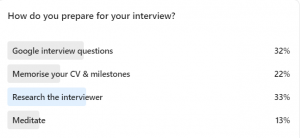
A recent poll we conducted among our Learners on how best to prepare for a job interview yielded some surprising results. Our survey revealed that the most popular form of interview preparation was, in fact, researching the interviewer (33%). This was followed by googling interview questions (32%), memorising your CV and achievements (22%) and meditation (13%).

What’s so surprising about these results is that the two most popular preparation methods focus on the interviewer and the interview format, as opposed to the most pivotal element of the interview process – the interviewee. That means you!

While being interviewed for a job can be daunting, you need to concentrate on the aspects that are under your control, and that includes quite a lot. Rather than focusing on things you can’t control (like the interviewer and their questions), it’s important to place yourself at the heart of your interview preparation.

The fact that most respondents didn’t focus their preparations on themselves shows a lack of confidence when it comes to interviews. However, if you’ve made it to the interview stage of the hiring process, then that means the employer sees you as someone who can add value to their company. Otherwise, you wouldn’t have made it this far. You need to remember to bear this in mind and take confidence from it.
To help you prepare for your next job interview, we’ve compiled the ultimate interview checklist to make sure you do everything right and give yourself the best shot at securing that new job.

Before the Interview

  • When researching the company you’re interviewing for, it’s important to focus on how you see yourself fitting into the organisation. The people interviewing you are going to know more about their company than you ever will, so don’t worry about memorising basic facts about the business. What’s more important is showing the interviewer that you already have ideas in mind about how you can improve the daily operations and running of the company.
  • The same goes for researching the role you’re applying for. Study the job description so that you can find ways to align your experience and qualifications with what the employer is looking for. Make the job description work for you.
  • Compile a list of common questions you might expect to answer during the interview. When you’re writing up your answers, make sure to always emphasise your commitment and desire for the job, and why you’re the perfect fit for the company. Once you’ve prepared your sample answers, make sure to study them inside out.
  • The most important preparation for a job interview is to practice the interview process. By doing mock interviews with family or friends you’ll be able to:
  1. Acquaint yourself with the “interview feeling” of being the focus of attention. The more comfortable you can feel “on the spot” the more natural your answers will be.
  2. Make sure your voice and body language are confident.
  3. Get used to giving the answers you’ve prepared and make them sound unrehearsed.
  4. Learn how to think on your feet. Get your mock interviewer to throw you a few curve ball questions to get you thinking!
  • Come up with some intelligent and insightful questions for the interviewer. Include questions about the company that show that you really know what you’re talking about. Also don’t be afraid to inquire about salary.
  • Make sure to print out several hard copies of your CV and bring them to the interview.
  • Decide in advance what you’re going to wear and make sure that you have everything organised the night before. The last thing you want to stress about in the morning is having to iron you clothes! It’s important to take care over your appearance and to look your best for the interview.
  • Know exactly where your interview is taking place (down to the room if you can!). Have your travel arrangements made in advance and arrive early. Give yourself plenty of time as turning up late is not an option. (If your interview is taking place online then make sure that you’re familiar with the software.)


During the Interview

  • Maintain eye contact with your interviewers. Be professional and friendly, as you would with any other colleagues.
  • Be confident about your accomplishments when asked about them. A job interview isn’t the time to be overly modest. You want the interviewers to feel like you’re the perfect candidate.
  • Maintain a calm and confident body language. Be at ease in the space and don’t fidget.
  • While you’ll mostly be thinking about what you’re going to say next, make sure to listen to what the interviewers are saying! Don’t just listen out for the next question, take in everything they tell you.
  • If there are more than one interviewers, be sure to address them all at various points. Don’t just stare at the person asking the questions.
  • Last but not least, thank the interviewers before you leave! Final impressions can be just as important as first impressions.

 After the Interview

  • Once the interview is over, make a note of what you were happy with and what you were unhappy with. Which elements of the interview went well? What did the interviewers respond well to? Regardless of how the interview goes, it’s important to always learn from your experiences so that you can improve on your performance next time.

Word of the Day: jaunty

0
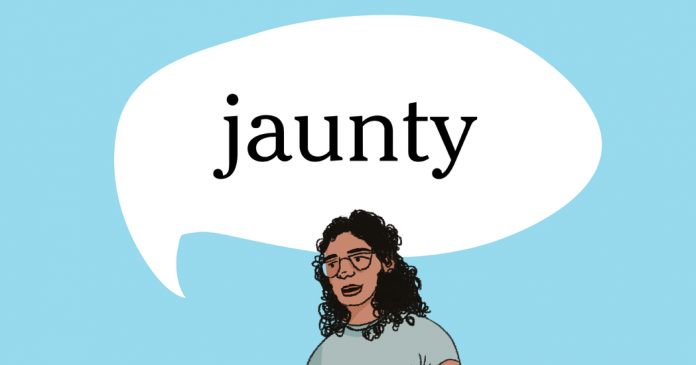
Word of the Day: jaunty

1. having a cheerful, lively, and self-confident air

2. marked by lively and up-to-date dress and manners

_________

The word jaunty has appeared in 75 articles on NYTimes.com in the past year, including on April 5 in “A Cyclist on the English Landscape” by Roff Smith:

A year ago, as a travel photographer grounded by the pandemic, I started bringing a camera and tripod with me on my morning bicycle rides, shooting them as though they were magazine assignments.

It started out as just something to do — a challenge to try to see the familiar through fresh eyes. Soon it blossomed into a celebration of traveling at home.

… It’s addictive, too. Over the past year I’ve become a keen student of local geography — not just the layout of the towns and the architecture and the contours of the landscape, but when and where the light falls as the seasons progress. I know the tide tables like an old salt and follow the phases of the moon. I’ve developed a peasant’s eye for weather. I can tell at a glance, when I step outside my door, those mornings when an evocative mist will be rising miles away on the marsh. I plan my outings with the same jaunty expectancy I used to feel on my way to the airport. And when I push off down the street, the world becomes big again, the way it used to be when I was a child: rich in detail, ripe for discovery.

Can you correctly use the word jaunty in a sentence?

Based on the definition and example provided, write a sentence using today’s Word of the Day and share it as a comment on this article. It is most important that your sentence makes sense and demonstrates that you understand the word’s definition, but we also encourage you to be creative and have fun.

Then, read some of the other sentences students have submitted and use the “Recommend” button to vote for two original sentences that stand out to you.

If you want a better idea of how jaunty can be used in a sentence, read these usage examples on Vocabulary.com.

Students ages 13 and older in the United States and the United Kingdom, and 16 and older elsewhere, can comment. All comments are moderated by the Learning Network staff.

Weave Through This Puzzle

0
Weave Through This Puzzle

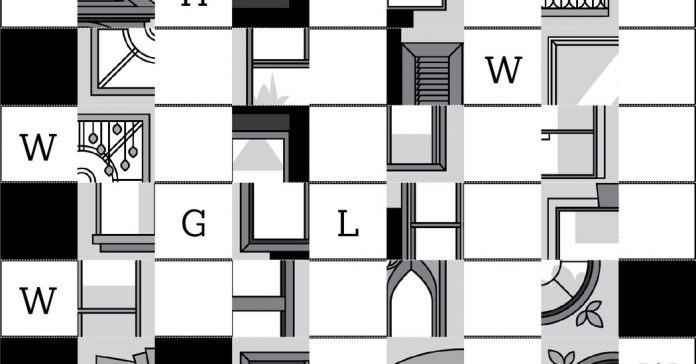
This week is the one-year anniversary of the At Home section, and what better way to celebrate than with a puzzle containing a hidden picture? Solve the clues and reveal the twist, with a mini shout-out to the section’s basket-weaving activity from August.

Write the answers to the 16 clues in the blank spaces on each strip. (We’ve filled in some letters to help.) Then cut and sort the strips into one of the four categories, based on your answers. Can you find what connects them? Words starting with B? Animals you’d find on a farm? We’ve given you a clue for each category.

Once you’ve sorted your strips into categories, the A and B groups become the vertical “warp” for your weaving; the C and D groups are woven through them horizontally. They should be ordered alphabetically within their categories. Follow the diagram to weave the strips in an under-and-over pattern, with the lettered squares going under the vertical strips. The weaving will reveal the hidden picture.

Place the A and B groups vertically using alphabetical order within each group, starting from the left and alternating groups.

Start with the first strip alphabetically from the C group and weave it in, making sure the lettered squares go under the A strips. Slide the strip to the bottom.

Repeat with the first alphabetical strip from the D group, making sure it goes under the B strips. Keep weaving, alternating strips from the C and D groups until you have used all your strips.

Congratulations! You’ve revealed the image! Now fold and tape the extra tabs to square the sides and save your artwork.

A printable version of this activity is available for download here.

Flying Over Water

0
Flying Over Water

Students in U.S. high schools can get free digital access to The New York Times until Sept. 1, 2021.

This athlete is taking a ride on an eFoil, a cross between a surfboard and a Jet Ski. The contraption can reach speeds of up to 25 miles per hour.

Use your imagination to write the opening of a short story or poem inspired by what you see.

If you like, try writing from the rider’s point of view: Is this their first eFoil ride? What kind of thrill are they experiencing? What kind of life does the rider lead when they aren’t flying over the water?

Post your piece in the comments, then read the related article to find out more about the eFoil.


About Picture Prompts

• Find all our Picture Prompts in this column.
• Have an idea for a Picture Prompt? Tell us about it.
• Teachers, discover more ways to teach with our Picture Prompts and learn how to use our free daily writing prompts for remote learning.

Students 13 and older in the United States and the United Kingdom, and 16 and older elsewhere, are invited to comment. All comments are moderated by the Learning Network staff, but please keep in mind that once your comment is accepted, it will be made public.

Lesson of the Day: ‘One of the World’s Oldest Science Experiments Comes Up From the Dirt’

0
Lesson of the Day: ‘One of the World’s Oldest Science Experiments Comes Up From the Dirt’

Have you heard or read about other seed storage projects, including perhaps the two mentioned in the article — the doomsday-prevention crop seed vaults and Indigenous food sovereignty efforts? Read the two excerpts below to learn a bit more.

“Arks of the Apocalypse,” by Malia Wollan, focuses on Svalbard Global Seed Vault, a storage facility dug into the side of a mountain on an island near the North Pole. Ms. Wollan writes, “We build banks to better understand, but also perhaps to save, our disappearing world. The plan is to study these specimens now but also to deliver them to the future, when scientists will presumably be more advanced than we are, technologically — and hopefully smarter.” The article continues:

The seed vault is perhaps the best-known project in a growing global campaign to cache endangered phenomena for safekeeping. Fortunately — the leak snafu notwithstanding — scientists, governments and even private companies have become quite good over the last decade at these efforts to bank nature. The San Diego Zoo’s Frozen Zoo cryogenically preserves living cell cultures, sperm, eggs and embryos for some 1,000 species in liquid nitrogen. Inside the National Ice Core Laboratory, in Lakewood, Colo., a massive freezer contains roughly 62,000 feet’s worth of rods of ice from rapidly melting glaciers and ice sheets in Antarctica, Greenland and North America. The Smithsonian’s National Zoo in Washington maintains the world’s largest collection of frozen exotic-animal milk, from mammals large (orcas) and small (critically endangered fruit bats), in order to help researchers figure out how to nourish the most vulnerable members of any species: babies. An international project called Amphibian Ark engages in ex situ conservation by relocating amphibians, the most endangered class of animal, indoors for safekeeping and sperm collection.

In “For the Navajo Nation, a Fight for Better Food Gains New Urgency,” Amelia Nierenberg writes about Summer Brown, an enrolled member of the Navajo Nation, who moved back to her childhood home in Cornfields, Ariz., only to find it difficult to find healthy food for her family. To address her family’s needs, Ms. Brown collected seeds from Indigenous seed banks and researched Indigenous methods.

Her backyard garden isn’t meant just to replace a trip to the grocery store. Ms. Brown is part of a movement for food sovereignty, a global effort to give people control of their food supply and nutrition. It is a public health endeavor, an economic reclamation, an environmental protest and for many, a spiritual quest. Gardeners aim to grow healthy foods that are connected to their traditions, and to revive old methods of cultivation.

“I want to show the whole Navajo Nation, and even off the reservation, that you can live with the earth and you don’t have to rely so much on the outside to feed yourself,” Ms. Brown said. “We have all this land. We should be able to just go outside and get our food.”

The small gardens and cornfields rising across the Nation (which the Diné call the Dinétah) are attempts to correct legacies of historical wrongs. Once, the Diné (what the Navajo call themselves) were prosperous gardeners, hunters and stewards of the land. Then the United States government colonized the land and displaced the Diné in the mid-1800s, during what is now known as the Long Walk, to an internment camp at Fort Sumner, N.M. Livestock were killed off. Fields were trampled. And some orchards were lost forever.

After reading the two excerpts, choose one article to read in its entirety. Then, respond to these questions:

  • What are three things you learned about the seed storage project?

  • What are two connections you can make between the second seed storage project you read about and the one at Michigan State University?

  • What is one question that you still have about seed storage?

If you have more time, try out one of these experiments related to seed storage or seed germination.

  • Seed Storage Study from Education.com
    In this experiment, you will store seeds in different conditions: in the freezer, next to a stove, and at room temperature. Then, after a month, you will try to grow them.

  • Seed Banks Lesson Plan from Kids Gardening
    In this lesson, you will place seeds in a freezer at three-, two- and one-month intervals. Then you will try to germinate the three sets of frozen seeds and one set of seeds that was never frozen.

  • Ask a Biologist: Pocket Seed Experiment from Arizona State University
    In this experiment, you will compare the growth of seeds that were soaked and some that were not soaked, in different conditions, such as in light or darkness.

You can share the results of your experiment in the comments section of the article. How did conducting an experiment related to seeds deepen or change your understanding of the topics explored in the featured article?


About Lesson of the Day

• Find all our Lessons of the Day in this column.
• Teachers, watch our on-demand webinar to learn how to use this feature in your classroom.