fbpx
Home Blog Page 1470

Lesson of the Day: ‘Teenager, an Aspiring Detective, Returns $135,000 He Found’

0
Lesson of the Day: ‘Teenager, an Aspiring Detective, Returns $135,000 He Found’

In this lesson, you will consider what Mr. Nuñez’s actions, and the community’s response to those actions, say about him and about our larger society.

Imagine you are walking down the street and you see a wallet. You open it and it has an ID but no money. Would you return it? What if it had $20? What about $200? Would that prompt you to change your decision?

Is it stealing if you keep it? Are you a sucker if you return it? What’s the right thing to do?

We asked that same question in a Student Opinion prompt earlier this year. One student commented, “If it has a lot of money in it I think a lot of people would actually be more obligated to return the wallet knowing that the person would miss it more.” What do you think about that response? Do you think it would be more tempting to keep the money if it was only a small sum? Why?

Jose Nuñez Romaniz found a bag with $135,000. What do you think would go through your mind if that happened to you? Would you give the money back immediately? Would you be tempted to keep any of it? What do you think most people would do in this situation?

Read the article, then answer the following questions:

1. Where did Mr. Nuñez find the money? Why did it have a tag on it that said how much money it was supposed to contain? How much money was in the bag?

2. Why did he move the money from the place where he found it? Why did he decide not to call the phone number that was posted on the A.T.M.? What did he do instead?

3. How did Mr. Nuñez say he felt at the time? What about later, when he learned that a ceremony would be held to honor him?

4. Mr. Nuñez said, “I’ve wanted to be a crime scene investigator or a detective for the police since I was a kid.” Based on how he reacted in this unusual situation, do you think he would make a good law enforcement officer? Why?

5. Officer Simon Drobik, an Albuquerque Police Department spokesman, described the Nuñez family as humble. He also said: “It was amazing to watch them. There’s a greater good there. They weren’t blown away by Jose’s actions, but everyone else was.” Why was the Nuñez family not surprised by what Jose did? Why do you think other people were surprised? What was your reaction when you read the article?

A special ceremony was held on May 7 to honor Mr. Nuñez. He was given gift cards, merchandise from a sports store, a $500 scholarship from an electric company and a plaque. He also got to throw the first pitch in an improvised ceremony with the Albuquerque Isotopes, a minor-league baseball team, and got to meet the mayor.

Watch the video embedded in the tweet below.

Why do you think Mr. Nuñez was given these honors and gifts? Was it to thank him for being honest? Was it to remind the rest of us that there is reason to have faith in humanity? Was it to make Mr. Nuñez a role model for other children and teenagers, to show that good things can happen when you do the right thing? Are there other reasons the community might have decided to hold a special ceremony for Mr. Nuñez?

What is your reaction to the ceremony? Was it the right thing to do for Mr. Nuñez, no matter what the reasons? Why?

2020 Coursera Virtual Conference: Reflections and Resources

0
2020 Coursera Virtual Conference: Reflections and Resources

By the Coursera Conference Team

The Coursera Conference is an opportunity for our global community to engage around innovative teaching and learning experiences. This year, after careful consideration for the growing concerns surrounding the spread of COVID-19, the Coursera Conference transitioned from a two day, in-person event to a free, fully virtual experience focused on “The Digital Transformation of Higher Education, COVID-19 and Beyond.” 

With an audience of over 3,200 attendees from 78 countries, we are humbled that the 2020 Coursera Virtual Conference enabled so many people from around the world to connect and discuss higher education’s most pressing issues.

In addition to forcing a pivot in the program’s format, the pandemic was also a common topic of conversation. Here are four themes that surfaced during the conference — from the bookending remarks by our co-founders to the four sessions in between.

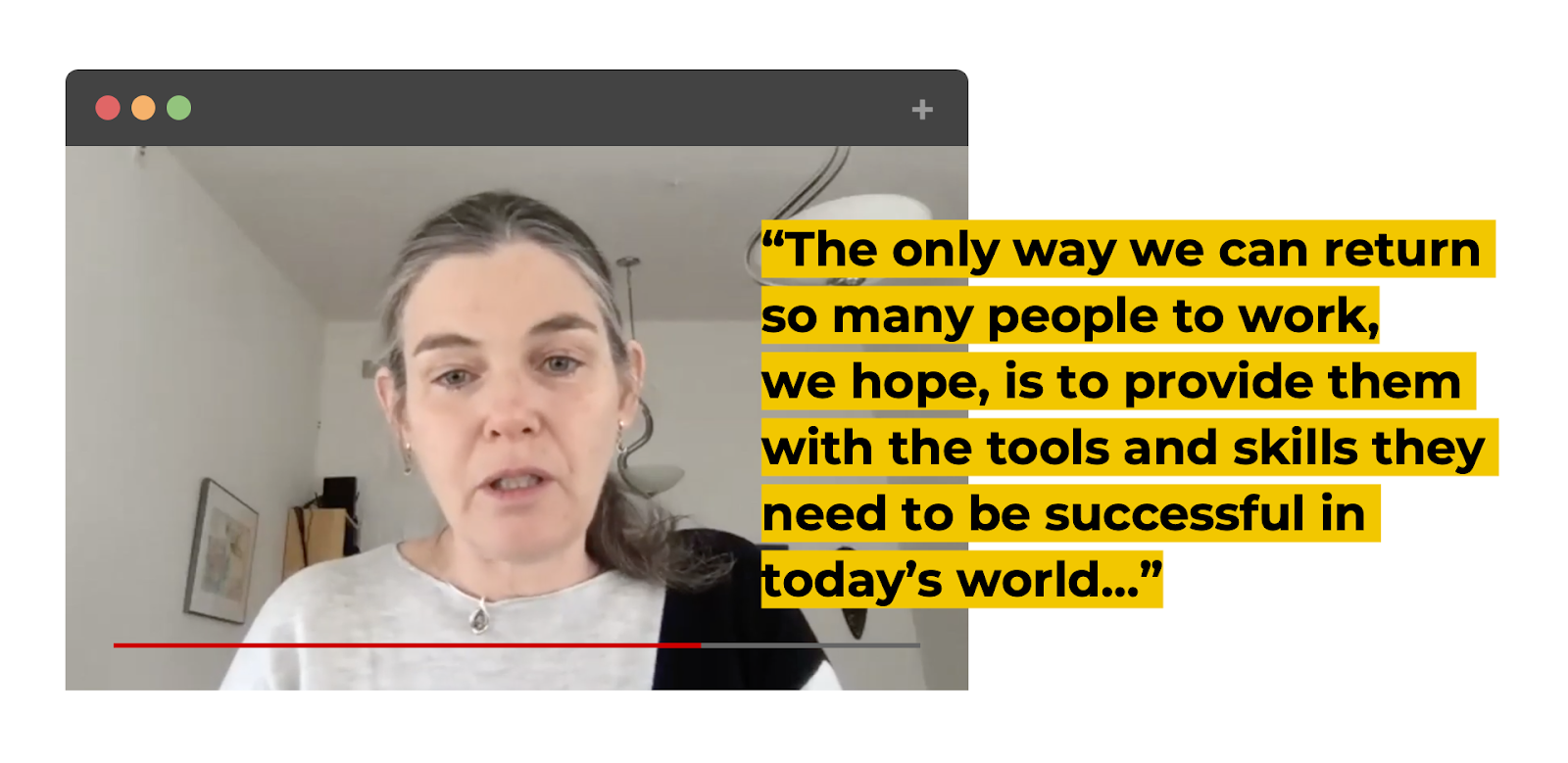
Coursera Co-Founder Daphne Koller opened with an acknowledgement that many workers now will not be able to make a living but said Coursera is a place for millions of people “genuinely looking for some hope and the path forward.” 

Pointing to research from McKinsey and the World Economic Forum, Coursera CEO Jeff Maggioncalda described how our catalog and stackable content can help the most vulnerable — people in “jobs making the lowest wages, with the lowest levels of education.” 

Shravan Goli, Chief Product Officer at Coursera, said the company has seen a 1500% month-over-month increase in demand for personal development content on the platform between February and March of this year.

In conversation with Coursera Chief Enterprise Officer Leah Belsky, Duke University’s Associate Vice Provost for Digital Education and Innovation Matthew Rascoff predicted that the increased adoption of courseware will be a longer-range impact. “We need to move away from the language of ‘teaching someone else’s course,’” Rascoff said, adding that “curation is its own art. The new model of teaching and learning is going to reward that resourcefulness.” 

In a panel moderated by former Coursera CEO and former president of Yale University Rick Levin, HolonIQ Co-CEO and Co-Founder Patrick Brothers said course sharing especially makes sense “at the foundational level where the content differentiation isn’t high.”

Ted Mitchell, President of the American Council on Education, drew a parallel between course sharing and another classroom instrument we often rely on. “We’ve done this before: textbooks are the old version of this exact conversation. Textbooks are a distillation of a high-level, common understanding of a field of study,” Mitchell said, “we are just doing it now far more efficiently.”

Shravan Goli, Emily Glassberg Sands, and Ken Sun, product leaders at Coursera, showed how we are helping educators respond to the pandemic with product innovations such as CourseMatch and Live2Coursera, which will automatically upload Zoom recordings for future use in a course. Ken also deemed Coursera’s new Machine-Assisted Peer Review “the most groundbreaking improvement ever.” The tool enables grading at scale with a machine learning model that can automatically assess 48% of the 1.9 million submissions.

Dr. Simone Buitendijk, Vice Provost at Imperial College London, sees “enormous possibilities in the COVID-19 crisis” to speed up global collaboration, but said institutions need to put rankings aside and move away from being very competitive with each other. 

Bringing the topic closer to home, Dr. Sharon Kardia, Associate Dean for Education and Millicent W. Higgins Collegiate Professor of Epidemiology at the University of Michigan, said we need many lines of connection to be built for the next leap in education, starting within campuses — schools and colleges inside a university need to find more ways to collaborate.

While access is key, Dr. Rupamanjari Ghosh, Vice-Chancellor of Shiv Nadar University, said “affordable education without quality is highly dangerous and no good for anybody.” 

Coursera CEO Jeff Maggioncalda pointed out that “the marginal cost of delivery to a fully online course is quite low and the value is quite high.” Given these economics, Coursera and our community of partners can help — especially as the pandemic highlights compounding layers of inequality in the workforce: Do you work for a company whose business model is mostly digital? If so, do you have the kind of job that can be done remotely? Even further, do you have the tools, technology, and bandwidth?

Coursera’s Co-Founder Andrew Ng, noted that as school campuses close around the world, “it’s up to all of us to use the digital realm to make sure that education becomes more, rather than less, accessible.”

It was humbling to see partners, educators, learners, and leaders from around the world gather on Zoom for Coursera’s first-ever virtual conference. If you couldn’t join us, you can watch recordings of all presentations during the 2020 Coursera Virtual Conference:

1

Word + Quiz: affront

0
Word + Quiz: affront

noun: a deliberately offensive act or something producing the effect of deliberate disrespect

verb: treat, mention, or speak to rudely

_________

The word affront has appeared in 135 articles on NYTimes.com in the past year, including on April 23 in “Imams Overrule Pakistan’s Coronavirus Lockdown as Ramadan Nears” by Maria Abi-Habib and Zia ur-Rehman:

While clerics and governments across the Muslim world will greet Ramadan this week under lockdown, working together to shut mosques and urging worshipers to pray at home, in Pakistan, some of the most prominent imams have rallied their devotees to ignore the anti-pandemic measures.

…. An editorial in the prominent newspaper Dawn demanded that the clerical establishment take a back seat and let the government manage the crisis.

“This should not be seen as an affront to religion,” editors wrote last week. “Rather, it is an attempt to save the lives of the general public.”

_________

The Stories Maps Can Tell

0
The Stories Maps Can Tell

A recent Times article suggests that you “release your inner explorer” by reliving, commemorating or envisioning a favorite place in the world through creating an illustrated map of it.

What place would you choose? Your own neighborhood? Your favorite vacation spot? A place you long to visit when quarantine is over? Or, perhaps, might you want to draw a place that doesn’t actually exist, like a fantasy island? No matter what you choose, what landmarks would you include? Why? What story might this map tell about who you are and what you care about?

Film Club: ‘Concert for One: I.C.U. Doctor Brings Classical Music to Coronavirus Patients’

0
Film Club: ‘Concert for One: I.C.U. Doctor Brings Classical Music to Coronavirus Patients’

In chaotic emergency rooms and intensive care units around New York City, coronavirus patients struggle to survive in isolation, with masked doctors and nurses keeping their distance and family visits barred. Alarms, monitors and overhead announcements blare incessantly.

But at NewYork-Presbyterian Allen Hospital in Manhattan, the music of Bach, Brahms and even the Beatles has begun wafting through patient rooms, played by accomplished performers — recently out-of-work chamber music players; winners of international competitions and prizes; teachers at prestigious music schools.

They perform from California, Kentucky, Maine, Virginia, Massachusetts and New York, where they are sheltered in place. The music plays through an iPhone or iPad placed at the bedside of patients who indicated they wanted to hear a performance, using FaceTime’s audio-only feature to protect their privacy.

“I’m hoping to offer a brief moment of comfort or distraction or beauty,” said Michelle Ross, a violinist in Manhattan who has performed for the patients.

At the Allen Hospital, which is at the northern tip of Manhattan and serves a community that is largely low income and minority, the toll of coronavirus cases has been particularly devastating. Last week, a top emergency room physician at Allen died by suicide, putting a spotlight on the struggles at the small hospital.

At times, the 200-bed hospital has had as many as 170 coronavirus patients; by early April, there were 59 patient deaths, The New York Times has reported.

It was around that time that the concert idea blossomed. Dr. Rachel Easterwood, who works the night shift in the I.C.U., had despaired at how little could be done for some patients. “I just felt desperate actually, and helpless,” she said. “People are dying left and right.”

One evening off, she listened to a cellist friend in California play Bach for her over FaceTime. Dr. Easterwood, 35, who played clarinet professionally before going to medical school, found the music comforting.

“Man, I wish we could do that in the hospital,” she told her friend, as he recalled the conversation. At that moment, the idea about playing for patients clicked.

What I have Learned (in the last 2mths)

0
What I have Learned (in the last 2mths)

The old adage, take time to smell the roses, I always found odd.  I mean I understand its “meaning”, but I thought to myself, who has the time, to just sit back, relax and well, smell flowers – besides say my late Diego (dog) and now sometimes Cali (dog) who I think is really smelling them for squirrel scents.

Whenever I talk to folks, I often say pre-pandemic and now, to represent what the industry was like in the past, and well, what it is now and going forward  (I always note it as for the rest of the year).  I dislike saying “Post-Pandemic”, because until a vaccine is made available for the masses, the virus isn’t taking a holiday or going away to visit Mars.   It is here to stay. 

Any data from any research firm that presented CAGR or revenue projections for 2020, that was pre-pandemic, can go right into the trash can.  It’s worthless data, because no one foresaw the pandemic when they were writing up their forecasts and projections. 

That’s just a fact.  I myself, spent the past 1.5 months scouring data numbers from a global perspective on the B2B/B2C market for financial projections and always had to clarify “pre, now, and project into early 21.   I feel confident on the numbers and the verticals/industries most likely to take a hit, and not necessarily rebound as quickly as folks would like or want.

For L&D (employee) wise projections, I am still working on that side of the data house, with a financial forecast and won’t have one ready until the end of the month.  And as with anything, there is always caveats, after all, no one is Nostradamus, and if those folks who always want to tell you the “Future” at carny shows are so good, how come none of them, ever win the lottery?  I’m just saying – be honest, you have thought it too!

Learned

#1 – Many vendors in the EdTech market have done a poor job, helping their school clients during the Pandemic.  Many reached out to the school and asked if they needed any assistance, and some went further with providing tutorials, helping teachers and what not.  But very very few, offered or even provided training or tutorials to the parents (who are having a lot of problems).   I know of parents at one school district here in LA, who have told me, that they can’t access certain features in their parent portal, because no one ever explained how to do so.  The school’s tech lab person provided them with a user name and password and that is it.

If you do any cursory search you will find that the whole learning system experience, as a whole, has been awful in the Edtech space – from a child – the student, and parent perspective.  It does no one any good, when this occurs and no wonder, more folks enjoy the bash of e-learning as a result.

I do wish to recognize though a couple of vendors who went beyond for their school clients – D2L, Instructure and itslearning.  NEO did a solid job too. 

At the university level, EdTech systems fared at a so-so level.  Professor re-training? Mixed. Student tutorials? Mixed.  Getting students at that level to be excited about taking online content? Awful – from the university perspective, that is to say, Academia really took a back seat here when it came to what was possible with e-learning and interactive experiences to their students (topic related) and what was/is actually being done.   Just when you thought, there is no way any lecture could get any worse (as you sat back in the days of your schooling), you should check out what some “e-learning” sessions were like now.

#2.  Not fully understanding the remote workers learning approach.  For years, research has shown that most people who are salaried, access a learning system, outside of the workplace.  But for many companies, whose employees were working from home, that data point was lost (even though there are companies who tell employees to access on their own time).   The result – quite a bit of task driven learning, which just isn’t effective. 

#3.  A survey of LXP vendors, found that overall, they are seeing better than expected sales for early Q2 (fiscal calendar year), compared to all other types of learning systems (i.e. LMS, Learning Platform, Sales Enablement and so forth).  While it is true that not every LXP vendor is experiencing this, it is clear that the pack to starting to break out.

It reminds me of what occurred in the authoring tool space many years ago, where you had a couple of leaders, then the mass, followed by those coming up in the rear.

#4 LXP Pack Status

If the sales data continues for this quarter, and stays even at similar for the next two quarters, what you will see (okay, not really “see”), is the following:

  • Leaders – Three or four that really stand out.  The top two will be customers/sales (never assume that having 1,000 customers versus 850 customers, means that at 1,000 that company has more sales, because it isn’t always the case).  By having the financial resources, they can invest more in R&D, and internal resources (ppl) too.   One of these leaders though, is a concern to me, because what I thought they would be doing (after an acquisition), and which they denied would occur, is uh, going to occur.  And personally, I think that is really a bad idea. 
  • Mid of the Pack – Could they jump up into the leader Quad? Absolutely, but innovation, thinking out of the box has to take a priority here, and not following what everyone else is doing nor relying only on what your clients are asking/wanting.

If your goal is to mimic an LMS, then I can tell you, that is really a bad goal. Similar to those goals you set at the beginning of a new year, one of which is to stop stealing your neighbor’s newspaper, only to realize that if you stop, what will you read when your spouse is trying to get your attention?

  • Bottom Feeders – Yes, they will have customers.  They will invest in R&D, but they will never get to upper mid of the pack level.  No vendor will ever tell you they are struggling or low mid-pack or worse.  Everyone has big name clients (usually a department/division, unless the vendor says “we are the only LXP” for the entire company or customer base”), so you can’t rely on that.  

#5 I’m just like you – LXP Style

First came ubiquitous on the LMS side of the house, and now more and more LXPs are becoming so similar to each other, that nothing really surprises me anymore.  Okay, I shouldn’t fully say that because CK Connect with their personality assessment angle, was a pleasant surprise and not something I’ve seen with any other LXP, but so many of the same features and capabilities are showing up, it can easily become white noise.   Innovation is down across all learning system types, and has been for years,  if there was ever a time, to change the path, this is it. 

#6 Buy-Buy

The buying spree continues, as learning system vendors and non learning vendors (including PE firms) are buying up other e-learning solutions including authoring tool, content provider, learning systems – across all types and tools.

What has yet to happen, and to me would make the most sense is a learning system vendor (LMS, LXP, SEP, etc.) acquiring a digital coaching platform, skills management platform and/or online proctoring vendor. 

Expect to see more acquisitions in the coming months and in a specific total sales range – for learning systems (Sorry, can’t disclose). 

#7 vILT – Plan now, start to find, and begin hiring (for the training session)

Face to Face (physical ILT) is not going to happen to at least 2021 for the majority of companies who conduct ILT.  This is based on three key factors (on why it won’t happen sooner)

a.  Even with “openings” and businesses being open for their employees in the next few months, many employees (who are currently working remote) are not going to return to the office, they will prefer to work remote.  In the U.S. Congress (okay the Senate) is discussing a bill to limit i.e. make it beyond difficult – for an employee to sue if they get sick at their company’s offices.  Right now, they can sue – and the employer is liable.  I am unsure of the status in other countries, but here in the U.S., it should cause employers to take notice.   What isn’t in discussion is what will happen if a guest comes to the workplace and in our scenario is providing training.  They get the virus. Head back to wherever, and it spreads.   

Regardless, until there is a vaccine, and if your employer doesn’t force you to come into the office, remote is where it is at. 

b. 3rd party presenters/instructors/experts may not be too thrilled to come to a location, where they might get the virus. Plus, the whole way the session is to be presented has to change.  Hard to gauge level of interest, when the person’s face is partially covered by a mask. 

c. Setup has to drastically change.  No more audience seating – next to one another. Round tables? Goodbye. Unless, only three to a table, and spread out.  Try to do computer training, which tables next to each other, and little space to move around.  And we aren’t even getting into the hand sanitizer, plastic guards and so forth.

If you are planning/had plan to offer ILT, go vILT but start to think about when and whom with the topic identified or in process.  Hire sooner rather than waiting to see how it turns out.  If you have someone specific in mind, recognize they might be booked already or are starting to book. 

Even if you plan to use say Big Name Entity presenters of Sales for example, and you love Fred DogFace, a great trainer in the past, FDF (as his friends call him), might be booked out.  Then what will you do?  Hire someone else? If yes, Steve is available. But only on Tuesday between 9 and 10 a.m.

Bottom Line

Every day is a learning experience.  A learning moment. 

And you do not need to stop and smell the roses.

Petunias will do.

E-Learning 24/7

Big news – Starting in just 10 days, will be my new Virtual Presentation Series. Each week, we dive into a L&D, training, e-learning topic. From Systems to Best Practices. Insight, knowledge and latest research.   Details coming.  Always free to attend and view later (via a recording).


What’s Going On in This Picture? | May 11, 2020

0
What’s Going On in This Picture? | May 11, 2020

Students

1. After looking closely at the image above (or at the full-size image), think about these three questions:

2. Next, join the conversation by clicking on the comment button and posting in the box that opens on the right. (Students 13 and older are invited to comment, although teachers of younger students are welcome to post what their students have to say.)

3. After you have posted, try reading back to see what others have said, then respond to someone else by posting another comment. Use the “Reply” button or the @ symbol to address that student directly.

Each Monday, our collaborator, Visual Thinking Strategies, will facilitate a discussion from 9 a.m. to 2 p.m. Eastern time by paraphrasing comments and linking to responses to help students’ understanding go deeper. You might use their responses as models for your own.

4. On Thursday afternoons, we will reveal at the bottom of this post more information about the photo. How does reading the caption and learning its back story help you see the image differently?

WordPress.com vs. WordPress.org – pros and cons of both platforms

0
WordPress.com vs. WordPress.org – pros and cons of both platforms

Guide to help you choose between WordPress.com vs. WordPress.org - differences, pros and cons.

Many clients have come to us with WordPress.com blogs wanting us to do custom design work for them. While it is possible to do some customization, we are so limited in what we can do with the layouts we have chosen to work only with self-hosted, WordPress.org websites, and blogs. Today we will help you answer which WordPress is better for you by showing the pros and cons of using both WordPress options.


Let’s start from the very basics and answer the significant question:

What is WordPress?

WordPress is a content management system (also called CMS) that will power your site or blog and let you manage everything without the need to learn any coding language. There are other systems available; however, WordPress is currently the most popular one next to Blogger

If you would like to know the difference between those two, make sure to read our Blogger vs. WordPress post.

For your website or blog to be visible on the internet, you need:

  • a hosting,
  • CMS,
  • a domain name (optional). 

I would compare it to building a house. Hosting is your plot (or your piece of the internet in this case), CMS (like WordPress) is your house you will build on the parcel you bought, and the domain is an address to help people find you.

WordPress itself is free! Web hosting is the thing you need to pay for.

If you would learn how to buy a hosting, set up a domain, and WordPress for $2,95 a month check our guide on how to start a blog or website.


Why should you choose WordPress?

WordPress offers you almost unlimited options for growing your site. Because of that, you can use it both for a simple blog or huge shop with the forum and advanced website. Our site is built on WordPress too!

You should remember that ‘with great power comes great responsibility,’ and the more your site can do, the more you need to do to keep it safe and working properly. Because of that WordPress can be a little bit scary for beginners.

How can I know which WordPress it is?

The general rule of a thumb is that if someone is telling you about WordPress, he means the self-hosted WordPress, also known as wordpress.org. Getting a WordPress is easy, and we have covered it in our 4 step guide on how to start a blog.

Pros and Cons of Self-hosted WordPress

Below I will list a few essential pros and cons of having a WordPress.

Pros

  • Complete control over your site
  • You can use any Theme you want
  • All plugins are available
  • Complete control over coding
  • Freedom with Adsense and other ads

Cons

  • There are monthly (or yearly) hosting costs ($2,95 a month with our link)
  • You are responsible for spam control
  • You have to do your own back-ups and upgrades

WordPress.com – what is it?

WordPress.com is just a version of self-hosted WordPress. The main difference is that you do not need to buy hosting for it. WordPress.com is a company that sells you access to WordPress installed on their hostings (it is a huge simplification but explains how it works). It means that you no longer need to worry about your hosting safety or pay for it, but instead, you may need to pay WordPress.com for some additional features.

Getting WordPress.com is free; however, with the free plan, you are very limited with options. To get possibilities similar to self-hosted WordPress you need to pay from $5 to $59. There is even a vip package for $1700 a month!

Pros and Cons of WordPress.com

To help you decide which WordPress is better for you here are a few pros and cons of WordPress.com so you can make your own conclusions.

PROS

  • Free and easy to set up
  • upgrades, spam and security are all taken care of for you
  • back-ups are done automatically
  • Info is hosted on WordPress.com servers, so you are much less likely ever to have your site crash or go down

CONS

  • Tons of generic themes are available, but you cannot use a custom theme like a Designer Blogs theme
  • You need to pay to use plugins
  • Require a premium package to use ads
  • You do not have access to your WordPress files
  • For larger sites, it is more expensive than self-hosted WordPress.

WordPress.com vs. WordPress.org

In my mind, I find WordPress.com to be very similar to Blogger. You have a nice, simple, budget-friendly setup. But if you are a serious blogger and want to own your content and have complete control of your design, self-hosted is going to be the route you want to go.

For help getting a self-hosted WordPress.org blog set up, you can follow this step-by-step tutorial for instructions.

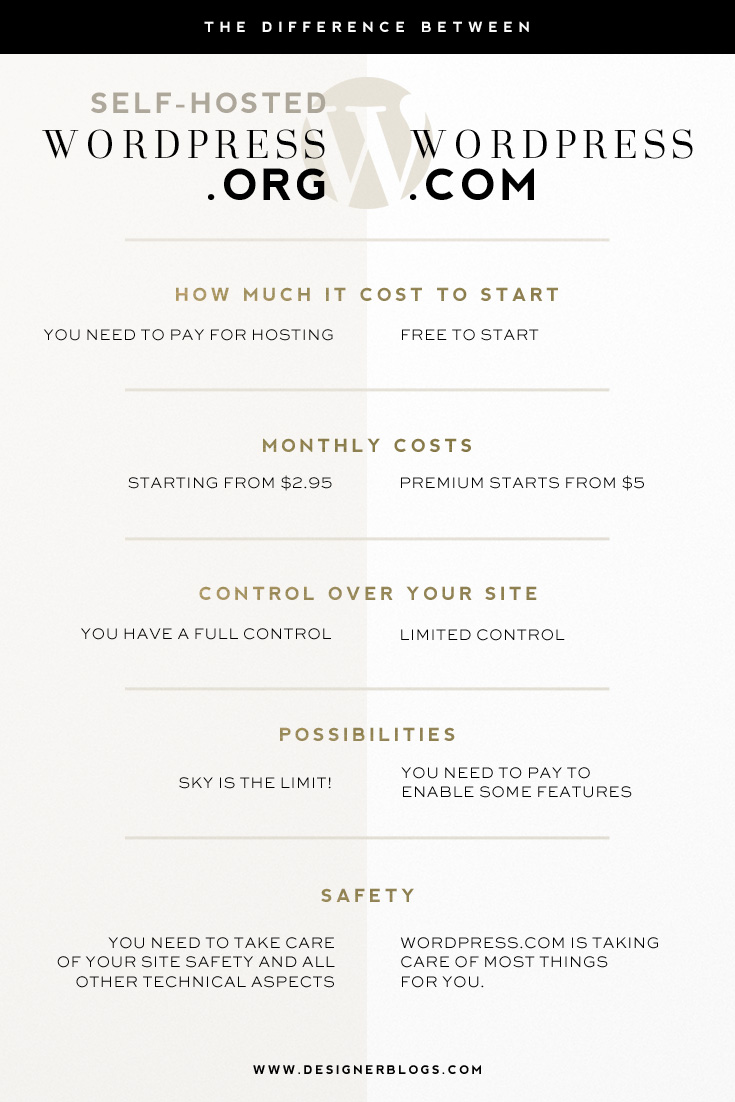
And for those of you who are visual like me, here is an eays to pin image with breakdown:

WordPress.com vs. WordPress.org - differences, pros and cons.

For step-by-step instructions on how to move from WordPress.com to WordPress.org check our guide below.

How to Move Your Blog from WordPress.com to a Self-Hosted Domain

Which WordPress is better?

I will never recommend WordPress.com simple because I think that it will be more expensive for you if you are creating a website or think seriously about blogging. In other words, self-hosted WordPress should be cheaper in the long run.

If you are a beginner and want only to blog and do not care about all those technical stuff the choose Blogger. It is completely free and easy to use. Moreover, it is very beginner friendly.

I would recommend WordPress.com only if you are thinking about starting a WordPress blog and would like to see how it works before buying a hosting. However, with the current prices (only $2,95 per month for hosting plans), it may be better just to buy a hosting and start working on creating a proper site from the very beginning.


Finally, I would love to hear your thoughts. Have you ever had a WordPress.com blog? Maybe you are still using it? Have you ever consider changing the platform?

Baseball

0
Baseball

This image might at first seem like a bit of a mystery, but look at it closely and notice as many details as you can.

Then tell us, what do you think is going on in this image? How does it relate to or comment on our world right now? What can you guess about the related article before you click on it? Why?

Learn From Home Day: Guest Speaker Schedule

0
Learn From Home Day: Guest Speaker Schedule

Here at Codecademy, we believe that learning new skills can offer a fun and empowering way to find focus during these difficult times. That’s why we’ve teamed up with some of our favorite brands to bring you a full day of learning new skills on Wednesday May 13 at 10:45am ET.

Take a break from your quarantine routine and join Codecademy, our friends from Food52, Y Combinator, Fatherly, Splice, Twitch, Brunchwork, Skillshare, Duolingo, Headspace, and Casper, along with celebrated executive coach Jerry Colonna, for Learn From Home Day. Explore new skills, try new things — and maybe even discover a lifelong passion!

Register now to save your spot for Wednesday’s event!

Learn From Home Day Schedule

Here’s a rundown of our schedule for Learn From Home Day. Check out a quick schedule overview. Click on the links to learn more about each session, including some prep instructions and materials you may need. All times are EDT.


Improving Your Whole Self, Keynote with Jerry Colonna

Time: 11:00am EDT | Add to calendar

Our keynote speaker is the author of Reboot: Leadership and the Art of Growing Up, Jerry Colonna. Jerry is a venture capitalist and professional coach. He’ll be sharing his thoughts on true grit to help people through the pandemic and answering some audience questions live.

A Fireside Chat on Startups with Y Combinator

Time: 11:30am EDT | Add to calendar

Eric Migicovsky, founder of Pebble and partner at Y Combinator, will be doing a live fireside chat. He’ll answer questions about starting a company using Kickstarter and helping startups be successful. Have a question for Eric? We’ll be taking questions live in the comments.

Cooking with Food52

Time: 12:00pm EDT | Add to calendar

Ella Quittner, Food52 writer and recipe developer, will be showing you how to cook a vegetable-forward and sparse pantry-friendly recipe — Pasta with Broccoli-Cheddar Sauce. Want to follow along? You’ll only need four ingredients:

  • 4 tablespoons kosher salt, plus more to taste
  • 18 to 20 ounces of broccoli (2 small crowns or 2 medium ones)
  • 1 ¾ ounces sharp white cheddar, grated (about ½ cup), plus more for serving
  • 1 pound short-shaped pasta (like rigatoni or cavatappi)

Parenting During the Pandemic with Fatherly

Time: 12:30pm EDT | Add to calendar

The team at Fatherly will join us for a conversation about parenting during a pandemic. Editorial Director Tyghe Trimble will be joined by Patrick Coleman (aka The Goodfather), Fatherly parenting expert and columnist.

Make a Track with Splice

Time: 1:00pm EDT | Add to calendar

Nick Chen, electronic musician, percussionist, educator, and producer at Splice will be doing an interactive beat making session, showing you how to create a song from scratch using Splice sounds. Nick will be taking suggestions from the chat on what sounds to use.

Streaming Best Practices with Twitch

Time: 1:30pm EDT | Add to calendar

Learn the best practices, do’s, and don’ts of live streaming with Mary Kish, Head of Community Marketing at Twitch.

Mindfulness and Meditation with Headspace

Time: 2:30pm EDT | Add to calendar

Join Eve Lewis, Content Director and the voice of Headspace, for a relaxing guided meditation. Eve is a trained mindfulness meditation teacher.

Learn How to Network with brunchwork

Time: 3:00pm EDT | Add to calendar

Looking for a new job during this time? Paulina Karpis is the cofounder of brunchwork, the first and largest co-learning company focused on career advancement through community. She’ll be sharing tips for networking that’ll help set you up for success on your next job search.

Drawing for Inner Calm with Skillshare

Time: 3:30pm EDT | Add to calendar

Join Skillshare instructor Amber Vittoria for a session on drawing for inner calm.

Learn a Language with Duolingo

Time: 4:00pm EDT | Add to calendar

Dr. Cindy Blanco, language scientist at Duolingo, will be sharing tips for learning a new language.

Learn to Code with Codecademy

Time: 4:30pm | Add to calendar

Alex Kuntz and Zoe Bachman, Codecademy curriculum developers, will teach you how to code! You’ll walk through Learn How to Code, an introductory lesson from Codecademy.

Sleeping Well with Casper and Dr. Frank Lipman

Time: 5:30 PM EDT | Add to calendar

Dr. Frank Lipman is a sleep advisory board member at Casper. He’ll be closing out the day with a talk about the importance of sleeping well, especially now, and the impact sleep has on our personal health and wellbeing.

We’d love to hear from you during the event! Use the hashtag #LearnFromHomeDay so we can see all your questions and comments.

Register now to save your spot.