fbpx
Home Blog Page 31

What Students Are Saying About Law Enforcement in Schools

0
What Students Are Saying About Law Enforcement in Schools

Welcome to Current Events Conversation, where each week we round up some of our favorite responses to one of our student writing prompts.


A recent joint investigation by The New York Times and The San Antonio Express-News revealed that an increase of police officers in Texas schools over the past decade has led to more criminal charges for students.

In the 2024-25 school year, about 4,800 children between the ages of 10 and 13 were referred for prosecution, The Times reports in “For Texas Schoolchildren, Minor Misbehavior Can Mean Criminal Charges.” That is a third more than the number a decade before. Most of the students were accused of minor offenses, like making threats, vaping, or lashing out at classmates or teachers.

We asked teenagers: What role, if any, should law enforcement have in schools?

They told us how seeing police officers on their campuses makes them feel; debated when schools should handle discipline and when officers should intervene; and shared what a truly safe school environment looks like to them.

Thank you to everyone who joined the conversation this week, including students from Valley Stream North High School in Valley Stream, N.Y.

Please note: Comments have been edited and condensed.

_________

We do have law enforcement every day. There’s always a police car parked somewhere and security on campus in case there are any problems, to keep us safe. In my opinion, these are very effective. Law enforcement is not only nearby just in case something happens, but they also have authority and control, making people feel more secure.

— Alice, Cumberland Polytechnic

Law enforcement in schools is incredibly important when rightfully in schools, because they can protect children from any dangers that may occur. Especially because of school shootings becoming common in America. I personally think that the dangers in school means that most schools should have a working police officer there plus additional safety procedures.

— Sal

I believe that law enforcement should absolutely be in schools. I think this because of the problems many schools are having right now with threats to safety of students. Having law enforcement in school already can really help prevent or get quick help during an emergency regarding students’ safety like a school shooter for example. Having law enforcement in school also personally gives me peace of mind that I know if something bad happened they would be there to help the situation.

— NRT, Bville

The cops give some kids a sense of protection and a sense of peace, but they also give kids a sense of panic. Some kids have had bad encounters with cops and them being at the school could bring up past trauma. It’s unnecessary especially since the cops at my school mainly stand there doing nothing and walk around trying to show they are there and show intimidation.

— Isaac, Ontario, Ca

I think that the police should never be present at schools unless there is an emergency. Schools should be relatively safe places for children to go, a place where one can get help, and some kids, particularly children of color, feel unsafe with the police around. This is an entirely different issue, but as a safe space our schools are failing us. If there were police presence on campuses, I do believe the number of students put into the justice system for very minor offenses would rise, perhaps even rapidly. A child should not be walking on eggshells while they are trying to get through the (already stressful) school days. The concept of monitoring by law enforcement almost feels like an authoritarian regime one finds in dystopian media.

— Cassiopeia, PA

Cops tend to carry an air of intimidation due to the power they hold, and as such, many kids our age or younger find themselves on guard or even scared around them. The constant arrests of young children for such minor offenses doesn’t help this feeling of unease, as children being arrested for simply not going to class or shoving another student would be much more likely to scare others to the point where they don’t know if they’ll be arrested for something small. This would foster an environment in which students are too scared to express themselves or act like kids.

— Maleah, Valley Stream North High School

The role that law enforcement should have in schools is to prevent dangerous scenarios such as gun violence from occurring as it is beneficial to the safety of students and staff. The problem arises when police officers begin to take on too much of a role in disciplinary action that can be handled by school officials. Students being arrested for vaping, getting into altercations with peers, and refusing to comply to school rules are all scenarios that could have been solved through the school’s disciplinary system and did not need the involvement of officers.

— Rima, VSN

While, for the physical safety of students, it is important to have people at the ready to handle violence, they should be doing just that: handling violence. Police officers and security guards should not interact with students otherwise, because they are not trained specifically to deal with kids. I don’t want an adult who isn’t a teacher or adjacent talking to me at school, and I can speak for the elementary and middle schoolers who have been “swept into the justice system” as well (Sifton). If there isn’t an explicit and immediate threat to a student’s safety, then law enforcement officers have no grounds to act, at all.

— Sam, Glenbard West HS

Schools should be spaces for kids to learn from their mistakes, not places where they get funneled into the legal system for minor incidents. Law enforcement should only ever be a last resort for extreme safety threats, not a replacement for school counselors and discipline.

— Kristianne, VSN

The involvement of police officers in academic settings — more specifically concerning situations that the school should handle itself — should be limited. By constantly arresting students for actions that could most likely be solved with detention — or similar practices — it not only hurts their families financially but can truly impact their emotional self as well. Academic lifestyles are negatively affected due to the complexity of the process accused students have to go through. Ultimately though, I firmly argue that students should not be arrested for routine classroom disruptions and minor misbehavior. Such issues are best handled through school-based discipline and support systems.

— Ayesha, VSCHSD

Pulling tens of thousands of elementary students and middle schoolers into the justice system is not valid based on the reasons of civil disputes such as slapping another kid on the playground, puffing on a vape, or kicking a principal in frustration. Detaining adolescents who still have developing minds is an action that will not change how they behave. Pulling children into a justice system and putting legal bills onto their family will only make them more frustrated and against change.

— Dana, Glenbard West High School

Public schools have become extremely chaotic and unrealistic, this is why we need police officers to enforce the rules and keep things in order. Cops provide fear for students and responsibility within the classrooms. The students, however, must understand that the cop will in fact achieve their goals, even if it means getting someone in trouble, making sure it is the real deal.

— NB, CPHS

In some schools, violence has become so common that in-school suspension is overcrowded. Clearly, that type of discipline isn’t enough for those kids. Obviously, I’m aware that petty fist fighting shouldn’t be enough to get a kid into the legal system, but I believe just having an officer at the school, just present, is enough to deter kids from doing harmful things.

— Rose, CPHS

I do believe that treating a kid and processing them as they would in an actual police situation can help a kid realize how their actions can have consequences. It could make them want to straighten up once they realize how serious it is.

— Kyrsten, CPHS

I believe making my school safer and healthier requires more than just having police officers on campus. Schools should focus on preventing problems and making sure students feel supported, respected, and comfortable asking for help. One idea is to provide more access to counselors and mental health resources. Students sometimes deal with stress, bullying or personal problems and may not know who to talk to. Schools can solve disagreements peacefully instead of facing serious punishment immediately.

— Kaden, Montclair High School, Montclair CA

The whole point of growing up is learning about how the world works and making mistakes so you can learn from them and grow up to be a better person. School teachers and administrators understand this and as result generally do a great job addressing bad behavior of students and doing it in a way where students learn from their mistakes but aren’t afraid to make other mistakes and continue to learn. Law enforcement ignores a lot of the constructive process of growing up by using often harsh punishments for kids that aren’t bad people and creating anxiety about making mistakes.

— Grant, Glenbard West High School

Instead of police, we should invest in trained counselors and conflict-resolution teams. Last year, our school piloted a peer-mediator program that cut “late” incidents by 30% and reduced suspensions by 20%. A calm, supportive environment is safer for learning than a courtroom.

— Faizyab

Instead of having police officers who escalate minor situations into criminal charges, schools can just implement security guards. The security guards can limit misbehavior and give the students clear oversight from what’s right and wrong.

— Chandler, Valley Stream North High School

The example of the 12-year-old who was arrested, should not have involved the police. Instead, the school should have used warnings, parent meetings to discuss behavior, counseling, and consequences like detention if appropriate. Schools can also improve overall safety for others by strengthening security, prevent the act of bullying, and encouraging students to feel comfortable reporting concerns without the constant fear of getting in trouble.

— Sharmia, New York


Learn more about Current Events Conversation here and find all of our posts in this column.

Why the Future of Learning Starts with Building

0

Coding has always served two purposes: the intrinsic drive to build something, and the practical path to a lucrative career. Even the most passionate code aficionados don’t dream of variables or syntax — they want to make a website, a tool, a game. For years, the career upside was impossible to ignore. You could land a stable SWE job, bootstrap your own app, or join a buzzy startup as a first hire.  

Generative AI flipped the script. AI now handles the repetitive tasks that used to define entry-level developer roles. At the same time, the barrier to entry for coding and building is lower than ever — you can spin up a working prototype with just an idea and a natural language prompt.  

This shift hasn’t eliminated the desire to code, but it’s changed what and who coding is for. If you’re not learning to land a junior dev role, you’re learning to build the thing you’ve been imagining, to add a technical skill to your existing career, or to understand the tools you’re already using at work. And here’s the catch: those goals all require understanding your code, not just having code that works. 

At Codecademy, all of these changes excite us about the future of learning to code. We’re introducing the AI Builder, a new project-based learning tool that flips the script by teaching you how to work with AI-generated code from the start. Our approach brings together the immediacy of modern AI tools and the rigor of real instructional design.

Why we created the AI Builder 

AI’s speed and efficiency often come with a tradeoff; you can get working code immediately, but you don’t really know what it’s giving you or why it’s built a certain way. Developers use the term “vibe coding” to describe this phenomenon — it’s fast, fun, but shallow; great for demos, less great for long-term skill-building.  

If your goal is to understand what you’re building, generic AI output alone won’t get you there. And the more you push these tools into real-world complexity, “the harder it is for them to give you exactly what you want,” says Zoe Bachman, Head of Learning at Codecademy.  

Switch to Learn for behind-the-scenes insights and your personalized roadmap.

With the AI Builder you get an education along with the AI output. In the workspace, you can toggle between two tabs: Build, where you work directly with a project and can modify and change code in real time; and Learn, where you get a personalized learning roadmap that’s based on your project.  

“We pair the experience of having a working app with a learning path that allows you to reverse engineer how it’s built, so you can deeply understand it and modify it confidently,” Zoe says. We’re calling our hybrid approach to learning-driven development “vibe learning” — it’s powered by AI guidance but rooted in learning science.  

Build first; learn continuously 

With AI Builder, you start with what you want to do: build the thing in your head. Whether that’s a habit tracker, a portfolio site, or the seed of a bigger idea, you don’t need to have prior coding knowledge to learn and build with the AI Builder. In other words, there are no pre-requisites for creation.  

You create a prototype by typing what you’d like to create in natural language. The AI chatbot will ask a few clarifying questions about your needs and overall goal before generating the project. Once the project is created, you can use the chat function to continue describing what you want. (You’re also welcome to go right into the code and start making changes if you already know your way around!)  

“It was fun to build something so quickly and be able to see the code and a learning plan for it,” says Grace Krishna, a Code Crew member who beta tested the AI Builder.   

When you need clarity on what’s going on behind the scenes in your code, or you hit a wall with AI, that’s a great time to flip over to the Learn tab.  

We’re calling our hybrid approach to learning-driven development ‘vibe learning’ — it’s powered by AI guidance but rooted in learning science.

Your project becomes the curriculum 

Rather than teaching concepts in the abstract and hoping learners translate them later, AI Builder removes that translation tax entirely. “We’re showing you specifically your code from your project and helping you understand it,” Zoe says.  

Rework your prototype in real time with the help of AI.

To build that personalized curriculum, the AI Builder breaks your project’s code into clear milestones and tasks. For each task, it generates an interactive learning loop, which is an activity designed to help you form a mental model of what your specific code is doing.  

These loops help you understand the logic behind each part of your project, so you can confidently apply the same thinking to other sections, or even future projects. This approach also ensures everything you learn is directly relevant to what you’re making — so you don’t have to guess when you’ll ever use this. 

Why this is vibe learning (not vibe coding) 

A key misconception about AI‑assisted development is that it makes learning superficial. AI Builder challenges that by grounding the entire experience in learning science rather than simple code generation. Our entire system is intentionally designed for you to retain knowledge. So, while it might not feel like you’re taking a course, you’re absorbing key concepts just by interacting with AI-generated code.  

A Socratic AI, not an answer-spitting chatbot 

Our educational AI chatbot is designed to guide you toward an answer through an in-depth questioning approach that’s based on the Socratic method of teaching. Instead of spitting out shortcuts or answers like AI typically does, you get strategic nudges, hints, and questions that build durable mental models.  

Research on AI in education shows that just providing an answer makes it harder for learners to retain the information on their own. Zoe compares the Socratic AI to “a personalized tutor, facilitating you acquiring more knowledge, so you’re not totally left on your own.” Our method encourages you to think critically so you really grasp the concepts and can continue to use them in the real world.  

Learning loops with real instructional design 

Behind the scenes, every learning loop in the Learn tab is built on proven frameworks like inductive learning and the 5E model, a popular STEM teaching framework that’s shorthand for engage, explore, explain, elaborate, and evaluate.

You’ll notice that the questions and exercises in the Learn tab feel different than the rest of our courses and paths, and that’s intentional. “The learning loops are designed very well — they get you there inductively,” Zoe says. They’re exploratory without being overwhelming, and evaluative without feeling like tests.  

Negar Vahid, a beta tester for the AI Builder appreciated the AI’s interactive question format. “The question-based learning feels engaging, and the starter project it builds is simple but useful,” she says.  

This structure ensures you don’t develop the wrong mental models — a known risk in fully constructivist or student-centered environments — while still giving you the freedom to explore.

Why learn when AI can build? 

There are some projects that are well-suited for simply vibe coding, like making a personal HTML website or a single-use script to automate a one-time task. Tools like Lovable and v0 are suited exactly for these types of projects.  

The longer your code needs to live, and the more complex your project becomes, the more you need to actually understand what you’re building. Joe Holmes, Codecademy Curriculum Developer in the AI and machine learning domain, uses the term “ignorance debt” to describe what happens when you don’t: 

“It’s like tech debt squared. It’s much, much worse,” Joe says. “You don’t know what kind of code is coming out. You just are only looking at: Does this kind of generally appear to be what I asked for? You don’t know if there are security flaws. You don’t know if there are performance flaws. You don’t know if you’re leaking sensitive information. You don’t know how to fix anything.” 

The tipping point comes down to two factors: complexity and time. If you’re developing software professionally, you’re legally responsible for the code you output. If you’re building something that will serve actual users, you need to be accountable for security, performance, and maintainability. And if your project will need updates or fixes over time (which most do) understanding your codebase becomes essential, not optional. 

The good news? Learning doesn’t have to feel like eating your vegetables. “Kids hate veggies and broccoli because we don’t cook it well enough to make it tasty when we first introduce it to them,” says Nhi Pham, Codecademy Curriculum Developer. The same is true for teaching AI: “If you do it well, you’re inspiring people to have these very hygienic practices when working with AI,” she says.  

That’s exactly what AI Builder is designed to do — make learning feel as immediate and rewarding as building, so you develop good habits from the start rather than building a lifelong aversion to understanding your own code. 

Get started with the AI Builder 

AI isn’t a replacement for learning, it’s a tool — and a powerful one when it comes to education. Our new AI Builder allows for “just‑in‑time learning that’s highly personalized,” Zoe says. Even the best teachers or bootcamps can’t deliver that for every learner, on every project, instantly. Perhaps the most exciting vision is how AI changes what a learning environment can be. 

Zoe described it beautifully: “I imagine the AI Builder as a workspace… like having all your resources around you and an AI tutor in the background.” 

That’s the shift: from learning before you build to learning while you build. We can’t wait to see what you create. 

Word of the Day: agrarian

0
Word of the Day: agrarian

The word agrarian has appeared in 44 articles on NYTimes.com in the past year, including on Sept. 6 in the guest essay “The Research We Need to Understand A.I. Is Falling Apart” by Henry J. Farrell, Alison Gopnik and James Evans:

Nineteenth-century industrialization led to a series of huge social upheavals in which people left agrarian lives in the countryside for jobs in cities. Subjects were increasingly becoming citizens who could vote and influence policy to some degree and were educated in government-funded schools.

Can you correctly use the word agrarian in a sentence?

Based on the definition and example provided, write a sentence using today’s Word of the Day and share it as a comment on this article. It is most important that your sentence makes sense and demonstrates that you understand the word’s definition, but we also encourage you to be creative and have fun.

If you want a better idea of how agrarian can be used in a sentence, read these usage examples on Vocabulary.com. You can also visit this guide to learn how to use IPA symbols to show how different words are pronounced.


Word of the Day, produced by The Learning Network, introduces a new vocabulary word from The New York Times every school day. Our words are provided by Vocabulary.com.

Students ages 13 and older in the United States and the United Kingdom, and 16 and older elsewhere, can comment. All comments are moderated by the Learning Network staff.

Ask a Journalist: How Images Help Tell the Story

0
Ask a Journalist: How Images Help Tell the Story

Welcome to Ask a Journalist! This school year, we’re hosting monthly discussions about teen-relevant journalism topics with New York Times reporters and editors.

In November we invite you to talk with Fernanda Didini, an art director, about communicating with images. Whether you’re planning to participate in our current Coming of Age in 2026 Contest where we invite teenagers to submit visual works telling us what it’s like to be a teen today, or just a fan of art and design, we know you’ll have a lot to learn from someone who is an expert in visual storytelling.

Here’s how to participate:

  • Part 1: Explore the topic on your own and with other students by looking at one or more of the pieces below and discussing them in class. Post your thoughts and questions for Ms. Didini and for other students in the comments section by Nov. 16.

  • Part 2: Ms. Didini will respond to a selection of student comments, and you’ll receive an email letting you know if yours is one of them. On Nov. 30, come back to read highlights from the conversation and some of our favorite student responses.


Fernanda Didini is an information designer and art director at The New York Times. She spent several years as a senior designer for The New York Times for Kids, a special section for The Times’s youngest readers which ran from 2017-2025.

What does an art director do? They are the people responsible for the images and style you see in the pages of The New York Times. They work with photographers and illustrators to create images that, as this Times Insider article explains, provide “a visual metaphor or narrative that helps readers better understand the topics that will be explored in an article.”

What is the purpose of including images in a news or opinion article? How do they work together with the words on the page to communicate information or tell a story? And how can you make them inviting and compelling to look at?

We hope you can learn about all of this and more from Ms. Didini who works with illustrators and photographers to design pages like the one you see above.

Before you talk to her, look closely at one or more of the following pages from The New York Times for Kids section, for which Ms. Didini was on the design team. As you do, annotate and take notes about everything you see on the page — the photos, the illustrations, the text (if you can read it; we know it’s small!), and the layout as a whole:

Now, share your thoughts and questions in the comments:

  • Introduce yourself. Share anything that feels both comfortable for you and relevant to the discussion, such as your first name, general location, grade, background, interests or anything else.

  • Tell us what you think. What stood out to you in pages you looked at? What challenged you? What connections did you make? What do you think is missing from the conversation around this topic? What do you want the journalist to know about a teen’s perspective on the subject?

  • Ask a question. Ask the journalist about the pages you viewed or her work in general. (Not sure what to ask? Check out this list of more than 20 ideas — but don’t feel that you have to stick to them!)

Post your comments and questions by the end of the day on Monday, Nov. 16. Then Ms. Didini will respond and you’ll receive an email if she replies to you.

Come back on Nov. 30 to read highlights from the conversation and some of our favorite student comments.


Students 13 and older in the United States and Britain, and 16 and older elsewhere, are invited to comment. All comments are moderated by the Learning Network staff, but please keep in mind that once your comment is accepted, it will be made public and may appear in print.

Are you a teacher or student who has feedback on this new feature or would like to suggest a Times piece for future discussion? Please post a comment here.

Why the Future of Learning Starts with Building

0

Coding has always served two purposes: the intrinsic drive to build something, and the practical path to a lucrative career. Even the most passionate code aficionados don’t dream of variables or syntax — they want to make a website, a tool, a game. For years, the career upside was impossible to ignore. You could land a stable SWE job, bootstrap your own app, or join a buzzy startup as a first hire.  

Generative AI flipped the script. AI now handles the repetitive tasks that used to define entry-level developer roles. At the same time, the barrier to entry for coding and building is lower than ever — you can spin up a working prototype with just an idea and a natural language prompt.  

This shift hasn’t eliminated the desire to code, but it’s changed what and who coding is for. If you’re not learning to land a junior dev role, you’re learning to build the thing you’ve been imagining, to add a technical skill to your existing career, or to understand the tools you’re already using at work. And here’s the catch: those goals all require understanding your code, not just having code that works. 

At Codecademy, all of these changes excite us about the future of learning to code. We’re introducing the AI Builder, a new project-based learning tool that flips the script by teaching you how to work with AI-generated code from the start. Our approach brings together the immediacy of modern AI tools and the rigor of real instructional design.

Why we created the AI Builder 

AI’s speed and efficiency often come with a tradeoff; you can get working code immediately, but you don’t really know what it’s giving you or why it’s built a certain way. Developers use the term “vibe coding” to describe this phenomenon — it’s fast, fun, but shallow; great for demos, less great for long-term skill-building.  

If your goal is to understand what you’re building, generic AI output alone won’t get you there. And the more you push these tools into real-world complexity, “the harder it is for them to give you exactly what you want,” says Zoe Bachman, Head of Learning at Codecademy.  

Switch to Learn for behind-the-scenes insights and your personalized roadmap.

With the AI Builder you get an education along with the AI output. In the workspace, you can toggle between two tabs: Build, where you work directly with a project and can modify and change code in real time; and Learn, where you get a personalized learning roadmap that’s based on your project.  

“We pair the experience of having a working app with a learning path that allows you to reverse engineer how it’s built, so you can deeply understand it and modify it confidently,” Zoe says. We’re calling our hybrid approach to learning-driven development “vibe learning” — it’s powered by AI guidance but rooted in learning science.  

Build first; learn continuously 

With AI Builder, you start with what you want to do: build the thing in your head. Whether that’s a habit tracker, a portfolio site, or the seed of a bigger idea, you don’t need to have prior coding knowledge to learn and build with the AI Builder. In other words, there are no pre-requisites for creation.  

You create a prototype by typing what you’d like to create in natural language. The AI chatbot will ask a few clarifying questions about your needs and overall goal before generating the project. Once the project is created, you can use the chat function to continue describing what you want. (You’re also welcome to go right into the code and start making changes if you already know your way around!)  

“It was fun to build something so quickly and be able to see the code and a learning plan for it,” says Grace Krishna, a Code Crew member who beta tested the AI Builder.   

When you need clarity on what’s going on behind the scenes in your code, or you hit a wall with AI, that’s a great time to flip over to the Learn tab.  

We’re calling our hybrid approach to learning-driven development ‘vibe learning’ — it’s powered by AI guidance but rooted in learning science.

Your project becomes the curriculum 

Rather than teaching concepts in the abstract and hoping learners translate them later, AI Builder removes that translation tax entirely. “We’re showing you specifically your code from your project and helping you understand it,” Zoe says.  

Rework your prototype in real time with the help of AI.

To build that personalized curriculum, the AI Builder breaks your project’s code into clear milestones and tasks. For each task, it generates an interactive learning loop, which is an activity designed to help you form a mental model of what your specific code is doing.  

These loops help you understand the logic behind each part of your project, so you can confidently apply the same thinking to other sections, or even future projects. This approach also ensures everything you learn is directly relevant to what you’re making — so you don’t have to guess when you’ll ever use this. 

Why this is vibe learning (not vibe coding) 

A key misconception about AI‑assisted development is that it makes learning superficial. AI Builder challenges that by grounding the entire experience in learning science rather than simple code generation. Our entire system is intentionally designed for you to retain knowledge. So, while it might not feel like you’re taking a course, you’re absorbing key concepts just by interacting with AI-generated code.  

A Socratic AI, not an answer-spitting chatbot 

Our educational AI chatbot is designed to guide you toward an answer through an in-depth questioning approach that’s based on the Socratic method of teaching. Instead of spitting out shortcuts or answers like AI typically does, you get strategic nudges, hints, and questions that build durable mental models.  

Research on AI in education shows that just providing an answer makes it harder for learners to retain the information on their own. Zoe compares the Socratic AI to “a personalized tutor, facilitating you acquiring more knowledge, so you’re not totally left on your own.” Our method encourages you to think critically so you really grasp the concepts and can continue to use them in the real world.  

Learning loops with real instructional design 

Behind the scenes, every learning loop in the Learn tab is built on proven frameworks like inductive learning and the 5E model, a popular STEM teaching framework that’s shorthand for engage, explore, explain, elaborate, and evaluate.

You’ll notice that the questions and exercises in the Learn tab feel different than the rest of our courses and paths, and that’s intentional. “The learning loops are designed very well — they get you there inductively,” Zoe says. They’re exploratory without being overwhelming, and evaluative without feeling like tests.  

Negar Vahid, a beta tester for the AI Builder appreciated the AI’s interactive question format. “The question-based learning feels engaging, and the starter project it builds is simple but useful,” she says.  

This structure ensures you don’t develop the wrong mental models — a known risk in fully constructivist or student-centered environments — while still giving you the freedom to explore.

Why learn when AI can build? 

There are some projects that are well-suited for simply vibe coding, like making a personal HTML website or a single-use script to automate a one-time task. Tools like Lovable and v0 are suited exactly for these types of projects.  

The longer your code needs to live, and the more complex your project becomes, the more you need to actually understand what you’re building. Joe Holmes, Codecademy Curriculum Developer in the AI and machine learning domain, uses the term “ignorance debt” to describe what happens when you don’t: 

“It’s like tech debt squared. It’s much, much worse,” Joe says. “You don’t know what kind of code is coming out. You just are only looking at: Does this kind of generally appear to be what I asked for? You don’t know if there are security flaws. You don’t know if there are performance flaws. You don’t know if you’re leaking sensitive information. You don’t know how to fix anything.” 

The tipping point comes down to two factors: complexity and time. If you’re developing software professionally, you’re legally responsible for the code you output. If you’re building something that will serve actual users, you need to be accountable for security, performance, and maintainability. And if your project will need updates or fixes over time (which most do) understanding your codebase becomes essential, not optional. 

The good news? Learning doesn’t have to feel like eating your vegetables. “Kids hate veggies and broccoli because we don’t cook it well enough to make it tasty when we first introduce it to them,” says Nhi Pham, Codecademy Curriculum Developer. The same is true for teaching AI: “If you do it well, you’re inspiring people to have these very hygienic practices when working with AI,” she says.  

That’s exactly what AI Builder is designed to do — make learning feel as immediate and rewarding as building, so you develop good habits from the start rather than building a lifelong aversion to understanding your own code. 

Get started with the AI Builder 

AI isn’t a replacement for learning, it’s a tool — and a powerful one when it comes to education. Our new AI Builder allows for “just‑in‑time learning that’s highly personalized,” Zoe says. Even the best teachers or bootcamps can’t deliver that for every learner, on every project, instantly. Perhaps the most exciting vision is how AI changes what a learning environment can be. 

Zoe described it beautifully: “I imagine the AI Builder as a workspace… like having all your resources around you and an AI tutor in the background.” 

That’s the shift: from learning before you build to learning while you build. We can’t wait to see what you create. 

Word of the Day: paraphernalia

0
Word of the Day: paraphernalia

The word paraphernalia has appeared in 43 articles on NYTimes.com in the past year, including on July 5 in the guest essay “Mexico’s World Cup Moment Is Pure, Fragile Magic” by Ioan Grillo:

Mexico City is hosting only five games in this year’s World Cup, but you wouldn’t know it from walking the streets, which are awash in soccer paraphernalia. Everyone seems to be wearing a green Mexico jersey, thanks to corner vendors hawking unlicensed merch for as little as $15, much to the chagrin of FIFA, whose official shirts often cost upward of $100.

Can you correctly use the word paraphernalia in a sentence?

Based on the definition and example provided, write a sentence using today’s Word of the Day and share it as a comment on this article. It is most important that your sentence makes sense and demonstrates that you understand the word’s definition, but we also encourage you to be creative and have fun.

If you want a better idea of how paraphernalia can be used in a sentence, read these usage examples on Vocabulary.com. You can also visit this guide to learn how to use IPA symbols to show how different words are pronounced.


Word of the Day, produced by The Learning Network, introduces a new vocabulary word from The New York Times every school day. Our words are provided by Vocabulary.com.

Students ages 13 and older in the United States and the United Kingdom, and 16 and older elsewhere, can comment. All comments are moderated by the Learning Network staff.

Lesson Plan for Reacting to the Midterm Election Results

0
Lesson Plan for Reacting to the Midterm Election Results

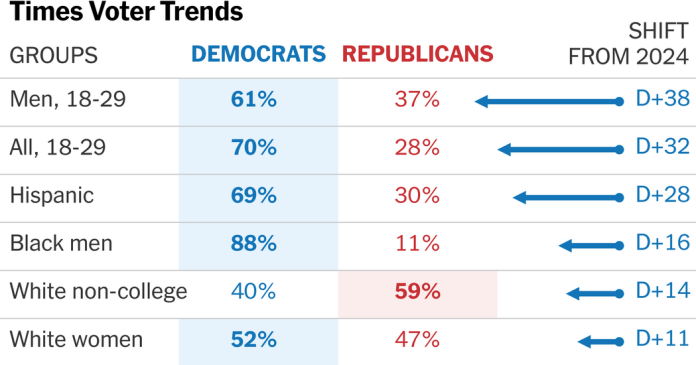
There is no modern precedent for the electoral wave last Tuesday that brought a complete collapse of the Republican coalition and gave Democrats the largest victory by either party in half a century. The American political landscape has been reshaped.

What does this mean for your students? Their communities? The United States? The world? What questions do your students have? What can they predict may happen next? What connections can they make between this election and global trends?

Here are a few quick ways to use Times resources to touch on these questions. As always, we’d love to hear what you’re doing. Write to us at LNFeedback@nytimes.com.


Last week, we asked What Are Your Reactions to the Results of the 2026 Midterm Elections? and students across the United States and around the world answered. We invite your students to post their thoughts, too, and to respond to the thoughts of others. Later this month, we hope to do a roundup of our favorite comments and conversations.

The Morning newsletter on Nov. 5 offered an accessible summary of how this election could reshape American politics. It begins this way:

As President Obama liked to say, elections have consequences. Tuesday’s contest — in which Democrats routed Republicans by shocking margins in shocking parts of the country — is no exception. How will Democrats use their new power?

The answer isn’t so simple. The result was more a rebuke of President Trump than an endorsement of specific policies, and Democrats disagree with one another on impeachment, the role of fossil fuels, Israel, health care and how much to tax the rich. Meanwhile, Trump still controls the executive branch — and the veto pen.

But the blue wave still promises to reshape American politics.

  • Invite your students to work in partners or small groups to make predictions based on what they know so far. What happens next? What will Democrats do? What about President Trump? The Republicans? What obstacles stand in the way for both parties? Why?

  • Have students share their predictions with the class, perhaps comparing them to what is covered in The Morning. For homework, you might invite each student to adopt a prediction — whether they made it themselves or not — and find at least three pieces of reliable evidence to either back it up or rebut it.

  • If you and your students would like to follow up with more Times analysis, you can check out pieces like “America Punishes Trump’s Party: 8 Takeaways From a Democratic Landslide”; the video “For Democrats, Midterm Wins Bring New Challenge”; and news analyses like “For Trump and America, a Clear Election Verdict Leaves a Murky Future” and “With Democrats’ Sweep, Congress Is Set to Reassert Power to Check Trump.”

  • When big news like this happens, how do your students tend to make sense of it? What sources do they trust? Why? What has been in their news or social media feeds over the last week? How has that affected their views? Invite students to compare the Times analyses they have read with reactions and analyses from other sources — from across the political spectrum and mediums. Which takes are most interesting or compelling to them? Why? What do these analyses help them understand? How do they figure out which sources to trust? How do they take in all this information and come to conclusions?

  • “The discontent is global,” Sabrina Tavernise and Ruth Igielnik write in “Fed Up With Politics and Struggle, Young Voters Rose Up.” What connections can your students make? Where else in the world is Gen Z demanding generational change, and why? What issues unite young people all over?

  • Here are a few paragraphs from the piece that touch on those questions:

The discontent is global, fostering youth movements from Bangladesh and India to Serbia and France. Government resources have gone to Baby Boom retirees with free health care and subsidized retirements, while education has been stretched, health insurance costs have soared and job security has been hampered by older generations that will not get out of the way. Artificial intelligence and climate change have injected real dread into those coming of voting age.

That is scrambling the political lines that have given shape to American politics since the end of World War II.

“The traditional left-right paradigm has been broken,” said Brandon Kenig, 41, a Kansan who came of age in the College Republicans and worked on Mitt Romney’s presidential campaign.

For young people, that paradigm “applied to their parents and grandparents during a time of relative economic stability,” he said. But normal politics no longer apply, and young people are “seeking out candidates who acknowledge what is happening and do not try to sugar coat.”

  • What parallels can your students find? Invite them to look for news and information from a country outside their own and find facts, quotes, statistics, images and more that they think show commonalities. What does this information help them understand about their own country? Why?


Our 15-minute lesson plans are new this year. Find more lessons here, or send in your idea.