fbpx
Home Blog Page 33

Why the Future of Learning Starts with Building

0

Coding has always served two purposes: the intrinsic drive to build something, and the practical path to a lucrative career. Even the most passionate code aficionados don’t dream of variables or syntax — they want to make a website, a tool, a game. For years, the career upside was impossible to ignore. You could land a stable SWE job, bootstrap your own app, or join a buzzy startup as a first hire.  

Generative AI flipped the script. AI now handles the repetitive tasks that used to define entry-level developer roles. At the same time, the barrier to entry for coding and building is lower than ever — you can spin up a working prototype with just an idea and a natural language prompt.  

This shift hasn’t eliminated the desire to code, but it’s changed what and who coding is for. If you’re not learning to land a junior dev role, you’re learning to build the thing you’ve been imagining, to add a technical skill to your existing career, or to understand the tools you’re already using at work. And here’s the catch: those goals all require understanding your code, not just having code that works. 

At Codecademy, all of these changes excite us about the future of learning to code. We’re introducing the AI Builder, a new project-based learning tool that flips the script by teaching you how to work with AI-generated code from the start. Our approach brings together the immediacy of modern AI tools and the rigor of real instructional design.

Why we created the AI Builder 

AI’s speed and efficiency often come with a tradeoff; you can get working code immediately, but you don’t really know what it’s giving you or why it’s built a certain way. Developers use the term “vibe coding” to describe this phenomenon — it’s fast, fun, but shallow; great for demos, less great for long-term skill-building.  

If your goal is to understand what you’re building, generic AI output alone won’t get you there. And the more you push these tools into real-world complexity, “the harder it is for them to give you exactly what you want,” says Zoe Bachman, Head of Learning at Codecademy.  

Switch to Learn for behind-the-scenes insights and your personalized roadmap.

With the AI Builder you get an education along with the AI output. In the workspace, you can toggle between two tabs: Build, where you work directly with a project and can modify and change code in real time; and Learn, where you get a personalized learning roadmap that’s based on your project.  

“We pair the experience of having a working app with a learning path that allows you to reverse engineer how it’s built, so you can deeply understand it and modify it confidently,” Zoe says. We’re calling our hybrid approach to learning-driven development “vibe learning” — it’s powered by AI guidance but rooted in learning science.  

Build first; learn continuously 

With AI Builder, you start with what you want to do: build the thing in your head. Whether that’s a habit tracker, a portfolio site, or the seed of a bigger idea, you don’t need to have prior coding knowledge to learn and build with the AI Builder. In other words, there are no pre-requisites for creation.  

You create a prototype by typing what you’d like to create in natural language. The AI chatbot will ask a few clarifying questions about your needs and overall goal before generating the project. Once the project is created, you can use the chat function to continue describing what you want. (You’re also welcome to go right into the code and start making changes if you already know your way around!)  

“It was fun to build something so quickly and be able to see the code and a learning plan for it,” says Grace Krishna, a Code Crew member who beta tested the AI Builder.   

When you need clarity on what’s going on behind the scenes in your code, or you hit a wall with AI, that’s a great time to flip over to the Learn tab.  

We’re calling our hybrid approach to learning-driven development ‘vibe learning’ — it’s powered by AI guidance but rooted in learning science.

Your project becomes the curriculum 

Rather than teaching concepts in the abstract and hoping learners translate them later, AI Builder removes that translation tax entirely. “We’re showing you specifically your code from your project and helping you understand it,” Zoe says.  

Rework your prototype in real time with the help of AI.

To build that personalized curriculum, the AI Builder breaks your project’s code into clear milestones and tasks. For each task, it generates an interactive learning loop, which is an activity designed to help you form a mental model of what your specific code is doing.  

These loops help you understand the logic behind each part of your project, so you can confidently apply the same thinking to other sections, or even future projects. This approach also ensures everything you learn is directly relevant to what you’re making — so you don’t have to guess when you’ll ever use this. 

Why this is vibe learning (not vibe coding) 

A key misconception about AI‑assisted development is that it makes learning superficial. AI Builder challenges that by grounding the entire experience in learning science rather than simple code generation. Our entire system is intentionally designed for you to retain knowledge. So, while it might not feel like you’re taking a course, you’re absorbing key concepts just by interacting with AI-generated code.  

A Socratic AI, not an answer-spitting chatbot 

Our educational AI chatbot is designed to guide you toward an answer through an in-depth questioning approach that’s based on the Socratic method of teaching. Instead of spitting out shortcuts or answers like AI typically does, you get strategic nudges, hints, and questions that build durable mental models.  

Research on AI in education shows that just providing an answer makes it harder for learners to retain the information on their own. Zoe compares the Socratic AI to “a personalized tutor, facilitating you acquiring more knowledge, so you’re not totally left on your own.” Our method encourages you to think critically so you really grasp the concepts and can continue to use them in the real world.  

Learning loops with real instructional design 

Behind the scenes, every learning loop in the Learn tab is built on proven frameworks like inductive learning and the 5E model, a popular STEM teaching framework that’s shorthand for engage, explore, explain, elaborate, and evaluate.

You’ll notice that the questions and exercises in the Learn tab feel different than the rest of our courses and paths, and that’s intentional. “The learning loops are designed very well — they get you there inductively,” Zoe says. They’re exploratory without being overwhelming, and evaluative without feeling like tests.  

Negar Vahid, a beta tester for the AI Builder appreciated the AI’s interactive question format. “The question-based learning feels engaging, and the starter project it builds is simple but useful,” she says.  

This structure ensures you don’t develop the wrong mental models — a known risk in fully constructivist or student-centered environments — while still giving you the freedom to explore.

Why learn when AI can build? 

There are some projects that are well-suited for simply vibe coding, like making a personal HTML website or a single-use script to automate a one-time task. Tools like Lovable and v0 are suited exactly for these types of projects.  

The longer your code needs to live, and the more complex your project becomes, the more you need to actually understand what you’re building. Joe Holmes, Codecademy Curriculum Developer in the AI and machine learning domain, uses the term “ignorance debt” to describe what happens when you don’t: 

“It’s like tech debt squared. It’s much, much worse,” Joe says. “You don’t know what kind of code is coming out. You just are only looking at: Does this kind of generally appear to be what I asked for? You don’t know if there are security flaws. You don’t know if there are performance flaws. You don’t know if you’re leaking sensitive information. You don’t know how to fix anything.” 

The tipping point comes down to two factors: complexity and time. If you’re developing software professionally, you’re legally responsible for the code you output. If you’re building something that will serve actual users, you need to be accountable for security, performance, and maintainability. And if your project will need updates or fixes over time (which most do) understanding your codebase becomes essential, not optional. 

The good news? Learning doesn’t have to feel like eating your vegetables. “Kids hate veggies and broccoli because we don’t cook it well enough to make it tasty when we first introduce it to them,” says Nhi Pham, Codecademy Curriculum Developer. The same is true for teaching AI: “If you do it well, you’re inspiring people to have these very hygienic practices when working with AI,” she says.  

That’s exactly what AI Builder is designed to do — make learning feel as immediate and rewarding as building, so you develop good habits from the start rather than building a lifelong aversion to understanding your own code. 

Get started with the AI Builder 

AI isn’t a replacement for learning, it’s a tool — and a powerful one when it comes to education. Our new AI Builder allows for “just‑in‑time learning that’s highly personalized,” Zoe says. Even the best teachers or bootcamps can’t deliver that for every learner, on every project, instantly. Perhaps the most exciting vision is how AI changes what a learning environment can be. 

Zoe described it beautifully: “I imagine the AI Builder as a workspace… like having all your resources around you and an AI tutor in the background.” 

That’s the shift: from learning before you build to learning while you build. We can’t wait to see what you create. 

Student News Quiz: Blue Wave, Disneyland, Smugglers’ Socks

0
Student News Quiz: Blue Wave, Disneyland, Smugglers’ Socks

President Santiago Peña of Paraguay was impeached, removed from office, placed under house arrest and charged with using his office to enrich himself after a bank with close ties to his administration went under.

Which country on the map above is Paraguay?

Are You a Hugger?

0
Are You a Hugger?

You bump into an old friend you haven’t seen in a long time.

Your parents give you the Xbox you’ve been dying for.

You just hit a 3-pointer to win the basketball game and a teammate rushes up to you to celebrate.

You see a relative off to a train station.

Do you hug them? Why or why not?

How important are physical affection and contact to you? Do you ever wish you could be more of a hugger?

In “Are You a Hugger? Your Answer May Be Telling.,” Christina Caron writes about how our memories of an embrace can reveal a lot about ourselves and our attachment styles:

Can you remember the last time that you received an especially good hug?

For Anna Lena Dueren, a psychologist in Germany, it was the day that her mother died. She was 19 years old when she received a call from her father telling her the news. In shock, she confided in a friend, who immediately hugged her.

“She held on for quite a while,” Dr. Dueren said. The hug was “super meaningful,” she added, and remains a vivid memory more than 10 years later.

Now, Dr. Dueren and her colleagues have published a study looking at how people remember and perceive hugs. Drawing from a large survey, they analyzed the responses of more than 15,000 people who were asked about the positive aspects of memorable hugs, like comfort, friendliness or happiness. The study suggested that people’s gender, as well as their attachment style — or how they relate to other people in the context of relationships, according to attachment theory — plays a role in what hugs mean to them.

“The perception of hugs is just incredibly complex,” Dr. Dueren said. Your feelings about being hugged can be influenced by a variety of factors, including experiences you’ve had in past relationships, the ways you’ve been physically touched in the past and your relationship to your body.

The article continues:

Survey participants filled out a questionnaire that measured their attachment style. Those who scored higher in what psychologists term an avoidant attachment style — displaying independence and self-sufficiency in their interpersonal relationships — were less likely to remember hugs that left them with positive emotions than those who scored lower on that scale. Those who had a so-called anxious attachment style — showing a tendency to feel distress when faced with the prospect of separation — had a greater likelihood of remembering a positive hug. (The questionnaire did not screen for those with a secure attachment style.)

Dr. Gail Saltz, a psychiatrist at NewYork-Presbyterian Hospital, who was not involved in the study, said the results made sense given what we know about attachment styles.

For those with anxious attachment, who tend to crave extra reassurance, hugs might be “exactly what they’re seeking out,” Dr. Saltz said. “It’s a sign that would reduce their anxiety.”

However, those with avoidant attachment styles might feel scared or uncomfortable at the prospect of intimacy, she said. For them, hugs might elicit the feeling of “being smothered,” rather than comforted or supported.

Can hugs improve your health? The article continues:

Physical contact is known to have numerous health benefits. There is less research specifically on hugs, but some studies have shown they can help lower stress, improve mood and lower markers of inflammation.

Brooke C. Feeney, a professor of psychology at Carnegie Mellon University who was not involved in Dr. Dueren’s study, has found in her research that affectionate touch encourages feelings of security and safety, reduces stress and pain, and may even decrease the amount of jealousy that someone feels in a relationship.

“Interestingly, we find benefits for both imagined touch and actual touch,” Dr. Feeney said, referring to the process of asking study participants to visualize receiving affectionate, supportive touch.

Students, read the entire article and then tell us:

  • Are you a hugger? Why or why not? Can you remember the last time that you gave or received a good hug? What made it especially meaningful to you? For instance, did it offer you comfort, support or understanding? Why do you think you still remember it?

  • When do you embrace others? Do you like to give or receive hugs in moments of joy or sorrow? How about when you greet friends or family? Or, do you generally prefer less intimate gestures — especially when saying hello or goodbye — like a handshake, a fist bump or verbal greetings like “hey,” “later” or “what’s up?” Do you wish that hugs were a more regular part of your life?

  • What’s your reaction to the article and the study about how people remember and perceive hugs? What did you find most fascinating, memorable or surprising? Which attachment style described in the piece, if any, do you think you have?

  • The article notes that in some studies, hugs have shown they can help lower stress, improve mood and lower markers of inflammation. What benefits of hugging have you noticed in your life?

  • In the article, a professor in pediatrics and psychiatry says, “everyone needs a daily dose of touch.” Do you agree? How important to you is physical affection with your friends and family — whether that’s hugs or kisses, holding hands or giving an affectionate pat on the back? Is it a significant way for you to feel loved, cared for or connected with them? Or does it not mean that much to you?

  • Does reading the article make you more likely to hug someone the next time you see them? Why or why not?


Student Opinion, produced by The Learning Network, invites teenagers to add their voices to the conversation around New York Times articles. Find a teaching guide here.

Students 13 and older in the United States and Britain, and 16 and older elsewhere, are invited to comment. All comments are moderated by the Learning Network staff, but please keep in mind that once your comment is accepted, it will be made public and may appear in print.

Word of the Day: exude

0
Word of the Day: exude

The word exude has appeared in 124 articles on NYTimes.com in the past year, including on Feb. 26 in “‘The Luckiest Man in America’ and More Streaming Gems” by Jason Bailey. The article reviews “Danny Collins,” a 2015 comedy-drama starring Al Pacino:

It’s as narratively predictable as the day is long, but Pacino and the supporting cast (which also includes Jennifer Garner and Christopher Plummer) exude so much genuine warmth and good cheer that you’ll hardly mind.

Can you correctly use the word exude in a sentence?

Based on the definition and example provided, write a sentence using today’s Word of the Day and share it as a comment on this article. It is most important that your sentence makes sense and demonstrates that you understand the word’s definition, but we also encourage you to be creative and have fun.

If you want a better idea of how exude can be used in a sentence, read these usage examples on Vocabulary.com. You can also visit this guide to learn how to use IPA symbols to show how different words are pronounced.


Word of the Day, produced by The Learning Network, introduces a new vocabulary word from The New York Times every school day. Our words are provided by Vocabulary.com.

Students ages 13 and older in the United States and the United Kingdom, and 16 and older elsewhere, can comment. All comments are moderated by the Learning Network staff.

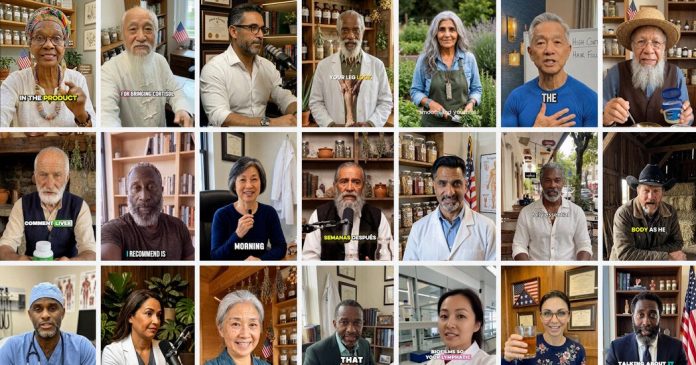
Lesson Plan | Fake Health Influencers

0
Lesson Plan | Fake Health Influencers
  • Do you follow any health or wellness influencers? Have you ever taken any of their advice? What happened?

  • How do you decide whom to trust and which advice to follow?

  • Watch the five-minute video above and write down three things you learned that you might want to keep in mind next time you come across health or wellness information on the internet.

  • Then, share your notes with others in your class. How many of you wrote down similar facts or pieces of advice?

  • Finally, discuss: What would you ideally like any piece of health or wellness advice — whether in print, on social media, or from a friend or relative — to include that would help reassure you it is reliable?

Apply what you learned! Identify one example of fake or unreliable health or wellness advice from your social media or news feed. What made you suspicious? Where can you find more reliable information about this same topic?

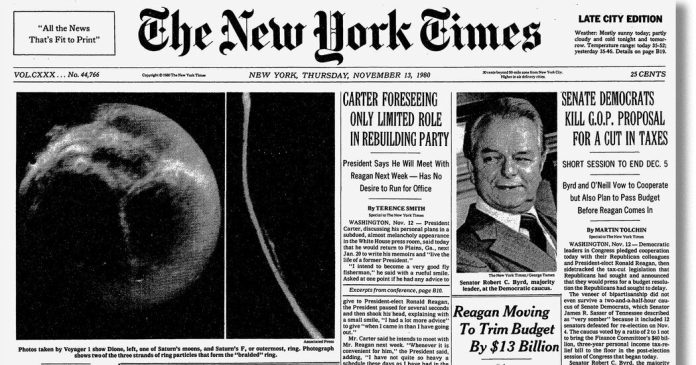
From the Front Page: Voyager 1 Flies Past Saturn on Nov. 12, 1980

0
From the Front Page: Voyager 1 Flies Past Saturn on Nov. 12, 1980

On This Day spotlights a historic New York Times front-page article. For teaching ideas, visit this resource.


1980

PASADENA, Calif., Nov. 12 — An American spaceship of discovery, Voyager 1, sailed past Saturn and through its archipelago of moons today in the first close photographic reconnaissance of the solar system’s second largest planet.

Voyager’s cameras surveyed the grayish-white icy moons and found a huge crater with a central peak on Mimas, a sprinkling of large craters on Dione, bright cobweb markings on Rhea and Dione and a 500-mile-long canyon cutting through the frozen surface on one side of Tethys and a jumble of craters on the other side.

Until now these worlds, ranging in diameter from a couple of hundred to thousands of miles, had been mere points of light in Earth telescopes.

This event occurred on Nov. 12, but appeared in the Nov. 13 issue of The New York Times. Read the entire article or explore this issue in full in TimesMachine.


Read the article excerpt and then make a connection: How does this news event relate to what’s happening today in the world, in your community or in your own life? Post a comment.

If time allows, use the following prompts to dive deeper into today’s featured front page:

  • Look at the print front page or explore it in TimesMachine. What do you notice? What do you wonder?

  • Read the entire featured article. What did you learn? What questions do you have about the event, the reporting, the language used at the time, or anything else?

Why the Future of Learning Starts with Building

0

Coding has always served two purposes: the intrinsic drive to build something, and the practical path to a lucrative career. Even the most passionate code aficionados don’t dream of variables or syntax — they want to make a website, a tool, a game. For years, the career upside was impossible to ignore. You could land a stable SWE job, bootstrap your own app, or join a buzzy startup as a first hire.  

Generative AI flipped the script. AI now handles the repetitive tasks that used to define entry-level developer roles. At the same time, the barrier to entry for coding and building is lower than ever — you can spin up a working prototype with just an idea and a natural language prompt.  

This shift hasn’t eliminated the desire to code, but it’s changed what and who coding is for. If you’re not learning to land a junior dev role, you’re learning to build the thing you’ve been imagining, to add a technical skill to your existing career, or to understand the tools you’re already using at work. And here’s the catch: those goals all require understanding your code, not just having code that works. 

At Codecademy, all of these changes excite us about the future of learning to code. We’re introducing the AI Builder, a new project-based learning tool that flips the script by teaching you how to work with AI-generated code from the start. Our approach brings together the immediacy of modern AI tools and the rigor of real instructional design.

Why we created the AI Builder 

AI’s speed and efficiency often come with a tradeoff; you can get working code immediately, but you don’t really know what it’s giving you or why it’s built a certain way. Developers use the term “vibe coding” to describe this phenomenon — it’s fast, fun, but shallow; great for demos, less great for long-term skill-building.  

If your goal is to understand what you’re building, generic AI output alone won’t get you there. And the more you push these tools into real-world complexity, “the harder it is for them to give you exactly what you want,” says Zoe Bachman, Head of Learning at Codecademy.  

Switch to Learn for behind-the-scenes insights and your personalized roadmap.

With the AI Builder you get an education along with the AI output. In the workspace, you can toggle between two tabs: Build, where you work directly with a project and can modify and change code in real time; and Learn, where you get a personalized learning roadmap that’s based on your project.  

“We pair the experience of having a working app with a learning path that allows you to reverse engineer how it’s built, so you can deeply understand it and modify it confidently,” Zoe says. We’re calling our hybrid approach to learning-driven development “vibe learning” — it’s powered by AI guidance but rooted in learning science.  

Build first; learn continuously 

With AI Builder, you start with what you want to do: build the thing in your head. Whether that’s a habit tracker, a portfolio site, or the seed of a bigger idea, you don’t need to have prior coding knowledge to learn and build with the AI Builder. In other words, there are no pre-requisites for creation.  

You create a prototype by typing what you’d like to create in natural language. The AI chatbot will ask a few clarifying questions about your needs and overall goal before generating the project. Once the project is created, you can use the chat function to continue describing what you want. (You’re also welcome to go right into the code and start making changes if you already know your way around!)  

“It was fun to build something so quickly and be able to see the code and a learning plan for it,” says Grace Krishna, a Code Crew member who beta tested the AI Builder.   

When you need clarity on what’s going on behind the scenes in your code, or you hit a wall with AI, that’s a great time to flip over to the Learn tab.  

We’re calling our hybrid approach to learning-driven development ‘vibe learning’ — it’s powered by AI guidance but rooted in learning science.

Your project becomes the curriculum 

Rather than teaching concepts in the abstract and hoping learners translate them later, AI Builder removes that translation tax entirely. “We’re showing you specifically your code from your project and helping you understand it,” Zoe says.  

Rework your prototype in real time with the help of AI.

To build that personalized curriculum, the AI Builder breaks your project’s code into clear milestones and tasks. For each task, it generates an interactive learning loop, which is an activity designed to help you form a mental model of what your specific code is doing.  

These loops help you understand the logic behind each part of your project, so you can confidently apply the same thinking to other sections, or even future projects. This approach also ensures everything you learn is directly relevant to what you’re making — so you don’t have to guess when you’ll ever use this. 

Why this is vibe learning (not vibe coding) 

A key misconception about AI‑assisted development is that it makes learning superficial. AI Builder challenges that by grounding the entire experience in learning science rather than simple code generation. Our entire system is intentionally designed for you to retain knowledge. So, while it might not feel like you’re taking a course, you’re absorbing key concepts just by interacting with AI-generated code.  

A Socratic AI, not an answer-spitting chatbot 

Our educational AI chatbot is designed to guide you toward an answer through an in-depth questioning approach that’s based on the Socratic method of teaching. Instead of spitting out shortcuts or answers like AI typically does, you get strategic nudges, hints, and questions that build durable mental models.  

Research on AI in education shows that just providing an answer makes it harder for learners to retain the information on their own. Zoe compares the Socratic AI to “a personalized tutor, facilitating you acquiring more knowledge, so you’re not totally left on your own.” Our method encourages you to think critically so you really grasp the concepts and can continue to use them in the real world.  

Learning loops with real instructional design 

Behind the scenes, every learning loop in the Learn tab is built on proven frameworks like inductive learning and the 5E model, a popular STEM teaching framework that’s shorthand for engage, explore, explain, elaborate, and evaluate.

You’ll notice that the questions and exercises in the Learn tab feel different than the rest of our courses and paths, and that’s intentional. “The learning loops are designed very well — they get you there inductively,” Zoe says. They’re exploratory without being overwhelming, and evaluative without feeling like tests.  

Negar Vahid, a beta tester for the AI Builder appreciated the AI’s interactive question format. “The question-based learning feels engaging, and the starter project it builds is simple but useful,” she says.  

This structure ensures you don’t develop the wrong mental models — a known risk in fully constructivist or student-centered environments — while still giving you the freedom to explore.

Why learn when AI can build? 

There are some projects that are well-suited for simply vibe coding, like making a personal HTML website or a single-use script to automate a one-time task. Tools like Lovable and v0 are suited exactly for these types of projects.  

The longer your code needs to live, and the more complex your project becomes, the more you need to actually understand what you’re building. Joe Holmes, Codecademy Curriculum Developer in the AI and machine learning domain, uses the term “ignorance debt” to describe what happens when you don’t: 

“It’s like tech debt squared. It’s much, much worse,” Joe says. “You don’t know what kind of code is coming out. You just are only looking at: Does this kind of generally appear to be what I asked for? You don’t know if there are security flaws. You don’t know if there are performance flaws. You don’t know if you’re leaking sensitive information. You don’t know how to fix anything.” 

The tipping point comes down to two factors: complexity and time. If you’re developing software professionally, you’re legally responsible for the code you output. If you’re building something that will serve actual users, you need to be accountable for security, performance, and maintainability. And if your project will need updates or fixes over time (which most do) understanding your codebase becomes essential, not optional. 

The good news? Learning doesn’t have to feel like eating your vegetables. “Kids hate veggies and broccoli because we don’t cook it well enough to make it tasty when we first introduce it to them,” says Nhi Pham, Codecademy Curriculum Developer. The same is true for teaching AI: “If you do it well, you’re inspiring people to have these very hygienic practices when working with AI,” she says.  

That’s exactly what AI Builder is designed to do — make learning feel as immediate and rewarding as building, so you develop good habits from the start rather than building a lifelong aversion to understanding your own code. 

Get started with the AI Builder 

AI isn’t a replacement for learning, it’s a tool — and a powerful one when it comes to education. Our new AI Builder allows for “just‑in‑time learning that’s highly personalized,” Zoe says. Even the best teachers or bootcamps can’t deliver that for every learner, on every project, instantly. Perhaps the most exciting vision is how AI changes what a learning environment can be. 

Zoe described it beautifully: “I imagine the AI Builder as a workspace… like having all your resources around you and an AI tutor in the background.” 

That’s the shift: from learning before you build to learning while you build. We can’t wait to see what you create. 

Why the Future of Learning Starts with Building

0

Coding has always served two purposes: the intrinsic drive to build something, and the practical path to a lucrative career. Even the most passionate code aficionados don’t dream of variables or syntax — they want to make a website, a tool, a game. For years, the career upside was impossible to ignore. You could land a stable SWE job, bootstrap your own app, or join a buzzy startup as a first hire.  

Generative AI flipped the script. AI now handles the repetitive tasks that used to define entry-level developer roles. At the same time, the barrier to entry for coding and building is lower than ever — you can spin up a working prototype with just an idea and a natural language prompt.  

This shift hasn’t eliminated the desire to code, but it’s changed what and who coding is for. If you’re not learning to land a junior dev role, you’re learning to build the thing you’ve been imagining, to add a technical skill to your existing career, or to understand the tools you’re already using at work. And here’s the catch: those goals all require understanding your code, not just having code that works. 

At Codecademy, all of these changes excite us about the future of learning to code. We’re introducing the AI Builder, a new project-based learning tool that flips the script by teaching you how to work with AI-generated code from the start. Our approach brings together the immediacy of modern AI tools and the rigor of real instructional design.

Why we created the AI Builder 

AI’s speed and efficiency often come with a tradeoff; you can get working code immediately, but you don’t really know what it’s giving you or why it’s built a certain way. Developers use the term “vibe coding” to describe this phenomenon — it’s fast, fun, but shallow; great for demos, less great for long-term skill-building.  

If your goal is to understand what you’re building, generic AI output alone won’t get you there. And the more you push these tools into real-world complexity, “the harder it is for them to give you exactly what you want,” says Zoe Bachman, Head of Learning at Codecademy.  

Switch to Learn for behind-the-scenes insights and your personalized roadmap.

With the AI Builder you get an education along with the AI output. In the workspace, you can toggle between two tabs: Build, where you work directly with a project and can modify and change code in real time; and Learn, where you get a personalized learning roadmap that’s based on your project.  

“We pair the experience of having a working app with a learning path that allows you to reverse engineer how it’s built, so you can deeply understand it and modify it confidently,” Zoe says. We’re calling our hybrid approach to learning-driven development “vibe learning” — it’s powered by AI guidance but rooted in learning science.  

Build first; learn continuously 

With AI Builder, you start with what you want to do: build the thing in your head. Whether that’s a habit tracker, a portfolio site, or the seed of a bigger idea, you don’t need to have prior coding knowledge to learn and build with the AI Builder. In other words, there are no pre-requisites for creation.  

You create a prototype by typing what you’d like to create in natural language. The AI chatbot will ask a few clarifying questions about your needs and overall goal before generating the project. Once the project is created, you can use the chat function to continue describing what you want. (You’re also welcome to go right into the code and start making changes if you already know your way around!)  

“It was fun to build something so quickly and be able to see the code and a learning plan for it,” says Grace Krishna, a Code Crew member who beta tested the AI Builder.   

When you need clarity on what’s going on behind the scenes in your code, or you hit a wall with AI, that’s a great time to flip over to the Learn tab.  

We’re calling our hybrid approach to learning-driven development ‘vibe learning’ — it’s powered by AI guidance but rooted in learning science.

Your project becomes the curriculum 

Rather than teaching concepts in the abstract and hoping learners translate them later, AI Builder removes that translation tax entirely. “We’re showing you specifically your code from your project and helping you understand it,” Zoe says.  

Rework your prototype in real time with the help of AI.

To build that personalized curriculum, the AI Builder breaks your project’s code into clear milestones and tasks. For each task, it generates an interactive learning loop, which is an activity designed to help you form a mental model of what your specific code is doing.  

These loops help you understand the logic behind each part of your project, so you can confidently apply the same thinking to other sections, or even future projects. This approach also ensures everything you learn is directly relevant to what you’re making — so you don’t have to guess when you’ll ever use this. 

Why this is vibe learning (not vibe coding) 

A key misconception about AI‑assisted development is that it makes learning superficial. AI Builder challenges that by grounding the entire experience in learning science rather than simple code generation. Our entire system is intentionally designed for you to retain knowledge. So, while it might not feel like you’re taking a course, you’re absorbing key concepts just by interacting with AI-generated code.  

A Socratic AI, not an answer-spitting chatbot 

Our educational AI chatbot is designed to guide you toward an answer through an in-depth questioning approach that’s based on the Socratic method of teaching. Instead of spitting out shortcuts or answers like AI typically does, you get strategic nudges, hints, and questions that build durable mental models.  

Research on AI in education shows that just providing an answer makes it harder for learners to retain the information on their own. Zoe compares the Socratic AI to “a personalized tutor, facilitating you acquiring more knowledge, so you’re not totally left on your own.” Our method encourages you to think critically so you really grasp the concepts and can continue to use them in the real world.  

Learning loops with real instructional design 

Behind the scenes, every learning loop in the Learn tab is built on proven frameworks like inductive learning and the 5E model, a popular STEM teaching framework that’s shorthand for engage, explore, explain, elaborate, and evaluate.

You’ll notice that the questions and exercises in the Learn tab feel different than the rest of our courses and paths, and that’s intentional. “The learning loops are designed very well — they get you there inductively,” Zoe says. They’re exploratory without being overwhelming, and evaluative without feeling like tests.  

Negar Vahid, a beta tester for the AI Builder appreciated the AI’s interactive question format. “The question-based learning feels engaging, and the starter project it builds is simple but useful,” she says.  

This structure ensures you don’t develop the wrong mental models — a known risk in fully constructivist or student-centered environments — while still giving you the freedom to explore.

Why learn when AI can build? 

There are some projects that are well-suited for simply vibe coding, like making a personal HTML website or a single-use script to automate a one-time task. Tools like Lovable and v0 are suited exactly for these types of projects.  

The longer your code needs to live, and the more complex your project becomes, the more you need to actually understand what you’re building. Joe Holmes, Codecademy Curriculum Developer in the AI and machine learning domain, uses the term “ignorance debt” to describe what happens when you don’t: 

“It’s like tech debt squared. It’s much, much worse,” Joe says. “You don’t know what kind of code is coming out. You just are only looking at: Does this kind of generally appear to be what I asked for? You don’t know if there are security flaws. You don’t know if there are performance flaws. You don’t know if you’re leaking sensitive information. You don’t know how to fix anything.” 

The tipping point comes down to two factors: complexity and time. If you’re developing software professionally, you’re legally responsible for the code you output. If you’re building something that will serve actual users, you need to be accountable for security, performance, and maintainability. And if your project will need updates or fixes over time (which most do) understanding your codebase becomes essential, not optional. 

The good news? Learning doesn’t have to feel like eating your vegetables. “Kids hate veggies and broccoli because we don’t cook it well enough to make it tasty when we first introduce it to them,” says Nhi Pham, Codecademy Curriculum Developer. The same is true for teaching AI: “If you do it well, you’re inspiring people to have these very hygienic practices when working with AI,” she says.  

That’s exactly what AI Builder is designed to do — make learning feel as immediate and rewarding as building, so you develop good habits from the start rather than building a lifelong aversion to understanding your own code. 

Get started with the AI Builder 

AI isn’t a replacement for learning, it’s a tool — and a powerful one when it comes to education. Our new AI Builder allows for “just‑in‑time learning that’s highly personalized,” Zoe says. Even the best teachers or bootcamps can’t deliver that for every learner, on every project, instantly. Perhaps the most exciting vision is how AI changes what a learning environment can be. 

Zoe described it beautifully: “I imagine the AI Builder as a workspace… like having all your resources around you and an AI tutor in the background.” 

That’s the shift: from learning before you build to learning while you build. We can’t wait to see what you create. 

Why the Future of Learning Starts with Building

0

Coding has always served two purposes: the intrinsic drive to build something, and the practical path to a lucrative career. Even the most passionate code aficionados don’t dream of variables or syntax — they want to make a website, a tool, a game. For years, the career upside was impossible to ignore. You could land a stable SWE job, bootstrap your own app, or join a buzzy startup as a first hire.  

Generative AI flipped the script. AI now handles the repetitive tasks that used to define entry-level developer roles. At the same time, the barrier to entry for coding and building is lower than ever — you can spin up a working prototype with just an idea and a natural language prompt.  

This shift hasn’t eliminated the desire to code, but it’s changed what and who coding is for. If you’re not learning to land a junior dev role, you’re learning to build the thing you’ve been imagining, to add a technical skill to your existing career, or to understand the tools you’re already using at work. And here’s the catch: those goals all require understanding your code, not just having code that works. 

At Codecademy, all of these changes excite us about the future of learning to code. We’re introducing the AI Builder, a new project-based learning tool that flips the script by teaching you how to work with AI-generated code from the start. Our approach brings together the immediacy of modern AI tools and the rigor of real instructional design.

Why we created the AI Builder 

AI’s speed and efficiency often come with a tradeoff; you can get working code immediately, but you don’t really know what it’s giving you or why it’s built a certain way. Developers use the term “vibe coding” to describe this phenomenon — it’s fast, fun, but shallow; great for demos, less great for long-term skill-building.  

If your goal is to understand what you’re building, generic AI output alone won’t get you there. And the more you push these tools into real-world complexity, “the harder it is for them to give you exactly what you want,” says Zoe Bachman, Head of Learning at Codecademy.  

Switch to Learn for behind-the-scenes insights and your personalized roadmap.

With the AI Builder you get an education along with the AI output. In the workspace, you can toggle between two tabs: Build, where you work directly with a project and can modify and change code in real time; and Learn, where you get a personalized learning roadmap that’s based on your project.  

“We pair the experience of having a working app with a learning path that allows you to reverse engineer how it’s built, so you can deeply understand it and modify it confidently,” Zoe says. We’re calling our hybrid approach to learning-driven development “vibe learning” — it’s powered by AI guidance but rooted in learning science.  

Build first; learn continuously 

With AI Builder, you start with what you want to do: build the thing in your head. Whether that’s a habit tracker, a portfolio site, or the seed of a bigger idea, you don’t need to have prior coding knowledge to learn and build with the AI Builder. In other words, there are no pre-requisites for creation.  

You create a prototype by typing what you’d like to create in natural language. The AI chatbot will ask a few clarifying questions about your needs and overall goal before generating the project. Once the project is created, you can use the chat function to continue describing what you want. (You’re also welcome to go right into the code and start making changes if you already know your way around!)  

“It was fun to build something so quickly and be able to see the code and a learning plan for it,” says Grace Krishna, a Code Crew member who beta tested the AI Builder.   

When you need clarity on what’s going on behind the scenes in your code, or you hit a wall with AI, that’s a great time to flip over to the Learn tab.  

We’re calling our hybrid approach to learning-driven development ‘vibe learning’ — it’s powered by AI guidance but rooted in learning science.

Your project becomes the curriculum 

Rather than teaching concepts in the abstract and hoping learners translate them later, AI Builder removes that translation tax entirely. “We’re showing you specifically your code from your project and helping you understand it,” Zoe says.  

Rework your prototype in real time with the help of AI.

To build that personalized curriculum, the AI Builder breaks your project’s code into clear milestones and tasks. For each task, it generates an interactive learning loop, which is an activity designed to help you form a mental model of what your specific code is doing.  

These loops help you understand the logic behind each part of your project, so you can confidently apply the same thinking to other sections, or even future projects. This approach also ensures everything you learn is directly relevant to what you’re making — so you don’t have to guess when you’ll ever use this. 

Why this is vibe learning (not vibe coding) 

A key misconception about AI‑assisted development is that it makes learning superficial. AI Builder challenges that by grounding the entire experience in learning science rather than simple code generation. Our entire system is intentionally designed for you to retain knowledge. So, while it might not feel like you’re taking a course, you’re absorbing key concepts just by interacting with AI-generated code.  

A Socratic AI, not an answer-spitting chatbot 

Our educational AI chatbot is designed to guide you toward an answer through an in-depth questioning approach that’s based on the Socratic method of teaching. Instead of spitting out shortcuts or answers like AI typically does, you get strategic nudges, hints, and questions that build durable mental models.  

Research on AI in education shows that just providing an answer makes it harder for learners to retain the information on their own. Zoe compares the Socratic AI to “a personalized tutor, facilitating you acquiring more knowledge, so you’re not totally left on your own.” Our method encourages you to think critically so you really grasp the concepts and can continue to use them in the real world.  

Learning loops with real instructional design 

Behind the scenes, every learning loop in the Learn tab is built on proven frameworks like inductive learning and the 5E model, a popular STEM teaching framework that’s shorthand for engage, explore, explain, elaborate, and evaluate.

You’ll notice that the questions and exercises in the Learn tab feel different than the rest of our courses and paths, and that’s intentional. “The learning loops are designed very well — they get you there inductively,” Zoe says. They’re exploratory without being overwhelming, and evaluative without feeling like tests.  

Negar Vahid, a beta tester for the AI Builder appreciated the AI’s interactive question format. “The question-based learning feels engaging, and the starter project it builds is simple but useful,” she says.  

This structure ensures you don’t develop the wrong mental models — a known risk in fully constructivist or student-centered environments — while still giving you the freedom to explore.

Why learn when AI can build? 

There are some projects that are well-suited for simply vibe coding, like making a personal HTML website or a single-use script to automate a one-time task. Tools like Lovable and v0 are suited exactly for these types of projects.  

The longer your code needs to live, and the more complex your project becomes, the more you need to actually understand what you’re building. Joe Holmes, Codecademy Curriculum Developer in the AI and machine learning domain, uses the term “ignorance debt” to describe what happens when you don’t: 

“It’s like tech debt squared. It’s much, much worse,” Joe says. “You don’t know what kind of code is coming out. You just are only looking at: Does this kind of generally appear to be what I asked for? You don’t know if there are security flaws. You don’t know if there are performance flaws. You don’t know if you’re leaking sensitive information. You don’t know how to fix anything.” 

The tipping point comes down to two factors: complexity and time. If you’re developing software professionally, you’re legally responsible for the code you output. If you’re building something that will serve actual users, you need to be accountable for security, performance, and maintainability. And if your project will need updates or fixes over time (which most do) understanding your codebase becomes essential, not optional. 

The good news? Learning doesn’t have to feel like eating your vegetables. “Kids hate veggies and broccoli because we don’t cook it well enough to make it tasty when we first introduce it to them,” says Nhi Pham, Codecademy Curriculum Developer. The same is true for teaching AI: “If you do it well, you’re inspiring people to have these very hygienic practices when working with AI,” she says.  

That’s exactly what AI Builder is designed to do — make learning feel as immediate and rewarding as building, so you develop good habits from the start rather than building a lifelong aversion to understanding your own code. 

Get started with the AI Builder 

AI isn’t a replacement for learning, it’s a tool — and a powerful one when it comes to education. Our new AI Builder allows for “just‑in‑time learning that’s highly personalized,” Zoe says. Even the best teachers or bootcamps can’t deliver that for every learner, on every project, instantly. Perhaps the most exciting vision is how AI changes what a learning environment can be. 

Zoe described it beautifully: “I imagine the AI Builder as a workspace… like having all your resources around you and an AI tutor in the background.” 

That’s the shift: from learning before you build to learning while you build. We can’t wait to see what you create. 
Why the Future of Learning Starts with Building

0

Coding has always served two purposes: the intrinsic drive to build something, and the practical path to a lucrative career. Even the most passionate code aficionados don’t dream of variables or syntax — they want to make a website, a tool, a game. For years, the career upside was impossible to ignore. You could land a stable SWE job, bootstrap your own app, or join a buzzy startup as a first hire.  

Generative AI flipped the script. AI now handles the repetitive tasks that used to define entry-level developer roles. At the same time, the barrier to entry for coding and building is lower than ever — you can spin up a working prototype with just an idea and a natural language prompt.  

This shift hasn’t eliminated the desire to code, but it’s changed what and who coding is for. If you’re not learning to land a junior dev role, you’re learning to build the thing you’ve been imagining, to add a technical skill to your existing career, or to understand the tools you’re already using at work. And here’s the catch: those goals all require understanding your code, not just having code that works. 

At Codecademy, all of these changes excite us about the future of learning to code. We’re introducing the AI Builder, a new project-based learning tool that flips the script by teaching you how to work with AI-generated code from the start. Our approach brings together the immediacy of modern AI tools and the rigor of real instructional design.

Why we created the AI Builder 

AI’s speed and efficiency often come with a tradeoff; you can get working code immediately, but you don’t really know what it’s giving you or why it’s built a certain way. Developers use the term “vibe coding” to describe this phenomenon — it’s fast, fun, but shallow; great for demos, less great for long-term skill-building.  

If your goal is to understand what you’re building, generic AI output alone won’t get you there. And the more you push these tools into real-world complexity, “the harder it is for them to give you exactly what you want,” says Zoe Bachman, Head of Learning at Codecademy.  

Switch to Learn for behind-the-scenes insights and your personalized roadmap.

With the AI Builder you get an education along with the AI output. In the workspace, you can toggle between two tabs: Build, where you work directly with a project and can modify and change code in real time; and Learn, where you get a personalized learning roadmap that’s based on your project.  

“We pair the experience of having a working app with a learning path that allows you to reverse engineer how it’s built, so you can deeply understand it and modify it confidently,” Zoe says. We’re calling our hybrid approach to learning-driven development “vibe learning” — it’s powered by AI guidance but rooted in learning science.  

Build first; learn continuously 

With AI Builder, you start with what you want to do: build the thing in your head. Whether that’s a habit tracker, a portfolio site, or the seed of a bigger idea, you don’t need to have prior coding knowledge to learn and build with the AI Builder. In other words, there are no pre-requisites for creation.  

You create a prototype by typing what you’d like to create in natural language. The AI chatbot will ask a few clarifying questions about your needs and overall goal before generating the project. Once the project is created, you can use the chat function to continue describing what you want. (You’re also welcome to go right into the code and start making changes if you already know your way around!)  

“It was fun to build something so quickly and be able to see the code and a learning plan for it,” says Grace Krishna, a Code Crew member who beta tested the AI Builder.   

When you need clarity on what’s going on behind the scenes in your code, or you hit a wall with AI, that’s a great time to flip over to the Learn tab.  

We’re calling our hybrid approach to learning-driven development ‘vibe learning’ — it’s powered by AI guidance but rooted in learning science.

Your project becomes the curriculum 

Rather than teaching concepts in the abstract and hoping learners translate them later, AI Builder removes that translation tax entirely. “We’re showing you specifically your code from your project and helping you understand it,” Zoe says.  

Rework your prototype in real time with the help of AI.

To build that personalized curriculum, the AI Builder breaks your project’s code into clear milestones and tasks. For each task, it generates an interactive learning loop, which is an activity designed to help you form a mental model of what your specific code is doing.  

These loops help you understand the logic behind each part of your project, so you can confidently apply the same thinking to other sections, or even future projects. This approach also ensures everything you learn is directly relevant to what you’re making — so you don’t have to guess when you’ll ever use this. 

Why this is vibe learning (not vibe coding) 

A key misconception about AI‑assisted development is that it makes learning superficial. AI Builder challenges that by grounding the entire experience in learning science rather than simple code generation. Our entire system is intentionally designed for you to retain knowledge. So, while it might not feel like you’re taking a course, you’re absorbing key concepts just by interacting with AI-generated code.  

A Socratic AI, not an answer-spitting chatbot 

Our educational AI chatbot is designed to guide you toward an answer through an in-depth questioning approach that’s based on the Socratic method of teaching. Instead of spitting out shortcuts or answers like AI typically does, you get strategic nudges, hints, and questions that build durable mental models.  

Research on AI in education shows that just providing an answer makes it harder for learners to retain the information on their own. Zoe compares the Socratic AI to “a personalized tutor, facilitating you acquiring more knowledge, so you’re not totally left on your own.” Our method encourages you to think critically so you really grasp the concepts and can continue to use them in the real world.  

Learning loops with real instructional design 

Behind the scenes, every learning loop in the Learn tab is built on proven frameworks like inductive learning and the 5E model, a popular STEM teaching framework that’s shorthand for engage, explore, explain, elaborate, and evaluate.

You’ll notice that the questions and exercises in the Learn tab feel different than the rest of our courses and paths, and that’s intentional. “The learning loops are designed very well — they get you there inductively,” Zoe says. They’re exploratory without being overwhelming, and evaluative without feeling like tests.  

Negar Vahid, a beta tester for the AI Builder appreciated the AI’s interactive question format. “The question-based learning feels engaging, and the starter project it builds is simple but useful,” she says.  

This structure ensures you don’t develop the wrong mental models — a known risk in fully constructivist or student-centered environments — while still giving you the freedom to explore.

Why learn when AI can build? 

There are some projects that are well-suited for simply vibe coding, like making a personal HTML website or a single-use script to automate a one-time task. Tools like Lovable and v0 are suited exactly for these types of projects.  

The longer your code needs to live, and the more complex your project becomes, the more you need to actually understand what you’re building. Joe Holmes, Codecademy Curriculum Developer in the AI and machine learning domain, uses the term “ignorance debt” to describe what happens when you don’t: 

“It’s like tech debt squared. It’s much, much worse,” Joe says. “You don’t know what kind of code is coming out. You just are only looking at: Does this kind of generally appear to be what I asked for? You don’t know if there are security flaws. You don’t know if there are performance flaws. You don’t know if you’re leaking sensitive information. You don’t know how to fix anything.” 

The tipping point comes down to two factors: complexity and time. If you’re developing software professionally, you’re legally responsible for the code you output. If you’re building something that will serve actual users, you need to be accountable for security, performance, and maintainability. And if your project will need updates or fixes over time (which most do) understanding your codebase becomes essential, not optional. 

The good news? Learning doesn’t have to feel like eating your vegetables. “Kids hate veggies and broccoli because we don’t cook it well enough to make it tasty when we first introduce it to them,” says Nhi Pham, Codecademy Curriculum Developer. The same is true for teaching AI: “If you do it well, you’re inspiring people to have these very hygienic practices when working with AI,” she says.  

That’s exactly what AI Builder is designed to do — make learning feel as immediate and rewarding as building, so you develop good habits from the start rather than building a lifelong aversion to understanding your own code. 

Get started with the AI Builder 

AI isn’t a replacement for learning, it’s a tool — and a powerful one when it comes to education. Our new AI Builder allows for “just‑in‑time learning that’s highly personalized,” Zoe says. Even the best teachers or bootcamps can’t deliver that for every learner, on every project, instantly. Perhaps the most exciting vision is how AI changes what a learning environment can be. 

Zoe described it beautifully: “I imagine the AI Builder as a workspace… like having all your resources around you and an AI tutor in the background.” 

That’s the shift: from learning before you build to learning while you build. We can’t wait to see what you create.