Your blog name is one of the most critical elements of your entire site. You want it to be memorable, catchy, and perfectly aligned with your content. But let’s face it: your first choice isn’t always the final one, and you are never permanently stuck with it.
Whether you are launching a brand-new site or rebranding an existing one, here is how to find the ideal name and update your Blogger title and tagline in less than a minute!
Part 1: How to Find the Perfect Blog Name
Coming up with a blog title can feel intimidating. You are shaping your site’s identity, and the decision deserves a little thought. If you are feeling stuck or rethinking your current title, try these proven brainstorming strategies:
Brainstorm industry buzzwords
Make a list of core terms from your niche. For example, if you run a photography site, your list might include camera, lens, click, frame, or pose. Mixing and matching these relevant words is a great way to jumpstart your creativity.
Keep it short and punchy
Brief titles boost memorability. Follow the golden rule: Keep it Simple, Short, and Memorable.
Aim for uniqueness
As long as it isn’t bizarre or confusing, a distinct blog name stands out and sticks in your readers’ minds.
Know your audience
Before settling on a name, consider who you are trying to reach. What is their language, style, age, or level of sophistication? Your blog title should specifically appeal to your target audience, not just sound good to you.
Hunt for inspiration
If you are still hitting a creative wall, look to a map, try an acronym, explore foreign words, use your own name or nickname, draw inspiration from mythology or your favorite books, or simply thumb through a dictionary.
RELATED: 6 Tips for Writing Attention Grabbing Post Titles
Part 2: How to Change Your Blogger Title and Tagline
Once you have landed on your killer new title and tagline, it’s time to update your Blogger dashboard.
Step 1: Navigate to Your Settings
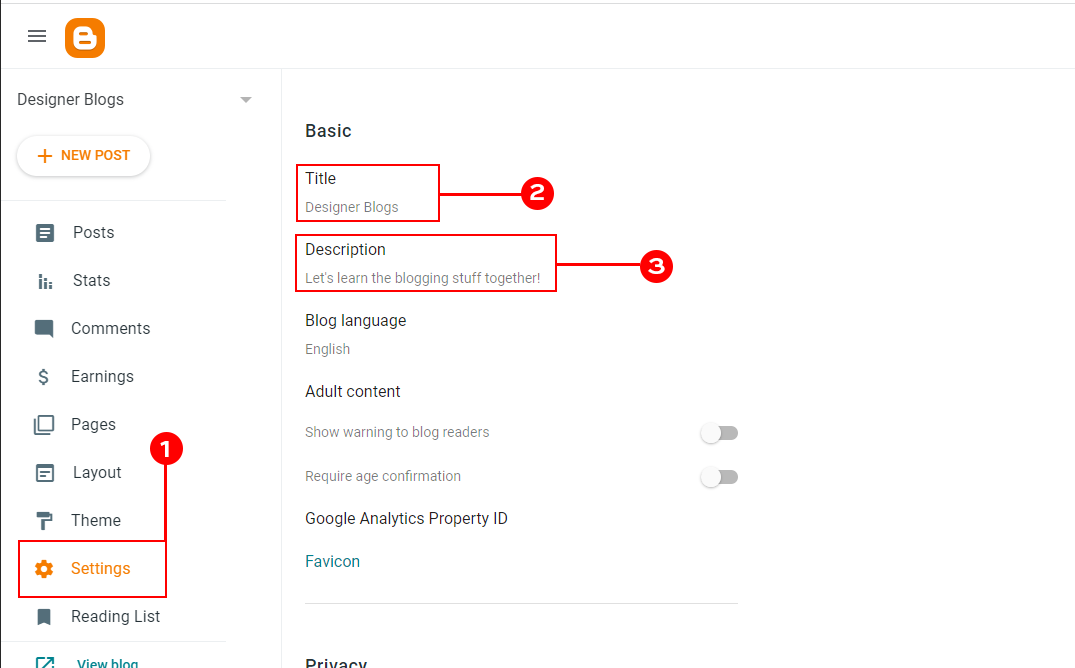
Login to your account and go to the Settings tab on the left. It will show all the blog settings on the right. The blog title and tagline (also called Description) will be located at the very top in the basic section of the settings.
Click on the Title or Description to edit it.
Step 2: Save Your Changes
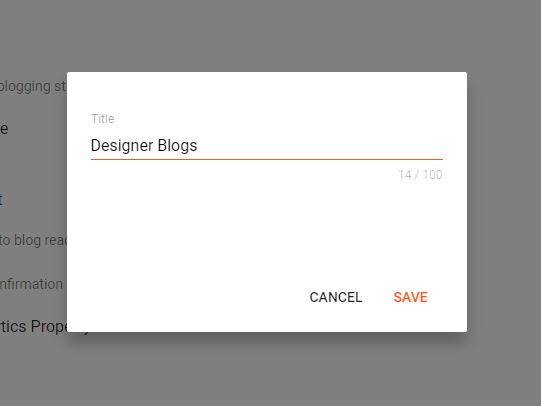
Type in your desired title and description (aka tagline). Some Bloggers leave the description blank and let the title be the show’s star. Once you click “Save” your new title and description will automatically appear on your blog.
Bonus: Quick Tips for a Great Tagline
If you decide to feature a tagline (description) alongside your title, keep these tips in mind:
- Capture your essence: It should immediately tell visitors what your brand is about.
- Highlight the benefit: Help people quickly understand why they should stick around.
- Keep it brief: Aim for under 5 words as a general rule of thumb.
- Reinforce your brand: A sharp tagline cements your identity in your readers’ minds.
Your title and tagline are the very first things visitors see when they land on your site. Spend a little time brainstorming, trust your gut, and give your blog the standout identity it deserves!