fbpx
Home Blog Page 1174

Lesson of the Day: ‘2021’s Most Fascinating Animals’

0
Lesson of the Day: ‘2021’s Most Fascinating Animals’

This lesson is a part of our new Accessible Activities feature, which aims to welcome a wider variety of learners to our site and to The Times. Learn more and tell us what you think here.


Featured Article: “2021’s Most Fascinating Animals” by Michael Roston

Sea slugs that can crawl around without their bodies. Tortoises that hunt baby birds. A bird with a broken beak that uses a tool to comb himself. These are some of the animals profiled in The New York Times’s roundup of the most fascinating animals of 2021.

In this lesson, you will learn about six different animals and what makes them special. Then, you will research another interesting animal discovery that The New York Times reported on last year.

In your journal, respond to these questions about animals using words or drawings:

  • What is your favorite animal? Why? What is special or unique about it?

  • Think about the most unusual or strange animal you’ve heard of: What makes this animal so interesting or different?

Take a look at the 11 words below. Do you know what they mean? Are any of these words new to you?

1. generate
2. parasite
3. kingdom
4. defenseless
5. ecologists
6. dexterity
7. compensate
8. enterprising
9. mischievous
10. fortify
11. moray

Make sure you are familiar with these 11 words before reading the featured article. Go to vocabulary.com to learn what each word means and to practice using them.

Read the article below, or as a PDF, then answer the following questions:

1. Why do some sea slugs “dump their bodies”? Does this remind you of an action any other animals or organisms take?

2. The article says that giant tortoises “look so gentle,” but they aren’t always. Why not? Do you agree with Justin Gerlach, a Cambridge ecologist, that witnessing their behavior is “horrifying”? Why or why not?

3. Why do you think scientists found it so fascinating that elephant trunks could pick up a tortilla chip without breaking it? What else would you like to see an elephant pick up to test its nimbleness?

4. Why do you think the author called Bruce, the kea, “one of the most charming creatures of the year”?

5. The author described titmice and other Parids as “mischievous.” Why?

6. Do you understand the joke about the eel in the final slide? Listen to this excerpt from the song “That’s Amore” and follow along with the lyrics. What is the play on words that the author used in this slide?

All of the animals you read about first appeared in the Trilobites column. Learn about another animal by reading one of these short Trilobites articles in its entirety:

As you read, write down three fascinating facts you learned about the animal. What makes this creature special or different? Then, write down two questions you have about the animal or its behavior. Finally, draw one picture of the animal based on its description in the article.

Share what you found with your classmates and learn about the animals they researched.


Want more Lessons of the Day? You can find them all here.

6 Hottest New Fonts for 2022

0
6 Hottest New Fonts for 2022

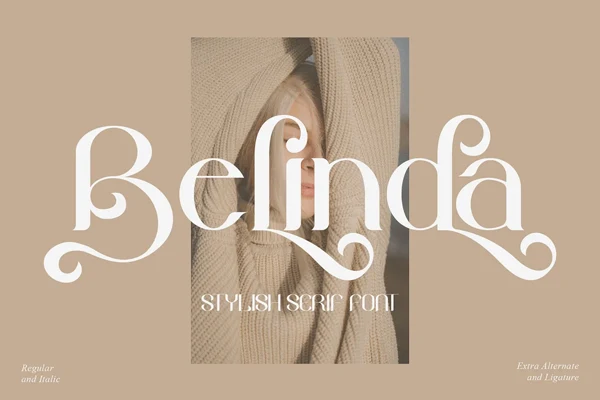
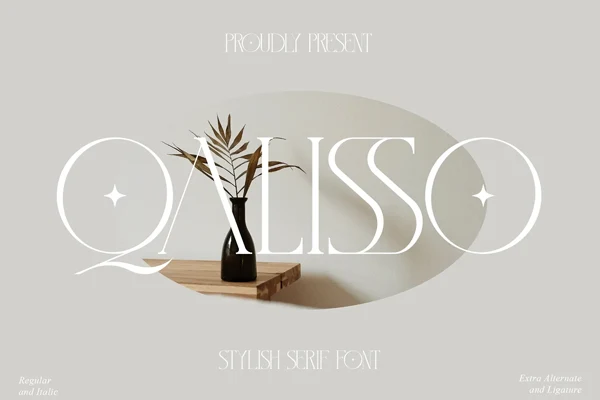
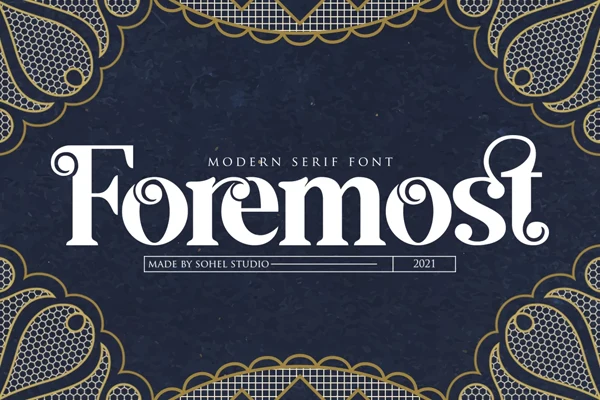
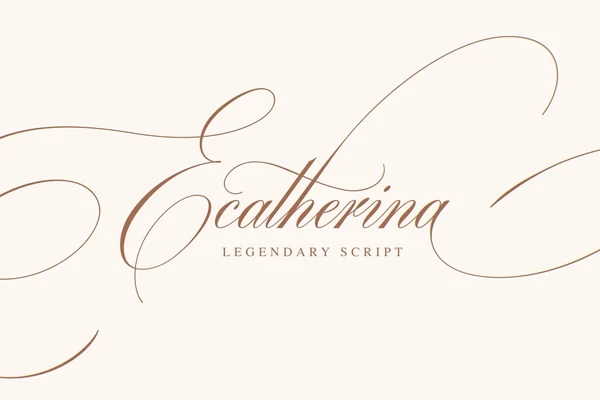
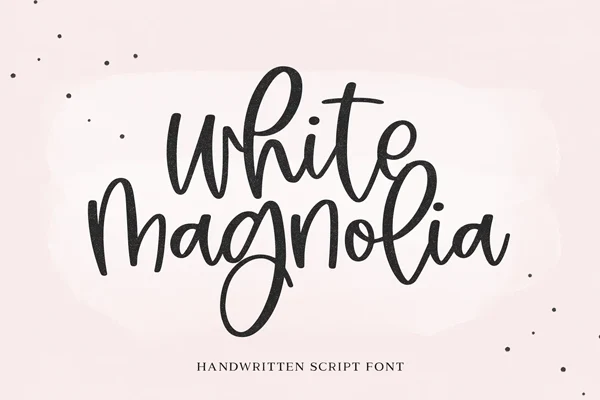
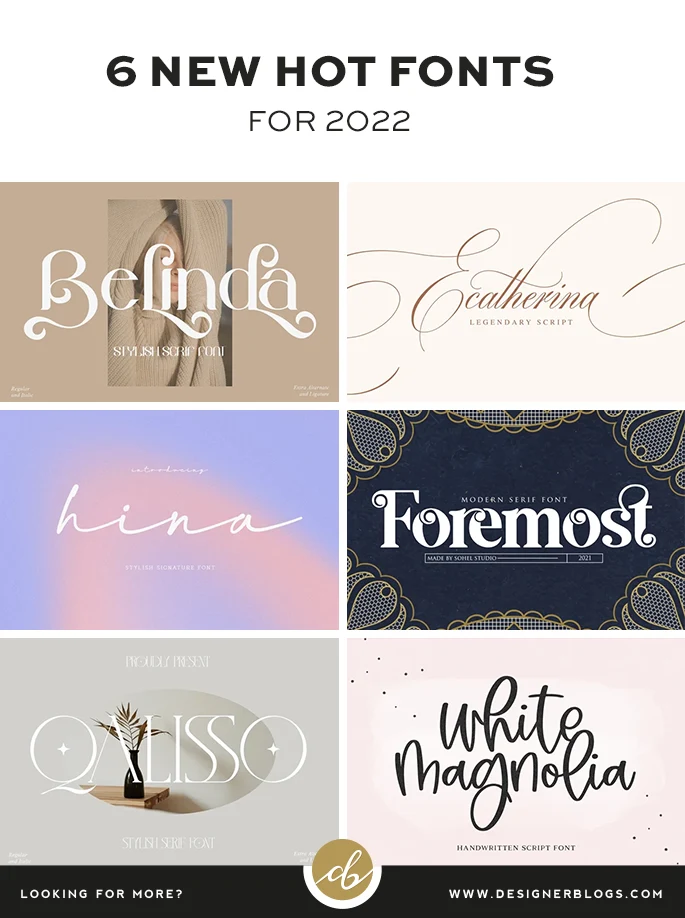
Here at Designer Blogs we are always keeping our eye out for the hottest new fonts on the market so you don’t have to! Today we wanted to share with you six of the most gorgeous new fonts around. Each of these was launched within the last two months and will make a standout presence in any font collection. So if you are looking for some hot new fonts, make sure to check our picks

Hot New Fonts for 2022

For this post I did my best to find something for everyone, so you will find here both script lettering and modern shapes. All the fonts were added to Creative Market recently so I hope that all of them will be new for you. Below you will find my 6 picks with links to their pages.


Pin me for later!

If you are browsing this post at work or just do not feel crafty right now, we have something for you too! All the fonts collected in one please on easy to pin graphic so you can save those inspirations for later.

Hot New Fonts to add to your collection in 2022

Show us your works!

I would love to see what you will create using those hot new fonts. Make sure to let us know in the comments, or share your creation on social media and tag Designer Blogs.

Don’t forget to let us know which font is your favorite. Do you like graphic fonts, or would you rather see a compilation of classic fonts?

Still looking for a perfect font? Check the list of 20 Best Free Holiday Fonts.


P.S This post includes affiliate links so by clicking them you are supporting us. Thanks!


The post 6 Hottest New Fonts for 2022 appeared first on Designer Blogs.

How to Start a Blog or Website

0
How to Start a Blog or Website

How to Start a Blog on WordPress - Designer Blogs

Updated for 2022

Are you a new blogger or a seasoned Blogspot or WordPress.com blogger wanting to switch your blog over to self-hosted WordPress? Or, are you wanting to build a website or blog? Then you’ve come to the right place. In this post, we will show you how to start a blog or website in only a few minutes.


This tutorial will walk you through you how to launch a self-hosted WordPress site on Bluehost (our preferred web host) in 3 simple steps.


Bluehost is one of the largest and most trusted web hosting provider’s out there. They have very affordable pricing, stellar customer service, are incredibly reliable, and they install WordPress automatically! Follow these four simple steps and you’ll have a self-hosted WordPress site set up in a jiffy.


How to start a blog or website

Step 1 – Find a space for your new site

I like to think about a website (or a blog) as a house. If you want to build one you need to get yourself a plot. For the website/blog such plot is called hosting. It is your piece of internet that you need to rent with a monthly or yearly fee.

To get your hosting in place, so head on over to Bluehost and click on that big green button.

Bluehost Exclusive Designer Blogs Offer - Designer Blogs

Note: receive exclusive pricing by signing up through this link.*


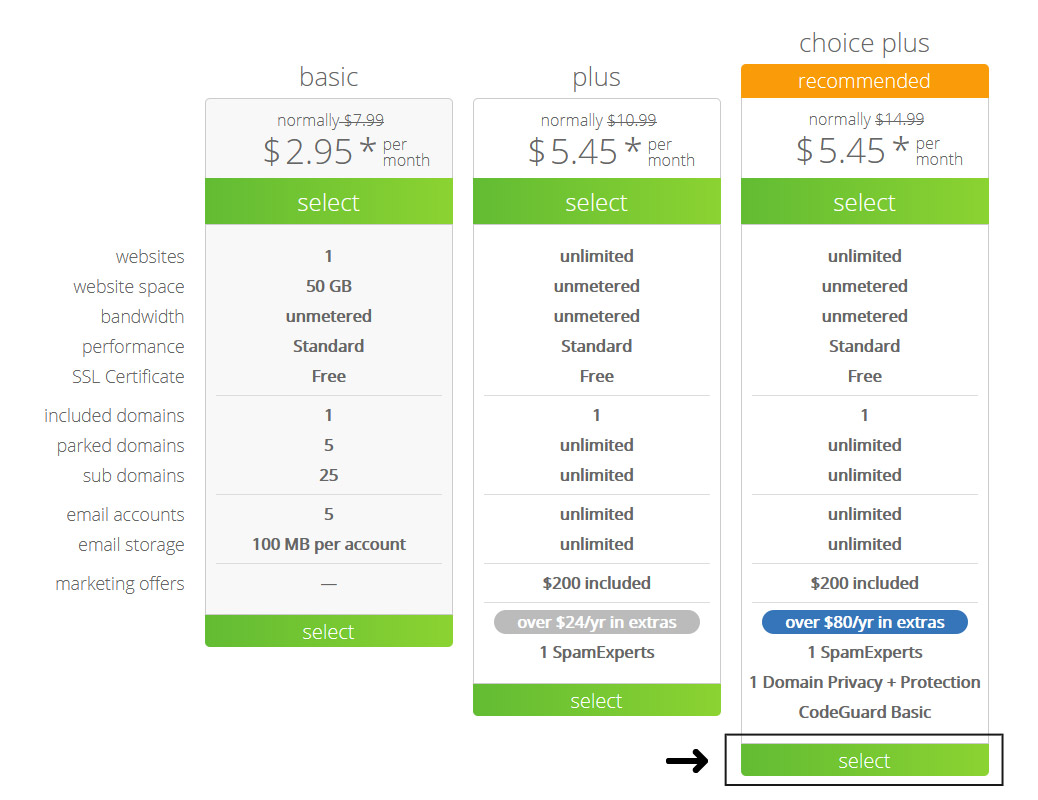
Select a plan

The “choice plus” plan is the most popular and really does give you the most bang for your buck, but if you want to start with the “basic” or “plus,” plans due to limited funds, know you can always upgrade in the future if needed.

Bluehost Hosting Plans - Designer Blogs

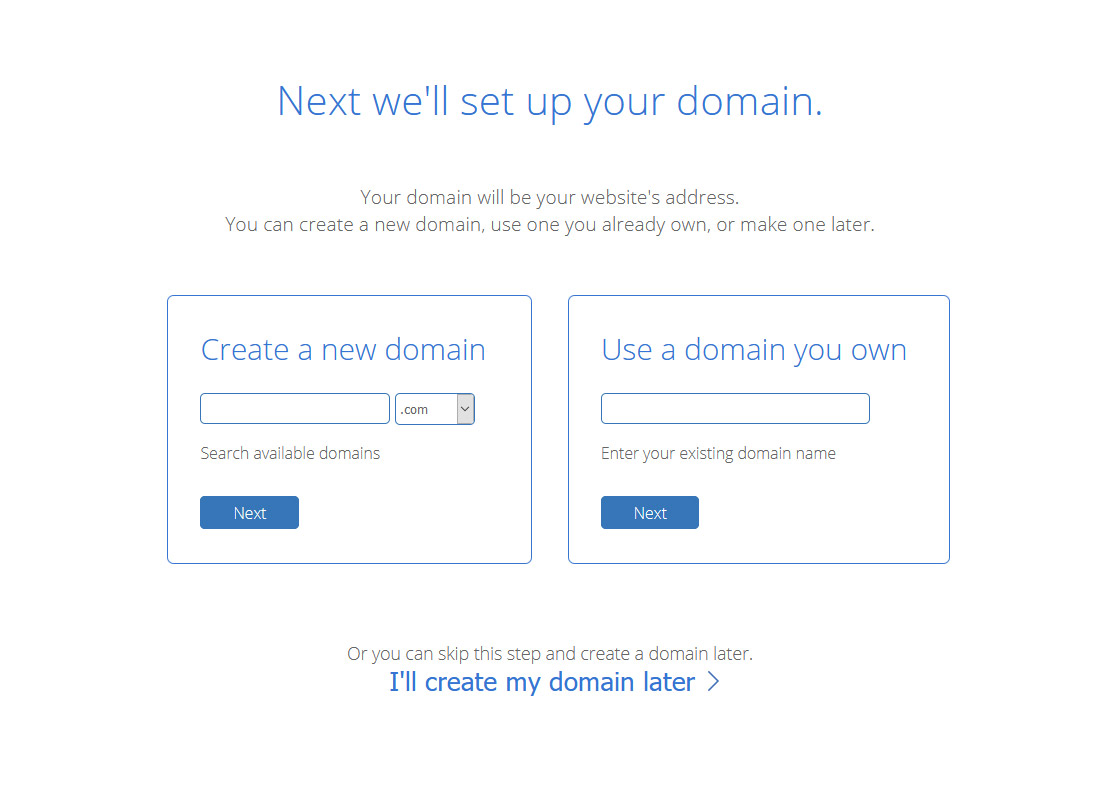
If you haven’t thought about what you want to call your blog, now’s the time.

You will be asked to create or use (if you already own one) a domain. If you do not have one yet, you can compare it with a house address. People will use it to find your site and recognize it amongst

Try your best to match your domain to the title of your blog (e.g. our site name is Designer Blogs, so we chose the domain www.designerblogs.com).

If the domain you are wanting isn’t available, try using different variations of your title (it will offer you some suggestions). If you already own a domain that you’d like to use, enter it in the area provided.

RELATED: 5 Blog Investments Worth Making (read this for tips on choosing a killer domain)

Bluehost Sign Up Page - Designer Blogs

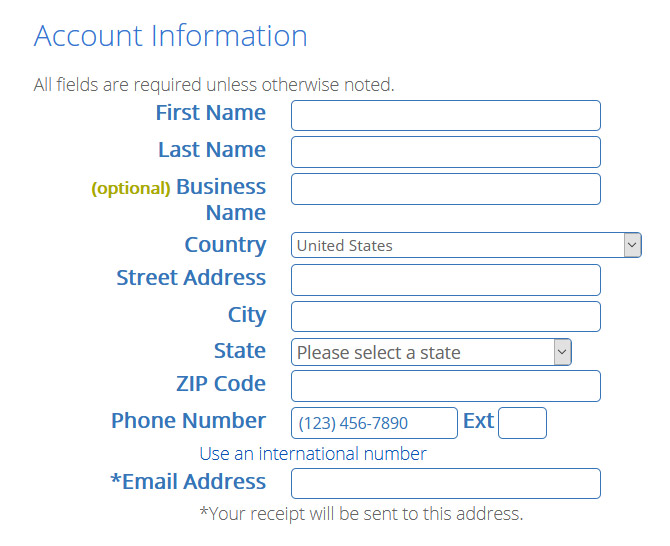
Follow the instructions and enter in your account information. Be sure to use a working email address because this is where your login info will be sent.

Bluehost Account Information - Designer Blogs

Now check your package details and add extras. You do not really need any of them if you starting your site so do not feel pressured to check all the boxes.

Finally, enter in your billing information, confirm that you’ve read the fine print, and hit the green submit button.

Your hosting account will now be in place.

Follow instructions on your screen to set up your Bluehost login details and install your new WordPress. Remember to note all the logins and passwords in a safe place as you will need them later!


Step 2 – Open WordPress

If you followed all steps, Bluehost had automatically installed WordPress for you and you can start working on your new blog right away.

You can log into your site by going to:

www.yourdomain.com/wp-admin (“yourdomain.com” being your own personal domain).

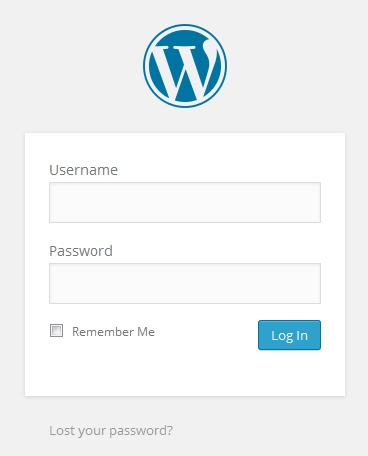
This will bring you to the login area on the backend of your site. It’s a good idea to bookmark your login page so you can easily access it when you need to log in.

Enter in the login info you wrote down from the previous step and then click “Log In.”

RELATED: How to Change Logo on WordPress Login Page

WordPress Login Screen - Designer Blogs

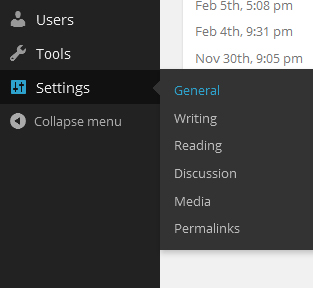
First, let’s get your basic settings in place, so in your dashboard go to “Settings” and then “General.”

WordPress Dashboard Settings - Designer Blogs

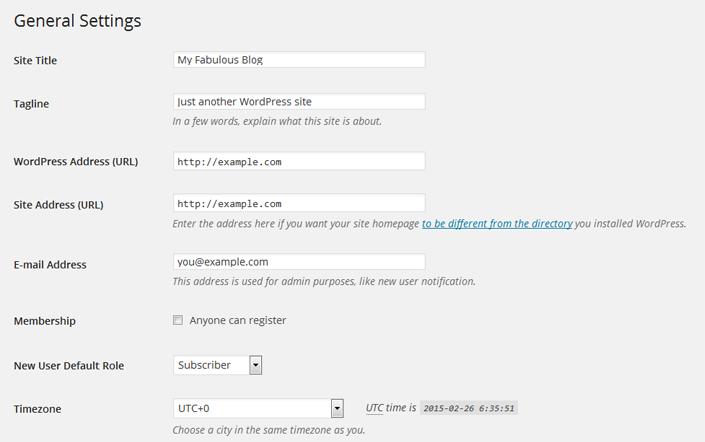
Enter in your site title, tagline, url, email and the other information it asks for and click “Save Changes.”

WordPress General Settings - Designer Blogs

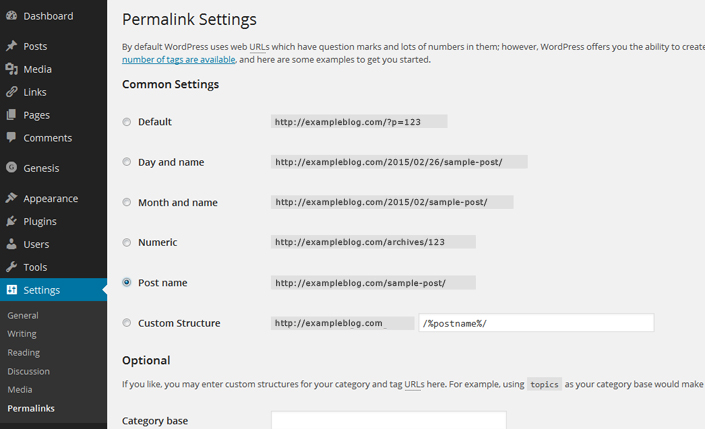
Now I highly recommend that you change your permalink settings for SEO purposes. To do this go to “Settings” and then “Permalinks” and then select the “Post name” option and click “Save Changes.”

WordPress Permalink Settings - Designer Blogs

I also recommend that you click through each of the options under “Settings” to get the additional options set up like you want.

You can also visit our WordPress Tutorials page for additional help in getting the other areas of your site set up.


Step 3 – Make it Gorgeous!

Now it’s time to get your blog looking fabulous! You have a few options when it comes to the look of your site:

Browser free designs

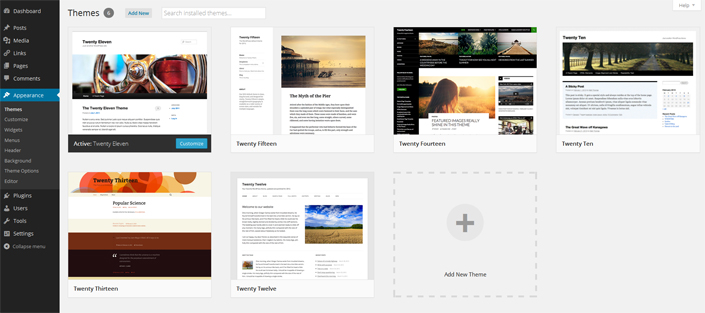
You can use one of the free generic themes that are included with your WordPress install. Go to “Appearance” and then “Themes” to find them. As you can see, they aren’t much to look at and there isn’t much variety, but if it’s not in your budget to spend money on a theme right now, then it’s a good place to start.

WordPress Default Themes - Designer Blogs

Get something more unique

You can hire a blog design company (like Designer Blogs!) to create a fabulous design for you. We offer very affordable WordPress Themes or if you want a one-of-a-kind blog design, you can request a quote for a custom design.

With either option, we take care of the design work (including install) so you don’t have to worry about a thing!

We hope you’ve found this tutorial helpful and by now you know exactly how to start a blog. If you have any questions, please leave a comment below and we’ll do our best to answer!


*Disclaimer: this post contains affiliate links, which means your clicks and purchases help support Designer Blogs at no extra cost to you. We only recommend products we absolutely love.

Weekly Accessible Learning Activities: Food Carts, Bravery and Vocabulary Stories

0
Weekly Accessible Learning Activities: Food Carts, Bravery and Vocabulary Stories

Each Wednesday we shine a spotlight on five student activities that support a broad range of learners. In this week’s roundup of accessible activities, we invite students to explore the world of New York City’s food carts, share about a time when they were brave, participate in a vocabulary-based storytelling challenge, write an image-inspired story and watch a film about grieving pre-Covid days.

Note: To learn more about this new weekly feature, read our introductory post. Please share your thoughts in the comments section or by emailing us at LNFeedback@nytimes.com.


1. Learn about the flavors and tastes that fill New York City streets.

Students will learn about New York’s food carts in this Lesson of the Day. Then, they will reflect on the smells, tastes and flavors that make up their community.

2. Reflect on a moment of bravery.

In this Student Opinion, students will learn about a sixth grader who saved two people’s lives in one day. Then, they will share about a time when they were in a situation that required courage and bravery.

3. Write a story using our Words of the Day.

This month’s vocabulary challenge is a special opportunity open only to middle and high school students who are emerging writers, readers and speakers of English. Students will use some of the Words of the Day published in December and write a 50-word story that incorporates those words.

4. Use an image to reflect on the New Year.

This Picture Prompt asks students to allow an image to prompt their reflections on the questions: What does it mean for a year to be new? How do we measure our lives? Students can share their responses in a class discussion or post publicly in the comments section.

5. Watch a film about mourning our “old normal.”

Students will watch this Film Club about redefining normal after two years of the pandemic. Then, they will think about what it might take to mourn, accept and move on from everything we’ve experienced during the pandemic.

What Disgusts You?

0
What Disgusts You?

How do you feel when you look at the image of moldy fruit at the top of this post? Are you disgusted?

How does disgust feel in your body? Is it a queasiness or nausea? Is it the sensation of creepy crawlies? What expression does your face make when you see something disgusting like that photograph?

In “How Disgust Explains Everything,” Molly Young writes about the science of revulsion:

Once you are attuned to disgust, it is everywhere. On your morning commute, you may observe a tragic smear of roadkill on the highway or shudder at the sight of a rat browsing garbage on the subway tracks. At work, you glance with suspicion at the person who neglects to wash his filthy hands after a trip to the toilet. At home, you change your child’s diaper, unclog the shower drain, empty your cat’s litter box, pop a zit, throw out the fuzzy leftovers in the fridge. If you manage to complete a single day without experiencing any form of disgust, you are either a baby or in a coma.

Disgust shapes our behavior, our technology, our relationships. It is the reason we wear deodorant, use the bathroom in private and wield forks instead of eating with our bare hands. I floss my teeth as an adult because a dentist once told me as a teenager that “Brushing your teeth without flossing is like taking a shower without removing your shoes.” (Do they teach that line in dentistry school, or did he come up with it on his own? Either way, 14 words accomplished what a decade of parental nagging hadn’t.) Unpeel most etiquette guidelines, and you’ll find a web of disgust-avoidance techniques. Rules governing the emotion have existed in every culture at every time in history. And although the “input” of disgust — that is, what exactly is considered disgusting — varies from place to place, its “output” is narrow, with a characteristic facial expression (called the “gape face”) that includes a lowered jaw and often an extended tongue; sometimes it’s a wrinkled nose and a retraction of the upper lip (Jerry does it about once per episode of “Seinfeld”). The gape face is often accompanied by nausea and a desire to run away or otherwise gain distance from the offensive thing, as well as the urge to clean oneself.

The more you read about the history of the emotion, the more convinced you might be that disgust is the energy powering a whole host of seemingly unrelated phenomena, from our never-ending culture wars to the existence of kosher laws to 4chan to mermaids. Disgust is a bodily experience that creeps into every corner of our social lives, a piece of evolutionary hardware designed to protect our stomachs that expanded into a system for protecting our souls.

The article goes on to discuss two important research papers on disgust from the Hungarian researchers Aurel Kolnai, whose paper came out in 1929, and Andras Angyal, whose work was published in 1941:

Nonetheless, Kolnai was the first to arrive at a number of insights that are now commonly accepted in the field. He pointed to the paradox that disgusting things often hold a “curious enticement” — think of the Q-tip you inspect after withdrawing it from a waxy ear canal, or the existence of reality-TV shows about plastic surgery, or “Fear Factor.” He identified the senses of smell, taste, sight and touch as the primary sites of entry and pointed out that hearing isn’t a strong vector for disgust. “One would search in vain for any even approximately equivalent parallel in the aural sphere to something like a putrid smell, the feel of a flabby body or of a belly ripped open.”

For Kolnai, the exemplary disgust object was the decomposing corpse, which illustrated to him that disgust originated not in the fact of decay but the process of it. Think of the difference between a corpse and a skeleton. Although both present evidence that death has occurred, a corpse is disgusting where a skeleton is, at worst, highly spooky. (Hamlet wouldn’t pick up a jester’s rotting head and talk to it.) Kolnai argued that the difference had to do with the dynamic nature of a decomposing corpse: the fact that it changed color and form, produced a shifting array of odors and in other ways suggested the presence of life within death.

Angyal argued that disgust wasn’t strictly sensory. We might experience colors and sounds and tastes and odors as unpleasant, but they could never be disgusting on their own. As an illustration, he related a story about walking through a field and passing a shack from which a pungent smell, which he took for that of a decaying animal, pierced his nostrils. His first reaction was intense disgust. In the next moment, he discovered that he had made a mistake, and the smell was actually glue. “The feeling of disgust immediately disappeared, and the odor now seemed quite agreeable,” he wrote, “probably because of some rather pleasant associations with carpentry.” Of course, glue back then probably did come from dead animals, but the affront had been neutralized by nothing more than Angyal’s shifting mental associations.

Disgust, Angyal contended, wasn’t merely smelling a bad smell; it was a visceral fear of being soiled by the smell. The closer the contact, the stronger the reaction.

Students, read the entire article, or at least the first two sections of it (until “I first met”), then tell us:

  • What is your reaction to the article? Did you feel disgust while reading any parts of it? Did any of the theories about disgust resonate with you?

  • In your experience, what makes something disgusting? Is it the taste, texture, smell or sight of it, as Kolnai argued? Is it the mental associations with it or the fear of being contaminated as, Angyal suggested? Or is it something else?

  • Describe in detail something that really disgusts you. Use vivid and descriptive language to bring your revulsion to life. Then, explain why you think this thing is so repulsive to you. (Please keep in mind that your comment should remain appropriate for our site. We won’t approve comments that include obscenity, vulgarity or profanity.)

  • Later on in the article, the author suggests that disgust can also apply to a person’s politics, beliefs or activities, such as what a person with conservative politics might feel for someone with liberal politics (and vice versa), or what someone might feel about things like racism, brutality or hypocrisy. Do you agree? Do you ever feel disgust, and use that word, to describe such ideas? Is it the same feeling you might feel for moldy food or garbage? Or is the sensation and meaning different to you?

  • The author describes the feeling of disgust as “the energy powering a whole host of seemingly unrelated phenomena … a piece of evolutionary hardware designed to protect our stomachs that expanded into a system for protecting our souls.” What role do you see disgust playing in our society? How has it influenced your own life, if at all?


Want more writing prompts? You can find all of our questions in our Student Opinion column. Teachers, check out this guide to learn how you can incorporate them into your classroom.

Students 13 and older in the United States and Britain, and 16 and older elsewhere, are invited to comment. All comments are moderated by the Learning Network staff, but please keep in mind that once your comment is accepted, it will be made public.

Here’s How To Code Wordle — That Game That Everyone’s Talking About

0
Here’s How To Code Wordle — That Game That Everyone’s Talking About
How to code Wordle online word game

If your social feeds are full of people sharing green, gray, and yellow square emojis, you’re probably familiar with Wordle, the deceptively simple online word game that’s blown up in recent months.

Wordle challenges you to guess a random five-letter word in six attempts. Playing Wordle can be frustratingly hard, but coding it was easy, according to Josh Wardle, who built the game in November as a fun activity for his wife. Now, hundreds of thousands of people play Wordle each day and share their stats (in the form of emoji squares) on social media.

Curious how a viral game like this gets made? Here are the skills you need to learn to code a game as simple and satisfying as Wordle:

How Wordle works

Wordle features a keyboard and 30 letter tiles that change color after each guess: A green square means you chose the right letter in the correct position, yellow means the word contains the letter in a different place, and gray means it’s not in the word at all. That’s it.

Wordle is intentionally understated, according to Wardle. “I built it as simply as possible,” Wardle, a Brooklyn-based software engineer who previously worked at Reddit, told TechCrunch.

It’s not an app or a piece of software, “it’s literally just a website and some JavaScript that downloads,” Wardle told TechCrunch. “And once it’s downloaded, it never needs to do anything again.” Wordle lives on Wardle’s personal website, which has no backend, so it doesn’t get bogged down by the growing fanbase, he told TechCrunch.

How to build a game like Wordle

All it takes to code a game like Wordle is JavaScript, HTML, and some CSS, explains Nik Dolan-Stern, a Curriculum Developer at Codecademy. “Essentially any beginner course on a language could teach you most of the mechanics of this game,” they say.

Once you have a handle on the programming language, Nik says ​​you could use for loops to create the mechanism that checks whether guess letters are in the solution. “All of that logic is fairly straightforward,” they say. “Okay, is this letter contained in this set of other letters? Is it both in the set and in the right position?”

For example, here’s a code snippet that Nik wrote (check out their workspace here):

  for (let i = 0; i < guess.length; i++) {
    let guessLetter = guess.charAt(i);
    let solutionLetter = solution.charAt(i);
    if (guessLetter === solutionLetter) {
      result.push("Green");
    }
    else if (solution.indexOf(guessLetter) != -1) {
      result.push("Yellow");
    }
    else {
      result.push("Grey");
    }
  }

Wordle’s runaway success is proof that even beginner code can create cultural impact. “The fact that this is popular is so cool, because I love the idea of students seeing this and feeling like, ‘This is something I can make,’” Nik says.

For now, Wardle said that making a Wordle app is off the table. “I don’t have the skills,” he told TechCrunch. “I’d have to invest the time to learn how to do it, which I could do, but it would be an investment of my time.”

Motivated to build your own Wordle-like game? Start by taking our Learn JavaScript course, and then learn to build a video game app with our Game Development courses. You can share your progress (and get some help from the community, if you need) in our forums. And don't forget to post again to show off the finished product. Who knows? Maybe your game will go viral, too.


JavaScript Tutorial: Learn JavaScript For Free | Codecademy

Learn the JavaScript fundamentals you’ll need for front-end or back-end development.

10 React Interview Questions to Practice

0
10 React Interview Questions to Practice
10 React interview questions to practice

React is an open-source JavaScript framework developed by Facebook. It’s currently the most popular front-end framework in use today. Its success even convinced Facebook to develop React Native, another framework that uses React for cross-platform mobile development.

When you’re interviewing for a job that requires using React daily, employers want to know that you have the skills needed to get the job done. That means your interview will likely include React interview questions, and while we can’t guess precisely what they’ll ask, we’ve collected some of the most popular ones here, along with possible answers.

1. What is React, and how is it different from other JavaScript frameworks?

With this question, the interviewer wants to find out if you know about the JavaScript ecosystem in general and what makes React unique. One thing you could bring up is that while some developers call React a framework, many consider it a library and not a full framework.

This is because React’s purpose is to build UI components for your web app. That’s all it really does. It’s the V (or View) part of an MVC (Model, View, Controller) architecture, and to build a complete application with React, you need other libraries like Redux.

Most JavaScript frameworks, like AngularJS, have tools for creating controllers, directives, services, and other functionalities. With these other frameworks, you have to use the tools you’re given for the most part. With React, you can build an application with the libraries of your choice.

2. What is JSX?

JSX is a language that React uses to embed an HTML template in code. It isn’t understood by browsers and must be transpiled with tools like webpack and Babel before it can be run.

Still, JSX helps streamline React development once you know its syntax. You don’t actually have to use JSX to create React components and can use React.createElement() instead, but Facebook recommends using JSX. Most React developers prefer its declarative syntax, and it also reduces code complexity.

Here’s an example of JSX:

return( 
Hello World!
); 

3. What is state in React?

State is a JavaScript object used to represent the data held in a React app that may change over time. For example, you might have a state variable called clicks which updates when a button is pressed.

State is fully contained within the component, unlike props. In class components, you use the state class variable to set a state variable, like in the example below:

class User extends React.Component { constructor(props) { super(props)
this.state = { greeting: 'Hello World!' } 
}
render() { return ( 
{this.state.greeting}
) } } 

In functional components, you can set state in the component with the useState hook:

const User = () => { const [greeting, setGreeting] = '';
setGreeting('Hello World!');
return ( 
{this.state.greeting}
); } 

4. What are props in React?

Props are inputs for components and a way for passing data from one component to a child component. They can be single values, objects, or functions. Here’s an example:

const User = () => { const [greeting, setGreeting] = '';
setGreeting('Hello World!');
return ( 
); } 

In the example above, the MyHeader component is passed the greeting prop and can be accessed inside that component with props.greeting.

5. What are the three main phases of a React component’s lifecycle?

They are:

  1. The initial rendering phase, when the component is about to modify the DOM of the web page.
  2. The updating phase after the component is added to the DOM and only updates when its state or props change.
  3. The unmounting phase, when the component is destroyed and removed from the DOM.

6. What are synthetic events in React?

React wraps the native events of the browser with its own event structure for cross-browser compatibility. It has the same API as the browser’s events but acts the same in every browser.

7. Where is using a key prop necessary, and why?

Key props are required when you create an array of elements. React uses this key to identify specific elements in the array when they’re updated, removed, or added.

8. What is a ref in React?

A ref (reference) in React is an attribute that gives you a handle to access the functions in a specific element. Here’s an example:

const User = () => { const ref = React.useRef();
ref.current.focus();
return ( 
); } 

The code above will focus the cursor in the input using a ref.

9. What are Higher-Order Components (HOC)?

Higher-Order Components are custom components that wrap other components within them. They can dynamically accept one or more components as children without modifying or copying any of the children’s behavior. They allow for code reuse and state abstraction and manipulation.

10. What are pure components?

Pure components in React don’t re-render when props or states update to the same value. You can extend the React.PureComponent class to use them. The rendering is restricted in this way for higher performance and is often used for components that are mainly for display.

Learn more about React

Don’t worry about preparing for every possible question you might face during your interview. That’d be impossible. Instead, focus on solidifying your understanding of React concepts and functions, and if you need a refresher, try courses like:

But remember, even if the company you’re interviewing with relies heavily on React, they’ll likely test your knowledge of other programming tools and functions. You might even be asked to complete a technical interview. For more information on interviewing in the tech industry, check out the articles below. Then, for more tips on how to prepare, visit our Career Center.


Interview Prep Courses & Tutorials | Codecademy

Interviewing is an important step in your journey towards landing a job in tech. Technical interviews let you showcase your skills and knowledge, but practice is key. You’ll need to understand technical concepts and be prepared to talk through solutions with your interviewers.

Candy Cornucopia

0
Candy Cornucopia

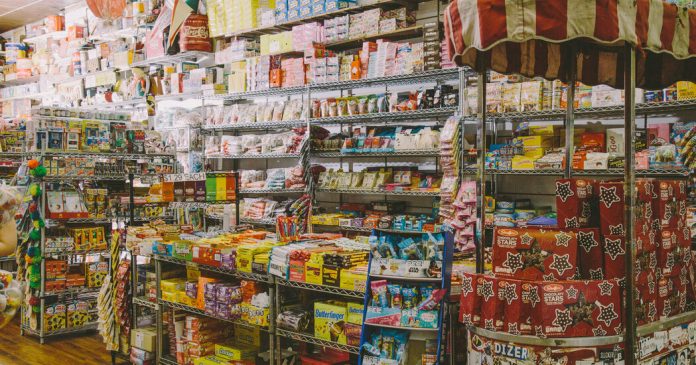
Use your imagination to write the opening of a short story or poem inspired by this photograph — or, tell us about a memory from your own life that this image makes you think of.

Post it in the comments, then read the related article to learn more.


Want more Picture Prompts? Find them all in this column.

Students 13 and older in the United States and Britain, and 16 and older elsewhere, are invited to comment. All comments are moderated by the Learning Network staff, but please keep in mind that once your comment is accepted, it will be made public.

Word of the Day: malleable

0
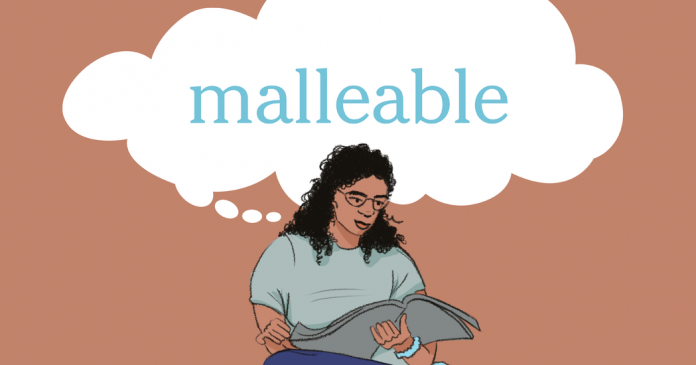
Word of the Day: malleable

1. capable of being shaped or bent or drawn out

2. easily influenced

_________

The word malleable has appeared in 57 articles on NYTimes.com in the past year, including on Jan. 6 in “Watching a Partner Change Is Hard. Accepting It Can Be Harder.” by Allison Hope:

We don’t marry one person as much as we marry one version of a person, a snapshot of who we (and our partner) are individually and to one another at the moment when we say “I do.” Who we are five, 10 or 40 years later is anybody’s guess.

People change. As a result, relationships change, too.

“Not only do relationships change with time, but people change, which can affect the relationship dynamics as well,” said Michelle Chalfant, a therapist in Charlotte, N.C.

Personalities are more malleable than we may think. Most of us change, though often gradually, according to a study published in 2018 by the University of Houston, University of Tübingen and University of Illinois at Urbana-Champaign, which assessed the personality traits of 1,795 people in the U.S. in adolescence and then 50 years later. Many participants, the study showed, tended to become more emotionally stable, conscientious and agreeable over time.

Can you correctly use the word malleable in a sentence?

Based on the definition and example provided, write a sentence using today’s Word of the Day and share it as a comment on this article. It is most important that your sentence makes sense and demonstrates that you understand the word’s definition, but we also encourage you to be creative and have fun.

Then, read some of the other sentences students have submitted and use the “Recommend” button to vote for two original sentences that stand out to you.

If you want a better idea of how malleable can be used in a sentence, read these usage examples on Vocabulary.com.

Vocabulary in Context: Exotic Pets

0
Vocabulary in Context: Exotic Pets

There are several reasons a person might come to own a large number of unusual pets. For instance, because they are passionate about animals. But also, because YouTube is passionate about animals — the more, the better. “A large number of pets is not my goal, but a large number of pets gets views on YouTube,” Pasiecznik said.

At the moment, Pasiecznik has 31 animals (his cockroach and powder orange isopod colonies are too unwieldy to calculate as individuals, so he counts each colony as one pet). This is a relatively number for him. His most popular videos of all time include “Feeding my 31 tarantulas (GONE WRONG)” (3.7 million views), “FEEDING ALL MY ANIMALS (100+ PETS) [INSANE]” (1.6 million views) and the Spanish-language version of that video, “ALIMENTANDO A TODOS MIS ANIMALES (+100 MASCOTAS) INCREÍBLE” (1.8 million views).