What does your “For You” page look like on TikTok? Do you watch mostly dance challenges, lip syncs, comedians, travel videos or something else? Have you ever ventured onto food TikTok, or FoodTok?
Food content exploded on the app when the pandemic forced people indoors and cooking became a hobby for many. Now, some Gen Z cooks have turned to TikTok to become recognized and celebrated in the cooking world.
In this lesson, you will learn about what it’s like to make your living as a young celebrity chef. Then, you will create a TikTok cooking video with a recipe of your choice.
Warm-Up
Do you enjoy cooking? Do you like to help family members in the kitchen or do you prefer to whip up meals on your own? Do you ever cook with your friends?
Watch this 60-second TikTok video from Eitan Bernath, a 19-year-old TikTok star with more than 1.6 million followers, who is known for his bright, upbeat and approachable cooking videos. Then, respond to the following questions:
What techniques does Mr. Bernath use to hook you at the beginning of the video? How does he hold your interest and attention throughout?
Are you interested in cooking this recipe? Does it feel easy enough that you could try it at home? If so, what about the video made it seem accessible to you?
Would you be interested in creating TikTok cooking videos like this one? Why or why not?
1. Have you seen, or tried, any viral food trends? The article mentions ones like whipped coffee, “TikTok pasta” and the three-ingredient Oreo cake. Why do you think these short cooking videos appeal to so many people?
2. Eunice Shin, the head of media and entertainment at a growth strategy firm, and Jad Dayeh, the head of digital media at a top talent agency, explained why they think TikTok has become such a popular platform. Do you agree with their analyses? What else do you think contributes to TikTok’s popularity?
3. Why might someone aspire to be a FoodTok star? Have you ever wanted to become a TikTok celebrity for cooking or something else?
4. What are some of the career goals of people who start on TikTok as food content creators?
5. Why are teens and home cooks drawn to TikTok cooking videos to learn new recipes, versus more traditional cookbooks or full-length cooking shows?
6. Choose one of the TikTok creators featured in the article and watch several of their videos. What stands out about the food they cook and the way they present it in their videos?
7. Ahmad Alzahabi, a TikTok food star in Flint, Mich., said young creators are a little more imaginative in the kitchen: “I think this younger generation, especially in America with all the cultures that are mixing together, I think there will be a new breed of insane foods that are combining all these cultures and ethnicities.” Do you agree that Gen Z cooks are creative or interested in mixing cultures and traditions in cooking and beyond? Why or why not?
Going Further
Create your own TikTok food video. You can watch more examples from the featured article to get inspired, or just get started by choosing a favorite recipe. It could be something you’ve created on your own, something you learned from a family member, or one that you’ve made from a website or cookbook (just be sure to give appropriate credit).
Then, write out all of the ingredients and steps in the recipe. If you do anything special, like add an ingredient or use a little-known kitchen tool, be sure to specify that as well.
Break down the steps in your recipe to four or five shorter steps, like in the TikTok videos featured in the article. How could you make this recipe even easier and more accessible to viewers? Are you able to combine two or more steps? Or use fewer bowls, pans or pots?
To plan out your video, create a storyboard, or use this template, to determine five or six frames and their corresponding steps in the recipe. Consider, as the videos featured in the article do, how you can help your viewers understand the recipe and keep them engaged.
If you’d like, film your cooking video and edit it down to 60 seconds or less. Then share it with your classmates or on social media.
About Lesson of the Day
• Find all our Lessons of the Day in this column. • Teachers, watch our on-demand webinar to learn how to use this feature in your classroom.
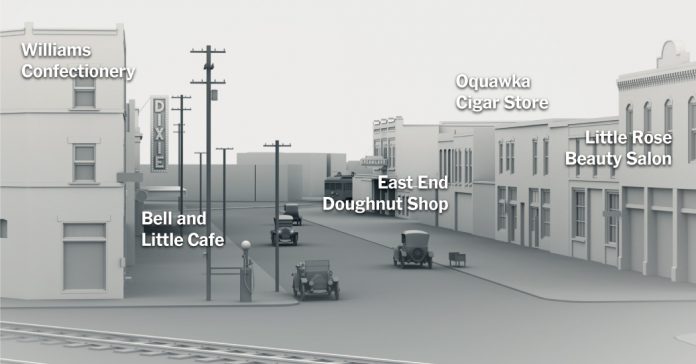
One hundred years ago, a white mob in Tulsa, Okla., attacked and destroyed Greenwood, a neighborhood that had been one of the most prosperous Black communities in the country. The mob’s anger was in part a reaction to Black Tulsans who had come downtown to prevent a lynching, but more broadly it was inspired by a sense of rage at the success of theGreenwood neighborhood.
The New York Times pieced together archival maps and photographs to construct a 3-D model of Greenwood — home of “Black Wall Street” — as it was before the violence and destruction in May 1921. In this lesson, students will explore the neighborhood and learn about the devastating race riot. In the Going Further section, we provide three teaching ideas that invite students to explore the New York Times archive from 1921, consider what justice should look like now and discuss the importance of history and memory.
Warm-Up
The New York Times Graphics Desk spent months trying to recreate what was lost in the 1921 Tulsa Race Massacre.
What do you notice about the opening text? What do the two sentences (copied below) reveal for you? What questions do they raise for you?
A century ago, a prosperous Black neighborhood in Tulsa, Okla., perished at the hands of a violent white mob.
The Tulsa Race Massacre of 1921 killed hundreds of residents, burned more than 1,250 homes and erased years of Black success.
What about the opening graphics — what do you notice?
Now predict: What do you think the rest of the interactive will be like? What kind of journey will it take the reader on? What information will it communicate?
Questions for Writing and Discussion
The featured interactive article is divided into five sections. Use the guide below as you read the article and answer the questions:
I. Introduction
1. In the first two paragraphs of the introduction,the authors invite the reader to imagine:
Imagine a community of great possibilities and prosperity built by Black people for Black people. Places to work. Places to live. Places to learn and shop and play. Places to worship.
Now imagine it being ravaged by flames.
Start by doing that: Close your eyes and imagine that scene. Then consider: Why do you think the authors asked readers to do that? Do you think it is an effective writing strategy? Why?
2. The authors describe Greenwood as “a fully realized antidote to the racial oppression of the time.” What does that statement mean? What details do the authors provide to support that characterization?
3. What is meant by the sentence “The destruction of property is only one piece of the financial devastation that the massacre wrought”? Choose one statistic or quotation from the introduction that illustrates that point in a meaningful way.
II. The Marquee Block
4. Navigate down the 100 block in Greenwood, also known as the “marquee block.” What do you notice about the businesses and stores, as well as the professionals and entrepreneurs who lived and worked there? What stands out? How do you think residents or visitors might have felt walking down those streets?
III. A City Within a City
5. This section is titled “A City Within a City.” In what ways was Greenwood in 1921 a city within a larger city?How does the interactive illustrate the effects of the “economic detour” described by Hannibal B. Johnson, an author and the education chair for the 1921 Tulsa Race Massacre Centennial Commission?
IV. The Massacre That Ended It All
6. According to the article, what was the event that mobilized the white mob? Then consider the larger context of racism at the time. Why might white Tulsans have targeted the community of Greenwood, “where Black success embodied the American dream,” with such brutality and violence?
7. How did you feel as you read this section that describes the massacre in detail? Did certain images or statistics stand out to you? Choose one number, phrase or quotation from this section that you found powerful.
V. What Was Lost
8. What happened to the survivors of the massacre? What was the impact on them emotionally and financially through property loss and racist policies? What support, if any, were they given?
9. What do the authors mean in writing, “The final insult of the massacre came in the silence”? In what ways is the silence an “insult”? Use examples from the article to support your answer. Why do you think this history is not more widely discussed? What are the repercussions of not sharing this history?
10. In the introduction, Brenda Nails-Alford, whose grandfather’s shop was destroyed, asked, “What if we had been allowed to maintain our family business?” After reading the article, what do you think? How might she and other descendants of Greenwood have experienced the world differently if their ancestors had not been victim to the riots?
11. What is your reaction after reading the article? What are you thinking or feeling?
Going Further
Option 1: Explore original reporting from the Tulsa Massacre.
The New York Times first reported on the Tulsa Massacre on June 2, 1921. Start by looking at the headline from that day: “85 Whites and Negroes Die in Tulsa Riots as 3,000 Armed Men Battle in Streets” (PDF). What do you notice about the language and framing of what happened as it is articulated in the headline? If you were reading the paper in 1921, what would you have first assumed happened?
What assumptions might you have made about the event based on the word “riot” versus “massacre”? How does this difference in language change your understanding of the events?
Now read the featured article (PDF) from June 2, 1921, that details what happened, according to New York Times reporters. As you read, you can discuss the questions below in pairs or groups.
Who created this article? Who is the intended audience? How might different readers have responded to the language, framing and analysis?
When and where was the article originally created? What, if anything, do you know about the circumstances under which it was created?
In your own words, what does this article say? What do you think are the most important points in it? What perspectives, opinions and voices are included? What perspectives are left out?
How would you describe the language and tone of the article? Is one person or group depicted as initiating action versus receiving action or defending? How does this affect or change the narrative?
Reflect on the interactive article you read in this lesson. In what ways does this article from 1921 correspond with the information in the interactive? In what ways is it different? How do you feel about The Times’s original reporting on the Tulsa massacre?
Option 2: What does justice for the victims and their descendants look like?
This month the House Judiciary Committee held a hearing in Washington about the massacre. Watch the video above of the three known remaining survivors — Viola Ford Fletcher, 107, Hughes Van Ellis, 100, and Lessie Benningfield Randle, 106 — testifying with their accounts of the attack.
The survivors are among the plaintiffs who have sued the city of Tulsa, claiming the city and the Chamber of Commerce tried to cover up the attacks and distort the narrative of what had happened, deflecting blame onto the Black victims and depicting them as instigators. They seek punitive damages, tax relief and scholarships for survivors and their descendants, along with priority for Black Tulsans in awarding city contracts.
Do you believe the victims of the Tulsa massacre and their descendants are owed anything? If so, why? How should they be compensated? If not, why not?
In her testimony, Ms. Randle said:
“People in positions of power, many just like you, have told us to wait,” she said. “Others have told us it’s too late. It seems that justice in America is always so slow, or not possible for Black people. And we are made to feel crazy just for asking for things to be made right.”
What is your reaction to her statement? Is it “too late” to ask for justice?
Option 3: Discuss the importance of history and memory.
“The massacre lay hidden for decades. Educators did not teach it. Government offices did not record it. Even archival copies of some newspaper accounts were selectively expunged,” Ben Fenwick writes in “The Massacre That Destroyed Tulsa’s ‘Black Wall Street.’”
Why do you think this history has been “willfully buried” for so long? Why do you think that the people of Tulsa, and even some descendants of the victims of the massacre, did not know about this event that destroyed an entire community?
What is the importance of knowing the history of the Tulsa massacre? What can be gained from excavating the past now — and making sure that Tulsans and the rest of the country know what happened 100 years ago?
Who has historically gotten to tell (or not tell) this history? From what perspective have these stories been told? Who should tell this history?
How do you think this event should be remembered and memorialized? Should students learn about the massacre in schools? Should there be monuments, gathering places and museums dedicated to the victims and their descendants? What other ideas can you come up with?
What connections can you make between what happened in Tulsa 100 years ago and what is happening in America today? How can confronting this history help us address the issues of racism and racial justice we currently face?
About Lesson of the Day
• Find all our Lessons of the Day in this column. • Teachers, watch our on-demand webinar to learn how to use this feature in your classroom.
You’ve finally done it. You’ve learned a couple of programming languages, built a tech stack, and you’re finally ready to start applying for jobs. But first, you’ll need a resume.
Your resume needs to assure employers that you’re a great fit for the role and can handle its responsibilities, whatever they may be. Below, we’ll explain everything you need to include in your junior developer resume to show prospective employers that you’re the best candidate for the job.
What does a junior developer do?
Junior developers typically work on a team with more experienced developers. They get to be a part of exciting new projects, fast-paced companies, and they learn a ton by putting their skills to good use in the real world.
A junior developer’s responsibilities will vary depending on the company they work for, but common duties include building websites, improving existing software, and testing and debugging code. Smaller companies might have junior developers perform tasks that are usually reserved for senior developers but with more oversight.
In larger companies, junior developers go through company-tailored training before jumping into their first project — which is great news if you’re nervous about whether your current skills will be enough.
How do I write a resume for a junior developer position?
Now that you understand what a junior developer does, let’s take a look at what you should include in your resume. But before you get into the nitty-gritty details of format, content, and style, you’ll need to get a few things prepared.
Give yourself enough time
First, give yourself a little breathing room to be in the right headspace before you write. Don’t put it off until the night before applications close for the position you want — give yourself a few hours to put your resume together. After all, if it lands you a fantastic job, isn’t it worth more than an hour of your time?
Gather your reference materials
Second, gather up all the data you’ll need. Save or print the job postings for junior developer positions with the companies you want to work for to reference later.
Find a resume template
Finally, find a few templates that you like and save them for inspiration. There’s nothing wrong with using a template, as long as you tailor it so that it accurately represents you. If you need help finding a template, check out Microsoft Word’s library of resumes or Canva’s offerings online. Now, let’s get into the details.
What skills do you need to be a junior developer?
Answering this question will help you highlight the right skills in your resume. Generally, junior developers need problem-solving, command line, documentation, and communication skills. They’ll also need other, more specific skills, but these vary depending on their role and the company they work for.
For example, a junior front-end developer would want to highlight their proficiency with languages like JavaScript, HTML, and CSS on their resume. A junior mobile developer would be better off highlighting their familiarity with Java, Kotlin, or Swift.
Be mindful of space while you’re creating your resume. List only the skills you’ll need for the position, as including more than that might be too much for a single page. It could also signal to the hiring manager that you didn’t take the time to tailor your resume for their posting.
Refer to the job postings you saved and take note of recurring keywords. If you see “web development” or “Ruby” or “C++” show up across different postings, sprinkle them strategically into your resume to show you have what it takes for the job.
What should you include in your junior developer resume?
When building your junior developer resume, remember that hiring managers go through dozens of applications, so you’ll want the most important information front and center. Include your contact info near the top. Then, below, add a short section with the skills we discussed above.
In general, you want your resume to be:
One page in length
Concise by making great use of bullets
Easily read by people and scanners
Well organized
Below your skills, add your relevant experience. Keep in mind a few rules of thumb for a junior developer resume:
Start with your most recent job and move back in time.
Include your title, the company, location, and the years you worked there.
You don’t need to detail every single job you’ve had. Stick with the most relevant.
Explain how the skills you gained from your past jobs pertain to the position.
Lastly, don’t worry if you think you don’t have enough experience. You’re applying for a junior developer position — no one expects you to have years of programming experience. Instead, highlight relevant skills from your last job, along with any courses you’ve completed or certificates you’ve earned that are relevant to the position.
Tailor your learning to match the junior developer job you want
If you’ve already got some of the skills your new job requires but need to brush up on a few things, take a course that’ll help you bridge the gap. Let’s say the job you want requires some knowledge of C++, but you’ve never programmed in that language. Try our Learn C++ course. We’ll teach you the language’s basics, and show you how to use it to build applications. For more skill-building courses, check out our catalog.
More data has been created over the last 2 years than in the rest of human history combined. So it’s no surprise that machine learning, a field that gives computer systems the ability to learn using this data, has grown in popularity. But what exactly does a machine learning engineer do?
A machine learning engineer performs very specialized programming in order to create code and systems that progressively improve as they run. In a sense, they create programs that “learn” as they go. The career is exciting, and this blog will cover what type of work machine learning engineers do, what their salary expectations are, and how you can train to work in this exciting field.
What does a machine learning engineer do?
In an interview with the Codecademy Team, data scientist Hillary Green-Lerman shares, “Machine Learning is about using the data you already have to make predictions.” Machine learning engineers create systems so that computers can learn and make predictions on their own. This includes things like facial recognition software, recommendation engines, speech recognition, and more.
The types of projects you’ll work on will differ depending on the type of company you join, so if this type of work interests you, search what’s out there to get a feel for the types of companies that offer positions. In general, a machine learning engineer will be expected to:
Develop highly scalable code for multiple applications
Maintain, create, or streamline data pipelines
Build real-time machine learning applications for customization purposes
Keep impeccable documentation
Work within an Agile team
Seek out opportunities to improve processes and systems across the tech stack
Machine learning engineers prepare and clean data, then select a model to use that data, which will provide a final result of recommendations based on identified patterns. As the program continues to work (for example, think of the Netflix algorithm recommending the next show to you), it’ll get better and better at delivering answers with more experience knowing the user.
In many roles, the machine learning engineer will need to also wear the hat of a data analyst, IT expert, or full-stack engineer. Job openings are advertised as machine learning engineering to attract the best and brightest, but in reality, a well-rounded programmer and problem-solver is what many companies are after.
Machine learning engineers also work hand-in-hand with data scientists, who create models that the machine learning engineers feed data into and then scale to production levels. They take the theoretical models from the scientists and put them to work on massive scales.
Depending on the tech stack used and the company’s actual product/service offerings, a machine learning engineer will spend their day using code to contribute to the company. They will create a program that’s trained on a set of data, and then improved upon as more information becomes available. They can do this in any number of ways, and for any number of applications, including:
Personalized recommendations on streaming software, such as movie or music recommendations
Recommendations for complementary products to what customers have purchased
Image recognition software improvement
Machine learning engineer skills
A machine learning engineer needs a few general skills to perform in their job:
Meticulousness in working with data and documentation
Communication skills to interface with their team
Creativity and an open mind for solving problems using code
Big-picture thinking, understanding how a program can address a larger business problem
In addition, machine learning engineer skills must include some of the detailed, technical skills required for them to program and train models. Just like any other developer or engineering job, different jobs will require different sets of skills. But to give you an idea of the type of skills you’ll need to have, here are some examples:
Machine learning libraries and frameworks (e.g., pandas, keras, sci-kit learn)
Machine learning engineer salary
The average machine learning engineer salary is $114,579 in the United States. That number is expected to increase 13% by 2026, making machine learning engineers’ earning potential that much greater.
In addition, the demand for machine learning engineers is high. The U.S. Bureau of Labor Statistics predicts that all software developer (which machine learning engineers fall under) employment will increase by 22% over the next decade.
How to become a machine learning engineer
Back when the only way to learn was with a traditional college degree, most computer science and software engineers would get a four-year degree to qualify them for a job. But now, you have more options for learning the skills required to become any type of software engineer, machine learning specialists included.
If you’re a beginner when it comes to machine learning, you can gain the skills you need through online courses. You can even earn certificates that you can put on your resume and LinkedIn profile to show you’ve trained in the right topics and languages.
Because machine learning engineers work very closely with data scientists, you might consider gaining some skills in this area as well. It’ll allow you to understand the models you’ll be working with better, and some jobs will require you to also wear the data scientist’s hat. If you’re keen to work at a start-up, you’ll more than likely need to do a variety of jobs. But don’t worry, that’s the exciting part! You’ll be able to solve many problems from start to finish using both machine learning and data science skills.
Lastly, if you already have a good grasp on machine learning topics and you’ve worked on projects in the field, but you need to brush up on your use of Tensorflow, you can just take a single skill path on that subject alone. Many machine learning positions will require you to use Tensorflow, because it’s a great tool to make it easy to train, test, and tune learning models without getting into the weeds of complex math.
Beyond these basics, check out the exact company and job posting that you are going after to see what additional programming skills you might need. Just like with Tensorflow, you can always take a course on different languages or skills that might be required. And don’t stress. Many jobs will offer some form of training in their particular tech stack. So get the basic skills you need by learning in a way that suits you and on a timeline that doesn’t overwhelm you. The learning process should be enjoyable — as should be your next career as a machine learning engineer.
Marble is one of my favorite textures. Paired with gold accents, it makes a stunning masterpiece that will decorate your screens in June. I think it has a perfectly balanced shade for a wallpaper that isn’t too dark or too bright. Let me know what you think about it in the comments!
As always, our June’s free wallpaper comes with two different mobile phone layouts. They are great to use at once – the simple version for your phone background and the one with a quote for the lock screen.
Quote for June
This month’s quote is simple, and I hope it will bring you a smile every day you will see it.
Today is a good day for a good day
P.S the square image is also included in the download package below! Feel free to post it on your Instagram.
What font is it?
Free June’s wallpaper features a serif font called Coachella and script one called Aurora. Coachella is actually one of my newest fonts but I’m using it quite often since I got it. It has a modern and very stylish look so make sure to check it.
In conclusion, the free download includes three desktop options – one with the calendar and one without the calendar and one with a quote. There is also a wallpaper for tablet and two options for the phone. We have also included an Instagram ready square with the weekly quote.
Your voice matters!
If you have your favorite quotes and would like them to appear on the next free wallpaper, make sure to post them in the comments below or send us your ideas via email.
Enjoy!
FOR PERSONAL USE ONLY.
Lastly, we would appreciate if you can share this freebie. It is really easy! Just click on the buttons below. It is completely free for you but helps us grow and produce even more content.
Share and help us grow. Thanks!
P.S This post includes affiliate links so by clicking them you are supporting us. Thanks!
Here is the May edition of Teenagers in The Times, a roundup of the news and feature stories about young people that have recently appeared across sections of NYTimes.com. We publish a new edition on the first Thursday of each month during the school year.
For ideas about how to use Teenagers in The Times with your students, please see our lesson plan and special activity sheet, both of which can be used with this or any other edition.
An alienated teenager finds questionable companionship in this playful coming-of-age romance by Suzanne Lindon, who was in her teens when she wrote, directed and starred in the film.
Representative Andy Kim of New Jersey, who picked the painting to represent his district in the Capitol, did not know it was inspired by a canceled TV show.
The other day, I went to Tombstone, the tourist trap of the Old West. Of all the amazing things you can see, and get, uh, ripped off (when did the Old West start pricing a meal like it was Vegas?), was the number of reenactors, walking around. I should note, that there is one street, that has remained the way Tombstone used to be, building wise, etc.
I digress.
Anyway, I assumed that all these people wearing clothing from the 1880s were employees. What I learned though, was that half of them were residents of Tombstone and surrounding areas, who everyday/weekend, dress up in their old west best, and walk around. Each of these people paid for their own costume, including those who actually are reenactors and those in the shops and restaurants.
I wondered to myself, what if Tombstone, purchased a learning system, to provide learning and training content to their employees, reenactors and even townsfolk on everything from customer service, to communication, to dealing with groups and teams?
Would they need certain functionality in the system for the days to come, or rely on what is in existence today or in the past?
Would they as frontline workers need classroom management or would vILT suffice? Would they want content/courses assigned to say only the Wyatt Earp lookalikes or for anyone who is a gunfighter? (I learned that the locals, were using real guns). For the professional workforce (i.e. in the office, or a part-time office via a hybrid workplace or working remote – hey who is to say Virgil Earp lookalikes prefer remote?), did they require certain functionality? The old west wasn’t known for internet connectivity, and even modern-day Tombstone looks like it isn’t on the bandwidth speed of many of us. Thus, issues such as video content and the ability to view it and perhaps read the transcripts would make sense.
Restaurants in the 1880s were mainly gambling halls, where they served food and a lot of people got killed, one in fact over asking a Clayton to have a drink with them. He declined, then shot him in the head.
If they had a learning system back then, they would have been able to keep metrics and reporting around such incidents, after all, the barkeep would need certain skills to uh, clean up.
Present Day
I hear all the time, features and functionality folks want in their learning system when it comes to employee training/learning. There are features who make absolutely complete sense, then there are others, who while, they have frontline workers, focus on capabilities for their in-house workforce (again, hybrid, all office or works remote).
Then there are people who seem so focused on security, they forget the basics, such as net connectivity issues (which is relevant) and support (another reason why the customer excellence pledge is so important).
Security? I know and understand why customers focus heavy on it, but be aware that the majority of vendors are on AWS, plus have 256 bit AES (minimum) and numerous fail safes. I’ve been in the e-learning industry for over 20 years (yowsa) and to date, I know of only one vendor in all those years, who has been hacked. They were not on AWS btw.
Thus, submitting to a vendor hundreds of questions around security, while understandable, isn’t necessary to that extent. I mention this, just as an fyi, and sure you can argue what does have to do with employee training and my learning system?
Well, from a security standpoint since most white-collar professionals (pre COVID) were already taking courses from home, and now they are definitely are either 100% or hybrid, and even those in the office, likely will still access the system from home, and/or courses, the security questions that must be asked include:
Can they access via a VPN – nowadays a lot of folks use VPNs to surf the net
If they access via a VPN – will the speed slow down or will be there any type of impact to accessing video courses or content with a lot of data? The answer by the way is yes. But you want some specifics here. If a vendor says no, there isn’t any impact, well, Morgan Earp (Sheriff) would like a word with them, because lying is an offense here in Tombstone.
256 AES security or higher?
Where are your servers being hosted? (And if your country of residence or for any of your employees/customers requires the data center to be hosted in that country, find that out too)
How will you protect credentials and data transmissions from detection while in transit to your application?
Do you support the California Consumer Protection Act? (If you have customers or employees in CA, this is now the law – but only for companies who generate 20M USD in revenue)
Do you support GDPR – There isn’t a certification process here, but the answer should be YES. Anyone who isn’t uh, move on.
What is your backup process and how often do you back up the system? Is it once a day? Multiple times? Overnight, etc. I have heard of vendors who backup twice a week. Yeesh.
If there is a security breach, what are your protocols? When will we be notified?
Reportedly, according to a source, the hacking breach that occurred with their system, the client wasn’t immediately notified.
Doc Holliday loved to gamble. But trust me on this one, he wouldn’t want to gamble here.
Employee Learning System Features you must have
This isn’t about “oh, maybe I need this, ” or “I do not need this now, maybe later” approach, because let’s remember a few items, we all tend to ignore (as the head of L&D, Training, etc.)
People leave companies. This includes your administrator, heck could be you? So if a replacement comes in, they may want those features – you are not interested in – and thus, if the system doesn’t offer them, or has no plans to do so, they are stuck. Until the end of the contract. How would you like it, if you take another job, and that scenario happens to you?
You may change your mind in six months or a year from now. Too late by then.
Employees may inquire whether they system can do this or that? But you selected a system, that didn’t have it, because you didn’t see it as a benefit or need. The system has no plan to ever add it. Now your stuck.
The industry is starting to revert back to add-ons as a method of tailoring. I prefer the tailoring approach, but everything is included. No one says, I have to turn it on right away or ever. But at least, I know it is there, in my back pocket. Like a map of Boot Hill (graveyard and yes, they have one).
Onto the functionality.
If they are specific for say frontline and/or blue-collar you will see (F, BC). Otherwise, it is for all employees. I won’t be going into all the functionality a system has. Based on my data, overall industry-wise, I find that systems tend to be in the 85% range of features to one another. Now how good it is versus someone else is completely different.
Information is presented via the following
Learning Environment – This is what the Learner sees
Administration – The Administrator (if you have like a super admin, that is this person, it can also be sub-admins, but the main admin sets the rules)
Additional Functionality – Again, these are musts, and I will include a couple (I) which means ideal. One such is a custom domain. A vendor may say yes we have a custom domain, but that does not mean custom as in widgetuniversity.com (i.e a true custom domain, like elearninfo247.com). The majority of the time, what they are referring to is your name, then their name in the domain, like widgetuniversity.lmsvendorname.com – For the record, you can purchase a custom domain for like $12 on most sites, and then a URL mask if they do the above with their name as part of the domain (the site hosting the domain, will have directions on how to do this). I had to go this route many times.
Learning Environment
How could anyone miss? The Earps and Doc Holiday are wearing black. Not visible, Kurt Russell.
I’m sure your learners feel the same way of the Claytons. Surprised, confused and realizing that it is a no win situation, but darn it, let’s go out with a bang. I refer to this, when it comes to the learning environment, after they log into the system. Who doesn’t love “I do not know how to navigate” inquiry or the “I can’t figure this out” retort. Then you have learners, who use only partially the front-end (what they see), and thus your data is skewed because they are ignoring all that wonderful assigned learning, just as the Claytons ignored the fact that they were up against serious gunslingers, and uh, Doc had a shotgun.
The front end of the system (i.e.) Learner side is crucial for employee training/learning regardless if the employee is white-collar professional, frontline or blue-collar. It is what they see first, every time they go into the system. It is where the courses/content they are taking, regardless if assigned or not, is placed. If there are playlists – they are there. Some vendors show progress bars, others show circles of progress, and plenty do neither.
Some learning environments have announcements for the employees on various subjects. Some LEs are widget based where the learner can change the placement or turn them off (admin decides). Other systems have LEs that can change in terms of where the widgets are placed or what is added – but it appears across the board for everyone, not individual.
I am a huge fan of a system whereas it has widgets or blocks, and the learner can move them around anywhere they want and add/remove. This is true personalized experience. The OK Corral picture above, and where these folks are placed is based on the personal experience of one said, Wyatt Earp, in the 1920s.
Learning Environment as a whole
Learner home dashboard (this means that when the learner enters the system, they see a home dashboard that contains high level information, including their current courses)
Search functionality allowing learners to find specific courses, materials, delivery format, based on keywords, title, delivery format, and other tagged identifiers (usually appears as a search bar – like you see with a search engine)
Learners can enroll or request enrollment in course or cancel their enrollment
The courses/content have identifiers such as title, category (if applicable), brief description (if applicable), Tags, format
Learner progress bar or similar (My recommendation is color-coded, whereas red means past due, green in progress and blank for not started)
Learners can view entire catalog and select own courses – Usually they click a link or similar off the home page and it goes to the catalog for them to select from.
Catalog (it exists in the system, again on the learner side) has filters, which include – duration, delivery format, category/subject, tags, skills. Some systems include a filter for CPD or CEUs. Many list publishers – which makes no sense. I hate to say this, but a learner doesn’t care if your leadership course came from Sammy’s or House of Cards University. There are catalogs that have ratings, based on learner ratings of the courses.
Learners can be assigned materials, videos, etc. – If you think everyone system can do this, well, you are 85% right.
Search by TAGS – Skills, Interests – eventually job roles (for those who want it – but for now, not a necessary need)
Ability for development paths or curriculum/learning paths to have contents placed in a specific order/hierarchy of learning – For those who want a “lockdown”, which means the learner cannot jump to the next course/content until completed, you will want to make sure the system can do this. Never assume.
Individualized learning plan (including required -i.e. assigned courses/content and optional courses/content)or similar appear on the same screen
Support for the hierarchy at the enterprise, business unit or other desired levels
Ideal
Playlists/Channels with “assigned” (for those who want this), “recommended”, “most popular”, “based on skills of interest or skills tied to job role”.
You also want a system that has a clean and modern crisp look. This is what your employees see every day when searching the net, watching Netflix or visually experiencing. Cluttered never looks good. And a dated look, is well, dated.
Administration
This is the view and capabilities seen by the administrator. NOT THE LEARNER. Or James Earp, the one brother who wasn’t at the OK corral or Tombstone for that matter.
Administrator dashboard – The best ones have high level metrics for the administrator to see. I’ve seen new ones where they also list the top skills, their employees are selecting.
Allow administrators to create, modify and cancel a course/content (very common with systems)
Assign users to groups, can assign X number to X number of courses, Y to a different number of courses or course (Majority of systems have this capability)
Learning plan can be assigned by job role, region, department (Common)
Allow administrators to set multiple levels of approval (e.g., no approval needed, supervisor approval, instructor approval, etc.) (Most systems have this, but there are plenty who do not)
Allow administrator and/or tech team to load learner learning history via batch import (excel template) (Always check, some vendors think this is the same as a batch upload of courses/content. It’s not)
Allow administrators to track attendance status (e.g., no show, cancelled, attended) of all types of training (e.g. instructor led, online, virtual) (This is especially relevant for those who have frontline workers, and those in the “workplace”).
Assign and enforce access based on user profile (A must, and most systems have it)
Capture multiple user attributes (e.g. Organization, department, Manager, Job role, etc.) – Common, but always verify what are the attributes
Create user groups through defined attributes (e.g. organization, departments, country, etc.) – Common, but again, verify what are the attributes. Never assume it is the same for every system.
Control profile settings by field (e.g., allow learners to change email addresses but not change user name) – This will be in the learner profile, where they can update or change their password for example.
Administrator can limit access to catalog items based on user profile (i.e. job role, location, group, etc.) – A must you want this, majority of systems offer this – ‘job role’ is always the wild card, but still most can do that.
Provide multiple levels of administrative access and privileges – Crucial! You want this. You also want the ability to assign different rules as well.
Allow administrators to create and assign system roles – Example – Dave, as a Manager, can access the Manager view and nothing else. Never let other employees, except those in Training or L&D or HR or whoever is running the system, get access. Some companies think “IT wants access”. ?Okay, assign one person in IT as a sub-administrator, give them access to some reports and that’s it. And yes, it is possible in the majority of systems
Create user groups through defined attributes (e.g. organization, departments, country, etc.) – Most systems offer this – again, verify the attributes
Batch upload courses/content and batch upload learners. I would love to tell you this is very common, but I see systems that lack the first, and thus you have to go one by one – which is a huge yuck, especially if you have like 100 videos and 75 courses you have created. Even the batch upload of learners is not a guarantee – I promise you this is a must. Just as checking out Boot Hill in Tombstone, trust me worth the $3 – cash only.
Ideal
TAGS- Administrator can create TAGS by Skills, Interest, Job Role, etc. – This will be a must by the end of 2022
Administrator can create job roles, job titles, edit and delete
Administrator can create skills – needed, requested and assign to learner, learners or in general in the system – A must if you are using a Talent Development Platform. Another must will be the ability to add/delete a skill/job role in the system’s skill/job role library
Ability to assign courses based upon skills, interests, or other variables
Classroom Management
If you have frontline workers, or blue-collar workers you must make sure to have a classroom management capability. Classroom management refers to physical ILT (Instructor Led-Training), on-site. This will be crucial for these employees. For your workplace professionals, not a need, but vILT (Virtual ILT) will be.
Classroom management features
Resource management – Ensures that the projector is available, or those six laptops haven’t all been checked out
Facilities management – If your facility has multiple locations on-site for example, this feature will cross-check to see which ones are available at that given time.
Print out sheets – The instructor does this either ahead of time or via a mobile app
Instructor View
Regardless if you are going on-site or vILT, always make sure your system has the following (all are essential for employees)
Allow instructors access to course enrollment information
Instructor can push survey/assessment during active class
Instructor can update rosters
Allow instructors ability to print rosters, send emails to participants and update course attendance post class
Some customers want the instructor to see some metrics. Again, this is doable via your administrator creating a rule around it, and what the instructor can access. Personally, I’m not a fan of this. I mean, you as the administrator can create a report and send it to them.
Manager View – A must for employee training/learning
And as noted above earlier, you can decide what the manager(s) see – so some might see all below, others may not – your choice.
Manager can to see their team in a manager dashboard or view
Manager can assign content/courses to team and/or individuals
Manager can monitor learning paths for each team member
Manager can update on the job training, mark training complete – This refers to OJT – (F, BC)
Manager can manage training of indirect or virtual reports
Manager can add/reject/update/approve learners/users
Manager can approve/disapprove of learners applying for opportunities (a must for a TDP)
Manager can approve/disapprove of content, employee wants to take
Ideal
Manager can compare team members by skill(s)
Manager can compare team members by self-ratings
Manager can leave a self-rating of what they see the learner needs or has related to skills
Mobile as it relates to OJT
The internet is not the greatest when it comes to the warehouse, manufacturing site, plant, retail, restaurant, and so forth. Thus, a mobile app is crucial here. Remember when a vendor says mobile first! or Mobile Learning, it does not mean they have a mobile app. All it means is that you can access the system via a mobile web browser
Mobile App – Native iOS and Android (Vendors who offer a native mobile app, usually support iOS and Android, but there a few who support only iOS) iOS is Apple
On/Off synch – This means that your worker can take content/courses, surveys and some other functionality within the app, and can continue to do so offline. When a net connection is re-established, the data gets pushed into the learning system. This is a big win, if the system has a native mobile app
Mobile responsive – People always ask for it, every vendor supports it – now to how well it looks on the screen? Different story.
Can take content/courses, surveys in the mobile app
Ideal
Can record employee with mobile device and upload into the learning system – for the manager to verify – great for compliance, and even can be used as content too
Digital signature within the mobile app. It is not common in the space, but for any vendor who has a native mobile app and focuses on frontline workers, blue-collar, even a combo of workers, this is a need.
Bottom Line
I could write a long list of everything you want in a system for employees, from reporting and metrics with segmentation – including KPIs, to a coaching capability (a nice plus for onboarding and frontline), to content curation, playlists, even machine learning. Skills is now a must – a reason I created a template specifically for skill capabilities in a learning system.
Event management is related around webinars and seminars (ILT), you want this. For frontline, you will want SMS notifications beyond just e-mail. Forget password is a must, same as self-registration. Social is a must, but how much you need is totally based on your employees.
Some systems offer communities tied to groups, the system itself, a piece of content, skills and so forth. These are nice to have, and can spur engagement, if they are utilized correctly. Compliance is essential if your are a company whereas employee compliance training is a requirement or in an industry whereas compliance attributes with a system is a must. Such as FS or Life Sciences.
There are two key takeaways in this post.
The features and functionalities employees need and are must for you, are presented
Tombstone wasn’t a great place if you decided that Morgan Earp was overrated as a gunslinger and that there is no way the rest of his brothers and Doc Holiday will show up to protect him, in a small area known as the OK Corral.
By Jyoti Motwani, Senior Product Manager, Coursera
Today, we’re excited to announce that educators can now seamlessly import content from select learning management systems (LMS) directly to Coursera. This new feature supports scalable content creation, enabling educators to quickly migrate large amounts of content between an LMS and Coursera. It is enabled via an integration with K16 Solutions, an industry leader in large-scale LMS migrations, and currently supports content ingestion from Blackboard, Canvas, Desire2Learn (D2L), Moodle, Open LMS, and Sakai.
Creating high-quality educational content requires considerable time and resources. LMS ingestion helps educator teams focus on creating impactful lessons, perfecting course assets, and supporting real-time student needs, rather than navigating tedious migrations or re-creating content from scratch.
Today’s general availability comes after a successful pilot, which showed that the new LMS solution could help educators save up to 67% in time when building courses on Coursera. Take for example the University of North Texas, which used LMS ingestion during the pilot for its Bachelor of Applied Arts and Sciences degree on Coursera. With it, the UNT team was able to save a significant amount of time adding and refreshing individual courses for upcoming terms.
“Without this capability, I highly doubt that the course would be as far along as it is today. This capability could be a game changer to how quickly we can have a course ready!” – Lauri Morrow, Asst. Director, Instructional Design, University of North Texas
To get started with LMS ingestion, reach out to your Coursera partnership manager today. Once set up, you can begin migrating content such as videos, quizzes, readings, discussion prompts, peer review assignments, learning objectives, and LTIs from your LMS to Coursera and unlock valuable time to best serve students. Additional information about LMS ingestion is on the Partner Resource Center [login required].
Students 13 and older in the United States and the United Kingdom, and 16 and older elsewhere, are invited to comment. All comments are moderated by the Learning Network staff, but please keep in mind that once your comment is accepted, it will be made public.
Have you ever been involved in activism on behalf of a particular candidate or cause? If you have, what inspired you to do so? If you have not, what might motivate you? Do you think a direct message on Twitter from another teenager could bring you into the fold?
Dana Depelteau, a hotel manager, had just gone public with a long-shot candidacy for mayor in Boston when he noticed that someone in city politics was going after him online.
The effect of this attack, he said, was lightning-fast and pervasive. The morning after he announced his candidacy on Twitter, he showed up at his local barbershop and, while staring at himself in the mirror, overheard a customer describing his views as white supremacist.
“I’m thinking, ‘Man, politics is dirty,’” recalled Mr. Depelteau. He rushed home to fire back at his critic, a sharp-edged progressive who had dug up some of Mr. Depelteau’s old social media posts and was recirculating them online. But that, he discovered, was a big mistake.
“I didn’t know how old she was,” he explained. “I just knew she was a prominent person.”
That is how he became aware of Calla Walsh, a leader in the group of activists known here as the Markeyverse. Ms. Walsh, a 16-year-old high school junior, has many of the attributes of Generation Z: She likes to refer to people (like the president) as “bestie.” She occasionally gets called away from political events to babysit her little brother. She is slightly in the doghouse, parent-wise, for getting a C+ in precalculus.
She is also representative of an influential new force in Democratic politics, activists who cut their teeth on the presidential campaigns of Senators Bernie Sanders and Elizabeth Warren.
The full strength of these activists — many of whom are not old enough to vote — did not become clear until last fall, when they were key to one of the year’s most surprising upsets, helping Senator Edward J. Markey defeat a primary challenge from Representative Joseph P. Kennedy III, who had been heavily favored to win.
In conversation, Ms. Walsh tends to downplay her movement, describing them as “Markey teens” and “theater kids” who “formerly ran, like, Taylor Swift or K-pop stan accounts.”
But the Markeyverse carried out a devastating political maneuver, firmly fixing the idea of Senator Markey as a left-wing icon and Representative Kennedy as challenging him from the right. They carried out ambitious digital organizing, using social media to conjure up an in-person work force — “an army of 16-year-olds,” as one political veteran put it, who can “do anything on the internet.”
They are viewed apprehensively by many in Massachusetts’ Democratic establishment, who say that they smear their opponents and are never held accountable; that they turn on their allies at the first whiff of a scandal; and that they are attacking Democrats in a coordinated effort to push the whole party to the left, much as the Tea Party did, on the right, to the Republicans.
Ms. Walsh, for one, is cheerfully aware of all those critiques.
“I won’t lie, I was terrified,” she said. But then, she said, the fear evaporated.
“That’s when I realized I had a stake in this game: They are scared of me, a random teenager on the internet who just happened to be doing some organizing with her friends,” she said. “I think that made us all think, ‘Hey, they’re scared of us. We have power over them.’”
Students 13 and older in the United States and the United Kingdom, and 16 and older elsewhere, are invited to comment. All comments are moderated by the Learning Network staff, but please keep in mind that once your comment is accepted, it will be made public.