fbpx
Home Blog Page 1330

5 professional benefits of learning to code

0
5 professional benefits of learning to code

By signing up for Codecademy for Teams, you already put one of the hardest parts of learning to code behind you — getting started. But if you need a little extra motivation, here’s a tip: stay focused on the benefits that’ll come from from what you’re learning, like career advancement or more exciting projects.

Need a little inspiration? Six learners share what they experienced as a result of upskilling with Codecademy.

“I can have better conversations with developers now.”

If you’re in a non-technical role, learning a programming language means you’re able to speak the same language as the engineers, developers, or customers you’re working with. Less gets lost in translation, which makes it easier for everyone to stay on the same page as far as expectations and timelines.

Take it from Johnnie, Business Intelligence (BI) Team Lead at The Motley Fool, who completed the Python course:

“This has been the first time I’ve been able to successfully retain Python. I can remember the syntax now, I can remember the functions now. It hammered it into my head better than any other times I tried to learn it with videos or books. I’m more confident and I feel more understanding of our devs. I can have better, more contextual conversations with them now.”

When you know the technical lingo and have a basic understanding of how products are built, it leads to more natural conversations with those in other functions, which — you never know — could spark the next big idea at your company. Calli Bonnet, a Product Manager at Paradox shares:

“I love getting the opportunity to chat with other people who are doing similar things and bounce ideas off each other. When we talk about a product or requirements, we’re all talking the same language now.”

New tools pop up all the time and you can never be sure which one your team may adopt or which one a future employer may prefer. Keeping up with technology trends is the way of work these days, so the more knowledge you have, the better. It’s this idea that motivates Gary Taylor, BI Analyst at The Motley Fool, to keep learning:

“For me, it was expanding my toolbox. When you look at the tool set that gets used in data science a lot, Python is way up there. Your critical data analysis tools — like Django, NumPy, or pandas — are all derived from Python.”

“The products I manage are shipped at higher quality.”

By understanding how code works, you’re able to think through the technical requirements of building a product, adding a feature, or fulfilling a customer request. This helps you more accurately gauge what’s possible — and what’s not — given your resources, ultimately resulting in better products. As Product Director at Paradox, Jessica Sarceda experiences this:

“I am in a very strategic and product heavy role, and through learning with Codecademy (SQL in particular), I can now better communicate with clients on their reporting requests, speaking to what’s realistic technically and map those reporting needs to engineering. I have found that the more I can technically understand the scope of products I manage, the more likely the product is to be shipped at high quality.”

“We’re getting opportunities to work on bigger projects.”

When you know how a product works inside and out, it shows. And when leadership picks up on this, they’ll be more likely to trust you with bigger, more strategic projects. This was the case for a group of product managers at Paradox who learned to code together. Calli from the team shares:

“We’re getting the opportunity to work on more strategic initiatives that involve looking at our database, looking at the data we have, and thinking about how we can potentially restructure it. I don’t know that leadership would give us that opportunity if we didn’t have a basic understanding of how the product works, what’s possible, and what’s not possible. We’re getting more opportunities, bigger opportunities as product people.”

“I felt stuck in my day-to-day tasks. Now I have some independence.”

Getting through your work becomes a lot easier when you don’t have to rely on others for their technical skills or knowledge. Not to mention, it feels pretty empowering to be able to run with tasks on your own. This was the case for Marco De Libero, a senior BI analyst, who tells us:

“To perform very basic analyses, I needed to interrogate an old, slow, and basic software to retrieve my raw data in the first place. Furthermore, any advanced extraction needed a data engineer to do the job. I felt stuck in my day-to-day tasks. My wake-up call was when my data engineer co-worker suggested that I pick up some SQL skills to provide me with some independence when completing my tasks. I’ve built some exciting analyses that I could never have completed had I not started my coding journey with Codecademy.”

“My company recognized my growth.”

Climbing the corporate ladder is a thing of the past. Today, it’s way more common to dip your toes into new areas, try out different roles, and apply a mix of different skills at work. The result could be career advancement or work that’s more fulfilling, which was the case for Jorge Alejo at dataPlor. He explains:

“As I’ve developed more skills, I’ve created multiple, company-wide business intelligence dashboards, provided custom datasets for everyday operations, and assumed command of a variety of processes at the console level. My company has recognized my growth and I have since moved into data analytics for operations and business intelligence, which is now my main responsibility.”

Keep coding, keep growing

We know learning a new technical skill isn’t easy. But, as the learners above can tell you, it’s worth it. So, keep putting one foot in front of the other and don’t stop until you reach your goals.

Speaking of reaching your goals, what are you aiming to achieve by learning how to code? Let us know in the comments below! And if you’re still figuring out where to get started, we have some recommendations for courses based on your current team and role. Check them out here.


Walter LaFeber, Historian Who Dissected Diplomacy, Dies at 87

0
Walter LaFeber, Historian Who Dissected Diplomacy, Dies at 87

As an undergraduate, he had been relatively comfortable with the foreign policies of Republicans like Senator Robert A. Taft and President Dwight D. Eisenhower. He became more critical after he entered the University of Wisconsin, where he studied under Professor Fred Harvey Harrington and where he and two other future professors, Lloyd C. Gardner and Thomas J. McCormick, were recruited to be William Appleman Williams’s teaching assistants.

In 1955, Professor LaFeber married Sandra Gould, whom he had met at Hanover. She and their daughter survive him, along with a son, Scott; two grandsons; and a granddaughter.

After he earned his doctorate in 1959, he was hired as an assistant professor at Cornell, joining a star-studded roster of political scientists that would include Allan Bloom, Andrew Hacker and Theodore J. Lowi. He became a full professor in 1967 and, unlike many colleagues, continued to teach undergraduates regularly. The students in his class “History of American Foreign Relations” gave him standing ovations.

His formal dress gave him gravitas in an era of growing turmoil on campus.

“Wearing a tie to teach, for example, might signify a belief that teaching is a different and more serious enterprise than anything else he does,” Professors Rotter and Costigliola wrote in 2004. “Certainly the decision to look very different from how he sounded, to create and then confound expectation in this way, gave LaFeber a special authority of the sort often lacking in radicals in the 1960s-’70s. It was in part because of the contrast in form and substance that students paid attention.”

In 1976, Professor LaFeber was the first faculty member invited to deliver Cornell’s commencement address, and in 2002 he was named the first Andrew H. and James S. Tisch distinguished professor. In 2006, some 3,000 Cornellians filled the Beacon Theater in Manhattan to hear him deliver what was billed as his farewell lecture, titled “A Half-Century of Friends, Foreign Policy and Great Losers.”

His books include “The New Empire: An Interpretation of American Expansion, 1860-1898” (1963); “Creation of the American Empire: U.S. Diplomatic History” (1973); “The Panama Canal: The Crisis in Historical Perspective” (1978), which was credited with nudging the Senate into ratifying the treaty relinquishing the canal (National Review called its support of the treaty “predictable”); “The American Age: U.S. Foreign Policy at Home and Abroad Since 1750” (1989); “America, Russia and the Cold War” (the most recent edition of which was published in 2006); and “The Deadly Bet: LBJ, Vietnam, and the 1968 Election” (2005).

Professor LaFeber’s books won praise for placing American foreign policy in the context of domestic politics and the sometimes neglected agendas of other nations. He also took the long view of history, which was a prudent perspective for a fan of the Chicago Cubs, a team that before 2016 had not won a World Series since 1908.

“As someone once said,” Professor LaFeber noted, “‘Anybody can have a bad century.’”

Sweet Dreams

0
Sweet Dreams

Students in U.S. high schools can get free digital access to The New York Times until Sept. 1, 2021.

What do you think this image is saying? How does it relate to or comment on society or current events? Can you relate to it personally? What is your opinion of its message?

Tell us in the comments, then read the related article to learn more.


About Picture Prompts

• Find all our Picture Prompts in this column.
• Have an idea for a Picture Prompt? Tell us about it.
• Teachers, discover more ways to teach with our Picture Prompts and learn how to use our free daily writing prompts for remote learning.

Students 13 and older in the United States and the United Kingdom, and 16 and older elsewhere, are invited to comment. All comments are moderated by the Learning Network staff, but please keep in mind that once your comment is accepted, it will be made public.

Word of the Day: unbecoming

0
Word of the Day: unbecoming

: not in keeping with accepted standards of what is right or proper in polite society

_________

The word unbecoming has appeared in 13 articles on NYTimes.com in the past year, including on Sept. 2 in “Prince Harry and Meghan Sign Megawatt Netflix Deal” by Brooks Barnes:

Meghan and Harry, the second son of Prince Charles, abruptly announced in January that they planned to step back from their royal duties, seek financial independence and spend part of the year living in North America. It triggered the most serious crisis for the British royal family since the death of Harry’s mother, Princess Diana, in a car crash in 1997. The news media labeled the fracas Megxit.

… Harry and Meghan — beloved by millions of fans, who see them as daring and modern, and reviled by an equally vehement faction, which sees their royalty-spurning actions as unbecoming — have long been expected to set up shop in Hollywood. Before he gave up his Royal Highness title, Harry signed on for a project with Ms. Winfrey and Apple TV+ involving mental health. And Meghan provided narration for “Elephant,” a nature documentary that arrived on Disney+ in April.

Can you correctly use the word unbecoming in a sentence?

Based on the definition and example provided, write a sentence using today’s Word of the Day and share it as a comment on this article. It is most important that your sentence makes sense and demonstrates that you understand the word’s definition, but we also encourage you to be creative and have fun.

Then, read some of the other sentences students have submitted and use the “Recommend” button to vote for two original sentences that stand out to you.

If you want a better idea of how unbecoming can be used in a sentence, read these usage examples on Vocabulary.com.

If you enjoy this daily challenge, try using multiple Words of the Day in a 50-word story that you submit to our Monthly Vocabulary Challenge.

Students ages 13 and older in the United States and the United Kingdom, and 16 and older elsewhere, can comment. All comments are moderated by the Learning Network staff.


The Word of the Day has been provided by Vocabulary.com. Learn more and see usage examples across a range of subjects in the Vocabulary.com Dictionary. See every Word of the Day in this column.

What Are Your Reactions to Oprah’s Interview With Harry and Meghan?

0
What Are Your Reactions to Oprah’s Interview With Harry and Meghan?

Students in U.S. high schools can get free digital access to The New York Times until Sept. 1, 2021.

Were you among the 17.1 million viewers of Oprah Winfrey’s interview with Prince Harry and his wife, Meghan? If so, how much did you already know about the couple and their break with the British royal family last year? What parts of the interview stood out for you?

Even if you don’t know much about the couple — or about British royalty in general — do you think this is an important story? Do the issues raised by the couple, especially about race and mental health, have broader implications for our society?

There are many places in The Times to read about aspects of this interview. In an overview, “‘I Just Didn’t Want to Be Alive Anymore’: Meghan Says Life as Royal Made Her Suicidal,” Mark Landler opens by summarizing what happened:

A year after Meghan Markle married Prince Harry in a fairy-tale wedding, she said in an extraordinary interview broadcast on Sunday night, her life as a member of the British royal family had become so emotionally desolate that she contemplated suicide.

At another point, members of the family told Harry and Meghan, a biracial former actress from the United States, that they did not want the couple’s unborn child, Archie, to be a prince or princess, and expressed concerns about how dark the color of the baby’s skin would be.

An emotional but self-possessed Meghan said of her suicidal thoughts: “I was ashamed to have to admit it to Harry. I knew that if I didn’t say it, I would do it. I just didn’t want to be alive anymore.”

Meghan, 39, made the disclosures in an eagerly anticipated, at times incendiary, interview on CBS with Oprah Winfrey that aired in the United States in prime time. In describing a royal life that began as a fairy tale but quickly turned suffocating and cruel, Meghan’s blunt answers raised the combustible issues of race and privilege in the most rarefied echelon of British society.

The article continues:

For the royal family, already preoccupied by the hospitalization of its patriarch, Prince Philip, it was both an embarrassing airing of dirty laundry and a painful reminder, a year after Harry and Meghan turned their backs on royal life, that the wounds from that rupture had yet to heal.

Meghan said that while her husband was deeply concerned about her emotional fragility — gripping her hand tightly at public events — her efforts to seek medical help were rebuffed by palace officials, who worried about the impact on the monarchy. She described herself as a sort of prisoner in Kensington Palace.

“I couldn’t just call an Uber to the palace,” she said.

Meghan did not say which family member had raised questions about her baby’s skin color, nor did she fully explain why the royal family had not automatically planned to confer a royal title, which would have provided security protection for the child. By convention, Archie would assume a royal title once his grandfather Prince Charles ascended to the throne.

Students, read the entire article, then tell us:

  • If you watched the full interview, or even the short version above, what stands out for you? What are your reactions to the revelations?

  • Do you agree with those who think Meghan was brave and admirable in openly addressing her mental health challenges? Why or why not? What effects might her speaking out about them have?

  • The couple took on the issue of racism, noting its role both in the British tabloids’ treatment of Meghan and in her relationship with the royal family. Harry also discussed his own racial awakening. A Times critic writes that Harry became “more cleareyed, confrontational and emboldened to take on the British monarchy into which he was born, and the white privilege that holds it up and has benefited him his entire life.” What are your reactions to the revelations revealed in the interview about these issues? Did they surprise you? What effects do you think raising them this way might have in Britain or elsewhere in the world?

  • What is your reaction to this letter to the editor in The Times that reads:

So, the media uber-celebrity thinks that interviewing the two escaped royal celebrities during a public health crisis is a good use of our attention. Aww, they were mean to me, says one of the two privileged spoiled brats. Why should I care? Why do you?

How would you answer this question? Is the British royal family and the story of Harry and Meghan something we should care about? Why or why not?


About Student Opinion

• Find all of our Student Opinion questions in this column.
• Have an idea for a Student Opinion question? Tell us about it.
• Learn more about how to use our free daily writing prompts for remote learning.

Students 13 and older in the United States and the United Kingdom, and 16 and older elsewhere, are invited to comment. All comments are moderated by the Learning Network staff, but please keep in mind that once your comment is accepted, it will be made public.

Teaching and Learning With the Coming of Age Project

0
Teaching and Learning With the Coming of Age Project

One of the resources we published last fall offered students three tips for making meaningful and engaging personal pieces — in writing, video, photography, painting, podcasting, cartooning or any other format. Now that the contest is over, if you match the work the judges chose with the tips, below, you can see that most pieces managed to follow all three. There is much more detail about each in this resource, but here is a summary of the tips and why they are important:

  • Create from who you are and what you genuinely care about. As we wrote: “When students are given the freedom to make what they want, and use their own real voices to do it, the resulting work shines. If there was ever a time to bring your own identity, circumstances and emotions into a piece, it is for a project like this one.”

  • Focus on something small to tell a larger story. As we told students: “A piece about, say, making brownies with your stepbrother at 3 a.m. can speak volumes about the experience of living in a blended family during quarantine. You don’t always have to reach for a ‘deep meaning’ — often that meaning is inherent in the details of the story itself, or in the way you tell it.”

  • Find a unique way to approach your topic by playing with genre, voice, tone, the use of detail and other craft tools. We explained: “Amid a pandemic that is affecting the entire world, it’s hard to come up with a topic that’s original. The good news is that you don’t have to — you just need to put your own special spin on it.”

As your students look through the collection to find inspiration, they might use these three tips as a lens. Ask them:

  • Which of the pieces in the Coming of Age collection seem to best follow each of these tips? Why?

  • How might following these tips help your own work? Which one do you think will be hardest for you? Why?

Good luck, and if you teach with this project, we’d love to hear how. Please post a comment here, or write to us at LNFeedback@nytimes.com.


The team that helped choose the 245 finalists included educators, Learning Network staff and Times journalists, as well as teenagers who have won previous Learning Network contests. In alphabetical order they were:

Tanya Abrams, Anushka Agarwal, Adee Braun, Amanda Brown, Alison Bruzek, William Chesney, Nicole Daniels, Shannon Doyne, Madeline Dulchin, Jeremy Engle, Nora Fellas, Ross Flatt, Madeline Fox, Annissa Hambouz, Henry Hsiao, Mara Gay, Nico Gendron, Michael Gonchar, Karen Hanley, Callie Holtermann, Isabel Hui, Isabel Hwang, Abel John, Lauren Kelley, Caroline Kravitz, Matt Kwong, Alexander Lee, Phoebe Lett, Simon Levien, Tiffany Liu, Rachel Manley, Sue Mermelstein, Wadza Mhute, Corinne Myller, John Otis, Alice Park, Elizabeth Phelps, Natalie Proulx, Liv Ryan, Adam Sanders, Katherine Schulten, Jessie Schwartz, Ana Sosa, Noah Spencer, Nicholas St. Fleur, Ananya Udaygiri, Emma Weber, Clare Zhang and Celina Zhao.

The Unbounded University: Bridging the Gap Between Education & Employment

0
The Unbounded University: Bridging the Gap Between Education & Employment

Over the last year, the pandemic has posed unprecedented challenges for universities. As campuses shuttered around the globe, emergency response teams jumped into action by implementing “remote teaching” stopgaps to keep, at the peak of the pandemic, more than 1.6 billion students learning. 

Universities and colleges globally have refocused or will need to refocus on the following set of priorities critical to their success: student employability, cost management, technical capacity building, faculty development, and innovation. 

To help universities unlock the full potential of online learning, we today published The Unbounded University: Unlocking Opportunities through Online Learning. In this report, we use Coursera’s proprietary platform data to explore skill proficiency gaps between students and working professionals, propose a model for leveraging blended learning to bridge curriculum gaps, and highlight some of the long-term skill trends we’ve observed that are shaping higher education and lifelong learning. 

In the first section of the report, we examine gaps between skills university students have and skills they’ll need to succeed in the workforce. Research suggests that recent economic volatility and rising unemployment caused by the pandemic has only intensified pressure on universities to equip students with in-demand skills. With greater transparency into existing workforce trends, universities can align curriculum with market demand to help ensure graduates are industry-ready. 

To shed light on this, we evaluated students’ business, technology, and data science skills across majors as well as the average time it would take each student to develop the skills needed to be job-ready for their intended careers. Our analysis uncovers the intended careers and skills needs of students across a total of nine majors, including: Biological Sciences, Business, Computer Science, Education, Engineering, Health Sciences, Mathematics and Statistics, Physical Sciences, and Social Sciences. 

Our data show that engineering students on the Coursera platform, for example, are most interested in becoming solutions engineers, electrical engineers, and mechanical engineers after graduation. These engineering professionals who learn on the Coursera platform have advanced skill proficiencies in statistical programming, leadership and management, and data analysis. 

The employability skills that engineering students are lacking and the average time needed to reach target proficiency

Engineering students learning on Coursera are trailing furthest behind in software engineering, statistical programming, and data management skills. Current engineering students learning on Coursera appear to be left unprepared in certain key digital skills. Our data shows that it would take an engineering student 48 days, or less than a semester on average, to close the software engineering gap.

According to our platform data, business students are most interested in becoming financial advisors, marketers, and management consultants. These business professionals who learn on Coursera have advanced skill proficiencies in leadership and management, statistical programming, and sales.

The employability skills that business students are lacking and the average time needed to reach target proficiency

To upskill, business students have opportunities to deepen expertise in critical technical skills, like software engineering, computer programming, and data visualization. According to our data, a business student could close the software engineering gap in 39 days—half a semester on average—and close the statistical programming gap in 19 days on average. 

Download the full report here for more insights about the Unbounded University and Coursera for Campus, including a skills proficiency analysis across all nine majors.

1

How to add JavaScript to customize your Wix site with Velo

0
How to add JavaScript to customize your Wix site with Velo

Want to do more with your Wix site? Whether you’re a creative professional, business owner, or building something just for fun, you can add tons of advanced features to your site with a bit of JavaScript know-how.

Learning JavaScript can seem daunting — especially if you’re new to coding. But it doesn’t have to be that way. Once you know some JavaScript basics, you’ll be able to create one-of-a-kind features for your site.

In this article, we’ll look at how you can get started adding JavaScript to your Wix site.

We’ll also share a few tips for learning JavaScript from Kenny, the Curriculum Developer behind our free Create a Professional Website with Velo by Wix course. For this course, we partnered with Wix to guide you through all the steps for adding JavaScript to your Wix site — no coding experience needed.

How do I add JavaScript to my Wix site?

The way to add JavaScript to your Wix site is using Velo — Wix’s full-stack development platform. Velo can be accessed from your Wix site editor (under Dev Mode).

Once Velo is enabled, you can add JavaScript code that makes your drag-and-drop page elements more interactive, whether that’s adding event listeners or displaying content pulled from a database.

“Velo is great for anyone who wants to tweak or add more to their drag-and-drop site. You can take Velo and write some JavaScript code to include customized interactivity and even to create a full stack experience for your visitors,” Kenny says.

How much JavaScript code do I need to know?

To make the most out of Velo, you’ll need to have a basic understanding of JavaScript.  A good place to start is by learning about if statements, for loops, variables, data types, collection types, arrays, and objects.

You’ll also need to learn a bit of Velo’s own syntax. The Velo syntax helps simplify the coding experience. Once you’re familiar with the syntax, you’ll be able to link custom code to your site’s images, text, and forms, interact with databases, and access back-end files.

With a basic understanding of JavaScript and Velo syntax, you’ll be able to add one-of-a-kind features to your site. Our Wix course takes you through all of these basics.

What can I do with JavaScript on my Wix site?

JavaScript can enable you to add interactivity to your Wix site, pull and display information stored in databases, and more. For example, when someone selects a button, you can program a pop-up that says “Hello world!” Or when someone comes to your site for travel ideas, you can generate a unique list of travel destinations each time, pulling from a database that you created.

In this section we’ll show you a few things that you’ll learn how to do with JavaScript and Velo in our free course.

You’ll learn to code interactive page elements, like this fun color scheme generator.

You’ll find out how to populate your site with data from third-party APIs, including up-to-date weather information.

And you’ll learn how to retrieve and display data — like statistics that show how your online business is doing — from a database that you’ve created.

“Traditionally, if you wanted to set up a database, you would need to find a database engine and install SQL onto your computer. But with Velo, all of this comes with the platform already,” says Kenny. “You’ll need to enable a few settings and give a name to your database, and then you can directly interact with it through the Velo interface.”

Tips on adding JavaScript code to your Wix site

Here are a few tips from Kenny on getting started with JavaScript for your Wix site.

1. Check the drag-and-drop capabilities first

Before you do any coding, see if what you want to make already exists as a drag-and-drop element. “Wix offers a lot right off the bat. They put a very thoughtful effort into what users might want on their sites. And often, the functionality is already set up for you,” says Kenny.

2. Experiment and try things out

You can always undo changes, so experiment and try things out, Kenny shares. “You can see how the site looks to your users using the Preview button. So after you write your code, you can try it out and see if it actually works and if it’s something you want. You’ll also see a console in Preview mode that tells you if there are any errors so you can fix them. Until you Publish your site, users won’t see your changes, so play around!”

3. Get unstuck with the Velo documentation and Wix Forum discussions

When you get stuck on something, you can search for solutions in Wix’s Velo documentation. “Often, if you look through the documentation for something really specific, you’ll find it. And you’ll find code examples of how to implement it,” Kenny says.

You can also ask for help in the Wix Forum Discussions. Wix has a dedicated community of people helping to answer questions, and staff members who check in regularly to provide solutions.

Getting started

Ready to do more with your Wix site? Head over to our Create a Professional Website with Velo by Wix course to get started.

We can’t wait to see what you build!

Codecademy for Teams: Deciding what to learn

0
Codecademy for Teams: Deciding what to learn

We’re excited that you’ve decided to learn with Codecademy. Our curriculum covers a variety of languages and skills. If you’re not sure where to start, don’t worry — we’re here to offer some insight on which courses might be a good fit, based on your current team and role.

We have a large catalog of courses, Skill Paths, and Career Paths to choose from. Courses focus on teaching you a specific programming language, like Python 3, or skill, like Deploying with Netlify and Heroku. Skill Paths string together a series of courses to offer a clear path to learning everything you need to know to build a larger skill — like analyzing financial data or building a chatbot. Career Paths offer a track that helps you go deeper in a domain and learn everything you need to know to get started in a specific technical career, like Data Scientist or Full-stack Engineer.

Choose your path

Ready to choose your path? Click through the links below to find a course, Skill Path, or Career Path that’s right for you based on the type of team you work on and your individual role.

Non-technical teams

Technical teams

Recommendations for non-technical teams

Marketing and sales teams

If you are a member of a growth team like marketing, sales, or SEO, there are a variety of technical skills — which mainly fall under web development-related skills or data skills — that can help you with your job.

If you regularly use a content management system in your role or you’re tasked with website ownership, you can benefit from learning in-demand front-end skills like CSS, HTML, and Javascript. These skills can equip you with the tools to adjust website parameters in response to data like impressions, click-through rates, and page load speed.

Additionally, technical skills like SQL and Python can help you make the most of sales and marketing funnel data and boost the effectiveness of lead generation efforts.

Check out the suggestions below and click through to learn more:

Product teams

If you’re on a product team, technical skills are a valuable asset that can help you communicate effectively with engineers and gain a better understanding of a product and its requirements. These skills can also be leveraged to interact with a technical product to gain better insight into end users’ experiences.

Check out some of the courses and Skill Paths we recommend for product teams and click through to learn more:

  • Analyze Data with SQL – Learn the basics of SQL, one of the most popular tools for analyzing data.
  • Intermediate SQL for Marketers and Product Managers – Learn to work with data and frameworks to investigate user churn metrics, interpret usage funnels, and analyze marketing attribution methodologies.
  • Learn how to Build Websites – Learn the basics of HTML and CSS, and apply those skills to build a website with Github Pages.
  • Create Front-End Apps w. React – Build a foundation in JavaScript and React and learn how to create an interactive web application.
  • Learn JavaScript – An introduction to JavaScript, a flexible front-end skill in high demand.
  • Code Foundations – Learn to write your first lines of code with an introduction to basic programming concepts.
  • Learn Git – An introduction to Git, the most popular version control tool used by programmers.
  • Learn Python 3 – An introduction to the most up-up-to date version of Python.

Business teams

If you’re on a business, operations, consulting, or finance team, you’re probably aware that data is critical in driving decisions. Developing technical skills like SQL, Python, and R can help you make the most of your datasets so that you can extract valuable insights to inform business strategies.

Here are some courses that can help you build the skills to organize, analyze, and communicate your data more efficiently in your day-to-day work:

Recommendations for technical teams

Data teams

If you’re currently on a data, business intelligence, or analytics team, our courses can help you build on your existing technical skills for handling and analyzing data.

Here are a few courses that can help you get up to speed on a new language or stay up to date on the most important topics:

  • Analyze Data with SQL – Learn the basics of SQL, one of the most popular tools for analyzing data.
  • Analyze Data with Python – Learn how to visualize data and interpret large datasets using the NumPy and pandas libraries.
  • Analyze Financial Data w. Python – Learn how to use Python to analyze financial data and optimize portfolios.
  • Master Statistics w. Python – Learn how to summarize data and run hypothesis tests using Python. Then, grow your knowledge to work with the pandas and NumPy libraries.
  • Analyze Data with R – Learn the basics of R to conduct statistical analyses and data visualization, and dip your toes in Machine Learning in R.
  • Build a Machine Learning Model – Learn how to build on Python skills to create predictive models based on past data.
  • Data Scientist Career Path – If all of the above interests you, dive into this Career Path to learn SQL, Python, data visualization, and machine learning.

Engineering teams

Whether you’re a front-end, back-end, or full-stack engineer, we’re here to help you combine your knowledge and continue building on your technical skill set. We’ve broken things down with recommendations for building front-end and back-end skills.

If you’re a front-end or full-stack engineer, here’s a list of Skill Paths and Career Paths to check out:

If you’re a back-end or full-stack engineer, check out the following Skill Paths and Career Paths:

If you’re trying to get up to date on a specific language, library, or framework, we offer a variety of courses like Learn TypeScript, Learn Node.JS, Learn Express, Learn React, Learn Redux.

Still haven’t made up  your mind? Explore our full catalog to see all we have to offer and find the course that’s most relevant for you.

4 Tips for the Perfect Color Scheme That You Need to Know!

0
4 Tips for the Perfect Color Scheme That You Need to Know!

4 tips for finding the perfect color scheme for your blog

When choosing the perfect color scheme for your blog, the possibilities are nearly endless. With inspiration around every corner, it can make it challenging to narrow down the options. Fortunately, there are ways of approaching your color choices that won’t leave you grasping at thin air.


#1 Use Pinterest for Inspiration

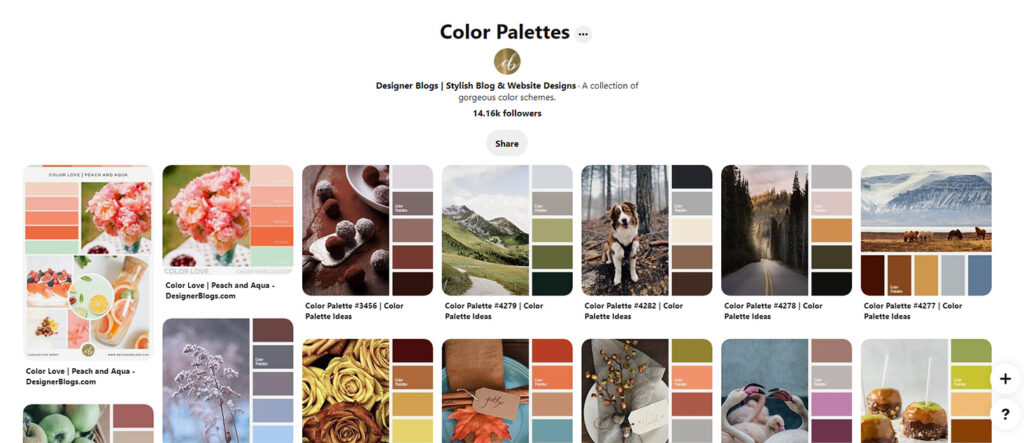
Pinterest is one of the most amazing tools available for finding inspiration. We’ve created a color palette board on our profile that is packed with gorgeous color palette inspiration.

If you don’t find anything that interests you there, search for other color palettes using the search bar. Create a board for this and start pinning any color palette or photo that appeals to you. After you’ve compiled about 20-30 pins, you’ll most likely start seeing a pattern in the colors you are drawn to. This should help you narrow down your colors to a palette best suited for your blog.

Color Palettes Pinterest Board

#2 Find an image that interests you

This does not have to be an image you’re planning on using on your blog. Still, it should be an image you find visually pleasing or, if you’re designing for a client, that somehow adheres to any brand colors or their imagery guidelines. Keep in mind how it makes you feel, as the colors in this image can subconsciously inform tone and mood.

Let’s say that this is an image of your choice:

Once you have an image, pull one or two of the dominant colors. If you like what you see, add other colors into the mix as accent colors.


#3 Use an online color palette generator

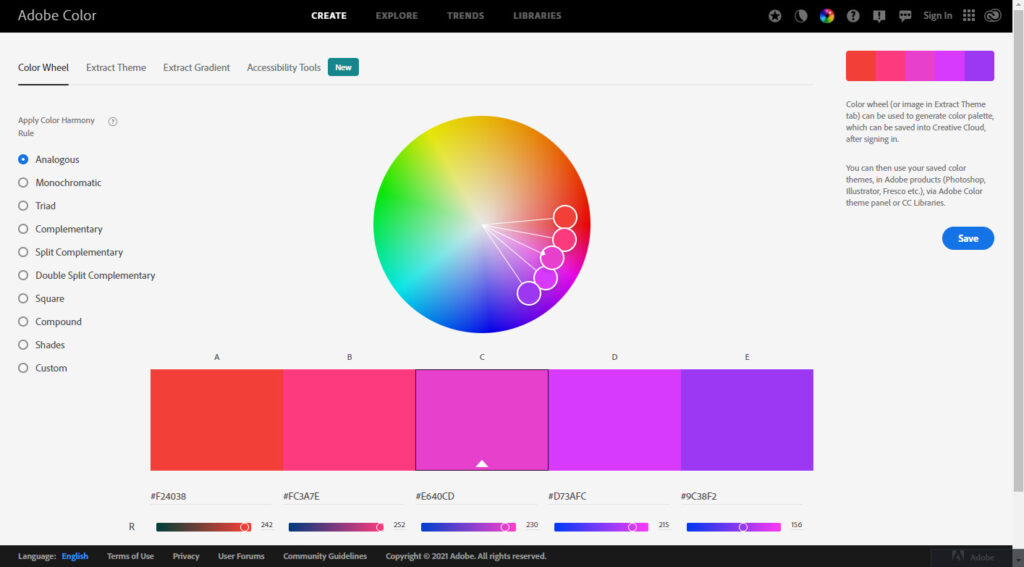
If you need a little more guidance right off the bat, use an online color palette generator. Let the math do the work for you! This site can help you see a visual representation of your color palette and quickly translate the color values you see for online use.

Adobe Color

The most popular online color palette generator is Adobe Color. Users can create custom color palettes that are downloadable and rated by others in the community.

How to use Adobe Color for finidning Perfect Color Scheme for your Blog

Creating a color palette from your image

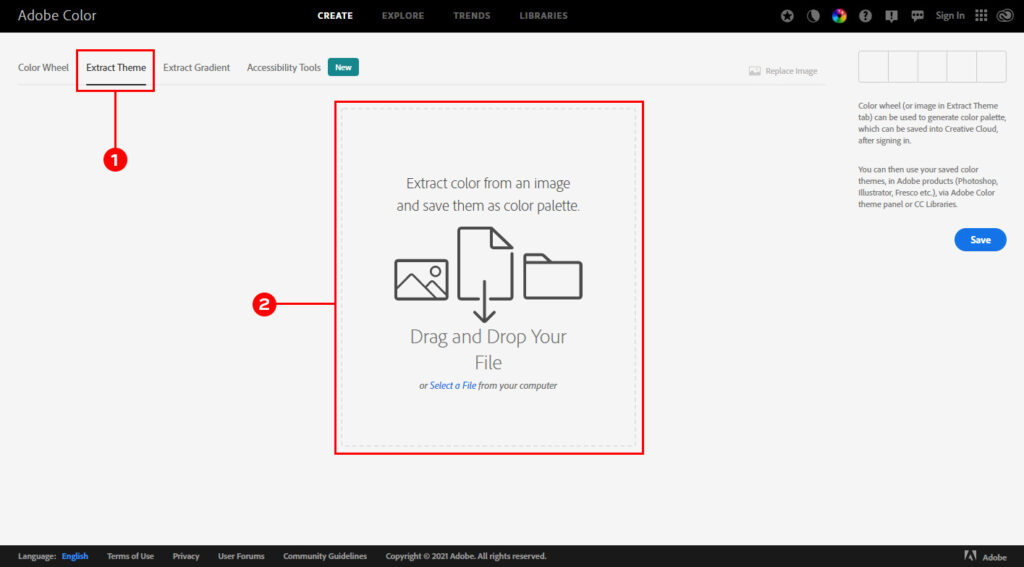
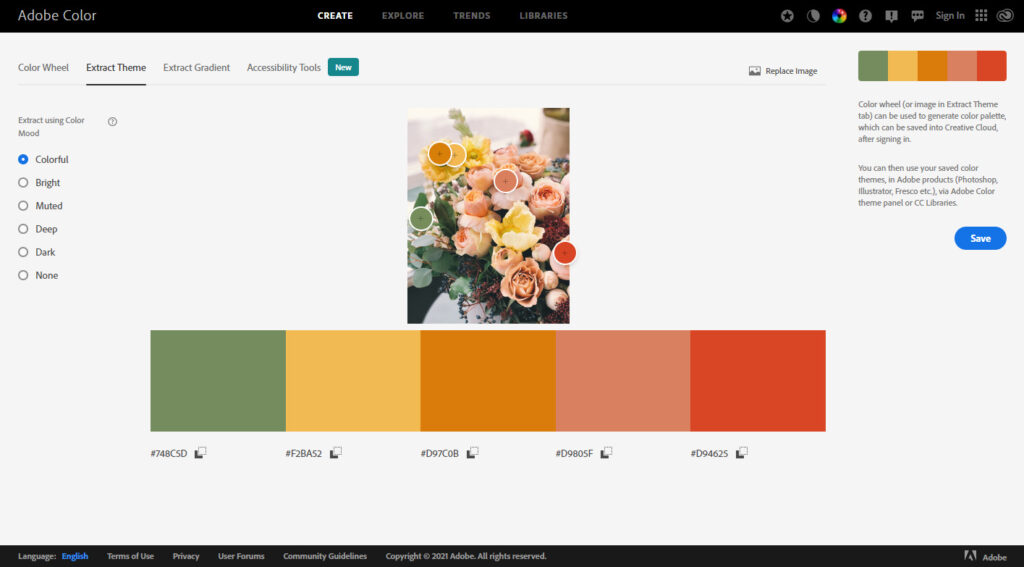
You can create a palette by picking a color on your own or make the Adobe Color create one for you based on the image you already have. To do so, click on the Extract Theme tab at the Adobe Color page’s top and upload an image from your computer.

Here are the results for the image we have chosen in #2.

Remember not to focus on only your favorite colors but rather to use them as a starting place to expand. You might begin, for instance, with blue and then add a neutral color or two. Then you could try adding non-typical colors to help give a well-rounded variety of values.


#4 Look at blogs or websites in your same niche

Finding a sampling of websites with similar topics can reveal a common thread in the colors used to represent them. For example, you may find that cooking blogs use more neutral colors for the design since they have quite colorful posts. Knowing that these colors are inspired by food and have also been successful when used on other recipe sites can help validate and determine a good starting point for your color scheme.

However, you should remember that sometimes using color completely different from the other blogs from your niche may give you a more unique and recognizable look.


Take-Away

Finding the perfect color scheme for your blog can seem like an intimidating prospect at first. However, it’s not so hard with these four methods. In fact, the process of searching for your color can inspire even the written tone and voice for your blog, as well as your content.

So dig in, have fun, and make those colors pop!

Make sure to check our collection of gorgeous color palette’s