What a year. I won’t get into the let’s review 2024 because that is a post in January 2025, and what a gem that will be.
Instead, this is the end of the year, Awards for 2024 – Top 10.
You can’t get any better than that.
Razor’s slim margins between the top three learning systems, plus a historical three-way tie for #5 and multiple ties at the 7,9 and 10 rankings, add to how far the industry has come with the elite level of systems.
Each one is special in their way.
Systems that were the best of Enterprise and Large Enterprise are here.
Systems that were in the top two for customer training? Here.
Best learning system for skills? Here.
Best learning system the coolest mascot? Here.
A vendor can refer to themselves as “whatever works for them” angle.
It’s an employee development platform (the vendor refers to itself as that), but I see it more as a talent development platform.
The grouping includes multiple LMS vendors, a learning platform, a skills-based platform, and a sales training enablement platform.
When possible, I added screenshots.
Some of the vendor’s analyses will be shorter than the others.
This is just based on what I want to highlight as wins.
Will there be any cons? I prefer ‘needs improvement.’
If the system is on my platform, FindAnLMS, it will be noted as FAL.
I want to make it very clear that being on FAL or not was a zero-factor in the decision-making process.
While the goal is to have the best learning systems in the world, we are aware that not everyone is on there. Nevertheless, we continue to work towards that objective I set forth when launching the platform years ago.
Other acronyms you will see
- IO – This means the system focuses only on employees – think internal audience. You can have retail locations, but the audience is still your employees. The industry sees L&D and HR as internal.
- CS—The system is focused only on customer training, aka customer education, client/partner training, B2B, and associations. The term in the industry is ‘external’.
- Combo—This is the most common type of system in the industry. It focuses on internal (L&D, employees) and external (Training, and what I wrote up there around CS) aspects. The system always skews one way (internal) or the other (external). And yes, it is common to have a combo system that offers multi-tenant—aka parent-child.
I did not place in verticals (because vendors always say we either do all these verticals or they pick and choose, but if a MONSTERXTW company with 500,000 users that isn’t in their vertical comes knocking at the door, my money is on them taking MonsterX).
If the system is heavy on compliance, then that is horizontal, and it goes across industries. If a system focuses solely on FS and has functionality designed specifically for FS and nobody else, that is different.
None are in the top 10, so it isn’t at play here.
AI did not play a role here, because only some have it. Did I see it as a plus for 2024? Sure.
And I will mention it when I see big wins with it – tied to those vendors.
There is a great system in the top 10 that doesn’t have it yet but will in 2025.
I still think the system is fantastic.
Knowing what I know for 25, with AI for them, impresses me.
It did not factor into the decision – i.e.24 vs. 25.
The analysis is based on 650 systems around the world.
One other info before diving into the rankings, which as to do with AI. Regardless of the rankings here, more of an FYI, because so many people read this post.
I want to make this very clear – even if the AI LLM is trained with your own data or the vendor’s own data, and it has only your content in the system – it may still produce fake or false information. I cannot stress this enough. There are a couple of issues with AI today – every LLM regardless of commercial or not, built from scratch by the vendor themselves, the company added guardrails, RAG and so forth – it doesn’t matter. It is a flaw of AI.
Secondly, there is no perfect LLM. Each has strengths and weaknesses. Hence the value of multiple LLMs. If a vendor says they are LLM agnostic – it is a load of baloney. I could go on, with the issues they are finding, and what I hear vendors say, which seriously, it makes me wonder who is feeding them this garbage (when it comes to some claims they make).
Top 10 Learning Systems 2024

#10. Skillable (Combo – albeit mor likely to be employees)
I didn’t know what to expect with Skillable. What is it, I thought to myself? Is it the same ol same, that I’ve seen with other technical skills focused systems?
It is to me, a system that scream “We are here, get ready to push the go button.” The capabilities I believe have to be seen. Words, which yeah, I’ll present shortly, doesn’t give the system true justice. In our industry, it’s all about “show me, tell me, and let me rock to it.”


Big Wins
I believe that not everyone can just jump into a lab, and figure it out, nor do I believe on the admin or whomever is creating the lab/content can figure it out too.
We are talking about training people or L&D, despite the presumption that IT is going to do it (G-D forbid).
- Skillable Studio—This is, for all purposes, an authoring tool for creating labs. However,was that it went multiple steps forward. For example, it taps into AI for automatic scoring—an approach that can help.
When using Studio, you can view analytics tied to it
- Interactive instructions editor
- Lab config and cost controls – Winner!!
- Extensive pre-made lab templates – Winner!!
Templates include a variety of SaaS offerings and VM.
In the templates are tools to support training, plus customizable instructional offerings to develop guided lab experiences.
Let’s return to my initial statement – Show me – Studio does that. Tell me – Ditto. Let me do it – ditto.
Other pluses
- The analytics are quite robust – lots of data for those who want it
- Gamification option – for labs
- Skills you have – and equally what skills you will need – obvious you would think – and yes they exist in learning systems with skills, but labs?
- Tailored labs – this doesn’t have to be one-size fits all – people learn differently and therefore why would anyone think a sim should be different?
Cons
- The UI/UX while nice – I think needs some tweaking
If you want to take and beat Pluralsight, the king in this space you need to do more. Yes, Skillable has hired some execs from Pluralsight, but that doesn’t just automatically mean, well anything. Plenty of companies in our industry and outside of it, have experienced the hire from competitors, top execs, and it isn’t a home run.
- Bringing in content from a 3rd party – and therefore it’s entire whatever content and design approach – with providers such as Degreed
I understand that a company doesn’t want to be a content library – totally get it. But if your key differential – i.e. your unique value proposition is pre-designed labs – IMO, that is content – with an interactive angle.
Secondly, there is nothing to say, that Degreed or whomever won’t look at this, and go, “Hey, we can do some of this ourselves, and angle it in this way.” It’s a risk – and there have been cases – especially one that is so HOLY COW – where it has happened.
#10 BizLMS with Biz Skills (FAL) (Internal)
I am a huge fan of BizSkills. From the moment it launched I saw a big-time winner.
The pre-skill mapping to content was to me, genius. Why other vendors didn’t do this, which they could even with 3rd party content that is from another provider; baffles me.
It is a huge pain point with a lot of folks who have to do it themselves.
Plus, BizSkills will work with you, if you want to add a skill or multiple skills, to content – whatever it might be, or change. Biz also has the capability to tap it into job roles too.
The UI/UX works. It’s fresh, visual and gets a learner’s attention to use it.
I’m never a fan of UI that is as though I am in a museum or the morgue. Bleech.
BizLMS
Super refresh with the LMS, and I love it. The custom dashboard on the admin side, is sweet and easy to use.
I’ve seen custom dashboards before on many systems, and wait for it, I’ve seen custom dashboards that are so difficult to use, you are thinking, uh, how do I do this? Worse, the UI/UX is just downright awful.
With the I’ve seen custom dashboards before, they are not easy to use. With BizLMS (and yes, screenshot below) – take a look at how easy this is to use. Anyone whether they have a L&D or Training or none at all – which is expanding in the industry, could figure this out.

Look at it. Not the assignment status – but the initial top
- Create Learner – Anyone can see this and go, okay, click
- Create Learning Initiative
- Create Featured Playlist
And it goes on.
When you look at some of the data, what I love is what I don’t see.
I never understood why vendors show the number of licenses on the main dashboard page.
Who cares.
Nor views. You are not a search engine.
Views do not tell your learning story.
It tells me someone clicked into the content, may have looked at it, and left.
Great.
Very informative.
I just clicked “Bob’s Way to Make Vegan Hamburgers.”
I spent two seconds in there.
It’s a view.
BizLMS’s data gives me an idea of my learning story.
From there, I, as head of L&D or Training in this case, can extrapolate and, uh, I don’t know, as an expert figure out what it means and how to tap into it.
BizLMS now has AI.
While they use machine learning—and yes, it is a form of AI—they utilize it in a way that makes total sense
Big Wins
- Revamped UI/UX – It scream let me use this, it is very visual and colorful (if the client wants it that way, and honestly, you should)
- AI taps into a holistic approach to learning. A lot of systems claim it, but many fail at it.
- A video player with translated closed captioning in 11 languages and the ability to change the text into your language in handouts and materials. Again, many systems do this – but it is often cumbersome. BizLMS’s isn’t.
Learner Onboard workflow is another slick look. Easy and straightforward with the following options:
a. I’m here for exploration
b. I like to learn really fast
c. Remember, people will retain and understand more when they select topics of interest.
There is plenty of data out there showing that the #1 reason people leave a company is the lack of personal and professional development.
You want someone to go into the system over and over again, to learn something useful or beneficial to them (which should be your objective) —interests will do it.

Clever.
I won’t bounce into BizSkills, because you just have to go into the system to experience it, and see why it really is of use for onboarding. Here is just a quick look:


Lastly, you may think this system with everything it has would be expensive. Nope. It is very affordable, and that includes the content if you wish to have it (it may or may not be an additional cost).
BizLibrary, verifies that you don’t have to drop a lot of $$$ to get a robust system.
I love that.
#9 Hive Perform by Hive Learning (Combo, internal and external)
Sales Teams. Skills. Sales Training. AI. Modular Learning. Sales Enablement Capabilities.
Hello.
Perform goes beyond the common and oh-so-boring SEPs that are out there in the market.
The others I have seen, including some big names with lots of capital raised, are ideal for sales enablement; however, they are not when it comes to learning because it isn’t their forte.
With, Hive it is.
I love that you get the power pack of sales learning developed by learning experts with a nice feature set of sales capabilities.
The latter includes real-world scenarios via sales coaching intertwined with AI.
Pipeline management is there.
Tracks skill gaps and recommends tailored practice modules.
Extensive analytics around sales performance in combination with sales training.
Perform offers the ability to target specific strategies to improve sales reps’ performance and deal outcomes.
The system comes with a training repository so that content always stays updated.


There is a lot to digest here. The system uses AI – called Sidekick. The positive is that it offers the ability using the thumbs up, down pieces to enable someone to say, if they pick thumbs down – this is incorrect.
The downer is that Perform does not mention anywhere that AI may produce fake or false information.
It is rare even today, that vendors with AI mention this.
#8 Learnster (Combo) (FAL)
If you are seeking a system that is driven and heavily leveraging AI, here you go. I named them the #1 Learning System for AI in 2024.
They believe that AI when used properly should be around learner engagement and organizational reach.
Not just productivity.
Big Wins
- You want AI – here you go. Yes, we are still in baby stage with AI – nevertheless they lead the industry
- Learning Companion – The compaion is all about informal learning, whereas a learner using AI can choose text, quizzes, learning casts and other formats that suit they way they learn. This includes thereafter learning paths for that specific learner – HUGE
- The ability to select a variety of synthetic voices for your personal agent, including specific accents. You want an agent to have a british accent? You can.
- Remixes – The coolest capability I have seen -period. A learner using their space, can select variety of pieces of content including say podcasts (coming in 2025) – but I mention it here, only due to how this works – and remix them in a different journey. Thus maybe organizational content, 3rd party courses, PDFs, audio files and remix. Love it.
- When using AI – you choose your companion mode – Scholar, Coach, Expert – Again, the system is all about learners first – which it should be. And individuality – rather than the assumption let’s push out content and quizzes for everyone – assuming everyone learns the same way.
- Compliance capabilities – Data visualization and the key information you need to know


Needs Improvement – or Tweaks
- The home page – Common look I see nowadays with the content in a format like NetFlix. Today, the industry overwhemingly is following this approach. Let’s move on. Give me something fresh and noveau.
- Better metrics – the internal is solid, customer training? Not so much. Plus, on the metrics side as a whole, insure it tells me my learning story. I want to make clear – that 90% of the systems in the industry fail and the metrics should tell me my learning story.
#7 (tie) 360Learning (Combo, but skews internal)
Pleae note – that every vendor in the top 10 had the option to provide screenshots. 360Learning offered me the opportunity to take some screenshots from a demo I saw, just in the past few weeks. However, they asked me to show them the screenshots I snapped ahead of time.
After pondering this, I declined to do so. Therefore there are no screenshots here. I am just not a fan of a venodr verifying whether the image is acceptable or not. I surmise that after 360 reads this, they will provide the screens I want, without delay.
When this occurs, this post will be updated.
Now back to the analysis.
360Learning does have AI, and they as so many – the majority I want to remind you – lack the text of fake or false information and review before accepting it.
I honestly can count on two hands the number of times, I have seen a vendor actually post it – not just on the admin side, content creator piece, anything that uses AI, but also the learner side.
Anyway, that is that is a minus of AI with 360Learning. Since they push the narrative around AI.
There are though plenty of pluses.
Big Wins
I like that they follow the structure of the TOC, using the term chapters which is appropiate for WBT. One the cool aspects is that under each chatper or page you are viewing, they give you the option to select either a thumbs up – I liked it, Smiley face – I learned something, another icon – this is outdated, or another icon – I have a question.
From content creator standpoint, they have the best one in the industry -= in their system. It’s AI is solid here.
On the content side, it is all about collaborators – and actually in the system itself, they have a lot of power in terms of what they can do. You as the admin decide who is a collaborator, but once you do, you better have selected the right folks.
The overall UI/UX is solid. But this system, while it offers a lot of wham, and yeah across the platform, does have a few warts.
Need tweaks:
- The metrics for activities include “views” – you already know my feeling there
- The system notes SCORM which you can click to upload a SCORM course. Ok. What if fails to note though is that the system also takes SCORM 1.2, SCORM 2004 3rd edition, and until you click SCORM- xAPI. Ask yourself this – how would I know that ahead of time? Exactly.
- The whole collaborators aspect – even after explaining how it worked and showing me, I had missgivings. I didn’;t list everything they can do or drive in the system – but it doesn’t make me feel all warm and fuzzy, Plus with that level of what they can do in the visible side – learnre side, there is zero metrics to identify their level of success or failure. To me, that would be relevant
- No e-commerce, even though they play on the customer training side. It’s on their map for next year. It should have been in the system, already.
#7 (tie) CYPHER Learning (Combo) (FAL)
Hello my dear friend. You have some wonderful approaches to learning, and strong AI – number two in the industry, plus you have the fake or false information, always review before accepting – everywhere in the system – learner side, admin side, creating content.
Yet, the content creator changed in just less than a year.
Initially it was designed in such a way that a person with Intermidate skills around ID could tap it. I mean this was close to Storyline.
Next, you added the push out quick content creator – the most popular – okay everyone is going this way.
Finally, you offered some of the capabilites of the advanced – but we are talking about synthetics audio, and so forth with the quick push out.
Yes, you can edit it, and add some items, but this is designed for someone with zero skills sets – again the industry goes this way with AI (even the angle for the most part of saying you do not have to use it, as though nobody will – a fallacy I believe).
That said, the term “teaching” has to go. Who in the corporate space or association market says that? I’m sure nobody has every said anything to you, about the term. My guess? They don’t know.
You are the expert – not them. EdTech isn’t corporate. Not now, not ever.
I like the AI learning agent initial style. However, it is a bit conusing and efinitley not user friendly.
The metrics in the system need an improvement and for someone who places warnings throughout the system around AI, you have ignored it with AI cross-check.


#6 Eurekos (External, including Associations) (FAL)
#2 Learning System for Customer Training.
Ignore SkillJar, and others that claim they drive first with Customer Training.
Yes, they are more well-known, but being stronger in marketing and exposure, means zip.
The metrics options – yowsa there are a lot to choose from – and they are all about customer training.
What a concept – that I’d argue 98% of custoer training focused systems ignore.
While Eurekos is one of the vendors to hold off with AI, and I fully understand why, they bring a lot to the table without using it.
For those worreied about that, don’t fret it is coming in 25.
The learner side punches thorugh with lots of options.
Ditto on the admin side.
Wins:
- Tax management
- Incentives – Huge fan of tapping gamification into a reward store – where learners can actually get well rewarded. Adults love that.
- Analytics that tell me my learning story
- Unlimited multi-tenants (i.e. parent-child – children – also known as extended enterprise
- Never a fee for you wanting/using customer training – multi-tenant (aka extended enterprise)
- Robust system at a very affordable price point
The system has come a long way. Their support and training of clients is first rate.
The best way to show off the system, is take a quick look.
And remember this is all about customer training, not compliance driven nor L&D internal only.


A two-way tie – LearnUpon and D2L for Business
#5 LearnUpon (FAL) (Combo including associations)
#5 D2L for Business (Combo including associations, entering L&D segment)
In no particular i.e. order, like why is X ahead of Y? Because I just wrote it that way.
Very streamlined system.
The administration side while having a very modern look. I like that you can add esignature, and it is very visible in the elements – options right on the main screen.
AI right now exists in the question/assessment tool. You can take content or bits of content, text from a course description, even from the code script.
You (not the AI) chooses the number of questions, you want, the type and then the AI generates
I am curious on whether it is doable with items from your external training, because a interesting option/section on the learner page is “External Training” right next to the learning journeys, and learning paths options.
I really can’t recall seeing that as a visible option, in the home screen, with the others front and center.
Sure, I’ve seen calendars, and listing of live events, but this isn’t internal live events, this is external – not associated with the company.
LearnUpon’s newest offering is Learn Anywhere.
There are pluses here, but at the same time, a bit of concern – because you have to remember who is behind the screen – and not it is not the Wiz. (i.e. Wizard of Oz)
It could be someone who has no idea what embed code – and that is worriesome.
Anywhere achieves this as an integratl part – which is to say you can put a course, content anywhere – from another platform to your web site, to wherever. It is a partial Content Delivery System (CDS).
Which opens up possibilities of saying “Okay, I want to embed some content, into my Instagram feed or in Salesforce or HubSpot.”
The system – LearnUpon tracks everything from learner clicks, progress, completions and even exam results – because yep, you can place assessments or PDFs, or this or that into anywhere.
Learner Home Page, Admin page


#5 D2L Brightspace (Combo) (FAL)
What can you say, that hasn’t been said already?
I really like this system.
I believe it is underrated, perceived as only an EdTech (K-12, Higher Ed), and lacks what others have in the industry, a result of the factors listed above, and a few other items.
Let’s go to reality
- It has an extensive set of metrics and data that can be extracted from it. It tells your learning story
- Functionality wise, it matches the well-known players in the market that people perceive as leaders in the various segments
- It is way better, than Crowd Wisdom, the leader for reasons I still cant figure out beyond tit is tied to an assocation management platform – which FWIW D2L can tap integrate with too – plus any other association mangement platforms too (I should note that D2L has a system for associations, which I love as well)
- D2L is the #1 learning system for the association market, three yers running
- They play strongly in the customer training market, with wait for it – unlimited multi-tenant (parent-child, i.e. unlimited children). You know how many vendors do this? I can tell you, not many. In fact, on my top 10, three – including D2L. You may think well that is a lot – but seriously beyond those three, not an extensive list does. Minute is the wright word.
- Content Creator+ – Lots of options to deliver content – one factor on its power is the acquisition of H5P – which does offer yes, flexibility to those who want – well, have some ID skill sets.
- Workforce development components that are easy to use and figure out – I kid you not, there are a lot of vendors whose WD options – and ease of use are two terms that should not be put together as one.
- Ease of use – on learner and admin side – huge for admin side – learner is good too, but admin is big.
AI
For an additional fee, you can get Luma. What is Luma you ask?
A series of AI learning tools.
Generate questions, answer questions, create content and reduce workflow.
I liked it. I think it opens up a lot of possibilities, and look foward to what it can do in 2025.
That said, I wish it was included at no additional cost.
D2L Home Page, Content Creator+ (second screen)


#4 Thought Industries (Combo, heavily skews customer training) (FAL)
Two-time system of the year. Drops to #4 this year. Why?
First, I really dig this system.
The UI/UX on the learner side is #1 for 2024, and their onboarding of clients is #1 for 2024.
However, they lack some data/metrics that I expect for a top-tier system when your core is customer training (they note it as customer education).
Plus, I’m not fully sold on the entrance into L&D – simply because while they have skills, additional functionality to leverage strongly into that audience is well – an expansion.
This is the #1 system for customer training for 2024. It was #1 in 2023, and #1 in 2022.
That tells me, or should tell you, where the power is here.
Anyway, a couple of concerns – whereas some folks would be “big deal,” and others, well that is your aspect.
I should mention that #3 skews towards L&D, on the flip compared to their higher segment of customer training. Thus, it isn’t a one-off.
The system continues to charge a fee for Panoramas, which look, is outstanding, but it is my feeling, it should be included as part of the system. Again, the additional cost of multi-tenants (aka extended enterprise) is common, but why be common.
Let’s jump to wins
- #1 for customer training, #1 for onboarding (clients) and their onboarding aspect with identifying and training two additional folks who are not in the training side, is brilliant. If the admin or head of training wins the lotto, who is going to jump in and handle it? Not Barney in HRIS – unless Rubble is their last name.
- They have the data on the back-end for customer training – a lot of data and reports. AWESOME.
- Executive Summary which shows you a quick snapshot of your site, learner, and financial performance – Right to the point data that you will need.
- Their learner side’s functionality is strong and ease of use, exists
- Very robust system that still understands who is overseeing the system, including who is running training or whatever their title is. Customer training overwhelmingly is about making money and having the metrics that identify what is working. That is huge.
- Early adopters of AI – and they are very aware of the pitfalls, and recognizing that we still have a long way to go
- An admin “zone” whereas everything you need for a variety of tasks associated with customer training, and yes L&D – internal is available. You do not need to look for these options, as many systems require you to do so – and I am referencing specifically for VLT and ILT.
- Dedicated project manager and implementation consultant – LOVE it.
Add-ons you will need
I recommend the purchase of the following add-ons to totally tap into the system. Essential IMO.
- Advanced Enhacement
- Panorama
- E-Commerece – I wish this was included as part of the system, without you having to pay extra for it – very robust with everything will need, without having to go all over the place to find 3rd party pieces
- Advanced integration – BI-Connector – should be an extra cost, along with other integrations – very common in the space to charge; there are some items in there that should be included. IMO
Dashboard that the Learner can see (first screen) – I like this, Second Screen – Executive Summary

 Executive Summary
Top Three

Pronounced (Doh-Che-Bo). Think Italian, because that is where their corporate HQ used to be and where the story of Docebo began.
Wonderful system, overall.
Let’s just jump into wins and need enhancements or tweaks
- Win – #1 Large Enterprise System 2024
- Win – First system to dump the “content catalog where the publisher who created it is visible” – nobody cares – so Docebo went by category minus the names – smart – they did this in 2023, and have improved it in 2024
- Win – Skills contineus to improve, new options, new capabilities
- Win – Another vendor who added AI
- Win – Insights – that goes beyond the out of the box nothingness I see way too many times. Insights tells the learning metrics of your system – however does it go full learning story? Not yet, unless you purchase the analytics advanced add-on. That said, you are going to go “oh yeah” and thank the Gods for it.
- Win -Admin side increased ease of use, learner side ditto
AI capabilities that went beyond
Automation of the tasks so many folks run into and find it takes so long
- Enrollments
- Translations (seen in other systems, but still their version stands out)
- Content tagging
- Automation of Skills tagging
- Insights
They offer for an additional fee, AI authoring, which is a content creator, that includes the use of AI for revisions and rewrite to name just two, plus the creation of activities – which is a bit different and offers additional potential down the road.
After listening to my ongoing irritation with their pricing structure, they have now gone tiers – and visible no less for anyone to take a look at.
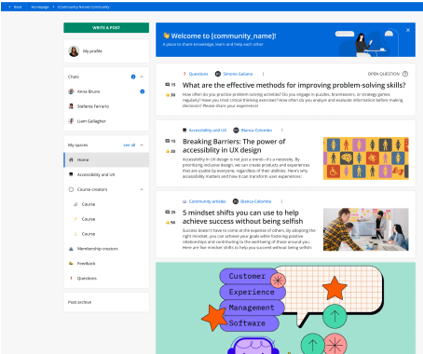
I love the new communities that is in the system. However, to get it (as an optional), you need to purchase Elevate (Docebo has multiple pricing tiers – one of them being Elevate. Another is Enterprise, and the lower priced tier than Elevate, I can’t recall – but it is on their web site).
Each tier has additional capabilities within it. Elevate has a few more capabilities than the one below – again, you can read on their pricing to see what the tiers are, and thus the name of the one below Elevate.
Elevate Pricing Tier (And the one I note, as the pricing tier that I would buy, of course you can do Enterprise too, but Elevate should suffice for most folks)
There is a lot here to get when you buy the system. I won’t regurgitate it.
That said, there are way too many a’la carte (add-ons) for the Elevate tier.
This gets back to the whole do you want to lead or be like others aspect?
The items I dislike being add-ons in the Elevate package are:
- E-commerce – you need it for customer training or any training you want to charge a fee for, even offer it for a freebie. Worse, you pay yearly for this privilege. If you are buying the system for customer training – give it to this use case for free. Simple.
- Communities – This is a huge winner – why do I or want to pay extra for it?
- Extended Enterprise – a legacy term, since the key monsters in the space, use the terms of either customer training or customer education. Anyway, it is yearly fee, and they charge I believe buy the number you want (on top of that). If my use case is customer training, and I have five children – give it to me free. Ditto on if I have 25 children. There is a reason why – but this isn’t the time for it.
- Salesforce – nowadays this is quite common in the industry to integrate and use your content blah blah. I know of vendors who jumped into this before 2015. Ditto on the Microsoft Teams angle too.
The other add-ons make total sense. I am still not a believer that AR/VR is going to take off in the amazing word of immersive learning simply because if I can view it on a mobile device without a headset, that isn’t really VR learning. To do that you need a headset. AR? Sure. But VR is far better. Plus the future ix XR.
Docebo isn’t the ony vendor plunging full steam ahead with AR or VR as an option to have with their leraning system. Cornerstone our #2 offers the same thing.
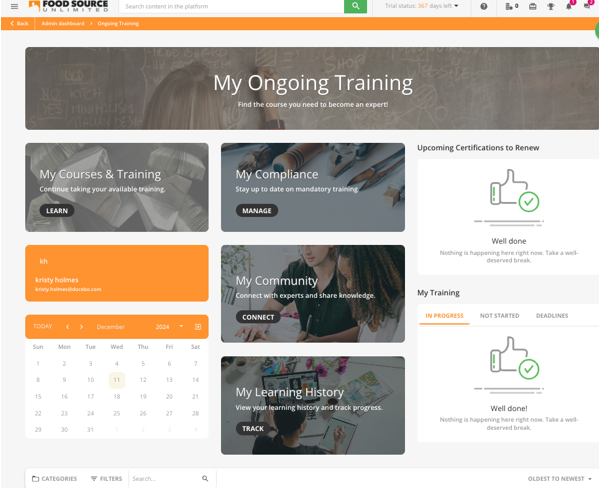
Docebo home page, Communities
#2 Cornerstone OnDemand LMS (Combo, skews employees) (FAL)
C-O-N-E-R-S-T-O-N-E (whew, repeat three times, – like a choo-choo steam engine, whoosh). Why you ask? Well it’s more fun that way.
And oh how fun we are having, unless you are not Cornerstone LMS, or you think they are some ‘traditional’ or ‘legacy’ system that is incapable of new functionality, unique value propositions or you have been told that hey they are too old to do anything that is on the edge like us.
I’m unusure what that means, unless the ‘edge’ is a cliff, then yes, I have heard of such a term.
For sakes of me writing their full name out each time, I will just reference the system as Cornerstone LMS and make it a lot easier.
While I am not sold on the whole VR/AR experience angle (as noted in the previous vendor) because you can do ‘VR’ on a mobile device, sans headset (ditto as previous vendor), and as noted above, that is not truly VR, nor the idea that with budget cuts, and layoffs – I meant reduction – unless you have lots of cash flow to give to your L&D or Training department, then sure by all those headsets.
The rest of us?
Okay off the mountain top and onto the ‘edge’. Look I made a funny.
There is nothing funny about the latest version of the LMS.
It is intuitive on the learner side. It is in the top five for AI. It is still the leader for skill management (as they were in 2023).
They have a very strong mobile app – with solid functionality. They continue to add – okay -ongoing resources into development of the system – not just once a quarter – but on-going.
That doesn’t sound like a ‘legacy’ or slowly creeping along system.
Wins
- #1 Skills Management 2024 (yeah I mentioned it above, but folks can easily skip and go right to this section
- #1 Compliance Management 2024
- Top five for AI, 2024 – They have AI folks who understand the essentials for learning/training – that’s important
- UI/UX on the learner side – the best it has ever been – and I know, because I have seen this system, every year it has been around
- Vast improvement for data visualization – You see nice dashboards
- Assigments design – yeah when you are focused heavily around L&D – onboarding employees too, this is relevant
- Mobile app – it is good, capable for on-the-go learning with on/off synch
- HUGE WIN ALERT – HUGE WIN ALERT – A DAP (Digitial Adoption Platform) built into the LMS and included at no charge.
A DAP for those unaware is a platform that provides a ‘how to do it, show me, let me do it,” approach which everyone I ever met in L&D and Training loves – uh the folks behind, and even learners – ‘Show, Tell, Let me do it.”
I’d argue not only for technical training, but also for business, customer service and well, any type.
That is a DAP.
You can be standalone’s that say they can do way more, but at the end of the day, its core is what I mentioned, and it is all you need, or I’d say your learners need.
Plus, I’m not just zeroing in on the learner, equal the admin.
Here is how the admin taps into it.
- I need to know how to do this – because nobody trained me, I can’t remember, I was handed this ‘THING’ and need to figure it how to upload something called courses or add ‘learners’ to it. A DAP says okay type in either a word or a series of words and it will go to the specific area on how to learn that. Then it shows you step-by-step. A good one, goes further – ‘let’s do it together’. Finally, you can do it – okay, learn how to do it, with doing the steps again, or going back to learn a specific step.
Trust me, it will save you a lot of time. And you do not have to go to some HELP section (which nobody does) or look at videos (which are boring, and whoa is that my pen?).
Nor contact the vendor’s support and ask them how to do it – because well, let’s just say some vendors’ support is lackluster.
A DAP takes that – away. Which is why you see DAPs being sold as standalone to whatever “tech” training you need.
2. The Learner side – This is where a DAP can really help. Follows the same approach as above.
Where it leverages the system though – is it saves the ADMIN a lot of headaches, because learners are known to say, “my system doesn’t work,” “I can’t access blah blah, because this is junk,” “I can’t find my catalog, so there must be something wrong with the system.”
Then assuming they don’t just say forget it (using other lingo), they contact the Admin and tell them all those problems.
An admin who has been trained to do their own Q/A; well first see if they can replicate the issue, and then and only then if they can’t find the problem (not the nav thing, that screams learner and not the system has a bug in it, or is actually junk), they – the admin- contacts the vendor’s support.
99% of all issues learners contact an Admin on, are human error – i.e. the learner hasn’t been trained on it, or is unaware and thus, not an Admin needing to contact vendor support.
The vendor wants to avoid the calls, because it costs them money, and you can see where this goes.
Hence the DAP – with the learner using it too.
- Skills mapping with AI
- Mentoring – with the usual deliciousness of the learner being matched with the mentor, based on whatever variables (options the mentoree) selects.
Selection of the mentor(s) they want, because I may need a mentor for this and need one for this or that.
Mentoring is not the same thing as coaching. Any vendor who says it is or believes the word is interchangeable as baloney is to salami, needs to try both and then ascertain if that is a correct statement.
For those folks who are selected by the company to acquire skills on being a good listener, hires a coach or nowadays has you either going to a ‘coaching session’ or workshop or you are talking to an AI coach.
Do you want to know what is going to really take off in 2025 with systems tied within an LMS or LXP or learning platform OR vendor’s who will launch their own – on top of what exists today?
MENTORING
Anyway it comes with the system, and Cornerstone recognizes the importance of it.
- Course Content player with AI in it – yes, others have it too, I get that, still a plus
- Admin side has vastly improved UI/UX wise – including the reporting piece and the metrics that appear.
Can you tell what your learning story is? Yes. It offers those metrics, right out the gate.
Cornerstone has a data connection to hundreds of systems, including the ability to connect with another learning system, not just HR.
Yes, there are other vendors who can do this, but not all of them, can go ‘if then, go do this.” Think Zapier, but without the disconnects you can experience with offerings such as Zapier.
Improvements needed
- The visualization of data has the same issue as the majority of systems in the market – out of the box – overall – looks like Excel 2000. I can get the same pie charts too. It should appear like modern you know. Yes, good data is presented, but you can’t get by or shouldn’t get by seeing of such, when in other places, you see a different appearance of data – even on the same screen. Again, Cornerstone are not the only ones in this approach. But if you want to lead…..
- The reporting can be streamlined. The two biggest complaints, I hear about Cornerstone is that the admin side is hard to figure out (that has been fixed), and the reporting is challenging to get understand and get the info. As in cumbersome.
It has improved. I think it can go a step further. That’s all.
Compliance insight, Data dashboard


#1 Learn Amp (FAL) (Employees)
Learn Amp identifies themselves as an employee development platform. Which slides under the learning system moniker – first because it is a learning platform, and second, it goes back to it being a learning platform whereas employees are the only focus.
I know there will be vendors who say, “mine does too,” okay then, why do you also accept customer training? You can be both, accept employees, customers and then yur skystem towards one segment.
Thats fine.
Learn Amp says “No. We see ourselves only for employees – that’s it.”
I could easily see them saying, “All aboard, the employee cruise ship to wonderment, where learning is free (for your employees), design is special – just watch out for icebergs (other systems who promise but fail), and engagement to what is needed and requested for you, is delivered on time (except your postal – HA).
#1 for Enterprise
- #1 for Onboarding Employees
- Top 10 for AI
- Wonderful UI/UX – Learner, Admin and Manager
- The important essentals you need as a manager – everything you think is relevant, well, for many companies, it may not be – Learn Amp has figured it out – what is important for what you need
- Easy use, figure out and extract your learning story
- Ability to leverage tagging tied around skills with AI
- AI recommendations include content, expert
- AI skills taonomy – I love that you cn create a taxnomoy quikcly. That is big.
- Opportunities
- More than 50 canned reports (I counted them, and since they continue to add ongoingly) out of the box with relevant data to enable you to really get a solid grasp of your learners and thus learning
- Create custom reports (I know folks will go, “we can too) with a built-in BI tool (as in built into the system already), thus why buy a BI solution for your learning, and use a BI tool that is create for BI data, but trying to mush that into learning is a headache – and reading that info it is a migraine.
However, since there are many companies that have already purchased their own BI tool or data lake, and want to use it for learning
- You can – with over 100 data points combining your data with Learn Amp’s data – The “already you have a BI or data lake,” and get that info is an additional fee (other systems charge for a BI connector – as well, but how many data points they offer varies)
- Outstanding support and service – I again, are aware lots – okay every vendor out there on the planet says they have outstanding support and service – but trust me, they really have it, and back it up, day by day.
I am a believer that for folks who want performance management – unless they are buying a performance management system or talent development or management system – should have it available as an add-on and not just stuck into as part of a system. Not everyone who is all about employees, wants or will use what comes with performance management that one vendor offers versus another.
Learn Amp sees it that way too. If you want the full throttle PM options – here it is available as an add-on, if you don’t – and are fine with what we offer out of the box – here you go – it is included.
And later on, you can go push it up next tier PM or you can say, you lknow what comes with the system is perfect.
They list quite more features of items, I like, but you can read all of that on their web site, so I didn’t see the need to rehash it. Okay, two I will point out – the communities piece – which can easily be utilized as cohorts; and their widgets options – quite a bit to pick from – which your learner will see
Add-ons
Everyone now knows (if they didn’t know before) my vibe around add-ons.
Advanced analytics – Ok, maybe – Definite if is it BI level
Performance Mgt – Yep
With Learn Amp, the two above are add-ons, and they have another add on called,
“Advanced” which when you read it, is confusing on what some of that means.
I admit, when they first explained it to me, “I’m thinking WHAT?”
Then I thought okay, the advanced analystics+ is there (which is also avaialbe as a standalone add-on) and there are other items in there – that I would see as advanced tools.
However, for multi-branding – white-labeling for example, that should be free and not part of the Advanced add-on, ditto for a custom domain. I will be clear, thatt when a vendor says custom domain, it usually means yourname.vendorname.com – which is garbage.
This is yourname.com or lets say RubbleConsultationUni.com (you get the point). I think this should be included. It is not as though custom domains are expensive.
But I am very aware that the number f vendors who give a free custom domain (i.e. they never charge you) is few and far between.
And the whole multi-tenant (number of children you get, which should be free, as you are aware, only a smithering of vendors) include it for free (heck only a couple in the top 10 do). I wish LA here would do the same.
Excluding that aspect, I still say “Tally-Ho.” (That means, yeah – they deserve to be #1)
Skills Reporting, Roles and Opportunities


Bottom Line
There will be a version, second edition, available as a PDF arriving before the end of the month. It will cost you..NOTHING. It’s free but will have additional items such as updated images (when available – this requires vendor permission) and an AI synthetic voice – could it be mine (replaced by AI)?? – I say with a Jekyll like laugh!
The second version will be available by download – so you can share with colleagues.
I am aware of typos in this post – and rest assured that everything will be cleaned up by mid-next week (i.e. the 10th or so of Jan).
My goal was to publish this before the end of 2024, however, I wanted to provide as much depth an insight without this being an extensive report, that folks have to purchase to read or view.
For those keeping track – what you just read = 8,129 words, with an estimated read time of 49 minutes. Although for folks who skim, that means 10 minutes.
I’m fine with either. Take your time, take a few. The read time is based on a fancy reader thing I got, which I ignore, but since people always add “duration” to their course, and others mean it has to be, well, here is my fancy reader thing, and I added the duration, even though I promise to ignore it.
Just not the insight.
E-Learning 24/7