
I’ve written in the past about MCP (Model Context Protocol) for learning and training (via learning systems), albeit a link to a highly confusing and yet the best version of explanation on the net.
MCP, which I will use going forward, is best in explanation to something everyone else can relate to.
Let’s say back in the day, you had a DVD player, a Fire TV Stick, a TV remote, perhaps a soundbar remote.
Or for plenty of folks nowadays, you have a remote for the soundbar, maybe a remote for a speaker system you want to use with the soundbar, a remote for the TV, and another remote you use for some tech item for your TV.
That is a lot of remotes.
Then, someone came up with the idea of a Universal remote, which connected all your different remotes into one remote that can handle it all.
This is how an MCP works in basic terms.
It is not an API, mind you, that allows you to connect different applications with the LLM you are using (you have it already at your company) with the LLM the vendor is using in their system.
Just as that universal remote, you can have it handle different tasks, dependent on the vendor’s LLM capabilities and how they set it up.
The interesting aspect is that you can connect that Learning System (regardless of type) with their LLM or LLMs (the vendor’s) and your LLM to multiple MCPs in lots of different solutions.
Sort of one for all, all for one – a quote from a film, which I don’t remember nor care to.
What I set out to do in this post is the following
- Selected a random number of vendors to inquire if they offer an MCP to the clients who already have their own LLM (again, think universal remote)
- Ask for what the vendor’s MCP can do in their system, with your LLM (did I mention that universal remote)
- Present to you, my dear reader, the capabilities
- A few items that vendors may not be aware of, that impact you – uh, the client with your own LLM using the MCP (let’s say with just one platform in this case, a learning system, and not the learning system enabling connections with lots of other MCPs you can use for the system)
- The difference between an MCP and an API
- Those nasty things called cost to you, and data sets – yours in the system
- Something on the horizon called a Headless MCP (which I won’t dive into too much, but give you some highlights of what is possible, but it comes with a cost)
We are talking AI when I reference the LLM; granted, it is Generative AI, but it’s still AI.
MCP – Easy to use
The big win for an MCP, besides the universal remote, is a plug-and-play angle.
If the vendor has one MCP, they will identify what LLMs, including small (sometimes referred to as tiny) LLMs, their learning system supports.
Plenty support all LLMs (or so the vendor says), while others support a specific provider – and a specific version of said provider.
When it comes to config, if that is available to you, it is just turn on or off – on the MCP side – because that MCP is connected to the AI in the system, and thus, you are using the AI that you have, without having to go into the system, if you so choose (the pitch is to just stay in your AI offering).
Again, that universal remote.
For those who still say, “I need another explanation on what an MCP is,” here you go.
“It’s a standardized protocol that sits on top of systems (often on top of APIs themselves) and makes them accessible to AI in a natural, flexible way.” (Claude 4.6 Sonnet. Validated by me – a human).
Example
I use Claude.ai and Sonnet (you can also pick Opus, Haiku – check with the vendor (your learning system vendor) to see the version acceptance, and/or the AI provider you are using.
Anyway, my blog (the one you are reading) sits on WordPress – and I use the Business edition.
WordPress now has an MCP for Claude.
I connected – simply by adding the WordPress MCP with Claude.
Within Claude, I had a config option.
It allowed me to simply select (on or off) a variety of capabilities Claude could do in WordPress, without me having to be in WordPress.
I could have Claude decide whether I need a plugin or, if I already have one, no longer need it.
I could have Claude review all my content in a couple of blog posts or all of them (652 – who knew, I didn’t) and see if there were trends or whatever I asked.
If I wanted Claude to create content it could (I kept that option off)
The initial configuration of Claude Sonnet 4.6 with WordPress
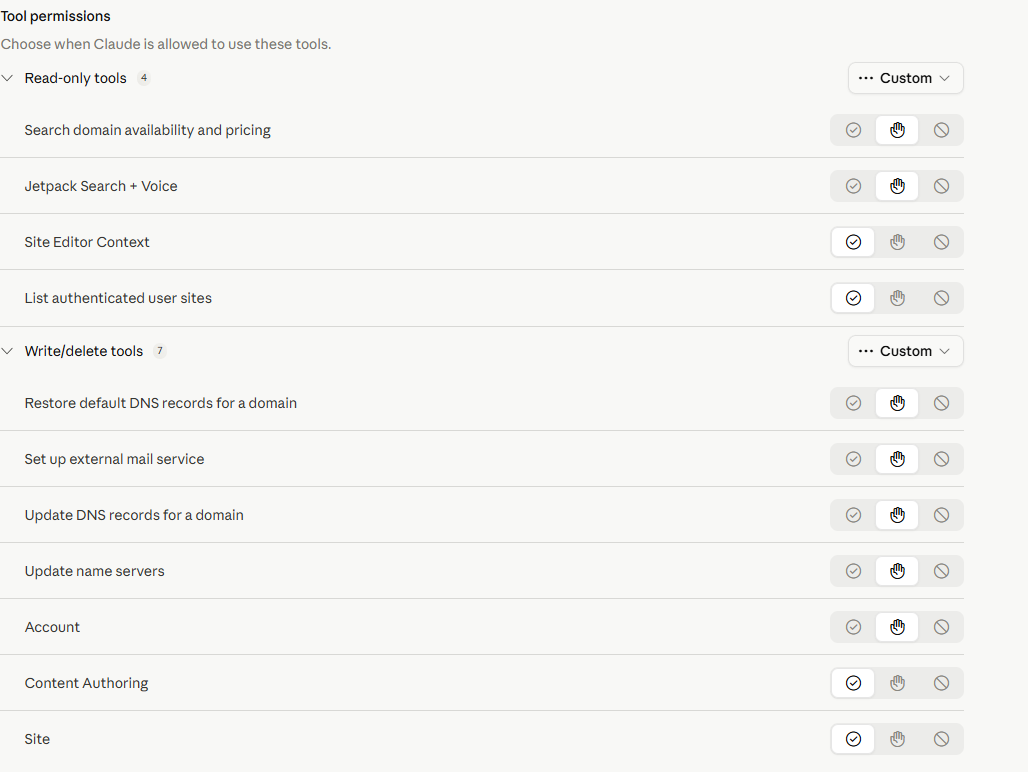
Once you decide, you can bounce into the MCP on WordPress and again, just turn on or off what you will allow Claude (in my case) to do.
I asked a question within Claude tied to my blog – Total engagement with all the topics, and which ones do you see as high priority for future posts?
It provided its results. Then, they gave specific topic ideas and offered an outline.
I openly admit that a couple of topic ideas I never considered made complete sense.
What about using a different MCP with the LLM I am using?
I connected Claude Sonnet to Microsoft Office 365 – Outlook in this case (you can have it with Word, Excel, PowerPoint)
Outlook365

Simple.
Easy to connect and rock and roll.
The downside to using an MCP
Darn it, the cost comes with those nasty Tokens, and what you – okay, your end-user i.e. learner or even admin does within the LLM you have at the company with the LLM(s) the vendor has – with the MCP – again, connect from your own LLM to the vendor’s LLM using an MCP, which in turn you could connect multiple MCPs within the learning system – universal remote.
Here is a common trend when it comes to using your AI Assistant (which the learner sees – if they go into the system) or if they stay within your LLM (the ideal) and type away.
- Ambiguity – Very common. Start ambiguous, because the individual doesn’t go right to the main point
- Asks for more details (perhaps the AI offers prompt suggestions) – the learner chooses to use them or not
- Follows up with whatever question or questions they asked
- If we add the MCP, then, depending on what the vendor’s learning system can do, which would appear in your AI LLM (again, you are the client), the learner is given greater context and can do more things.
- Anything they type becomes token fees
- The more datasets you (client) has in the Vendor’s LLM – which is a very popular aspect, vendors note with their “you can add your own content/data,” and we the vendor has trained the LLM (ours, with various data sets) or maybe they haven’t, but it is still your own content/data the LLM has been trained on – end result, you will see higher token fees – i.e you the client pays.
MCP is wonderful, but because it is tying into your own LLM – guess who pays those token fees? Not the vendor! You.
Even if the token fees are .025, you could blast through and see a massive size cost.
Do I still want to use an MCP if the vendor has its own AI built into the system?
Yes. If you want that connection to the LLM your company uses, your learners can do what is possible in the vendor’s LMS and stay in the LLM you have. You can also still use what the vendor’s AI can do.
If you do not want to use an MCP and only use what AI capabilities the vendor has in their platform, you can.
I see the MCP as an added benefit if you already have bought and use an LLM within your company, thus Gen AI at your company, and wish to stay there for learning, without pushing people to go into the system.
What is the difference between an API and an MCP?
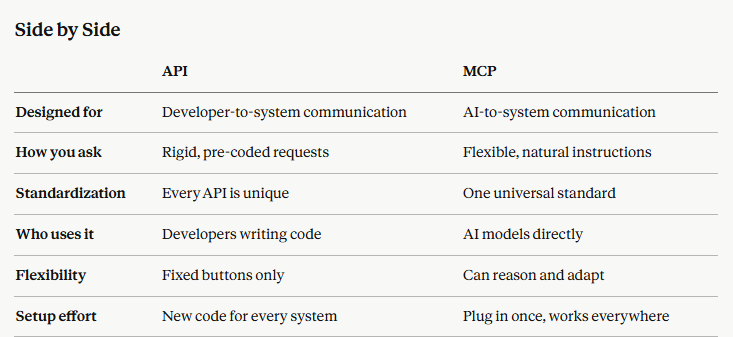
(via inquiry to Claude, and validated by human – hence the importance of the human loop).
MCP and API
It should be noted that MCPs often sit on top of an API, but that is getting into the weeds, and let’s just move on. (I brought this up because I will get folks stating this in the comments section, so for those folks here you go.
Terms to remember
Model Agnostic – This means that any LLM the client (you) supports, the vendor’s MCP will support it. Since Claude, and ChatGPT are the most popular I asked vendors to verify that their MCP works with them.
Regarding Claude (MCP supports only paid versions), and ChatGPT (paid versions only). Thus if you have the free versions, the MCP on your side (client) will not work with a vendor’s MCP. It doesn’t matter which vendor (if they have a MCP).
MCP offerings
Vendors are not just including theirs – if they have it or it is in the works, but they will have MCP connections with other providers (SaaS) that offer MCP. Always ask a vendor who has a MCP, what other systems it can connect with. Don’t assume it will connect with your HRIS, ERP, etc. platform.
LearnAmp
- Cornerstone
- Absorb
- DigitalChalk
- Docebo
- Thrive Learning
- Capacity
- Metalark.ai
- Kallidus
- KREDO
- 360Learning
- Talvi
- Otus
- SparkLearn
I did some light editing for clarity, when applicable, but for the most part, it is what they provided to me.
LearnAmp
Which AI models does it support?
Model agnostic including Claude, ChatGPT, Gemini, CoPilot.
What can users do through MCP?
Administrators
- Browse and search all learning Items, Channels, and Community posts
- Create new learning Items
- Pull Activity data to report on engagement and completions
- View Tasks, Events, and Enrollments across the organization
- Create, update, and delete Teams
- Add or remove users from Teams
- Create Enrollments to put users into events
Examples:
- “List all learning items added in the past 30 days.”
- “Show me activity for the Finance team last month.”
- “Create a new team called ‘Q2 New Hires’ and add these five users.”
Managers
- View Activity and Channel progress for their Team
- View their Team’s Tasks and Enrollments
- Enroll Team members in Events (create Enrollments)
- Manage Team membership (add or remove users)
- Pull recent learning Activity ahead of 1:1s
Examples:
- “Show me my team’s learning activity for the last 30 days.”
- “Enroll Sarah in next week’s leadership workshop.”
Learners
- Browse Items, Channels, and Community posts
- View their own Activities, Tasks, and Enrollments
- See upcoming Events and Event Sessions
- Self-enroll in Events (create an Enrollment)
- Mark Items as complete
- Check progress against Channels
Examples:
- “What learning items are in the ‘Giving feedback’ channel?”
- “Which events can I sign up for next week?”
Absorb
Which AI models does it support?
Model agnostic including Claude, ChatGPT, Gemini, CoPilot.
What can users do through MCP?
- Once a customer’s IT team has connected Absorb and a user sign in with their Absorb account, they can ask Aura questions directly from inside the AI assistant (VhatGPT, Claude, Gemini, Copilot) — without opening Absorb.
- For a regular learner, that includes:
- Q&A grounded in actual content (e.g., “what did our compliance training say about handling customer data?”, “how does our refunds policy work?”) — answered from the course content and organizational knowledge base content made available to the learner (Google Drive, Sharepoint, OneDrive, Box, DropBox, Confluence)
- Natural language course discovery
- Personalized recommendations
- Lookups on their own enrollments, progress, and certifications.
- For an administrator, it adds Q&A on Absorb’s help knowledge base (e.g., “how do I set up automatic enrollment for new hires?”) as well as the ability to pull reports in natural language (e.g., “who’s overdue on GDPR training?”)
- Every answer comes with a source link back to the original course, lesson, or article.
Cornerstone Galaxy (Includes Learn)
Which AI models does it support?
LLMs currently supported through Amazon Bedrock are – Sonnet 4.6, Nova lite, Nova; OpenAI 4.6+, 5.x and Llama 8b, 70b for light tasks (such as metadata generation) are also supported through the architecture
What can users do through MCP?
Cornerstone will make the announcement of what their MCP can do, by the end of May, along with another item (cannot be disclosed at this time due to an agreed Embargo).
Docebo
Which AI models does it support?
Supports all LLM models. Setup with the MCP will take your IT about 10 minutes.
What can users do through MCP?
Some of the tasks include:
- Asking what courses they’ve completed or what’s still in progress
- Checking certifications and upcoming renewal deadlines
- Searching the full learning library by topic or keyword
- Getting answers pulled directly from inside course content, not just titles or descriptions
Coming by the end of the year – 2026
- More advanced server-side capability: Admins will soon be able to query enrollment and completion data conversationally from their AI assistant without opening the Docebo platform.
- Client-side capability: Instead of just querying information in Docebo, admins will be able to take action directly in Docebo by talking to their AI assistant or connecting other applications via MCP-based workflows. So Docebo could use context from a customer’s HRIS, ticketing system, or other tools to trigger an action like enrolling a user into a course or sending a notification.
FYI from Craig – I should note that Client-side capability will become common with vendors who are already have MCP or is planning on having, before the end of 2027, with many whose target is before end of the year.
DigitalChalk
Which AI models does it support?
MCP is coming later this year via their AI core and leveraging Bedrock, from AWS.
What will users be able to do through MCP?
- Create users within DigitalChalk
- Find users and their associated learning records
- Update user information
- Register users or groups of users into courses
- Create courses
- Find courses by category, time period, and other metadata, including when they are offered
Thrive Learning
Which AI models does it support?
Supports Claude and ChatGPT (paid version). It is model-agnostic thus it will work with any LLM.
What can users do through MCP?
Content Management
- Create, update, publish, and manage learning content entirely through conversation. Build articles, videos, quizzes, and mixed-format resources complete with metadata, descriptions, and content items – without leaving your AI tool.
- Create new learning content with rich mixed media (text blocks, videos, quizzes, and more)
- Update existing content: edit titles, descriptions, and individual content items
- Publish content when it’s ready, or delete drafts that are no longer needed
- Create and manage pages and posts with full control over layout and structure
- Search across your content library to find and review existing resources
- Skills and Tags
- Take full control of how skills, interests, and topics are organised across your platform.
- Search your skills taxonomy to find and explore available skills
- View and manage tags assigned to any user — skills, interests, and topics
- Add or remove tags from users individually or in bulk
- Create new tags and generate AI-suggested tags for your content
- Update skill levels for users to reflect their progress
- Get tag suggestions for specific content to improve discoverability
- Check tag permissions to understand who can manage what
- User Insights
- Quickly pull up the information you need about any user on your platform.
- View a user’s badges and achievements
- Check learning assignments and progress
- Retrieve audience membership to understand segmentation
Content Endorsement - Control which content carries your organisation’s official endorsement.
- Toggle endorsement status on any piece of content to signal quality and relevance to your learners
ExpertusOne
Which AI models does it support?
Model-agnostic including Claude, ChatGPT (paid version).
What can users do through MCP?
ExpertusOne provided some information, mostly technical, but items presented include
- Converstional retrevial of various learning information (They did not provide specific details)
- Metrics and Reporting
- Workflows Orchestratian
SparkLearn (Frontline workers/Deskless/Blue-collar focus)
Which AI models does it support?
Currently, the AI can only be used within the Veracity LRS (Learning Record Store).
Coming later this year or early 2027, you will be able to use it with the LMS too.
What can users do through MCP?
- Learners — search, retrieve, create, and update learner records
- Courses and Content — list and pull course details, lessons, content items
- Classes — retrieve and create classes with member rosters and course assignments
- Launches — query and initiate content launch sessions per learner
- xAPI Keys — manage xAPI access credentials
- Analytics — access embeddable dashboards, charts, and logs
Joysuite by Neovation
Which AI models does it support?
Model agnostic including Claude, ChatGPT, Gemini, CoPilot.
What can users do through MCP?
Knowledge Access
- As Joy retains an organization’s “source of truth” documents, and they are very heavily indexed, a Client LLM can use them to ask questions of the documents. This includes asking questions of videos, eLearning modules, diagrams, etc., and receiving answered filtered by the user’s permission level.
- Joy retains a full audit trail of interactions by user, sources being access/cited, analytical information, flags for conflicting or inaccurate responses, etc., to allow an organization to improve their knowledge sources over time.
Administration
- Assign training, create learning paths, create training, verify certification status
- Run reports, analytics and generate interactive dashboards which is based on Joy’s data, or combines Joy’s data with another dataset (eg: correlate product knowledge to sales by salesperson)
Learner Examples
- Just-in-time answers in the flow of work such as “how do I refund a customer in this edge case?”) and gets the company’s answer with citations.
- A learner can ask for a 5-minute explainer, a quiz, or a worked example from any of the sources of truth
- A learner can ask “remind me what the course says about …”
- A learner can ask “Quiz me on objection handling” or “roleplay a tough customer call with me” based on source material
- Pre-meeting micro-prep. “I have a discovery call in 20 minutes, what do I need to remember about MEDDIC and our discovery framework?”
- Coach-style feedback on real work. Paste a draft email, proposal, or call transcript into ChatGPT; and ask it to be scored by JoySuite which will use the company’s actual playbook and shows what to improve.
- Catch-up after time off. “I was on parental leave for 4 months, what’s changed?” and get a synthesized briefing of policy, product, and process changes, with optional deep-dives.
- Capture what you just learned. After a Client LLM explains something well, the learner can say “save this to my notes in JoySuite”, turning ad-hoc learning into a personal knowledge library.
Kallidus
Which AI models does it support?
Currently in beta, however when launched it will work with any LLM (i.e. model agnostic), albeit at this time they have tested and validated success with Claude, ChatGPT and Copilot
What can users do through MCP?
- Training the current user has completed
- Training the current user needs to complete
- Training a specific user has completed/needs to complete
- Training a manager’s team has completed/needs to complete
- Who has completed a specific piece of training
- Training usage patterns (IE: volumes of completion)
- Any of the above, and use in conjunction with other data sources (EG: a Salesforce MCP Server, allowing for queries like “Show me what training is overdue for the salespeople who didn’t achieve their quota last quarter”… assuming this data is available in Salesforce then it is possible to use.)
KREDO
Which AI models does it support?
Model agnostic including Claude and ChatGPT 4.0 and above (business subscriptions)
What can users do through MCP?
Learners and administrators
Knowledge Reinforcement
- Follow-up content or practice material based on learner progress
Notifications
- Alerts and/or messages, updates
- Reminders on activity, incomplete tasks, in-progress
Generate Reports
- Showing data/metrics on performance, progress or activity
Others
Metalark.ai
Currently in beta target launch date late Q3 2026. Model agnostic including Claude, ChatGPT (paid version).
Features will be learners and administrators (information to be provided soon).
IMC-Sheer
Model agnostic including Claude (Sonnet and Opus) and ChatGPT (Plus account required).
Capacity’s Answer Engine
Plans to evolve into an MCP (target end of 2026, early 2027). Capacity is a knowledge management platform.
360Learning
MCP is not yet live, target by the end of 2026. Will support Claude (versions noted earlier), ChatGPT (Enterprise), CoPilot. More coming soon.
Use Cases they see include learning in the flow of work (content/courses, questions, etc.) and reduction of administrative burden such as user management, content creation.
Otus
Currently building MCP, target date Q4 2026.
Bottom Line
MCP it’s a new term, well for folks who are unaware of the latest around AI and connectors – the fun technical side of the house.
Just wait until headless MCP rolls out, and yep, for some vendors it is in the works – rolling out before end of Q4, 2026.
Headless definitely won’t be for everyone, and while headless technology for learning systems sans the MCP side, has been around for several years, it isn’t as though everyone wants or uses it.
As with any “new AI connectors” there is always a cost involved.
You as the client pick up the tab.
Datasets, capabilities available and achievable within your own LLM comes with a price tag.
MCPs will do far more than what you see say in MS teams – whereas folks will think, hey we can do a bunch of this stuff now, without an MCP – ditto for Slack, Salesforce and the list goes on.
Let’s be clear MCP is the future.
Plugins and integration is the past.
After all, what do you want?
A universal remote
Or a bunch of them to find somewhere
in your residence?
E-Learning 24/7